
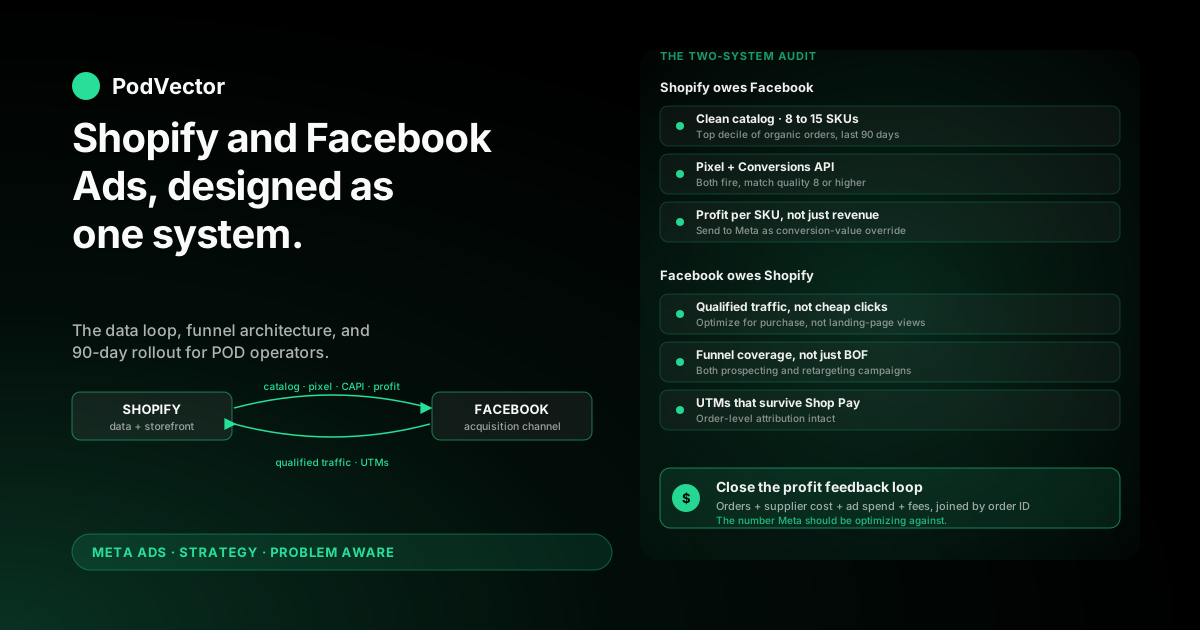
Quick Answer: A Shopify and Facebook Ads strategy for print-on-demand only works when you treat the two platforms as one system, not two. Shopify is your data layer and storefront. Facebook is your acquisition channel. The strategy is the loop between them.
For POD specifically, that loop has to carry profit signal — not order subtotal — because Printify and Printful supplier costs eat 50–65% of retail before any ad spend. Send subtotal and Meta's algorithm chases your worst SKUs.
This playbook covers the two-system audit, funnel design across Shopify and Facebook, the data feedback loop most POD operators skip, and a 90-day rollout plan.
The "and" is the strategy: why two-system thinking matters
Most "Shopify Facebook Ads" guides write the strategy as if it lives inside Ads Manager. Pick audiences, write copy, set bids, ship. Shopify shows up only as the destination URL.
That framing breaks for POD. Your contribution margin lives in Shopify. Your fulfillment lag lives in Shopify. The order data Meta needs to find more buyers like your existing buyers lives in Shopify.
Treating Shopify as "the place ads send people" wastes the most useful asset you have. The strategy is a loop: Shopify orders teach Meta who to target, Meta drives traffic back to Shopify, Shopify confirms the orders and feeds the next round. Break the loop and the campaign degrades into spray-and-pray.
What the "and" actually means in the strategy
Shopify's job in the loop: clean catalog, working pixel and Conversions API, accurate margin data per SKU, a checkout that converts the traffic Facebook sends. Facebook's job: prospect, retarget, scale, surface creative winners.
Neither side wins alone. A perfect Facebook campaign feeding a slow Shopify checkout loses money. A clean Shopify catalog with a misconfigured pixel turns Meta's optimizer into a random-number generator.
If you want the wider context for everything that follows, the complete Meta Ads playbook for POD sellers is the pillar this article sits inside, and the rest of the Meta Ads strategy cluster drills into specific scenarios.
The two-system audit: what each side owes the other
Before writing a single ad, audit both systems against what they have to deliver.
What Shopify owes Facebook
1. A clean product catalog. Meta needs structured product data — title, description, image, price, availability, GTIN if you have one — for dynamic ads, Advantage+ Shopping (Meta's all-in-one auto-targeted campaign), and catalog sales campaigns to work. Pull up Shopify's Facebook & Instagram channel and confirm every SKU you plan to advertise has a complete listing.
2. A working pixel plus Conversions API (CAPI). The Meta Pixel is browser-side tracking that misses 15–30% of events because of iOS tracking prevention and ad blockers. CAPI sends the same events server-side from Shopify's backend. Run both. Industry standard now.
3. Profit per SKU, not just revenue per SKU. Shopify's default order export shows subtotal and shipping, not the Printify or Printful supplier cost. Most operators don't have margin in Shopify at all. That's the gap that kills POD ad campaigns — Meta optimizes for what you tell it to, and "subtotal" is the wrong target on POD margins.
4. Audience-quality signal. Email match keys, phone numbers where customers consent, the Shopify customer ID — these flow to Meta as the "external_id" that lets Meta match your customer to a Facebook profile. Match-quality scores below 6 in Events Manager mean lookalikes are noisier than they should be.
What Facebook owes Shopify
1. Qualified traffic, not cheap clicks. Optimizing for landing-page views is how operators end up with $0.40 clicks and a 0.4% conversion rate. Facebook's job is to send people Shopify can convert.
2. Coverage of the funnel, not just bottom-of-funnel. A retargeting-only strategy starves Shopify of new customers. A prospecting-only strategy ignores the warm cart-abandon traffic Shopify is already producing. Both campaigns or neither.
3. UTM tags that survive the round trip. Facebook traffic should carry consistent UTM parameters back into Shopify so order-level reporting knows which campaign drove which order. Missing UTMs make post-purchase attribution guesswork.
4. Creative refresh that respects creative fatigue. Frequency above 3.5 on cold prospecting kills click-through rate. Facebook's job is to keep cycling new creative through Shopify's traffic stream, not lock in one winner forever.
Funnel design across Shopify and Facebook
The funnel runs across both platforms. A clean way to design it:
Top of funnel — prospecting (Facebook does the work)
Cold audiences who've never heard of you. Run one broad-targeting Advantage+ Shopping campaign or a manual prospecting campaign on a 1% lookalike of your top-margin customers (built from Shopify order data, filtered by margin not revenue).
Creative goal: get the click. Static product photos and short-form Reels both work for POD, but vertical creative is where most apparel POD accounts are winning right now.
Shopify's job at this stage: a fast, mobile-first product page with one clear add-to-cart and trust signals (reviews, shipping policy). The cold visitor decides in 8–12 seconds.
Middle of funnel — consideration (Shopify and Facebook share the work)
Visitors who clicked but didn't add to cart. Visitors who saw a product but bounced. People who watched 75% of a video ad. These are warm.
Run a Facebook retargeting campaign with creative that handles the actual objections — sizing for apparel, print quality for art, shipping time for everything. Shopify's job is to make sure those visitors land back on the same product, not the homepage.
Bottom of funnel — conversion (Shopify does most of the work)
Cart abandoners and view-product-3+-times visitors. Show them a dynamic product ad (DPA) with the exact SKU they looked at. Facebook dynamic product ads work especially well for Shopify POD because the Shopify catalog feed and the Meta Pixel together know which product to show which person.
Shopify's job: a checkout that doesn't drop the order. Shop Pay one-click checkout, real shipping estimates, no surprise fees. Most POD checkout abandonment is shipping-related — surface the shipping cost and ETA on the product page, not at step 3 of checkout.
Post-purchase — retention (Shopify does the work, feeds Facebook)
The first order is the cheapest data point you'll buy on a customer. Use Shopify Email or Klaviyo for transactional and next-purchase nurture, and feed the customer list back to Meta as a Custom Audience for lookalike seeds.
POD has weak repeat rates compared to consumables, but a 12% repeat rate at higher margin (because retention is organic, not paid) is the difference between a profitable account and a treadmill.
The Shopify side of the strategy
SKU selection: 8–15 products to advertise, not all of them
Don't sync your full Shopify catalog into the Meta catalog feed. With 200 SKUs and a $50/day budget, Meta's algorithm spreads learning data so thin that no single SKU earns enough purchase signal to matter.
Pick the 8–15 SKUs that account for the top decile of organic Shopify orders over the last 90 days. Those are your strongest creative and your strongest margin. Submit only those to Meta first.
Add the rest in cohorts of 5–10 every two weeks once the initial group has earned at least 50 purchase events.
The conversion-value override: send profit, not subtotal
This is the single biggest leverage point in any POD Meta Ads strategy and the one most guides skip.
By default, Shopify's Facebook channel sends order subtotal as the conversion value. For owned-inventory ecommerce at 60% gross margin, that's tolerable — high-revenue orders are usually high-profit orders.
For POD, it's actively harmful. A $45 oversized hoodie might net $7 of contribution margin after Printify cost, payment fees, and shipping subsidy. A $28 t-shirt might net $11. Optimize on subtotal and Meta chases hoodies. Optimize on profit and Meta chases t-shirts.
Implementation: use Shopify's order metafields plus a conversion-value override in the Facebook channel app, or send custom data via CAPI with the profit-after-supplier-cost number instead of subtotal. Either path requires that profit-per-SKU exists in your Shopify data — see the feedback-loop section below.
The Shopify checkout audit
Audit your checkout against the traffic Facebook is about to send:
- Mobile load time under 3 seconds (PageSpeed Insights, Mobile)
- Shop Pay or Shop App for one-click checkout enabled
- Shipping cost and ETA visible on the product page
- Trust signals (reviews, return policy) above the fold on mobile
- One primary call-to-action — not "Add to Cart" alongside "Save" alongside "Share"
POD checkout drop-off above 75% is usually the storefront, not the ad. Fix the storefront first.
The Facebook side of the strategy
Campaign structure for the first 60 days
Run two campaigns, not five:
- One prospecting campaign. Either Advantage+ Shopping (broad targeting, Meta picks the audience) or a manual broad-targeting campaign optimized for purchase. Start with Advantage+ Shopping if your pixel already has 50+ purchase events of training data; start manual if you're cold.
- One retargeting campaign. Three ad sets: 7-day product viewers, 14-day add-to-cart, 30-day site visitors. Dynamic product ads on the first two, video creative on the third.
That's it. Don't add a Reels-only campaign, a Stories-only campaign, a lookalike-1% campaign, and a lookalike-3% campaign. You'll fragment your budget and starve every ad set of learning data.
Once those two campaigns earn signal, the next layer is retargeting depth — covered in Facebook retargeting ads for Shopify — and the scaling moves from scaling Facebook Ads on Shopify for POD.
Audience strategy without breaking the loop
Build three Custom Audiences from Shopify customer data:
- All purchasers, last 365 days — the broadest pool
- Top 25% of purchasers by margin (not revenue), last 180 days — the seed for your strongest lookalike
- Repeat purchasers, last 365 days — usable for retention upsell campaigns
Build 1% lookalikes off the second list. That's your prospecting audience for the manual campaign and a useful sanity check against Advantage+ Shopping's automated picks.
Creative for POD specifically
Three creative angles work disproportionately well for POD apparel and accessories:
- Lifestyle UGC. A customer wearing the product, filmed on a phone. Cheap to produce, high CTR.
- Design close-up + lifestyle. Show the print or design at full resolution, then the product in context. Reels format.
- Identity-driven copy. POD wins on niche identity ("for Australian shepherds owners," "for night-shift nurses"). Generic apparel copy ("comfortable, premium fabric") loses every time.
Refresh creative every 7–10 days on prospecting once frequency hits 3.0+. Keep the winners running on retargeting longer — frequency tolerance is higher on warm audiences.
The profit feedback loop most POD operators skip
The strategy works only if the loop closes. Here's the loop most POD operators run with:
Meta sends traffic → Shopify takes orders → Shopify shows revenue → operator looks at reported ROAS in Ads Manager → operator decides what's working.
That loop is broken because the "what's working" signal is built on revenue. On POD margins, revenue and profit diverge. The campaign that looks best in Ads Manager is often the one losing the most money.
What the closed loop actually looks like
Orders flow into Shopify. Supplier costs flow in from Printify or Printful. Ad spend flows in from Meta. Shipping subsidy, payment fees, returns flow in from Shopify and Stripe.
All four streams land in one place — your store of record, whether that's a spreadsheet, a BI tool, or a unified data warehouse — joined by order ID. Now you can see contribution margin per order, per SKU, per campaign.
That's the number you optimize against. That's also the number you feed back to Meta as the conversion-value override.
Without this loop, you're flying on Meta's reported ROAS, which is calibrated to revenue and known to overcount conversions on iOS post-ATT. With it, you have ground truth on what each ad dollar actually returned.
Where Victor fits
Building this loop manually is doable — most POD operators stitch a Google Sheet that joins Shopify exports, Printify CSVs, and Meta exports — but it's brittle and lags reality by days. Joins break when SKU naming drifts. Reconciliation is a Sunday-afternoon chore.
PodVector AI's Victor is an AI employee that sits on top of a unified data warehouse holding your Shopify orders, Printify or Printful supplier costs, and Meta and Google ad spend joined automatically. Ask Victor "is this Facebook campaign profitable on actual margin, not subtotal" and you get the live answer in plain English. Today the answer; on the agentic-roadmap, the action — pause the unprofitable ad set without leaving the chat.
The deeper attribution context — why Meta's reported ROAS overcounts on iOS post-ATT, how view-through versus click-through windows interact for POD — sits in the complete guide to Meta Ads ROAS and attribution for POD, plus the broader Meta Ads topic hub for everything else in the channel.
90-day rollout: month 1, 2, 3
Month 1: install, launch, hold
Week 1–2: Two-system audit. Pixel and CAPI installed and verified. Catalog feed clean, top 8–15 SKUs only. Conversion-value override set up if you can; default if you can't yet.
Week 3–4: Launch one prospecting campaign and one retargeting campaign. Daily budget targeting roughly 50 purchase events per campaign per week so Meta exits learning. Make zero optimization decisions in days 1–14 — fulfillment lag distorts the signal.
Month 2: measure, fix the loop
Week 5–6: Build the profit feedback loop. Either spreadsheet, BI tool, or AI employee on a warehouse — but build it. Compare Meta-reported ROAS against profit-after-supplier-cost ROAS for every campaign. Expect a 25–40% gap.
Week 7–8: First creative refresh. Kill ads above frequency 3.5 with declining CTR. Add 2–3 new creatives per ad set. Don't change campaign structure yet.
Month 3: scale or kill
Week 9–10: For campaigns with positive profit-margin ROAS, scale daily budget by 20–30% per week. Bigger jumps trigger learning-phase resets.
Week 11–12: Add the next cohort of 5–10 SKUs to the catalog feed. Add a Custom Audience based on month 1–2 purchasers as a new lookalike seed (now built on richer data than at launch).
End-of-quarter review: kill any campaign still negative on profit-margin ROAS. Don't rescue it — the learning phase is sunk cost.
Five breakdowns at the seam between the two systems
The strategy fails most often at the integration seam, not on either side individually.
1. Pixel fires on Shopify, CAPI doesn't, or vice versa
Pixel-only setups undercount conversions by 15–30% on iOS. CAPI-only setups miss browser-side context Meta uses for matching. Both have to fire, and Events Manager has to show match quality 8+. Audit weekly for the first month.
2. Catalog feed shows out-of-stock products as available
Printify and Printful "stock" is virtual — products are made on demand. But variants can go genuinely unavailable when a base product is discontinued. Shopify's catalog sync sometimes lags this by a week. Burning ad spend on out-of-stock variants is the cleanest way to torch a budget.
3. UTMs strip out at Shop Pay
Shop Pay express checkout sometimes drops UTM parameters between the product page and the order. Order-level attribution then fails. Test with a real Shop Pay purchase under your own UTMs and confirm they survive into the Shopify order record.
4. Conversion-value override sends to Pixel but not CAPI
If you've built a profit-as-conversion-value override, it has to fire on both Pixel and CAPI. A common failure: Pixel sends profit, CAPI sends subtotal, Meta picks the higher number, and the override is silently doing nothing. The complete guide to Meta Ads + Shopify integration for POD covers the override implementation in detail.
5. Repeat-customer audiences excluded from prospecting
Without exclusion, prospecting campaigns burn budget showing ads to existing customers — who weren't going to buy again that week anyway. Add your "all purchasers, last 365 days" Custom Audience as an exclusion on every prospecting ad set.
FAQs
How much should I budget for the first month?
Plan for a $1,500–3,000 month-one spend before expecting positive ROAS. POD-specific note: roughly 30–40% of that goes to learning-phase exploration that won't directly convert. Budget less and Meta never exits learning, which is worse than not running ads at all. Shopify's general Facebook ad strategy guide suggests broader budget bands but doesn't account for POD's tighter margin floor.
Should I use Advantage+ Shopping or manual campaigns?
Advantage+ Shopping if your pixel has 50+ purchase events of training data already and your catalog feed is clean. Manual prospecting plus retargeting if you're cold. Most POD accounts start manual for 30–60 days, then add Advantage+ Shopping as the third campaign once they have signal.
What's the right ROAS target for Shopify POD on Facebook?
On 28–35% contribution margin, you need profit-margin ROAS above 3.0 to break even after ad spend. Meta's reported ROAS will read 25–40% higher because it's calibrated to revenue and overcounts post-ATT iOS conversions. Internalize the gap or build the profit feedback loop to close it.
Do I need both Facebook and Instagram, or can I just run Facebook?
Run both. Meta's automated placement system serves the same ad across Facebook Feed, Instagram Feed, Reels, Stories, and Marketplace based on predicted conversion probability. For POD apparel and accessories, Instagram now drives more profitable conversions than Facebook on most accounts because mockups and lifestyle photography read better at full-bleed.
How long until I know if the strategy is working?
Days 1–14 are noise — fulfillment lag and learning-phase exploration distort everything. Days 15–30 give a directional read. Day 30–60 is when profit-margin ROAS starts to stabilize and you can make scale-or-kill calls. Don't shorten this timeline.
What if my account already has years of history and old campaigns?
Don't archive everything and start fresh — you lose the pixel training data. Pause underperforming campaigns, leave the pixel events history intact, and launch the new prospecting plus retargeting structure alongside. Once new campaigns prove out at 30 days, archive the old ones.
Stop optimizing on revenue. Optimize on actual profit.
The Shopify-and-Facebook loop only closes when you're looking at contribution margin, not order subtotal. Meta says your campaign is winning. Your bank account says otherwise.
PodVector AI's Victor is the AI employee that joins your Shopify orders, Printify or Printful supplier costs, and Meta and Google ad spend in one place — and answers questions like "is this Facebook campaign profitable on real POD margin?" in plain English, with the live numbers.
Try Victor free