
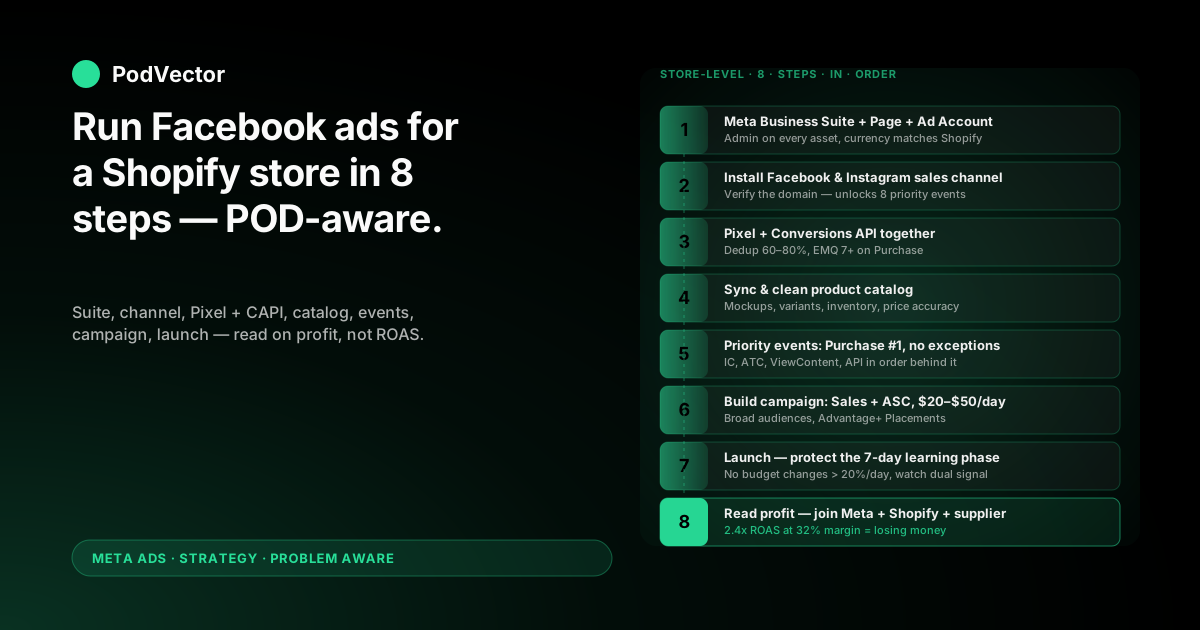
Quick Answer: Running Facebook ads for a Shopify store is store-level work before it's ad-level work. Get the Meta sales channel, Pixel, Conversions API, and product catalog wired in correctly — and most "ad performance" problems quietly solve themselves.
For print-on-demand stores, that plumbing matters even more. With contribution margins around 28–35% after Printify or Printful supplier costs, every misfired event or unattributed purchase eats the budget you can't get back.
This walkthrough is end-to-end: from "I have a Shopify store" to "campaigns are running and I can read them on profit, not just ROAS." Eight steps, every one tuned for POD.
Why store-level setup beats ad-level tinkering
New Facebook advertisers obsess over creative, audiences, and bid strategies. Those things matter. But they're downstream.
The real leverage on a Shopify store is the layer below the ad: the sales-channel connection, the Pixel, the Conversions API (CAPI — the server-side tracking that bypasses browser blocks), and the product catalog. Get this layer wrong and even great ads will look mediocre because Meta is missing half the signal it needs to optimize and report.
For POD sellers, the cost of bad signal is brutal. A Shopify report says you sold $1,000. Meta says it drove $1,400. After Printify or Printful supplier cost, your real margin is around $300. If 30% of conversion events are missing or duplicated, the algorithm targets the wrong audiences and your real margin slides toward zero — and ROAS dashboards won't tell you.
So the playbook starts with the store, not the ad.
Step 1 — Set up Meta Business Suite the right way
Meta Business Suite is the parent account that owns your Page, Ad Account, Pixel, and Catalog. It's free and takes ten minutes — but the setup choices you make here ripple through everything that comes later.
Go to business.facebook.com and either create a new Business Account or open the one you already have. Make sure the business name matches the legal entity behind your Shopify store. Banks and Meta both care.
Inside the account, create or claim:
- Facebook Page — the store's brand page (not a personal profile)
- Ad Account — set timezone and currency to match Shopify; you can't change them later without creating a new account
- Pixel — you'll connect this through Shopify in Step 3, but create the placeholder now
- Catalog — Shopify will populate this automatically; just create the empty container
One step that almost every guide skips: assign yourself as Admin on every asset. If you set up Business Suite as a regular employee or page editor, you'll hit permission walls in two days when you try to install CAPI or run domain verification.
Step 2 — Install the Facebook & Instagram sales channel in Shopify
Shopify maintains an official "Facebook & Instagram" sales channel. Use it. Third-party connectors and "Pixel installer" apps add layers of failure for no benefit.
From the Shopify admin, go to Sales channels → Add sales channel → Facebook & Instagram by Meta. Click Add channel, then Start setup.
You'll be walked through:
- Logging in with the Facebook account that admins your Business Suite
- Connecting your Business Account, Page, Ad Account, Pixel, and Catalog
- Granting permissions (grant all of them — partial permissions are how tracking quietly breaks)
- Verifying your domain on Meta
Domain verification is non-negotiable post-iOS 14.5. It's how you claim authority over the eight priority events Meta will let you optimize toward. Skip it and your ad sets default to underpowered configurations.
If you're moving from another setup, our step-by-step guide to making Facebook ads for Shopify covers the disconnect-and-reconnect path cleanly.
Step 3 — Connect Pixel and Conversions API through Shopify
The Meta Pixel fires from the customer's browser. Conversions API (CAPI) fires from your store's server. You need both — running together — or you're blind.
Why? Apple's iTrackingTransparency, Safari's ITP, ad blockers, and aggressive privacy extensions block roughly 30–40% of browser-side Pixel events. CAPI bypasses all of that because it sends events from server to server. The ones that already fire on the browser are deduplicated.
The Shopify sales channel installs both for you in one step. After connecting your Pixel in Step 2, look for the Conversions API toggle in the channel's settings. Turn it on. Confirm in Meta Events Manager that you see events arriving with both Browser and Server source labels.
Important checks before you trust the install:
- In Events Manager, the deduplication rate should be 60–80%. Under 50% means events aren't matching — usually a missing event ID
- Event Match Quality should be 7+ for Purchase. Under 6 means you're losing attribution to anonymous events
- The "Test events" tab should show events firing in real time when you place a test order
Don't skip this. The most common reason a Shopify store's Facebook ads "stop working" after a few weeks is that Pixel-only tracking decayed and nobody noticed. CAPI keeps signal alive.
Step 4 — Sync your product catalog cleanly
Once the sales channel is live, Shopify pushes your products into Meta's Catalog automatically. This unlocks dynamic product ads (DPAs) and Advantage+ Shopping campaigns — both critical formats for ecommerce stores.
For POD sellers, catalog hygiene needs extra attention. Review the synced catalog in Meta Commerce Manager → Catalogs for these problem patterns:
- Variant explosion. If every t-shirt has 30 size/color variants, your catalog might show 50,000 SKUs. Meta will optimize against the variants, not the design. Use Shopify's product feed settings to push only the parent product or a chosen "default" variant
- Mockup quality. Catalog images come from Shopify's product images. If your Printify or Printful auto-generated mockups are flat or low-resolution, swap them. Lifestyle mockups outperform flat mockups by a wide margin in DPAs
- Inventory state. POD products are usually "always in stock," but make sure the feed reflects that. Out-of-stock items get deprioritized
- Price accuracy. Sale prices and the base price both need to map correctly. Promo discounts that don't sync break ad price displays
Once the catalog is clean, group products into product sets by collection, theme, or margin band. Product sets are how you'll target specific catalog slices in dynamic ads later.
Step 5 — Configure priority events for the right objective
Aggregated Event Measurement (AEM — Meta's post-iOS event prioritization system) lets you pick eight events per domain that the Pixel and CAPI will optimize against. Picking them in the wrong order is one of the most common silent failures.
For a Shopify POD store, the right priority order is almost always:
- Purchase — your money event, always #1
- InitiateCheckout — high-intent micro-conversion
- AddToCart — useful for prospecting and creative testing
- ViewContent — used by retargeting and DPAs
- AddPaymentInfo — strong purchase predictor
- Lead — only if you run lead-gen campaigns
- (Optional custom events)
- (Optional custom events)
To configure: go to Events Manager → Aggregated Event Measurement → Configure web events, select your verified domain, and drag events into priority order. Save.
If your Purchase event isn't #1, your campaigns optimizing for purchases are silently hitting a downgraded version of the signal. Fix this first.
Step 6 — Build your first campaign in Ads Manager
Now — only now — you're ready to actually run an ad. Go to Ads Manager → Create Campaign.
Campaign objective. For a POD store with a working Pixel and CAPI, choose Sales. Other objectives (Engagement, Traffic, Awareness) sound cheaper but burn budget on people who'll never buy.
Campaign type. Two paths matter for Shopify:
- Advantage+ Shopping Campaigns (ASC). Meta's automated campaign type that bundles prospecting and retargeting. Strong default for most POD stores; the catalog you cleaned in Step 4 is the fuel
- Manual Sales campaign. More control over audiences and budgets. Better when you want explicit prospecting/retargeting separation, or when you have a creative testing system that needs structure
Start with ASC unless you have specific reasons not to. The algorithm is genuinely good now; manual structure earns its complexity only at higher spend.
Conversion event. Set this to Purchase. (See Step 5 — that's why event priority matters.)
Budget. $20–$50/day for a single ASC campaign is enough to start gathering signal. Dropping below $15/day stretches the learning phase past two weeks. If you're running parallel manual campaigns, allocate 70–80% to prospecting, 20–30% to retargeting at first.
Audience. For ASC, just feed it your existing customer file (Shopify can sync this) and let it broaden. For manual campaigns, start broad — country + age + maybe one interest cluster. Stacked detailed targeting is mostly counterproductive in 2026.
Placements. Advantage+ placements (the default) lets Meta serve across Feeds, Stories, Reels, and Audience Network. Trust it for the first 7 days. You can carve out underperformers later.
Step 7 — Launch, learn, and let the algorithm work
Build the ad creative — image, video, or carousel — write your primary text and headline, plug in the Shopify product page URL, and publish.
The first 3–7 days are the learning phase. Meta needs around 50 conversions per ad set per week to exit learning and stabilize. Until then, performance metrics are noisy. Resist the urge to "fix" what looks bad on day 2.
What to actually do during the learning phase:
- Watch for delivery errors (low spend, audience too narrow, ad disapproved). Fix those
- Check that conversion events are arriving in Events Manager from both Browser and Server sources
- Verify Shopify is recording the same orders that Meta is reporting (usually within 1–2)
- Don't change budget by more than 20% per day. Bigger jumps reset learning
Our how-to-run-Facebook-ads-for-Shopify guide covers what to do once campaigns exit learning — when scaling becomes the question instead of stability.
Step 8 — Read performance on profit, not on ROAS
Meta will tell you, "Your ROAS is 2.4." That number is wrong for a POD store. Here's why.
ROAS = revenue / ad spend. It says nothing about what's left after Printify or Printful supplier cost, Shopify fees, payment processing, taxes, and refunds. A 2.4 ROAS on a $30 average order with 32% margin is $7.20 of contribution profit per $30 of revenue. After $12.50 of ad cost, you're losing money. The dashboard shows green.
What you actually need is a profit-on-ad-spend (POAS) view. To get one, you need three sources joined:
- Meta ad spend and reported revenue (from the Ads Manager API)
- Shopify orders, refunds, and discounts (from Shopify's Order API)
- Supplier costs per SKU (Printify, Printful, or whoever you fulfill through)
Joining those by date and order ID gives you contribution margin per campaign. That's the number to optimize against. Not ROAS.
Most POD operators try to do this in a spreadsheet. It works for one store. At three, it breaks. At five, it's a part-time job.
This is exactly the reporting problem PodVector AI's AI employee, Victor, was built for. Victor pulls Shopify, Printify, Printful, Meta, and Google into a unified live data warehouse — single source of truth — and answers profit questions in plain English. "Which Facebook campaign actually made money last week, after supplier cost?" gets a number, not a dashboard. Victor answers; He also acts on what he finds — with your approval.
For a deeper dive into ROAS limitations, see our complete guide to Meta Ads ROAS and attribution for POD.
Mistakes that quietly drain POD store budgets
Treating Pixel as enough. Pixel-only setups lose 30–40% of conversion signal post-iOS. CAPI is required, not optional.
Letting the catalog go dirty. Variant explosion, broken mockups, and stale prices break dynamic ads silently. Audit the catalog monthly.
Ranking events wrong. If Purchase isn't priority 1 in Aggregated Event Measurement, optimization runs on a downgraded signal.
Optimizing for clicks instead of purchases. "Traffic" objective sends people who click but don't buy. Sales objective sends people who buy. The CPC is higher; the CPA is lower.
Reacting to day-2 data. Learning phase needs 7 days minimum. Hot-fixing during it kills consistency and resets learning.
Reading ROAS as profit. The ad-platform dashboard is gross revenue divided by ad cost. POD margin lives below that. Read profit at the order level or you're flying blind.
Skipping a customer audience. Your existing Shopify customer list is the single highest-quality seed audience you have. Upload it to Meta as a Custom Audience, and use it for both retargeting and as a Lookalike source.
FAQs
Do I need to verify my domain before running ads?
For a Shopify store, yes. Domain verification through Meta is what unlocks the eight priority events you'll optimize against. Without it, you're stuck on Meta's underpowered default event configuration, which hurts both delivery and reporting.
Can I run Facebook ads without the Conversions API?
You can, but you shouldn't. Pixel-only tracking misses 30–40% of conversion events post-iOS, and that gap widens every quarter. The Shopify sales channel installs both Pixel and CAPI for free in one step. Use them together.
How much should I spend per day on a brand-new Shopify store?
$20–$50/day for a single Advantage+ Shopping campaign is the practical floor. Below $15/day, the learning phase stretches past two weeks and signal stays unstable. If you're testing multiple ad sets in a manual campaign, multiply that by the number of sets — each one needs its own learning runway.
Should I use Advantage+ Shopping or build campaigns manually?
Start with Advantage+. The algorithm's automation is genuinely good in 2026 and most stores under $20K/month in ad spend get more out of ASC than out of hand-built structures. Switch to manual when you have a creative testing system that needs explicit ad-set separation, or when ASC is plateauing and you've ruled out catalog and tracking issues.
What's a good starting ROAS target for a POD store?
The honest answer: ROAS isn't the right target. POD margins after Printify or Printful supplier cost are around 28–35%, so ROAS of 3.5+ is roughly break-even on cold traffic. But ROAS varies wildly by AOV, product, and refund rate. Track contribution margin per campaign instead. Our complete Meta Ads playbook for POD walks through the math in detail.
What if Shopify orders don't match Meta's reported conversions?
Some gap is normal — Meta reports based on attribution windows and view-through clicks; Shopify reports the actual order. Up to 10–15% drift is fine. More than that suggests an event-deduplication problem, a CAPI install issue, or attribution-window mismatch. Check Event Match Quality (target 7+ for Purchase) and the deduplication rate (target 60–80%) in Events Manager first.
Do I need a separate Page and Ad Account for each Shopify store?
Yes. Shared accounts blur attribution and trigger Meta's automated review systems more often. One Business Suite, one Page, one Ad Account, one Pixel, one Catalog per Shopify store. The setup overhead is worth the clarity.
Run Facebook ads on profit, not just ROAS.
The plumbing in this guide gets you running. The hard part comes next: knowing which campaigns make money after Printify and Printful supplier costs, Shopify fees, and refunds.
Victor pulls Shopify, your supplier, and Meta into one live data layer. Ask in plain English which campaigns are profitable, and get the answer instantly.
Try Victor free