
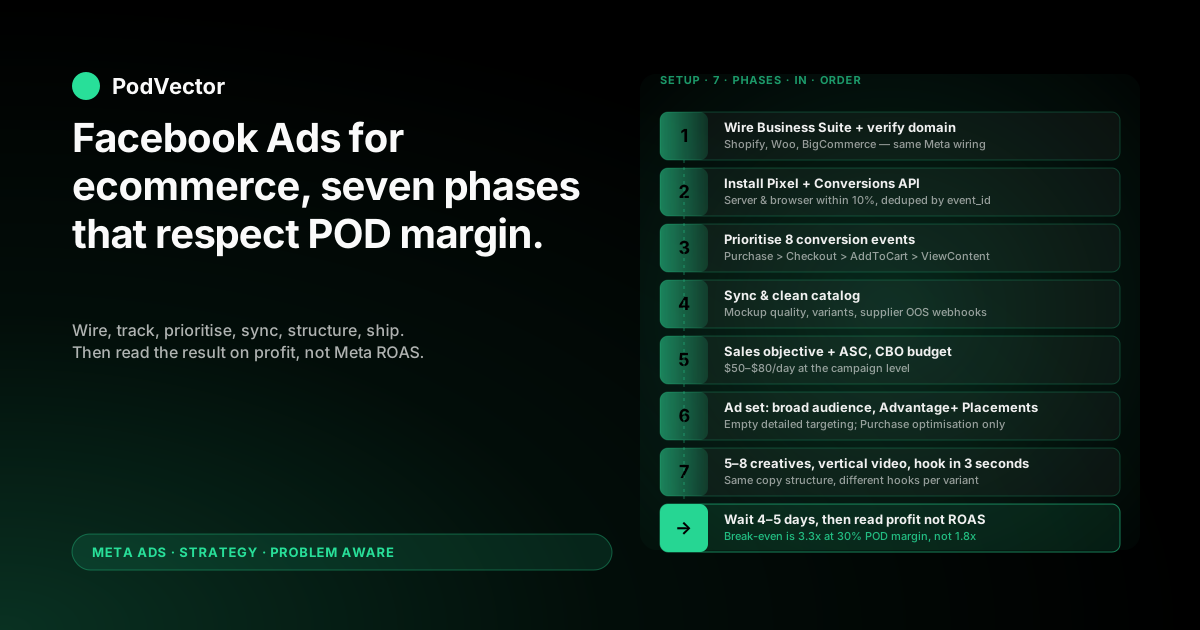
Quick Answer: Running Facebook ads for an ecommerce store is a seven-phase setup, not a one-night tutorial. The Meta side is identical whether you're on Shopify, WooCommerce, or BigCommerce. The profit math is what trips up print-on-demand sellers.
Wire your store to Meta Business Suite, install the Pixel plus the Conversions API (CAPI — Meta's server-side event channel that survives iOS opt-outs), prioritise your eight conversion events, sync a clean catalog, build the campaign on the Sales objective, ship 5–8 creative variants, and only then turn it on.
The piece nobody else writes: at 28–35% contribution margin after Printify or Printful supplier costs, your break-even ROAS is roughly 3.3x — almost double what generic ecommerce guides assume. Every phase below is sequenced so you don't burn through learning budget on math that was never going to work.
Why running Facebook ads for POD ecommerce is different
Search "how to run Facebook ads for ecommerce" and you'll find dozens of solid step-by-step guides. AdNabu's 8,000-word walkthrough, Sachs Marketing's primer, and Engine Scout's guide all march through the same seven or so phases. They're not wrong.
They're written for stores that own their inventory at 50–60% gross margin. Print-on-demand doesn't.
After Printify or Printful supplier costs, your contribution margin lives between 28% and 35%. That changes which ROAS counts as profitable, which campaign objective is safe to scale on, and what "good" looks like inside Meta Ads Manager.
Break-even ROAS is roughly twice the generic ecommerce assumption
An owned-inventory store at 55% margin breaks even around 1.8x ROAS. A POD store at 30% margin breaks even around 3.3x.
So when a generic ecommerce tutorial says "anything above 2x is healthy," that's true for them. For you, 2x ROAS is the algorithm charging a small premium to manufacture a small loss.
Meta optimises on receipt size, not on your profit
Meta's Sales objective reads order subtotal from your Pixel and CAPI events. That subtotal includes the part you owe Printify or Printful — so Meta will happily push budget toward the orders that look biggest to it, regardless of how much margin sits underneath.
Every phase below assumes you'll measure the campaign on profit-after-supplier-cost, not the ROAS Meta reports back. The full breakdown lives in the Facebook Ads for ecommerce strategy guide for POD.
Phase 1 — Wire the foundation (Business Suite + domain)
Before you touch Ads Manager, you need three things wired together: Meta Business Suite, your Facebook Page, and your ecommerce store.
Create or claim Meta Business Suite
Go to business.facebook.com and either create a new Business Manager or open the one tied to your personal Facebook. Add your Facebook Page as a managed asset. Then create an Ad Account inside the Business if you don't already have one.
Keep the Ad Account currency set to whatever your store transacts in. Mismatched currencies break ROAS math without throwing an obvious error.
Connect your ecommerce platform
Most store platforms have a first-party Meta integration that handles the wiring in one flow:
- Shopify: the official "Facebook & Instagram by Meta" channel app installs the Pixel, sets up CAPI, and syncs the catalog automatically.
- WooCommerce: the "Facebook for WooCommerce" plugin does the same, though CAPI configuration is more manual.
- BigCommerce: Meta integration ships in the native channel manager.
- Custom builds (Wix, Squarespace, headless): install the Pixel via Google Tag Manager and configure CAPI through Meta's Business Extension.
Whichever you're on, grant every permission the integration asks for. Half-granted permissions are the most common cause of "events not firing" support tickets a week after launch.
Verify your domain
Inside Business Settings, go to Brand Safety → Domains, add your ecommerce domain, and verify it. The meta-tag method is the fastest — drop the verification tag in your store's <head> and click verify.
Domain verification is what lets you control which conversion events Meta is allowed to optimise toward. Skip it and you cap out at three priority events instead of eight, which kneecaps the campaign before it starts.
Phase 2 — Install Pixel + Conversions API
Two trackers, both required, doing different jobs.
The Pixel handles browser-side events
Whichever platform you're on, the Meta integration installs the Pixel automatically once you grant permissions. Verify it works with the free Meta Pixel Helper Chrome extension.
Walk through your store as a customer would — home page, product page, cart, checkout — and watch the helper count PageView, ViewContent, AddToCart, InitiateCheckout, and Purchase in turn.
If any event is missing, Meta won't optimise toward it, and any retargeting audience built on it will be empty.
CAPI handles server-side events
Conversions API (CAPI) sends purchase events directly from your store's server to Meta's server, bypassing the browser entirely. After iOS 14.5, somewhere between 25% and 40% of Pixel purchase events fail to fire because of opt-outs and ad blockers. CAPI catches those.
Most platform integrations turn CAPI on by default in newer setups, but verify in Meta Events Manager → Data Sources → your Pixel → Settings. Look for the green "Receiving server events" status.
The Server column on the Overview tab should land within 10% of the Browser column for Purchase events over a 7-day window. If Server is blank, the integration didn't push through — uninstall and reinstall, or follow the Shopify-specific step-by-step if you're on Shopify.
Deduplicate Pixel and CAPI events
Both trackers fire on the same purchase. Meta deduplicates them by event_id, but only if your store sends the same ID through both channels.
First-party platform integrations handle this. Custom Pixel installs and third-party tracker apps frequently don't — and the result is double-counted Purchase events that inflate ROAS by 1.5–2x in your Ads Manager dashboard.
Spot it by comparing Events Manager Purchase count to your store's order count for the same 7-day window. If Meta shows materially more, deduplication is broken and every ROAS number you read will be a lie.
Phase 3 — Prioritise your eight conversion events
iOS 14.5's Aggregated Event Measurement (AEM — Meta's framework for handling iOS opt-outs) caps each verified domain at eight prioritised conversion events. Meta will only optimise toward an event that's on the list.
The POD priority order
Set this order in Events Manager → Aggregated Event Measurement → Configure web events:
- Purchase — the only event that pays the bills
- InitiateCheckout — proxies serious purchase intent
- AddToCart — useful for retargeting, weak for prospecting
- ViewContent — broad, only optimise on this for cold traffic in early days
- Lead — only if you run an email capture flow
- CompleteRegistration — same caveat
- Search — diagnostic only
- PageView — diagnostic only
Switch Value Optimisation off until your AOV is consistent across SKUs. With POD's mix of mugs, hoodies, and posters, Meta misreads the value signal and over-bids on high-receipt orders that have lower margin.
Phase 4 — Sync a clean product catalog
Even if you don't plan to run Catalog Ads on day one, sync the catalog now. Meta's Advantage+ creative tools and dynamic retargeting both pull from it.
Mockup quality is the silent killer
Printify and Printful auto-generate mockups that work on a product page but flatten in a Facebook feed at 1080×1080. Replace the worst offenders with lifestyle photography or higher-contrast mockups before sync.
The catalog feed is also where variant explosion bites. A single t-shirt design with five colors and four sizes can become twenty separate catalog items, splitting the Pixel's purchase signal twenty ways. Set "parent product" grouping in your platform's catalog settings before connecting to Meta.
Out-of-stock handling
POD doesn't carry inventory, so most platforms mark POD products as "always available." When Printify or Printful pauses a SKU, your Meta catalog keeps showing it as in-stock.
Set up the supplier's webhook (both Printify and Printful expose one) to flip product availability in your store, which then propagates to the Meta catalog on the next sync. Without this, you'll spend ad budget driving traffic to product pages that fail at checkout.
Phase 5 — Create the campaign (Sales objective)
Open Ads Manager → Create → and pick the campaign objective.
Always pick Sales
Sales is the only objective that optimises toward Purchase events. The other objectives — Awareness, Traffic, Engagement, Leads, App Promotion — are not for ecommerce.
The classic mistake is running Traffic to "warm up" the Pixel before switching to Sales. Don't. The Pixel doesn't need warming, and Traffic optimises toward clickers, not buyers, polluting your retargeting audiences with people who will never convert.
Use Advantage+ Shopping Campaign for new accounts
Advantage+ Shopping Campaign (ASC) is Meta's automated campaign type. It collapses the audience and placement decisions into one bidding system, which is what you want when the Pixel has limited purchase data.
For accounts under 30 purchases per week, ASC will outperform manual ad sets in 80% of cases. Once you cross 30 purchases/week and want to test specific cold audiences, layer in manual campaigns alongside — never replace ASC, supplement it. The full decision logic lives in the scaling Facebook ads playbook for POD.
Set the campaign budget, not the ad set budget
Use Campaign Budget Optimisation (CBO) on the campaign level. This lets Meta shift spend between ad sets based on which one is winning, instead of locking equal budget into each.
For POD, start with $50–$80/day at the campaign level. Below $50/day Meta can't accumulate purchase signal fast enough to exit the learning phase inside Meta's 50-conversion threshold.
Phase 6 — Build the ad set (audience, budget, placements)
The ad set is where most ecommerce tutorials get fancy and most POD operators lose money. Keep it boring.
Audience: broad first, narrow only after data
For ASC, audience selection is automated — let it run. For manual campaigns, set the audience to:
- Country: US, UK, CA, AU (English-speaking markets where Printify/Printful ship cheaply)
- Age: 25–55 (POD apparel buyer skew)
- Gender: match the design's intended audience
- Detailed targeting: empty
Empty detailed targeting feels wrong. It is correct. Meta's algorithm finds buyers faster than your interest stack does, and interest stacks get expensive in the bidding auction.
Layer Lookalike audiences only after the Pixel has accumulated 1,000+ Purchase events. Below that threshold, Lookalikes are unstable and frequently underperform broad audiences.
Placements: Advantage+, never manual
Set placements to Advantage+ Placements. Manual placement selection ("Facebook Feed only" or "Instagram Stories only") is the second most common mistake after Traffic-objective warm-ups. It restricts Meta's auction options and inflates CPM.
The single exception: if your creative is a static image and unreadable on Stories or Reels, exclude those specific placements. Better answer: reshoot the creative as vertical video.
Optimisation event: Purchase
Always Purchase. Never AddToCart, never ViewContent, never InitiateCheckout, regardless of how many older guides recommend "starting with a softer event." That advice is from before AEM domain verification existed. It's outdated.
Phase 7 — Build the ads (formats, hooks, copy)
Creative is where 70% of campaign performance is decided. The setup phases above just stop you from sabotaging it.
Lead with vertical short-form video
Vertical video (9:16) wins almost every POD ad test in 2026. Stories, Reels, and the in-feed video placement all get this format.
Build 5–8 creative variants per concept before launch. Same product, different hooks. The goal is to give Meta enough creative diversity to find the one that resonates with the broad audience — not to give yourself five backup options.
The hook in the first 3 seconds is the single highest-leverage element. Test:
- Pattern interrupt (a striking visual — color flash, unexpected zoom)
- Direct call-out ("If you have a [specific identity] in your life…")
- Problem statement ("You can never find a [niche] gift that doesn't look generic")
- Social proof ("Over 12,000 of these shipped this year")
Image and carousel as backup formats
Static images are rarely the best-performing format for POD, but they're the cheapest to produce. Use them as the third or fourth variant in an ad set, never the only ad type.
Carousels work for showcasing variant ranges (one design across multiple products, or one product across multiple designs). They underperform single video ads for cold traffic but recover ground in retargeting.
Copy structure that doesn't feel like an ad
Three paragraphs, in this order:
- Identity hook — open with who the product is for. "For people who can't find a [niche] gift that isn't generic."
- Product specifics — material, sizing, fit. POD buyers are skeptical about quality; specifics build trust.
- Soft CTA — "See the full collection" beats "Buy now" for cold traffic by 15–20% in our seller cohort.
Phase 8 — Launch, wait, then read on profit
This is where 80% of POD operators kill working campaigns and scale broken ones.
Don't touch the campaign for 4–5 days
Meta's learning phase needs ~50 conversion events at the ad set level (or campaign level for ASC) to exit. At $50–$80/day with a $40–$60 cost-per-purchase, that's 4–5 days of stable budget.
Editing budget, audience, or creative inside the learning phase resets the timer. So does pausing and re-enabling. So does duplicating the ad set "to test something."
Read results on profit, not Meta-reported ROAS
This is the operational difference between POD and owned-inventory ecommerce. Open your store's order list and Ads Manager spend side by side, then calculate:
- Revenue from Meta ads (orders attributed via UTM or Meta-reported, whichever you trust more)
- Minus Printify/Printful supplier cost on those orders
- Minus payment processing fees (~2.9% + $0.30/order on Stripe or Shopify Payments)
- Minus ad spend
- Equals contribution profit from Meta ads
If contribution profit is positive, the campaign is working — even if Ads Manager shows 2.5x ROAS that looks "average" in a generic ecommerce guide.
If contribution profit is negative at 3x ROAS, your supplier cost ratio is higher than you assumed and the campaign needs creative work, not budget. The full ROAS-to-profit translation lives in the benefits of Facebook ads for ecommerce guide for POD.
Five POD-specific mistakes that drain margin
1. Reading Meta-reported ROAS as if it were profit
Ads Manager doesn't know your supplier cost. A 2.5x ROAS at 30% margin is a 25% loss. Always translate to contribution profit before deciding to scale, pause, or duplicate.
2. Scaling on the daily ROAS spike
POD daily ROAS bounces hard. A single $80 hoodie order on a $50/day ad set looks like a 5x day. The next day at 1.2x looks like the campaign died. Neither is true. Scale and cut on rolling 7-day blended ROAS, never on the last 24 hours.
3. Letting catalog feed errors quietly compound
A Printify supplier pauses a SKU. The store still shows "in stock" because POD doesn't track inventory. Meta keeps running Advantage+ creative on the unavailable item. You discover it 14 days later when refunds spike. Audit Commerce Manager weekly.
4. Running Traffic objective to "warm up" the Pixel
The Pixel doesn't need warming. Traffic objective optimises toward clickers, not buyers, and pollutes retargeting audiences with people who will never convert. Skip it. Go straight to Sales.
5. Killing ad sets at the 3-day mark
The learning phase needs the full 4–7 days of stable budget to exit. Operators kill ad sets on day 3 because the ROAS looks weak, then re-launch a near-identical ad set three days later — restarting the learning phase from zero. Patience is cheaper than re-tests. Hold the line.
FAQs
How much budget do I need to start running Facebook ads for an ecommerce POD store?
The honest minimum is $1,500 over 30 days — roughly $50/day on one ASC campaign. Below that, the Pixel never accumulates enough purchase signal to exit learning, and you're paying for testing without enough data to act on the result.
Can I run Facebook ads before my store has any sales?
Yes, but ASC will spend more per purchase in the first 2–3 weeks because Meta has no Pixel data to optimise on. Plan for $200–$400 cost-per-acquisition during the cold-start period, then expect it to halve as Purchase events accumulate. Generic ecommerce CPA benchmarks don't apply to POD's cold-start curve.
Do I need the Conversions API if my store already has the Pixel installed?
Yes. Pixel-only setups lose 25–40% of Purchase events to iOS opt-outs and browser blockers, which inflates your real cost-per-purchase by the same amount inside Ads Manager. CAPI is what makes the data accurate enough to scale on. Most platform integrations turn it on by default — just verify it's actually firing in Events Manager.
Should I use Advantage+ Shopping Campaign or build manual ad sets?
Start with ASC. It needs less structure and runs better with limited Pixel data, which is where every new POD store starts. Add manual campaigns once ASC clears 30 purchases/week and you want to test specific cold audiences.
How long until I should expect profitable ROAS?
Plan for 30 days at break-even or below while Meta's algorithm learns who buys your designs. Profitable contribution margin usually shows up in week 4–6 if creative and catalog hygiene are solid. If you're still negative after 60 days at $1,500+ in spend, the issue is product-market fit or unit economics, not Facebook ads.
Does the platform matter — Shopify vs WooCommerce vs BigCommerce?
Not for the Meta side. The Pixel, CAPI, catalog, and AEM mechanics are identical across platforms. The only differences are integration polish (Shopify's channel app is the smoothest, WooCommerce takes more manual config) and reporting depth in your store admin. Pick the platform on store-side reasons, not on Facebook ad mechanics.
Where do most ecommerce POD Facebook ads campaigns fail?
Three places: tracking (Pixel/CAPI half-installed or not deduplicated), measurement (reading Meta ROAS as if it were profit), and patience (killing ad sets before the learning phase exits). Solve those three and the rest of the playbook does its job. The full account architecture for POD sits inside the Meta Ads topic hub, with the strategy cluster at the Meta Ads strategy hub.
Stop reading Meta-reported ROAS as if it were profit.
Meta Ads Manager shows you ROAS on subtotal. Printify shows you the supplier invoice. Your store shows you the order revenue. The margin sits in the gap between three dashboards — and most POD operators never close it.
Victor is the AI employee that pulls your store, suppliers, and Meta into one live data warehouse and answers the question Ads Manager won't: is this campaign making me money on profit, not on receipt size? Ask in plain English, get the number from your real data, decide on the right one.
Try Victor free