
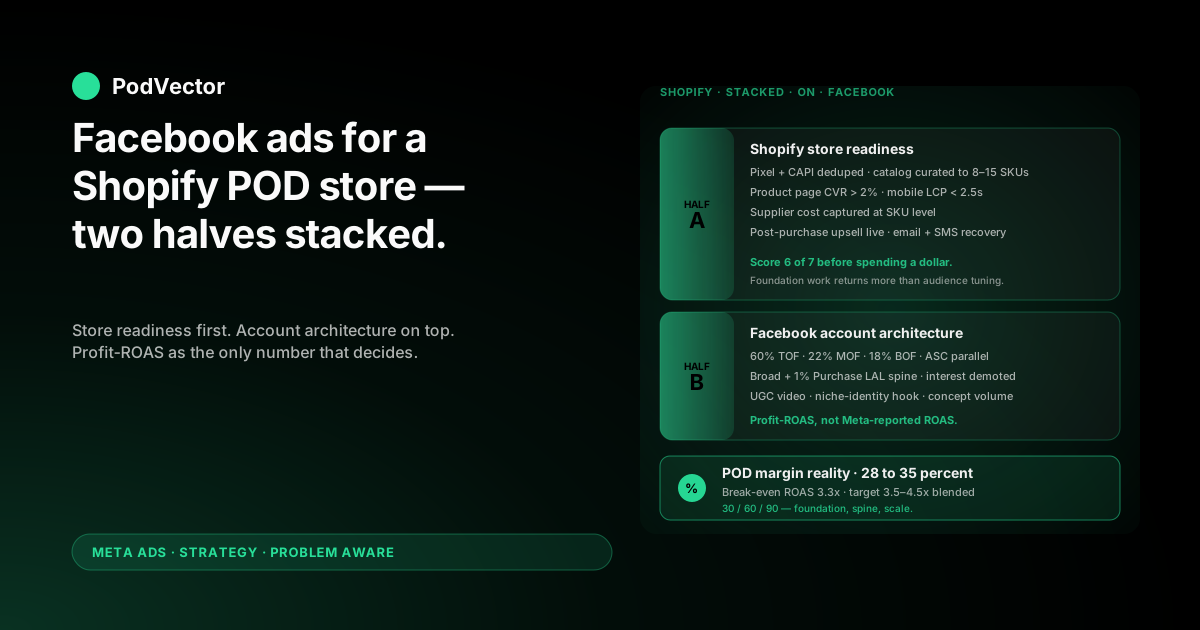
Quick Answer: A Facebook-ads playbook for a Shopify print-on-demand store is two halves stacked. First, the Shopify side has to be ad-ready — pixel and Conversions API clean, catalog curated, product pages converting above 2%, supplier costs visible at the SKU level. Second, the Facebook side runs broad-first prospecting with a customer-list lookalike spine, UGC video creative built around niche-identity hooks, and a profit-aware measurement layer.
Most generic Shopify guides skip the POD-specific edits. After Printify or Printful supplier cost, contribution margin sits at 28–35%, which doubles your break-even ROAS, hides losing winners inside Meta's reporting, and shrinks the cut-decision tolerance to a fraction of what owned-inventory stores work with.
This playbook walks the store-side readiness audit, the Facebook-side architecture, and a 30/60/90-day plan to take a cold POD store from zero ad spend to a profit-checked, scaled account.
Why a Shopify POD store needs an edited Facebook playbook
Search "facebook ads for shopify store" and the top guides converge on a clean shape: install the Facebook & Instagram channel app, pipe in Pixel and the Conversions API (CAPI — Meta's server-side event channel), build prospecting and retargeting layers, run UGC video and Advantage+ Shopping Campaigns, optimise on ROAS. AdNabu's step-by-step, Enhencer's Meta-ads-for-Shopify guide, and Reap Agency's profitability piece all land in roughly the same neighbourhood.
The shape is right. The numbers underneath it assume an owned-inventory store keeping 50–60% of every order.
POD doesn't keep that. After Printify or Printful supplier cost, contribution margin lives between 28% and 35%. That single number rewrites the playbook in three concrete ways.
Break-even ROAS roughly doubles
An owned-inventory Shopify store at 55% gross margin breaks even around a 1.8x ROAS. A POD store at 30% margin breaks even around 3.3x.
So the "healthy 2.5x" most Shopify articles cite is, for POD, the platform paying you to lose money. Every scaling rule, every cut threshold, every "winner" call sits 2x further up the chart than what generic guides publish.
Meta's optimiser scales the wrong wins
Meta optimises against the order subtotal it sees in your Pixel and CAPI events. For POD, that subtotal includes the supplier cost — so Meta pushes traffic toward orders with the largest receipts, not the largest margin.
A $48 hoodie with $26 supplier cost looks like a $48 win to Meta and a $22 win to your P&L. A $24 mug with $7 supplier cost looks like a $24 win to Meta and a $17 win to your P&L. Meta will scale the hoodie. You make more money on the mug.
Variance flips winners to losers at smaller swings
At 55% margin, a 10% ROAS dip still leaves a profitable ad set. At 30% margin, that same dip pushes the ad set under break-even. POD's cut decisions have to be more sensitive than its raise decisions — and most operators do it backwards.
Once those three things are on the table, the playbook below makes sense. The store-readiness audit comes first because no Facebook tactic survives a leaking Shopify foundation.
The Shopify store-readiness audit (do this first)
Seven things on the Shopify side determine whether your Facebook spend will compound or just buy traffic. Run this audit before you launch a campaign — fixing any of them mid-flight is twice the work.
1. Pixel + CAPI both live, deduplicated
The Facebook & Instagram channel app on Shopify installs both. Confirm in Meta Events Manager that browser-side and server-side events match within 10% on Purchase, AddToCart, and ViewContent. If they don't, the deduplication ID isn't firing — fix that before you spend.
Pixel-only setups lose 20–35% of conversion signal post-iOS 14. CAPI-only setups lose in-session optimisation. Both, deduplicated, is the only working pattern in 2026.
2. Catalog feed published and curated
The same channel app syncs your product feed to Meta. The default behaviour is to push every available product. For POD, that's wrong.
Curate the feed down to a 8–15 SKU shortlist of your highest-margin, best-converting designs before turning Advantage+ Catalog Ads or Advantage+ Shopping Campaigns on. Otherwise the algorithm picks whatever has the largest receipt — which, for POD, means whatever has the largest supplier cost.
3. Product page conversion rate above 2%
This is the lever most operators ignore and most ad accounts need. A 0.5-point lift in product-page conversion rate (e.g., 2.0% → 2.5%) drops effective customer acquisition cost (CAC) by 25%. That's bigger than most audience changes will produce.
Mechanics that move the number: trust badges, design-detail close-ups, sizing chart, real-customer review imagery (not stock), under-2.5-second mobile load (Largest Contentful Paint), and a sticky add-to-cart button on mobile.
4. Mobile load under 2.5s LCP
~80% of Facebook traffic is mobile. A 4-second Shopify product page bleeds 30–40% of that traffic between ad click and pixel fire. Run a Google PageSpeed Insights check on your highest-traffic product page; if LCP is over 2.5 seconds, this fix returns more than another round of audience tuning.
5. Supplier cost visible at the SKU level
Printify and Printful base costs vary by product, by colour, by size. Your Shopify catalog needs the supplier-cost-per-variant captured somewhere queryable — either in product metafields, an inventory app, or exported to a unified data layer — so you can compute true margin per order.
Without this, every "what's my profit on this ad set?" question becomes a manual export-and-spreadsheet exercise. With it, you can answer in seconds.
6. Post-purchase upsell live
POD's repeat-purchase rate inside 30 days hovers around 8–12% for design-led stores. A one-click post-purchase upsell ("Same design, also on a hoodie?") can add 15–25% to average order value (AOV) at near-zero ad cost. That delta widens MER (Marketing Efficiency Ratio — total Shopify revenue ÷ total ad spend) directly.
7. Email and SMS recovery flows running
Meta retargeting handles cart abandoners on-platform. Email and SMS recover the rest at much lower variable cost. A POD store with no email recovery flow leaves margin on the table that no Facebook change will replace.
Score the audit. Stores passing 6 of 7 are ready. Stores passing under 5 should fix the foundation before scaling spend. The Meta Ads + Shopify integration guide walks the technical setup; the complete Meta Ads playbook sits beside this article in the cluster.
Facebook account architecture for a POD store
The store-readiness audit decides whether ads can work. Account architecture decides how fast they compound.
Campaign objective: Sales, attribution window 7-day click + 1-day view
Use Sales as the optimisation objective once you have ~50 conversions per ad set per week. Below that, optimise on AddToCart and graduate to Purchase as data accumulates. The 7-day click + 1-day view window is the post-iOS standard for ecommerce — shorter windows starve the algorithm; longer windows over-credit Meta against the rest of your stack.
Three-layer funnel allocation
POD's allocation differs slightly from generic Shopify because the prospecting pool is huge but the margin tolerance is thin. A working POD allocation:
- 55–65% top-of-funnel (TOF) prospecting — broad ad sets, 1% Purchase Lookalike, Advantage+ Audience
- 20–25% middle-of-funnel (MOF) — page viewers, AddToCart, 30-day site visitors
- 15–20% bottom-of-funnel (BOF) — Advantage+ Catalog Ads (formerly Dynamic Product Ads), 7–14 day cart abandoners, with recent purchasers excluded
The extra 5% on retargeting matters because POD's design-led model means a niche-design viewer is more recoverable than a generic apparel viewer — they self-selected by clicking a niche-specific creative in the first place.
Where Advantage+ Shopping Campaigns belong
ASC is Meta's automated campaign type that optimises across audience, placement, and creative simultaneously. It delivers 15–30% lower CAC than manual structures for most stores. For POD it's conditional.
ASC scans your Shopify catalog and picks whichever SKUs it sees as biggest. Without curation, that's the highest-supplier-cost designs — biggest receipts to Meta, smallest margin to you. The fix is the curated catalog from the readiness audit. With a 8–15 SKU shortlist of high-margin designs, ASC's optimisation pressure concentrates where margin actually lives.
Run ASC alongside manual prospecting, not instead of it, until ASC has cleared 30 days at or above your blended target.
Naming convention that survives a year of experiments
This sounds clerical. It compounds. Use a consistent campaign / ad set / ad name pattern from day one — something like [Objective]_[Funnel]_[Audience]_[Date] for ad sets and [Concept]_[Hook]_[Format]_[V#] for ads. Six months in, when you're trying to remember which 1% lookalike from which seed list outperformed last quarter, the naming convention is what makes that question answerable.
Audience playbook: broad, lookalike, and where interest still earns its slot
Interest-based targeting collapsed after iOS 14. Meta's behavioural data thinned out and broad audiences started outperforming narrowly-targeted ones. The 2026 SERP unanimously says go broad. Mostly correct — with a POD-specific edit.
The audience ladder for POD
Build the ladder from narrowest to widest, run all rungs concurrently, and let CPA arbitrate budget:
- 1% Purchase Lookalike — built off your top-decile customer list (filtered to highest-LTV buyers, not just any purchaser). For POD this often outperforms broad on prospecting CPA by 20–35%.
- 1% AddToCart Lookalike — wider behavioural pool, useful when purchase volume is too low to seed a stable Purchase LAL (under ~500 customers).
- 3–5% Purchase Lookalike — used as a scaling rung once 1% saturates.
- Advantage+ Audience — Meta's auto-expanding audience seeded with your customer list; treat it as a parallel ad set, not a replacement.
- Pure broad — no targeting input. Often the highest-volume rung at scale, but the noisiest on quality.
For stores with under 500 customers, the spine collapses to broad + 1% AddToCart Lookalike. The customer-list rungs unlock once data exists.
The interest layer is not dead, just demoted
Interest stacks (e.g., "people interested in Etsy + dog owners + 35–55") still produce stable performance for niche POD designs where the niche is small enough that broad won't reliably find it.
If you sell designs for "left-handed bass guitarists" or "Cavalier King Charles Spaniel owners," interest targeting still earns its slot at maybe 10–15% of TOF spend. For broad-niche designs (parents, teachers, generic fitness), kill the interest layer — it just adds fragmentation.
Creative playbook: UGC, design-in-context, and the hook
Creative is the only lever that breaks ad-account ceilings. Targeting compresses, bidding compresses, placements compress — creative is the open variable. The 2026 consensus is UGC video at the top, carousel at the middle, dynamic catalog at the bottom.
Format mix for POD
- UGC video (15–30s) — the workhorse. POD wins on niche-specificity, and a creator who actually owns the niche identity (a teacher, a nurse, a horse owner) outperforms generic UGC by 1.5–3x click-through rate. Run at 60–70% of TOF spend.
- Static design-on-product — strong for top-of-funnel design discovery; cheap to produce. 15–20% of TOF.
- Carousel — best for design-collection retargeting. Show 5–10 designs from one niche to MOF visitors who only saw one.
- Advantage+ Catalog Ads — bottom-of-funnel only, fed by the curated catalog from the readiness audit.
The hook is most of the work
Meta gives you ~1.7 seconds of attention before the scroll. The first frame and the first three words of the caption decide whether the ad gets to deliver its content. Hook formats that travel well in POD:
- Niche-identity hook — "If you've ever taught third grade, you'll get this." Lets the viewer self-identify in frame one.
- Design-in-context hook — the design shown on a real person, in a real environment, not a flat product mockup.
- Pattern-interrupt hook — text-on-screen that contradicts expectation in the first half-second. Risky; works when it lands.
Avoid generic "10% off" hooks at TOF. Discount-led hooks burn through the audience without building niche-design recognition, and POD's repeat-purchase rate depends on that recognition.
Creative volume scales with spend
Creative fatigue (frequency above 3.0 on a single concept) is the single largest cause of account decline. The volume floor by spend tier:
| Daily spend | New concepts per month | Active concepts at any time |
|---|---|---|
| $50–$200 | 4–6 | 6–10 |
| $200–$800 | 8–12 | 10–18 |
| $800–$2,000 | 15–20 | 20–30 |
| $2,000+ | 20–30 | 30+ |
The scaling playbook walks how to push concept volume without inflating production cost.
Measurement: the three numbers that decide
This is the layer most playbooks treat as a side note. For POD it's the one that decides whether the others work.
Why Meta-reported ROAS isn't your profit signal
Meta-reported ROAS is the platform's attribution model's estimate of revenue it thinks it caused, divided by spend. It includes view-through windows, default 7-day click attribution, and the iOS-driven modelled gap. It also includes the supplier cost portion of every order.
None of that is wrong, exactly. It's just not the number that decides whether you have a business.
The three numbers that actually decide
- MER (Marketing Efficiency Ratio) — total Shopify revenue ÷ total ad spend across all platforms. The blended truth. POD's MER target lands at 3.5–5x depending on margin and AOV. Below 3.3x and you're losing money in aggregate.
- Profit-ROAS — (Shopify revenue − Printify/Printful supplier cost − Shopify fees − payment processor) ÷ ad spend. The number Meta will never show you, because it doesn't have the supplier-cost data. The break-even line for profit-ROAS is 1.0x. Most POD operators discover their "4x ROAS" winner is a 0.9x profit-ROAS loser.
- Item-level margin per ad set — which SKUs each ad set is actually selling. ASC and broad-targeted ad sets often drift toward high-supplier-cost SKUs because Meta scales receipt size. Catching this needs SKU-level tagging on every order, joined back to ad-set ID.
Where the profit signal has to live
None of these three numbers exists inside Meta Ads Manager. They live across Shopify orders, Printify or Printful supplier exports, Meta spend reports, and your payment processor — and the join requires connecting them in a single source of truth.
Most stores attempt this in spreadsheets and it works until the store crosses ~$30k/month, at which point manual reconciliation breaks. The pattern that survives is a live data warehouse that reads from each source on a schedule, joins on order ID, and exposes profit-ROAS and item-level margin per ad set in something an operator can query in the moment.
Snowflake, Redshift, Databricks, or equivalent all work as the warehouse layer. The principle is the same: ad-set-to-margin has to be queryable in seconds, not assembled in CSVs once a week. The ROAS & attribution guide covers the join pattern in depth.
The 30/60/90-day plan
Most operators try to do everything above in week one. It doesn't work. The order below is what compounds.
Days 1–30: Foundation and signal
- Complete the store-readiness audit. Fix anything below 6/7 score before launching.
- Install Pixel + CAPI via the Facebook & Instagram channel app; verify event match in Events Manager.
- Curate the catalog feed to your top 8–15 designs.
- Launch one TOF prospecting campaign — broad + 1% AddToCart LAL — at $50–$80/day with 4–6 creative concepts.
- Launch one BOF retargeting campaign — Advantage+ Catalog Ads on the curated feed — at $20–$30/day.
- Take no decisions on individual ad sets in week one. Meta needs ~50 conversions per ad set per week to optimise; below that, every signal is noise.
Days 31–60: Layer the spine
- Build 1% Purchase LAL once you have 500+ purchasers. Add as a new ad set in TOF, run beside broad.
- Add MOF retargeting (page viewers, AddToCart, 30-day visitors). Allocate ~20% of total spend.
- Move into the weekly review cadence. Profit-ROAS by ad set; winners get +20% budget, losers get killed.
- Build the creative concept pipeline. Refresh anything at 2.5+ frequency. Aim for 8–12 new concepts/month at this spend tier.
- Start tagging orders with ad-set-ID and SKU-level supplier cost. By day 60 you should be able to query item margin per ad set.
Days 61–90: Scale and structure
- Test Advantage+ Shopping Campaigns alongside manual prospecting. Run 30 days minimum before reading.
- Add 3–5% Purchase LAL as a scaling rung once 1% saturates.
- Run the 4-weekly review: funnel allocation drift, ASC catalog re-curation, lookalike rebuild, creative concept post-mortem.
- If MER is sitting at or above 3.5x for two consecutive 4-week windows, increase total spend by 20–30%. If it's below 3.3x, the answer is creative or product-page work, not more spend.
Operators who stick to this rhythm beat operators with better single-week tactics. The step-by-step setup guide covers what has to be in place before the cadence is worth running, and the Meta Ads strategy cluster covers the wider stack.
Five mistakes that drain Shopify-POD ad accounts
1. Skipping the readiness audit
Launching ads on a 1.5%-converting product page with a 4-second mobile load is paying Meta to deliver traffic to a leaking bucket. The store-side fixes return more than another round of audience experiments — they just don't feel like "doing ads work" so operators skip them.
2. Scaling on Meta-reported ROAS, ignoring profit-ROAS
Meta-reported 4x with profit-ROAS at 0.9x means you're growing revenue and shrinking profit at the same time — the trap a thin-margin model punishes hardest. Most POD accounts have at least one "winner" that's secretly a loser; only profit-ROAS surfaces it.
3. One creative, three formats, called "creative volume"
Cropping the same UGC clip into 1:1, 4:5, and 9:16 doesn't add concept volume. Meta's algorithm treats them as variants of the same creative for fatigue purposes. Concept volume = different hook, different angle, different creator, different design.
4. Using uncurated Advantage+ Shopping Campaigns
ASC on a full POD catalog will scale your highest-supplier-cost designs because Meta only sees receipt size. Curate the feed to 8–15 high-margin designs first, then turn ASC on. Otherwise you're paying Meta to find your worst-margin orders.
5. Treating the strategy as set-and-forget
The Meta auction shifts. iOS shifts. Audience pools saturate. Creator preferences shift. A strategy decided in Q1 and never re-decided is a Q3 loss. The 4-weekly review exists for this reason — not to second-guess every week, but to catch the drift before it compounds.
FAQs
What's the minimum daily budget to make Facebook ads work for a Shopify POD store?
$50–$80/day is the floor that produces enough conversion signal in 7 days for an ad set to clear learning. Below that, Meta's algorithm doesn't have enough data to optimise and the account looks broken when it's actually just under-fed. Plan for $1,500–$2,500 minimum across the first 30 days — split between media and 4–6 creative concepts.
Do I need both the Facebook Pixel and the Conversions API?
Yes — run both with deduplication. The Pixel handles browser-side events (still useful for fast in-session signal); CAPI handles server-side events (resilient to ad blockers and iOS opt-outs). Most working 2026 setups have CAPI as the primary signal and Pixel as the backup, with event_id deduplication so Meta doesn't double-count. Shopify's Facebook & Instagram channel app handles the dedup automatically once you confirm both are firing.
What ROAS should a Shopify POD store target on Facebook?
3.5–4.5x blended (across all Meta spend) is the workable band, with 5x+ on retargeting and 3.0x+ on cold prospecting. POD's 28–35% margin makes 3.3x literal break-even, so the buffer above absorbs supplier price changes, refunds, and seasonality. Stores running at "industry-standard" 2.5–3x targets are scaling losses without realising it.
How do I track Facebook ad profitability when Printify costs vary by SKU?
You need supplier cost captured at the SKU level (Shopify metafield, inventory app, or warehouse export), then joined to each Shopify order, then joined to ad-set ID via UTM or attribution data. The output is profit-ROAS per ad set: revenue minus supplier cost minus Shopify and processor fees, divided by spend. Spreadsheets handle this until ~$30k/month; above that the join needs to live in a real data layer.
Should I use Advantage+ Shopping Campaigns or stick with manual?
Both, in parallel. ASC delivers lower CAC for most stores once Meta's algorithm has data, but it needs a curated catalog feed to work for POD — otherwise it scales whatever has the largest receipt, which is your worst-margin SKUs. Run ASC on a 8–15 SKU shortlist alongside a manual prospecting campaign, give it 30 days, then compare profit-ROAS.
How does Facebook ad strategy connect to Google for the same Shopify POD store?
Meta drives demand creation; Google Shopping captures the bottom-of-funnel intent Meta created. Most working POD stores run both — Meta at 60–70% of total ad spend, Google at 30–40%. The two complement: Meta tells someone the design exists, Google's there when they search for it the next day. A shared MER target across both keeps the apples-to-apples comparison honest.
How much should I spend on creative production each month?
Plan for 15–25% of media spend on creative production at the $50–$200/day tier, dropping to 8–12% as spend scales above $2,000/day (because volume amortises fixed cost). UGC creators charge $80–$300 per video for short-form ad content; static design-on-product mockups can be produced internally. The constraint isn't usually budget — it's the concept pipeline. Operators who can ship 8–12 new concepts a month outperform operators who ship 2.
What's the relationship between this strategy and the wider Meta Ads picture?
This article is the store-level strategy layer. The setup mechanics, ad-type playbooks, and ROAS/attribution detail sit beside it across the Meta Ads topic hub. If your foundation isn't in place — Pixel + CAPI clean, Shopify catalog feed live, baseline conversion tracking matching within 10% — none of the strategic decisions above will hold. The fix is upstream.
The number Meta won't show you is the one that decides
Meta-reported ROAS is one number. Shopify revenue is another. Printify or Printful's supplier cost is the one Meta will never see. Profit-ROAS is the one that decides whether your Facebook ads are growing the business or quietly draining it.
PodVector AI's AI employee Victor connects all three. You ask "is this Facebook ad set actually profitable after Printify cost?" and Victor answers with live numbers from your Shopify, Printify or Printful, and Meta data — not a delayed export, not a yesterday-end snapshot. Victor answers and acts on what he sees — with your approval.
Try Victor free