
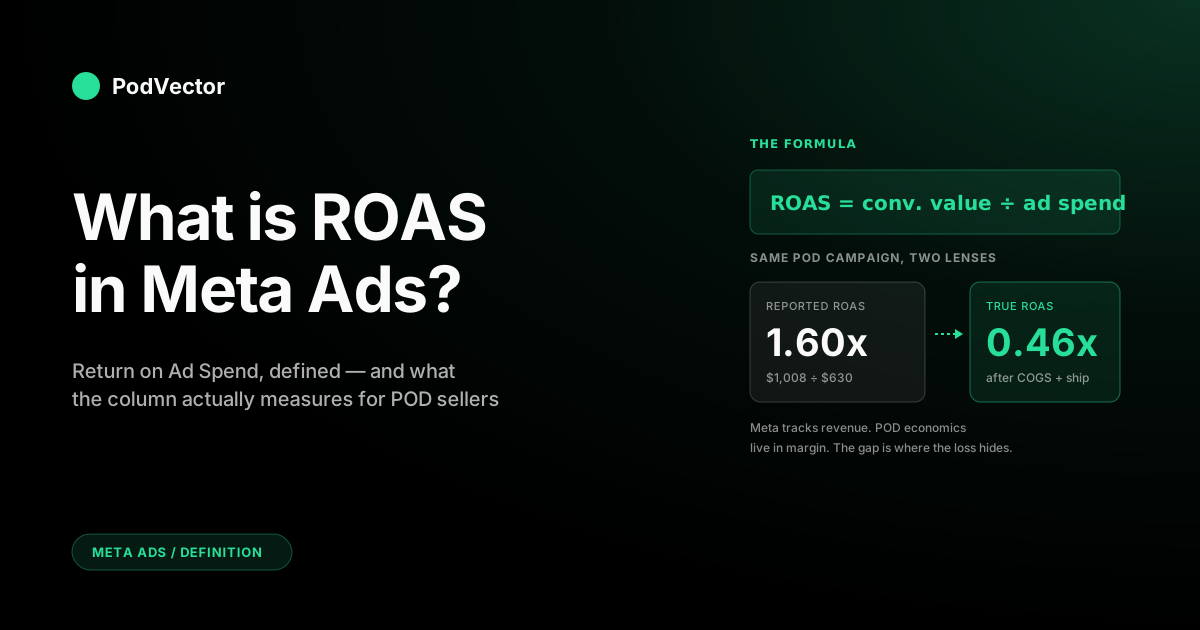
Quick Answer: ROAS in Meta Ads stands for Return on Ad Spend. It's the dollar value of conversions Meta attributes to a campaign divided by what you spent — the platform's headline efficiency number, surfaced in every row of Ads Manager.
The formula is simple: conversion value ÷ ad spend. A 3.0x ROAS means Meta credited $3 of revenue to every $1 of spend, based on whatever your pixel and Conversions API reported during the attribution window.
For print-on-demand (POD) sellers, the catch is that ROAS measures revenue, not margin. After Printify or Printful supplier costs, shipping, and processor fees, a 3.0x reported ROAS is often a 1.5x real one. This guide explains what the number means, how Meta calculates it, and how POD operators should read it without getting burned.
What ROAS means in Meta Ads
ROAS stands for Return on Ad Spend. In Meta Ads, it's the metric that answers a single question: for every dollar you put through this campaign, how many dollars of attributed conversion value came back?
That's it. No profit, no margin, no shipping, no refunds. Just revenue Meta's tracking infrastructure matched back to your spend.
You'll see it expressed as a multiple — 2.5x, 3.7x, 0.8x — or as a ratio (3:1). Meta uses the multiple form in Ads Manager. Both mean the same thing.
Why Meta puts ROAS at the center of reporting
Meta needs a metric that compares apples to apples across very different campaign types. Cost per purchase varies by product price. Conversion rate varies by funnel stage. ROAS normalizes both into one ratio you can scan in a column.
It's also the metric Meta's own bidding system optimizes against when you choose ROAS goal as a performance objective. Hit the column and you've fed the algorithm what it asked for.
ROAS vs. ROI — they're not the same
ROI (Return on Investment) is the all-in number: revenue minus every cost (ads, COGS, shipping, fees, overhead) divided by total investment. ROAS only looks at the ad spend slice.
That distinction matters for POD operators because the gap between ROAS and ROI is where most stores quietly bleed money. A 3.0x ROAS feels like winning. A -8% ROI on the same campaign means it's draining cash.
The ROAS formula, with a POD example
One line:
ROAS = total conversion value ÷ total amount spent
Both numbers come from the same campaign and the same time window. Conversion value is the dollar total of purchase events Meta attributed. Spend is what Meta charged your ad account.
Worked example: a POD hoodie campaign
You're selling a $48 graphic hoodie via Shopify, fulfilled by Printify. Last week you ran a single ABO campaign at $90/day for seven days — $630 in spend.
The pixel fired 21 purchase events for $1,008 in revenue. Meta's reported ROAS for the campaign:
$1,008 ÷ $630 = 1.60x
That's the headline number. Looks below the 2x line most operators target, so you'd be tempted to pause it. But you haven't yet asked the only question that matters: was the campaign profitable?
To answer that, you need to subtract everything Meta doesn't see — supplier cost, shipping, processor fees, returns. We'll do that math in the true-ROAS section below.
How Meta actually calculates the number
The formula is simple. The plumbing behind it is not. Three things determine what your ROAS column shows.
1. Pixel and Conversions API events
Conversion value comes from Purchase events fired by Meta's Pixel (browser-side) and Conversions API (server-side). The pixel reports what happens in the browser; the Conversions API (CAPI) reports what your server saw — order ID, value, currency, customer hash.
Most POD stores on Shopify use both. Browser-only pixels lose data to ad blockers, iOS privacy settings, and the 2021 ATT framework. Adding CAPI gets server-side coverage that Meta dedupes against the browser event using the order ID.
If your CAPI isn't wired up, your reported conversion value — and therefore your ROAS — is understated by 15–30% on most accounts.
2. Attribution window
Meta only credits a purchase if it falls inside the campaign's attribution window. The default since iOS 14.5 is 7-day click, 1-day view (often written as 7d-click/1d-view).
That means: if a user clicked your ad in the last 7 days or viewed it in the last 1 day before purchasing, the conversion gets credited to that ad. Click any combination of attribution settings and your ROAS will move — sometimes by a lot.
Wider windows credit more conversions and inflate ROAS. Tighter windows under-credit. Neither is "correct" — they're different lenses on the same purchase data.
3. Modeled conversions
Since iOS 14, Meta backfills "modeled" conversions — statistical estimates for purchases the platform thinks happened but couldn't directly measure (because of opt-outs, blocked pixels, or aggregated event measurement caps).
Modeled conversions show up in the same Purchase column as direct ones, with no flag distinguishing them. Most operators don't realize that a meaningful slice of their reported ROAS is Meta's best guess, not measured fact.
The ROAS columns you'll see
Meta doesn't report a single ROAS. Ads Manager has several variants and they measure different things. Reading the wrong one is the most common reporting error in POD ad accounts.
Purchase ROAS
The blended row. Sums every Purchase event Meta attributed across surfaces — website, app, Meta Shops, Marketplace — and divides by spend. Convenient single number, but it averages high-quality pixel events with lower-quality cross-platform ones.
Website Purchase ROAS
Conversion value from your storefront only — pixel plus CAPI on your Shopify, WooCommerce, or custom store. For most POD operators this is the column that matches your actual sales data, and the one to lead reporting with.
Mobile App Purchase ROAS
In-app purchase value from an SDK-instrumented app. Almost always zero for a POD store. If it isn't, check whether Meta is misclassifying your events.
Direct Purchase ROAS
Checkouts completed on Meta's own surfaces — Shops, Marketplace, Messenger. Most POD operators sync Printify or Printful to Shopify and don't run Meta-native checkout, so this row is informational at best.
For a deeper teardown, see our guide on the Meta Ads ROAS definition Help Center entries and what each one really tracks.
What counts as a "good" ROAS
The honest answer: it depends on your margin. The shortcut answer most accounts default to: 2x to 4x.
The 2025 ecommerce average across industries hovers around 2.87x, per InBeat's benchmark study. That's a useful sanity check, not a target.
Why generic benchmarks don't fit POD
POD is a low-margin model. After supplier base cost, shipping, and processor fees, your contribution margin per order is often 20–35% of revenue — not the 50–70% a typical DTC brand operates with.
That means a 3x reported ROAS that's perfectly fine for a high-margin skincare brand can put a POD store underwater. The break-even ROAS for POD typically sits at 3.0x to 4.5x, depending on the supplier and product.
For a deeper analysis of where the line actually sits, see what is a good ROAS for Meta Ads and the average ROAS benchmarks for Meta Ads.
Calculating your own break-even ROAS
The break-even formula:
Break-even ROAS = 1 ÷ contribution margin %
If your hoodie sells for $48 and your contribution margin (after Printify base, shipping, and Shopify fees) is 30%, your break-even ROAS is 1 ÷ 0.30 = 3.33x. Anything below that and the campaign is losing money on contribution, regardless of what Meta's column says.
Why reported ROAS misleads POD sellers
Meta tracks revenue. POD economics live in margin. The gap between those two numbers is where most underperforming POD ad accounts hide their losses.
The platform doesn't know your supplier costs
When Meta reports a $48 purchase, it has no idea Printify will charge you $24.50 for the base item plus $5.99 to ship it. From Meta's perspective, the order was worth $48. From your bank account's perspective, $30.49 of that was supplier cost before you even pay processor fees or attribute any return.
Multiply that across hundreds of orders and the "winning" 3x ROAS campaign quietly underperforms a "losing" 2.5x one if the second one's mix is on higher-margin SKUs.
Reported revenue includes refunds and chargebacks
Meta credits the purchase event the moment the pixel fires. It doesn't subtract the refund three weeks later when the customer returns the misprinted shirt. POD sellers running variable-quality suppliers often see 3–6% of reported conversion value evaporate to refunds that never come back out of the ROAS column.
Attribution drift since iOS 14
Apple's App Tracking Transparency framework cut Meta's measurement coverage on iOS by an estimated 15–25%. Meta's response was modeled conversions, which fill the gap with statistical guesses. Those guesses are directionally useful but not auditable — the number you see is partly real, partly inferred.
Reconciling reported ROAS to actual deposits in your bank account is the only way to know how big the gap is for your store. Most operators discover the answer is bigger than they thought.
Calculating true ROAS after COGS
True ROAS — sometimes called net ROAS or contribution ROAS — is the version that actually reflects your margin.
True ROAS = (revenue − COGS − shipping − processor fees − refunds) ÷ ad spend
The same hoodie campaign, redone honestly
From the example above: $630 in spend, 21 orders at $48 = $1,008 reported revenue, reported ROAS 1.60x.
Now subtract what Meta doesn't see:
- Printify supplier cost: $24.50 × 21 = $514.50
- Shipping: $5.99 × 21 = $125.79
- Shopify processor fees (~2.9% + $0.30): $34.53
- Refunds (assume 4%): $40.32
Total non-ad costs: $715.14. Net contribution: $1,008 − $715.14 = $292.86.
True ROAS = $292.86 ÷ $630 = 0.46x. The campaign isn't underperforming — it's losing 54 cents on every ad dollar.
Meta's column told you 1.60x. Your bank account is showing -54%. Both numbers are accurate; they just measure different things.
Building a repeatable view, not a one-off spreadsheet
Doing the math by hand for one campaign is fine. Doing it weekly across 40 ad sets, two suppliers, and 60 SKUs in a spreadsheet falls apart fast. The supplier base costs change, shipping rates differ by region, and refund timing lags by weeks.
The fix is unifying ad spend, Shopify orders, supplier costs, and refunds into a single warehouse — Snowflake, Redshift, BigQuery, Databricks, or whatever your stack runs on. Once those four streams sit in the same place, true ROAS is one query away. You can answer it for any campaign, any window, any product.
How to find ROAS in Ads Manager
Most operators stare at the default Performance preset and never realize Meta hides the most useful ROAS columns. The fix takes two minutes.
Step 1 — open Customize Columns
From any campaign, ad set, or ad view, click the Columns dropdown above the table and choose Customize Columns. A panel opens with hundreds of available metrics grouped by category.
Step 2 — search "ROAS" and pick the right rows
For a POD store, the columns that matter:
- Website Purchase ROAS — your storefront-only return.
- Purchase ROAS — blended across surfaces, useful as a sanity check.
- Cost per Purchase — pair with ROAS to read absolute spend efficiency, not just the ratio.
- Purchase conversion value — the numerator alone, useful for spotting attribution drops.
Step 3 — save the preset
Tick Save as preset, name it something like POD ROAS, and Ads Manager will keep it across sessions. From here on, every campaign view starts with the right columns. For the full Ads Manager walk-through, see our complete guide to Meta Ads ROAS and attribution.
Common ROAS mistakes
The errors below show up across nearly every POD ad account. Each one inflates or distorts the reported number in a way that hides actual performance.
Mistake 1 — using Purchase ROAS when Website Purchase ROAS exists
Purchase ROAS folds in Meta-native conversions you probably don't run. Website Purchase ROAS isolates your storefront. The difference can be 10–20% on accounts that haven't disabled Marketplace and Shop checkout.
Mistake 2 — comparing campaigns on different attribution windows
A campaign on 7d-click/1d-view will always show higher ROAS than the same campaign on 1d-click. Lock all reporting to one window before drawing conclusions.
Mistake 3 — ignoring CAPI gaps
If the Conversions API isn't deduping cleanly with the pixel, Meta either under-counts (you miss credit) or double-counts (your ROAS is inflated). Run an Events Manager diagnostic monthly.
Mistake 4 — treating reported ROAS as profit
It isn't. It never has been. The column is a top-of-funnel efficiency signal, not a P&L line.
Mistake 5 — chasing high ROAS instead of contribution dollars
A retargeting campaign at 8x ROAS on $200 of spend earns less contribution than a prospecting campaign at 2.5x on $5,000. ROAS is a ratio. Margin pays the bills.
How to improve ROAS without lying to yourself
Real, durable ROAS gains come from one of four levers. Most operators chase the first three; the fourth is usually where the leak is.
Lever 1 — creative
The single biggest ROAS driver on Meta in 2026 is still creative quality and rotation. Stale ads fatigue audiences fast. Test creative every 2–4 weeks and kill the bottom quartile aggressively. The step-by-step guide to increasing Meta Ads ROAS walks the testing cadence.
Lever 2 — audience and bidding
Use ABO (ad set budget optimization) for testing, then graduate winners to CBO (campaign budget optimization) once you have stable creatives. Avoid stacking five interest layers — Meta's algorithm performs better on broader inputs since 2024.
Lever 3 — measurement quality
Improving CAPI coverage, deduplication, and event match quality often lifts reported ROAS 10–20% with no change to actual performance. Check Events Manager → Diagnostics monthly.
Lever 4 — product mix
This is the one POD operators underweight. Two SKUs at the same price point can have wildly different supplier costs depending on Printify or Printful base item, blank, and shipping zone. Reallocating spend to the higher-margin SKU lifts true ROAS without lifting reported ROAS at all — sometimes the opposite. The best practices for higher Meta Ads ROAS covers SKU-level attribution patterns.
For broader campaign-level guidance, the complete Meta Ads playbook for POD sellers ties ROAS into the larger media plan, and the Meta Ads + Shopify integration guide covers the pixel and CAPI plumbing that determines whether the number is even trustworthy.
Want every ROAS-related guide in one place? The ROAS & attribution hub indexes the cluster, and the Meta Ads topic hub covers the rest of the platform — ad types, integrations, comparisons, and strategy.
FAQs
What does ROAS stand for in Meta Ads?
Return on Ad Spend. It's the ratio of attributed conversion value to ad spend, expressed as a multiple (e.g., 3.0x means $3 of revenue per $1 of spend).
How is ROAS calculated in Meta Ads?
Conversion value (from pixel and Conversions API Purchase events within the attribution window) divided by amount spent during the same period.
What's a good ROAS in Meta Ads?
It depends on your margin. Generic ecommerce benchmarks sit at 2x to 4x, but POD sellers typically need 3x to 4.5x to break even after supplier and shipping costs.
Why is my reported ROAS different from my actual profit?
ROAS measures revenue, not margin. Meta doesn't subtract supplier base costs, shipping, processor fees, or refunds. Your true ROAS after those is usually 30–50% lower than the column shows.
Where do I see ROAS in Ads Manager?
Open Customize Columns, search "ROAS", and add Website Purchase ROAS, Purchase ROAS, and Cost per Purchase. Save as a preset so it persists.
What's the difference between Purchase ROAS and Website Purchase ROAS?
Purchase ROAS includes Meta-native conversions (Shops, Marketplace). Website Purchase ROAS isolates your storefront via pixel and CAPI. POD sellers should lead with Website Purchase ROAS.
How does iOS 14 affect Meta Ads ROAS?
App Tracking Transparency reduced direct measurement on iOS by 15–25%. Meta backfills with modeled conversions, which are statistical estimates rolled into the same column. Your reported ROAS is now part-measured, part-modeled.
Should I use 7-day or 1-day attribution for ROAS?
For ad-account-level reporting, lock to one window and stay consistent. 7d-click/1d-view is the platform default and most operators stay there. For incrementality testing, 1d-click is more conservative.
Stop reading ROAS in two columns. Read it in one.
Reported ROAS lives in Ads Manager. True ROAS lives in your bank account. Bridging the two — every campaign, every SKU, every supplier — is the work most POD operators put off because it means stitching ad spend, Shopify orders, Printify costs, and refunds together by hand.
PodVector AI's AI employee, Victor, sits on top of a unified data warehouse that joins those streams the day you connect them. Ask "which Meta campaigns are unprofitable after COGS this week?" and Victor returns the list in seconds — true ROAS, not reported, broken down by SKU and supplier. Victor answers your questions and acts on those answers directly inside your ad accounts — with your approval.
Try Victor free