
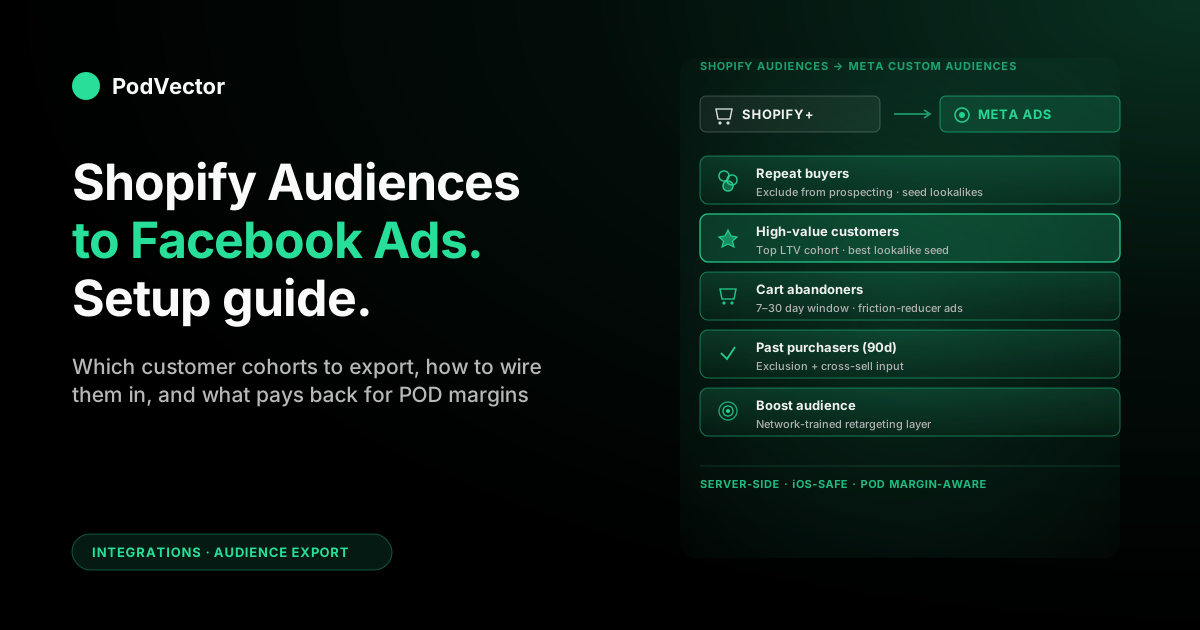
Quick Answer: Shopify Audiences is a Shopify Plus app that exports curated customer segments — cart abandoners, repeat buyers, high-value customers, lookalike seeds — straight into Meta Custom Audiences. It is a separate integration from the standard Facebook & Instagram channel.
Setup takes about 20 minutes: install the Audiences app, connect your Meta Business Account and Ad Account, accept Meta's Custom Audiences terms, then export the segments you want. Audiences refresh on a rolling schedule and show up in Ads Manager for targeting.
For POD sellers, the integration is straightforward. The harder part is figuring out which audience type actually drives profit per order — once Printify or Printful fulfillment, refunds, and ad spend are netted out — instead of just optimizing on Meta-reported ROAS.
What Shopify Audiences actually is
Shopify Audiences is a free app for Shopify Plus stores that turns your first-party customer data into ready-made audience lists, then exports those lists to ad platforms — primarily Meta, but also Google, TikTok, Snap, Pinterest, and Criteo.
It's not the same thing as the Facebook & Instagram by Meta sales channel. That one wires up the Pixel, CAPI, and product catalog. Shopify Audiences sits on top, exporting segmented customer data so you can target it (or build lookalikes from it) inside Ads Manager.
What gets exported
Shopify Audiences pushes hashed customer identifiers (email, phone, sometimes other PII) for cohorts you choose: cart abandoners, repeat buyers, high-LTV customers, recent purchasers, and a "Boost" audience trained across the Shopify network.
The data lands in Meta as a Custom Audience. From there you can target it directly, exclude it, or use it as the seed for a Lookalike Audience.
Why Shopify built this
iOS 14.5 broke a lot of Pixel-only audience-building. First-party customer data, hashed and shared via the privacy-compliant CRM-style match Meta supports, survives the iOS opt-out wall in a way browser-fired Pixel events don't.
For Plus merchants, it's the cleanest way to get high-quality customer cohorts into Meta without manually exporting CSVs every week.
Shopify Audiences vs Facebook Custom Audiences
Most guides on this topic blur the two together. They are different things, and the distinction matters for what you're actually setting up.
Facebook Custom Audiences (the Meta feature)
A Custom Audience is any audience you've defined inside Meta Ads Manager. Sources include: website visitors via the Pixel, customer file uploads (CSV), engagement on your Page or Instagram, app users, and offline events.
Custom Audiences exist on every Meta ad account, free, no extra app required. The Pixel-driven ones (website-visitor audiences, cart abandoners by Pixel event) get built automatically once your Facebook & Instagram channel is wired up.
Shopify Audiences (the Shopify Plus app)
Shopify Audiences is a delivery mechanism that creates Custom Audiences for you in Meta from your Shopify customer data, on a refresh schedule, without you uploading CSVs.
So technically: Shopify Audiences creates Facebook Custom Audiences. But it does so from server-side Shopify data — which is more accurate, more privacy-safe, and refreshed more often than what the browser Pixel can build.
Which one do you need?
Both, usually. The Pixel-built audiences (website visitors, viewers of specific products) are still useful for fresh top-of-funnel retargeting. Shopify Audiences gives you the durable, cleanly segmented customer cohorts (LTV tiers, repeat buyers, churned customers) the Pixel can't build.
If you're not on Shopify Plus, the Shopify Audiences app isn't available. You'd build the same audiences manually via CSV exports — slower, but doable.
Advantage+ Shopping Campaigns and Shopify Audiences
Meta's Advantage+ Shopping Campaigns (ASC) have become the dominant campaign structure for many Shopify merchants. Shopify Audiences complements ASC: you can supply your exported Custom Audiences as the "existing customer" segment inside ASC, which tells Meta's automation to separate prospecting from retention spend and respect your exclusions rather than blending them.
Why POD sellers should care
Print-on-demand is a margin business. The advantage of Shopify Audiences for POD specifically isn't the audience export itself — it's the targeting precision it unlocks for two repeat problems POD sellers have.
Catalog width fragments your retargeting
A typical POD store runs dozens to hundreds of SKUs across multiple blanks. Pixel-based retargeting often shows shoppers the exact product they viewed, but doesn't know the customer is more likely to convert on a different design from the same collection.
Shopify Audiences cohorts (e.g., "purchased a hoodie in the last 90 days") let you build cross-sell audiences Meta can't infer from the Pixel alone.
Refund tail is higher than DTC average
POD has higher returns because customers can't try the print before buying. Including known refunders in lookalike seeds quietly poisons your prospecting. Shopify Audiences lets you exclude refunders explicitly — Pixel-built audiences can't, because the Pixel never sees the refund.
Customer LTV varies more than ROAS suggests
A single low-AOV buyer and a customer with three orders look identical to Meta until you train it. Exporting an LTV-tiered audience (top 25%, top 10%) gives Meta a high-signal lookalike seed that respects margin reality, not just first-purchase revenue.
Prerequisites
Run through this list before you click anything. Missing a prerequisite is the most common reason the export connection fails silently.
Shopify Plus subscription
Shopify Audiences requires Plus. If you're on Basic, Shopify, or Advanced, the app won't install. The same audience logic is buildable manually via CSV exports — see the workaround note in the FAQs.
Meta Business Manager + Ad Account
You need full admin control of a Meta Business Account and an Ad Account inside it, both. A personal ad account won't accept the export. (For the Business Manager setup, see the complete guide to Meta Ads + Shopify integration for POD.)
Two-factor authentication on Facebook
Meta requires 2FA on the Facebook account exporting Custom Audiences. If you skipped this, the connection wizard will halt. Enable it under Facebook Settings → Security and Login.
Pixel and CAPI already wired up
Shopify Audiences is layered on top of the core integration, not a replacement for it. If you haven't installed the Facebook & Instagram channel yet, do that first. Walkthrough in the Shopify Facebook Ads integration setup guide.
Accepted Meta Custom Audiences terms
You'll need to accept Meta's Custom Audiences Terms of Service during the connection. Have admin rights so you can do that without bouncing approval to someone else.
The setup, step by step
Total time: about 15–25 minutes including DNS and approval waits. Meta's official walkthrough lives in the Shopify Help Center; this version is the POD-operator condensation.
Step 1 — Install Shopify Audiences
From Shopify admin: Apps → Shopify Audiences. If you don't see it, install from the Shopify App Store (free, Plus-gated).
The app lives separately from the Facebook & Instagram channel. Don't expect to find it inside that channel — it's its own surface.
Step 2 — Open the Meta tab and click Generate audiences
Inside the Audiences app, switch to the Meta tab. Click Generate audiences. Shopify will spend a few minutes profiling your customer data to build the available cohorts (cart abandoners, repeat buyers, etc.).
If your store is new and has fewer than roughly 1,000 customers, some audience types will be greyed out until you have enough volume.
Step 3 — Connect Meta
Click Connect. A Facebook login prompt appears. Sign in with the account that has admin access on your Business Manager and Ad Account.
Then search for and select the right Meta Business Account and Ad Account. If you have multiple, this is the step that gets misclicked most often — confirm you've picked the production Ad Account, not a sandbox or a client-of-client one.
Step 4 — Accept Meta's Custom Audiences terms
One-click acceptance. You'll only see this prompt the first time you export Custom Audiences from this Ad Account. If someone else accepted it previously, the screen skips.
Step 5 — Export your audiences
Pick the cohorts you want pushed. Click Export audiences. Each cohort lands in Meta as its own Custom Audience, named with a Shopify-prefix tag so you can identify them in Ads Manager.
First-time exports take 24–48 hours to fully populate inside Meta. Don't panic if the Custom Audience shows "Below 1,000" for the first day — Meta builds them in batches.
Step 6 — (Optional) Set up a Retargeting Boost ad set
Shopify Audiences offers a "Retargeting Boost" feature where you can preselect a Meta ad set during export. The boost audience is a Shopify-network-trained extension of your retargeting pool.
If you already have a working retargeting ad set, point Boost at it. If you don't, you can either create a new ad set inside the Audiences app flow or skip Boost for now and configure it later. (For ad-set strategy, see the Facebook retargeting ads for Shopify strategy for print-on-demand.)
Step 7 — Supply your audiences as the existing-customer segment in ASC (optional but recommended)
If you run Advantage+ Shopping Campaigns, go into your ASC campaign settings and set the exported Shopify Audiences Custom Audience (repeat buyers or high-value customers) as the existing customer audience definition. This separates your retention and prospecting budgets within ASC and prevents Meta from spending prospecting CPAs on people who already buy from you.
Audience types worth exporting
The Audiences app lists more cohorts than you should actually use. For POD specifically, here's the priority order.
Repeat buyers (highest priority)
Customers who bought twice or more. Use as: an exclusion from prospecting (don't pay to acquire someone you already have) and as a lookalike seed (the highest-LTV cohort you've got).
This is the single most valuable audience to export. POD margins are thin enough that paying prospecting CPA to serve ads to people who'd buy organically anyway is a steady leak.
High-value customers
Top spenders by lifetime spend or AOV. Same plays as repeat buyers — exclude from prospecting, seed for lookalikes — but with stronger margin signal because the LTV-weighted seed teaches Meta to find profitable buyers, not just any buyer.
Cart abandoners
People who added to cart but didn't check out, in the last 7–30 days. Run a dedicated retargeting ad set against this cohort with a friction-reducer message (free shipping nudge, a single-product reminder, a discount only if margin allows). Pair this with a CRO technique like a trust badge or social proof block on your product page to lift the post-click conversion rate at the same time.
Past purchasers (90-day)
Used as: an exclusion from prospecting for at least 60–90 days post-purchase, and as the input for cross-sell ad sets ("you bought a hoodie, here's a matching tote"). Raising your free-shipping threshold can also push cross-sell AOV higher — see the guide on increasing AOV for the mechanics.
Boost audience
Shopify-built, network-trained retargeting layer. It plugs into the Retargeting Boost ad set you set up in Step 6. Worth testing once your standard retargeting ad set has a stable performance baseline — comparing the two is the only way to know whether Boost adds incremental conversions or just cannibalizes.
Skip these (for now)
Niche cohorts like "first-purchase only" or "browsed but didn't add to cart" tend to be too small to drive meaningful spend on a POD store. They're useful at scale; they're noise at lower monthly ad budgets.
Post-export verification
Five minutes of checking before you start spending against the new audiences saves a lot of debugging later.
Audiences appear in Ads Manager
Open Meta Ads Manager → Audiences. Filter by source = "Customer list". You should see one entry per cohort you exported, named with a Shopify prefix. Status should be Ready within 24–48 hours.
Audience size matches Shopify customer counts
Meta will show a population estimate per audience. It will be smaller than your raw Shopify customer count for that cohort because not every customer email matches an active Meta account. That gap is normal; if it's very small (under roughly a third of your customer count), your hashed-email matching may be broken — usually a stale Shopify customer-data export.
Custom Audiences Terms acceptance is logged
If someone else on your team accepted the Custom Audiences terms previously, no action needed. If the export errored with a terms-acceptance message, sign in with an account that has admin rights and accept.
What to track once it's live
Connection is the easy part. The harder question is whether the new audiences are actually moving profit, not just impressions.
Profit per audience, not just ROAS
Meta will report ROAS by ad set. For POD, the same ROAS number is healthy on one product and bleeding on another because per-variant Printify or Printful fulfillment costs differ. The clean way to see what's working is to land Shopify orders, fulfillment costs, and Meta spend in one place — a live data warehouse — and compute contribution margin per audience.
That answers questions like: "What's my net profit per order on the high-value-customer lookalike vs the cart-abandoner retargeting audience?" — which Meta's UI alone never tells you. (For the deeper attribution view, see the complete guide to Meta Ads ROAS and attribution for POD.) You can also benchmark your settled performance against net profit margin benchmarks for POD to know whether what you're seeing is normal or a signal to act.
Checkout completion rate by audience
Cart-abandoner audiences are only as good as the post-click experience. If your store's checkout completion rate is below category norms, the retargeting spend is leaking on the landing side, not the targeting side. Check your rate against ecommerce checkout completion benchmarks before blaming the audience.
Refund-adjusted performance
POD refund tails run weeks behind the conversion. A new audience's first-week ROAS will look better than the eventual settled number. Always read campaign performance against a 30-day window once refunds are reconciled.
Lookalike decay
Lookalikes built from a Shopify Audiences seed degrade over time as your customer base shifts. Re-export the seed monthly so the lookalike refreshes against current best-buyer profiles.
Audience overlap
Inside Ads Manager, run the audience overlap report on your new Custom Audiences. If two cohorts overlap heavily (e.g., repeat buyers and high-value customers usually do), you'll spend twice on the same people unless you configure exclusions in the ad set targeting.
Common mistakes
Treating Shopify Audiences as a prospecting tool
It isn't. The exported audiences are warm — your existing customers and their lookalikes. Use them for retargeting, exclusion, and lookalike seeds. For pure cold prospecting, Meta's interest-based and Advantage+ targeting still wins.
Skipping the exclusion step
Exporting the audiences but not excluding repeat buyers and recent purchasers from your prospecting campaigns is the single biggest waste. You'll pay full prospecting CPA to serve ads to people who'd buy organically anyway.
Building lookalikes from the wrong seed
A lookalike of "all customers" teaches Meta to find any buyer, including the bottom-margin ones. Use high-value-customer or repeat-buyer cohorts as lookalike seeds instead — Meta will optimize toward profitable lookalikes.
Not refreshing the export
Shopify Audiences refreshes the underlying data on a rolling schedule, but only for cohorts you've exported. If your customer base shifts seasonally and you haven't re-checked the active export list, you'll be retargeting cohorts that no longer reflect reality.
Forgetting Boost is opt-in
Retargeting Boost doesn't activate just because you connected Meta. You have to attach it to a specific ad set during or after export. Check the Audiences app's status panel monthly to confirm Boost is still pointed at a live ad set.
Ignoring email re-engagement alongside Meta retargeting
Cart abandoners who opted into email can be reached via Klaviyo as well as Meta retargeting — often at lower cost. A Klaviyo browse abandonment flow running in parallel with your Meta cart-abandoner audience can recover orders Meta never converts, and it doesn't require a Plus subscription to set up.
POD-specific gotchas
Refunders pollute lookalike seeds
If a customer ordered, refunded, and you didn't filter them out of the high-value-customer cohort, Meta is being told "find more people like this profitable buyer" — except they weren't profitable. Build a Shopify customer segment that excludes refunders, then export that as your lookalike seed.
Wide catalog blurs cross-sell signal
"Purchased a hoodie" is useful. "Purchased anything" is too broad — a mug buyer and a hoodie buyer have different next-best products. Build narrower cohorts inside Shopify (by product collection or tag) before exporting, when the segmentation matters.
Variant-level fulfillment cost disappears
Shopify Audiences exports customers, not orders. The cohort tells Meta who to retarget but doesn't carry which variant they bought. To know whether a campaign is paying off on specific variants, you need order-line-level data outside Meta — which is the gap a unified data warehouse fills. (For the broader campaign-strategy view, see the complete Meta Ads playbook for print-on-demand sellers and the Meta Ads for POD topic hub.)
Embroidery and premium blanks skew your LTV cohorts
If your store mixes standard DTG products with premium items like embroidered hoodies, the LTV-tiered cohorts can look distorted — a single embroidery order inflates a buyer's lifetime value without indicating genuine loyalty. Segment by product type before building your high-value seed if your catalog has a wide price spread. For cost context on embroidery specifically, see the Printful embroidery pricing breakdown.
Boost incremental lift is hard to measure
Retargeting Boost's whole pitch is incremental conversions. The only honest way to test it is a holdout: run two equivalent retargeting ad sets, one with Boost, one without, and compare net-of-fulfillment profit per user reached over four weeks. Meta's in-platform attribution will overstate Boost's contribution every time.
FAQs
Do I need Shopify Plus to use Shopify Audiences?
Yes. The Shopify Audiences app is gated to Plus. If you're on Basic, Shopify, or Advanced, you can build similar audiences manually by exporting customer segments as CSV from Shopify, hashing emails, and uploading to Meta as a Custom Audience. It's the same end result, just manual.
How is this different from the Facebook & Instagram by Meta sales channel?
The Facebook & Instagram channel installs the Pixel, CAPI, and product catalog — the core ad infrastructure. Shopify Audiences is a separate app that pushes server-side customer cohorts (repeat buyers, high-value customers, etc.) into Meta as Custom Audiences. You need both.
How long does it take for audiences to populate in Meta after export?
24–48 hours for the initial population. Meta processes the customer file in batches and only shows the final size once the match is complete. If it's still showing "Below 1,000" after 72 hours, something failed — recheck the connection.
Can I use Shopify Audiences as a lookalike seed?
Yes, and you should. Build a Lookalike Audience inside Meta Ads Manager using one of the exported Shopify Custom Audiences (high-value customers or repeat buyers are the best seeds) as the source. A 1–3% lookalike gives Meta a high-signal prospecting pool.
Does Shopify Audiences work with iOS opt-out customers?
Better than Pixel-built audiences do. Because the data is server-side, hashed, and matched against Meta's customer file (not browser cookies), it's largely unaffected by ATT opt-outs. That's the main durability case for using it instead of relying solely on Pixel-built audiences.
Will exporting customer data to Meta create a privacy issue?
The export uses hashed identifiers (email, phone) and runs under Meta's Custom Audiences Terms, which are designed to be GDPR/CCPA-compatible when deployed correctly. That said, your privacy policy should explicitly mention you share hashed customer data with ad platforms for marketing purposes. Have your legal team review before launching if you operate under strict regulatory regimes.
How often do the exported audiences refresh?
Shopify Audiences refreshes the underlying cohorts on a rolling schedule (typically every 1–7 days depending on cohort). Meta then re-syncs the Custom Audience automatically. You don't need to re-export manually unless you're adding a new audience type.
Can I export the same audiences to Google Ads and TikTok too?
Yes. The Shopify Audiences app supports multiple ad platforms — Meta, Google, TikTok, Snap, Pinterest, Criteo. Each gets its own connection and its own export, but the underlying cohorts are shared.
Does Shopify Audiences replace the need for a customer file CSV upload?
For the cohorts it supports, yes. The export is server-to-server and refreshed on a schedule, which is materially better than uploading a stale CSV every few weeks. For one-off custom segments not in the standard cohort list, you might still build a Shopify customer segment, export the CSV, and upload manually.
What's the most common reason exported audiences look smaller than expected?
Email match rates. Meta can only build the Custom Audience from emails that match active Meta accounts. POD stores often see partial match rates because some customers used disposable or work emails Meta can't tie to a profile. A very low match rate is a red flag — recheck that the right Shopify customer data is actually flowing into the cohort.
How does Shopify Audiences interact with Advantage+ Shopping Campaigns?
ASC has a built-in existing-customer audience field. Plug in your exported Shopify Audiences Custom Audience (repeat buyers or high-value customers) there so Meta knows who to treat as a retention target vs a prospecting target. Without it, ASC's automation blends the two and you lose visibility into where each dollar is going.
Audiences are exported. Which one is making you money?
Shopify Audiences gets the right customer cohorts into Meta. The harder question — "is the high-value-customer lookalike actually netting more profit per order than the cart-abandoner retargeting set, after Printify or Printful fulfillment, refunds, and ad spend?" — is the one that decides whether you scale or stall.
Victor is an AI employee built for POD sellers. Connect your Shopify, Printify or Printful, and Meta Ads accounts, and ask in plain English: "Which Meta audience is most profitable per order on the spring tee campaign?" or "Are my Shopify Audiences lookalikes paying back after refunds?" Victor reads your live data across Shopify, Meta Ads, Printify, and Printful, surfaces the answer, and — when there's an action to take on the Shopify side — proposes it as an approval card you accept or reject. No autonomous moves, no spreadsheets, no SQL.
.
Try Victor free