
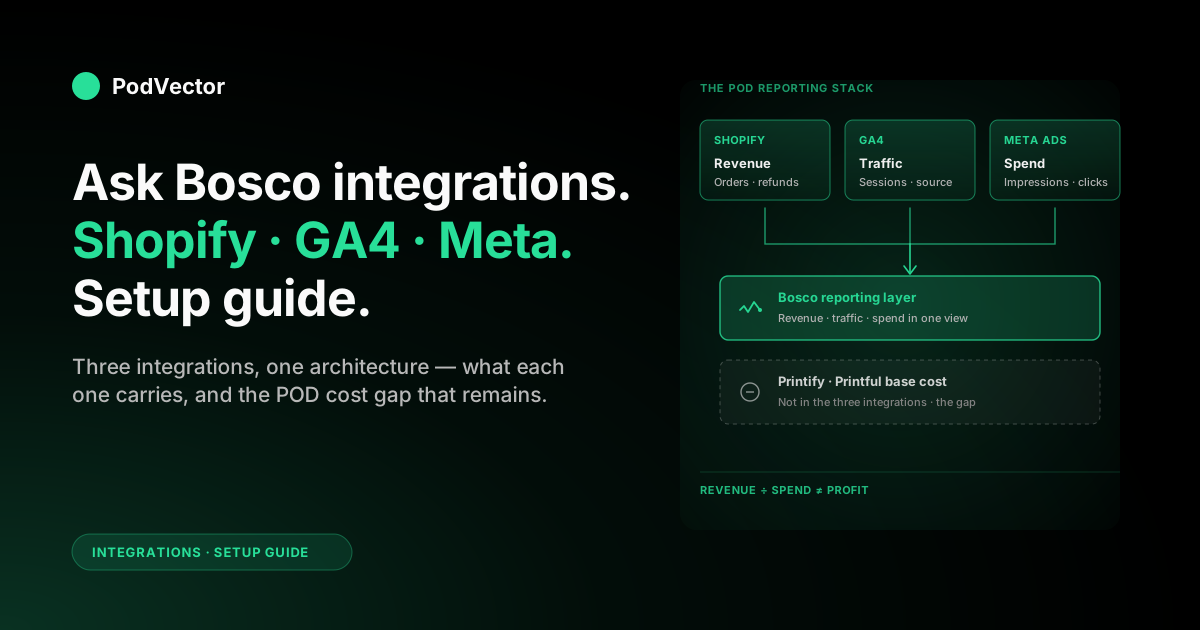
Quick Answer: Ask Bosco supports three integrations that matter most for a print-on-demand reporting stack: Shopify (for revenue), GA4 (for traffic), and Meta Ads (for spend). Each is a separate OAuth hookup inside Bosco's data sources page.
Together they answer a focused question: did the money you spent on Meta show up as Shopify revenue? They do not answer the question every POD operator actually needs answered: did it show up as profit after Printify or Printful base costs, refunds, and Shopify fees.
This guide covers what each integration carries, how to wire them up cleanly, and where the reporting picture still has gaps you'll need to close another way.
Why these three integrations, not Bosco's full catalogue
Ask Bosco supports a long list of integrations — Google Ads, Microsoft Ads, TikTok, Klaviyo, Amazon Ads, Pinterest, more. For most POD operators, three of those carry roughly 90% of the reporting value: Shopify, GA4, and Meta Ads.
The reason is simple. POD profit hinges on three numbers: what came in, where it came from, and what you paid to get it. Shopify owns the first. GA4 owns the second. Meta Ads owns the third (for stores where Meta is the dominant paid channel, which is most of them).
Wire those three in, and you have the skeleton of a real reporting stack. Add the others later if and when a specific channel or workflow makes them worth the click. (For the broader Meta Ads + Shopify integration landscape, see our Meta Ads integrations hub and the Meta Ads for POD topic hub.)
What each integration actually carries
Before you start clicking Connect, it helps to know what each integration is going to put on your dashboard — and just as importantly, what it isn't.
Shopify integration: the revenue source of truth
The Shopify integration pulls orders, products, customers, and refund data via Shopify's Admin API. Read-only. It's the number every other source gets compared against.
For POD specifically, this is also where your variant catalogue lives. A "Spring Tee" can be 20 SKUs (5 sizes × 4 colours), and how Bosco rolls those up by default decides whether your reports show product-level performance or variant-level signal.
GA4 integration: the traffic and behaviour layer
The GA4 integration pulls sessions, source/medium, on-site events, and GA4-modelled conversions. It tells you how shoppers found you and what they did before checkout — not how much money you actually made.
Treat GA4 as context. Trust Shopify for revenue numbers, GA4 for the journey leading up to it. Confusing the two is the single biggest reason ecommerce dashboards stop being trusted.
Meta Ads integration: spend, plus Meta's view of conversions
The Meta Ads integration pulls spend, impressions, clicks, and Meta-attributed conversions from your Business Manager Ad Account. Spend is reliable to the cent. Conversions are Meta's self-reporting and will routinely disagree with Shopify by 10–40%.
That gap isn't a bug. It's a structural feature of post-iOS 14 attribution, and it's the reason you can't just trust Meta's in-platform ROAS for a POD store. Our Meta Ads ROAS and attribution guide walks the mechanics in detail.
Prep before you open the integrations page
Five things to have lined up. Skip any one and a 30-minute setup turns into a permissions chase.
An Ask Bosco plan that includes all three integrations
Trial accounts can usually attach one or two sources. Full multi-source reporting sits on paid tiers. Confirm your plan covers Shopify, GA4, and Meta Ads before you start — you can find the breakdown on Bosco's pricing page.
Shopify owner-level access
The Shopify OAuth flow asks for orders, products, customers, and reports scopes. A staff account with limited permissions can't approve those. Log in as the store owner for the install, then revoke later if your security model requires it.
A Google account with Editor on the GA4 property
Viewer access can read most reports but won't grant Bosco the Google Analytics Data API subscription it needs. Editor or higher is the floor. If you're not sure, check under Admin → Property Access Management in GA4.
Meta Business Manager admin on the Ad Account
Bosco connects to the Ad Account, not the Page. You need to be an admin on the Business Manager that owns the Ad Account, with permission to grant a third-party app data access. Personal-account ad setups won't work cleanly.
Time-zone alignment across all three
Confirm Shopify, GA4, and Meta Ads are all set to the same time zone. If Shopify is on London time and Meta is on Pacific, every "yesterday's revenue vs spend" comparison Bosco produces will be off by hours. Fix this in each platform first; Bosco can't normalise mismatched zones for you.
Wire up Shopify
Shopify first. Revenue is the anchor every other number in Bosco gets compared to, so getting it in cleanly avoids a lot of "why don't my numbers match" debugging later.
Open the integrations page
From your Bosco dashboard, navigate to Settings → Integrations (the wording varies — older UIs show "Connectors" or "Data Sources"). Find the Shopify tile and click Connect.
Enter the myshopify URL, not the custom domain
Bosco asks for yourstore.myshopify.com. The custom domain you sell on isn't what Shopify's OAuth flow expects. You can find the myshopify URL under Shopify Settings → Domains.
Approve the install on Shopify
Shopify's permission screen lists the scopes Bosco wants — orders, products, customers, reports. Approve. Bosco gets read-only API access; it cannot edit your store, modify orders, or write to the catalogue.
The Shopify tile in Bosco should flip from "Disconnected" to "Connecting…" to "Connected". First sync usually takes 5–20 minutes depending on order history depth.
Pick the historical backfill window
Most plans let you backfill 12–24 months. Default to the maximum your plan supports. Year-over-year comparisons need historical data, and you only get one clean shot at the backfill.
If your store predates the backfill window, Bosco pulls what it can. The earliest months may show partial data; that's a Shopify API limit, not a Bosco issue.
If your Shopify-to-Meta wiring isn't yet in place upstream, sort that first. Our connect Shopify to Meta Ads setup guide walks the four pieces — Pixel, Conversions API, catalogue, Page — and the order to wire them in.
Wire up GA4
GA4 next. The role is context, not revenue truth — where traffic came from, what shoppers did before checkout.
Click Connect on the GA4 tile
Same integrations page. Find the Google Analytics 4 (or "GA4") tile, click Connect.
Authorise the right Google account
Google's OAuth flow opens. Sign in with the Google account that has Editor access on your GA4 property. Watch the account picker carefully if you have multiple Google accounts in the browser — authorising the wrong account is the most common cause of "GA4 not pulling data" tickets a week later.
Pick the GA4 property, not Universal Analytics
You'll see every property your Google account can read. Pick the one that matches your live Shopify store. If you migrated from Universal Analytics in 2023 and never archived the old property, both still show — pick the GA4 one (the property ID starts with a number, not "UA-").
Pick the right data stream
Most Shopify setups have a single web data stream. If you use Shopify's Google & YouTube channel for GA4, the stream is named after your shop URL by default. If you wired GA4 manually via Tag Manager, the stream may be custom-named — pick the one tagged on your live storefront.
Check that Key Events are set
Bosco pulls every event GA4 records, but for sensible reports you want purchase, add_to_cart, and begin_checkout marked as Key Events on the GA4 side. Bosco can't create Key Events on your behalf — that's set under Admin → Events in GA4.
If Pixel and Conversions API are firing cleanly into Meta, GA4 is a complement, not a replacement. The Meta Pixel for Shopify setup guide covers the server-side stream that survives iOS attribution loss — GA4 doesn't replicate it.
For the source/medium parameters that decide whether Meta traffic actually appears under Paid Social in your reports, Ask Bosco's own write-up on getting GA and GA4 tracking right for Facebook (Meta) is the cleanest reference.
Wire up Meta Ads
Spend last. Now Bosco can place spend next to the revenue Shopify reports — the comparison every Meta Ads dashboard ultimately exists to answer.
Click Connect on the Meta Ads tile
Integrations page → Meta Ads (sometimes still labelled "Facebook Ads" in older UIs — same integration). Click Connect.
Sign in to Facebook with a Business Manager admin account
You're authorising a third-party app against the Ad Account. Use the Facebook account that's an admin on the Business Manager that owns your Ad Account. A personal account with only Page admin rights will see no Ad Accounts at all in the picker.
Approve the Business and Ad Account scope
Meta's permission flow asks which Business Manager and which Ad Accounts Bosco can read. Pick the Business Manager and check only the Ad Account that runs your Shopify store's spend. Granting access to all your Ad Accounts is fine if you only run one — sloppy if you manage multiple.
Pick the Ad Account inside Bosco
Back in Bosco, pick the specific Ad Account whose data this Bosco workspace should pull. One workspace, one Ad Account is the cleanest setup for a single POD store.
Set the attribution window
Bosco asks which Meta attribution window to apply to incoming conversion data — typically 7-day click + 1-day view. Match it to whatever your Ad Account is set to inside Meta. Mismatched windows are the most common reason Bosco's reported ROAS differs from Ads Manager's.
Sanity-check the data after the first sync
Three integrations authorised doesn't mean three integrations syncing cleanly. Verify before you trust any number on the dashboard.
The 24-hour smoke test
Wait 24 hours after the third integration finishes its initial sync, then run this checklist on Bosco's overview dashboard:
- Shopify revenue for yesterday should match the Shopify Reports → Sales figure to the dollar.
- GA4 sessions for yesterday should match GA4's own Realtime/Acquisition reports within ±2% (sampling and time-zone rounding cause small drift).
- Meta Ads spend for yesterday should match Ads Manager's spend to the cent.
- Meta-attributed conversions will not match Shopify orders. Expect a 10–40% gap. That's iOS attribution loss, not an integration bug.
If any of the first three are off by more than the tolerance above, the integration didn't authorise cleanly. Disconnect, reconnect, and read the OAuth screens for warnings.
The directional check: did spend produce revenue?
Once data is flowing, the most useful single visualisation is plotting daily Meta spend against daily Shopify revenue for the same date range. If you can see your campaign launches in the Shopify revenue line, attribution is at least directionally working. If revenue stays flat while spend climbs, you have a problem — and that problem isn't a Bosco integration issue.
Where the three-integration picture falls short for POD
Bosco's three-integration picture is a real upgrade over reading Shopify, GA4, and Ads Manager in three browser tabs. It's also incomplete in three specific ways every POD operation eventually hits.
Gap 1: variant performance is hidden by default
Shopify orders roll up to the parent product in Bosco's default reports. That hides which variant — say, the navy XL of your "Spring Tee" — is the one actually moving in your Meta campaigns. The variant data is in there; the default views just don't show it.
Workaround: drill into variant-level data manually in Bosco's product report when investigating a specific campaign. Treat parent-product reports as a starting point, not the answer.
Gap 2: refund timing distorts campaign-level ROAS
POD refunds and replacements often hit days or weeks after the original sale (printing defect, sizing return, supplier reship). Shopify reports the refund on the day it's processed, not the day of the original order. Bosco pulls Shopify's numbers as-is, so a campaign's "real" ROAS keeps drifting downward for weeks after launch.
Workaround: judge campaign performance on rolling 14-day or 28-day windows, not single days. The shorter the window, the noisier the signal — and a refund processed three weeks late will silently change yesterday's number.
Gap 3: fulfilment cost is not in the picture at all
This is the big one. Shopify, GA4, and Meta Ads — the three Bosco integrations a POD operator cares most about — none of them carry your Printify or Printful base cost.
Bosco's "ROAS" is therefore revenue ÷ spend, not profit ÷ spend. For a typical POD margin of 20–35%, a 3.0 ROAS that looks profitable can be break-even or underwater once Printify costs and Shopify processing fees are netted out.
This isn't a Bosco-specific limitation. It's the gap every POD analytics setup eventually hits. Closing it requires either a manual COGS spreadsheet that backs out an average percentage from each campaign's revenue, or a data layer that joins Printify and Printful order-line costs to Shopify orders directly.
Beyond Bosco — what a POD-native data layer adds
Bosco does what marketing reporting tools generally do well: it consolidates platform-reported numbers into one dashboard. That's a clear upgrade over tab-hopping. It's also the same job Whatagraph, Improvado, Polymer, NinjaCat, and a dozen others target.
The next layer up — and where POD-specific data work starts paying off — is a unified data warehouse that doesn't just pull platform numbers but joins them to your supplier costs at the order-line level. Snowflake, BigQuery, Redshift, Databricks, or any equivalent will do the heavy lifting; the work is the modelling on top.
The shape of that modelling: every Shopify order-line gets joined to its corresponding Printify or Printful fulfilment-cost line. Every Meta campaign's spend gets attributed to the orders it can credibly claim, with refund deltas applied. The dashboard you end up with shows campaign-level profit, not platform-level revenue.
That's the question Bosco's three integrations don't answer — and the question every POD seller eventually starts asking.
FAQs
What's the difference between Ask Bosco's "connectors" and "integrations"?
None. Bosco's UI uses the terms interchangeably depending on which page you're on (the data sources page tends to say "Integrations", while the public marketing site has historically used "Connectors"). Either way they refer to the same OAuth-style hookups to your data sources.
Can I add Printify or Printful through Bosco's integrations?
Not with the standard Shopify, GA4, and Meta Ads integrations covered here. Bosco may offer Printify-specific options on higher tiers — check current availability with their team — but the three integrations most POD operators wire up first do not pull supplier-level cost data.
How long does the initial sync take?
Shopify is typically 5–20 minutes for the historical backfill. GA4 and Meta Ads usually take 1–6 hours for 12 months of history. Plan for next-business-day before you trust full historical reports.
What's the most common reason an integration silently breaks weeks later?
Token expiry. OAuth tokens expire when admin passwords change or admin accounts get removed from a Business Manager. Bosco usually surfaces this on the dashboard as a "reconnect" prompt — but if you ignore it for weeks, gaps in the timeline can't be backfilled cleanly. Reconnect within a day of any prompt.
Why is my Bosco-reported Meta ROAS lower than what I see in Ads Manager?
Three usual suspects: (1) attribution window mismatch — Bosco might be on 7-day click while Ads Manager defaults to 7-day click + 1-day view; (2) currency-conversion timing if your Ad Account currency differs from Shopify's; (3) time-zone offset if Meta is on Pacific while Shopify is on your local zone. Audit those three and the gap usually closes.
Does GA4's modelled data show up in Bosco?
Yes. Bosco pulls whatever GA4 reports via the Data API, including modelled conversions. GA4's behavioural-modelling adjustments are inside Bosco's numbers by design. If you want unmodelled raw events, you'd need a custom data layer fed from GA4's BigQuery export — Bosco doesn't ingest that by default.
What if I run multiple Shopify stores?
Each store needs its own Shopify integration instance. Most Bosco plans allow multiple Shopify stores per workspace, but check the per-source limit on your plan. Same applies to multiple Ad Accounts — one integration per Ad Account.
Does the integration flow differ for Shopify Plus vs standard Shopify?
The OAuth flow is identical. Shopify Plus stores can have more granular custom roles, so if your admin uses a custom role rather than full owner access, double-check it has the orders, products, customers, and reports read scopes that the Bosco install screen requests.
Three integrations, one missing answer.
Wiring Shopify, GA4, and Meta Ads into Bosco is the right starting move. It still won't tell you which Meta campaigns made or lost money once Printify base costs, Shopify processing fees, and refund timing are accounted for — because none of those numbers live in any of those three sources.
Victor is an AI employee built for POD operators. Connect Shopify, Printify or Printful, and Meta Ads, then ask in plain English: "Which Meta campaigns made me money on Printify orders last week, after fulfilment and refunds?" Live data warehouse. Plain-English answers. SQL and charts on demand.
No spreadsheets. No tab-hopping.
Try Victor free