
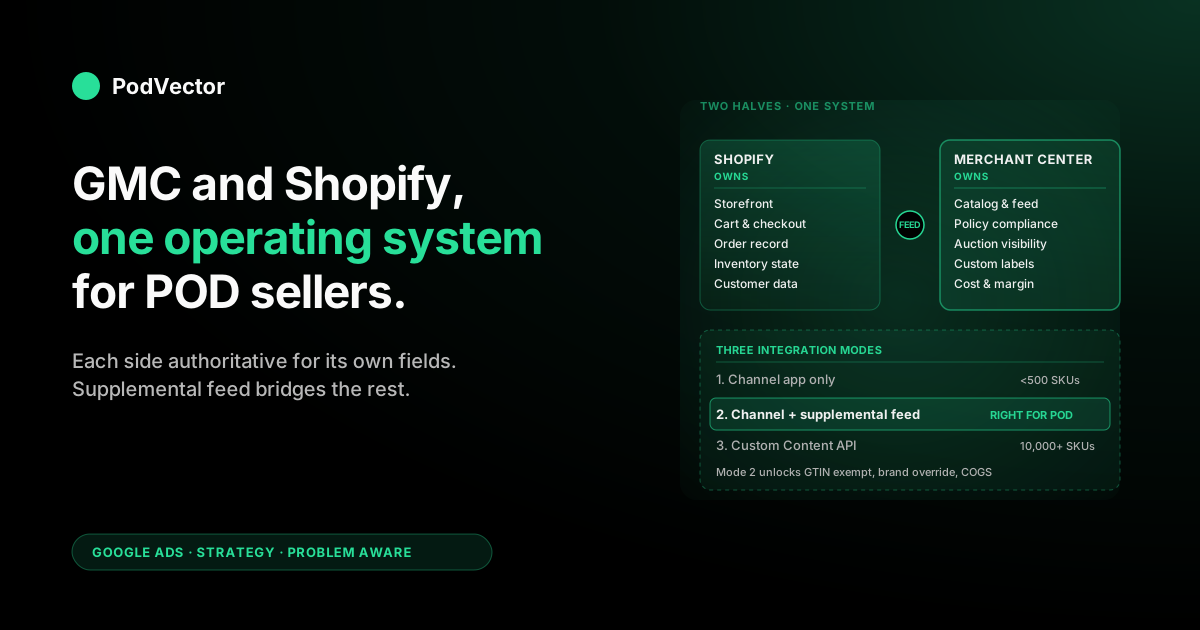
Quick Answer: Google Merchant Center and Shopify are not two products that sync — they're two halves of one operating system, and the strategy decision for a print-on-demand store is which half owns which piece of data. Shopify owns the storefront, the order, the fulfillment trigger, and the customer record.
Merchant Center owns the catalog representation Google's auction sees, the policy compliance state, and the attribution back to ad spend. The Google & YouTube channel app is one integration mode (the simplest, most fragile); a Shopify-primary-feed-plus-supplemental-feed split is a second mode (more resilient, requires a Google Sheet); a fully custom Content API push is a third (most control, most engineering). For most POD sellers running 1,000–10,000 variants across Printify and Printful, the right answer is mode two: the channel app handles connection plumbing, a supplemental feed handles every POD-specific attribute the channel app can't, and the seller treats Shopify and Merchant Center as one configurable surface where each side has explicit ownership of the fields it's authoritative for.
Why GMC and Shopify are one system, not two integrations
Most POD sellers approach Google Merchant Center and Shopify the way they'd approach any other two SaaS products: install an integration, watch data flow from one to the other, and hope the connector handles the edge cases. That mental model is wrong, and it produces a predictable failure pattern — the channel installs, the feed syncs, the campaigns launch, and three weeks later 40% of the catalog is disapproved for reasons the Shopify admin can't see and the Google Ads dashboard doesn't surface.
The accurate mental model: Shopify and Merchant Center are two halves of one operating system. Shopify owns the storefront layer — the URL the customer lands on, the cart they fill, the checkout that fires the conversion pixel, the order record that triggers Printify's fulfillment webhook.
Merchant Center owns the discovery layer — the catalog representation Google's Shopping auction sees, the policy compliance state every product is evaluated against, the attribute completeness that determines whether a product can show on free listings, paid Shopping, Performance Max asset groups, or none of them. Neither half works without the other.
A perfect Shopify storefront with a broken Merchant Center catalog gets zero Google traffic. A perfectly compliant Merchant Center catalog with a broken Shopify checkout gets clicks that don't convert.
For a POD seller, the practical implication is that the integration setup decisions — which connector to use, which fields go where, what the supplemental feed should contain — are operating-system architecture decisions, not connector configuration. They determine what's possible 90 days into Shopping spend, not just what shows up in the feed tomorrow.
Three integration modes and which one fits POD
There are three ways to connect Shopify product data to Merchant Center. Each one is a different point on the control-vs-effort curve, and POD operations sit at different points depending on catalog size and team composition.
| Mode | What it is | POD fit |
|---|---|---|
| 1. Google & YouTube channel only | The first-party Shopify app from Google. Auto-syncs Shopify products into a Content API primary feed. | Catalogs under 500 SKUs, single niche, no apparel-specific attribute requirements. |
| 2. Channel app + supplemental feed | Channel app for the primary feed, plus a Google Sheet supplemental feed that overrides or adds attributes the channel app leaves empty. | Catalogs of 500–10,000 variants. Most apparel/accessory POD operations live here. |
| 3. Custom Content API push | The seller builds their own integration that writes directly to the Content API. No channel app involvement. | Catalogs over 10,000 SKUs, multi-storefront operations, or sellers who need real-time inventory pushes that exceed the channel app's sync frequency. |
Mode 1 is what 80% of new Shopify POD stores deploy because it's the path of least resistance — install the app, accept the permissions, watch the feed populate. It's also where most stores plateau, because the channel app's defaults skip the apparel-specific attributes Merchant Center requires for Shopping eligibility on apparel verticals (covered in the Shopify and Google Merchant Center strategy guide).
Mode 2 is the right answer for almost every POD seller running apparel through Printify or Printful. The channel app handles the parts of the integration that are tedious and well-solved (OAuth connection, domain verification, Content API authentication, daily product sync).
The supplemental feed handles the parts the channel app can't (GTIN exemption, brand override, age_group, gender, custom labels, cost of goods sold). The seller maintains a single Google Sheet that's regenerated nightly from their product database, and Merchant Center fetches it on schedule.
Mode 3 only makes sense at scale or for engineering-heavy POD operations. The control is real — direct Content API writes let you push inventory updates within minutes rather than hours, support arbitrary custom logic, and remove the channel app as a dependency entirely. The cost is also real — you're now maintaining a Google API integration, handling token refresh, monitoring sync failures, and rebuilding the diagnostic surface the channel app provides for free.
The strategic decision for a POD seller is rarely "which mode is best" in the abstract; it's "which mode are we ready to maintain six months from now without it breaking silently." Mode 2 hits the right balance for the long tail of POD operations because the supplemental feed is just a Google Sheet — if the integration breaks, the seller can read the sheet by hand and fix the row.
Data ownership: which system is authoritative for which field
The clearest way to think about Shopify and Merchant Center together is to assign each field a single authoritative owner. When two systems both think they own the same field, you get sync conflicts that show up as Merchant Center disapprovals at the worst possible moment (usually the day before a Q4 promotion launch). When ownership is explicit, the disapproval pattern stays in known categories the seller can fix.
| Field | Authoritative owner | Why |
|---|---|---|
| Product title | Shopify | The customer sees this on the storefront. The supplemental feed can rewrite it for Merchant Center if Shopping copy needs different framing, but the source of truth is the storefront. |
| Description | Shopify | Same logic as title. Supplemental feed rewrite is acceptable when the storefront description is too long or markdown-heavy for Shopping snippets. |
| Price | Shopify | Shopify's price is what the customer is charged at checkout. Any divergence between Shopify and Merchant Center triggers an immediate disapproval. |
| Availability | Shopify | Shopify is where inventory state lives (or, for POD, where availability is hardcoded to "in stock" because suppliers print on demand). |
| Image | Shopify | The same image renders on both surfaces. Merchant Center will reject <800x800; ensure Shopify product images meet that threshold before relying on the channel sync. |
| GTIN / identifier_exists | Supplemental feed | POD products have no UPC. Shopify has no native field for "GTIN exempt." The supplemental feed is the only clean place to set identifier_exists: false globally. |
| Brand | Supplemental feed | Shopify's vendor field defaults to the supplier (Printify, Printful) which Google rejects. Override with the storefront brand via supplemental feed. |
| age_group, gender, size, color | Supplemental feed | Required for apparel. Shopify's variant options can sometimes carry size/color, but age_group and gender almost never come through cleanly from the channel app. |
| Custom labels (0–4) | Supplemental feed | The labels exist for the seller to define. Margin tier, supplier, design category, seasonality, fulfillment region — none of these belong in Shopify's data model. |
| cost_of_goods_sold | Supplemental feed | The Printify or Printful unit cost. Pushing this into Merchant Center unlocks the margin reports that make Shopping spend governable. |
| Shipping override | Merchant Center settings | Configured directly in Merchant Center because Shopify's "calculated at checkout" doesn't translate. See the shipping section below. |
The rule that comes out of this table: Shopify owns everything the customer sees and transacts on; the supplemental feed owns everything Merchant Center needs that Shopify wasn't built to express. Once that division is explicit in writing, the integration stops feeling fragile and starts feeling like a documented architecture.
The Google & YouTube channel: install in 30 minutes
The channel app installation is the same regardless of which integration mode you ultimately deploy — even if you plan to add a supplemental feed or move to a custom Content API push later, the channel app is the cleanest way to handle connection plumbing on day one.
- Open Shopify admin → Sales channels → green "+" → search "Google & YouTube" → Add channel. The app is first-party (built by Google, distributed by Shopify), free, and the only Shopify-supported path Google currently endorses.
- Sign in with the Google account that owns the Merchant Center account. If you don't have a Merchant Center account yet, the channel app will create one in the same flow. If you have an existing one, choose "link existing" and accept the verification email.
- Verify the domain. Domain verification happens automatically through Shopify's hosted record if you're on a Shopify-managed domain. Custom domains may need a TXT record added to DNS — Shopify provides the exact value to paste.
- Configure shipping. Choose between "use Shopify shipping rates" (works only if you have flat rates configured) or "configure separately in Merchant Center" (the right choice for most POD operations — see the shipping section).
- Wait for the first sync. Initial sync runs 1–24 hours depending on catalog size. POD stores with under 500 variants typically complete in under two hours; stores with 5,000+ variants can take a full day.
- Review the diagnostics tab. The first sync will surface every product that's missing required attributes. Don't fix them one-by-one in Shopify — that's where the supplemental feed earns its keep.
For step-by-step screenshots, the how to connect Shopify to Google Merchant Center step-by-step guide covers each click in order. The integration's failure modes — what happens when domain verification stalls, when the OAuth permission scopes expire, when the channel app loses sync — are covered in the Shopify Google Merchant Center strategy article.
POD-specific attributes the channel app leaves empty
The channel app maps Shopify's native fields to Merchant Center's required attributes for the categories Shopify was designed around — physical products, electronics, food, books. For apparel and home goods, which is what 90% of POD catalogs sell, the mapping leaves seven to ten attributes empty per product. The Merchant Center diagnostics tab will flag every one of them within 24 hours of the first sync.
| Attribute | Why it's empty | How to fill it |
|---|---|---|
gtin | POD products have no UPC because they're produced on demand | Set identifier_exists: false globally via supplemental feed |
brand | Shopify's vendor field often defaults to "Printify" or "Printful" | Override with storefront brand via supplemental feed |
age_group | No native Shopify field maps to it | Default to adult via supplemental feed; override per-product for kids/infant designs |
gender | No native Shopify field maps to it | Default to unisex via supplemental feed; override per-product for explicitly gendered designs |
size | Sometimes maps from Shopify variant options, sometimes doesn't | Verify in Merchant Center diagnostics; supplement where missing |
color | Same intermittent mapping as size | Same approach — verify, supplement |
material | Lives in Printify/Printful product data, not Shopify | Pull from supplier API into supplemental feed |
google_product_category | Channel app guesses, often wrong | Set explicitly via supplemental feed (e.g., 1604 for Apparel & Accessories > Clothing > Shirts & Tops) |
cost_of_goods_sold | Shopify has no native field for this | Pull supplier cost into supplemental feed; unlocks margin reporting |
The supplemental feed approach reduces this from a 4,000-row product-by-product fix to a single row of global defaults plus per-product overrides for the small subset that genuinely differ. A POD operation maintaining a 4,000-variant catalog can keep all nine attributes correct with about 50 rows of supplemental feed overrides plus one row of defaults.
Shipping: the one place Shopify and GMC fight
Shipping is the integration's most common failure surface for POD because Shopify's checkout shipping logic and Merchant Center's required shipping attribute are structured differently. Shopify lets you set "calculated at checkout," which defers the rate until cart-stage, integrating with Printify or Printful's shipping APIs. Merchant Center treats "calculated at checkout" as missing data — it needs a concrete shipping cost to show on the Shopping listing before the customer ever clicks.
The reconciliation pattern that works for POD operations:
- Configure shipping directly in Merchant Center, not in Shopify. Open Merchant Center → Settings → Shipping & returns → Add shipping service. Set flat rates that approximate Printify or Printful's typical domestic and international rates ($5.50 domestic apparel, $8.00 oversized, $12.00 international as of 2026; verify against your supplier's current published rates).
- Set the Shopify shipping configuration to its actual production state. Don't try to mirror the Merchant Center flat rates back into Shopify if the storefront genuinely uses calculated-at-checkout. Shopify's shipping is for the customer; Merchant Center's is for Google's auction.
- Accept that the displayed shipping cost on the Shopping listing won't exactly match the cart shipping cost at checkout. Google's threshold for divergence before disapproval is approximately ±20% — set the Merchant Center flat rate to the upper end of your typical actual rate to stay conservative.
- For free-shipping promotions, set
shipping[0].price: 0globally in Merchant Center settings rather than relying on Shopify's free-shipping discount logic. The discount logic doesn't propagate to the Shopping listing.
The shipping reconciliation is one of those places where the abstraction "Shopify and Merchant Center are one system" matters in practice — the seller stops trying to make Shopify's shipping configuration match Merchant Center's and instead configures each side for the customer it's actually serving. Shopify configures for the buyer at checkout; Merchant Center configures for Google's auction display.
Sync failures: where the integration breaks and what fixes it
The channel app's sync is reliable about 95% of the time and fails silently the other 5%, usually at the worst possible moment. Three failure modes account for almost every incident:
- OAuth permission expiration. The channel app's permission scopes expire periodically — typically every 6–12 months, sometimes triggered by a Google account password change or 2FA reset. The symptom is "feed last synced 4 days ago" in the channel app dashboard. The fix is to disconnect and reconnect the Google account in the channel app settings, accepting the permissions prompt again.
- Domain verification dropout. If you change your Shopify domain, switch from a Shopify-managed domain to a custom domain, or rotate DNS records, domain verification can drop. The symptom is every Shopping campaign showing zero impressions while the feed itself looks healthy. The fix is in Merchant Center → Settings → Business information → Website → re-verify.
- Supplemental feed schedule drift. If you're running mode 2 with a Google Sheet supplemental feed, the Google Sheet's fetch URL is sensitive to permission changes — sharing the sheet with the wrong email, or the sheet owner leaving the team, can break the fetch. The symptom is partial disapprovals (a subset of products lose attributes). The fix is to verify the supplemental feed's fetch URL is publicly accessible (or shared with the Merchant Center service account) in Merchant Center → Feeds → [supplemental feed name] → Settings.
The diagnostic discipline that prevents most of these from becoming incidents: check Merchant Center's diagnostics tab once a week, scan the channel app's sync status in the Shopify admin once a week, and treat any "products disapproved" count above 2% of the catalog as something that needs investigation before the week ends. Every POD seller running paid Shopping should also link their Merchant Center account to Google Ads so disapprovals surface as warnings on the campaigns where they actually matter for spend — covered in the link Google Ads to Shopify strategy guide.
Closing the profit feedback loop with cost data
The integration discussion so far has focused on what gets pushed from Shopify (and the supplemental feed) into Merchant Center. The other direction matters too: closing the loop so Shopify-side profit data informs Merchant Center segmentation, which then informs Google Ads bidding, which then changes which Shopify products get traffic.
The mechanism is cost_of_goods_sold as a supplemental feed attribute. When Merchant Center has the supplier unit cost for every variant, three things become possible:
- Margin reports surface in Merchant Center directly. The Performance tab shows revenue and cost side by side, which lets the seller spot loss-making variants without exporting to a spreadsheet.
- Custom labels can be computed from margin tier. A nightly script that pulls Shopify orders, computes per-variant margin, and writes it back to the supplemental feed gives the campaign structure access to live profitability data — bottom-tier variants drop into a "low_margin" custom label that's excluded from paid Shopping bids.
- Performance Max gets the signal it needs to optimize against margin instead of revenue. Once Merchant Center has cost data, Google Ads' Profit goal (currently in preview for some accounts) becomes a viable bid strategy. Until then, the labels do the work — Performance Max is fed only the variants whose margin is high enough to absorb a CPA at target ROAS.
This is the architectural reason mode 2 (channel app + supplemental feed) is the right answer for POD operations even when mode 1 looks like it works. The supplemental feed is the only place to push cost data into Google's auction, and without cost data the auction optimizes the wrong objective.
Most stores discover this 90 days into Shopping spend, when revenue is up and margin is flat. The fix is the supplemental feed they should have set up on day one.
For POD sellers running this loop seriously — checking Merchant Center diagnostics weekly, refreshing supplemental feed cost data nightly, segmenting campaigns by margin tier — the question that surfaces every week is the same: which campaigns should I scale, which should I pause, which products are dragging margin down? Victor, the AI employee PodVector AI is building, is designed to answer that question against live data combining Shopify orders, Printify and Printful supplier costs, and Google Ads spend — so the margin-tier custom labels stay accurate without a manual nightly script. Victor answers the question and acts on the answer by adjusting Merchant Center segmentation directly — with your approval.
FAQs
Do I need both Shopify and Google Merchant Center, or can I use just one?
You need both. Shopify is the storefront, cart, checkout, and order record.
Merchant Center is the catalog representation Google's Shopping auction sees and the policy compliance state every product is evaluated against. There's no path to running Google Shopping ads (free or paid) without a Merchant Center account, and there's no path to running a transacting POD store without Shopify or an equivalent storefront platform. The integration question is how the two connect, not which one to skip.
Is the Google & YouTube channel app enough on its own for a POD store?
For under 500 variants in a single niche with no apparel-specific attribute requirements, yes. For most POD operations — apparel through Printify or Printful, 1,000+ variants, mixed niches — the channel app gets you the connection but leaves required attributes (GTIN exemption, brand override, age_group, gender, custom labels) empty. The supplemental feed addition takes a couple of hours to set up and unlocks Shopping eligibility on the entire catalog.
What's a supplemental feed and why does POD need it?
A supplemental feed is a second feed (typically a Google Sheet) that joins to the primary feed on product ID and adds, overrides, or modifies attributes. POD needs it because the primary feed (from the channel app) can't natively express GTIN exemption, brand overrides for products marked with a supplier vendor field, or POD-specific attributes like age_group and gender that don't have native Shopify fields. The supplemental feed is also where cost-of-goods-sold lives — the field that unlocks margin-aware campaign segmentation.
How long does the first sync take?
Initial sync runs 1–24 hours depending on catalog size. POD stores under 500 variants typically complete in under two hours. Stores with 5,000+ variants can take a full day. After the first sync, incremental updates happen on a 30-minute to 4-hour cadence depending on the channel app's current schedule.
Why does Merchant Center show shipping errors when Shopify shipping is configured?
Because Shopify's "calculated at checkout" doesn't propagate to Merchant Center as a concrete shipping cost. Configure shipping directly in Merchant Center with flat rates that approximate Printify or Printful's typical rates ($5.50 domestic apparel as of 2026), and accept that the listing shipping cost won't exactly match cart shipping. Google tolerates ±20% divergence before disapproval.
Can I use Shopify and Merchant Center for free Shopping listings only?
Yes. Once the catalog is approved in Merchant Center, free Shopping listings are enabled by default — the same feed that powers paid Shopping ads also surfaces products on Google's free Shopping tab and in Search's product carousels.
For POD sellers testing demand before committing ad spend, free listings are the right starting point. The integration architecture is identical; only the bidding side differs.
What's the difference between this and just running Google Ads with a Shopify store?
Merchant Center is the connective tissue. Google Ads can run Search and display campaigns without Merchant Center, but every Shopping format (Shopping ads, Performance Max with retail goals, free Shopping listings, Demand Gen with product feed) requires a Merchant Center account with an approved catalog. The complete Google Ads strategy for POD is covered in the complete Google Ads playbook for print-on-demand sellers.
Where do I check whether the integration is healthy?
Three places, weekly: Merchant Center → Diagnostics tab (product-level disapprovals and warnings), Shopify admin → Sales channels → Google & YouTube → Overview (sync status and last sync timestamp), Google Ads → Campaigns → any Shopping or Performance Max campaign → "feed status" warning indicator. If all three are clean, the integration is healthy. If any one shows a warning, investigate before it becomes a paid-traffic incident.
Make Shopify and Merchant Center one observable system
The integration setup is half the battle. The other half is keeping margin visible across both — Shopify orders, Printify and Printful supplier costs, Merchant Center catalog state, and Google Ads spend in one place where the question "which products are profitable to advertise" gets a real answer. — the AI employee built on live data that tells POD sellers which campaigns to scale, which to pause, and which products to suppress before they erode the margin Shopping ads are supposed to grow.
Try Victor free