
Quick Answer: "The Google Ads Shopify app" usually means the official Google & YouTube channel app published by Google itself — a free install that handles three jobs: syncs your Shopify catalog into Google Merchant Center, fires standard Google Ads conversion tags, and lets you launch a basic Performance Max campaign without leaving Shopify. For a print-on-demand store it covers about 60% of what you actually need.
The other 40% — supplier-cost-aware bidding, multi-variant feed curation, return-adjusted conversion values, and profit-per-campaign reporting — sits outside any Shopify app and is where most POD ad accounts quietly leak margin. This guide walks through what the official app does well, where it falls short for POD specifically, the supporting apps worth installing on top of it, and the analytics layer none of them provide.
Which Shopify app are we actually talking about?
Search "Google Ads Shopify app" and the App Store surfaces dozens of results. Three of them matter for the singular-keyword intent — most queries land on the same destination:
- Google & YouTube — the official channel app published by Google. ~4.5 stars, 4,700+ reviews, free. This is the canonical "Google Ads Shopify app" for almost every search context.
- Google Ads & Shopping AI: ST (StoreYa) — third-party AI campaign manager, paid, useful when you want a fully managed Performance Max layer.
- Tracking for Google Ads (AdNabu) — third-party conversion-tracking specialist, useful when the official app's tag implementation isn't enough.
For the rest of this article, "the Google Ads Shopify app" means the official Google & YouTube channel unless we say otherwise. The supporting third-party apps get their own section below. If you want the full category-by-category breakdown of every Shopify Google Ads app worth knowing, the sibling guide on the full Shopify Google Ads apps stack for POD covers every category in depth.
What the official Google & YouTube app does in 2026
The official channel app has consolidated three jobs that used to require three separate integrations. Knowing which job each part is doing is the difference between debugging it competently and reinstalling it three times hoping things start working.
- Catalog sync into Google Merchant Center. Pulls your Shopify product feed (titles, descriptions, prices, images, inventory, variants) and pushes it into a Merchant Center account it provisions or connects on your behalf. Updates run on a few-hours cadence; price and inventory changes propagate faster than new-product additions.
- Conversion tag installation. Drops the Google Ads global site tag and the standard
purchase,begin_checkout,add_to_cart, andview_itemevents on every page of the Shopify storefront — including the post-purchase confirmation page where the conversion value is read. - In-Shopify Performance Max campaign launcher. Lets you create and publish a basic PMax campaign — feed-driven, audience signals optional, budget and target ROAS configurable — without going to ads.google.com. Reports impressions, clicks, conversions, and revenue back into the Shopify admin.
That third job is the newest addition and the reason a lot of operators install the official app for the first time in 2026. The PMax launcher is fine for a starting point. It's also where the next section's POD-specific limitations show up most acutely.
Installing it on a POD store: the 12-minute walkthrough
The end-to-end flow on a typical Printify- or Printful-backed Shopify store, assuming you don't already have Merchant Center or Google Ads accounts:
- Install the Google & YouTube channel from the Shopify App Store (search "Google & YouTube" — pick the one published by Google).
- Connect or create the Google account. The app prompts you to either connect an existing Google login or create a new Google Merchant Center and Google Ads account. New accounts auto-link; existing ones require you to grant the app admin access.
- Verify your Shopify domain in Merchant Center. The app does this automatically for most domains; custom-domain stores occasionally need to add a DNS TXT record.
- Approve the catalog sync. Shopify exposes every published, in-stock product with required Merchant Center fields filled (GTIN, brand, condition). Most POD stores don't have GTINs — you can mark
identifier_exists: falseat the global level, which the app does automatically for apparel categories. - Wait for product approval. Merchant Center crawls each product URL and validates landing-page health. Approval takes 1–3 business days; expect 5–15% disapproval rate on a first sync, mostly from missing color/size attributes on POD variants.
- Launch a Performance Max campaign from inside the Shopify admin. The launcher asks for daily budget, target geographies, and a target ROAS; it auto-selects all approved products and uses your store's images and copy.
That's the install. The campaign starts spending the next day. If you're at this step and want the parallel guide that walks through Google Ads conversion setup specifically — the part of the install that matters most for POD profit measurement — see the complete guide to Google Ads + Shopify integration for POD.
What the official app gets right for POD
The Google & YouTube channel is genuinely good at three things that matter to a POD operator:
- Free product listings. Approved products appear in unpaid Google Shopping results — the "Free listings" surface — at no cost. For a new POD store this is real, recurring traffic that compounds before you've spent a dollar on ads.
- Inventory and price-change propagation. When you mark a Printify product unavailable or adjust a price in Shopify, the Merchant Center feed updates within hours. Compared to manual feed-management apps, this is a big quality-of-life upgrade for a fast-iterating POD catalog.
- Conversion tag reliability. The Shopify-managed tag is unusually clean. It fires on the right pageviews, attaches the right conversion value, and survives Shopify theme updates. Custom GTM-based implementations break more often than the official app does.
If you stop here — install the official app, let free listings run, occasionally turn on a PMax campaign — you have a workable Google Ads presence for a small POD store doing < $20K/month in revenue. The cracks show up later, at scale.
Where the official app falls short for print-on-demand
The reasons every POD operator past about $20K/month in monthly revenue layers additional apps and external analytics on top of the official channel:
- It optimizes against revenue, not profit. The conversion tag sends Shopify checkout subtotal as the conversion value. Your Printify or Printful supplier cost — typically 40–60% of subtotal — is invisible to Smart Bidding. Performance Max happily scales spend against a 4x ROAS that, after supplier cost, is breakeven or worse on the apparel SKUs Google decided to favor. None of this shows up in the in-Shopify reports.
- The feed is a copy of the Shopify catalog, not a curated POD feed. A POD store with 60 designs across 12 colors and 5 sizes has 3,600 variants. The default feed pushes all of them. Performance Max then learns which of the 3,600 to push — usually the cheapest variants in the most-searched colors — which is the variant set you make the least margin on. POD-specific feed curation (excluding loss-leader sizes, prioritizing high-margin colors, suppressing variants with low review density) is impossible from inside the app.
- Returns and refunds aren't fed back to Smart Bidding. Apparel POD has 6–14% return rates, concentrated in specific sizes (XS and 3XL especially) and specific suppliers. The conversion value reported on the original purchase isn't negative-adjusted when the order is refunded. Smart Bidding keeps bidding aggressively for the SKUs that get returned the most.
- The PMax launcher hides the audience and asset structure. You can't see what audience signals PMax is using, can't override which assets it generated from your catalog, and can't isolate Shopping placements from Display placements when one is profitable and the other isn't. Ads.google.com gives you those controls; the in-Shopify launcher doesn't expose them.
- No per-supplier reporting. If you split fulfillment between Printify and Printful (or use multiple Printify print providers), the official app reports total revenue and total spend with no way to attribute results back to which supplier path each order took. For a POD operator deciding which supplier to scale, this is a meaningful blind spot.
None of these are bugs. They're product-decision boundaries — the channel app is built for a generic Shopify store, and POD is a non-generic shape on top of Shopify.
The fix is layering, not replacement. The pillar guide on the complete Google Ads playbook for print-on-demand sellers covers the full strategic frame; the next section narrows in on the apps that close each gap.
The supporting Shopify app stack POD operators add on top
The minimum supporting stack we see profitable POD operators run alongside the official Google & YouTube channel:
- A specialist conversion-tracking app — Tracking for Google Ads (AdNabu) or Analyzify. Catches the events the channel app misses, supports enhanced conversions with hashed customer email/phone, and lets you fire conversion adjustments on refund. Material lift on Smart Bidding signal quality, especially in iOS-heavy traffic.
- A feed curation app — Simprosys or CedCommerce Google Feed. Lets you curate which variants ship into the Merchant Center feed, override titles and product types per channel, and suppress out-of-trend designs without unpublishing them in Shopify. Replaces the channel app's automatic feed for serious catalogs.
- A retargeting or audience app (optional) — Nabu for Google Ads Pixel for retargeting-pixel coverage, or Customer List for Google Ads to sync your buyers into Customer Match for exclusion and lookalike use. Only worth installing once your traffic volume justifies a separate retargeting line.
- An analytics layer that connects supplier cost — this is where Shopify apps stop and external tools (or Victor) pick up. The App Store has no app that pulls Printify/Printful supplier cost into the same view as Shopify revenue and Google Ads spend. We'll cover this in the measurement section below.
If you're in the $5K–$50K monthly revenue band, the channel app + a tracking app is usually enough. Above $50K/month, the feed curation app earns its keep. Above $100K/month, you almost certainly want the analytics layer too. For the dedicated Shopping placement angle of this stack, see Google Shopping ads on Shopify for POD.
Decision tree: when the official app is enough vs when to layer
A simple decision tree we walk operators through:
- Less than 5 SKUs, < $5K/month revenue, single supplier. Official Google & YouTube app is enough. Don't add layers yet — your spend is too small for the marginal lift to outweigh the setup time.
- 5–50 SKUs, $5K–$30K/month, single supplier. Add a conversion-tracking app (AdNabu or similar) to handle enhanced conversions and refund adjustments. Skip feed curation; the default feed is fine at this scale.
- 50+ SKUs or multiple variants per design, $30K–$100K/month. Add feed curation (Simprosys/CedCommerce). The default feed starts pushing low-margin variants and Smart Bidding learns the wrong signal. Tracking app stays in the stack.
- $100K+/month or multi-supplier. All of the above plus an external profit-measurement layer. The official app's lack of supplier-cost visibility starts costing real money at this scale; the analytics gap becomes the highest-leverage thing to close.
This decision tree is more conservative than the typical Shopify app roundups (compare the recommendations on DelightChat's Shopify Google Ads apps roundup, which tends to recommend installing more apps earlier). The conservatism is deliberate — every Shopify app you install is a permission grant, a JavaScript injection, and a recurring fee. Add only when the marginal revenue lift is documented.
Measurement: the profit gap no Shopify app closes
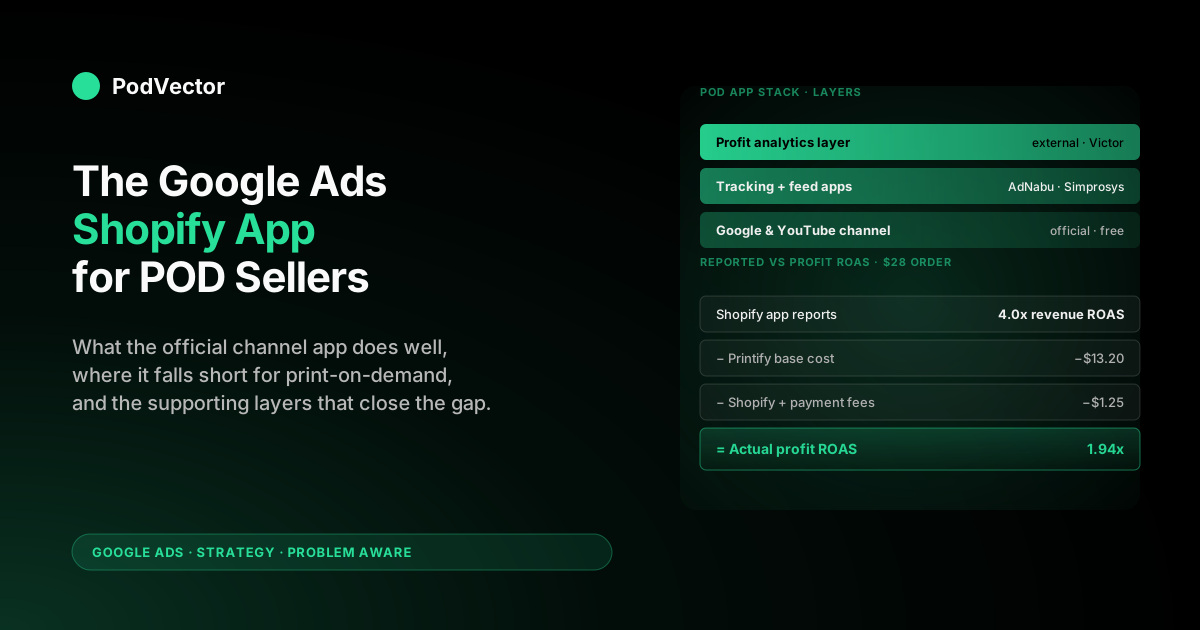
The single most important thing to internalize about any Google Ads Shopify app — official or third-party — is what they don't report. None of them, as of 2026, pull supplier cost from Printify or Printful into the same view as Shopify revenue and Google Ads spend. The reports they show you are revenue ROAS, not profit ROAS.
The math, with a representative POD t-shirt order:
- Average order value (Shopify subtotal): $28.00
- Printify base cost (shirt + print + shipping): $13.20
- Shopify transaction + payment fees (~3.4% + $0.30): $1.25
- Net before ad spend: $13.55
- Google Ads spend at "4x ROAS" (channel app's headline number): $7.00
- Actual profit per order: $6.55
That's a 1.94x profit ROAS on what the official app calls a 4.0x revenue ROAS. The campaign is in fact profitable here — but the platform-reported number is overstating profitability by roughly 2x.
The same math at "3x revenue ROAS" produces a roughly breakeven profit ROAS, and at "2.5x revenue ROAS" the campaign is losing money on every order. Without reconciling the two, you can't tell which scenario you're in.
The reconciliation is the same job whether you do it in a spreadsheet, a custom warehouse pipeline, or a tool like Victor. The point is that no Shopify app — no row in the App Store search results, however many stars — does it for you.
Plan for the reconciliation to happen outside the app stack from day one. For the underlying attribution mechanics this depends on, see Google Ads attribution explained for POD sellers.
Anti-patterns we see POD operators repeat
- Installing the official channel app and three competing third-party apps simultaneously. Conversion tags fire twice (once from the channel app, once from a third-party tracker), inflating reported conversions by 30–80%. Pick one source of truth for conversion tags.
- Trusting the in-Shopify PMax launcher to cap supplier-cost exposure. The launcher caps spend, not loss. Smart Bidding will spend the full daily budget chasing low-margin SKUs. Cap with a target ROAS that bakes in your supplier cost (typically 4x revenue ROAS for ~50% margin POD), not a target ROAS that looks reasonable in isolation.
- Uninstalling the official channel app to "switch" to a third-party Google Ads app. The official app is the only one Google itself supports for free listings, which is a meaningful free-traffic stream. Layer third-party apps on top, don't replace.
- Letting Merchant Center disapprovals accumulate. POD stores commonly have 5–20% of variants disapproved for missing GTIN, color, or size. The channel app surfaces these but doesn't force-resolve them. A monthly review of the disapproval list is worth more than most apps in your stack.
- Optimizing the in-Shopify dashboard instead of the Google Ads console. The Shopify report is a summary view; the Google Ads console has the full asset, audience, and bid-strategy controls. Once you're spending more than $1K/month, work in ads.google.com, not Shopify.
A monthly review routine for the app stack
A 45-minute monthly cadence catches most of the drift before it costs you a quarter of margin:
- Audit Merchant Center disapprovals. Open the Merchant Center diagnostics tab. Resolve any product-level disapprovals from the past month — especially ones blocking free listings, which are recurring free traffic.
- Verify conversion tag firing. Use the Google Tag Assistant Chrome extension on a test purchase. Confirm the official app's tag fires once per event. If you've added a third-party tracker, confirm one — and only one — is firing per conversion.
- Refresh enhanced conversions consent settings. Shopify customer-account changes and Privacy & Cookies settings can quietly de-authorize email-hashed enhanced conversions. Re-confirm consent mode in the channel app's Settings → Tagging panel.
- Reconcile profit per campaign. Pull last month's Shopify orders, Printify/Printful supplier costs, and Google Ads spend by campaign. Calculate net profit per campaign. Pause or restructure any campaign at < $0 net for two consecutive months.
- Review which apps you actually used. If a third-party Shopify app didn't generate a click, a report, or a setting change in the past month, uninstall it. Every dormant app is permission, JavaScript, and recurring fees you don't need.
For the broader monthly cadence covering campaign-side actions, see the strategy hub at /articles/google-ads/strategy, and for the topic-level overview all PodVector AI Google Ads guides.
FAQs
Is "the Google Ads Shopify app" the same as "Google Channel" or "Google & YouTube"?
Yes — they're the same app, renamed across releases. Google originally shipped it as "Google Shopping," renamed to "Google Channel," and now ships it as "Google & YouTube." The functionality is the same lineage: catalog sync, conversion tag, and (newer) in-Shopify campaign launcher. Search the App Store for "Google & YouTube" and confirm the publisher is Google itself.
Do I need a separate Google Ads account, or does the Shopify app handle it?
The app can create one for you, but for any serious operator we recommend creating the Google Ads account directly at ads.google.com first, then linking it from inside the channel app. Reason: account-level settings (billing, MCC linkage, conversion definitions) are easier to manage outside Shopify, and they survive if you ever uninstall the channel app.
Will the official channel app handle conversion tracking, or do I still need a third-party app?
For stores doing < $5K/month, the channel app's tags are usually enough. Above that, a specialist tracking app pays for itself by handling enhanced conversions, refund adjustments, and cross-device attribution that the channel app's default tags don't expose. The two apps coexist as long as you turn off duplicate event firing in one of them — never both.
Why is my Performance Max campaign in the channel app spending budget but not converting?
The most common POD-specific cause is feed quality, not bidding. Check Merchant Center for disapproved products, missing color/size attributes, and image-quality flags.
PMax sends impressions wherever the feed lets it; a low-quality feed produces low-quality impressions that don't convert. Second most common cause: a target ROAS set too high for the campaign's learning phase — drop to "Maximize Conversion Value" with no ROAS cap for the first 14 days, then re-introduce ROAS targeting once Smart Bidding has signal density.
Can I run the official channel app at the same time as a third-party "Google Ads AI" app like AdScale or StoreYa?
You can, but they'll fight over conversion attribution and double-fire tags unless you carefully turn off the third-party app's tag and rely on the channel app's. Most operators we talk to who try both end up keeping the channel app and uninstalling the third-party AI layer within a month, because the AI layer's premium fee doesn't outweigh what Performance Max in the channel app already does for free.
Does the channel app support multi-currency or multiple POD stores from one Shopify Plus account?
Multi-currency: yes, via Shopify Markets. Each market gets its own Merchant Center feed automatically.
Multi-store: you need a separate channel app install per Shopify store, each linked to its own Merchant Center and Google Ads account. Sharing a single Google Ads account across multiple POD brands leaks signal between them and is a setup we explicitly recommend against.
How do I close the supplier-cost gap that the channel app leaves open?
Three options, in order of operator effort. (1) Manually export Shopify orders, Printify/Printful supplier costs, and Google Ads spend monthly into a spreadsheet — works at small scale, breaks above $30K/month. (2) Build a custom warehouse pipeline that ingests all three sources — accurate but expensive in engineering time. (3) Use a tool like Victor that does the join automatically and answers profit-per-campaign questions on demand. Whichever you pick, plan for it from day one — the cost of running profitable Google Ads scales linearly with how quickly you can answer "is this campaign making money after Printify."
Will uninstalling the channel app break my existing Google Ads campaigns?
It will break the catalog sync (your Merchant Center feed will stop updating) and stop free listings. Existing PMax campaigns will keep running on the last-known feed until products go out of stock or get disapproved, then performance collapses. Don't uninstall the channel app while you have active campaigns; if you want to switch to a third-party feed app, install the new one and verify it's syncing correctly for two weeks before removing the channel app's feed connection.
Stop trusting the Shopify app's revenue ROAS — measure profit ROAS instead
The Google & YouTube channel app is good at what it does. The thing it doesn't do — and that no other Shopify app does either — is connect your Printify or Printful supplier cost to the campaigns spending against your store. Without that connection, every "4x ROAS" the in-Shopify dashboard shows you is half the story. Victor is the AI employee that closes the gap. Connect Shopify, your POD supplier, and Google Ads, ask "which campaigns are profitable after supplier cost?" and get a real answer with the numbers attached. — no credit card, connects in five minutes.
Try Victor freeFurther reading: Reputon's roundup of top Shopify Google Ads apps for the broader app-store landscape this guide narrows for POD, and DelightChat's Shopify Google Ads apps comparison for an alternative perspective on which third-party apps are worth installing.