
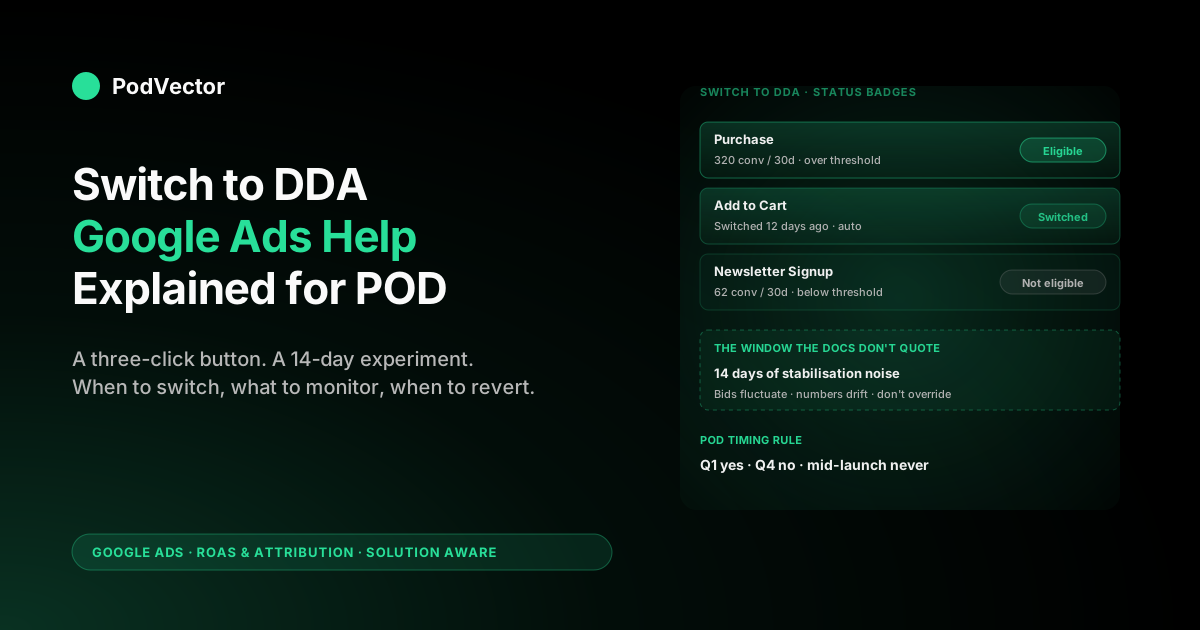
Quick Answer: The Google Ads Help page on "Switch to DDA" is a 450-word procedural doc covering one feature: the Switch to DDA tab inside Goals → Attribution, which migrates one or more conversion actions from a rules-based model (last-click, position-based, time-decay, linear, first-click) to data-driven attribution. Google may also auto-switch eligible actions on your behalf; eligibility is shown as a status badge in the same tab.
For a print-on-demand seller, the operational question is not how to click the button — that's three steps — but when to click it, how to interpret the 14-day stabilisation noise that follows, and how to verify the credit redistribution improved true ROAS after Printify or Printful supplier cost rather than just reshuffled the same gross numbers. This article walks the help docs procedurally, then adds the POD-specific timing, monitoring, and reversion guidance the docs leave out.
What the "Switch to DDA" help page actually covers
The official Google Ads Help page on Switch to DDA is approximately 450 words and covers five sections in order: a one-paragraph definition of data-driven attribution, three benefits, an "auto-switch conversion actions" note, the three-step manual instructions, and a description of the eligibility status indicator. That is the scope.
It is shorter than the broader about data-driven attribution Google Ads help page because it addresses one feature — the migration tooling — rather than the model itself. If you want the model-level explanation, read that companion piece first; this article is about the button you click after.
The help page does not cover four operational realities that matter for a POD seller running the switch on a real account:
- It says "switch" but doesn't quantify the 14-day stabilisation window during which reported numbers are noisy.
- It mentions auto-switch as a feature but doesn't explain when Google fires it or how to opt out per-conversion-action.
- It assumes you'll trust the eligibility indicator without explaining what causes "not eligible" for low-volume POD accounts.
- It is silent on the reversion procedure, which is the same three clicks but worth knowing in advance because you will use it eventually.
This article addresses those four gaps directly, in the order an operator encounters them: deciding to switch, doing the switch, watching the aftermath, and (sometimes) reverting. For broader strategic context on where DDA fits alongside attribution windows and Smart Bidding, see the complete guide to Google Ads ROAS and attribution for POD.
Manual switch versus Google's auto-switch
The help page describes two paths to DDA. You should know both because they happen at different times and for different reasons.
Manual switch. You click into Goals → Attribution → Switch to DDA tab, see a row per eligible conversion action with a button next to each, and click. The switch takes effect immediately for the conversion action selected. This is the path you use when you've decided to migrate proactively and want control over timing.
Auto-switch. Google may automatically switch eligible conversion actions to DDA on your behalf, with notice. The help page describes this neutrally; in practice it means that if you don't act, Google eventually does.
Auto-switch fires on a rolling cadence Google does not publish, generally on conversion actions that have been at the eligibility threshold (300 conversions, 3,000 ad interactions per 30 days) for some time and are still using a non-DDA model. As of late 2024, all new conversion actions default to DDA at creation, so auto-switch increasingly only applies to legacy actions created before that change.
The operator implication: if you've been ignoring DDA on a Shopify Purchase action you set up in 2022, Google may switch it for you regardless. You can either pre-empt that with a manual switch on a date you control or accept the auto-switch on Google's timeline. For a POD account in a stable period, pre-empting is the better choice because you can pair the switch with deliberate monitoring rather than discovering it happened through a Smart Bidding shift two weeks later.
Reading the eligibility status indicator for a POD account
The Switch to DDA tab shows a status badge per conversion action. There are four states the help page glosses over without explaining what causes each.
Eligible. The conversion action has 300+ conversions and 3,000+ ad interactions over the last 30 days. You can switch immediately. For POD stores doing $30K+ per month with normal Google Ads spend, the Purchase conversion action is usually here. Add to Cart and Begin Checkout often are too if you're tracking them.
Not eligible. The conversion action falls below the threshold. The badge will not let you click switch.
For POD sellers, this is most often the case for newer or specialty conversion actions — Newsletter Signup, View Specific Product Category, and so on — where volume is low. Note that "not eligible" doesn't mean DDA can never run; it means you cannot manually switch this action. Google's modeled DDA fallback applies once the threshold is crossed.
Switched. Already on DDA. The badge shows the date and source (manual or auto). For audit purposes this is the field you want to capture before making bid changes that depend on the model.
Pending. Switch initiated but not yet active. This window typically lasts a few hours but can extend to a day for large accounts. During pending, Smart Bidding still uses the prior model — the switchover is atomic but not instantaneous, and bids do not change until the model takes effect.
For a POD seller on Shopify or Etsy with a typical conversion action set, the eligibility check is the moment that often surfaces an unexpected truth: the Purchase action is eligible, but the assist-quality actions you set up for the funnel (Add to Cart, Begin Checkout, Newsletter Signup) are not. That mixed eligibility is normal. It means you can manually switch Purchase today and let Google's modeled DDA handle the others until they cross threshold or Google auto-switches them.
Pre-switch checklist for POD sellers
Before clicking switch, run through six items. None are in the help docs. All matter for a POD account where margin is thin and Smart Bidding consumes whatever credit you give it.
- Verify your conversion value approximates margin after supplier cost. If you are sending Shopify order subtotal to Google Ads as conversion value and your average order has $22 of Printify supplier cost on a $34 sale, the model is being told to optimise toward gross revenue, not margin. DDA will redistribute credit cleanly across that wrong number. Fix the value layer first if you can; if you can't, switch anyway and accept that the lift will be in correct credit allocation, not correct ROAS.
- Capture the last 30 days of Model Comparison data before switching. Goals → Conversions → click conversion action → Model Comparison tab. Filter by campaign and export. This is your before-state to compare against post-switch.
- Check Smart Bidding strategy. If you're on tROAS or Maximize Conversion Value, the bidder will react to the new credit distribution within 14 days. If you're on manual CPC, the report changes but bids don't.
- Note the date. Write it down. The 14-day stabilisation window starts now, and you'll need the boundary later.
- Pause major budget changes for the next 14 days. Do not raise budgets, launch new campaigns, or change tROAS targets during the stabilisation window. Multiple simultaneous changes destroy your ability to attribute the post-switch report shift to anything.
- If you run seasonal POD lines, time the switch outside peak. December for a winter holiday seller is the worst possible week to switch. February or March is better.
The help docs treat the switch as a configuration change. For a POD account it's a 14-day controlled experiment where Smart Bidding is the unknown variable. The checklist isolates what you can control.
Switching to DDA: the three-click procedure
The help page lays this out in a numbered list. Reproducing it here for completeness, with the path correct as of late 2024 onward when Google moved attribution under conversion actions.
- In your Google Ads account, click the Goals icon in the left navigation.
- In the section menu, click Attribution, then click the Switch to DDA tab at the top of the page.
- Find the row for the conversion action you want to migrate, confirm the eligibility badge is "Eligible," and click Switch to DDA.
That is the procedure. The page also offers an alternate path through Goals → Conversions → click the conversion action → Edit settings → Attribution model dropdown → Data-driven, but for accounts with multiple conversion actions, the Switch to DDA tab is faster because it batches the eligibility view in one place.
You will not be asked to confirm a 14-day window or accept any disclaimer about reported number volatility. The help docs don't surface that warning either. It's worth knowing on your own.
The 14-day stabilisation window the docs don't quote
Once you switch, the model retrains continuously on your account's actual paths. For the first 14 days, three things move that operators sometimes mistake for problems:
Reported conversions per campaign drift day-over-day. The model is reweighting touches as it accumulates more conversion paths under DDA. A campaign reporting 32 conversions on day 1 may report 28 on day 3 and 34 on day 7 with no underlying behavioural change.
By day 14, this jitter normally settles. Don't make budget decisions based on a single day's report during this window.
Smart Bidding adjusts. If you're on tROAS, the bidder is consuming new credit weights and adjusting bids. You will see CPC fluctuate by 10–30% on individual keywords during the first week as the bidder finds its new equilibrium. This is the bidder doing exactly what you switched DDA on for. Resist the urge to override.
The Model Comparison report becomes interesting. Once 14 days have passed, you can run a clean DDA-vs-last-click comparison filtered by campaign type. For POD accounts, the patterns to expect are documented in our companion data-driven attribution Google Ads help explained piece — generic Search up, branded Search down, PMax up, Demand Gen finally getting credit.
The Google Ads Help page does not call this window out by name. It exists because DDA is a continuously-trained machine-learning model and any model needs a stabilisation window after a major input change. Treat it as a known cost of switching.
What to monitor in the first 30 days after switching
The help docs end at the click. The actual work starts after. Track these four numbers daily for the first two weeks, then weekly through day 30.
Total conversions and conversion value at the account level. Should be roughly stable. DDA does not invent or destroy conversions; it reallocates credit. If your account total moves more than ±5% post-switch, look for an unrelated cause (a campaign turning on, a tracking issue, a seasonal shift). DDA itself doesn't cause account-level shifts.
Smart Bidding's tROAS or target CPA performance. If you're on tROAS, the bidder takes 5–10 days to recalibrate after the model change. CPA may rise temporarily before settling. If after 14 days CPA is still elevated and not trending back, the prior model may have been hiding genuine inefficiency in the bidder's view of your account.
Campaign-level ROAS shifts. Branded Search will likely drop and PMax will likely rise on the same total. If the shifts are within reason — branded -20% to -30%, PMax +15% to +30% — that's expected behaviour. Outliers warrant investigation.
Refund-adjusted ROAS. Apparel POD has a 12–18% refund rate; mug and accessory POD lower. If you don't push refunds back to Google Ads as conversion adjustments, DDA is allocating credit against gross conversions and your post-switch ROAS will look better than the cash reality. The help docs do not cover this; the link to fix it lives in the offline conversion adjustments documentation, not the Switch to DDA page.
When and how to revert from DDA to last-click
Google's docs treat reversion as an edge case and bury it under the broader Edit settings flow. There are three legitimate scenarios where a POD account should revert, at least temporarily.
The post-switch numbers are too noisy to make decisions. If you're 14 days in and the daily report is still moving more than 15% day-over-day on a stable spend base, something else is interfering — usually a small-volume conversion action or a Smart Bidding strategy that's incompatible with DDA in your specific setup. Revert to last-click for two weeks, get a clean baseline, then re-switch.
You're entering an audit period. If you and a partner or freelancer are arguing about attribution credit on a specific campaign, last-click is deterministic and easier to argue from. Revert for the audit, document outcomes, switch back.
You discovered the conversion value layer is broken. If post-switch monitoring reveals you've been sending wrong values (subtotal where you should be sending margin, missing refunds, double-counting a Pixel), fix the value layer first under last-click — its determinism makes the fix verifiable — then switch back to DDA once values are correct.
The reversion procedure: Goals → Conversions → click the conversion action → Edit settings → Attribution model dropdown → Last-click. There is no "Revert from DDA" tab matching the Switch to DDA tab. The help docs are silent on this; you'll find the same dropdown that set DDA in the first place lets you set anything else.
One note: reverting also triggers a Smart Bidding restabilisation window of similar length. Don't revert and re-switch repeatedly — each cycle costs you 14 days. Decide once, monitor for 30 days, then revert only if the data demands it.
Switch timing for POD: Q1 yes, Q4 no, mid-launch never
For a POD seller running on a typical seasonal pattern, three windows matter for switching to DDA.
Q1 (January through March): yes. Volume is rebuilding from holiday peak, traffic patterns are settling into baseline, and any 14-day stabilisation noise is absorbed by the natural Q1 quiet. This is the best window to switch a stable POD account from last-click to DDA. The model has Q4's high-volume paths to learn from while reporting itself against quieter Q1 traffic.
Q4 (October through December): no. Holiday traffic is the wrong moment to introduce model retraining noise. Smart Bidding is already adjusting to seasonal CPC inflation; DDA stabilisation on top of that compounds the unpredictability. If you missed Q1, wait for January.
Mid-launch (anytime you're scaling a new product line): never. If you're three weeks into a new design launch with rising spend and rising conversion volume, the DDA model has nothing stable to learn from. Wait until the launch settles into its own pattern (typically 30–60 days post-launch) before switching that conversion action. The auto-switch threshold delay usually handles this for you, but if you're tempted to manually switch a Purchase action mid-launch, don't.
None of this timing guidance is in the Google Ads Help page. The page treats the switch as a configuration change with no temporal cost. For a POD account where every 14 days of bidder confusion costs real money, timing matters more than the docs imply.
For more context on how attribution windows interact with this timing decision, see Google Ads attribution window explained for POD sellers. And for the cross-cluster context on how Smart Bidding consumes DDA credit, step into the Google Ads strategy cluster, or back up to the topic hub at Google Ads for POD sellers.
How Victor monitors the post-switch window against POD margin
The four post-switch metrics described above — account-level conversions, Smart Bidding performance, campaign-level shifts, refund-adjusted ROAS — are spread across three systems: Google Ads, Shopify, and Printify or Printful. Pulling them into one daily view during a 30-day stabilisation window is exactly the work most POD operators don't have time to do on top of running the store.
Victor connects to your Google Ads, Shopify, and Printify or Printful accounts and runs continuous a warehouse joins across them. During a post-switch window you can ask "what is my refund-adjusted ROAS by campaign for the last 7 days versus the 14 days before I switched to DDA, after Printify supplier cost?" and the answer is a comparison table with the data behind it.
The DDA distribution comes from Google Ads; the supplier cost and refund data come from the order and fulfillment ledgers; the join is what lets you tell whether the model change improved margin or just reshuffled gross numbers. That's the Stage 1 use case today. The employee roadmap is to let Victor pause asset groups whose post-switch ROAS-after-COGS is structurally unprofitable, or raise tROAS targets on campaigns where DDA newly credits high-margin paths — once you've granted that level of trust.
FAQs
Does Google switch my conversion actions to DDA automatically?
For new conversion actions created from late 2024 onward, yes — DDA is the default at creation, no switch required. For older conversion actions still on a rules-based model, Google may auto-switch eligible ones on a rolling cadence with notice. You can pre-empt this with a manual switch on a date you control.
How long does the switch itself take?
The configuration change is near-instant; the badge changes from Eligible to Pending to Switched within minutes to a few hours. The model stabilisation window is 14 days, during which reported numbers and Smart Bidding bids fluctuate as the model retrains.
Can I switch one conversion action to DDA and leave others on last-click?
Yes. Each conversion action has its own attribution model, set independently. POD sellers commonly switch the Purchase action to DDA while leaving Add to Cart and Begin Checkout on last-click until those cross the eligibility threshold or Google auto-switches them.
What if my account is too small for DDA eligibility?
Below 300 conversions and 3,000 ad interactions per 30 days per conversion action, the manual Switch to DDA button is unavailable. Google's modeled DDA fallback runs by default on new conversion actions regardless of volume — it's a generic model trained on broader signals rather than your account specifically. For most POD stores under $20K monthly revenue, this fallback is what's actually running and there's nothing to switch.
Will switching to DDA change my reported total conversions?
Almost never at the account level. DDA reallocates credit across touches; it doesn't invent conversions. Total reported conversions and conversion value should be roughly stable post-switch. What changes is the per-campaign and per-keyword distribution: branded Search drops, PMax and Demand Gen rise, generic Search rises.
How do I revert from DDA back to last-click?
Goals → Conversions → click the conversion action → Edit settings → Attribution model dropdown → Last-click. There is no dedicated "Revert" tab; the same dropdown that selects any model changes you back. Reverting triggers another 14-day Smart Bidding stabilisation window, so don't revert and re-switch in quick succession.
Should I time the switch to match a specific campaign change?
No. Pair the switch with a stable period of at least 30 days where you do not change budgets, launch campaigns, or adjust tROAS targets. Multiple simultaneous changes destroy your ability to attribute post-switch shifts to the model versus other variables. Q1 is the typical best window for POD sellers; Q4 holiday is the worst.
Run the post-switch 14-day window with margin in view
Switching a POD conversion action to DDA changes how Google Ads credits your touches. It doesn't change your margin after Printify or Printful supplier cost — that part is on you to verify. Victor connects Google Ads, Shopify, and your fulfilment provider in one chat interface so you can ask "what is my refund-adjusted ROAS by campaign for the 14 days after I switched to DDA versus the 14 days before, after supplier cost?" and get the answer with the data behind it.
Try Victor free