
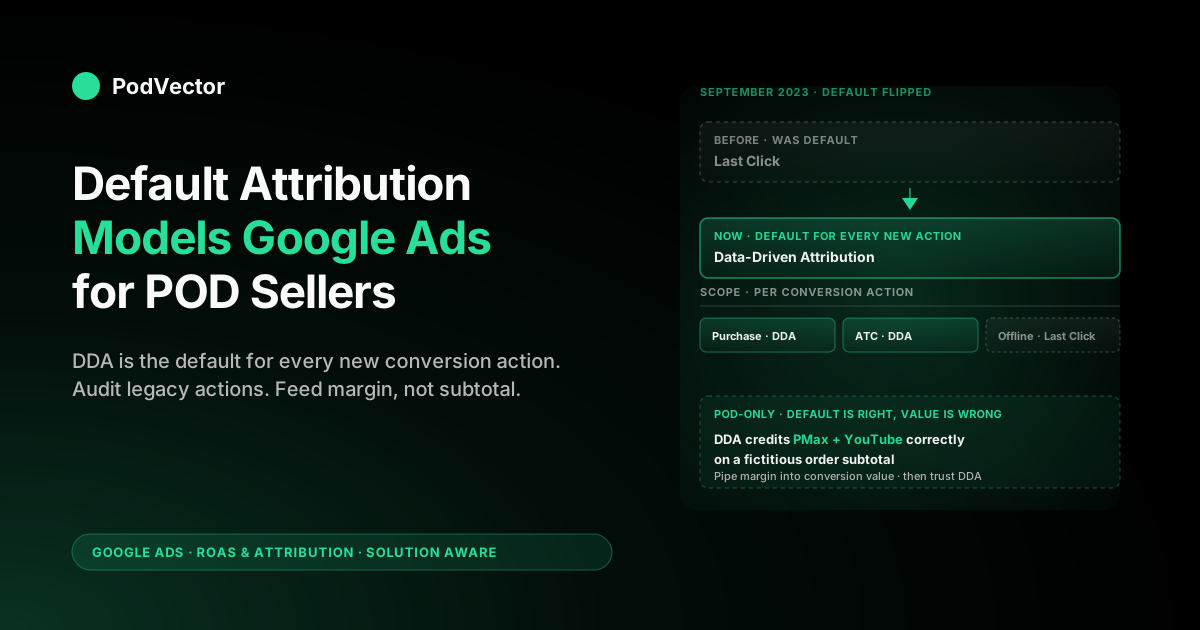
Quick Answer: The default attribution model in Google Ads is data-driven attribution (DDA). Google flipped the default from last-click to DDA in September 2023 and at the same time retired first-click, linear, time decay, and position-based as options.
The default is applied per conversion action, not at the account level — every new web conversion you create starts on DDA, but the conversion actions you set up before September 2023 only switched if you let Google migrate them. For print-on-demand stores the default is almost always the right pick: DDA redistributes credit toward Performance Max, YouTube, and Demand Gen — which is where most POD discovery actually happens — but the model number is meaningless until you also switch the conversion value from order subtotal to contribution margin after Printify or Printful supplier cost.
What "default" actually means in Google Ads attribution
Inside Google Ads, "default attribution model" has a very specific meaning that trips up a lot of operators: it is the model Google applies to a new conversion action the moment you create it, before you touch any settings. It is not a global account-level switch and it is not retroactive. Every conversion action — Purchase, Add to Cart, Lead, Begin Checkout — has its own attribution model field, and the default is what fills that field if you click through the setup wizard without changing anything.
That nuance matters because most POD stores have at least three conversion actions running at any time: a primary Purchase action that powers Smart Bidding, one or more secondary actions ("Add to Cart", "Begin Checkout", "Subscribe") used as observation signals, and sometimes a separate offline conversion action for higher-LTV customers imported from your back end. The default applies to each of them independently. If your Purchase action was created in 2022 and your Begin Checkout action was created in 2024, they may be on different models even though you never deliberately picked one.
The default also matters for a second reason: Google Ads quietly changed which model is the default in September 2023, which means the answer to "what's the default?" depends on when your account was set up. Stores opened after that date have data-driven attribution baked in everywhere. Stores opened before that date have a mix — and in many cases that mix is the silent reason ROAS reports look incoherent across campaigns.
The current default in 2026: data-driven attribution
As of mid-2026 the default attribution model in Google Ads, for every new web conversion action and every new app conversion action, is data-driven attribution (DDA). Last-click is the only alternative you can pick for a standard web or app action; the older rules-based models — first-click, linear, time decay, and position-based — are no longer selectable when you create a new conversion action. (A third option, "External", exists only for conversions you import with their credit already assigned by a third-party tool — it is not a model you choose, it is a passthrough.)
DDA uses Google's machine-learning model to assign fractional credit to every ad interaction in the conversion path based on that path's measured contribution to driving conversions inside your account. It compares converting paths to non-converting paths, looks at sequence, time, and ad type, and produces credit weights that change as your account accumulates more data. There is no minimum data threshold any more — Google removed the old 3,000 ad interactions / 300 conversions floor in 2023, which is the change that made it possible to set DDA as the universal default.
Last-click is still selectable for one reason only: comparison. A handful of POD operators run a duplicate "last-click" Purchase action alongside the DDA one purely as a sanity check, so they can read both numbers in the Model Comparison report and see how much credit DDA is shifting toward upper-funnel campaigns. We cover whether that's worth doing in Google Ads Attribution Models Explained for POD Sellers.
Why Google changed the default in September 2023
Two things forced the change at the same time. First, Performance Max — Google's bundled campaign type that runs across Search, YouTube, Display, Discover, Gmail, and Maps from a single asset group — became the dominant ad format for ecommerce, and last-click attribution badly under-credits the YouTube, Display, and Discover surfaces that PMax depends on.
Stores running PMax on last-click were turning off PMax because the reported ROAS looked terrible, even when blended store-wide ROAS was rising. Defaulting to DDA fixes that without making operators understand the underlying mechanism.
Second, the privacy migration to consent-mode v2, Safari/Firefox third-party cookie blocking, and the GA4 transition all landed in the same window. (Note: Google ultimately abandoned its plan to remove third-party cookies in Chrome and wound down the Privacy Sandbox effort in late 2025 — but the broader erosion of observable cross-site signal continued anyway, and Enhanced Conversions with hashed first-party data became the standard way to feed the gaps.) Rules-based models like time decay and position-based assumed you could see the full conversion path; DDA can produce credit weights even when chunks of the path are modeled rather than directly observed. Google needed a default that degrades gracefully as deterministic signal thins out, and only DDA does that.
The deeper context for POD specifically — why the upper-funnel formats Google cares about happen to be the ones where t-shirt and mug discovery actually lives — is in About Data-driven Attribution Google Ads Help Explained for POD Sellers.
The default applies per conversion action, not per account
This is the single most-missed detail in attribution-model articles, and it is the one that creates the most reporting confusion for POD stores. There is no "account default attribution model" setting. You will not find one in Tools → Conversions → Settings. The "default" simply describes which model is pre-selected when you spin up a new conversion action.
That has three downstream consequences worth internalizing:
- Different conversion actions can be on different models. Your Purchase action might be on DDA, your Add-to-Cart on last-click, and your offline import on last-click — and Google Ads will not warn you. The Conversions table shows the model for each action in the "Attribution model" column; that's the only place to confirm.
- Smart Bidding optimizes against whichever models the actions in its conversion goal are using. If your Purchase action is on DDA but your Begin Checkout (set as a secondary "Observation" action) is on last-click, the bid algorithm sees two views of the same funnel and your CPA targets behave inconsistently.
- Switching the model on a conversion action is a count change, not a rebuild. Switching from last-click to DDA does not retroactively reassign credit in past data the way changing a definition would. It changes how credit is assigned going forward, and Google rebuilds the account-level DDA model on a rolling basis from there.
Legacy conversion actions: what happened to your old settings
If your Google Ads account predates September 2023, your old conversion actions did not silently flip to DDA on the day Google changed the default. Instead, Google ran a one-time migration: every conversion action that was on first-click, linear, time decay, or position-based was offered an upgrade to DDA, and most accounts that didn't manually opt out had the migration applied between September 2023 and early 2024.
What you can verify today:
- Go to Tools → Conversions → Summary.
- In the table, check the "Attribution model" column for every web conversion action.
- You should see only "Data-driven" or "Last click". If you still see "Linear", "Time decay", "Position-based", or "First click" anywhere, the action is broken — those models stopped being supported and the conversion will be miscounting against any modern bidding strategy.
If you find a stuck legacy model, switch it to DDA (or last-click if you have a deliberate reason). The switch takes effect immediately for new conversions and the historical numbers in your reports will not change.
When POD sellers should override the default
For most print-on-demand stores running Performance Max, YouTube, or Demand Gen alongside Search, the DDA default is the right answer and you should leave it alone. There are three narrow cases where overriding to last-click is defensible:
- You are debugging a single Search campaign in isolation. Last-click gives you a clean read of which keyword closed the order. Switch back to DDA once the diagnostic is done.
- You run only Search Brand campaigns, no upper-funnel formats at all. DDA on a single-format account adds noise without adding insight. Last-click is more interpretable.
- You have an offline conversion import where the lag between click and conversion is >30 days. DDA's training window is shorter than that and will under-count the import. Last-click is the safer reporting model in that case (though Smart Bidding still benefits from DDA for the in-platform actions).
Outside those cases, the override has more downside than upside. The historical noise about whether last-click "feels more honest" is not a good reason — your gut feel for what closed the sale is exactly the bias DDA is built to correct. The deeper case for staying on the default is built out in our Google Ads Attribution Explained for POD Sellers piece.
A worked POD example: how the default reshuffles credit
Take a POD store running a Bigfoot-themed coffee mug at $24.95, fulfilled by Printify on a Generic Brand 11oz mug ($5.81 supplier cost + $4.99 shipping). A buyer's path looks like this:
- Day 0: sees a YouTube Shorts ad of the design (Performance Max, video asset). No click.
- Day 2: searches "funny bigfoot coffee mug", clicks the Search ad.
- Day 2: bounces from the product page.
- Day 5: sees a Display retargeting ad (also PMax). No click.
- Day 6: searches the brand name, clicks the brand Search ad, completes checkout.
Last-click hands 100% of the $24.95 conversion value to the brand Search keyword. The PMax video impression, the non-brand Search click, and the PMax retargeting impression get nothing. Smart Bidding optimized to last-click would, over time, defund PMax and over-bid on brand keywords that would have converted anyway.
DDA on the same path might assign roughly 15% to the YouTube impression, 35% to the non-brand Search click, 10% to the Display retargeting impression, and 40% to the brand Search click. Smart Bidding optimized to DDA keeps PMax funded and shifts brand bids down, freeing budget for net-new acquisition.
The catch: the conversion value Google sees is $24.95, the order subtotal. Real contribution after Printify supplier cost ($5.81), Printify shipping ($4.99), Shopify payment fee on $24.95 (~$1.02), and a 6% refund rate is closer to $11.50. If you don't pipe the margin number into the conversion value field, DDA reshuffles credit correctly across a fictitious $24.95 — and your bid algorithm chases revenue you don't actually keep. The fix is covered in Google Ads Conversions Attribution Explained for POD Sellers.
How to check and change your default model
The 2026 Google Ads interface buries the model setting one level deeper than it used to. To see and change it:
- Click the wrench icon (top right) → Goals → Conversions → Summary.
- Find the conversion action you want to inspect (usually "Purchase" for ecommerce).
- Click the action name to open its detail page.
- Click Edit settings.
- Expand Attribution model. The current model and the date it was last changed are shown there. Switch to last-click only if you have a reason from the previous section.
- Save. Changes apply forward; reports for the prior period are not retroactively rewritten.
Repeat for every web conversion action. If you have offline conversion imports, they are managed separately under Conversions → Imports and have their own model setting per source.
What the default does to Smart Bidding
Smart Bidding (Target ROAS, Maximize Conversion Value, Target CPA) reads the conversion data through whatever attribution model the conversion action is set to. That means the "default" is not just a reporting choice — it is the input the bid algorithm trains on.
When you switch from last-click to DDA on a Purchase action that powers Smart Bidding, Google's docs recommend a one-week ramp where the algorithm rebuilds its bid landscape against the new credit weights. Bid volatility is normal in the first 7–14 days.
Don't react to it. The rule of thumb POD operators use: don't change the attribution model and the tROAS target in the same week — you won't be able to tell which lever moved the result.
One thing the default does not set for you is the conversion window — the second lever that shapes what Smart Bidding trains on. The model decides how credit is split across touchpoints; the window decides how far back Google looks before a touchpoint stops counting at all (click-through windows run 1–90 days, view-through 1–30 days). Leaving both on their defaults is fine for impulse-buy POD items where the path closes in a day or two, but if you sell higher-consideration custom or personalized products with a multi-week deliberation, a too-short window quietly drops the early PMax and YouTube impressions that DDA would otherwise credit — so the model looks like it's under-valuing upper funnel when the window is the real culprit. We break the window settings down in Google Ads Attribution Window Explained for POD Sellers.
The deeper mechanics of how Smart Bidding consumes the model output, including what happens during Google's "consideration" phase for fresh accounts, are walked through in Google Ads Attribution Models Explained for POD Sellers.
POD-specific mistakes around the default model
- Using the default DDA but reporting on order subtotal. The number is meaningless until conversion value reflects margin after Printify or Printful cost. Patterns and pitfalls are in our Google Ads ROAS hub.
- Leaving Add-to-Cart on a different model than Purchase. Smart Bidding sees two views of the same funnel and behaves erratically.
- Switching to last-click "to see real numbers" then forgetting to switch back. Smart Bidding ends up tuned against a model the operator no longer thinks they're using.
- Not auditing legacy conversion actions from before September 2023. The migration to DDA was opt-in for many accounts. Stuck on a deprecated model = silently broken counts.
- Conflating the Google Ads default with the GA4 default. They are separate systems. GA4 has its own attribution model setting under Admin → Attribution settings, and changing it does not change anything in Google Ads.
- Treating attribution as a one-time setup. DDA is retrained as your account accumulates data. Re-check the Model Comparison report quarterly, and any time you launch a new campaign type.
How Victor reads attribution against live POD margin
The real gap in every Google Ads attribution-model article — including this one — is that the model is doing accurate math on the wrong number. Order subtotal is what Google Ads sees because that's what the GA4 ecommerce event sends. But the contribution margin on a $24.95 mug after Printify supplier cost, shipping, payment fees, and refunds is closer to $11.50, and that's the number that should drive bid decisions.
Victor, the AI agent inside PodVector AI, joins three live data sources at query time — Google Ads spend by campaign and conversion action, Shopify orders by SKU and timestamp, and Printify or Printful itemized supplier and shipping costs — to compute net contribution after every per-order cost, then attributes that margin against whichever Google Ads model the underlying conversion action is set to.
The practical result: when you ask Victor "what was my true ROAS on Performance Max last month under DDA?" you get a single number that already nets out supplier cost, shipping, payment fees, and refund rate, calculated from the live tables. Victor answers; the employee roadmap takes that further — surfacing which conversion actions are stuck on a deprecated model, and which campaigns are over-funded relative to net margin without you needing to ask.
FAQs
What is the default attribution model in Google Ads in 2026?
Data-driven attribution (DDA). Google made it the universal default for new web and app conversion actions in September 2023 and removed the old data-volume requirements that previously gated DDA eligibility. Last-click is the only other supported model.
Did the default attribution model used to be last-click?
Yes. Last-click was the default for over a decade and only changed in September 2023. The same change retired four other rules-based models — first-click, linear, time decay, and position-based — which are no longer selectable when you create new conversion actions.
Does the default apply to my whole account or to each conversion action?
Each conversion action. There is no account-level "default attribution model" toggle. The default simply describes which model is pre-selected when you create a new conversion action. Existing actions keep whatever model they were on unless you migrate them.
Will my old conversion actions automatically switch to DDA?
Not silently. Google offered a one-time migration to DDA for actions on the deprecated rules-based models between September 2023 and early 2024. If you opted out — or if Google's migration didn't reach your account — you may still have conversion actions stuck on a model that's no longer maintained. Audit them under Goals → Conversions → Summary.
Should I override the default and switch to last-click?
For most POD stores, no. DDA is the right default when you run any combination of Performance Max, YouTube, Demand Gen, or Display alongside Search, because it credits the upper-funnel formats that POD discovery actually depends on. Last-click is defensible only for Search-only Brand campaigns, isolated single-keyword diagnostics, or offline imports with very long click-to-conversion lag.
Does changing the default model rewrite my historical reports?
No. Switching the attribution model on a conversion action only changes how credit is assigned going forward. Reports for prior periods stay on whatever model was in place when the conversions were recorded.
Is the default in Google Analytics 4 the same as in Google Ads?
Conceptually yes, mechanically separate. GA4 also defaults to data-driven attribution under Admin → Attribution settings, but it is a different model trained on different data, and changing one does not change the other. If you import GA4 conversions into Google Ads, the Google Ads attribution model wins for bidding purposes.
Why does my Smart Bidding go wobbly after switching to DDA?
The bid algorithm has to rebuild its bid landscape against the new credit weights, which takes about 7–14 days. Don't change the tROAS target in the same window or you won't be able to attribute the result. Bid volatility in the first two weeks is expected and is not a reason to switch back.
How do I tell which model my Purchase conversion action is on right now?
Open Tools → Goals → Conversions → Summary. The "Attribution model" column shows the current model for every web conversion action. Click into the Purchase action and open Edit settings → Attribution model to confirm and to see when the model was last changed.
See your true ROAS under the default model — net of every Printify and Printful cost
Google Ads' default DDA model attributes credit accurately, but it does it against order subtotal — not the contribution margin you actually keep after supplier cost, shipping, payment fees, and refunds. Victor joins live Google Ads, Shopify, and Printify or Printful data at query time so the ROAS number sitting next to your campaign is the one you can bid against.
Try Victor freeRelated reading:
- Google Ads ROAS & Attribution cluster
- Google Ads for POD Sellers (topic hub)
- Google Ads Attribution Models Explained for POD Sellers
- About Data-driven Attribution Google Ads Help Explained for POD Sellers
- Google Ads Attribution Explained for POD Sellers
- Google Ads Conversions Attribution Explained for POD Sellers
- Google Ads Help: About attribution models