
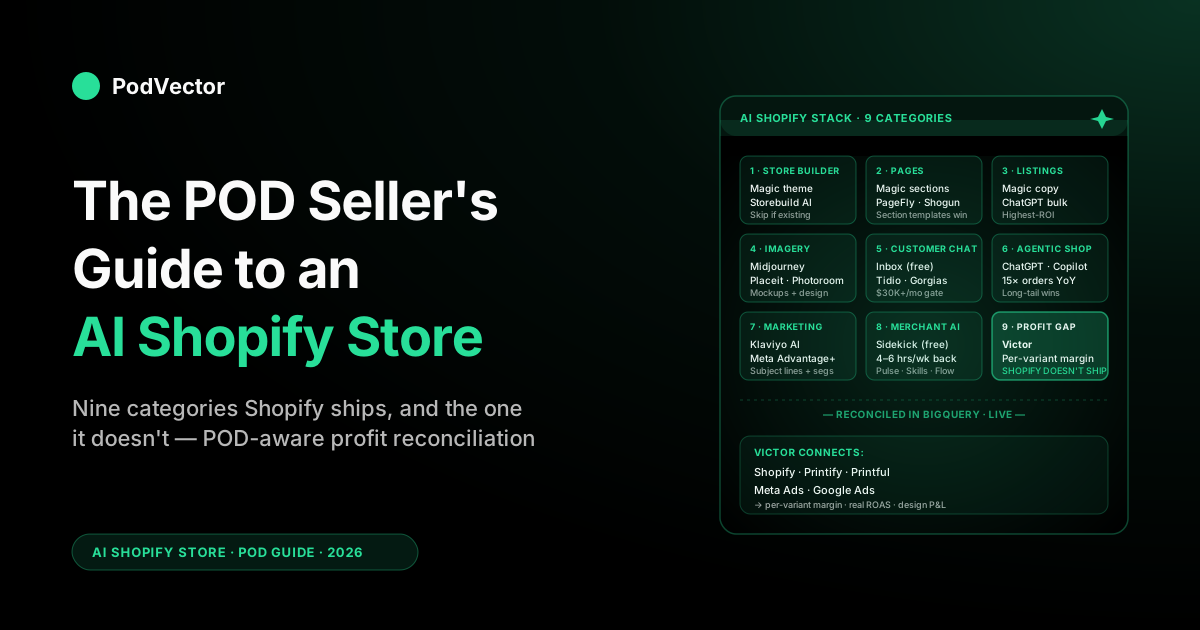
Quick Answer: "AI Shopify store" in 2026 is a stack of nine tool categories — store builder, theme/page generator, listing copy, product imagery, customer chat, agentic discovery, marketing automation, merchant analytics, and profit reconciliation — wrapped around the Shopify admin. For a print-on-demand operator, the first eight categories all have credible options on the App Store, and Shopify's own AI surfaces (Magic and Sidekick) cover most of them at no cost.
The ninth category — POD-aware profit reconciliation across Shopify, Printify or Printful, Meta Ads, and Google Ads — is the one Shopify's AI can't reach, and is where most POD stores discover that the bestsellers Sidekick keeps flagging are losing money on every order. Build the stack in that order: free Shopify-native first, then category-specific apps once the volume justifies the install.
What "AI Shopify store" actually means in 2026
Search "AI Shopify store" and you'll get articles that mash three different intents into one: how to build a Shopify store with AI from scratch, which AI apps to install on an existing Shopify store, and what Shopify's own AI features (Magic, Sidekick, the Shop app) actually do. For a print-on-demand operator the question is almost always the second one — your store already exists, your designs already exist, and you want to know which AI tools meaningfully change how the operation runs.
The honest answer is that the "AI Shopify store" stack has consolidated into nine functional categories. Each maps to a specific job that used to take human hours; each has at least one credible app or built-in feature that does it; and each has a different ROI for POD operators specifically. This guide walks the nine in order, with the print-on-demand specifics that the generic roundups miss, and ends on the category Shopify itself doesn't ship — the one that decides whether your AI-accelerated drop cycle is actually making money.
For the broader umbrella treatment of every Shopify AI surface in one place, see the POD seller's guide to Shopify and AI. For the Sidekick-specific deep dive, see the POD seller's guide to Shopify Sidekick AI. The rest of this guide is the category-by-category map.
Category 1 — AI store builders (and when POD sellers should skip them)
The most-promoted "AI Shopify" category is also the least relevant for the typical POD operator. AI store builders — Shopify Magic's theme generator, Storebuild AI, Atlas, Dropmagic, PagePilot — promise to spin up a complete branded Shopify store from a niche prompt or a single product link in five to ten minutes. The output is impressive: working theme, populated catalog, AI-written product descriptions, conversion-focused sections.
Why most POD sellers skip this
POD stores almost never start from a blank niche. They start from a designer's existing portfolio of designs, an audience already loosely formed around a Etsy or social presence, and a base-product catalog that's been narrowed by margin and supplier-quality experience. The AI store builder's value proposition — "tell us your niche and we'll generate everything" — solves a problem (cold start) that most POD sellers solved months or years ago by hand.
Where it does help: a designer launching a second store under a different brand name, or a POD operator spinning up a microsite for a single drop campaign. In both cases, the speed advantage matters because the asset is meant to be lightweight from the start. For a primary store with hundreds of designs and an established voice, an AI store builder usually generates a generic-feeling shell that you'll spend two weeks rewriting.
The honest comparison
Of the AI Shopify store builders we've evaluated, Shopify's own Magic theme generation does the job adequately for most operators and is free, which makes the third-party AI store builders ($30–$200/month) hard to justify unless you specifically need one of their differentiated features (PagePilot for AliExpress-style product page generation, Atlas for sub-2-minute spin-up). For the broader category compare, see best AI website builder for ecommerce (compared).
Category 2 — AI theme and page generation
Distinct from full store builders, AI page generation is about producing one specific page — a landing page, a collection page, a product page — from a brief, and it's a category where POD operators get real value because the work is recurring (every drop needs new pages) and bounded (one page at a time).
The Shopify-native option
Shopify Magic and Sidekick together can generate a theme section or a full landing page from a chat description ("create a landing page for the Tiger Dad collection with hero, three product callouts, testimonial strip, and CTA"). The output uses your existing theme blocks, respects your brand voice, and ships into the Online Store editor as a draft.
For most POD drop campaigns this is enough, and it's free. The full feature breakdown is in the POD seller's guide to Shopify Magic AI features.
Third-party page builders with AI
PageFly, Shogun, and GemPages have all bolted AI generation onto established drag-and-drop page builders. The AI in each is genuinely useful — generating section copy, headline variants, A/B test layouts — but the install cost and the theme-conflict risk are real. POD operators on a fast-changing catalog (more than four drops a month) tend to find the workflow breaks more often than it pays back. Operators on a slower cadence (one or two drops a month, premium positioning) often justify the install.
The pattern that actually saves time
The highest-leverage AI page-generation pattern for POD isn't the theme or the page — it's the section template. Build one well-converting product-page template (with AI help on copy and layout) and ship every new design through it on launch.
The first design takes an hour; the next 50 take five minutes each. AI accelerates the template; the template's reusability is what compounds.
Category 3 — AI listing copy and product descriptions
This is the category with the highest, fastest, and least controversial ROI for POD operators. Every drop needs new product titles, descriptions, and tags. Done by hand, that's 20–40 minutes per SKU at quality. Done with AI, it's 30 seconds per SKU plus your editing pass.
The Shopify-native option
Shopify Magic generates product descriptions, titles, and tags directly from the product editor. It pulls in your brand voice (which you train once, by giving it three to five examples of your existing writing) and generates copy that's about 80% there for most POD products.
The remaining 20% — the design-specific story, the audience-specific cultural reference — is what you'd be writing anyway. For most POD operators this category is fully solved by Magic at no incremental cost. The deep treatment is in the POD seller's guide to Shopify Magic AI.
Where general-purpose models still help
ChatGPT and other general-purpose AI models have an edge in two specific cases: generating bulk listing copy across 50+ SKUs in a single session (where the per-API-call cost beats Magic's per-product UI) and writing audience-specific descriptions that lean on cultural context Magic doesn't have. The standard pattern is: ChatGPT for the bulk first pass, Magic for the per-product edit and ship. For the ChatGPT-specific Shopify workflow, see the POD seller's guide to ChatGPT for Shopify.
The mistake to avoid
POD product descriptions written for keyword-search SEO (with the keyword stuffed three times, the meta description duplicated in the body, the H1 as a literal product title) read poorly to AI shopping agents. The AI surfaces (ChatGPT product search, Google AI Mode, the Shop app's conversational layer) reward audience-specific, contextual, descriptive writing — not keyword density.
Listings written in 2022 to game Google now actively underperform in agentic shopping. Use the AI to rewrite, not just to bulk-generate.
Category 4 — AI product imagery, mockups, and design generation
POD is unique among ecommerce categories in that the product image and the design are the same asset. There's no studio shoot of a fixed-SKU product; there's a mockup of your design on a base product. AI tools have meaningfully changed three sub-jobs here.
Design generation (the artwork itself)
Midjourney, DALL-E (via ChatGPT or the API), Adobe Firefly, and Ideogram all generate art assets that POD designers either use directly (rare, for legal and quality reasons) or use as ideation input that they redraw or composite into a final design. The design generation category is its own deep topic; the comparison is in best AI art generator for print on demand (compared).
Mockup generation
Placeit, Printful's built-in mockup generator, Printify's mockup library, and AI-driven tools like Mockey and Pacdora all turn a flat design file into product imagery on a model or a flat-lay. The Shopify-native angle here is that Magic can swap backgrounds, remove distractions, and generate lifestyle variants from a single product photo — useful for designers who already have a hero mockup but need additional imagery for collection pages, ads, and emails.
Image enhancement and editing
Photoroom and Remove.bg handle background removal at scale; Magic handles in-Shopify edits (background swap, model change, color tweak) without leaving the admin. For a POD operator publishing 20+ designs a month, the time saved on image prep is real — easily 4–6 hours a week, often the same range Sidekick saves on operational work.
The honest scope note
None of these tools generate the design strategy — which is the actual leverage point in POD. The decision to launch a "Math Teacher Dad" collection, the choice of which base products to offer, the audience targeting on the launch ads — these are unaffected by AI image tools. They speed up execution; they don't replace the editorial judgment.
Category 5 — AI customer chat and support
The category with the most apps and the most overlap. The Shopify App Store now lists hundreds of "AI chatbot" or "AI shopping assistant" apps, plus Shopify's own free Inbox, plus the merchant-facing Sidekick. The honest split for POD operators is two-tier.
The free baseline
Shopify Inbox handles live chat, AI instant answers from your FAQ, and order-status queries — all free, all in the admin. For most POD stores under $30K/month in revenue, this is the right answer. The deflection rate isn't as high as paid alternatives, but the reputation risk of a paid bot hallucinating a return policy is high enough that the free baseline usually wins on net.
The paid options at scale
Tidio, Gorgias AI, Manifest, and a half-dozen smaller players push deflection rates higher (60–80% on routine queries) and integrate deeper with order data. They're worth installing for POD stores doing $30K+/month with significant chat or email volume. The category breakdown for POD specifically is in best AI chatbot for Shopify (compared) and the broader treatment in Shopify AI chatbot: what it looks like for POD sellers.
The configuration mistake
POD catalogs churn faster than DTC catalogs (new designs weekly, old retired). A storefront chat assistant configured to answer from a static knowledge base will be confidently wrong about half your products within a quarter.
The fix is to wire it to pull live from your Shopify catalog and configure a fallback ("let me check with the team") for unrecognized SKUs. Most apps support this; many merchants don't enable it because the default setup uses static-KB mode.
Category 6 — Agentic storefronts and shopper-facing AI
The newest and most structurally important category. Shopify's Winter '26 release pushed Agentic Storefronts to general availability — your products in the Shopify Catalog are now queried by ChatGPT, Microsoft Copilot, Google AI Mode, and the Shop app's built-in shopping assistant when shoppers ask product questions in natural language.
Why this matters more for POD than for DTC
POD stores have long-tail catalogs by definition — 50–500 designs across multiple base products and color variants, often targeting niche interests (ICU nurses, Bernese mountain dog owners, fly fishermen who go for steelhead). Keyword search has historically struggled with this; nobody types "Bernese mountain dog mom mug with a paw print and the dog's name in cursive" into Google.
Conversational AI shoppers do exactly that, and the AI matches them against your product data. A long-tail design that gets one or two organic searches a year for its exact phrasing might match dozens of conversational queries a week — if your catalog is structured to be matched.
Per Shopify's announcement, AI-driven orders grew 15× between January 2025 and January 2026, off a small base. The realistic 12–24 month bet is that AI surfaces become a real channel — somewhere in the 5–15% of orders range for stores that opt in and have well-structured catalog data — alongside organic search, paid social, and direct traffic. POD stores are positioned to overperform here.
What "well-structured" means
The work is mechanical. Product titles describe the design, the audience, and the base product clearly ("Tiger Dad Tee — Math Teacher Gift — Funny Cotton T-Shirt for Father's Day"), not just SKU codes. Product descriptions are 100–300 words, written in your brand voice, covering audience, occasion, fit, fabric, care, and printing process.
Tags include audience tags, product tags, and design tags. Image alt text describes the design clearly enough that a vision-blind AI can pick it.
Product type maps to Shopify's standard taxonomy where possible. This is the same work that makes Shopify Magic, Sidekick, and storefront chat all work better — the payoff stacks across categories.
The opt-in mechanics
Agentic Storefronts participation is opt-in via the Shopify admin. There's no fee, but the prerequisite is the catalog hygiene above plus accepting the Shop Pay-mediated checkout flow that completes inside the AI surface.
Most POD stores opt in; a small minority hold off because of brand-control concerns about how their products appear inside ChatGPT. The deeper context is in the POD seller's guide to Shopify AI Assistant.
Category 7 — AI marketing and email automation
Klaviyo, Mailchimp, Postscript, and Shopify Email all ship AI features now — predicted send time, AI subject-line generation, AI segmentation, predicted CLV. Meta Advantage+ and Google Performance Max are the ad-side equivalents, with creative generation increasingly handled inside the ad platforms themselves.
What works for POD
The highest-ROI AI features in this category for POD operators are AI subject-line generation (incremental open-rate lift on every campaign, no extra cost) and AI segmentation (catalog-aware segments for "shoppers who bought a Tiger design," "abandoned cart on a Father's Day design," etc.). These are mostly built into Klaviyo or Shopify Email and require minimal configuration.
Predicted send time and AI-driven flow optimization both have measurable but smaller lifts. The AI-creative-generation features inside Meta Advantage+ are improving quickly but for design-driven POD products the AI-generated creative still underperforms a human-designed lifestyle mockup; treat it as a B-creative to test against your A.
What to avoid
"AI ad-budget optimizer" apps that claim to autonomously rebalance spend across campaigns based on AI-predicted performance. These almost never have access to true POD margin data (because the supplier-cost layer lives outside Shopify), so they optimize on revenue or platform-reported ROAS — both of which can lead to confidently scaling unprofitable products. Until the optimizer can see Printify or Printful cost, it's optimizing the wrong objective.
Category 8 — AI merchant analytics (Sidekick and beyond)
The category most operators come to first when they hear "AI Shopify store" — a chat-first AI that answers questions about your store. Sidekick, free on every Shopify plan, is the dominant option here and has gotten substantially better in 2026.
What Sidekick does well
Three jobs. First, asking questions about your store — "what's my AOV this week vs. last week," "which product had the highest return rate in March," "show me orders from California over $80." Second, taking action — discount creation, flow building, collection edits.
Third, generating content — descriptions, blog posts, alt text. The Winter '26 update added Pulse (proactive pattern surfacing), Skills (saved prompts), plain-language Flow, and custom admin app generation. The full breakdown is in the POD seller's guide to Shopify Sidekick AI.
What Sidekick costs vs. saves
Free. The hours saved for an active POD operator concentrate in five places: the Monday revenue review (15 minutes vs. an hour), discount-code experiments (5 minutes vs. clicking through the admin), bulk-import auto-tagging (15 minutes per drop vs. 90), returns clustering (a real workflow vs. a spreadsheet), and theme content edits without dev support. Together, for an operator running drops every two weeks, that's typically 4–6 hours a week back.
The shape of what it can't answer
Sidekick can tell you what sold and at what revenue. It cannot tell you what it cost.
It cannot reconcile ad spend to orders across Meta and TikTok. It cannot answer design-level (cross-SKU) profitability.
It cannot forecast demand for a design that doesn't exist in the catalog yet. These limitations are structural — they live in what data Sidekick has access to, not in the model's intelligence — and they're the reason the ninth category exists.
Category 9 — POD-aware profit reconciliation (the gap)
The category Shopify itself does not ship and the App Store mostly fills with profit-tracking apps that aren't AI-first. The honest accounting on the AI Shopify store stack for a POD operator is that categories 1–8 are powerful for content, operations, customer experience, and discoverability — and they're invisible to the question that actually drives POD profit decisions: was that drop profitable, after every cost line?
Why the gap exists
POD economics are uniquely cross-system. Per-variant net margin equals revenue (Shopify) minus supplier cost (Printify or Printful) minus per-order shipping minus payment processor fee minus the share of ad spend (Meta, TikTok, Google, sometimes Pinterest) that drove the conversion minus app subscription costs amortized across orders.
Shopify can see one number in that calculation — revenue. The supplier cost lives in your Printify or Printful account.
The ad spend lives in the ad platforms. The Shopify-native AI has no view into any of it; ask Sidekick "which products are losing money?" and you'll get either a confidently wrong answer or a polite redirect.
What POD-aware profit reconciliation looks like
The category is small and growing. The non-AI version is "profitability apps" — TrueProfit, Lifetimely, BeProfit, Sellerboard — that aggregate cost data into a dashboard and let you slice it by product, channel, or campaign. The AI-first version is what we built Victor for: a chat-first AI employee that connects directly to Printify, Printful, Shopify, Meta Ads, and Google Ads.
Victor looks at every order, ad dollar, and supplier cost together, so he always knows your true profit on each product. Then he can act on what he finds — pausing a campaign that's losing money, repricing a variant that's eating your margin, or turning off a discount that isn't working — and he shows you each change first so you can approve it. Ask "which products are losing money after ad spend this month?" or "what's my real ROAS on the Tiger Dad campaign after Printify costs?" and Victor answers with the numbers, then suggests the fix and waits for your OK.
From answer to action
The difference between a profit dashboard and an operator is what happens after the number lands. A dashboard shows you the campaign that's losing money; an operator pauses it.
Victor does the second thing — reallocating ad spend, repricing variants, retiring losing designs, updating listings — and asks for your approval before each material action. For the broader pattern of how AI agents fit into ecommerce analytics specifically, see the complete guide to AI agents for ecommerce analytics. For the AI-tools survey across POD more broadly, see the complete guide to AI tools for POD sellers.
A POD-aware build order for the AI Shopify stack
The wrong way to assemble an AI Shopify stack is to install one app per category as you read about each one. By month three you're paying $400/month in app subscriptions, half of which overlap, and your catalog has been edited by four different AI assistants with conflicting voice. The right order, in our experience working with POD stores from $5K to $5M ARR:
Tier 1 — Free Shopify-native (start here)
Sidekick, Magic, Shopify Inbox, Shopify Email's AI features, opt-in to Agentic Storefronts. Cost: $0 incremental beyond your Shopify plan.
Coverage: categories 2, 3, 4 (partial), 5 (basic), 6, 7 (basic), 8. This is the layer that handles most of what an active POD operator actually needs from AI on their Shopify store, and it's the layer most operators under-utilize. Spend the first month ramping these to a real workflow before installing anything else.
Tier 2 — Category-specific apps as volume justifies them
At $30K+/month: paid storefront chat (Tidio or Gorgias), if your support volume is large enough that deflection pays back. At $50K+/month: a paid email/SMS platform with deeper AI segmentation (Klaviyo or Postscript) if Shopify Email is hitting its limits.
At $100K+/month: a paid page builder (PageFly or Shogun) if drop-page production is bottlenecking. Each of these is a category-by-category decision driven by volume and bottleneck, not by the existence of an AI feature.
Tier 3 — Profit reconciliation (early, not late)
The mistake most POD stores make is putting profit reconciliation in Tier 3 in time-order — meaning they install it when the store is doing $50K+/month and the gap is now expensive. The right time-order is to put it second, right after Tier 1, because the dollars saved or earned from finding unprofitable bestsellers in your first month often pay for the layer for a year. For the related profitability angle, see best Shopify apps to track profitability in print-on-demand.
A 30-day adoption plan
If you're a POD operator with an existing Shopify store that hasn't yet pulled the AI layer into a real workflow, the highest-leverage 30 days look like this.
Week 1 — Sidekick + Magic on the operational rep
Open Sidekick. Run a Monday revenue review through it ("show me last week's revenue, AOV, top three products by units, and biggest mover by week-over-week change").
Save it as a Skill. Run Magic across your top 50 SKUs by revenue and bring them to the AI-readable standard (long-form descriptions, audience-relevant tags, alt text).
Build the standard into your drop-day SOP. By Friday you should have at least three saved Sidekick Skills and a refreshed top-50 catalog.
Week 2 — Catalog hygiene + Agentic Storefronts opt-in
Continue catalog hygiene through SKUs 51–200 by revenue. Opt into Agentic Storefronts. Verify your products are syncing to the Shopify Catalog. Test a sample query in ChatGPT or the Shop app to confirm a representative product is being returned. The work compounds across every AI assistant in the stack and pays dividends every quarter going forward.
Week 3 — Decide on storefront chat (probably no, under $30K/month)
If your store is doing under $30K/month, skip storefront chat for now — the install and maintenance cost outweighs the lift at that volume, and Shopify Inbox covers the basics for free. If you're above it, evaluate two apps from the App Store, install one on a 30-day trial, wire it to pull from live catalog data rather than a static knowledge base, and set the fallback to "let me check with the team" for unrecognized SKUs.
Week 4 — Connect the cost layer
Connect Printify or Printful, Meta Ads, Google Ads, and Shopify so Victor can see them all together (or build this yourself if you have an engineering team). Run the first pass of "which products are losing money after supplier cost and ad spend." Most store owners find at least one bestseller that's actually unprofitable, which usually pays for Victor in the first month. This is the work that closes the gap that the rest of the AI Shopify stack leaves open.
FAQs
Can I build a Shopify store entirely with AI?
You can spin up a working Shopify store from a niche prompt in five to ten minutes using Shopify Magic's theme generator or third-party AI store builders like Storebuild AI, Atlas, or Dropmagic. The result is a credible v1, not a finished store — you'll typically spend the next two weeks rewriting copy to your brand voice, replacing generic imagery, and pruning the AI-generated catalog of products that aren't actually right for your audience. For a POD operator with an existing portfolio of designs, the AI store builder usually doesn't fit the workflow because you're not solving a cold-start problem; you're solving a catalog-presentation problem.
Is Shopify Magic free? What about Sidekick?
Both are free on every Shopify plan, including the Starter plan, with no per-generation usage caps under typical merchant load. They're the right starting point for any POD store wanting to add AI to its Shopify operation, and most operators significantly under-use them. The deeper feature treatment for Magic is in the POD seller's guide to Shopify Magic AI features; for Sidekick, see the POD seller's guide to Shopify Sidekick AI.
What's the best AI app for a POD Shopify store on a tight budget?
Stay on Shopify-native (Magic, Sidekick, Inbox, Shopify Email's AI features, Agentic Storefronts opt-in) for as long as possible. The free layer covers most of what an active POD operator actually needs, and adding a paid app per category before you're hitting volume limits is the most common way POD stores burn $300+/month on overlapping AI features. The exception, even on a tight budget, is profit reconciliation — the dollars saved by finding unprofitable bestsellers usually pay for the layer in the first month regardless of store size.
Will AI shopping agents like ChatGPT actually drive sales to my Shopify store?
Probably yes, increasingly, if you opt into Agentic Storefronts and have well-structured product data. Shopify reported a 15× growth in AI-driven orders between January 2025 and January 2026, off a small base.
The realistic 12–24 month bet is that AI surfaces become a real channel — somewhere in the 5–15% of orders range for stores with well-structured catalog data — alongside organic search, paid social, and direct traffic. POD stores with long-tail catalogs are positioned to benefit disproportionately because conversational queries match long-tail intent better than keyword search does.
Can Shopify's AI tell me which products are profitable?
No. Sidekick can tell you what sold and at what revenue. It cannot see Printify or Printful supplier cost data, ad spend, or per-order shipping cost — all of which you need for true profitability.
To see profit on each variant, you need a tool that brings together your Shopify sales, your POD supplier costs, and your ad spend. This is the reason the ninth category in this guide exists, and it's the gap Victor fills.
How does Shopify Magic compare to ChatGPT for POD product descriptions?
Magic is grounded in your Shopify store and brand voice; ChatGPT is general-purpose with no view of your store. The standard pattern for POD operators is to use ChatGPT for bulk first-pass description writing across 50+ SKUs in a single session (faster and cheaper at that scale) and Magic for the per-product edit and ship inside Shopify (where the brand voice and product context are already loaded).
They complement rather than compete. The deeper ChatGPT-for-Shopify treatment is in the POD seller's guide to ChatGPT for Shopify.
Should I install an AI chatbot on my Shopify store?
Probably not under $30K/month in revenue. Below that threshold, the install effort, ongoing knowledge-base maintenance against a churning POD catalog, and the reputation risk of an assistant that confidently hallucinates a return policy outweigh the conversion or deflection lift — Shopify Inbox covers the basics for free.
Above that threshold, evaluate a couple of apps with a 30-day trial, wire them to live catalog data, and set conservative fallback behavior. For the category breakdown, see best AI chatbot for Shopify (compared).
Where can I read more about how this fits together?
For the umbrella treatment of every Shopify AI surface and how they relate, see the POD seller's guide to Shopify and AI. For the AI Overview cluster hub linking all AI-overview pieces together, see the AI Overview cluster hub.
For the broader topic, see the AI Analytics topic hub. The single best external reference for ground-truth on the broader AI-tools-for-Shopify category is Shopify's own AI tools for business roundup.
Close the gap Shopify's AI can't reach
Shopify's free AI handles most of your store. The one category it can't touch — POD-aware profit reconciliation across Shopify, Printify, Printful, Meta Ads, and Google Ads — is the one that decides which drops actually made money. Connect your stack and let Victor find the unprofitable bestsellers, then pause the losing campaigns and reprice the bleeding variants — with your approval.
Try Victor free