
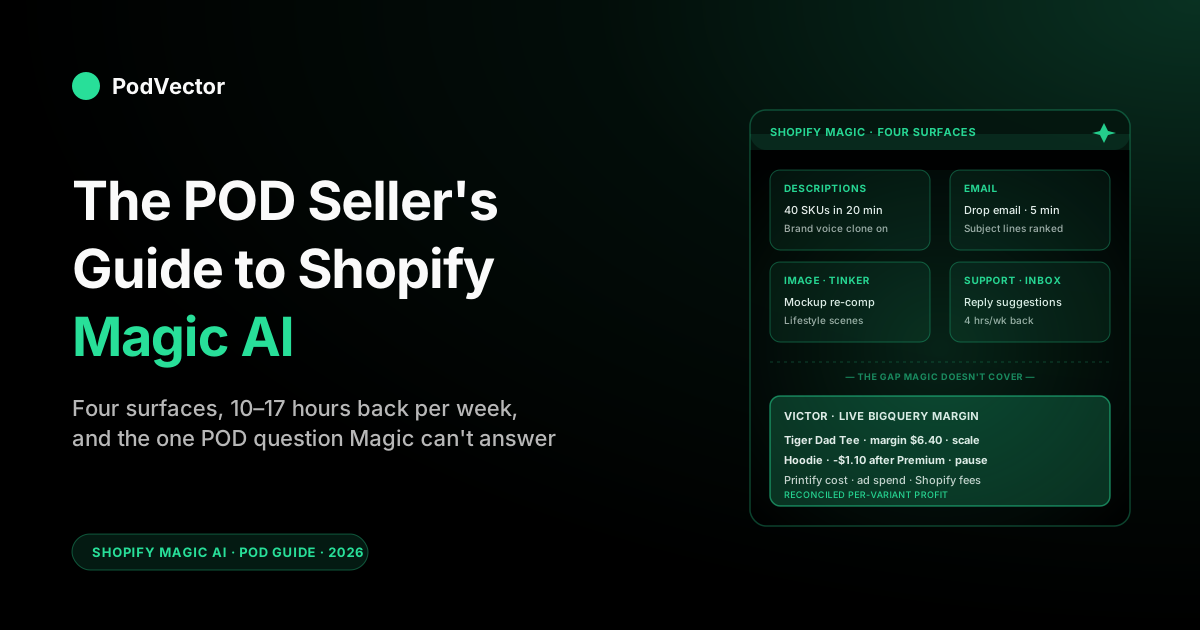
Quick Answer: Shopify Magic is the free, built-in generative-AI layer baked into the Shopify admin — product descriptions, email campaigns, blog posts, image edits, customer-support reply suggestions, theme content, and the Sidekick conversational assistant on top. It ships free on every plan and, used well, replaces 10–20 hours a week of content grunt work for a print-on-demand operator.
It also has one POD-specific blind spot: it has no view of your Printify or Printful supplier cost layer or your ad spend, so it cannot tell you which best-seller is actually losing money. This guide walks the surfaces, the workflows worth running, and the gap a POD-aware analytics layer fills.
What Shopify Magic actually is in 2026
Shopify Magic is the umbrella name for generative-AI features that ship inside the Shopify admin. It is not a separate product, not a separate plan, and not a separate price line on your bill. Wherever Shopify expects you to type content — a product description, an email subject line, a blog post, a theme content block, a reply to a customer in Shopify Inbox, a tag for a product, alt text on an image — there is a "Generate with Magic" button or a Sidekick chat surface that does the typing for you, with reference to your live store data and your existing brand voice.
The thing to understand up front is that Magic is two slightly different products that get marketed as one. The first is a set of generative buttons embedded in admin pages that produce one asset at a time (a description, an email, a blog post).
The second is Sidekick, a conversational assistant that lives in the bottom-right of every admin page and works as a store-aware chat — you ask it questions or give it tasks ("set up a 15% discount for Black Friday weekend"), and it answers or executes against your Shopify data. Both are part of "Shopify Magic." Both are free on every plan, including the Starter plan, with no per-generation usage caps for individual merchants under typical use.
For a print-on-demand seller, this distinction matters because the two halves earn their keep on different jobs. Generative buttons are the answer to "I have to launch 40 SKUs across a ten-design family this week and I cannot write 40 product descriptions by hand." Sidekick is the answer to "I forget how to set up a shipping zone and I don't want to dig through the help docs." Most of this guide focuses on the first half — the catalog-scale generative work that POD operations actually live or die on — but the Sidekick layer is the multiplier that turns a POD store into something one person can run.
The four Magic surfaces every POD seller will use
Shopify markets Magic as if there are dozens of features, which is technically true, but for a POD operator in 2026 it collapses into four surfaces that account for nearly all the value. The other features are mostly variations on these four. Treat the rest as bonus.
1. Product description and catalog content generation
This is the headline feature and the one that earns the most time back for POD. Inside any product editor, "Generate with Magic" produces a 100-300 word description from your title, a few keywords or seed sentences, and the product type.
With brand voice cloning enabled (added in the Winter '26 release), the output sounds like your store rather than a generic ecommerce blurb. Descriptions generate in eight languages, so a POD store selling into the EU or LATAM gets localized copy without a separate translation pass. For a POD store running a ten-design family across four product types — tees, hoodies, mugs, totes — that's 40 product descriptions in roughly 20 minutes of supervised generation, versus a half-day of writing.
The catalog-content surface also includes auto-generated SEO metadata (title tag, meta description), bulk image alt-text, and product tags. The tags matter more than they used to: as Shopify pushes the public Catalog as the index that AI shopping agents read from, well-tagged products surface in conversational queries that keyword-only catalogs miss. For a deeper feature-by-feature treatment of what each generation button does, see the POD seller's guide to Shopify Magic AI features.
2. Email and marketing copy
Inside Shopify Email, Magic generates subject lines, preheaders, and full campaign body copy from a short brief. POD stores tend to run weekly or twice-weekly drop emails — the new design just dropped, the gift-season collection is live, the Black Friday sale is up — and Magic-generated email drafts cut that from a half-hour copywriting exercise to a five-minute review. The subject-line generator in particular is the part most operators end up using daily; it produces ten options against a brief, ranked, and you pick.
Magic also generates blog posts (more on that under workflows), social ad headlines for Shopify Ads campaigns, and the in-admin storefront copy blocks. For POD, the blog-post generation is the underrated one — long-form content for niche audiences (the tiger-dad tee crowd, the emergency-room nurse mug crowd) is exactly what AI shopping agents and Google's AI Overviews chew through when ranking products.
3. Image generation and editing
Magic's image features cover background removal, scene transformation, mockup re-comping, and full text-to-image generation for marketing assets. For POD, the most-used surface is supplier-mockup background work: Printify and Printful provide standard mockup images that look like Printify and Printful mockups. Magic re-backgrounds them into lifestyle scenes — the tee on a person at a coffee shop, the mug on a desk next to a laptop — without sending the source design through a separate image-gen pipeline.
The text-to-image generation, branded as Tinker on mobile in the 2026 release, is more useful for marketing assets than for product images. Use it for social ad creatives, email headers, and seasonal hero banners. Don't use it for the actual product mockup; supplier mockups remain the source of truth on what the customer is buying.
4. Customer support: Shopify Inbox reply suggestions
Inside Shopify Inbox, Magic generates suggested replies to customer questions in the chat queue — sizing, shipping ETAs, order status, return policy. The suggestions are keyed to your store's existing FAQ content and policies, and they ship as drafts you accept or edit before sending. For a POD store running on supplier fulfillment with the typical "where's my order?" volume, the suggested-reply feature alone saves several hours a week, especially around the holiday peak.
The reply quality is good enough that most operators use the suggestions as-is for shipping and policy questions, and edit them only for design-specific or one-off questions. Inbox also feeds the Sidekick conversational layer, so you can ask Sidekick "what's my average response time this week?" and get a real number rather than a vague impression.
What's new in 2026: Sidekick goes agentic, Tinker, SimGym
The Winter '26 RenAIssance release was the largest single update to Shopify Magic since launch. Three additions stand out for POD sellers, and one of them changes the strategic framing of what Magic is.
Sidekick goes from reporter to actor
Pre-2026, Sidekick was a chat reporter — you asked questions, it answered them with reference to your store data. The 2026 release rewires Sidekick as a proactive partner: it suggests tasks unprompted based on patterns in your store ("I noticed your tiger collection has dropped 30% in conversion this week, here are three likely causes and a discount draft you could ship"), and it executes multi-step workflows on your behalf with confirmation gates. For a POD store this is the difference between "Sidekick can tell me my top sellers" and "Sidekick can tell me my top sellers, draft a re-up email for the top three, schedule it, and flag the one that's running low at the supplier."
In practice for a POD operator the agentic Sidekick is most useful for the operational drudge: discount setup, shipping-zone config, collection management, email scheduling, drop-day publishing checklists. The conversion-side or margin-side analysis is still bounded by what Shopify can see — which excludes supplier cost and ad spend. For the broader pattern of where agentic ecommerce AI is going and what it means for POD stores, see the complete guide to AI agents for ecommerce analytics.
Tinker — mobile creative generation
Tinker is Magic's mobile-first image generation surface. You shoot a quick photo or sketch, describe the variation you want, and Tinker produces ad creative or social content in seconds.
For POD stores running Meta and TikTok ads, this is the highest-leverage Tinker use case — generating five creative variants of a hero design for Advantage+ campaigns without leaving the Shopify mobile app. The image quality won't replace a real product photographer for top-of-funnel hero shots, but for high-volume creative iteration on paid social, it closes the gap.
SimGym — A/B testing without real traffic
SimGym is the strangest and most interesting 2026 addition. It runs simulated A/B tests using AI shopper personas against your store changes — different product titles, different theme layouts, different pricing structures — and predicts conversion impact before you ship the change.
For a small POD store that doesn't have the traffic volume to run real A/B tests with statistical power, this is a genuine workaround. Treat the predictions as directional rather than precise; they're a useful prior, not a replacement for shipped tests when traffic allows.
Agentic Storefronts — the public Catalog and AI shopping agents
Strictly speaking this is a Shopify-platform feature rather than a Magic feature, but it ships in the same release and most coverage groups it under the Magic umbrella. The Shopify Catalog is now positioned as the canonical index the major AI shopping agents (ChatGPT, Copilot, and the rest) read from when fielding shopper queries. Shopify reports a 15x increase in AI-driven orders across the platform on the back of this — directional, but it signals which way the discovery channel is moving.
For POD stores with long-tail design libraries, this matters: the "weird specific design that nobody searches for in keyword form" is exactly the kind of inventory that AI agents are good at matching to natural-language queries. Well-populated product data — descriptions, tags, alt text — feeds this discoverability, which is one more reason the Magic generation work compounds. The fuller treatment of Shopify's AI surface area is in the POD seller's guide to Shopify and AI.
Where Magic earns its hours back for a POD store
Magic is good at lots of things. For a POD store specifically, the time-saving concentrates in five workflows. If you do nothing else with Magic, do these.
The catalog-launch workflow
You drop a new design family. There are 30-50 new SKUs across product types and color variants.
Pre-Magic, this was a half-day of description writing, image cleaning, tag-setting, and SEO metadata. With Magic the same workflow is: bulk-import the design from your supplier (Printify or Printful sync), open one product, write three or four sentences of brand-voice seed prompt, hit Generate with Magic, edit the description down to your preferred length, then bulk-apply the tone across the rest of the family using the brand voice clone. End-to-end this is 30-45 minutes for a 40-SKU drop.
The drop-email workflow
Every drop needs an email to the list. With Magic, the workflow is: open Shopify Email, point Magic at the new collection, supply a short brief ("new tiger-dad collection, four designs, $24-$34 price range, ships in 5-7 days"), accept the generated draft, edit one or two paragraphs for voice, pick a subject line from the ranked options, schedule. Five to seven minutes from "I should write the drop email" to scheduled send.
The blog-post-for-niche-SEO workflow
Niche POD audiences google specific things. "Best gift for a retiring nurse" and "funny dad jokes about tigers" are the kind of long-tail phrases that map to your design library and that AI Overviews and Google's traditional results both surface. Magic generates a draft blog post against a target keyword, you edit for voice and accuracy, you embed product links to the relevant collection pages, and you publish.
Fifteen minutes per post versus an hour. At three posts a week you're publishing 12 SEO-targeted pieces a month for the cost of an editor.
The customer-support batch workflow
Every Monday morning there's an Inbox queue full of weekend questions. With suggested replies on, the workflow is: open Inbox, accept-or-edit the suggestion, send. Maybe one in five questions needs a custom answer. The rest get cleared in seconds. The reclaimed time is small per message but adds up to several hours weekly during peak.
The mockup-cleanup workflow
Supplier mockups are functional but unbranded. The Magic image-edit workflow takes the supplier mockup, removes the gray background, drops the product into a lifestyle scene that matches the design's audience (a coffee shop for the dad-joke tees, an outdoor scene for the hiking-pun mugs), and produces three variants.
Pick the one that fits the storefront. Fifteen seconds per product.
None of these workflows require new tools, new subscriptions, or new APIs. They're all built into the Shopify admin and free on every plan. For the broader POD-AI workflow taxonomy beyond Magic, see the complete guide to AI tools for POD sellers.
The cost-side blind spot Magic doesn't fix
Magic is good at content. Magic is conversational and competent on store admin. Magic is, by design, silent on the question that determines whether a POD store is actually a business: which products are profitable.
The reason is structural, not a bug. Shopify sees revenue, refunds, Shopify Payments fees, and the data merchants enter directly into Shopify.
It does not see your Printify or Printful supplier cost — the per-variant base cost that varies by product, by color, by size, by supplier tier (Premium membership vs. standard). It does not see supplier shipping costs by zone, which on a $24 t-shirt routinely eats 25-40% of revenue and varies by destination.
It does not see your Meta ad spend, your Google ad spend, or any reconciled CAC across reconciled conversions. None of that data is in Shopify, so none of it is in Magic, so none of it is in Sidekick.
Magic has actually pushed deeper into analytics in 2026 — it now generates customer-spend projections and auto-written segment descriptions in the admin. But those projections are built on the same Shopify-only revenue data. A spend forecast that doesn't subtract Printify base cost, supplier shipping, and ad spend is a revenue forecast wearing a profit costume. The more analytics Magic ships on top of cost-blind data, the easier it is to mistake revenue signal for margin signal.
What Sidekick can tell you: "Your top three products by revenue last week were X, Y, and Z." What Sidekick cannot tell you: "Of those three, only Y was profitable after Printify base cost, supplier shipping, Shopify fees, and the Meta ad spend that drove most of the orders." A POD store run on revenue rankings is at constant risk of scaling losing products. Without a layer that reconciles supplier cost, ad spend, and order data into per-variant margin, you're optimizing in the dark.
This is the gap a POD-aware analytics tool fills. Victor — the AI employee we build at PodVector AI — looks at your Printify and Printful supplier costs, your Meta and Google ad spend, and your Shopify orders all together. He can answer questions like "which Printify Premium-tier variants lost money last month after ad spend?" whenever you ask.
The roadmap takes Victor from answering to acting — drafting the discount, pausing the unprofitable ad set, flagging the supplier cost change — the same trajectory Sidekick is on for in-Shopify tasks, applied to the cost layer Sidekick can't see. For the deeper treatment of where AI analytics for POD lives, see the complete guide to AI analytics for print on demand.
A 30-day Magic adoption plan for POD
If you're rolling Magic into a POD store from scratch, the order of operations matters. The features compound in a specific direction; doing them out of order leaves time on the table.
Week 1 — turn on brand voice and clean the catalog
Enable brand voice cloning by feeding Magic 20-50 of your best existing product descriptions (or 10-20 of your blog posts and email campaigns if you're newer). Run Generate with Magic on five existing products, compare to your manual versions, and adjust the brand voice samples until output reads natively.
Then sweep the catalog: regenerate descriptions on any product where the existing copy is generic, missing, or off-voice. Set bulk SEO metadata at the same pass.
Week 2 — wire Magic into the drop pipeline
Build a drop-day checklist that uses Magic at every content step: product import, description generation, mockup cleanup, drop email, social ad creative via Tinker. Run one drop end-to-end with the checklist. Time it. Compare to the pre-Magic version. The win should be 3-5 hours per drop.
Week 3 — turn on Inbox and publish blog content
Enable Shopify Inbox with Magic suggested replies. Sit with the suggestions for a week and tune any that need a different default response. In parallel, generate two niche-keyword blog posts via Magic, edit, link to relevant collection pages, publish. Track impressions and clicks at the end of the week.
Week 4 — agentic Sidekick + cost-side analytics
Move into the proactive Sidekick workflow: enable task suggestions, accept the discount-draft and email-draft suggestions through a holiday or drop weekend, see how the conversion-side recommendations land. Then — separately, because Sidekick can't see this — connect a POD-aware analytics layer for the cost-side view. The combination is the full picture: Magic for the content production, Sidekick for the in-Shopify operational tasks, a POD-aware AI employee for the supplier-cost-and-ad-spend reconciliation Shopify can't reach.
Real numbers: what Magic actually saves
Shopify's own marketing claims Magic saves merchants 15-20 hours per week. That number is plausible for a high-content store. For a typical POD store with one or two drops a week, an active email list, and a niche blog, the realistic time savings work out to:
- Catalog production: 4-6 hours per week saved on description writing, alt text, tags, SEO metadata. Higher during big design-family launches.
- Email marketing: 2-3 hours per week saved on subject lines, drop-email body copy, segmented campaign drafts.
- Customer support: 2-4 hours per week saved on Inbox replies, especially during peak. Higher during the November-December gift season.
- Image work: 1-2 hours per week saved on mockup re-comping, social creative variants, email headers.
- Blog and social: 1-2 hours per week saved on blog post drafts and social copy.
That ranges from 10 to 17 hours weekly for a one-person POD store. At a $50-$80/hour opportunity cost (which is what most full-time POD operators value their own time at), Magic earns back $25,000-$70,000 of annualized time even before counting any conversion lift from better-quality content. And it's free — no per-token fees, no subscription tier above what you already pay for Shopify, no API metering.
What it does not earn back: the scaling decisions that determine whether your store grows or stalls. Those are downstream of margin visibility, and margin visibility is downstream of cost-side data Magic doesn't have.
Magic vs. ChatGPT and the rest of your AI stack
The most common question from POD operators new to Magic is "do I still need ChatGPT or another general AI assistant if I have Magic?" Short answer: yes, for different jobs. Long answer:
Use Magic for:
- Anything that lives inside Shopify content (descriptions, emails, blog, support, theme copy, image edits) — Magic is faster because it's in-context with your data and brand voice clone
- Catalog-scale work — Magic handles bulk operations natively, ChatGPT requires custom prompts and copy-paste
- Sidekick-style "do this in my store" tasks — Sidekick has the API permissions to actually execute, ChatGPT does not
Use ChatGPT or a general AI assistant for:
- Open-ended strategy and analysis that lives outside Shopify (positioning, audience research, niche brainstorming)
- Long-form content where you want more control over voice and structure than Magic gives
- Code, scripts, and any custom data work where you're shaping the output through iterated prompts
- Cross-tool workflows where Shopify is one input among several
For deeper treatment of how each tool fits a POD operator's workflow, see the POD seller's guide to ChatGPT for Shopify and the POD seller's guide to generative AI for ecommerce.
And the cost-side analytics layer:
Neither Magic nor ChatGPT solves the per-variant margin question for a POD store. To know which products are actually profitable after Printify cost, supplier shipping, Shopify fees, and Meta ad spend, you need something that pulls your supplier costs, ad spend, and Shopify orders together and shows you the true profit on each one. That's what Victor does.
That's the role Victor plays alongside Magic and Sidekick: Magic produces the content, Sidekick runs the in-Shopify ops, and Victor reallocates ad spend, pauses the losing ad sets, and adjusts the listings Shopify can't cost — each with your approval. They're complementary rather than competitive.
FAQs
Is Shopify Magic free?
Yes. Magic ships free on every Shopify plan, including Starter. There's no per-generation usage fee for typical merchant use. The underlying compute is paid for by Shopify as part of the platform. (Shopify's official Magic page confirms availability across plans.)
Does Magic work on the Starter plan or only on higher tiers?
Magic and Sidekick are available on every plan from Starter up. Some integrations (like Shopify Email at higher send volumes, or Shopify Inbox features at higher chat volumes) hit plan-tier limits, but the Magic generation surface itself is plan-agnostic.
How does Magic handle my store data and brand voice?
Magic reads your store's existing content (product descriptions, blog posts, email campaigns, theme content) to clone brand voice. The data stays inside Shopify's tenant boundary; it's not used to train shared models that other merchants benefit from. You can disable brand voice cloning if you'd rather generate against a generic baseline.
Can I bulk-generate descriptions across hundreds of products?
Yes — Magic supports bulk operations through the Shopify admin's bulk editor and through Sidekick's task surface ("regenerate descriptions on every product in the spring collection using the new brand voice"). For very large catalogs (5,000+ SKUs) the bulk job runs as a background task; for typical POD store sizes it completes in minutes.
Does Magic write good product descriptions or just generic AI slop?
The output quality is meaningfully better with brand voice cloning enabled and a few sentences of seed prompt. Without those, the default output reads like generic ecommerce filler. Operators who treat Magic's output as a first draft to edit, rather than a finished asset to ship, get the best results — same as any generative tool.
Can Sidekick see my Printify or Printful supplier costs?
No. Sidekick reads Shopify-side data only — orders, products, customers, refunds, payouts. Supplier-side cost data (Printify or Printful base costs, shipping, supplier promo tiers) lives in supplier APIs that Shopify doesn't currently sync. For per-variant margin questions you need a cost-aware analytics layer that joins supplier APIs to your Shopify orders.
Will AI shopping agents replace my storefront?
Not replace — supplement. The major AI shopping agents (ChatGPT shopping, Copilot, and others) read product data from indexed catalogs, including the Shopify Catalog.
For POD stores with long-tail design libraries, this is mostly upside: agents are better than Google at matching idiosyncratic queries to specific designs. The work is keeping product data — descriptions, tags, alt text — clean enough that agents can find your products. Magic does that work.
What's the most underrated Magic feature for POD?
Brand voice cloning. Most POD operators don't enable it, default Magic output reads like generic ecommerce, they conclude Magic is mediocre, and they stop using it. With voice cloning on, the same generation surface reads like the store's own writing, and the time-savings compound across every content surface.
Magic handles your content. Victor handles your margin.
Shopify Magic produces the descriptions, emails, and blog posts. Sidekick handles in-Shopify ops. The piece neither covers — per-variant profit after Printify cost, supplier shipping, Shopify fees, and ad spend — is where Victor goes to work: he sees your store and supplier data together, then reallocates ad spend, pauses unprofitable ad sets, and updates listings — each with your approval.
Try Victor free