
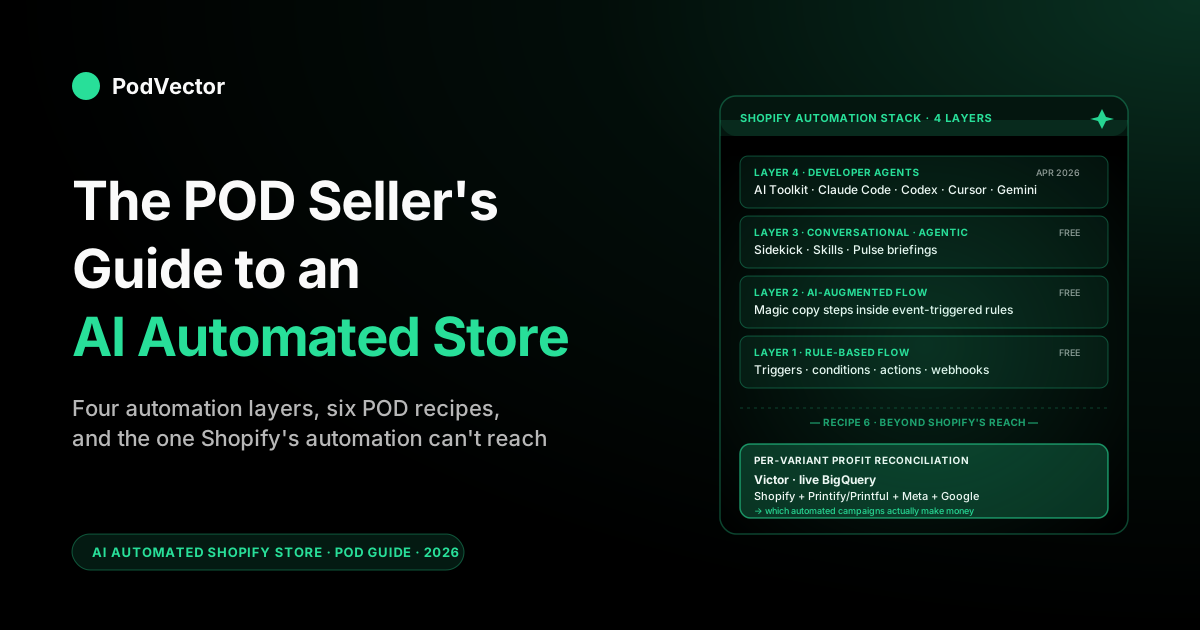
Quick Answer: An "AI automated Shopify store" in 2026 isn't one product — it's four overlapping layers of hands-off execution stacked together: rule-based Shopify Flow for deterministic events, AI-augmented Flow for content generation inside those rules, Sidekick + Skills for conversational work you save and re-run, and the Shopify AI Toolkit (released April 9, 2026) that lets external coding agents operate the store directly through its APIs.
For a print-on-demand operator, the high-leverage automations are six recipes: the Monday revenue brief, the drop-day catalog spin-up, the customer-support triage, the marketing-segment refresh, the fulfillment-exception alert, and the per-variant profit reconciliation.
The first five are now essentially free on Shopify-native surfaces. The sixth — reconciling Shopify, Printify, Printful, Meta Ads, and Google Ads into per-variant margin — is the one Shopify's automation can't reach, and it's where most POD operators discover their busiest automations are scaling unprofitable products.
What "AI automated Shopify store" actually means in 2026
Search "AI automated Shopify store" and you get two flavors of result. The first is "build a Shopify store with AI in five minutes" content — generators like Storebuild AI, Atlas, Dropmagic, AutoDS — which is about the cold-start problem and is mostly irrelevant to a working POD operator.
The second is "set up automations on your existing store" — the Shopify Flow product, AI-augmented marketing tools, agentic chat. That second flavor is what actually moves the needle on an established print-on-demand operation.
For a POD seller, "automated" is the more important word in the phrase. Shopify automation in 2026 isn't a single product — it's four overlapping layers, each solving a different class of work, and each with a different ROI envelope.
Map the layers to the recipes that actually run your store, install only what saves real hours, and you end up with a Shopify operation that runs four to eight hours a week instead of twenty. The trap is installing tools by category instead of by recipe — most POD stores end up paying for three overlapping AI marketing apps that each automate 30% of the same workflow.
This guide walks the four automation layers, the six recipes that matter for POD operators, what Shopify's new AI Toolkit (the April 2026 release) changes about the developer-agent layer, and the one recipe Shopify itself can't ship — the one that decides whether your automated drop cycle is making money. For the broader category map, see the POD seller's guide to AI Shopify store; this guide is the automation-and-execution counterpart.
The four layers of Shopify automation
Before walking the recipes, the layer map. Every automation you set up on a Shopify store falls into one of four buckets, and they stack rather than compete.
Layer 1 — Rule-based Shopify Flow
Shopify Flow is the deterministic if-this-then-that engine that's been on the platform for years and is now free on every plan. Triggers are events (order placed, customer created, inventory threshold hit, fulfillment status changed); conditions are filters (order total over $X, customer tag includes "VIP", product in collection Y); actions are the response (tag the customer, send the email, create the task, post the webhook).
No AI in the loop. This layer is the workhorse of Shopify automation and most POD stores under-use it because the marketing around AI is louder than the marketing around rules.
Layer 2 — AI-augmented Flow
The Flow engine now has AI-generation steps as a first-class action type. The trigger and condition are still deterministic (order placed, product tag matches), but the action can include "generate a personalized email subject line for this customer," "draft a fulfillment-delay note in our brand voice," or "rewrite this product description for a flash-sale email." The AI doesn't decide whether to fire; the rule decides.
The AI fills the variable text inside the action. For POD this is where Flow becomes useful for repetitive content work that previously needed a human pass.
Layer 3 — Sidekick + Skills (conversational/agentic)
Sidekick is Shopify's in-admin AI assistant. The new piece in 2026 is Skills — saved prompts that turn an ad-hoc conversational query ("show me last week's revenue, AOV, and top three movers by week-over-week change") into a re-runnable artifact.
Combined with Pulse (scheduled morning briefings), Sidekick covers the analytics and ad-hoc execution layer that rule-based Flow can't reach because the work isn't event-triggered. Free on every plan. The deeper Sidekick treatment is in the POD seller's guide to Shopify Sidekick AI.
Layer 4 — Developer agents (Shopify AI Toolkit 2026)
The newest layer, launched April 9, 2026. The Shopify AI Toolkit is a free open-source plugin that connects external coding agents — Cursor, Codex, and similar CLI coding agents — directly to your Shopify store's APIs.
The agent runs locally; you give it a task in natural language ("update the product descriptions across the Tiger Dad collection to mention the new heavyweight blend, then adjust prices by $2 for the long-sleeve variants"); the agent does it through the API without you opening the Shopify admin. This layer is overkill for most operators today and exactly the right layer for technical POD founders running large catalogs or multiple stores.
How the layers stack in practice
A drop-day workflow uses all four. Sidekick (Layer 3) drafts the launch checklist.
Flow (Layer 1) fires the inventory-threshold alerts as the drop sells through. Magic and AI-augmented Flow (Layer 2) generate the email-blast copy and abandoned-cart sequences personalized to the drop.
The AI Toolkit (Layer 4) bulk-updates the catalog's metadata after the drop closes. None of the layers replaces the others; they cover non-overlapping classes of work.
Recipe 1 — The Monday merchant brief (Sidekick + Skills)
The single highest-ROI automation for a POD operator is the recurring Weekly Health Report. Done by hand it's the part of the week most operators skip; done with Sidekick + Skills it runs in 90 seconds and you actually read it.
The setup
Open Sidekick in the Shopify admin. Type the brief you want as a natural-language query: "Every Monday morning, show me last week's revenue versus the trailing four-week average, AOV, top five products by units sold, biggest week-over-week mover by revenue, refund rate, and any product whose inventory crossed below my reorder threshold." Sidekick generates the answer once, then offers to save it as a Skill. Save it, name it "Monday Brief," and either re-run it manually each Monday or — if you have Pulse enabled on your plan — schedule it as a morning briefing that arrives in email or admin notification.
The POD-specific tweak
Add the design-level cut. Most POD stores have many SKUs per design (six T-shirt colors, three hoodie styles, etc.) and the per-SKU view in the default brief obscures whether a design is actually moving. Phrase the query as "group products by their design tag (the prefix before the variant suffix) and show me the top five designs by units sold and by revenue separately." Now the brief tells you what designs are landing, not just which color of which design happened to spike.
The boundary
Sidekick can pull from anything inside Shopify's data model — orders, products, customers, inventory, fulfillment, refunds, in-platform marketing campaigns. It cannot pull supplier cost from Printify or Printful, and it cannot pull ad spend from Meta or Google. Your brief tells you revenue and units, not margin. That's Recipe 6.
Recipe 2 — Drop-day catalog spin-up (Magic + Flow + Toolkit)
Drop day is the work-hours-into-launch-day equation that defines a POD operation's velocity. A typical drop with 15 designs across five base products is 75 SKUs that each need a title, description, tags, alt text, mockups synced from Printify or Printful, collection assignment, and SEO metadata.
Done by hand that's a full day of focused work. Automated, it's two to three hours.
Step 1 — Bulk-generate listings (Magic or ChatGPT)
For volume under 50 SKUs in a drop, Shopify Magic in the per-product editor is the fast path: open the product, click Generate, edit the 20% that needs your voice, ship. For volume over 50, the cheaper pattern is to feed the design briefs into a general-purpose AI chat assistant in a single session, get back a structured table, and bulk-import via CSV.
The brand-voice work happens once at the prompt level rather than per product. The deep ChatGPT treatment is in the POD seller's guide to ChatGPT for Shopify.
Step 2 — Flow rules for the launch sequence
Set up Flow rules that fire on the drop's tag. When a product tagged "drop-2026-04" is published: send to the launch collection, add to the homepage hero rotation, fire a webhook to your Klaviyo segment that's queued for the launch email, post to Slack so the team knows the drop is live.
None of this involves AI; it's deterministic rule-based work that should run without you watching it. The reason most POD stores don't have this set up is that the operator has been doing it by hand on launch day for years and it doesn't feel like enough work to automate. It is.
Step 3 — Toolkit-driven post-drop catalog cleanup
This is where the new AI Toolkit (Layer 4) becomes worth the install. Two days after the drop, you can ask your coding agent via the Shopify AI Toolkit: "Find all products in the drop-2026-04 collection that have sold zero units, mark them as draft, and remove them from the homepage hero rotation.
Find all products that have sold more than 20 units, add them to the bestsellers collection." That's a 15-minute manual cleanup task replaced by a 30-second prompt. For technical POD founders this layer compounds across drops; for non-technical operators it's overkill until volume justifies the learning curve.
Recipe 3 — Customer-support triage (Inbox + chatbot tier)
The right level of customer-support automation depends on volume more than any other recipe in this guide. The wrong tier wastes money or trashes your reputation; the right tier saves real hours.
Tier 1 — Shopify Inbox + Magic (free, $0–$30K/month)
For a POD store under $30K/month in revenue, Shopify Inbox covers the basics — chat widget on the storefront, mobile app for the operator, AI-suggested replies pulled from your store's order data ("Where's my order?" gets the actual tracking number from the matched order, not a generic "let me check"). The AI here is the suggested-reply layer; you accept or edit before sending. Free, low risk, no maintenance overhead, and good enough until you cross the volume threshold where reply latency itself becomes a conversion problem.
Tier 2 — Third-party AI chatbot ($30K–$100K/month)
Above $30K/month, evaluate one paid chatbot — Tidio, Gorgias AI, or a Shopify-specific option from the App Store — on a 30-day trial. The pattern that works for POD is to wire the bot to live catalog and order data (not a static knowledge base that goes stale every drop), set conservative fallback to "let me check with the team," and audit the first week's transcripts before scaling deflection rate. The pattern that fails is letting a generic chatbot hallucinate your return policy because the knowledge base wasn't updated after the last terms-of-service edit. The category breakdown is in best AI chatbot for Shopify (compared).
Tier 3 — Agentic support (above $100K/month, with engineering)
The new tier in 2026 is fully agentic support — bots that not only answer questions but execute actions (issue refunds, modify orders, update shipping addresses, create return labels) within bounded permissions. The technology works; the operational risk is non-trivial because the failure mode is "the bot refunded $4,000 of orders it misclassified." For POD stores at this volume, the right approach is usually a constrained agentic layer in front of a human reviewer, not full automation. The agentic landscape is mapped in agentic AI for ecommerce: what it looks like for POD sellers.
Recipe 4 — Marketing-segment refresh (Klaviyo AI + Advantage+)
Marketing automation is the category with the most overlapping AI tools and the easiest place to overspend. The honest recipe for a POD store is short.
Email and SMS — Klaviyo AI
Klaviyo's AI features in 2026 generate subject-line variants, predict the right send time per recipient, build dynamic segments from natural-language prompts ("customers who bought a women's hoodie in the last 90 days but haven't opened the last three campaigns"), and recommend products inside automated flows. For a POD store with an existing Klaviyo install, turning these on is mostly free and the lift on open and click rates is typically 5–15%.
The work is in actually using the dynamic segments — most operators set up the AI segments and then continue blasting their full list anyway. Set up the segments, then build a Flow rule that automatically routes new customers into the right one.
Paid social — Meta Advantage+
Meta Advantage+ is the AI-driven campaign type that lets the algorithm decide creative, audience, and budget allocation within bounds you set. For POD with a strong creative library, Advantage+ Shopping campaigns now consistently outperform manually-targeted campaigns at the same budget on most accounts under $50K/month in monthly ad spend, because the algorithm has more data than the operator does.
Above that spend level, manual segmentation often re-takes the lead because the operator's category and audience knowledge is now richer than the algorithm's. The rule of thumb: under $50K/month in ad spend, default to Advantage+; above it, run a 70/30 split and decide based on your own attribution.
The marketing automation gap for POD
Klaviyo and Advantage+ optimize for revenue, not margin. They will scale a hoodie campaign for a design that returns 3.5× ROAS even if the per-unit margin after Printify cost and shipping is breaking even.
This is the same gap as Recipe 6 — your automation surface is optimizing the wrong metric. The fix isn't to turn off the marketing automation; it's to feed it the right cost data via the analytics layer below.
Recipe 5 — Fulfillment-exception alerts (Flow + supplier webhooks)
POD's structural fulfillment risk is supplier-side: production delays at Printify or Printful, base-product stockouts at the print provider, address-failure auto-cancellations, lost-in-transit packages. Done by hand the operator notices these when a customer emails. Automated, the operator notices them before the customer does.
The Flow setup
Set up Flow rules that fire on order-fulfillment events. When an order has been in "in production" status for more than five days: tag the order, post a Slack message, and queue a customer email.
When a fulfillment status changes to "cancelled" by the supplier: tag the order, fire the email immediately, create a task for manual outreach. When a tracking event hasn't updated in seven days post-shipment: tag the order, alert the operator. None of this requires AI; it requires Flow rules that most POD stores never set up because the supplier dashboards are where the operator looks for problems.
The AI-augmented version (Layer 2)
Add an AI step inside the Flow action: "Generate a customer-facing apology note explaining the delay, in our brand voice, mentioning that we're shipping a free [base product] sticker to make it right." Now the Flow doesn't just queue the task; it queues the draft. You approve or edit and send. For high-volume stores this saves the per-incident drafting work that adds up across 50+ exceptions a month.
The Toolkit version (Layer 4)
For technical operators, the AI Toolkit can run a daily reconciliation script: "Pull today's Shopify orders that don't have a matching Printify or Printful production order created in the last 24 hours; flag them as a fulfillment gap." This catches the most expensive class of failure — orders that fell through the integration cracks and were never sent to the supplier at all — which Flow can't catch because there's no event to fire on.
Recipe 6 — Per-variant profit reconciliation (the gap Shopify can't close)
This is the one recipe Shopify's automation surface — Flow, Magic, Sidekick, Toolkit — cannot run, and it's the recipe that decides whether all the others are pointing in the right direction.
Why Shopify can't run it
Shopify's data model contains revenue, order count, product, customer. It does not contain Printify's per-variant supplier cost (which varies by base product, blank vendor, and print region).
It does not contain Printful's shipping price by zone (which can be 2× the supplier cost on a $15 T-shirt). It does not contain Meta or Google ad spend by campaign — let alone by audience or by attributed product.
Sidekick can tell you which design generated the most revenue last week. It cannot tell you which design is actually losing money on every order after supplier cost, shipping, and ad spend.
What "automated profit reconciliation" looks like
Victor already does this for you. He connects to Shopify, Printify or Printful, Meta Ads and Google Ads, and keeps everything in sync every day. He matches each order to its supplier cost and ad spend, so you see the real margin on every product variant.
Surface it through a query interface (or a conversational layer) so the operator can ask "which designs lost money last week" and get a real answer in under a minute. Built in-house this is two to four weeks of engineering. Built on top of Victor it's a connection wizard and the same conversational interface the rest of the AI Shopify stack already gave you.
The pattern that pays for itself in week one
Run the first reconciliation pass and find the top three bestsellers by revenue. Compare their margin after all costs.
The pattern most POD stores discover: at least one revenue-bestseller is breaking even or losing money per order, and the marketing automation layer (Recipe 4) is currently scaling it because ROAS looks healthy on a revenue basis. Pause that one campaign and the savings usually pay for the analytics layer for the year. This is the closing of the loop that the rest of the AI automation stack opens.
The Shopify AI Toolkit 2026 — what it actually does
The April 9, 2026 launch of the Shopify AI Toolkit changed what's possible at Layer 4 of the automation stack and deserves its own treatment because the existing roundup content rarely covers it accurately.
What it is
The Toolkit is a free, open-source plugin that exposes Shopify's APIs to external coding agents — Cursor, Codex, and similar CLI coding agents — through a standardized tool interface (the Model Context Protocol layer). The agent runs locally on your machine, authenticates against your Shopify store, and can read and write through the same APIs your custom integrations would use. There's no AI happening on Shopify's side; the AI is the agent you're already running.
What it changes for POD operators
The work that benefits is bulk catalog operations and cross-store coordination. Updating descriptions across 200 products in a collection.
Adjusting prices by a fixed percent across a tag. Tagging orders by some logic that Flow doesn't natively support.
Reconciling product data across two stores under the same brand. None of this was impossible before — you could write a Python script against the Admin API — but the Toolkit collapses the engineering effort to "describe what you want in natural language to an agent that already knows the API." For technical POD founders running large catalogs, the productivity multiplier is real.
What it doesn't change
Toolkit doesn't see your Printify or Printful data. It doesn't see your Meta or Google ad spend.
It operates on Shopify's data model and Shopify's data model only. The same gap that Recipe 6 covers is the same gap the Toolkit can't close — and the Toolkit makes it easier to scale your catalog at the speed that makes the gap more expensive, not less.
The honest readiness check
If you don't already use a coding agent (Cursor, Codex, or a similar CLI agent) for non-Shopify work, the Toolkit isn't worth installing yet — the learning curve is the agent itself, not the plugin. If you do, the Toolkit takes about 15 minutes to set up and the first useful task ("write me a one-liner that finds products with no images and tags them") pays back the install. For non-technical POD operators the first three layers cover 95% of the value; Layer 4 is opt-in.
What's not automatable yet — and shouldn't be
Healthy automation discipline includes deciding what stays human. The recipes above cover the work that AI does as well as or better than a human at lower cost. The work that doesn't belong in the automation stack — at least not yet — is its own list.
Design selection and curation
AI can generate design variations and recommend products to feature based on revenue history. It cannot decide whether a design fits your brand voice, whether the cultural reference will land in the next quarter, or whether the audience that liked your last drop will like this one too. Curation is taste work; taste work stays with the operator.
Pricing strategy
AI can adjust prices within a defined band based on rules you set. It cannot decide whether to position your premium tee at $34 versus $39 in a competitive niche where the difference is brand signaling, not unit economics. Pricing strategy stays human; price-execution rules can automate.
Customer-relationship-defining moments
The customer who's emailing about a damaged order from their wedding is not the right place for an automated reply, even a well-drafted one. The high-LTV moments — the apology that turns a refund into a referral, the surprise-and-delight on the second order, the personal note on the influencer outreach — these stay human and the operator who automates them is making a category error about what's actually scalable.
The pivot decision
The AI can tell you that a category isn't working; the AI cannot decide whether to pivot the brand. Strategy decisions — what new niche to enter, what supplier to switch to, when to hire — these are operator decisions informed by AI-surfaced data, not delegated to it.
A 30-day automation rollout
If you're a POD operator with a working Shopify store and the automation layer is mostly empty, the highest-leverage 30 days look like this.
Week 1 — Sidekick + the Weekly Health Report
Set up the Weekly Health Report Skill (Recipe 1). Run it against last week's data.
Spend 30 minutes adding the design-level cut and the inventory-threshold check. By Friday you should have at least three saved Skills (Weekly Health Report, drop-day pre-launch checklist, abandoned-cart deep dive) and you should have read your first AI-generated weekly report.
Week 2 — Flow rules for drop-day and fulfillment
Audit your existing Flow rules — most POD stores have none. Set up the drop-day launch sequence (Recipe 2 step 2) and the fulfillment-exception alerts (Recipe 5).
Both are deterministic, both are work you're currently doing by hand, and both pay back in the first week the automations fire. The lift here is operator hours, not AI per se.
Week 3 — Marketing automation + chatbot decision
Turn on Klaviyo's AI features if you haven't. Set up two AI-driven dynamic segments and route new customers into them via Flow.
If you're under $30K/month in revenue, leave Shopify Inbox as your support layer and don't install a paid chatbot yet. If you're above, start a 30-day chatbot trial with one app.
Don't install three. The deeper marketing-automation treatment is in the POD seller's guide to AI marketing for Shopify.
Week 4 — Connect the cost layer (close Recipe 6)
Connect Printify or Printful, Meta Ads, Google Ads, and Shopify into a unified analytics layer (Victor, or a self-built warehouse if you have the engineering). Run the first per-variant margin reconciliation.
Most operators find at least one bestseller that's actually unprofitable, which usually pays for the analytics layer in the first month. This week is the one that makes the previous three weeks point in the right direction. For the broader analytics treatment, see the complete guide to AI analytics for print-on-demand.
The optional Layer 4 add-on
If you're a technical founder and you're already using a coding agent for other work, install the Shopify AI Toolkit (Layer 4) in week three or four. If you're not, leave it for later. The first three layers cover the recipes most POD stores actually need automated.
FAQs
Can a Shopify store really run on autopilot with AI?
Not in the strict sense — there is no setting that runs your store without you — but the operator-hours-per-week required to keep a working POD store running is meaningfully lower with the four automation layers in place than without them. A typical POD store at $20K–$50K/month in revenue can drop from 20+ hours a week of operational work to 6–10 hours with the recipes in this guide deployed, freeing time for design work, brand work, and pivot decisions that AI can't make. "Autopilot" is the wrong frame; "operator-leverage" is closer.
Is Shopify Flow free? What about the AI features?
Flow itself is free on every Shopify plan, including the Starter plan. The AI-augmented action steps (Layer 2) are also currently free on every plan with no per-use cap under typical merchant load.
Sidekick and Skills (Layer 3) are free as well. The Shopify AI Toolkit (Layer 4) is free and open-source. The cost layer is the third-party apps you choose to add (Klaviyo, paid chatbots, profit-reconciliation analytics) — none of which are required to start.
What's the most under-used Shopify automation feature for POD stores?
Shopify Flow rules tied to order-fulfillment events (Recipe 5). Almost every POD store has experienced supplier-side fulfillment problems and almost no POD store has set up the Flow rules that catch them automatically. The one that pays back fastest is the "Printify or Printful production order is more than five days old without shipping" rule — most stores discover they have 2–5% of orders sitting in this state at any given time and the customer-email automation that fires when the rule triggers prevents the support-ticket flood that would otherwise happen 7–10 days later.
Should I install the Shopify AI Toolkit if I'm not technical?
Probably not yet. The Toolkit (Layer 4) requires that you already use a coding agent like Cursor or Codex; the agent is the bigger learning curve.
If those tools aren't already part of how you work, the first three layers — Flow, AI-augmented Flow, Sidekick + Skills — cover the high-ROI POD recipes without needing the Toolkit. Revisit when you've outgrown what the Shopify admin and Sidekick can do, or when you're managing multiple stores and the bulk-operation work becomes the bottleneck.
Will marketing automation like Klaviyo AI and Meta Advantage+ replace my marketing manager?
No. They will replace the manager's manual work — subject-line testing, send-time picking, audience tweaking, creative rotation — and free that time for the work that doesn't automate well, which is brand strategy, creative direction, and the partnerships and influencer relationships that move acquisition channels meaningfully. The pattern for POD stores is that AI marketing automation extends a small marketing team's reach by 2–3×; it doesn't eliminate the role.
Can Shopify's automation tell me which automated campaigns are profitable?
No, and this is the structural point of Recipe 6. Shopify's automation surface — Flow, Magic, Sidekick, Toolkit, plus Klaviyo and Advantage+ on top — optimizes for revenue and engagement metrics it can see (orders, AOV, click rate, ROAS on attributed revenue).
It cannot see Printify or Printful per-variant supplier cost or the real shipping price by zone, which means it cannot compute true per-order or per-campaign margin. For that you need the unified analytics layer that Recipe 6 describes — Victor, or a self-built warehouse — sitting alongside the rest of the automation stack.
How does Shopify Flow compare to Zapier or n8n for POD automation?
Flow is deeper inside the Shopify data model and free; Zapier and n8n are shallower in Shopify but broader across the rest of your stack (Notion, Discord, Airtable, Google Sheets, custom HTTP webhooks). The pattern that works for POD is to use Flow for everything that fires off Shopify events and stays inside Shopify or talks to one webhook out (to Slack, Klaviyo, your warehouse).
Use Zapier or n8n for cross-tool workflows that touch three or more non-Shopify systems. Don't pay for Zapier just to do work Flow already does for free.
What's the right order to roll out automation for a brand-new POD store?
Skip it. New POD stores under $5K/month in revenue should be doing the work by hand because the time spent setting up automations is time not spent finding the niche-product fit that will determine whether the store survives at all.
Once you cross $5K/month and have a working catalog rhythm, start the Week 1 plan above. Premature automation calcifies workflows that aren't yet known to be the right ones.
Where can I read more about how this fits together?
For the broader category map of every AI tool for Shopify rather than the automation-and-execution angle, see the POD seller's guide to AI Shopify store. For the umbrella treatment of every Shopify AI surface, see the POD seller's guide to Shopify and AI.
For the AI Overview cluster hub, see the AI Overview cluster hub; for the topic, see the AI Analytics topic hub. For the inventory-forecasting agent angle, see AI inventory forecasting Shopify: what it looks like for POD sellers. The single best external reference for the Toolkit launch and the broader agentic-commerce direction is Shopify's own agentic-commerce announcement.
Automate everything Shopify can — then close the gap it can't
The four automation layers — Flow, Magic, Sidekick, Toolkit — handle five of the six recipes a POD store actually runs. The sixth, per-variant profit reconciliation across Shopify, Printify, Printful, Meta Ads, and Google Ads, is the one Shopify itself can't ship. Connect your stack and let Victor reconcile the margin, pause the campaigns that are losing money, and update the listings — with your approval on every move.
Try Victor free