
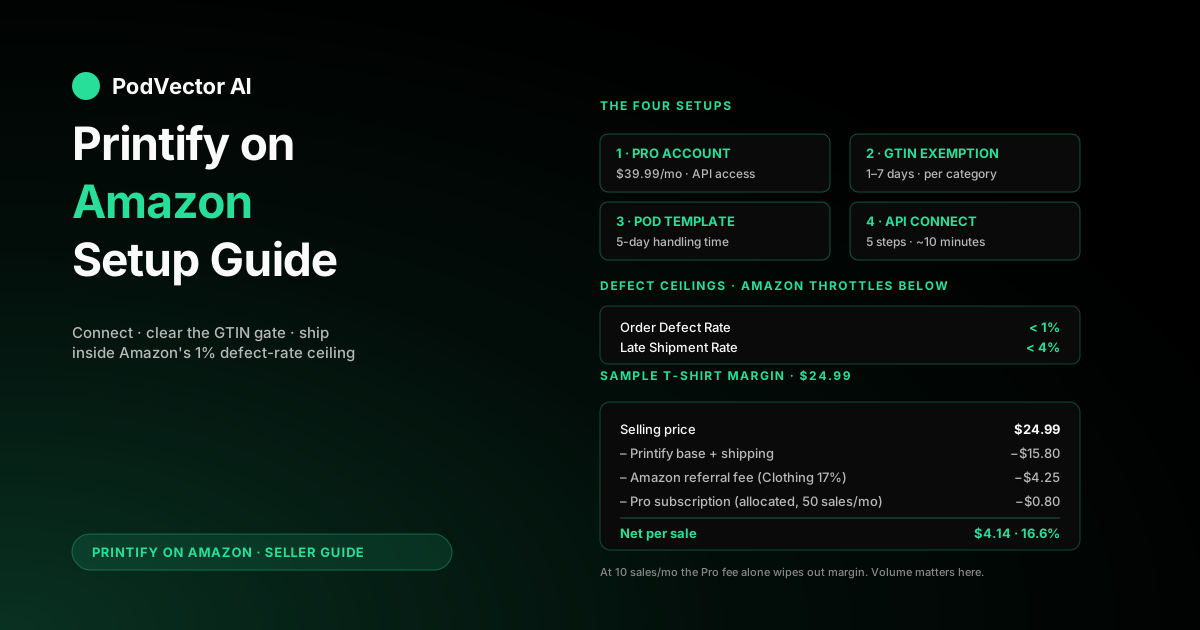
Quick Answer: Selling Printify products on Amazon takes four setups: a Professional Seller Central account ($39.99/month), a GTIN/UPC exemption, a Printify-friendly shipping template, and an API connect that authorizes Printify to publish and ship on your behalf.
Plan on 2-4 hours of clock time spread over 1-2 weeks. The exemption review is what makes it slow — Amazon's team takes 1-7 business days, and you can't list a single POD product until it lands.
Once it's live, Amazon's defect-rate and IPI scoring are where most POD sellers stumble. Printify's 2-7 day production has to be reconciled with Amazon's promised delivery dates from day one, or your listings get throttled before they ever rank.
Why Amazon is worth (and isn't worth) a POD seller's time
Amazon has the largest captive buyer pool of any marketplace POD touches. Roughly 200 million Prime members. Search-led discovery. Buyers who'll click Add to Cart on a $19 mug without thinking twice because the trust is pre-loaded.
That's the upside. The downside is that Amazon is the most punishing platform a POD seller will ever list on. Late shipments downrank you. Buyer complaints close listings. The Order Defect Rate ceiling is 1% — twice as tight as eBay's — and Amazon doesn't grade on a curve for POD providers.
The sellers who do well here treat Amazon as a complement to Shopify or Etsy, not a replacement. Listings on Amazon work best when they're keyword-driven, narrow-niche, and priced for Amazon's referral-fee structure. Trying to migrate an Etsy boutique catalog over verbatim usually fails — wrong audience, wrong economics.
If you're weighing whether Amazon belongs in your channel mix at all, the broader Printify topic hub and the Printify integrations cluster have the channel-comparison context.
What you need before you start
The connect is short. The prep is what stretches the timeline.
A Professional Seller Central account. Amazon's Individual plan ($0/month + $0.99 per item) blocks the API access Printify needs. You need the Professional plan ($39.99/month, US) to authorize third-party integrations. Sign up at sell.amazon.com if you don't have one, and verify the account fully — Amazon will hold the connect until verification clears.
Tax and bank info on file in Seller Central. Amazon won't deposit funds — and won't approve a GTIN exemption — until both are complete. This trips up most first-timers: the connect can succeed while payouts are blocked behind incomplete tax info.
A Printify account with at least three product designs ready. The exemption process asks for sample images of what you intend to list. Empty Printify catalog means a stalled application. Pick three designs that share a brand identity — Amazon prefers seeing a coherent brand, not three random one-offs.
A brand name you can defend. The exemption is keyed to your brand name (which doesn't have to be trademarked, but does have to be consistent across your product images). Pick something unique enough to clear the duplicate-name screen. "Generic" is allowed but pushes you into a more contested filter.
Realistic timeline expectations. If you have a Pro account already verified, the full setup is 1-2 days. If you're starting from zero — new account, no verification, no exemption — plan for 7-14 days before the first product can go live.
The GTIN exemption: the step that gates everything
This is the part of the setup most articles gloss over, and it's the one that catches every new POD seller.
Amazon requires a Global Trade Item Number (GTIN) — usually a UPC barcode — for every listing. POD products don't have manufacturer barcodes. Printify can't generate them. So before you list anything, you need Amazon to grant a category-level exemption.
Apply through Seller Central: Inventory → Add a Product → Apply for a GTIN Exemption. Pick the category you intend to list in (most apparel goes under Clothing & Accessories; mugs under Home & Kitchen; phone cases under Cell Phones & Accessories). Enter your brand name exactly as it appears on the product designs and mockups you're going to upload.
Amazon will ask for product images. Upload mockups from Printify that show your brand name visibly on the product, the packaging, or both — Amazon staff scan for brand consistency, not design quality. Submit 2-9 images per product. Three is the floor that usually clears.
Review takes 1-7 business days. Most exemptions clear in 2-3. If denied, the rejection email lists the specific reason — almost always either "brand not visible in images" or "brand name matches a registered trademark." Fix the cited issue and reapply. There's no penalty for multiple attempts.
One exemption covers one category. If you plan to sell apparel and mugs and posters, you'll file three exemptions. They can run in parallel.
Building a POD shipping template Amazon won't punish you for
Amazon's default shipping template promises 1-2 day handling. Printify needs 2-7 days. Use the default and you'll trigger late-shipment penalties on every order.
Create a custom template before connecting Printify. In Seller Central: Settings → Shipping Settings → New Shipping Template. Name it something obvious — "Printify POD" works. Then set:
- Handling time: 5 business days. This is Printify's worst-case production window for US providers on standard items. Setting lower than 5 means an order routed to a non-default provider will ship late.
- Transit time: Standard (3-5 business days) for the US. Add Expedited and International only after you've validated standard fulfillment is stable.
- Shipping price: Free shipping is what Prime-style buyers expect. Build the shipping cost into your product price instead. Amazon's algorithm prefers free-shipping listings.
- Regions: Continental US only at the start. Hawaii, Alaska, and international ship through Printify but eat into margin and add transit risk.
Apply this template to every Printify product as you publish. Amazon lets you set a default — make this one the default before you connect Printify, and every published listing inherits it automatically.
Connecting Printify to Amazon in five steps
The actual integration is the easy part. Five steps, about 10 minutes if your Amazon prep is done.
1. Open the store menu in Printify. Click the store dropdown in the upper-left of your Printify dashboard and choose Manage my stores. Pick Add a new store and select Amazon from the list.
2. Choose your Amazon marketplace. Printify supports Amazon US, UK, Germany, France, Italy, Spain, and Canada. Each is a separate Printify store. The connect flow differs slightly by region — VAT registration prompts appear for EU markets and Canada has GST requirements.
3. Authorize Printify through Seller Central. Click Connect. You'll redirect to Amazon's developer authorization screen. Sign in with your seller account, review the API scopes (orders, inventory, listings, reports), and click Authorize. Amazon returns you to Printify with the connection live.
4. Confirm your default shipping template is applied. Printify reads your Amazon shipping settings on connect and shows which template is set as default. If it's still showing Amazon's stock template, switch the default in Seller Central before publishing anything. Printify doesn't override the default — Amazon does.
5. Publish a single test product. Push one item to Amazon before publishing the catalog. The first publish confirms the API connection writes correctly, the GTIN exemption is keyed properly, and the brand name lines up. If the publish fails, the error message tells you which check missed. Catching it on one product is cheaper than catching it on fifty.
For the broader integration patterns across Amazon, Etsy, and Shopify in parallel, see the Printify-to-Amazon detailed walkthrough, the Printify-to-Etsy guide, and the Printify-to-Shopify setup.
Best Printify products for Amazon's buyer
Amazon's buyer behavior is different from Etsy's or eBay's. Amazon shoppers search with practical, gift-driven, or replacement queries. They expect Prime-tier delivery promise even when the product is POD.
Products that consistently move on Amazon:
- T-shirts with niche-interest designs — "RN nurse appreciation shirt," "vintage Mustang owner gift" — the buyer is searching for a use case, not browsing for aesthetics.
- Mugs — gift category, low return rate, well-suited to Amazon's gift-purchase flow.
- Posters and wall art — particularly subject-specific (movies, sports, hobbies). Amazon search for "vintage motorcycle poster 16x20" is a real channel.
- Phone cases — model-specific search intent is high. Title with the device model and design subject ("iPhone 17 Pro Max golf themed case").
- Sweatshirts and hoodies in cooler months, but only for designs with strong gift relevance.
What tends to struggle: high-end apparel competing with Amazon's own private-label brands, generic home decor, and any design where the use case isn't obvious from the search keyword.
Real cost: Amazon fees, Printify base, and your margin
Sample math on a Printify Unisex Cotton T-Shirt sold on Amazon US at $24.99 with free shipping. This is the math most setup guides skip.
| Line item | Cost |
|---|---|
| Selling price | $24.99 |
| Printify base (Bella+Canvas 3001, USA print provider) | $10.95 |
| Printify shipping (US standard, first item) | $4.85 |
| Amazon referral fee (Clothing, 17%) | $4.25 |
| Amazon closing fee (per-unit, applies to some categories) | $0.00 |
| Amazon Pro subscription (allocated, $39.99/mo ÷ 50 sales) | $0.80 |
| Your net per unit | $4.14 |
That's a 16.6% margin on a $24.99 sale. Tighter than eBay's 20% on the same product. The Amazon Pro fee allocation matters — at 50 sales/month it's $0.80/unit; at 10 sales/month it's $4/unit and the margin turns negative.
Two things to know about Amazon's fee structure that Printify's storefront doesn't surface:
Referral fees are category-specific. Clothing is 17%. Home & Kitchen runs 15% above $10, 8% under. Jewelry is 20% above $250. Check Amazon's referral-fee table for the exact category before pricing — a single category misclassification can flip a profitable SKU to a loss.
The Amazon Ads tax. Sponsored Products (Amazon's pay-for-placement) is on top of the referral fee. ACoS targets for POD categories typically run 20-35% — meaning if you're spending 25% of revenue on ads, your $4.14 net on the shirt above drops to about a $2.10 loss. Sponsored ads pay off when the listing has organic momentum already, not on day one.
For deeper analysis on where Printify's economics break versus competitors, the Teespring vs Printify comparison and the broader websites-like-Printify breakdown have the cost-side context.
When an order lands: who does what
Here's what happens between buyer click and delivered package:
1. Buyer pays on Amazon. Amazon holds funds in your seller balance and pays out on a biweekly schedule (faster for established sellers, slower for new accounts under reserve).
2. Printify receives the order automatically via the integration. Status: On hold until you click Approve in Printify, or 24 hours pass with auto-approve enabled.
3. Printify routes to the print provider. Production runs 2-7 business days depending on product type and provider load.
4. Print provider ships and uploads tracking to Printify. Printify writes the tracking number back to Amazon automatically. Amazon's "Order Status" updates from the tracking event, and the buyer sees the shipment confirmation.
5. Buyer receives the order. Returns flow through Amazon's standard return policy — Printify reprints at their cost only when the issue is production-side (misprint, wrong size shipped, damaged in transit at the provider). Buyer-remorse returns come out of your margin.
The friction point most new sellers miss: Amazon's Promised Delivery Date on the buyer's order screen is set by your shipping template, not by Printify's actual production. If your handling time is 1 day but Printify takes 4 days to print, you'll rack up late shipments. Amazon's Order Defect Rate ceiling is 1% — three late shipments in your first 30 sales puts you over. Set handling time to 5 business days before publishing the first product.
What to track in the first 30 days
The numbers that decide whether your Amazon channel lives or dies in the first month:
Order Defect Rate (ODR). Found in Performance → Account Health. Amazon counts negative feedback, A-to-Z claims, and chargebacks. Ceiling is 1%. One defect in your first 99 sales puts you at the threshold. Two puts you over. Suspended sellers cite ODR as the single most common trigger.
Late Shipment Rate. Same dashboard. Ceiling is 4%. If your handling time is set tight, this is where you'll fail first. Set handling to 5 days, monitor weekly, and tighten only after you've shipped 100+ orders without issue.
Inventory Performance Index (IPI) — for POD, this matters less than for FBA, but it still affects search ranking on stock-status listings.
Net margin per SKU after all fees. Not the headline margin Printify shows — that excludes Amazon's referral fee, the Pro subscription allocation, and any sponsored ad spend. The only number that matters is the Amazon deposit minus what Printify charges you. Reconcile weekly until you trust your numbers.
Search rank decay. Amazon's A10 algorithm rewards conversion. A listing with 200 impressions and zero sales after 30 days is signaling something — usually price, title keywords, or category mismatch. Re-title and republish rather than letting the listing rot.
If you're running Printify across Amazon, Shopify, Etsy, and eBay, these numbers live in four different dashboards that don't talk to each other. Reconciling them weekly by hand is where most multi-channel POD operators leak margin without noticing.
For the canonical Amazon-side documentation, the Amazon Seller Central signup page and Printify's official Amazon print-on-demand page are the authoritative references. The third-party walkthrough at Printify's Amazon POD guide covers the brand-building side in more depth.
FAQs
Does Printify charge anything to connect Amazon?
No. Printify's Free and Premium plans both include the Amazon integration at no extra cost. Your costs are the Amazon Pro subscription ($39.99/month), per-order Printify base costs, and Amazon's referral fees deducted from each sale.
How long does the GTIN exemption usually take?
1-7 business days. Most clear in 2-3. If denied, the rejection email cites the specific reason — fix it and reapply with no penalty.
Can I use the same brand name across multiple POD categories on Amazon?
Yes, but file a separate GTIN exemption per category. One brand, one exemption per category — apparel, mugs, posters each get their own. The applications can run in parallel.
Why is my first order still on hold after 24 hours?
Check three things: your Printify payment method is funded, the Amazon order has cleared payment validation, and you haven't disabled auto-approve in Printify settings. If all three are clean, contact Printify support — order routing failures are rare but happen.
Do I need Amazon Brand Registry to sell Printify products?
No. Brand Registry requires a registered trademark and is optional. Without it you can still get a GTIN exemption and list normally. Brand Registry adds A+ Content, Storefront pages, and protection against listing hijackers — useful once you're past $5K/month, not necessary to start.
What handling time should I set on my Amazon shipping template?
5 business days. That's Printify's worst-case production window for standard US providers. Going tighter (1-3 days) is where most new POD sellers get hit with Late Shipment Rate violations.
Will Printify update my Amazon inventory automatically?
Yes. Printify tracks the print provider's stock and pauses Amazon listings if a SKU goes out of stock at the provider. The listing returns when stock is back. You don't need to manage Amazon inventory levels manually for Printify-fulfilled products.
Can I use Amazon FBA with Printify?
No. Printify is Merchant Fulfilled Network (MFN) only on Amazon. The print provider ships directly to the buyer. FBA would require sending finished inventory to Amazon's warehouses, which defeats the POD model.
Let an AI employee run the day-to-day across Amazon, Shopify, and Printify
Once your Amazon channel is live, the daily work is what determines whether you survive Amazon's defect-rate ceiling. Reconciling Printify base costs against Amazon deposits. Spotting which SKUs are bleeding margin after referral fees. Catching a Late Shipment Rate spike before Amazon throttles you.
Victor is an AI employee built for POD sellers running Printify across Amazon, Shopify, Etsy, and beyond. He pulls every channel into one live data warehouse, watches your defect rate and net margin in real time, and proposes actions — pause this campaign, end this listing, change handling time on this template — for you to approve. Nothing ships without your sign-off.
Try Victor free