
Quick Answer: Go to Printify → Manage my stores → Add new store → Etsy, then approve the Etsy permissions screen. The OAuth handshake takes about three minutes once both accounts are live.
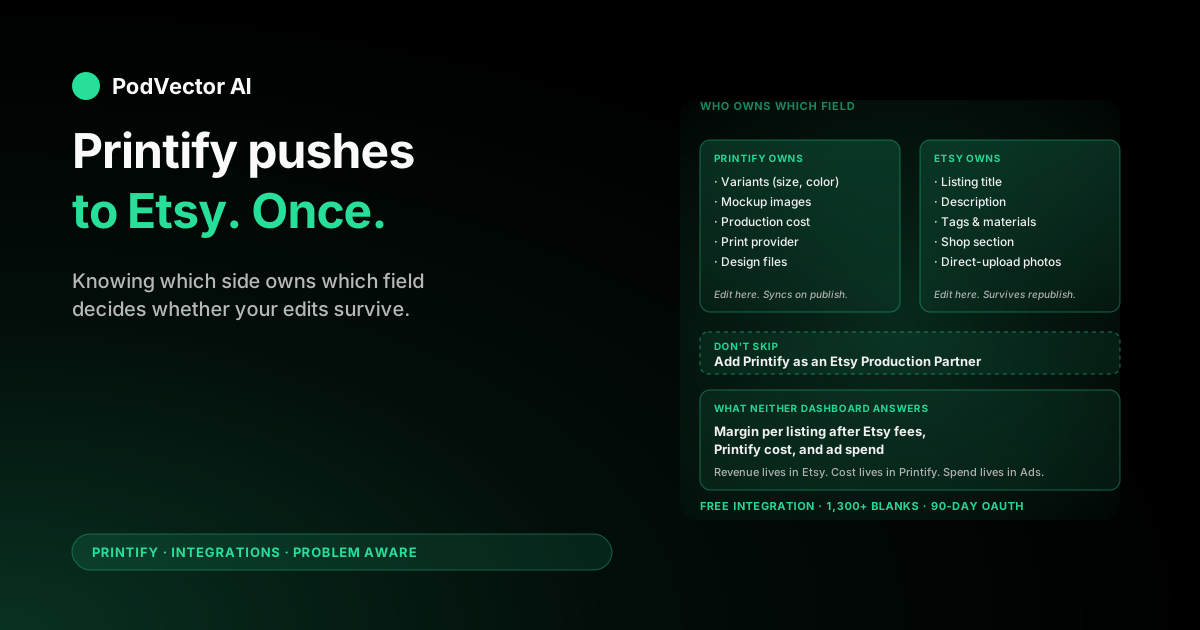
Before your first publish, add Printify as a Production Partner inside Etsy Shop Manager. Skip it and Etsy can delist your products without warning — it's the most common cause of suspended POD shops in their first month.
This guide walks the directional Printify-to-Etsy flow (what gets pushed, what syncs back, what each side overwrites), the connection steps, and the cross-source questions you'll need to answer once orders start landing — questions neither Etsy nor Printify can answer alone.
What Actually Moves From Printify to Etsy
The Printify-to-Etsy connection is a one-way publish flow with a two-way sync underneath. Understanding the direction matters because it decides which side you should edit each field on after a listing is live.
Printify is the source of truth for product structure: the blank, the print provider, the variants (size, color), the mockup images, the production cost, and the design files. None of that is editable from Etsy in a way that flows back.
Etsy is the source of truth for storefront merchandising: the listing title, description, tags, shop section, and the customer-facing price. Once a listing is published, you can edit any of those in Etsy and Printify will leave them alone.
Orders flow the other direction. A buyer checks out on Etsy, Etsy charges the card, Etsy pings Printify with the order, Printify queues the production charge to your card and ships the product. Tracking pushes back to Etsy automatically so the buyer sees a normal Etsy fulfillment timeline.
That split is what makes "I edited it in Etsy and it disappeared" the most-asked question in Printify support threads. Almost always: the seller edited a field Printify owns (variants, price, mockups) instead of a field Etsy owns.
Prerequisites Before You Click Connect
Gather these before starting. Half-set-up accounts cause more failed connections than any actual bug in either platform.
- A fully published Etsy shop. Not a draft, not a buyer account. Etsy's API only accepts a Printify connection after you've completed shop setup: currency chosen, payment method on file, identity verified, About section filled, and the shop officially opened with at least one listing live. New shops get 40 free listings.
- Etsy Payments active and verified. Bank account linked, identity confirmed. Without active Etsy Payments, buyers can't check out and Printify never receives an order from your shop.
- A Printify account. Free to create; no card required at signup. The free plan supports up to 5 connected stores and the full Etsy integration. Skip the Premium upsell during onboarding — you can upgrade later if volume justifies it.
- A debit or credit card on file in Printify. Production charges hit this card per order. Etsy pays you on its own payout schedule; Printify charges you independently. Add a backup card too — failed payments are the most common cause of stalled orders on busy shops.
- One print-ready design file. PNG with transparent background, 4500×5400 pixels at 300 DPI for full-front shirt prints. Sub-300 DPI uploads will publish but print blurry. Printify's editor includes an AI generator and a free Shutterstock library if you don't have artwork yet.
If your Etsy shop isn't live yet, do that first at etsy.com/sell. The new-shop flow takes 20-30 minutes and includes a one-time $15 setup fee in the US as of 2026. Printify cannot push a single listing into a shop that hasn't finished Etsy's onboarding.
Connect Printify to Etsy: The 6-Step Flow
With both accounts live, the connection itself takes about five minutes.
- Sign in to Printify. From the top-left store dropdown, click Manage my stores.
- Click Add new store in the top right. A panel opens with the sales channels Printify supports. Pick Etsy.
- Printify redirects you to Etsy's authorization page. Sign in to Etsy if you aren't already (email + password, or Google / Facebook / Apple).
- Etsy shows the permissions screen listing the scopes Printify requests: read shop info, read and write listings, read transactions, read and write shop sections. Click Allow access.
- Etsy redirects back to Printify. You'll see a confirmation screen with your Etsy shop name and a green Connected badge.
- Name the store inside Printify (e.g.,
BrandA-Etsy). This label is internal — buyers never see it, but it matters once you connect a second store and need to tell them apart in the dashboard.
If Etsy redirects you to a setup wizard or "Open your shop" page instead of the permissions screen, your Etsy shop isn't fully published yet. Finish Etsy's onboarding, publish at least one placeholder listing, then restart the Printify connect flow. A walkthrough of the same flow from the Etsy-side perspective is here.
Add Printify as a Production Partner on Etsy
This is the step almost every setup guide buries or skips. It's also the step that gets the most POD shops suspended.
Etsy's policy requires sellers to disclose any third party that physically makes their products. Printify produces and ships your orders, so Etsy classifies it as a production partner. Every Printify-fulfilled listing must reference a Production Partner entry attached to your shop.
To add one:
- In Etsy, open Shop Manager → Settings → Production partners.
- Click Add a new production partner.
- Production partner name:
Printify - Where is the partner located? Pick the country of the print provider you'll use most. If you ship from providers in multiple countries (common once you add European fulfillment), create a separate entry per country.
- About your production partner: Etsy wants a short description. Safe template: "Printify is a print-on-demand network that produces and ships my custom-designed products to my customers. I create each design and approve every product; Printify handles production and fulfillment."
- How is the partner involved? Select "They produce the items I sell" and "They ship the items I sell."
- Save.
When you push a Printify product into Etsy, the publish screen asks you to assign the production partner. Pick the entry whose country matches the print provider's country. Listings without an assigned partner are out of policy — Etsy doesn't enforce instantly, but repeat omissions can lead to delisting and, eventually, shop suspension.
Push Your First Product From Printify to Etsy
Connection alone moves zero listings. Each product is designed in Printify and pushed to Etsy individually.
1. Pick a blank and a print provider
Open the Printify catalog. Filter by product type (t-shirt, mug, poster, sweatshirt, tote — 1,300+ options) and pick a blank. Then pick a print provider for that blank.
Provider choice matters more than blank choice. The same Bella+Canvas 3001 t-shirt can cost $3 more or ship 5 days slower depending on which Printify provider fulfills it. Sort by cost and production time for your main buyer region before locking in.
2. Upload your design
Drop your PNG into Printify's editor. It auto-generates mockups for every variant. Transparent background, 300 DPI minimum. The editor previews how the design will print on each color and size — check dark variants especially, where light-colored ink can look different than on the white reference mockup.
3. Set the retail price
Printify shows production cost per variant in real time. You type the retail price; Printify calculates margin live. Default markup of 40-60% is the starting point most sellers use, but Etsy's fee stack is heavier than Shopify's, so price accordingly (see the sync direction section for what happens to this number after publish).
4. Fill in the Etsy-specific listing fields
Printify's publish screen surfaces Etsy's listing fields: title, description, up to 13 tags, materials, and which Etsy shop section to file the listing under. Etsy SEO lives mostly in the title and tags, plus the first 160 characters of the description. Spend time here — Printify's default copy is generic and never ranks.
5. Assign the Production Partner
The publish screen prompts for a production partner. Pick the entry whose country matches the print provider you selected in step 1. If you skipped the partner setup earlier, the publish fails here. Go back, add the partner, then retry.
6. Push to Etsy
Click Publish to store. By default the listing lands in Etsy as a draft, which is the right default — drafts don't trigger Etsy's $0.20 listing fee. Review the draft in Shop Manager → Listings → Drafts, fix anything that looks wrong, then click Publish in Etsy to take it live. The same publish-and-review pattern applies if you also connect Shopify alongside Etsy.
Sync Direction: Which Side Wins on Edits
After a listing is live, both Printify and Etsy let you edit most fields. They do not edit the same fields — and where they overlap, one side wins by default. Knowing the rules avoids hours of "why did my edit disappear?" later.
Fields Printify owns (edit in Printify, syncs to Etsy)
- Variants (which sizes and colors are offered)
- Mockup images generated by the editor
- Production cost (read-only on Etsy)
- Print provider assignment
- Design files (the artwork itself)
Edits to any of these in Printify trigger an automatic resync on the next publish. If you change variants in Printify after the listing is live, Etsy's listing updates within a few minutes.
Fields Etsy owns (edit in Etsy, Printify leaves alone)
- Listing title
- Listing description
- Tags and materials
- Shop section
- Listing photos you upload directly to Etsy (separate from Printify-generated mockups)
Edits to these in Etsy are not overwritten by future Printify publishes. Most experienced POD sellers keep Etsy SEO copy in Etsy and use Printify only for design and cost changes.
The shared field that causes the most confusion: retail price
Retail price is editable from both sides. The default Printify behavior is to push your Printify retail price into Etsy on publish — but Etsy edits to that price are not overwritten on future Printify republishes unless you explicitly enable "sync price" in Printify's product settings. The result is that prices can drift apart silently if you edit on one side and forget the other.
Pick one source of truth for price and stick to it. Most multi-store sellers manage price in Printify (so they can run a one-shot bulk price update across channels) and never touch the Etsy price field directly.
After the First Sale: Questions Neither Dashboard Answers
Getting the connection live is the easy half. The harder half starts the day after the first sale lands, because neither Etsy nor Printify alone can answer the questions that decide whether you make money.
The data sits in at least four places:
- Etsy has revenue, fees, listing performance, and conversion rate
- Printify has production cost and shipping cost per order
- Etsy Ads has ad spend and which listings it sent traffic to
- Meta and Google (if you run external ads) have spend and click data — but Etsy's attribution back to those clicks is partial at best
None of those four sources join natively. So the questions that decide your week-over-week decisions sit unanswered:
- Which listings made money after Etsy's fee stack, Printify's production cost, and ad spend last week?
- Which Etsy Ads campaigns recovered their click cost at the SKU level?
- Which print provider's slow ship times are dragging your "shipped on time" rate (and therefore your Etsy search placement)?
- Which listings haven't sold in 8 months and are paying the $0.20 renewal fee every 4 months for nothing?
- Which SKUs are getting refund requests at a rate that will tank reviews before the listing stabilizes?
Most sellers end up reconciling CSVs in Google Sheets every Sunday — exporting from Etsy, exporting from Printify, exporting from each ad platform, joining on order ID and SKU, and trying to compute true margin per listing. It works for the first 50 orders. It collapses around 500.
The alternative is to read all four sources into a single live data warehouse (your own setup with Snowflake, Redshift, BigQuery, Databricks, or equivalent — or hand the plumbing off entirely). Either way, the goal is the same: one place where order-level revenue, production cost, ad spend, and refund data sit joined and can be queried in plain English.
Once that join exists, the questions answer themselves — "which listings lost money to ads last week" stops being a half-day CSV exercise and becomes a one-sentence prompt. The same reconciliation problem applies the moment you add a second sales channel.
When the Push Fails: Common Errors
"Production partner required"
Printify's publish screen blocks you because no production partner is assigned. Either you skipped the partner setup earlier, or you're picking a print provider in a country you haven't added a partner entry for yet. Fix in Etsy Shop Manager → Settings → Production partners, then retry.
"Etsy authorization expired"
Etsy OAuth tokens expire every 90 days. Long-running stores see this as "orders suddenly stopped syncing." Fix: in Printify, go to Manage my stores, find your Etsy store, click the three-dot menu, pick Disconnect, then run the connect flow again. The new authorization refreshes the token.
"Currency mismatch"
Printify's catalog prices in USD. Etsy lists in your shop's listing currency. Printify pushes the retail price literally — type 25 in Printify and Etsy lists at 25 in your shop's currency, not a converted amount. UK shops get £25 listings, EU shops get €25, AU shops get A$25. Set the Printify retail price in your Etsy shop's currency or you'll under-price internationally by ~25%.
"Listing rejected by Etsy"
Two common causes. First, missing production partner assignment — Etsy's bot enforces this within hours of publish. Second, a trademark trigger in the design (sports teams, Disney, major brand marks). Etsy's automated scan removes flagged listings quickly. Republish without the protected element.
"Orders not flowing from Etsy to Printify"
Check My Orders → Action required in Printify first. The two usual culprits: your Printify payment method failed, or the buyer ordered a variant Printify has since retired. The order waits in queue until you fix the card or pick a replacement variant.
"Shipping cost in Etsy doesn't match what Printify charges"
You're using Etsy's calculated shipping based on your own shop profile, not Printify's recommended profile. Either set Printify's shipping profile on each listing during publish, or align Etsy's profile to Printify's actual rates by region. This mismatch is the single biggest source of unprofitable orders on Etsy POD shops.
FAQs
Is the Printify to Etsy integration free?
Yes. The connection costs nothing. You pay Etsy's standard listing fee ($0.20 per listing every 4 months), Etsy's transaction and payment processing fees, and Printify's per-order production and shipping cost. Printify Premium ($14.99/month) is optional and adds a 20% discount on production cost.
How long does it take to push Printify products to Etsy?
The connection itself takes about 5 minutes once both accounts are live. Each product push from Printify to Etsy takes another 10-15 minutes if you're writing original SEO copy. A small catalog launch (10 listings) is half a day. The 30-minute "5-minute setup" headline you'll see in marketing pages assumes both accounts already exist and you have a finished design uploaded.
Do I have to add Printify as a Production Partner on Etsy?
Yes, if you want to follow Etsy's policy. Etsy requires disclosure of any third party that physically makes your products. Listings without an assigned production partner can be removed, and repeat omissions risk shop suspension. The Printify publish screen prompts for it on every new listing — don't skip the prompt.
Can I push the same product to Etsy and Shopify at the same time?
Yes. The free Printify plan supports 5 connected stores, including any combination of Etsy and Shopify. You design the product once in Printify and publish it separately to each connected store. Listing copy and price can differ per store — Printify keeps them as independent publish targets.
What happens to my Etsy listings if I disconnect Printify?
The listings stay live in Etsy. Disconnecting only revokes Printify's OAuth token and stops new orders from flowing through. You have to delete or unpublish the listings manually in Etsy if you want them gone. In-flight Printify orders also continue to production on the card you have on file — disconnecting doesn't cancel them.
Why did my Etsy edit disappear after I republished from Printify?
You edited a field Printify owns (variants, mockups, or design) from inside Etsy, then republished from Printify. The republish reset the field to Printify's value. Title, description, tags, materials, and shop section are safe to edit in Etsy — they survive Printify republishes. Variants, mockups, and design files have to be edited in Printify.
Does the integration work outside the US?
Yes. Etsy is available to sellers in 80+ countries, and Printify supports international fulfillment with print providers in the US, UK, EU, Canada, Australia, and Asia. Pick a provider in or near your main buyer region to keep ship times competitive on Etsy's "shipped in X days" filter.
Can I connect more than one Etsy shop to one Printify account?
Yes. The free Printify plan supports 5 connected stores; Premium supports 10. Each Etsy shop gets a separate entry in Manage my stores with independent product lists and order feeds. Useful for multi-brand sellers running niche shops in parallel.
Related reading
For more on Printify's ecosystem and alternatives, see Best Printify alternatives for POD sellers and Better than Printify: which is best for POD sellers. Browse the full Printify integrations hub and the Printify topic page. Printify's official Etsy integration page is the canonical source for current pricing and feature changes.
Let Victor answer the cross-source questions for you
You connected Printify to Etsy. You added the production partner. You pushed your first listings. Now your revenue lives in Etsy, your cost lives in Printify, your ad spend lives in Etsy Ads (and probably Meta and Google), and no dashboard joins them.
Victor is an AI employee built for POD sellers. He reads every source — Etsy, Printify, Meta, Google, Shopify — into one live data warehouse, answers questions in plain English ("which Etsy listings lost money to ads last week?"), and, with your approval, reallocates ad spend, pauses unprofitable campaigns, and updates Printify and Etsy listings. You keep approval over every material action; Victor does the reconciliation.
Stop spending Sundays joining CSVs.
Try Victor free