
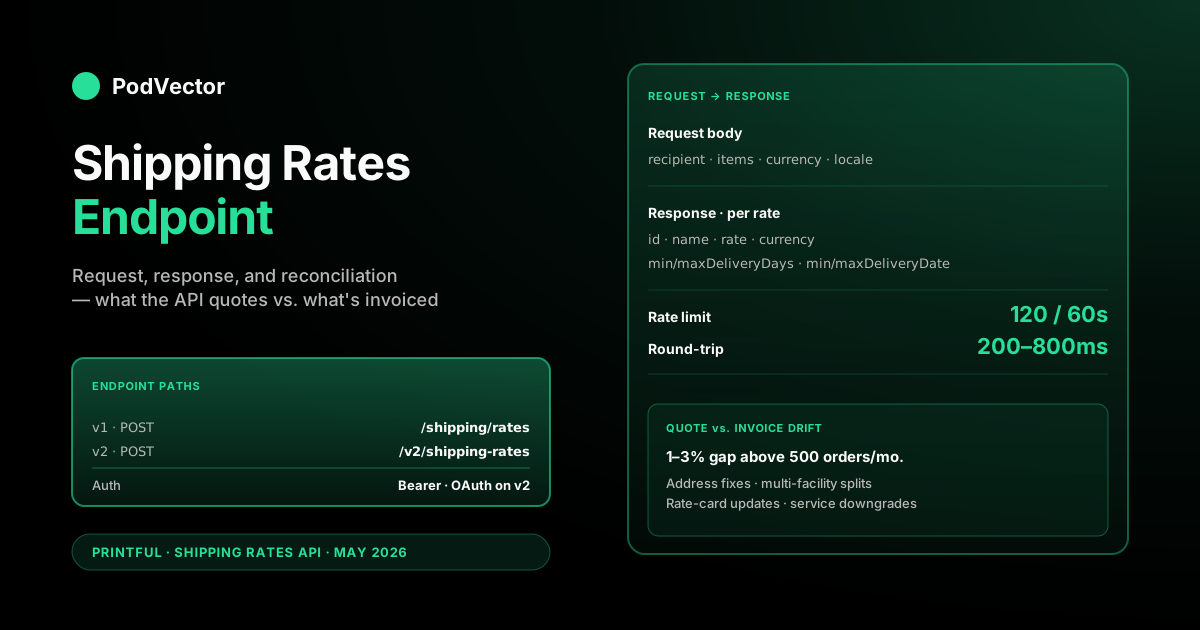
Quick Answer: The Printful shipping rates endpoint is a POST request that returns a list of available shipping methods with their exact prices and delivery windows. The v1 path is POST https://api.printful.com/shipping/rates; the v2 equivalent is POST https://api.printful.com/v2/shipping-rates.
Both take a recipient address and a list of items (variant ID plus quantity) and return Standard, Express, and Overnight options where supported. Auth is a Bearer token (private API key on v1, OAuth token on v2).
The catch operators miss: the endpoint returns what Printful will charge if the order ships today. Address corrections, multi-facility splits, and rate-card updates between quote and fulfillment still create a 1–3% drift between collected and invoiced shipping.
What the shipping rates endpoint is for
The Printful shipping rates endpoint is the API call that returns a live shipping quote for a given cart and destination. Your storefront sends Printful the recipient's address and the items in the cart. Printful sends back the available shipping methods with prices and delivery estimates.
The quote it returns is the rate Printful will invoice you for that order if it ships under those conditions. That's the contract. If the customer checks out at $4.75 Standard, Printful invoices you $4.75 Standard when the order moves to production.
This is the endpoint that powers every "live shipping rates" integration on the Printful side — Shopify carrier-calculated shipping, the Printful for WooCommerce plugin, Wix's Printful shipping provider, and any custom checkout you build against Printful's API directly. For a non-developer overview of how the same data surfaces in your store, see our Printful live shipping rates explainer and the Printful shipping cluster hub.
If you're calling the endpoint directly, you're usually doing one of three things: building a custom storefront, building a headless checkout against an existing CMS, or pulling shipping data into a back-office tool for reconciliation. The endpoint serves all three, but the rate-limit and caching strategy differs by use case.
v1 vs. v2 — which to use
Printful currently supports two API versions for shipping rates. They return the same underlying data but differ in auth, structure, and error format.
v1 (legacy, still supported). Path is POST https://api.printful.com/shipping/rates. Auth is a Bearer token using a private API key generated from your Printful dashboard. Response format is Printful's classic { code, result } wrapper. Error handling is HTTP-status-driven with a JSON body.
v2 (current, OAuth-only). Path is POST https://api.printful.com/v2/shipping-rates. Auth is OAuth — you create an OAuth app in the Printful developer console and use the issued access token. Response format is flatter and follows REST conventions more cleanly. Errors follow RFC 9457 Problem Details for HTTP APIs (the application/problem+json standard).
Which to pick:
- Pick v1 if you have an existing integration that's working and you don't need the v2-only features. Printful has not announced an end-of-life date for v1 shipping rates, and it remains stable.
- Pick v2 if you're building new today. OAuth is the path forward across Printful's API surface, error responses are more structured, and the response shape aligns with Printful's newer products.
The rest of this article documents both. Where they diverge, we call out the field name or behavior difference.
Request shape and required fields
The request body has two required top-level objects: recipient and items. Optional fields include currency and locale.
Minimal v1 request:
POST https://api.printful.com/shipping/rates
Authorization: Bearer {private_token}
Content-Type: application/json

{
  "recipient": {
    "address1": "123 Main St",
    "city": "Los Angeles",
    "state_code": "CA",
    "country_code": "US",
    "zip": "90001"
  },
  "items": [
    { "variant_id": 4011, "quantity": 1 }
  ],
  "currency": "USD",
  "locale": "en_US"
}
The recipient object accepts the same address fields used elsewhere in the API: address1, address2, city, state_code, state_name, country_code, zip, and phone. For shipping rates specifically, country_code and either state_code or zip are the load-bearing fields.
The items array carries the cart contents. Each entry needs variant_id (the integer ID of the Printful catalog variant — not your store's product ID) and quantity. You can pass multiple items in one call. Printful's response accounts for per-additional-item math and multi-facility routing.
v2 requests use the same logical shape but accept catalog_variant_id instead of variant_id for the item identifier, and the top-level object is wrapped slightly differently. The conceptual fields are identical.
Currency. A three-letter currency code (ISO 4217). Defaults to USD if omitted. Printful supports USD, EUR, GBP, AUD, CAD, and a few others. Pass the currency your storefront displays so the customer sees the rate in their currency without a client-side conversion.
Locale. Controls the language of the human-readable shipping method names in the response. Defaults to en_US. Useful if your storefront sells in non-English markets and you want "Standard," "Express," etc. localized.
Response shape and key fields
The successful response is an array of shipping rate objects. Each object describes one available shipping method for the requested cart and destination.
v1 response example (trimmed):
{
  "code": 200,
  "result": [
    {
      "id": "STANDARD",
      "name": "Flat Rate (3-8 business days after fulfillment)",
      "rate": "4.75",
      "currency": "USD",
      "minDeliveryDays": 3,
      "maxDeliveryDays": 8,
      "minDeliveryDate": "2026-05-21",
      "maxDeliveryDate": "2026-05-28"
    },
    {
      "id": "STANDARD_OVERNIGHT",
      "name": "Overnight (1 business day after fulfillment)",
      "rate": "24.99",
      "currency": "USD",
      "minDeliveryDays": 1,
      "maxDeliveryDays": 1,
      "minDeliveryDate": "2026-05-19",
      "maxDeliveryDate": "2026-05-19"
    }
  ]
}
The fields that matter for most integrations:
id— the machine-readable shipping method identifier. Stable across requests. Use this for storage and matching, not the human-readable name.name— the display string. Includes the delivery window in human language. Safe to show to customers.rate— the price. Returned as a string (not a float) to avoid floating-point rounding. Parse to your money type carefully.currency— the currency code matching the request's currency parameter.minDeliveryDays/maxDeliveryDays— the shipping-only window. Does not include Printful's production time.minDeliveryDate/maxDeliveryDate— pre-computed dates Printful expects the order to arrive. These do include production time, so they're the customer-facing delivery date estimates.
v2 adds a shipments array on each rate object with departure_country and a customs_fees_possible boolean. That's useful when you want to warn international customers that duties may apply at delivery — the v1 response doesn't expose that signal directly.
Order of returned methods is by delivery speed, slowest first. Standard is index 0; Express and Overnight follow if available for that cart + destination. Worldwide carts often return only Standard. Some product categories (apparel from EU facility, for example) return different method IDs than US-shipped carts — match on id rather than position.
Authentication and headers
v1 uses a Bearer token in the Authorization header. The token is a private API key you generate from your Printful dashboard under Settings → Stores → API. Each Printful store has its own key. The key is scoped to that store and to the orders, products, and shipping data belonging to it.
Authorization: Bearer {private_api_key}
Content-Type: application/json
Accept: application/json
v2 uses OAuth 2.0. You register an OAuth application in the Printful developer console, request scopes (including shipping_rates read where required), and exchange the authorization code for an access token. The access token then goes in the same Authorization Bearer header.
OAuth tokens are short-lived. Implement refresh-token logic before you ship to production — a long-running storefront will see the access token expire mid-day and start returning 401s if you don't refresh.
For server-to-server use where one merchant owns the integration and there's no end-user OAuth flow, v1 with a private API key is simpler. v2 is required if you're building a third-party Printful app that other merchants install. Printful's official developer documentation has the full OAuth scope reference for v2.
Rate limits and caching strategy
Printful publishes a general API rate limit of 120 calls per minute per store. The shipping rates endpoint counts against that limit. For a low-traffic store this is more than enough headroom. For high-traffic stores or for back-office tools doing bulk reconciliation, the limit gets uncomfortable fast.
If you're hitting the limit, Printful returns HTTP 429 with a Retry-After header. Honor it. Exponential backoff is the right default — start at 1 second, double on each retry, cap at 60 seconds.
For checkout integrations, the rate-limit math usually doesn't bite. Each cart triggers one shipping-rate call. A store doing 100 checkouts per minute uses 100 calls per minute and stays well under the cap. Where it bites:
- Aggressive re-quoting. Some checkouts re-quote shipping on every cart change — adding an item, changing quantity, switching country. A heavy cart-builder UX can fire 10+ shipping-rate calls per session. Multiply by concurrent visitors and you hit the cap.
- Back-office reconciliation. Pulling historical shipping quotes to compare against invoices means iterating through orders. 1000 orders to reconcile at 120/min is at minimum 9 minutes of wall-clock time, longer if you're sharing the rate-limit pool with checkout traffic.
- Multi-store accounts. Each store has its own rate-limit bucket, but the OAuth-app token may be shared across stores. Track usage per store, not per token.
Caching strategy: cache shipping rate responses by a hash of (items, recipient_country, recipient_zip) for 60 seconds. That's long enough to absorb the cart-rebuild storm during a single checkout session without serving stale rates if Printful updates pricing.
Don't cache across checkout sessions for periods longer than a minute. Printful occasionally adjusts rate cards intra-day, and a 1-hour cache window has been the source of more than one "I paid $4.75 but Printful invoiced $5.25" reconciliation thread.
Common errors and what they mean
The shipping rates endpoint returns a small set of errors that account for the vast majority of integration bugs. v1 returns these as HTTP status with a JSON body. v2 returns them as RFC 9457 Problem Details.
400 Bad Request — Missing required field. The recipient is missing country_code, state_code, or zip, or the items array is empty. The response body lists the missing field. Fix at the request-builder layer.
400 Bad Request — Invalid variant_id. You passed a variant ID that doesn't exist in Printful's catalog or that your store doesn't have sync rights to. Verify the variant via the catalog endpoint before retrying.
401 Unauthorized. Bearer token is missing, expired, or doesn't match the store. On v2, this often means the access token expired and the refresh-token flow didn't fire. On v1, double-check the API key for the correct store.
403 Forbidden. Token is valid but lacks the scope or store access to query shipping rates. Common when an OAuth app requests a scope but the merchant hasn't granted it on install.
404 Not Found — No shipping methods available. The destination country isn't shippable for the items in the cart. Some product categories don't ship to certain regions (Printful's Mexico facility, for example, doesn't ship internationally). Surface this gracefully to the customer with a "this item doesn't ship to your country" message.
422 Unprocessable Entity — Invalid address. The address fields are present but inconsistent — a US ZIP code with a non-US country_code, for example. Validate addresses before calling the endpoint to avoid these.
429 Too Many Requests. Rate limit exceeded. Honor the Retry-After header, back off exponentially.
500/502/503. Printful's infrastructure errors. Rare but they happen. Implement a fallback rate so customers can still complete checkout when Printful's API is degraded, and log the failure for reconciliation later.
Delivery windows in the response
The response surfaces two different time concepts and it's easy to confuse them.
Shipping window (minDeliveryDays / maxDeliveryDays) is shipping-only. For US Standard, this is typically 3–8 business days. It starts the moment Printful hands the package to the carrier. It does not include production time.
Delivery date estimate (minDeliveryDate / maxDeliveryDate) is the customer-facing arrival date. It bakes in Printful's expected production time for the items in the cart plus the shipping window. This is the number you show at checkout if you want a single "arrives by" line.
Production time varies by product category and current facility load. Apparel is typically 2–7 business days. All-over-print and embroidered items can stretch to 7–10 business days. Home goods (mugs, posters, blankets) sit at 2–5 business days. The endpoint accounts for this in the min/maxDeliveryDate fields, so trust those for customer-facing display.
For the broader timeline picture — including how production capacity flexes around peak season — see our Printful holiday shipping deadlines 2025 guide and our global shipping times breakdown.
Integration patterns for storefronts
The endpoint shows up in three common patterns. Each has its own latency and reliability profile.
Synchronous at checkout. The storefront calls the shipping rates endpoint when the customer enters their address. The page waits for the response, then renders the available methods. Round-trip latency is typically 200–800ms, occasionally up to 2 seconds. This is the simplest pattern and the one most platform plugins use.
The risk is API outage. If Printful's shipping rates endpoint times out, the checkout stalls. Build a fallback rate (a flat per-zone rate stored in your config) that activates when the endpoint fails after one retry. Log the fallback usage so you can reconcile later.
Async with optimistic UI. The storefront renders an estimated rate from a cached value while the live API call resolves in the background. When the live rate arrives, the page updates. Faster perceived checkout, but the customer can see the price change if the live rate differs from the cached estimate. Use sparingly and only for product categories where rate variance is low.
Pre-quote at cart-add. Some headless commerce stacks call the shipping rates endpoint when the customer adds the first item to the cart, using a default destination (usually the IP-geolocated country). The estimate gets refreshed once the real address is entered. Reduces perceived checkout latency at the cost of one extra API call per session. Worth it for high-conversion mobile checkouts on fast-spending product categories.
Regardless of pattern, the implementation rules are the same: idempotent retries with exponential backoff, fallback rate on outage, cache by cart-hash for 60 seconds, log every quote with the order ID for later reconciliation.
Where quoted rates drift from invoiced rates
Live rates promise that the quoted shipping rate at checkout equals the invoiced shipping rate on the Printful invoice. In normal operation, they do match — that's the design.
The drift comes from things that happen between the quote and the fulfillment:
- Address corrections after checkout. Customer typos the ZIP. Carrier returns the package. Reship to corrected address generates a separate Printful invoice line. Customer was only charged once.
- Multi-facility splits. The quote estimates fulfillment from the cheapest valid facility. If inventory shifts before the order moves to production, Printful may split it across two facilities and bill two shipping line items. Customer paid one bundled rate.
- Rate-card updates. Printful adjusts rate cards a few times a year. Carts quoted before the change and fulfilled after the change use the new rate-card prices on the invoice. Your cache window should be short enough to absorb the change quickly; even with a 60-second cache, a small drift window exists.
- Service-tier downgrades. Printful sometimes silently downgrades Express orders to Standard during capacity crunches. Customer paid for Express. Order shipped Standard. You got billed Standard. Net to you is positive, but it's a customer-experience issue.
- Currency conversion timing. If your store quotes in EUR but Printful invoices in USD, the FX rate at quote time and the FX rate at invoice time differ. Even a 0.5% FX shift on 1000 orders is a real number.
At low volume — under 50 orders a month — these gaps are noise. At 500+ orders a month, the cumulative drift can hit 1–3% of total shipping spend. That's $200–$600 on a $20,000-monthly shipping line, every month, in a direction you can't predict without auditing.
The fix isn't to abandon the shipping rates endpoint. It's to reconcile. Log every quoted rate with the order ID at checkout. Pull every invoiced shipping line from Printful's orders API at month-end. Match the two. The gap is your shipping P&L line.
For the per-product cost math the shipping line sits on top of, see our Printful t-shirt base cost 2025 breakdown and t-shirt pricing breakdown.
The operator view on shipping API data
The shipping rates endpoint is the right tool for checkout. It's the wrong tool for back-office margin analysis on its own.
What it gives you: the rate Printful will charge for this specific cart shipping today. That's perfect for quoting at checkout. It's incomplete for the question every POD operator actually wants answered — how much is shipping costing me as a percentage of revenue this week, broken down by product and region, and is that number moving?
Answering that question means joining three streams of data:
- Your storefront's revenue by order, by product, by region.
- Printful's invoiced shipping lines per order — different endpoint, accessed via the orders API.
- Printful's per-product base costs and fulfillment fees — yet another endpoint.
Build that join yourself and you're looking at a multi-day SQL project plus an ongoing maintenance load every time Printful updates a field or rate card. Most operators don't have the time. So they ship the integration, watch the dashboard go up, and discover at month-end that shipping ate two percentage points of margin and they're not sure why.
The shipping rates endpoint is one piece of a larger reconciliation surface. Treat it as such — log every quote, log every invoiced line, and pull both into one place where you can ask hard questions.
The auxiliary topic of how Printful handles printing and shipping together (and where the line between the two blurs on invoices) is covered in our Printful printing and shipping breakdown. For the broader Printful coverage across cost, quality, and integration topics, the Printful topic hub indexes every cluster.
FAQs
Is the Printful shipping rates endpoint free to use?
Yes. There's no per-call fee. The endpoint counts against your store's general API rate limit (120 calls per minute) but Printful doesn't charge per request.
What's the latency of a typical shipping rates call?
200–800 milliseconds when Printful's API is healthy. Occasional spikes to 2 seconds during peak periods. If you see consistent multi-second latency, check your platform's API request logs for retries, and look at your cache hit rate — a low cache hit rate often correlates with slow checkouts.
Can I get shipping rates without a Printful account?
No. The endpoint requires authentication tied to a store, and the variant IDs you pass have to resolve in Printful's catalog. Sandbox accounts are available via the developer console for integration testing.
Does the endpoint return international duties or VAT?
No. It returns shipping only. For EU orders under €150, Printful handles VAT through its IOSS flow when configured at the order level — not at the shipping-rate level. Above €150 or outside the EU, duties land on the buyer at delivery. Use the v2 response's customs_fees_possible flag to warn customers proactively.
Why does the endpoint return only Standard, no Express?
Express isn't available for every product + destination combination. International routes often return Standard-only. Some products (heavy goods, fragile categories) have carrier restrictions that block Express. Match on id and surface only the methods Printful returns — don't hardcode an assumption that Express always exists.
How accurate are the delivery date estimates in the response?
The dates are Printful's best estimate based on current production capacity and carrier transit times. They're directionally accurate — most orders arrive within the quoted window. They can miss during peak season (Q4, especially the last two weeks of November) when production capacity stretches. Build a buffer of 2–3 days into customer-facing copy during peak periods.
Can I cache shipping rate responses across customers?
Cache by (items_hash, recipient_country, recipient_zip) for up to 60 seconds. Anything longer risks serving a stale rate after a Printful rate-card update. Don't cache by customer ID alone — two customers in the same ZIP buying the same cart get the same rate, so the cache key should be cart + destination, not user.
What happens if I call the endpoint with a variant my store doesn't sell?
v1 returns the rate anyway — the endpoint is store-scoped for auth but catalog-wide for variant lookup. v2 may return 403 if the variant isn't accessible under your OAuth scopes. Validate variants against your synced product list before quoting if you want consistent behavior.
Does the endpoint support batch quoting for multiple destinations?
No. One request quotes one cart + one destination. For back-office reconciliation across thousands of orders, you make one call per historical destination. Honor the 120/min rate limit and parallelize within the cap.
How do I tell which Printful facility a quoted rate ships from?
v1 doesn't expose this in the shipping rates response. v2 includes a shipments array with departure_country per rate. For more detail on the facility-routing decision, you have to call the orders API after the order is placed — the shipping rates endpoint optimizes for the cheapest valid origin but doesn't always commit to a specific facility at quote time.
Will the endpoint be deprecated?
v1 is stable and Printful hasn't announced an end-of-life. v2 is the recommended path for new integrations. If you're starting fresh, build against v2. If you have a working v1 integration, keep running it until Printful signals a migration window.
Can I quote shipping in a currency Printful doesn't natively support?
No. The endpoint accepts a fixed set of ISO 4217 currency codes (USD, EUR, GBP, AUD, CAD, and a few others). For unsupported currencies, quote in the nearest supported currency and handle conversion in your storefront. Be aware that your FX-converted display rate and the eventual Printful invoice will drift slightly with exchange-rate movement.
The endpoint quotes the rate. Reconciliation answers whether you're collecting it.
The shipping rates endpoint does its job. It tells your checkout exactly what Printful will charge. The harder question is what happens between the quote and the invoice — the address corrections, the multi-facility splits, the rate-card updates that quietly compress your shipping margin while the API works "correctly."
Victor connects to your Printful account, pulls every quoted rate and every invoiced shipping line into a unified data warehouse alongside your storefront revenue, and answers questions like "how is shipping eating my margin this week, by product and region?" against live order data. No SQL. No spreadsheet. No quarterly P&L surprise.
Try Victor free