
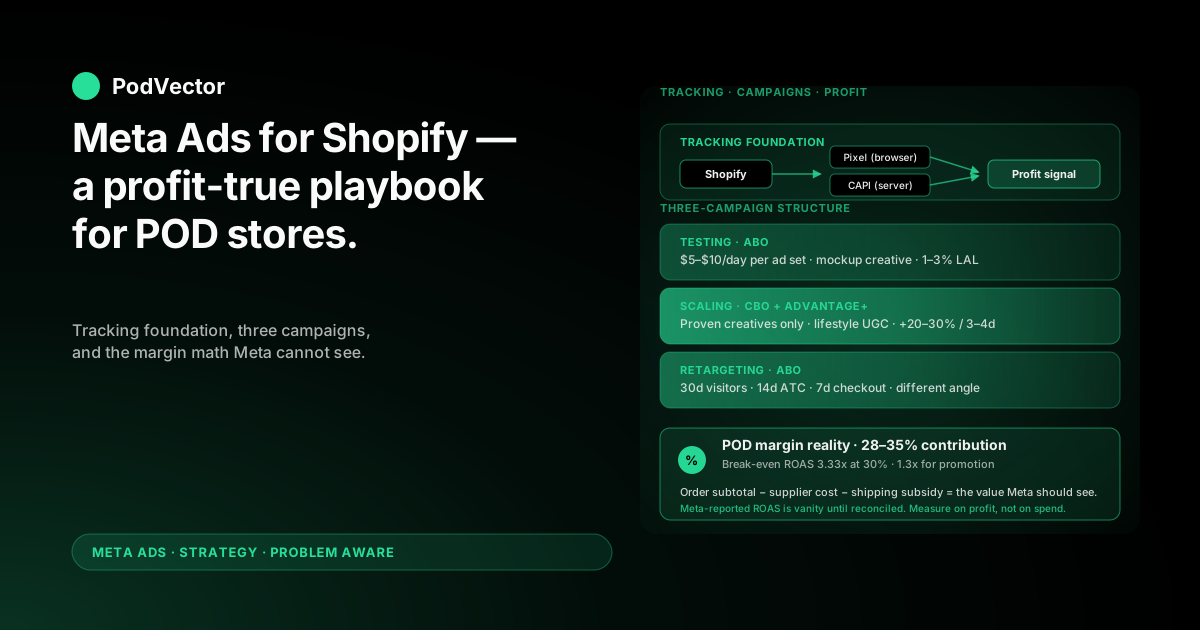
Quick Answer: A Meta Ads strategy for a Shopify print-on-demand store is not the same playbook a typical ecommerce brand runs. POD's 28–35% contribution margin (after Printify or Printful supplier cost) doubles your real break-even ROAS, and Meta's optimiser cannot see any of it.
What works: a tracking foundation (Pixel + Conversions API + correctly-valued events) that feeds Meta a profit signal instead of a revenue signal, a campaign structure that separates testing from scaling, and creative that respects POD reality — mockups for validation, lifestyle for scale.
The headline rule: Meta's reported ROAS is a vanity number until you reconcile it against supplier cost. The POD operators who scale on Meta are the ones who measure on profit, not on what Meta says they spent.
Why POD on Shopify is a different Meta Ads game
Generic Shopify Meta Ads guides assume a brand with 50–70% contribution margin. POD operators are working with 28–35% after the supplier takes their cut.
That single difference changes the math on every campaign decision. A 2.0x ROAS that looks profitable in OptiMonk's beginner Shopify guide is roughly break-even for a typical POD store, and a 1.5x ROAS that looks tolerable is an active loss.
Most of what follows assumes you already understand the basics of running ads on Meta. If you do not, start with our step-by-step guide to running Facebook ads for Shopify and come back here for the strategy layer. For the broader picture across every Meta surface — not just strategy — the Meta Ads topic hub indexes everything in one place.
The three POD constraints Meta cannot see
Three things are true about every POD Shopify store and invisible to Meta's optimiser:
Supplier cost varies by SKU. A Bella+Canvas tee on Printify and a hoodie on Printful have different base costs, different margins, and different profit-per-conversion outcomes. Meta sees one "Purchase" event with a revenue number; it does not know which SKUs are inside it.
Variant costs vary too. Size, color, and placement all change the supplier price. A 5XL costs Printful more than a small. If your audience skews toward the higher-cost end, your reported ROAS overstates true profit.
Shipping is part of the margin equation. Free-shipping offers on POD products often eat 20–30% of contribution margin by themselves. Meta sees the order subtotal, not whether you ate the freight.
Every strategy choice below is partly about closing this visibility gap.
The tracking foundation — Pixel, CAPI, and event values
Before strategy, infrastructure. A POD Meta Ads program built on default Shopify-Meta event tracking will spend efficiently against the wrong outcome — order revenue, not contribution margin.
Step 1: Install both Pixel and Conversions API
Install the Facebook & Instagram app from the Shopify App Store. Connect a Meta Business Suite account that owns both your Facebook page and your ad account.
Turn on the Conversions API (CAPI — Meta's server-side event API that supplements the browser pixel). Pixel-only tracking loses 15–35% of conversion events to ad blockers, iOS tracking opt-outs, and Safari's Intelligent Tracking Prevention. CAPI fills most of that gap because it fires server-to-server from Shopify directly to Meta.
Verify both are firing. In Meta Events Manager, your Purchase event should show two source columns: "Browser" and "Server." If either is missing, signal quality drops and the optimiser gets worse over time.
Step 2: Send the right event values
This is the step almost every Shopify POD store skips, and it is the one that matters most.
Out of the box, Shopify sends Meta the order subtotal as the Purchase event value. That number includes supplier cost. Meta then optimises toward audiences and placements that drive the highest-revenue orders — which, for POD, are often the lowest-margin orders (premium hoodies with low markup, large sizes, multi-item carts shipped free).
The fix is to send Meta a value that approximates contribution margin. The cleanest pattern: a Shopify script or a server-side tool overrides the default Purchase value with order_subtotal − supplier_cost − shipping_subsidy. Now Meta optimises toward profit, not toward revenue.
If a script is too heavy a lift, the simpler version is a flat margin multiplier — send Meta 30% of order subtotal as the event value. It is crude but directionally right, and it stops the optimiser from chasing high-revenue, low-margin orders.
Step 3: Track the right custom events
Meta's standard events (ViewContent, AddToCart, InitiateCheckout, Purchase) are enough for the optimiser. But POD operators benefit from two custom events that surface in audience and creative analysis:
"HighMarginPurchase" — fires only when contribution margin on an order exceeds your target (say, 35%). Build a lookalike off this event and you get audiences that Meta has never seen before — buyers of your most profitable SKUs.
"RepeatPurchase" — fires on order #2+ from the same customer. POD repeat-rate is low (15–25% in most niches), so the customers who do come back are gold for both retention and acquisition lookalikes.
Campaign structure for POD: testing, scaling, retargeting
The campaign structure question — CBO vs. ABO, how many ad sets, how many creatives — gets debated to death online. For POD on Shopify, the structure that actually works is boring and consistent.
Three campaign types, no more
Run exactly three campaign types. Adding more dilutes signal and burns budget on overlap.
Testing campaign (ABO). One campaign, ad-set-budget optimisation (ABO), $5–$10/day per ad set, broad audience or 1–3% lookalike, three to five creative variants per ad set. The job here is signal — finding which creatives and angles get above-baseline CTR and add-to-cart rates. Kill any ad set under your CTR threshold (1.0% is a reasonable floor for POD apparel) after $50–$100 spend.
Scaling campaign (CBO with Advantage+). Campaign-budget optimisation, Advantage+ shopping campaign type, fed only with creatives that survived testing. Start at $50–$100/day. This is where Meta's machine-learning actually earns its keep — give it your proven creatives and a budget it can flex across audiences, and it will outperform manual ad set splits at this stage.
Retargeting campaign (ABO). One ad set per audience: 30-day site visitors, 14-day add-to-cart abandoners, 7-day checkout abandoners. Different creative per ad set — abandoners need a reason to come back (urgency, social proof, a small discount), not the same creative they ignored the first time.
The testing-to-scaling promotion rule
The handoff from testing to scaling is where most POD operators leak money. Common mistake: they promote any ad set that hits a 2.0x ROAS in testing.
That is the wrong threshold. POD break-even ROAS is roughly 1/(margin %) — for a 30% margin, break-even is 3.33x on revenue. A 2.0x test ROAS is losing money; a 4.0x test ROAS is the floor for promotion.
Use this rule: a creative graduates from testing to scaling when it hits 1.3x your true break-even ROAS over $150–$200 spend. For 30% margin, that is roughly 4.3x on revenue. Below that, the scaling campaign will dilute it further and you will end up underwater.
For more on the scaling side specifically, see our breakdown on scaling Facebook ads for Shopify POD stores.
Creative for POD: mockups vs. lifestyle, what wins where
POD has one creative advantage and one creative disadvantage compared to traditional ecommerce.
The advantage: you can produce mockup creative for any design in minutes using Printify or Printful's mockup generator. No photoshoot, no sample, no inventory. You can test 20 designs in a week.
The disadvantage: mockups look like mockups. Polished, sterile, and increasingly easy for Meta users to recognize as "another POD store." Click-through degrades over time as the format saturates.
Use mockups for validation, lifestyle for scale
The pattern that works: mockups in the testing campaign, lifestyle in the scaling campaign.
Mockups are cheap, fast, and good enough to surface which designs and angles get traction. They will not win awards but they will tell you within a week which T-shirt design has demand. Run them in your testing campaign at $5–$10/day per ad set.
Once a design crosses the testing threshold and graduates to scaling, replace its mockup with at least one lifestyle creative — a real person wearing the shirt, ideally in the niche context (the fishing tee shot at a lake, the dog-mom hoodie shot with a real dog). Lifestyle outperforms mockups on Meta by 30–50% on CTR for proven designs because it stops the scroll and signals authenticity.
You do not need a studio. UGC creators on Backstage or Billo will shoot wearable POD lifestyle for $50–$100 per video. For a design doing $10k+/mo in scaling, that is the highest-ROI creative spend you can make.
Static, video, and carousel — what to run when
Static images: cheapest to produce, fastest to test, best for the testing campaign. One static per design angle (close-up, on-model, flat lay) is enough for validation.
Video: highest CTR in scaling, especially short (8–15 second) loops showing the design in motion or unboxing. Worth the production cost only after a design has proven testing-stage demand.
Carousel: underused in POD. A carousel showing the same design across three colorways or three SKU types (tee, hoodie, mug) increases AOV by 15–25% in retargeting. Skip it for cold audiences — too cognitively expensive for a first impression.
Audiences and targeting for POD niches
POD's strongest acquisition lever on Meta is interest stacking inside niche communities. The looser your targeting, the more Meta has to guess.
Start narrow, then let Advantage+ broaden
For a niche POD store (say, dog-mom apparel), start with a tight interest stack — "Dog Mom" + "Golden Retriever" + "Pet Adoption" + 2–3 related publisher pages. Audience size in the 500k–2M range is the sweet spot for testing.
Once you have a winning creative running in the scaling campaign, switch to Advantage+ Shopping Campaigns and let Meta broaden. The Advantage+ algorithm needs the seed creative and the conversion event, and it does better at finding incremental audiences than you will manually layering interests.
Lookalikes that actually work for POD
The default lookalike (LAL of Pixel-purchase audience) is fine but blunt. Better lookalikes for POD:
1% LAL of HighMarginPurchase — buyers of your most profitable SKUs. This audience often outperforms the default purchase LAL by 20–40% on profit.
1% LAL of RepeatPurchase — buyers who came back. Smaller audience, higher LTV match.
1% LAL of email subscribers tagged "engaged" — your email list filtered to people who opened in the last 30 days, exported to a Meta custom audience. This is the audience with the strongest brand affinity.
Stack all three into a single Advantage+ audience and you have given Meta the densest possible signal of who your real customer looks like.
Stay out of restricted niches
Meta's apparel ad policies restrict claims around weight loss, political affiliation, sexually suggestive imagery, and several health-related categories. POD niches that brush these lines (anti-political tees, body-image apparel) get accounts paused or banned without warning. If your niche is borderline, run it on TikTok or Pinterest instead — your Meta account is too valuable to risk.
Budget, bidding, and Advantage+ for POD
Budget pacing for thin margins
POD's margin profile means you cannot afford the "test with a $500 budget" advice that works for higher-margin brands. The right testing budget is $50–$100 per creative variant — enough to clear Meta's learning phase without burning a week of profit on a single bad ad set.
Once a creative is in scaling, the budget rule that works: increase by 20–30% every 3–4 days as long as ROAS stays above the promotion threshold. Bigger jumps (50%+ overnight) reset Meta's learning and usually crash performance for 5–7 days.
Manual bidding only if you know your margin precisely
Meta's default lowest-cost bidding is right for almost every POD operator. Manual ROAS bidding (specifying a target ROAS) only works if you know your true contribution margin per SKU and can set a target above your real break-even. Most operators set it too low (against Meta's reported ROAS) and starve their campaigns.
The exception: if your accountant or analyst can tell you margin per SKU, set Advantage+ ROAS bidding to 1.3x your true break-even on the scaling campaign. That gives Meta room to find profitable purchases without leaking spend on marginal ones.
Advantage+ Shopping Campaigns: when to use them
Advantage+ (ASC) is Meta's automated, AI-driven campaign type that handles audience, placement, and creative optimisation in one bundle. For POD, it works well in scaling and badly in testing.
In testing, ASC will pick winners on revenue, not on margin — and as covered above, those are different things for POD. Run ABO testing campaigns to control which creatives Meta sees as winners.
In scaling, ASC outperforms manual structure for most POD stores once you have 3+ proven creatives and at least 50 conversions/week. Below that volume, ASC starves; above it, ASC's automation beats manual.
Measuring on profit, not on Meta's ROAS
Everything above is preparation for one decision: which campaigns and creatives are actually profitable, after supplier cost and shipping subsidy?
Meta's reported ROAS will not answer that question. It cannot — Meta does not know what you paid Printify, what you ate on shipping, or what your refund rate looked like last week.
The minimum viable profit dashboard
You need a view that joins three data sources:
Meta Ads Manager — spend, impressions, clicks, conversions per campaign and per ad.
Shopify orders — order revenue, line-item SKU detail, shipping charged.
Printify or Printful supplier cost — the actual base cost per SKU and variant.
Reconciled together, you get true profit per Meta campaign — the only number that should drive scaling decisions. Without it, you are flying on Meta's instruments alone, and Meta's instruments are systematically biased toward revenue, not profit.
How a live data layer changes the question
Most POD operators try to do this reconciliation in a Google Sheet that is updated weekly. By the time the numbers are clean, the campaigns have already overspent on the wrong creatives.
The version that works is a live data layer — Meta, Shopify, and Printify/Printful all syncing into a single source of truth — so true profit per ad updates the same day a sale lands. With that, you can ask the question "is this creative profitable?" and get an answer in seconds, not next Monday.
That is the gap PodVector AI's Victor is built for. Victor sits on top of your live POD data and answers the questions that Meta's dashboard cannot — which campaign actually made money this week, which creative is bleeding margin, which SKU is dragging average margin down. The data path is yours; the conversational layer just makes it queryable.
For the deeper measurement architecture, see our guide to Meta Ads ROAS and attribution for POD.
Five mistakes that quietly bleed POD ad budgets
1. Promoting creatives at 2.0x ROAS. That is below break-even for almost every POD store. Use 1.3x your true break-even (typically 4.0–4.5x reported) as the floor.
2. Sending Meta order subtotal as the Purchase value. The optimiser then chases revenue, not profit, and quietly drifts toward your lowest-margin SKUs.
3. Running the same creative in cold and retargeting. The user who ignored your ad once will ignore it again. Retargeting needs a different angle — urgency, social proof, or a small discount.
4. Scaling budget by 100%+ overnight. Meta resets the learning phase and ROAS crashes for a week. 20–30% every 3–4 days is the boring, working pattern.
5. Trusting Meta's ROAS without margin reconciliation. Meta-reported ROAS is a vanity number until you subtract supplier cost. The whole point of the tracking foundation above is to make that subtraction continuous.
For the broader best-practices view, see our companion piece on Facebook ads best practices for Shopify POD stores, or the full Meta Ads strategy cluster for sibling playbooks across every spend tier and store stage.
FAQs
What is the minimum budget to start Meta Ads for a Shopify POD store?
$30–$50/day for the testing campaign is the realistic floor. Below that, ad sets stall in the learning phase and you cannot get statistically meaningful read on creatives. Plan for a $1,500–$2,500 first-month spend before you have enough data to scale anything.
Should I use Meta Advantage+ from day one?
No. Advantage+ optimises against revenue, which for POD diverges from profit. Run a manual ABO testing campaign first to identify creatives that hit 1.3x your true break-even, then graduate winners to an Advantage+ scaling campaign once you have 3+ proven creatives and 50+ weekly conversions.
How important is the Conversions API for a POD store?
Critical. Pixel-only tracking loses 15–35% of conversion events post-iOS 14, and that signal loss compounds — Meta's optimiser learns from incomplete data and gradually picks worse audiences. CAPI is free, takes an afternoon to set up via the Shopify Facebook app, and is non-negotiable in 2026.
What is a good ROAS for a Shopify POD store on Meta?
Forget the generic "3x is good" benchmarks. Your target ROAS is 1/(your contribution margin %) for break-even, and 1.3x that for healthy. At 30% margin, break-even is 3.33x on revenue and healthy is 4.3x. At 35% margin, break-even is 2.86x and healthy is 3.7x. Anything below those is losing money no matter what Meta's dashboard says.
Can I run Meta Ads to a Shopify POD store before launch?
You can run engagement and traffic campaigns to validate creative angles and build a retargeting pool, but conversion campaigns need at least 30–50 historical purchases before the optimiser has signal to work with. Most operators waste their first month running conversion campaigns on a brand-new pixel; do not be that operator.
How do I handle Meta's apparel ad restrictions for POD?
Stay clear of weight-loss claims, political content, body-image language, and any health-related claims. Meta enforces these algorithmically and will pause or ban accounts without warning. If your design is borderline (political slogans, body-positive language that pattern-matches to weight loss), run it on TikTok or Pinterest where the policies are looser.
Should I use third-party tools like Triple Whale or Northbeam?
For POD specifically, the gap most third-party attribution tools leave open is supplier cost — they show you order revenue per channel, not contribution margin per SKU. They are useful as an attribution layer, but you still need a separate path to reconcile Printify or Printful base costs against orders to get true profit. That reconciliation is what closes the loop.
Stop guessing whether your Meta Ads are profitable.
Meta says one ROAS. Shopify says another. Printify is not in the picture at all. Victor sits on your live POD data warehouse and gives you the only number that matters — true profit per campaign, per creative, per day. Ask it "is this ad working?" and get the margin-true answer in seconds.
Try Victor free