
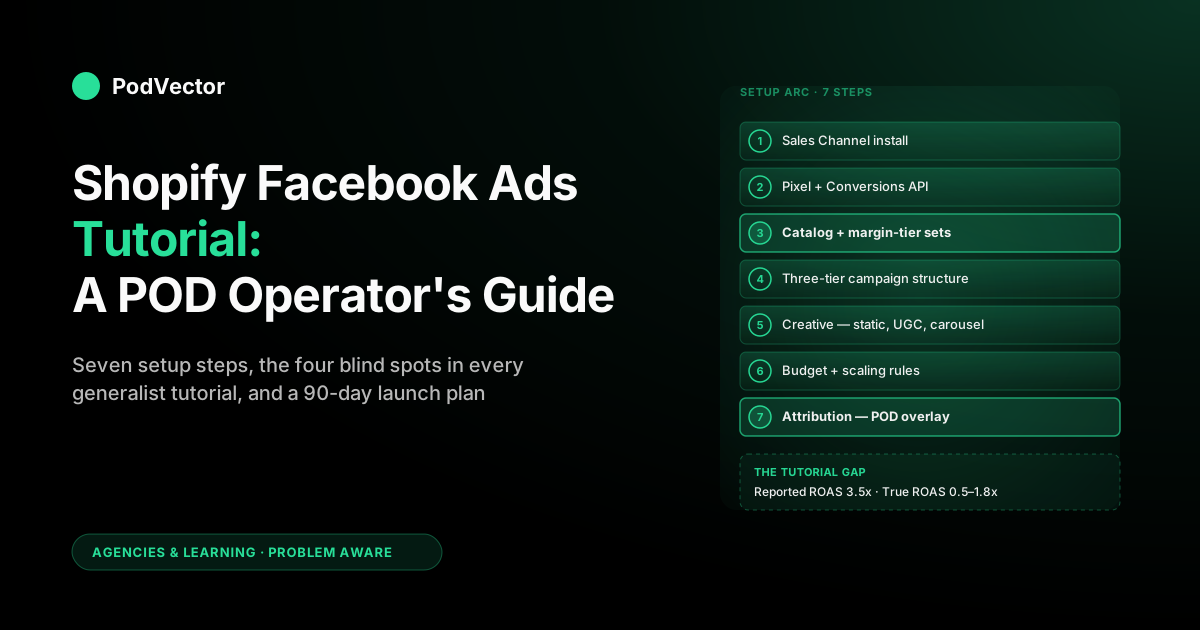
Quick Answer: A Shopify Facebook Ads tutorial walks through five concrete jobs — installing the Facebook & Instagram Sales Channel, configuring the Pixel and Conversions API, syncing the product catalog, structuring a three-tier prospecting/retargeting campaign, and reading the resulting Ads Manager numbers. The mainstream 2026 tutorials from Shopify, Optimonk, and EasyApps cover the platform mechanics correctly, but every one of them is calibrated against fixed cost of goods.
For a print-on-demand store routing Printify or Printful behind the same Shopify checkout, that calibration silently breaks: a healthy reported ROAS at the campaign level can hide a contribution loss at the order level. This tutorial follows the same setup-to-scale arc the canonical guides use, with the POD overlay made explicit at each step — so the campaign you ship at the end actually pays.
What you need before starting
Before opening Ads Manager, the Shopify side has to be in order. The mainstream tutorials skim this part because their assumed reader is already operating a stable, fixed-COGS catalog. POD operators frequently aren't, and a launch that skips the prerequisites pays for it later in disapprovals, mis-attribution, and bad scale decisions.
- An active Shopify store with at least 20 products live, real product imagery (not just print mockups), the Online Store sales channel published, and a domain that's been live for more than a few days. Brand-new stores under a week old draw policy review on Meta and frequently see ad accounts paused on the first launch.
- A Facebook Business Manager with a verified Business Page, a Business asset group, and a payment method on file. Operators who started on a personal ad account should migrate before launching anything they care about — Business Manager is what makes Pixel sharing, CAPI tokens, and policy appeals manageable.
- An Instagram Business profile linked to the Page. Almost all 2026 ad placements default across Facebook, Instagram, Reels, and Audience Network. An unlinked Instagram leaves placement coverage on the table for no reason.
- A working analytics baseline. Shopify Analytics, Google Analytics 4, and a way to view orders by SKU before you start spending. Without this, you cannot tell whether Meta is the channel that's actually selling — or whether organic search is, with Meta taking the last-click credit.
- An honest cost-of-goods read. Most importantly for POD: a recent export of supplier costs by SKU from Printify or Printful, including any variants where supplier price differs by size or product type. Without this, every ROAS number you see in Ads Manager is decorative.
Step 1: Install the Facebook & Instagram Sales Channel
Shopify's official Facebook & Instagram Sales Channel app handles four things in one flow: it provisions a Meta Pixel against your store, sets up server-side Conversions API forwarding through Shopify's infrastructure, sends your product feed into Commerce Manager as a catalog, and connects your Page and Instagram for Shop integration. Installing it is the easiest correct path; bolting Pixel and CAPI on by hand later is harder and more error-prone.
- From the Shopify admin, go to Settings → Apps and sales channels → Shopify App Store, search for "Facebook & Instagram", and install the official channel published by Meta.
- Walk through the connection wizard: log into Facebook with your Business Manager admin account, select the Business asset group, the Business Page, and the ad account you'll be running under.
- Approve catalog access, accept the Commerce data sharing terms, and let Shopify push the initial product feed. The first sync usually completes within an hour for a 200-SKU store; large 1,000+ SKU POD catalogs can take overnight.
- In Commerce Manager, open the catalog and confirm a sample of products synced cleanly — image, title, price, link, and at least one variant per item. Anything in the "Disapproved" or "Pending" buckets needs attention before campaigns can use the catalog.
The most common failure for POD operators at this step is product disapprovals on first sync. Trademark-adjacent designs, restricted niches (alcohol, cannabis-adjacent, certain political phrases), and any product where the mockup is read as user-generated content trigger automatic flags.
Fix what's fixable in product titles and descriptions, appeal the genuine false positives, and accept that 5–10% catalog rejection is normal on a fresh POD store. The strategic counterpart to this — how to design a catalog that minimizes ongoing rejection — sits in our complete Meta Ads playbook for print-on-demand sellers.
Step 2: Set up the Meta Pixel and Conversions API
The Pixel is the browser-side tracking tag; the Conversions API is the server-side parallel that sends events directly from Shopify to Meta, bypassing iOS 14+ blocking and ad blockers. Both matter; neither alone is sufficient in 2026.
Pixel verification
The Sales Channel app installs the Pixel automatically, but verify it. In Commerce Manager, open Events Manager → your Pixel → Test events, paste your storefront URL, and walk through view-product, add-to-cart, initiate-checkout, and purchase.
Each event should fire and appear in the test panel within a few seconds. If purchase events are missing, the most common cause is a custom checkout extension stripping the script — the fix is to re-enable the extension's Meta integration in checkout settings.
Conversions API verification
In Events Manager, switch to the Overview tab and check the Event Match Quality (EMQ) score for each key event. Below 5.0 is a problem; 7.0+ is healthy.
Low scores usually trace to missing customer parameters — email, phone, external ID — that Shopify can pass through CAPI but isn't, often because checkout marketing consent isn't being captured. The fix is in Settings → Customer accounts → Marketing consent, not in Meta's UI.
Aggregated Event Measurement
Configure your top eight events in Events Manager → Aggregated Event Measurement, ranked by business priority — for almost every Shopify POD store the order is Purchase, InitiateCheckout, AddToCart, AddPaymentInfo, ViewContent, Lead, Subscribe, CompleteRegistration. The top-ranked event becomes the optimization signal under iOS 14+, so getting Purchase first is non-negotiable.
The mechanics here are platform-standard — most generalist tutorials cover them adequately. What they don't cover is what you do with the data once it lands, which is where the POD overlay starts to matter. The detailed treatment is in our complete guide to Meta Ads ROAS and attribution for POD.
Step 3: Sync your Shopify product catalog (the POD twist)
Catalog sync is where POD operators diverge most sharply from the brand-DTC reader the canonical tutorials are written for. A generic ecommerce tutorial assumes a 50-SKU catalog with five variants per product and stable supplier costs. A POD store frequently runs 500–2,000 SKUs, monthly fresh design drops, and supplier-cost differences between a $12-cost tee and a $26-cost premium hoodie that all sit inside the same catalog and the same Advantage+ Shopping campaign.
Catalog hygiene first
Before any campaign uses the catalog, sweep it for the avoidable errors that hurt delivery. Missing product imagery (Meta needs at least one square or near-square image at 600×600 minimum).
Truncated descriptions that clip mid-sentence. Variant titles that read "Default Title" because Shopify's automatic variant naming wasn't overridden. Currency mismatches between Shopify and Commerce Manager — every catalog item should be in your store's primary selling currency, with regional pricing handled by Markets if relevant.
Product set segmentation by margin tier
This is the single most important POD-specific catalog decision and it appears in zero generalist tutorials. Inside Commerce Manager, build at least two product sets: one for "healthy margin" SKUs (typically tees, accessories, lower-cost items where the supplier cost leaves real contribution at retail) and one for "thin margin" SKUs (typically premium hoodies, oversized items, products with high Printify Premium or Printful supplier rates). Use product set rules — by product type, by tag, by collection — so the segmentation maintains itself as new products are added.
This matters because Meta's Advantage+ Shopping bidder, when fed a mixed-margin catalog, systematically prioritizes the highest-revenue SKUs, which in POD are almost always the worst-margin ones (a $50 hoodie outranks a $25 tee on revenue regardless of contribution). Separate product sets let you run separate Advantage+ campaigns with separate budgets, so the bidder optimizes inside a margin-coherent universe rather than across one. The deeper structural treatment is in our complete guide to Meta ad types for POD sellers.
Feed enrichment
Add custom labels for design family (e.g., "vintage-typography", "pet-portrait", "sports-niche"), supplier ("printify", "printful", "gelato"), and product type. These become available as creative selection rules and reporting dimensions. Most generalist tutorials skip custom labels because their reader doesn't have the catalog scale to need them; POD operators need them within the first 60 days of running.
Step 4: Build a three-tier campaign structure
The mainstream 2026 tutorials converge on roughly the same structure, and it's correct as a starting point. The POD overlay changes how each tier is parameterized, not the tier itself.
Top-of-funnel: prospecting
One Advantage+ Shopping Campaign (ASC) per margin tier, broad targeting, Advantage+ Audience or 1–3% lookalike of purchasers as the audience signal. Optimizing for Purchase, attribution window 7-day click / 1-day view (the 2026 default and the right choice for almost every Shopify store), budget at the campaign level under Advantage+ defaults. The "broad targeting" part is the 2026 reality — Meta's bidder outperforms hand-tuned audiences on most accounts, and detailed targeting has been deprecated for most use cases under iOS 14+ measurement constraints.
Middle-of-funnel: warm retargeting
One Manual Sales campaign retargeting site visitors from the last 14–30 days who didn't purchase, with exclusions for purchasers and current customers from your Shopify customer list. Creative leans into specific objections — sizing, fit, return policy, shipping time. POD operators have a unique opportunity here because Printify and Printful fulfillment times are a real concern for first-time buyers; a 30-second creative that explicitly addresses "ships from US/EU in 5–7 business days" frequently outperforms a generic discount offer at this stage.
Bottom-of-funnel: dynamic product retargeting
One Catalog Sales campaign showing dynamic product ads (DPA) to people who viewed or added specific products to cart but didn't purchase. The catalog feed does the work — Meta picks which product to show each user based on their actual browsing.
Budget is small relative to TOF (often 10–15% of total) but ROAS is consistently the highest of the three tiers because the audience already knows what they wanted. The mechanics of feed-driven retargeting for POD specifically are detailed in our Facebook Dynamic Product Ads Shopify strategy for print-on-demand.
What the canonical tutorials miss at this step
Generalist Shopify tutorials usually present the three-tier structure as one campaign per tier — total of three. POD operators with mixed-margin catalogs often need five to six: two TOF campaigns (one per margin tier), one MOF, two BOF (one per margin tier so DPA cycling stays inside its margin universe), plus an optional cold-launch campaign for new design drops that haven't accumulated enough engagement signal to ride inside the broader prospecting budget. More structure costs more attention; it also keeps the bidder honest in a catalog context where the canonical structure quietly misallocates spend.
Step 5: Ship the first creatives
Creative is the highest-leverage variable in 2026 — Meta's algorithm has internalized most audience and bid optimization, leaving creative quality as the dominant performance lever. The canonical tutorials all teach this; the POD overlay changes which creative formats earn attention first.
Static product hero (single product focus)
One product, lifestyle background or solid color, clear price-point teaser, single-line value proposition. Works well for high-design-density POD catalogs where the design itself is the hook — a strong typography tee or a well-crafted illustration carries the ad on its own visual merit. Ship six to eight static variants per launch; expect two or three to find traction, the rest to get pruned at the $30–$50 spend mark.
UGC-style video (15–30 seconds)
Hand-held vertical video, real person wearing or using the product, voiced over with the value prop. UGC outperforms studio creative by 30–40% on CTR in most accounts in 2026, and the gap is widening.
POD operators face a unique sourcing problem here: you usually don't have a local-warehouse sample to mail out for UGC, so paid UGC platforms (Insense, Trend.io, Billo) become the practical channel. Budget $300–$800 per usable UGC asset; expect 60–70% of submissions to be unusable.
Catalog carousel
Three- to five-card carousel pulled from your healthy-margin product set, ordered by your manual selection or Meta's automatic optimization. Carousels work as a discovery format for visitors who haven't seen the catalog breadth — particularly useful for niche POD stores where the design depth is the moat.
Section-break visual: the creative-loss model
Most generalist tutorials show creative testing as a clean win/loss: a creative either makes its CPM and ROAS targets, or it doesn't. The POD reality is messier.
Three categories of "loss" matter to disentangle. First, format failures (the hook didn't work, the music was wrong, the copy missed) — these are recoverable in the next iteration.
Second, design failures (the design itself isn't commercial enough; the niche is wrong) — these are catalog feedback, not creative feedback, and need to flow back to the design pipeline. Third, margin failures (the creative converted, but the product behind it has a thin supplier-cost margin that makes the conversion unprofitable) — these need product set re-segmentation, not creative re-shoots. A creative-test scorecard that distinguishes the three is a 60-day project, but it's the single biggest lever between losing money on Meta and winning at scale.
Step 6: Set budgets and scaling rules
Initial budget
For a store under $20K MRR launching its first paid Meta campaigns, $30–$75/day per campaign is the right starting band. Anything below $20/day per campaign means the bidder doesn't get enough events to learn, and you'll spend two weeks looking at noise. Anything above $150/day on a fresh account means you'll burn through your account-trust runway before you've debugged the basic setup.
Scaling rules
The canonical scaling advice is to raise budget by 20–30% every two to three days when a campaign is hitting its ROAS target. For POD operators with mixed-margin catalogs, modify this two ways.
First, scale based on contribution-margin ROAS, not reported ROAS — if the creative is winning on Meta's number but losing on your supplier-adjusted number, scaling makes the loss bigger. Second, scale within margin tiers separately — a healthy-margin TOF campaign hitting target should scale; a thin-margin TOF campaign hitting the same reported ROAS shouldn't.
De-scaling rules
If a campaign drops below 70% of its target true ROAS (not reported ROAS) for three consecutive days, cut its budget by 50% and audit before continuing. Holding budget on a losing campaign waiting for the bidder to "find it" is the most expensive single mistake POD operators make on Meta in 2026. Meta's algorithm is honest about what it can deliver at a given budget; the operator is the one extrapolating that "it will turn around tomorrow." It usually doesn't.
Reserve budget for creative iteration
Allocate 15–20% of total monthly Meta spend to creative testing — new hooks, new product introductions, new format experiments. Stores that spend 100% on scaling proven winners hit creative fatigue inside 60 days and watch ROAS decay with no replacement pipeline. Stores that maintain a creative-test budget refresh their winners every quarter and avoid the cliff.
Step 7: Read attribution like a POD operator, not a generalist
This is the step every generalist tutorial hand-waves and the step that separates POD operators who scale profitably from those who burn through capital. Ads Manager numbers — reported ROAS, cost per purchase, click-through rate — are platform-defined and platform-self-serving. They tell you what Meta thinks happened.
Your bank balance tells you what actually happened. The two diverge for every Shopify store and they diverge most for POD.
The reconciliation gap
Meta-reported revenue is gross order value at checkout. Your actual contribution is gross order value minus supplier cost (Printify or Printful), shipping (the supplier-charged amount, not what you charged the customer), platform fees (Shopify, payment processor, app subscriptions amortized), refunds, and any taxes you absorb rather than pass through. For a typical POD order — $35 retail, $14 supplier cost, $5 shipping, $1.50 platform fee — Meta reports $35 of revenue and the actual contribution is $14.50, before any ad spend.
The attribution-window question
Meta's default 7-day click / 1-day view window credits Meta with sales that customers may have arrived at through other channels and converted on a Meta touchpoint. For POD stores running parallel TikTok, Pinterest, or organic search traffic, this overstates Meta's true contribution by 15–30% in most accounts.
The correction is to look at Marketing Efficiency Ratio (MER) — total revenue divided by total marketing spend across all channels — alongside platform-specific ROAS. MER is harder to game; it's the number that matches the P&L.
The reporting cadence
Daily Ads Manager checks are noise; weekly is signal; monthly is decision-grade. Set up two views.
A weekly view that watches campaign-level reported ROAS, CPM, CPC, and creative-level CTR — useful for tactical iteration. A monthly view that reconciles total Meta spend against contribution margin from your actual order data, joining Shopify orders, Printify/Printful supplier costs, and Meta spend into one row per campaign.
This second view is the one that tells you whether to keep spending. The first view tells you what to ship next.
The four POD blind spots in every generalist tutorial
The mainstream 2026 Shopify Facebook Ads tutorials — Optimonk's beginner guide, Shopify's Ads Manager walkthrough, EasyApps' strategy guide, and the dozens of similar resources that rank below them — all share four blind spots. They aren't wrong; they're calibrated against a reader whose business has different cost mechanics than yours.
Blind spot 1: Reported ROAS as the optimization target
Tutorials teach you to set a target ROAS, scale spend up to chase it, and dial back when it slips. For a fixed-COGS DTC brand, target ROAS approximates contribution.
For a POD operator, reported ROAS is decoupled from contribution by the supplier-cost gap above. A 3.5x reported ROAS can be a 0.5x true ROAS or a 1.8x true ROAS depending on which products in the catalog converted.
Blind spot 2: The single-margin Advantage+ Shopping assumption
Generalist tutorials present ASC as a one-campaign rocket ship: load catalog, set budget, let Meta's bidder work. POD catalogs with mixed-margin tiers need product-set-segmented ASC to avoid the bidder systematically over-spending on thin-margin SKUs. No mainstream tutorial covers this because it's invisible at fixed COGS.
Blind spot 3: Creative fatigue treated as a creative problem only
Tutorials cover creative refresh as a content-volume problem — ship more hooks, more angles, more UGC. POD operators face a related but different problem: design fatigue.
The design behind the ad ages out of the niche's interest cycle and creative refresh against a fading design produces diminishing returns. The fix is to feed the design pipeline, not just the creative pipeline. Generalist tutorials don't have a vocabulary for this.
Blind spot 4: Policy review as a tactical chore
Tutorials cover Meta ad rejections in a single paragraph: fix the issue, resubmit, move on. POD catalogs experience policy review at a different volume and shape — trademark sweeps that pull dozens of designs at once, restricted-content flags on niche slogans, and account-level trust degradation from repeated appeals. The mitigation is structural (catalog design discipline, brand-safe design review processes, separate Business Manager environments for higher-risk niches), not tactical. The pattern is detailed in our complete guide to Meta Ads agencies and courses for POD, which lays out how this risk profile changes the buy-vs-build math.
A 90-day POD-aware launch plan
The mainstream tutorials end with "now run the campaigns and iterate." For a first Meta launch on a Shopify POD store, a structured 90-day arc dramatically improves the survival rate.
Days 1–14: foundation
Sales Channel installed, Pixel verified, CAPI EMQ above 7.0, catalog cleaned and segmented into margin tiers. One TOF campaign launched at $50/day on the healthy-margin product set, six creative variants.
No scaling decisions yet — the bidder needs the first two weeks to find equilibrium and you need the data to know what equilibrium even looks like. End-of-period deliverable: a baseline ROAS read with both reported and supplier-adjusted numbers calculated against the actual orders shipped.
Days 15–45: structure expansion
If days 1–14 produced a profitable baseline at the contribution-margin level, layer in MOF retargeting and BOF dynamic product ads. Begin the creative-iteration cadence — two new static variants and one UGC asset per week.
Start the design-feedback loop where ad performance data flows back to the design pipeline. End-of-period deliverable: the three-tier structure operational, contribution-margin ROAS tracked weekly, first creative pruning round complete.
Days 46–90: scaling and the question
If structure-expansion produced a profitable baseline at the MER level (not just per-campaign), begin scaling — 20–30% budget increases every three to five days on winners, separate scaling decisions per margin tier. End the period with a clear answer to one question: at our current spend level and current contribution margin, is Meta a channel we want to scale further, level off on, or pause? "Pause" is a legitimate answer; many POD operators discover at this stage that Meta works at $5K/month spend but breaks at $25K/month spend because the catalog isn't deep enough to absorb the broader audience.
That's not a failure of the launch; that's the launch doing its job. The framework for the buy-vs-build decision against agency dollars at this stage is in our Facebook Ads agency for ecommerce guide for POD operators.
The full topic universe — how Shopify-Meta integration fits the broader POD paid-acquisition stack — sits in our complete guide to Meta Ads + Shopify integration for POD, the cluster sits in the Meta Ads agencies and learning hub, and the topic hub is the Meta Ads for POD topic hub.
FAQs
How long does it take to set up Facebook Ads for a Shopify store?
The technical setup — Sales Channel install, Pixel verification, CAPI configuration, catalog sync, AEM event ranking — takes a focused operator about three to five hours of active work, plus an overnight wait for the initial catalog sync to complete on a 200+ SKU store. Realistic end-to-end time including a clean baseline campaign live: one full day for setup, plus two weeks of bidder learning before the first scaling decision is meaningful. Compressing this further is usually a mistake; the bidder cannot find equilibrium faster than its data volume allows.
What's the minimum daily budget to test Facebook Ads for a Shopify POD store?
$30/day per campaign is the practical floor in 2026. Below that, the campaign doesn't generate enough optimization events for Meta's bidder to converge, and you'll spend two weeks looking at statistical noise.
The right starting band for a first launch is $30–$75/day per campaign, with three campaigns active (one TOF, one MOF, one BOF) — total $90–$225/day across the structure, or $2,700–$6,750/month. POD stores below $5K MRR usually can't sustain this; a tier 2 ecommerce course plus a smaller-budget single-campaign launch is the more responsible path until cash flow supports the full structure.
How do I install the Facebook Pixel on Shopify in 2026?
Install the official Facebook & Instagram Sales Channel from the Shopify App Store. The channel installs the Pixel automatically through Shopify's first-party integration, configures Conversions API forwarding without code, and syncs your product catalog into Commerce Manager. Manual Pixel installs through theme code edits — common in older tutorials — are unnecessary in 2026 and frequently break under iOS 14+ measurement, because they don't include the server-side CAPI parallel that recovers blocked browser events.
Should I use Advantage+ Shopping Campaigns or manual sales campaigns?
For most Shopify POD stores in 2026, Advantage+ Shopping for prospecting and Manual Sales for retargeting is the right split. ASC's bidder consistently outperforms manual targeting on cold prospecting because it has access to signals individual advertisers don't (cross-account behavior, broader interest graphs, real-time conversion modeling). Manual Sales remains better for retargeting because you have specific custom audiences (cart abandoners, recent visitors) that you want to address directly with on-objection creative — handing those audiences to ASC's bidder dilutes the targeting precision the audience exists to provide.
What ROAS should a Shopify POD store target on Facebook Ads?
The honest answer: target the reported ROAS that delivers a 1.3–1.5x contribution-margin ROAS after supplier costs, shipping, platform fees, and refunds. For a typical POD margin profile, that's usually a reported ROAS of 3.0–4.0x — roughly double the 1.5–2.0x targets you'll see in generalist tutorials calibrated for fixed-COGS brands. Operators targeting the generalist 2.0x reported ROAS on POD margins are systematically losing money on Meta and don't realize it until they reconcile against bank deposits.
Why are my Facebook ad creatives getting rejected?
For POD stores specifically, the most common rejection causes in 2026 are: trademark-adjacent designs (logos, slogans, or imagery that touches another brand's IP), restricted-content niches (alcohol, cannabis-adjacent, certain political phrases, certain firearms-adjacent themes), unsubstantiated health or weight-loss claims in copy, and "before/after" body imagery on apparel ads. The fix order is: revise the design or copy if it's a real policy issue, appeal the false positives through the Account Quality dashboard with specific context, and avoid stacking appeals on the same Business Manager because account trust score degrades with repeated appeals. Multi-Business-Manager structure for higher-risk niches is a defensible setup but adds operational overhead.
What's the difference between the Meta Pixel and Conversions API?
The Pixel is browser-side: a tracking script in your storefront's HTML that fires events when shoppers interact (view product, add to cart, purchase). The Conversions API is server-side: events sent directly from Shopify's servers to Meta's servers, bypassing the browser entirely.
Why both: iOS 14+, ad blockers, and tracking-prevention browsers block 15–30% of Pixel events. CAPI recovers most of those by going around the browser.
Together they give Meta the most complete event picture, which improves Event Match Quality, ad delivery, and reported attribution. Running Pixel-only in 2026 is leaving 15–30% of measurable conversions on the floor.
Can I run Facebook Ads for Shopify without the Sales Channel app?
Technically yes — you can install the Pixel manually through theme code, configure CAPI through a third-party connector or a custom server, and upload a product feed manually to Commerce Manager. Practically no — the official Sales Channel does all three correctly and stays current with Meta's API changes; manual setups break on every Shopify or Meta platform update. The only legitimate reason to skip the Sales Channel in 2026 is if you're running a multi-store architecture where Shopify's single-Business-Manager constraint is a blocker, and even then the workaround is usually multiple Sales Channel installs rather than manual Pixel work.
How do I know if a Shopify Facebook Ads tutorial covers what POD operators actually need?
Three diagnostic questions. Does the tutorial discuss variable cost of goods or contribution margin anywhere — not just gross ROAS?
Does it cover catalog segmentation by margin tier, or treat the catalog as a single uniform pool? Does it acknowledge policy review as a structural risk for design-driven catalogs, or treat rejections as one-off chores? Most mainstream 2026 tutorials answer "no" to all three; a tutorial that answers yes to even one is calibrated closer to the POD reality and worth more than the average generalist resource.
What happens to my campaigns when I add new POD designs?
New SKUs added to the catalog flow automatically into Advantage+ Shopping campaigns within a few hours of catalog sync, but they enter cold — Meta's bidder has zero engagement signal on them, so they get under-shown until they accumulate clicks. The practical answer for POD operators with weekly design drops: maintain a separate "new launches" prospecting campaign with a smaller fixed budget that explicitly targets recent-additions product sets, so new designs get the early-life ad spend they need to surface. Without this structure, new designs sit dormant in the broader catalog while the bidder over-rotates on already-established winners.
How do I track true profit on Facebook Ads with Printify or Printful?
Manually: monthly export from Shopify (orders), Printify or Printful (supplier costs by order ID), and Meta Ads Manager (spend by day and campaign). Join in a spreadsheet on order ID, calculate contribution per order, allocate Meta spend by campaign, and produce contribution-margin ROAS per campaign.
Three to four hours of work per month for a sub-$30K MRR store. Programmatically: build a data pipeline (Snowflake, or a managed equivalent) that ingests all three sources and joins them daily.
Or use a tool that does this for you — PodVector AI's Victor agent runs live data warehouse across Shopify, Printify, Printful, and Meta Ads in a chat interface, which collapses the four-hour monthly reconciliation to a 30-second question. The cost arithmetic against in-house build versus tooling versus agency is detailed in our complete guide to Meta Ads agencies and courses for POD.
Take the tutorial. Then add the supplier-cost overlay every tutorial skips.
Mainstream 2026 Shopify Facebook Ads tutorials cover the platform mechanics correctly — Sales Channel, Pixel, CAPI, catalog, three-tier structure. What they all skip is the layer that tells a print-on-demand operator whether the campaign is actually profitable: reconciling Meta-reported ROAS against Printify or Printful supplier costs, shipping, platform fees, and refunds. PodVector AI's AI agent, Victor, runs live data warehouse across your Shopify, Printify, Printful, and Meta Ads data and answers questions like "what was my true contribution margin on Facebook Ads last week, by campaign" in plain English. Ship the tutorial, then make every scaling decision against your real numbers instead of the platform's reported ones.
Try Victor free