
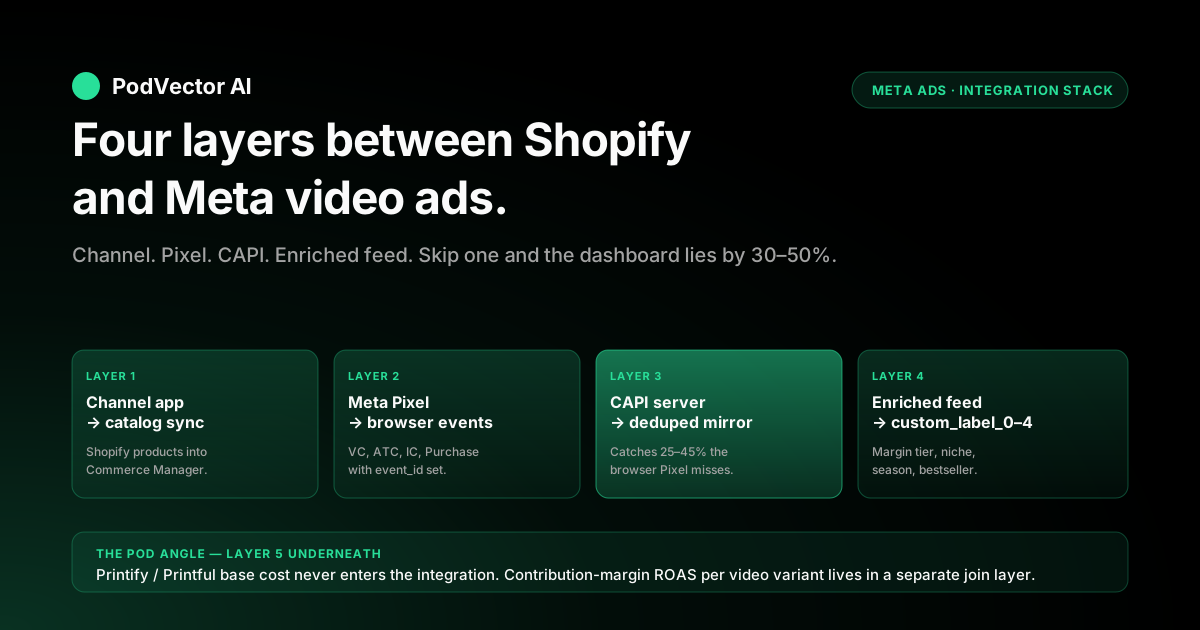
Quick Answer: A Shopify print-on-demand store running Facebook video ads only converts the way the dashboard claims when four integration layers are wired correctly: the Facebook & Instagram sales channel app on Shopify (for catalog sync), the Meta Pixel with browser-side events on every page (ViewContent, AddToCart, InitiateCheckout, Purchase), the Conversions API server-side stream from Shopify mirroring those same events with deduplication keys, and a product feed enriched with custom labels (bestseller flag, margin tier, niche, season) that feeds video Catalog Ads and Advantage+ Shopping Campaigns. Get those four layers right and Meta's algorithm can attribute purchases back to the specific video creative variant that won them, build video-engagement Custom Audiences for warm retargeting, and serve catalog video collection ads against the right inventory subset.
Get any one of them wrong and the symptoms cascade — under-reported attribution makes video creative look 30–50% worse than it is, video Custom Audiences collapse, Catalog Ads serve the wrong SKU mix, and the per-variant ROAS signal Meta needs to optimize spend goes silent. The walkthrough below is six pieces: the four-layer integration architecture and what each layer is for, the Shopify-side setup for the Facebook & Instagram channel and Pixel, the Conversions API server-side event stream with deduplication, the product feed enrichment that makes video Catalog Ads and ASC video usable on POD inventory, the video-specific attribution and Custom Audience setup that closes the loop from creative to purchase, and the POD-specific gap nobody else covers — Printify or Printful base cost never flows through the Pixel or CAPI by default, so contribution-margin ROAS per video variant requires a separate join layer underneath the integration stack.
Why integration is the bottleneck for POD video ads on Shopify
Most Shopify print-on-demand stores running Facebook video ads will tell you the creative is fine and the integration is "set up" — and most of them are quietly running half-wired plumbing that hides 30–50% of conversions, breaks video-engagement retargeting audiences within weeks of an iOS update, and serves Catalog Ads against a feed Meta thinks is fresh but actually re-syncs only on a 4–24 hour delay. The video creative isn't the bottleneck on a half-wired store. The integration is.
The shape of the problem: Meta's video ads architecture in 2026 leans hard on three integration-dependent signals. The 3-second view rate that Meta uses to rank video creative needs ad-set-level conversion data to weight against revenue, which needs Pixel + CAPI to be deduplicated correctly.
Video-engagement Custom Audiences (15-second view, 50% completion, 75% completion) only populate when the Pixel fires reliably across mobile Safari, in-app browsers, and ad-blocked desktop sessions — which only happens when CAPI is mirroring browser events server-side. Catalog Ads with video collection-ad creative pull from the product feed Shopify pushes through the Facebook & Instagram channel; if that feed is missing custom_label fields, the algorithm has no way to filter to bestsellers, margin tiers, or niches, and it spreads spend across the longtail by default.
For a POD operator running Printify or Printful as the fulfillment backend, the integration problem compounds. POD inventory turns over 20–30% per month as new designs launch and old designs slow.
The catalog feed has to keep pace or video Catalog Ads serve last month's winners. The Pixel and CAPI have to reliably attribute purchases to the specific video variant that drove them or the per-creative ROAS signal goes silent and weekly creative iteration becomes blind.
And — the gap nobody else covers — the integration stack carries product retail price and quantity but never carries Printify or Printful base cost, so the entire integrated stack reports gross revenue, not contribution margin. The walkthrough below treats integration as the foundation and creative as what sits on top, in that order.
Where this article sits inside the broader Meta context: the Meta Ads for POD topic hub is the topic entry point, the Meta ad types cluster is where this piece lives, and the cross-cluster integration framing — pixel, CAPI, channel, feed without the video-specific angle — sits in the complete guide to Meta Ads + Shopify integration for POD.
The four-layer integration stack and what each layer is for
The four integration layers between Shopify and Meta serve distinct, non-overlapping jobs. Wiring them in the wrong order or skipping one is the single most common cause of "video ads aren't working" tickets on POD stores. The full stack:
- Layer 1 — Facebook & Instagram sales channel app on Shopify. This is the catalog pipe. It pushes your Shopify product catalog (with prices, descriptions, image URLs, variants, availability, GTIN where present) into Meta's Commerce Manager so that Catalog Ads, Advantage+ Shopping Campaigns, and shoppable Instagram posts have inventory to sell. Without this layer, video Catalog Ads have no products to render and ASC video has no SKU shelf to optimize against.
- Layer 2 — Meta Pixel (browser-side events). The Pixel is a JavaScript snippet on every page of your Shopify store that fires standard events (PageView, ViewContent, AddToCart, InitiateCheckout, Purchase) into Meta's reporting and audience-building infrastructure as visitors interact with the site. Without browser-side events, you have no warm-retargeting Custom Audiences and no in-session video-attribution signal.
- Layer 3 — Conversions API (CAPI, server-side events). CAPI is a server-to-server stream from Shopify (or a middleware layer) that mirrors the Pixel events with the same event_id deduplication key. CAPI catches the 25–45% of Purchase events the Pixel misses on mobile Safari, in-app browsers, ad-blocked sessions, and post-iOS-14 ATT-opt-out users. Without CAPI, video Purchase ROAS reports 30–50% lower than reality and video-engagement audiences underpopulate.
- Layer 4 — Product feed enrichment with custom labels. The default feed Shopify pushes through Layer 1 carries title, price, description, and image URL. The fields that actually make video Catalog Ads usable on POD — bestseller tag, margin tier, niche, season, design ID — only show up if you enrich the feed with custom_label_0 through custom_label_4 either via a feed-management app, a custom Cloud Function rewrite, or manual product-tag templates Shopify maps into the feed.
The four layers stack — each depends on the one below. You can't run video Catalog Ads against an enriched feed if the channel app isn't pushing inventory; you can't run video-engagement audiences if the Pixel isn't firing; you can't trust ROAS reporting if CAPI isn't deduplicating with the Pixel.
The setup order matches the stack order: Layer 1 first, then Layer 2, then Layer 3, then Layer 4. Skipping Layer 3 (the most-skipped layer because Shopify's "out of the box" channel includes only a half-baked CAPI implementation) is the failure mode that hides itself the longest — the dashboard reports plausible numbers, just systematically low ones, and you don't notice until you reconcile against Shopify's order export and find a 30%+ gap.
Layer 1: Facebook & Instagram sales channel on Shopify
The Facebook & Instagram channel app installed from the Shopify App Store handles catalog sync between your Shopify product catalog and Meta's Commerce Manager. The setup that works on a POD store:
- Install the channel. Shopify admin → Sales channels → Add channel → Facebook & Instagram → Install. Connect your Meta Business Manager account, your Facebook Page, and your Instagram business account. The channel creates a dedicated Catalog inside Commerce Manager named after your store and assigns a Catalog ID — note the ID, you'll need it for ad-set Catalog Filter configuration later.
- Confirm Commerce Manager Catalog status. Inside Meta Commerce Manager, open the catalog the channel created and verify product count matches your Shopify storefront-published product count. Discrepancies of more than 2–3% usually mean specific products are missing required fields (image URL, price, availability, description over 9000 characters) — Meta rejects them silently. The catalog's Issues tab lists rejected products and the rejection reason.
- Set sync cadence expectations. The Shopify channel pushes a full catalog sync every 24 hours and incremental updates (price changes, inventory changes, new products) approximately every 15–60 minutes depending on Meta's queue. New POD designs launched at 2 PM typically appear in the catalog by 3–4 PM and become eligible for ASC video and Catalog Ads by 4–5 PM. Don't trust faster than that for new launches.
- Verify variant-level sync. POD products usually carry 30–90 variants per design (garment type × color × size). The default channel sync includes variants but Meta's ad rendering treats each variant as a separately-rankable item. For video Catalog Ads, you usually want the parent product (one design = one item in the feed) rather than every variant — configure variant grouping in the channel settings to consolidate by design where possible.
- Connect the Pixel through the channel. The channel's Data Sharing setting should be set to Maximum, which routes both Pixel and CAPI events through the channel's pipeline. This is a partial CAPI implementation that handles Purchase events well but leaves ViewContent and AddToCart server-side events incomplete — Layer 3 below handles the gap.
Common Layer-1 setup mistakes on POD stores: missing GTIN fields (POD garments don't have manufacturer barcodes, but Meta tolerates the missing field — don't try to fake it), oversized image URLs (Printify mockup URLs above 8MB get rejected silently — set your Shopify product images to 2048×2048 max), and Catalog tab in Commerce Manager not refreshed after install (refresh the catalog manually once after the first sync to confirm products are flowing). The cluster-pillar guide on Meta ad types for POD sellers walks through how the catalog feed plugs into each Meta ad type.
Layer 2: Meta Pixel browser-side events
The Meta Pixel fires browser-side events as visitors interact with your Shopify storefront. Five standard events matter for video ads attribution and Custom Audience building:
- PageView — fires on every page load. The baseline event that confirms the Pixel is installed and reachable.
- ViewContent — fires on product detail page load with the SKU's content_id and product details. Powers the "warm visitor" retargeting tier that video creative serves into.
- AddToCart — fires when a user adds a SKU to cart. Powers the "cart abandoner" retargeting tier; also feeds the algorithm a higher-intent signal than ViewContent for ad-set optimization.
- InitiateCheckout — fires when a user enters checkout. The strongest pre-purchase intent signal; powers the "checkout abandoner" retargeting tier where 5–8 second urgency video creative converts at the highest rate.
- Purchase — fires on order confirmation page with order_id, value, currency, and content_ids. The conversion event Meta uses to attribute video ads to revenue and to optimize ASC bidding.
The Shopify channel installs the Pixel automatically on installation (Layer 1), but two follow-up checks are required:
- Verify event firing with Meta Pixel Helper. Install the Meta Pixel Helper Chrome extension. Walk your storefront from a fresh incognito session — load the homepage, click a product, add to cart, start checkout, complete a test order. The extension should show one event per step with no duplicates and no failures. If ViewContent fires twice on a single product page load (a common Shopify-theme issue), the Pixel is double-installed via both the channel and a leftover theme.liquid snippet — remove the theme.liquid version.
- Confirm event_id is being set. Open the browser DevTools Network tab, filter by "facebook.com," and inspect the request payload of a Purchase event. The payload should contain an event_id field — a unique identifier per event used to deduplicate against the Conversions API stream. If event_id is empty, Layer 3 cannot deduplicate and you'll get double-counted Purchases when CAPI is added. The Shopify channel sets event_id automatically on the standard checkout pages; custom theme checkouts sometimes drop it.
One Pixel-specific configuration matters for video ads: enable the AddPaymentInfo and Subscribe standard events if your store offers subscriptions or BNPL (Shop Pay Installments, Klarna, Afterpay). These give the algorithm extra mid-funnel signals for video ad-set optimization beyond the standard five. The Pixel-only setup gets you partial coverage; the next layer closes the gap.
Layer 3: Conversions API server-side events
The Conversions API mirrors the Pixel events server-to-server, catching the 25–45% of Purchase events the browser-side Pixel misses because of mobile Safari ITP, in-app browsers (Instagram, TikTok, Gmail), ad blockers, iOS 14+ App Tracking Transparency opt-outs, and Google Chrome's third-party cookie deprecation. For video ads on a POD store, CAPI is non-optional — without it, video ROAS dashboards report 30–50% lower than reality and the Meta algorithm under-allocates to video creative because the conversion signal looks weaker than it is.
Three setup paths get CAPI working on Shopify, in order of completeness:
- Shopify channel default CAPI (Layer 1's built-in). The Facebook & Instagram channel ships with a partial CAPI implementation that handles Purchase events server-side. It does NOT mirror ViewContent, AddToCart, or InitiateCheckout server-side, which means the warm-retargeting audiences and mid-funnel optimization signals stay browser-only. This is the default state most POD stores sit in unknowingly. Coverage: ~50% of the gap.
- Server-side Pixel via a CAPI Gateway app. Apps like Trackify, Analyzify, Elevar, or Stape route every standard event server-side through a CAPI Gateway with proper event_id deduplication. Setup is 30–90 minutes depending on the app. Cost: $30–$200/month depending on order volume. Coverage: 90–95% of the gap. The most common path for Shopify POD stores running $5K+/month in Meta spend.
- Custom CAPI middleware. Build a Cloud Function or Lambda that receives Shopify webhooks (orders/create, carts/update, checkouts/create) and posts to Meta's CAPI endpoint with hashed PII (email, phone) and event_id matching the Pixel. Highest control, lowest ongoing cost ($0–$10/month in compute), but requires engineering time. Used by stores running $20K+/month in Meta spend or with bespoke attribution requirements.
The deduplication key is the part most setups get wrong: every Pixel event must carry the same event_id as the corresponding CAPI event so Meta can deduplicate on its side and not double-count. Without deduplication, your Purchase count doubles in Events Manager and ROAS reports overstate by 2×. Meta's Events Manager → Test Events tab shows live event flow with deduplication status — a healthy setup shows "Browser + Server" matched events, a broken setup shows "Browser only" and "Server only" as separate streams.
Match Quality is the second metric to watch. Inside Events Manager, each event source shows a Match Quality score from 0–10 based on how many user-identifying fields (email hash, phone hash, IP, user agent, Click ID, Browser ID) you're sending with each event.
Below 6.0 the algorithm struggles to attribute conversions to ad clicks; above 8.0 attribution stabilizes. POD stores commonly sit at 5–6 because they ship with email but no phone hash; adding phone capture at checkout pushes the score to 7–8 and improves video ad attribution by 8–15%.
The full server-side event stream architecture is covered in deeper detail in the complete guide to Meta Ads + Shopify integration for POD — this section's job is the video-ads-specific subset.
Layer 4: Product feed enrichment with custom labels
The default product feed Shopify pushes through the Facebook & Instagram channel includes the Meta-required fields (id, title, description, link, image_link, price, availability, condition, brand) plus a handful of optionals (sale_price, gtin, mpn, item_group_id). The fields that actually make video Catalog Ads and Advantage+ Shopping Campaigns work on POD inventory are the optional custom_label fields — five strings per product (custom_label_0 through custom_label_4) that you control entirely.
The custom_label schema that earns its keep on a POD store running video ads:
- custom_label_0: margin tier. Values like "high" (gross margin above 60%), "mid" (40–60%), "low" (below 40%). Computed at sync time from retail price minus Printify or Printful base cost. Used as a Catalog Filter on cold-prospecting ASC video to exclude low-margin SKUs from the algorithm's optimization pool.
- custom_label_1: niche. Free-form niche identifier — "fitness," "fishing," "homeschool-mom," "dnd-fan," "vintage-typography." Used to ensure cross-sell video Catalog Ads stay inside the same niche as the original purchase rather than serving a fishing shirt to a yoga buyer.
- custom_label_2: season. Values like "evergreen," "spring-summer," "fall-winter," "holiday-q4." Used to filter out off-season SKUs from cold-prospecting video and to surface seasonal SKUs in retargeting at the right time of year.
- custom_label_3: design status. Values like "active," "pre-launch," "winding-down," "discontinued." Used to filter out designs that are about to be retired and shouldn't pull cold-prospecting video spend.
- custom_label_4: bestseller flag. Values like "top-50" (your top 50 SKUs by trailing-30-day units), "top-200," "longtail." Used as the primary Catalog Filter on cold-prospecting ASC video so the algorithm focuses on SKUs with enough conversion volume to clear learning phase. Recompute weekly.
The mechanics for getting custom_label values into the feed:
- Manual product-tag template route (lowest cost). Use Shopify product tags with prefixes like "ml:high" (margin), "nh:fitness" (niche), "bs:top-50" (bestseller). A feed-management app like Flexify, Socialhead, or DataFeedWatch can rewrite these tag prefixes into custom_label fields on the outbound Meta feed. Cost: $20–$50/month for the feed app. Maintenance: weekly retag for bestseller flag and design-status changes.
- Custom feed rewrite via Cloud Function (mid-tier). Run a scheduled Cloud Function that pulls Shopify product data plus Printify or Printful base cost data plus your trailing-30-day order data, computes margin tier and bestseller flag, and writes a Meta-compatible XML or CSV feed to a Cloud Storage URL. Connect that URL as a feed source in Commerce Manager. Cost: $10–$30/month in compute. Maintenance: schedule once, runs weekly.
- Live warehouse-backed feed (highest accuracy). Pipe Shopify orders, Printify or Printful base costs, and Meta ad data into a warehouse in real time. Compute custom labels on a 1-hour cadence and push the enriched feed to Commerce Manager. The feed reflects this morning's bestsellers, this morning's margin reality, and this morning's design-status changes. Used by POD operators running $30K+/month in Meta spend where stale labels cost more than the infrastructure.
The cluster guidance on feed-driven ads — including how custom labels feed dynamic ad permutation — sits in the Shopify dynamic Facebook ads product feed strategy and the broader Catalog Ads architecture in the Facebook dynamic product ads Shopify strategy.
Video engagement Custom Audiences from integrated events
Video creative generates a class of Custom Audiences that static creative can't: video-engagement audiences segmented by how much of the video the viewer watched. These audiences only populate reliably when Layer 2 (Pixel) and Layer 3 (CAPI) are firing in deduplicated mirror — without CAPI, the audiences underpopulate by 30–50% on mobile-Safari-heavy traffic.
The four video-engagement audiences worth building from a POD store's video creative:
- 3-second video viewers (last 30 days). The widest video-engagement audience. Useful as a top-of-funnel warm seed and as a lookalike-source for cold prospecting (1% lookalike of 3-second viewers often outperforms 1% lookalike of pixel ViewContent on POD niches because the video viewers self-selected on aesthetic interest in the design).
- 15-second video viewers (last 30 days). Mid-funnel. Already engaged with the design beyond the 3-second hook. Serve longer-form video creative or a static carousel with the same SKU and a stronger CTA.
- 50% video viewers (last 30 days). Strong intent signal. Serve cart-abandoner-style video with urgency or social proof. Conversion rate from this audience often runs 2–3× the 3-second viewer audience.
- 75% video viewers (last 30 days). Highest video-only intent signal. Use as a lookalike seed for the strongest-signal cold prospecting audience and as an exclusion (after Purchase event) to suppress fatigue.
Configure these inside Meta Ads Manager → Audiences → Create Audience → Custom Audience → Video. Source the audience from a single video file or from all video activity on a Page; for POD stores running 5–10+ video variants per ad set, source from "all videos on Page" to avoid 8–10 separate small audiences that each fall below the 1,000-user threshold for ad-set targeting.
Two warnings:
- Video engagement audiences only retain users for 365 days maximum. Past that, the audience evicts old viewers and your audience size flattens or shrinks even if video-ad spend is constant. Plan for the natural decay; don't treat 6-month video-viewer audience size as evergreen.
- Video engagement audiences populate from Meta's tracking of video plays inside the Meta apps (Facebook, Instagram, Reels, Stories) — NOT from video plays embedded on your Shopify storefront via tools like Wistia or YouTube. If your product detail page autoplays a 30-second product video, those views don't count toward the engagement audience. Only Meta-served ad video views populate the audience.
The audience-tier architecture that uses these video Custom Audiences alongside Pixel-event audiences (ViewContent, AddToCart, InitiateCheckout) is the four-tier setup covered in the Facebook retargeting ads for Shopify strategy. The integration setup in this article is what makes that retargeting architecture actually work.
Per-variant attribution: creative-to-purchase loop
The integration's most-overlooked job is closing the loop from a specific video creative variant to the specific purchases it drove. Without per-variant attribution, weekly creative iteration (3–5 new video variants per ad set per week, retire below 0.5% CTR after 7 days) flies blind — the dashboard shows ad-set-level ROAS but not which of the five variants inside the ad set is carrying it.
Per-variant attribution requires three things working together:
- UTM parameters on every video ad's destination URL. Set utm_source=facebook, utm_medium=video_cpc, utm_campaign={{campaign.name}}, utm_content={{ad.name}}, utm_term={{adset.name}} via Meta's URL Parameters field at the ad level. Meta auto-fills the {{...}} placeholders per ad. The utm_content field lands the per-creative-variant identifier into Shopify's order data.
- Shopify order tagging captures the UTM. Shopify's default order export includes the landing_site_ref field which captures the entry-page URL with UTMs. Some apps (Lifetimely, Triple Whale, Polar Analytics) attach the UTMs as order tags or order metafields, which makes per-creative reporting easier. Without this, you'll need to parse landing_site_ref from raw order export.
- Daily join from Meta ad-level data to Shopify order-level data. Pull Meta's ad-level spend, impressions, clicks, and reported conversions per ad name nightly. Pull Shopify orders by date with their UTM tags. Join on utm_content (the ad name). The output is a per-creative-variant table: spend, dashboard-reported ROAS, actual Shopify-revenue ROAS, gap percentage. Variants with a large gap (Meta over-attributing) usually had cross-device conversions from CAPI; variants with no gap were already deduplicated cleanly.
The cadence: this join runs daily and feeds the weekly creative-iteration decision (which variants to scale, which to retire, which to refresh). Without it, the iteration cadence covered in the Facebook video ads for ecommerce strategy guide happens against a noisy ad-set average rather than a clean per-variant signal — and the wrong variants get killed.
One integration-specific failure here: Shopify's checkout flow strips UTMs from the URL after the customer enters checkout, which means landing_site_ref captures the FIRST visit's UTM but not the converting visit's UTM. For POD stores where the typical buyer takes 2–4 sessions to convert, this is a real problem. The fix is using Shopify's customer.metafields to write the latest UTM on every PageView via a small theme.liquid snippet plus a customer-update API call, or relying on a third-party attribution app (Triple Whale, Polar Analytics, Northbeam) that handles cross-session UTM stitching server-side.
The POD-specific gap: base cost never enters the integration stack
All four integration layers above carry product retail price, quantity, currency, and order value into Meta's reporting and audience-building infrastructure. None of them carry Printify or Printful base cost. Meta's "Purchase ROAS" reports gross revenue divided by ad spend — for a POD store where 35–55% of every retail dollar leaves immediately as base cost (item production + shipping subsidies + Shopify fee + refund reserve), that number overstates contribution-margin ROAS by 3–5×.
The gap in concrete terms on a typical POD apparel store:
- $30 retail t-shirt → $13 Printify base cost + $5 shipping shortfall + $1.17 Shopify fee + $0.90 refund reserve (3% × $30) = $20.07 cost. Gross margin: $9.93 (33%).
- Meta-attributed Purchase ROAS shows $30 / ad-spend-per-purchase. If ad-spend-per-purchase is $10, dashboard ROAS = 3.0×.
- Contribution-margin ROAS is $9.93 / $10 = 0.99×. Break-even, not 3× profitable.
- The dashboard / contribution-margin ratio: 3.0×.
The integration stack you just wired correctly — channel + Pixel + CAPI + enriched feed — has the same structural blindness as a half-wired stack on this question. The ratio is consistent (3–5× overstatement) on a healthy POD store, which is the only redeeming quality: you can apply a flat divisor to dashboard ROAS to estimate contribution margin if you know the average. You can NOT use the dashboard ROAS to compare two video variants if their SKU mix differs — variant A landing on $30 t-shirts and variant B landing on $50 hoodies will show different contribution-margin ROAS even if dashboard ROAS matches.
Closing the gap requires a fifth layer underneath the four integration layers — a contribution-margin join that pulls Printify or Printful base cost data per order, joins to Shopify order line items by SKU, subtracts costs from revenue, and computes contribution-margin ROAS per ad creative variant nightly. Three implementation paths:
- Spreadsheet: 30–60 min/day. Export Meta ad-level data, Shopify orders with UTMs, and Printify or Printful order data. VLOOKUP base cost by SKU, sum to per-creative-variant contribution margin, divide by spend. Workable up to ~$5K/month Meta spend; breaks down past that.
- Shopify-app stack (Lifetimely, BeProfit, Profit Calc): $30–$150/month. Most include Printify or Printful base cost imports and Meta connectors. Coverage of per-creative-variant attribution varies — some only do per-campaign, not per-ad. Check before subscribing.
- Let Victor run this for you. Victor already pulls together your Meta ad spend, Shopify sales and Printify or Printful costs. He tells you the true profit for every ad video, not just the clicks or views. Victor shows you which video is actually making you money, so your weekly creative tests are based on real profit instead of the numbers Meta likes to show off.
The full ROAS-and-attribution architecture — including how the contribution-margin loop sits underneath Meta's dashboard reporting across all ad types, not just video — is in the complete guide to Meta Ads ROAS and attribution for POD.
Integration failure modes and how to diagnose each
Eight integration failure modes show up repeatedly on Shopify POD stores running video ads, listed in roughly the order they appear as a store scales:
- Pixel installed twice (channel + leftover theme.liquid). Symptom: Meta Events Manager shows duplicate ViewContent and AddToCart counts; ROAS reports inflate. Diagnose: Meta Pixel Helper Chrome extension shows two PageView events on a single page load. Fix: remove the older theme.liquid Pixel snippet; the channel-installed one is the one to keep.
- CAPI not deduplicated with Pixel. Symptom: Events Manager shows "Browser only" and "Server only" Purchase events as separate streams; Purchase counts double. Diagnose: Test Events tab → look for events with matching event_id values. Fix: configure CAPI Gateway app to set event_id matching Pixel; for custom CAPI, ensure event_id is propagated from frontend to backend.
- CAPI not configured at all (channel-default only). Symptom: video Purchase ROAS reports 30–50% lower than Shopify revenue would suggest; video-engagement Custom Audiences underpopulate. Diagnose: Events Manager → Settings → Conversions API status shows "Not configured" or shows only Purchase events server-side (not ViewContent or AddToCart). Fix: install a CAPI Gateway app or wire a custom CAPI middleware.
- Catalog feed missing custom_label fields. Symptom: ASC video can't filter to bestsellers; spend spreads across longtail and low-margin SKUs. Diagnose: Commerce Manager → Catalog → Diagnostics → check the Recommendations tab for missing custom_label warnings. Fix: install a feed-management app or build a custom feed rewrite.
- Catalog feed staling. Symptom: video Catalog Ads serve last month's top SKUs; new design launches don't appear in the catalog for 24+ hours. Diagnose: Commerce Manager → Catalog → check "Last updated" timestamp on individual products. Fix: trigger a manual sync from the Shopify channel; if recurring, the channel may need re-authentication via Meta Business Manager.
- UTMs missing from video ads. Symptom: per-variant attribution impossible; weekly creative iteration runs on ad-set-level averages only. Diagnose: load a video ad's destination URL from a test click; check the URL for utm_content. Fix: set URL Parameters at ad level using Meta's dynamic placeholders.
- Match Quality below 6.0. Symptom: video ad attribution unstable, ROAS reports vary 20–30% week-over-week without underlying changes. Diagnose: Events Manager → Data Sources → Match Quality score per event. Fix: add phone capture at checkout (jump from 5 → 7); ensure email is hashed correctly in CAPI events; pass Click ID (fbc) and Browser ID (fbp) cookies through to CAPI.
- Contribution-margin not computed. Symptom: video ad spend scales 50% month-over-month, gross revenue scales 30%, bank deposits flat or declining because algorithm is over-spending on low-margin SKUs. Diagnose: pull a sample week of ad-attributed orders, subtract Printify or Printful base cost manually, compare to dashboard ROAS. If the ratio is above 3.5× and spend is scaling, this is the failure mode. Fix: implement the contribution-margin layer (spreadsheet, app, or a live data loop).
FAQs
How does Shopify integrate with Facebook video ads?
Through four integration layers: the Facebook & Instagram sales channel app on Shopify (catalog sync), the Meta Pixel for browser-side events, the Conversions API for server-side events, and a product feed enriched with custom labels. The channel app installs the Pixel and a partial CAPI implementation automatically; full CAPI coverage usually requires an additional CAPI Gateway app like Trackify, Analyzify, Elevar, or Stape. Once all four layers are wired correctly, video Catalog Ads can serve against the right inventory subset, video-engagement Custom Audiences populate reliably, and per-creative-variant attribution flows from ad click to Shopify order.
Do I need both the Pixel and CAPI for Facebook video ads on Shopify?
Yes. The Pixel handles browser-side events (PageView, ViewContent, AddToCart, InitiateCheckout, Purchase) and feeds in-session video ad attribution and Custom Audience building.
CAPI handles server-side events that mirror the Pixel with deduplicated event_id values, catching the 25–45% of events the browser-side Pixel misses on mobile Safari, in-app browsers, ad-blocked sessions, and post-iOS-14 ATT-opt-out users. Without CAPI, video Purchase ROAS reports 30–50% lower than reality and the Meta algorithm under-allocates spend to video creative because the conversion signal looks artificially weak.
How do I set up the Conversions API for Facebook video ads on Shopify?
Three paths. Path 1: rely on the partial CAPI built into the Facebook & Instagram channel — handles Purchase events server-side but not ViewContent, AddToCart, or InitiateCheckout.
Path 2: install a CAPI Gateway app like Trackify, Analyzify, Elevar, or Stape that handles all standard events with proper event_id deduplication; cost is $30–$200/month and setup is 30–90 minutes. Path 3: build custom CAPI middleware via a Cloud Function or Lambda that receives Shopify webhooks (orders/create, carts/update, checkouts/create) and posts to Meta's CAPI endpoint with hashed PII and event_id matching the Pixel. Path 2 is the most common for Shopify POD stores spending $5K+/month on Meta.
Why are my Facebook video ads underperforming on Shopify?
If the creative is sound (4:5 vertical, hook in the first 1.5 seconds, captions burned in, 15–30 second runtime per the format guidance in the Facebook video ads for ecommerce strategy guide), the cause is almost always integration. Check: Pixel installed once not twice (Meta Pixel Helper extension), CAPI configured and deduplicated with Pixel (Events Manager Test Events tab shows "Browser + Server" matched events), Catalog feed includes custom_label fields (Commerce Manager Catalog → Recommendations), UTMs present on ad URLs (set URL Parameters at ad level), Match Quality above 6.0 (Events Manager Data Sources). Fixing any one of these typically recovers 15–35% of reported video ROAS.
How do I track Facebook video ad conversions on a POD Shopify store?
The integrated stack — Pixel + CAPI + UTMs + custom_label-enriched feed — gives you per-creative-variant gross-revenue ROAS in Meta's dashboard. To get contribution-margin ROAS (the only number that matters for scaling decisions on a POD store), add a fifth layer that pulls Printify or Printful base cost data per order, joins to Shopify orders by SKU, subtracts base cost plus shipping shortfall plus Shopify fee plus refund reserve from revenue, and reports contribution-margin ROAS per video creative variant. Implementation paths range from a 30-60 min/day spreadsheet to a Shopify app like Lifetimely or BeProfit ($30–$150/month) to a live warehouse-backed loop via Victor.
What are video engagement Custom Audiences and how do I set them up?
Video engagement Custom Audiences segment users by how much of your video creative they watched: 3-second viewers, 15-second viewers, 50% viewers, 75% viewers. Configure inside Meta Ads Manager → Audiences → Create Audience → Custom Audience → Video.
Source from "all videos on Page" rather than per-video to keep audience sizes above the 1,000-user ad-set targeting threshold. These audiences only populate reliably when Pixel and CAPI are both firing in deduplicated mirror — without CAPI, mobile-Safari-heavy traffic underpopulates the audiences by 30–50%. Audiences retain users for 365 days maximum and only count Meta-served ad video views (not video embedded on your storefront via Wistia or YouTube).
What product feed fields do Facebook video Catalog Ads need beyond the defaults?
The required fields (id, title, description, link, image_link, price, availability, condition, brand) are pushed by the Shopify channel automatically. The optional custom_label_0 through custom_label_4 fields are what make video Catalog Ads usable on POD: margin tier (label_0), niche (label_1), season (label_2), design status (label_3), bestseller flag (label_4).
Without them, the algorithm has no way to filter to bestsellers, exclude low-margin SKUs, or keep cross-sell campaigns inside the same niche — and spend spreads across the longtail by default. Feed enrichment paths range from manual Shopify product tags + a feed-management app ($20–$50/month) to a custom Cloud Function rewrite ($10–$30/month in compute) to a live warehouse-backed feed updated hourly.
How long does the Shopify-Facebook integration take to fully set up for video ads?
For a small store with no existing integration: Layer 1 (channel install) is 15–30 minutes; Layer 2 (Pixel verification) is 15 minutes; Layer 3 (CAPI Gateway app install and configuration) is 30–90 minutes; Layer 4 (custom_label feed enrichment) is 1–4 hours depending on the path chosen. Total: half a day if everything goes cleanly, 1–2 days if you hit common edge cases (double-installed Pixel, Match Quality below 6.0, missing custom_labels). The contribution-margin layer underneath the integration is a separate workstream of a few days to a few weeks depending on whether you're going spreadsheet, app, or a live data loop.
Can I run Facebook video ads on Shopify without the Conversions API?
Technically yes — the Pixel alone is enough for ads to launch, audiences to populate, and reports to render. Practically no — without CAPI you'll under-report 30–50% of video Purchase events on mobile-heavy POD traffic, video-engagement Custom Audiences underpopulate, and Meta's algorithm under-allocates spend to video creative because the conversion signal looks weaker than reality. CAPI is the integration layer most POD stores skip and the one with the largest gap between "looks set up" and "actually working." Configure it before scaling video ad spend past $1K/month or you'll be optimizing on a systematically wrong number.
Wire the integration once, then scale video ads on contribution margin
The four-layer integration stack — channel + Pixel + CAPI + enriched feed — is the foundation that lets video ads work on a Shopify POD store. The fifth layer underneath, contribution-margin attribution per creative variant, is what makes scaling decisions actually profitable. Victor runs the contribution-margin loop against live data, joining Meta ad-level spend to Shopify orders to Printify or Printful base costs, and surfaces the per-video-variant number as a live dashboard — so weekly creative iteration on your Meta video stack is informed by which variant is actually building bank balance, not which one Meta's dashboard is bragging about. And see your video ads the way the bank account sees them.
Try Victor free