
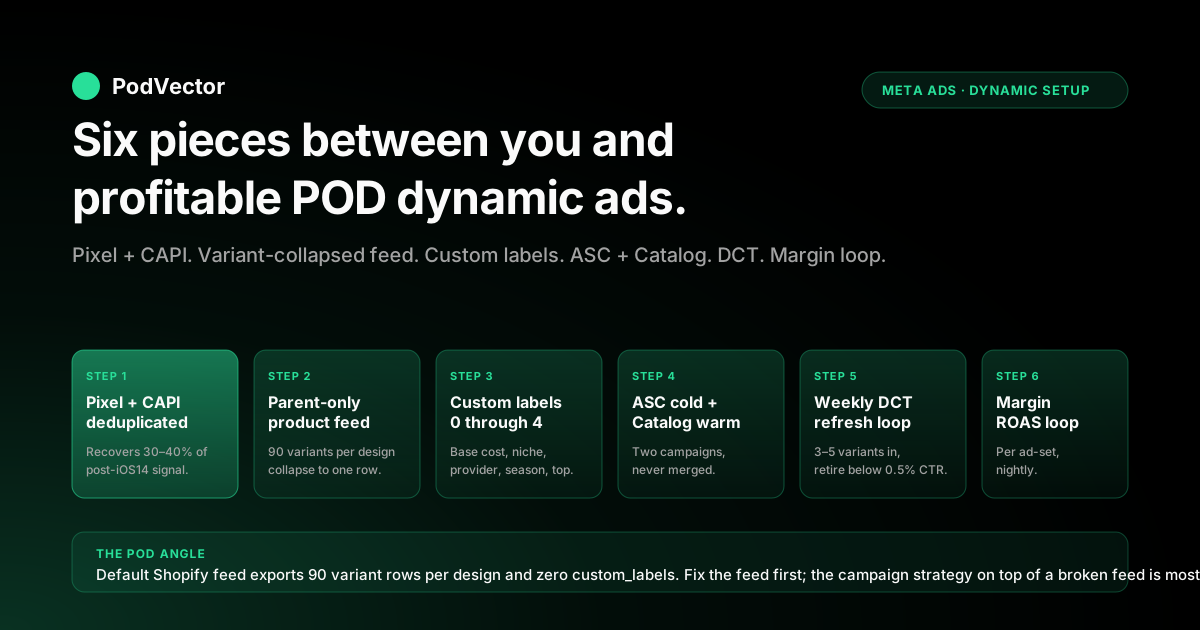
Quick Answer: Dynamic ads on Facebook for a Shopify POD store are the only ad format that scales catalog breadth without burning operator hours on per-SKU campaign builds — but the configuration that ships out of the box on Shopify's native Facebook channel is calibrated for inventoried merchants, not for POD stores where Printify or Printful base costs vary 3× across the catalog and a single design can have 60+ size/color variants. The setup that actually makes money on a POD Shopify store has six pieces: a Pixel + Conversions API installation that recovers 30–40% of post-iOS14 signal loss, a product feed where variants are collapsed to parent items and the five custom_label fields are populated with base-cost tier, niche, provider, season, and bestseller flags, an Advantage+ Catalog Ads campaign for warm intent with a base-cost-tier filter at the ad-set level, an Advantage+ Shopping Campaign for cold prospecting with a bestseller-only catalog filter, dynamic creative testing layered on top of both with weekly variant refreshes, and a contribution-margin ROAS measurement loop that subtracts Printify or Printful base cost, Shopify fees, and apparel refund rate from Meta-attributed revenue before any scaling decision lands. The walkthrough below covers each piece, the POD-specific failure modes that show up at every step, and the profit math that decides which dynamic ad set is creating money versus burning it.
What dynamic ads on Facebook actually are in 2026
Dynamic ads — rebranded as Advantage+ Catalog Ads inside Meta's interface in 2023 — are the format where you upload a product feed once and Meta personalizes which SKU is shown to each viewer based on their browsing behavior, lookalike signal, or website-event Custom Audience membership. The mechanic that makes them different from manual ads is that you never write per-SKU copy or upload per-SKU creative.
The feed becomes the ad library and Meta's ranking model picks the SKU per impression. For a Shopify store with 5–50 SKUs, the operator-hours saved are real but modest. For a Shopify POD store with 200–2,000 SKUs across multiple niches, dynamic ads are the only way to get the long-tail catalog onto Meta's surface at all.
The 2026 surface adds three Advantage+ features on top of base Catalog Ads: Advantage+ Shopping Campaigns bundle dynamic ads with cold prospecting in a single AI-driven campaign type; Advantage+ Creative permutes headlines, primary texts, and image treatments inside any campaign including dynamic ones; and Advantage+ Audience replaces hand-built lookalikes with modeled targeting when the seed audience is large enough. The strategic question for a Shopify POD operator in 2026 is not whether to "turn dynamic ads on" — it is which Advantage+ capability runs at which funnel stage, and that decision is what most generic guides skip.
Where this article sits inside the broader Meta context: the Meta Ads for POD topic hub is the topic entry point, the Meta ad types cluster is where this piece lives, and the upstream stack-wide framing is in the complete guide to Meta ad types for POD sellers.
Why a Shopify POD setup is different from generic Shopify
The official Shopify dynamic ads documentation, including the canonical Shopify blog walkthrough, treats every Shopify store as a single P&L with a uniform margin profile. That assumption holds on an inventoried store buying products at 30% landed cost and selling at 100% retail. It breaks on a POD store on three structural axes:
- Variable base cost across the catalog. Printify and Printful charge different base costs per product type — a t-shirt runs $9–$13, a hoodie $19–$28, a mug $4–$7, a poster $3–$15 depending on size. The same retail uplift produces a 28% margin on one SKU and a 52% margin on another. Meta's optimization model has no awareness of which is which and will happily over-spend on the lower-margin SKU if it converts at slightly higher rate.
- Variant explosion per design. A single design pushed through Printify with three garment types, six colors, and five sizes produces 90 variants. The default Shopify-to-Meta feed sync exports each variant as a separate feed item, which inflates the catalog Meta sees from your real catalog of (say) 80 designs to 7,200 variant rows. Meta's ranking model spreads spend across variants instead of concentrating it on the strongest design.
- Refund and reprint rate higher than inventoried e-comm. POD apparel runs 2–5% refund/reprint from sizing, color match, or print quality issues. Inventoried e-comm runs 0.5–1.5%. The 2–4 percentage-point gap eats into already-thin POD margin and is invisible to Meta's reporting.
The combined effect: the Meta-reported "Purchase ROAS" on a Shopify POD store overstates contribution-margin ROAS by 3–5×. The configuration walkthrough below treats that overstatement as the central problem to solve, not an afterthought.
The four prerequisites before turning dynamic ads on
Most "dynamic ads not performing" tickets resolve at the prerequisites layer, not the campaign-strategy layer. The four prerequisites that have to be in place before any Advantage+ Catalog Ads or ASC campaign launches:
- Meta Pixel + Conversions API both firing, deduplicated. Pixel-only on a 2026 Shopify POD store reports 60–70% of true event volume. CAPI recovers most of the gap by passing hashed user_data (email, phone, fbc, fbp) server-to-server. The native Shopify Facebook & Instagram channel ships both as a single toggle since 2022; if your store installed the channel before 2022 and never re-configured, CAPI is likely off. The full instrumentation walkthrough is in the complete guide to Meta Ads + Shopify integration for POD.
- Event match quality at 7.0+ on Purchase. Meta Events Manager shows a 0–10 score per event. Below 7.0, retargeting Custom Audiences populate at 50–70% of true size and dynamic ad ranking is starved of behavioral signal. The match-quality lever is user_data completeness in the CAPI payload — pass hashed email and phone at every event and the score climbs into the 8–9 range within a week.
- Product catalog connected to the Meta Commerce Manager. The native Shopify channel auto-creates a Meta catalog from your product feed; the auto-created catalog ships with the variant explosion problem discussed in the next section unsolved. Catalogs created via third-party feed apps (Flexify, Pixee, GroPulse) give you variant-collapse and custom_label control out of the box but require a separate setup step.
- Aggregated Event Measurement (AEM) configured with the eight events ranked correctly. Purchase, InitiateCheckout, AddToCart, ViewContent, Lead, plus three custom events. The order matters because iOS opted-out users only attribute the highest-priority event that fired in their session — if Purchase is ranked third behind ViewContent and AddToCart, you lose Purchase attribution on every iOS opt-out who triggered any earlier event.
None of the four prerequisites is dynamic-ads-specific — they are the baseline Meta instrumentation layer for any Shopify store. They show up here because dynamic ads amplify upstream signal-quality issues. Manual ads with hand-built audiences degrade gracefully when signal is weak; dynamic ads degrade sharply because the entire personalization mechanic depends on event signal.
Product feed setup: the POD variant explosion problem
The product feed is where most Shopify POD dynamic ad campaigns silently underperform. The default Shopify Facebook channel feed ships with two unsolved POD problems: every variant becomes a separate feed item, and the custom_label fields are empty so the ad-set Catalog Filter has no levers to pull. Both fixes are mandatory before scaling.
Variant collapse: parent products only. A Printify t-shirt with 6 colors × 5 sizes shipped through the default feed becomes 30 feed rows. Meta's ranking model treats each as a separate SKU and spreads spend, plus the same lifestyle photo appears 30 times in user feeds within a week.
Configure the feed to export only parent products, with size and color as variant_attribute fields rather than separate rows. The Shopify-native channel cannot do this in 2026; use a third-party feed app (Flexify, Pixee, GroPulse Catalog) or generate a custom feed via Shopify GraphQL Admin API and host it as a Meta-pingable URL. The feed-architecture walkthrough is the core of the Shopify dynamic Facebook ads product feed strategy.
Populate the five custom_label fields. These are the levers the ad-set-level Catalog Filter uses to slice the catalog without you rebuilding ad sets. The convention that works for most POD stores:
- custom_label_0 = base-cost tier. Values: under-$10, $10-$15, $15-$25, $25+. Lets the ad set filter to "only SKUs where base cost supports our target margin at the planned ad spend."
- custom_label_1 = niche or design family. Values: vintage-band-tees, dog-mom, fitness, etc. Lets cross-sell campaigns serve only complementary niches and prevents Meta from showing a fitness-niche cart-abandoner a dog-mom mug.
- custom_label_2 = provider. Printify, Printful, SPOD, Gelato. Useful when one provider has a quality issue or stockout and needs to be temporarily filtered out of all paid traffic without touching the main store inventory.
- custom_label_3 = season tag. spring, summer, fall, winter, evergreen, holiday. Filter out off-season SKUs from cold prospecting (no point serving a Halloween tee in May) while keeping evergreen SKUs eligible year-round.
- custom_label_4 = bestseller flag. top-10, top-50, longtail. Cold prospecting filters to top-50 only because longtail SKUs lack the conversion volume to clear ASC's learning phase; warm retargeting keeps all SKUs eligible because the user has already engaged.
The five custom_labels populate from a Shopify metafield or product tag — set them once per design and the feed app keeps them synced. Without these labels populated, every catalog filter you'll want to apply at the ad-set level becomes a manual ad-set rebuild, and the dynamic-ads operator-hours advantage evaporates.
Campaign build: cold prospecting and warm retargeting side by side
The two dynamic campaigns that run side by side on a Shopify POD store are an Advantage+ Shopping Campaign for cold prospecting and an Advantage+ Catalog Ads campaign with website-event Custom Audiences for warm retargeting. They serve complementary jobs and should never be merged into one campaign.
Cold prospecting: Advantage+ Shopping Campaign (ASC). ASC bundles audience selection, creative permutation, and placement allocation into one Meta-controlled campaign optimized for Purchase events. The configuration that works for POD:
- Catalog Filter at the ad-set level: custom_label_4 = top-50 and custom_label_0 ≠ under-$10. The under-$10 base-cost tier is excluded because a $10 base cost on a $25 retail t-shirt leaves no room for a profitable cold-acquisition CAC.
- Existing-customer cap: 25–35%. ASC by default mixes new and existing customers; on a POD store you want most spend going to new acquisition because retargeting is handled in a separate campaign.
- Daily budget: at least $50/day for ASC's algorithm to clear learning phase within 7–10 days. Below $30/day, ASC oscillates and never stabilizes.
- Creative: 5–10 variants combining lifestyle photography, product mockups, and text-overlay social-proof. Advantage+ Creative permutes headline, primary text, and image automatically — supply enough variants that the algorithm has room to optimize.
Warm retargeting: Advantage+ Catalog Ads with website-event Custom Audiences. Catalog Ads with explicit Custom Audiences gives you per-tier control over who sees what, which ASC's black box does not. The four-tier setup is the same architecture covered in detail in the Facebook retargeting ads for Shopify strategy:
- Tier 1 — warm visitors (ViewContent 30 days, exclude AddToCart-30d, exclude Purchase-180d). Catalog filter: custom_label_4 ≠ longtail and custom_label_3 ≠ off-season.
- Tier 2 — cart abandoners (AddToCart 14 days, exclude InitiateCheckout-14d, exclude Purchase-30d). Catalog filter: full catalog (the user has already chosen the SKU).
- Tier 3 — checkout abandoners (InitiateCheckout 7 days, exclude Purchase-30d). Catalog filter: full catalog. Single creative variant performs better here.
- Tier 4 — post-purchase cross-sell (Purchaser 14–60 days, exclude Purchase-14d). Catalog filter: custom_label_1 = matching niche, custom_label_4 ≠ longtail.
The two campaigns run in parallel with budget allocation roughly 70/30 prospecting to retargeting at most spend levels. The tracking and optimization layer underneath both is covered in the complete guide to Meta Ads ROAS and attribution for POD.
Creative strategy: mockups, lifestyle, and the social-proof overlay
Dynamic ads insert your product image into a Meta-templated layout — typically a single product card, a multi-product carousel, or a collection ad. The product image is the only creative element you fully control; everything around it (headline, primary text, CTA button) is permuted by Advantage+ Creative. POD stores that ship the default Printify mockup as the product image consistently underperform stores that produce 2–3 image treatments per design.
The three creative treatments that work for POD dynamic ads, in order of average CTR:
- Lifestyle photography with the product worn or in context. Printify and Printful both ship lifestyle mockup generators in 2026 that are good enough for prospecting; AI-generated lifestyle (Midjourney, Leonardo, ideogram) generates higher-CTR variants when the niche has a recognizable aesthetic. Average CTR uplift over default mockup: 1.4–1.8×.
- Flat product mockup with text overlay carrying social proof. "5,000 sold last month," "Bestseller in [niche]," "Ships in 3–5 days." The overlay sits on a flat mockup so the design itself is fully visible. Average CTR uplift: 1.2–1.4× over plain mockup.
- Default Printify or Printful mockup unmodified. Baseline CTR. Acceptable for warm retargeting where the user has already engaged; consistently under-performs in cold prospecting.
The cadence underneath the three treatments is dynamic creative testing (DCT) on a weekly cadence: 3–5 new creative variants per ad set per week, retire variants below 0.5% CTR after 7 days, and feed the top-3 winners forward into the next month's rotation. Tier 3 (checkout abandoner) is exempt — single creative variant performs better there. The walkthrough on the broader dynamic creative stack lives in the Facebook dynamic ads Shopify strategy guide.
Common sync errors that break Shopify POD dynamic ads
The most-cited POD-specific failure mode in Meta forum threads and agency post-mortems is feed sync errors that silently degrade ad performance for weeks before the operator notices. The five sync errors that show up repeatedly:
- SKU-vs-ID mismatch. Shopify's variant ID and the SKU code do not always match across feed sync, ViewContent events, and AddToCart events. When they don't, the dynamic ad can't tie a Custom Audience signal to a feed item, and the ad shows generic catalog rotation instead of personalized SKUs. Fix: pin the feed item's
idfield to Shopify variant ID consistently across all touchpoints. - Missing ViewContent event with content_ids. If ViewContent fires but the
content_idsparameter is empty or contains the product handle instead of the variant ID, Meta cannot match the event to a feed item and the warm-visitor Custom Audience populates with no SKU-level data. Catalog Ads fall back to algorithm-default SKU rotation. Fix: validate content_ids in Events Manager → Test Events; the value should match the feed item'sidfield. - Out-of-stock variants left in feed. POD providers occasionally drop a garment variant (color discontinued at the supplier). The Shopify product stays live but the variant becomes unfulfillable. If the feed isn't refreshing daily, Meta keeps spending on the discontinued variant, the user clicks through to a Shopify page that 404s on the variant selector, and conversion rate craters. Fix: feed refresh interval at 4 hours or less; auto-remove variants where Shopify inventory shows the variant as unavailable.
- Currency mismatch between feed and Pixel. Feed in USD, Pixel firing values in GBP because the store has multi-currency enabled. Meta treats the mismatched values as conversion noise and ROAS reports become unreliable. Fix: enforce single-currency in the feed (whatever the primary store currency is) and let Shopify's currency converter handle the customer-facing display.
- Image_link pointing to expired CDN URL. Custom-uploaded mockups stored on Shopify's CDN occasionally rotate URLs. Meta's catalog ingestion caches the image, but when the cache expires and re-fetches, the image is gone and the ad serves a placeholder. Fix: host product mockups on a stable CDN (Cloudinary, Bunny, or Shopify Files which has stable URLs) and reference those URLs in the feed's
image_link.
The diagnostic loop for sync errors runs through Meta Commerce Manager → Catalog → Diagnostics, which surfaces feed-level errors (missing fields, invalid values) and item-level warnings. Run the diagnostic weekly until the catalog is clean, then monthly. Most stores ignoring the diagnostic page have 5–15% of feed items in a degraded state at any time.
Dashboard ROAS vs contribution-margin ROAS for POD
Meta's reporting interface shows a "Purchase ROAS" or "Website Purchase ROAS" — the ratio of Meta-attributed purchase value to ad spend. For a Shopify POD store, that number overstates contribution-margin ROAS by 3–5× because four costs never enter Meta's calculation:
- Printify or Printful base cost on each item (35–55% of retail).
- Shipping shortfall on free-shipping promo orders (typical $2–$5 per order on apparel).
- Shopify transaction fee (2.9% + $0.30 per order on the standard plan).
- Refund and reprint rate (2–5% on POD apparel from sizing, color, or print-quality issues).
The gap shows up unevenly across the dynamic ad stack:
- Cold prospecting (ASC): dashboard 1.8–2.5×, contribution-margin healthy at 0.7–1.2×. Below 0.6× contribution-margin, the campaign is funding traffic that converts but doesn't profit.
- Warm visitor retargeting: dashboard 3–5×, contribution-margin healthy at 1.2–1.8×.
- Cart abandoner retargeting: dashboard 6–10×, contribution-margin healthy at 2.5–4×. Largest ROAS gap because cart-abandoner SKU mix often skews low-margin.
- Checkout abandoner retargeting: dashboard 8–15×, contribution-margin healthy at 4–7×.
- Cross-sell: dashboard 4–7×, contribution-margin healthy at 1.8–3×.
The minimum measurement loop: pull Meta-attributed purchases by ad set nightly, join to Shopify orders by order ID, subtract item-level base cost from Printify or Printful order data, subtract Shopify fees and expected refund rate, and compute contribution-margin ROAS per ad set. The loop runs in 30–45 minutes per day in a manual spreadsheet at the spend level where the dynamic stack matters ($1,000+/month in Meta spend); Victor automates the same loop against live data and surfaces the per-ad-set contribution-margin ROAS as a live number.
Scaling rules and budget allocation across the dynamic stack
The most common scaling mistake on a POD dynamic ads setup is doubling cold-prospecting budget when ASC's dashboard ROAS looks attractive. ASC degrades sharply at the spend level where Meta runs out of high-quality bestseller-tagged SKUs and starts spreading spend into the longtail. The scaling rules that work across most POD stores:
- 70/30 prospecting-to-retargeting split at most spend levels. Above $10K/month total Meta spend the prospecting share can rise to 75–80% as retargeting hits its audience-size ceiling. Below $3K/month, push the split closer to 60/40 because cold prospecting needs minimum spend per ad set to clear ASC's learning phase.
- Inside retargeting, allocate roughly 50% to warm-visitor, 25% to cart-abandoner, 15% to checkout-abandoner, 10% to cross-sell. Audience-size differences across tiers force this allocation; pushing more budget into checkout-abandoner above audience size hits diminishing returns within days.
- Scale the ad set that is below its target spend share and above its contribution-margin ROAS threshold. Pause the ad set above target share and below ROAS threshold. Dashboard ROAS by itself is a misleading scaling signal because warm-retargeting tiers can show 12× dashboard ROAS while shrinking 20% per week from purchase-driven exclusion.
- Refresh creative weekly per the cadence in the creative strategy section. Most "dynamic ads ROAS plateau" tickets at week 6 are creative fatigue, not audience exhaustion. Fresh creative on the existing audience usually recovers ROAS within 5–10 days.
- Re-evaluate the bestseller catalog filter monthly. The top-50 SKU list on a POD store rotates roughly 20–30% per month as new designs hit and old ones cool. A stale custom_label_4 = top-50 filter means cold prospecting is filtering to last month's winners. Auto-update the metafield from Shopify sales rank data.
The cross-channel scaling decisions that sit above the Meta-only stack — when to push more spend into Meta versus shifting budget to Google or TikTok — live in the complete Meta Ads playbook for print-on-demand sellers.
POD-specific failure modes and how to fix each
Eight failure modes show up repeatedly on Shopify POD dynamic ad setups, listed roughly in the order they appear as a store scales:
- Pixel-only without CAPI. Symptom: Custom Audiences populate at 60–70% of true size; CPA looks 30–40% worse than reality. Fix: enable CAPI through the native Shopify channel.
- Variant-explosion feed (every size/color as separate row). Symptom: 10× the catalog Meta sees vs your real catalog; same lifestyle image appears 30 times in user feeds. Fix: parent-product-only feed via third-party feed app or custom GraphQL feed.
- Empty custom_label fields. Symptom: every catalog filter requires a manual ad-set rebuild; dynamic ads operator-hours advantage evaporates. Fix: populate the five custom_labels from Shopify metafields, set once per design, sync via feed app.
- ASC running with low-margin SKUs eligible. Symptom: dashboard ROAS healthy at 2×, contribution-margin ROAS at 0.6× because algorithm is over-spending on $25 retail / $13 base-cost t-shirts. Fix: custom_label_0 ≠ under-$10 catalog filter at the ASC ad-set level.
- Same Catalog Ads campaign serving cold and warm. Symptom: warm retargeting dashboard ROAS dilutes into mid-tier numbers; per-tier scaling is impossible. Fix: separate ASC for cold and Catalog Ads with explicit Custom Audiences for warm.
- Default Printify mockups as the only creative. Symptom: CTR baseline, no creative-variance lift. Fix: add lifestyle photography variants and text-overlay social-proof variants per the creative strategy section.
- Stale catalog feed (24-hour refresh). Symptom: Meta keeps spending on discontinued variants; conversion rate drops on out-of-stock clicks. Fix: 4-hour or shorter feed refresh interval; auto-remove unavailable variants.
- Dashboard ROAS as the scaling input. Symptom: spend scales 50% month-over-month, gross revenue scales 30%, bank deposits flat or declining. Fix: contribution-margin ROAS as the only scaling input, computed per ad set nightly.
FAQs
How do I create dynamic Facebook ads for my Shopify store?
The five-step setup: install the native Shopify Facebook & Instagram channel and verify both Pixel and Conversions API are firing, connect a product catalog (either auto-created from the channel or via a third-party feed app), populate the five custom_label fields with base-cost tier, niche, provider, season, and bestseller flags, configure Aggregated Event Measurement with the eight-event ranking, then launch one Advantage+ Shopping Campaign for cold prospecting and one Advantage+ Catalog Ads campaign with website-event Custom Audiences for warm retargeting. Total operator setup time on a clean store is 6–10 hours; on a store with existing campaign history it's 3–5 hours plus creative production.
What's the difference between dynamic ads and regular Facebook ads for Shopify?
Regular Facebook ads use one creative per ad — you upload an image and headline and Meta serves that exact ad to every viewer in the targeted audience. Dynamic ads pull from your product catalog and personalize which SKU is shown to each viewer based on their browsing behavior or audience signal. The mechanic that matters: regular ads scale linearly with operator-hours per campaign; dynamic ads scale catalog breadth without operator-hours per SKU. For a Shopify POD store with 50+ active designs, dynamic ads are the only format that gets the full catalog onto Meta's surface; for a store with 5–10 SKUs the operator-hours advantage is smaller and regular ads with strong creative often outperform.
How much should I spend on dynamic Facebook ads for a Shopify POD store?
Minimum effective spend is around $50/day for ASC to clear learning phase within 7–10 days; below $30/day ASC oscillates and never stabilizes. A POD store starting from zero typically commits $1,500–$2,000/month total Meta spend with a 70/30 prospecting-to-retargeting split, which puts ASC at roughly $35/day and the four retargeting tiers at $15/day combined. Above $5,000/month total Meta spend, the prospecting share rises to 75–80% and retargeting tiers split into separate ad sets per tier rather than collapsed pairs.
How long until dynamic ads are profitable for Shopify POD?
14 days minimum, 28 days for confidence. Each ASC and Catalog Ads ad set needs to clear Meta's learning phase (typically 50 conversion events) before per-ad-set ROAS data is reliable.
For a POD store at $50/day per ad set, learning phase usually completes day 7–10 and per-ad-set contribution-margin ROAS stabilizes by day 14. Pausing or scaling before that window is acting on noise. The exception: if ASC is showing 0.3× contribution-margin ROAS at day 5 with the catalog filter set wide open, pause and re-check the custom_label filter rather than waiting out the learning phase.
Do I need to use the native Shopify Facebook channel or a third-party feed app?
Start with the native channel. It handles Pixel + CAPI, basic catalog sync, and ad creation for most POD stores at low spend levels.
Move to a third-party feed app (Flexify, Pixee, GroPulse Catalog) once you hit any of three triggers: variant explosion is bloating the catalog past your real SKU count by 5×+, custom_label population becomes a manual chore the native channel can't automate, or feed refresh interval is too slow on the native channel and out-of-stock variants are leaking into ads. Most stores cross at least one trigger by $3,000/month in Meta spend.
Why is my dynamic ads ROAS high on Meta's dashboard but my bank account is flat?
The Meta-reported "Purchase ROAS" excludes Printify or Printful base cost (35–55% of retail), Shopify transaction fees (2.9% + $0.30), free-shipping promo shortfall ($2–$5/order on apparel), and refund/reprint rate (2–5%). For a typical POD store, Meta's dashboard ROAS overstates contribution-margin ROAS by 3–5×.
A 3.5× dashboard ROAS on cold prospecting commonly translates to 0.9× contribution-margin ROAS — the campaign is funding traffic that converts but doesn't profit. The fix is the per-ad-set contribution-margin loop in the profit math section.
Can I run dynamic ads without Conversions API on Shopify?
Technically yes, practically no at any meaningful scale. Pixel-only on a 2026 Shopify POD store reports 60–70% of true event volume because of iOS 14.5+ ATT opt-outs, ad-blocker prevalence, and Safari ITP cookie expiration. Custom Audiences populate at the same 60–70% of true size; dynamic ad ranking is starved of behavioral signal; CPA looks 30–40% worse than reality and most operators scale down or pause campaigns that would actually be profitable with full signal. CAPI takes 30 minutes to enable through the native Shopify channel and is the highest-leverage 30 minutes in the entire setup.
What's the best ad creative format for Shopify POD dynamic ads?
Single product card for warm retargeting where the user has already engaged with a specific SKU; multi-product carousel for cold prospecting where Meta picks the strongest 3–4 SKUs from your bestseller-tagged catalog; collection ads for store-wide campaigns where you want a hero image and a four-SKU grid below it. Across all three formats, lifestyle photography out-performs default Printify or Printful mockups by 1.4–1.8× on CTR for cold prospecting; flat mockups with text-overlay social proof out-perform plain mockups by 1.2–1.4× on CTR. The full creative cadence is in the creative strategy section above.
Run dynamic Facebook ads against contribution-margin ROAS, not Meta's dashboard
The setup in this guide only works when each dynamic ad set is judged against its real contribution-margin ROAS — Meta-reported numbers inflate by 3–5× for POD stores because Printify or Printful base costs, Shopify fees, and apparel refund rates never enter Meta's calculation. Victor joins Meta, Shopify, and your provider's base-cost feeds into one live contribution-margin number per ad set and per creative variant — so the scaling decision on each layer of the dynamic stack is on the right number from day one. And see your dynamic ad sets the way the bank account sees them.
Try Victor free