
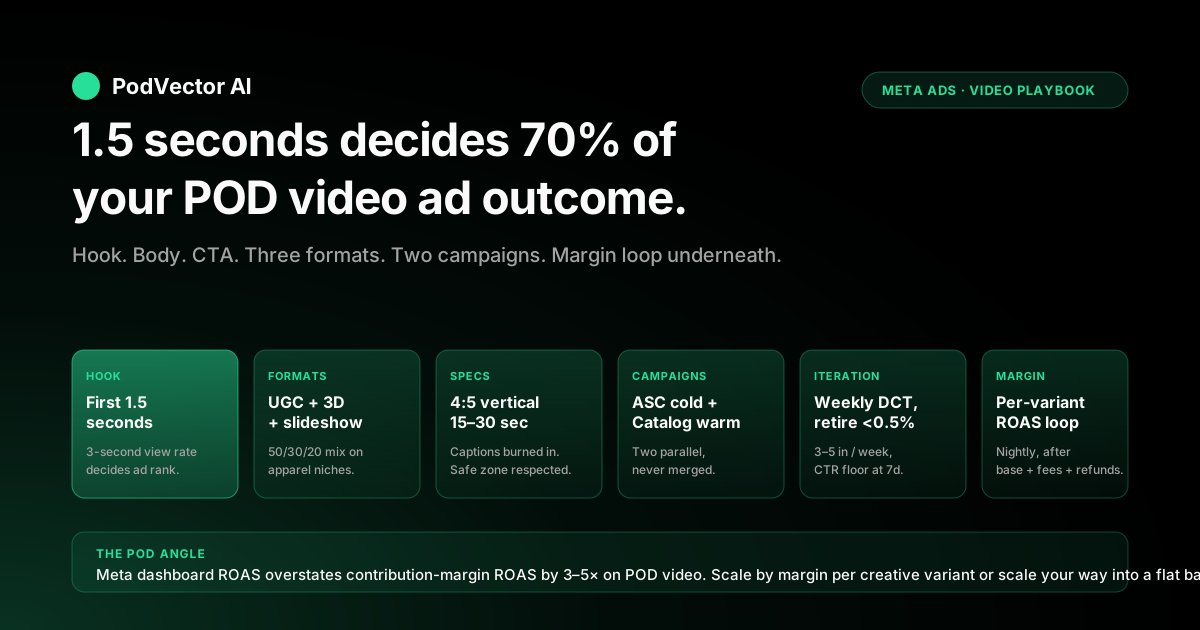
Quick Answer: Facebook video ads on a Shopify print-on-demand store outperform static creative on cold prospecting CTR by 1.6–2.4× and on cost-per-purchase by 15–30% — but only when the creative is built around the constraints that matter on Meta's mobile feed (a hook in the first 1.5 seconds, 4:5 vertical aspect, 15–30 second runtime, captions burned in for 85% sound-off viewing) and when the profit math underneath subtracts Printify or Printful base cost, Shopify fees, and apparel refund rate before any scaling decision lands. The playbook below is six pieces: a creative-brief template tuned to POD garments where the print is the hero, three video ad-type formats that actually work for POD (UGC unboxing, mockup-in-motion, and text-overlay social-proof slideshow), a campaign architecture splitting cold prospecting on ASC video from warm retargeting on Catalog Ads with video creative, a creative-iteration cadence built on weekly variant refresh and 0.5% CTR retire thresholds, a measurement loop that joins Meta-attributed video purchases to per-order Printify or Printful base cost and computes contribution-margin ROAS per ad, and a scaling rule set that keeps the algorithm on profitable SKUs instead of the lowest-margin ones it would otherwise pick. The walkthrough covers each piece, the POD-specific failure modes that show up at every step, and the profit math that decides which video creative is actually creating money versus burning it.
Why video beats static for POD on Meta in 2026
Meta's 2026 feed algorithm ranks video higher than static at every funnel stage where dwell time is a signal — which is most of them. On a Shopify POD store, the lift over static creative is real and measurable: cold-prospecting CTR moves 1.6–2.4×, cost-per-purchase improves 15–30%, and the 3-second video view rate becomes a usable lookalike seed that static doesn't generate.
The mechanism is dwell time. Static creative is scrolled past in 0.4 seconds on average; a video that survives the first 1.5 seconds buys 10–15 seconds of attention, and Meta reads that attention as a signal of intent quality.
Where this matters most for POD: the design itself is the product. A static feed image of a Printify t-shirt mockup competes with every other apparel ad in the user's feed using the same visual idiom (flat product on white).
Video lets the design move — onto a model, in a lifestyle context, or as a slideshow of customer-worn variants — and that motion is what stops the scroll. The CTR lift compounds at every stage of the funnel: more 3-second views feed better warm-retargeting Custom Audiences, which feed better cart-abandoner CTR, which feed better post-purchase cross-sell engagement.
Where this article sits inside the broader Meta context: the Meta Ads for POD topic hub is the topic entry point, the Meta ad types cluster is where this piece lives, and the upstream stack-wide framing is in the complete guide to Meta ad types for POD sellers.
Why POD video creative is different from generic ecom video
Most generic Facebook video ads guides — including the highest-ranking 12 e-commerce Facebook ad strategies roundup and the expert roundup on video ads from Hunch — assume an inventoried merchant with a 30–50% landed cost, photographed lookbooks, and the budget to commission UGC at $200–$800 per piece. The assumptions break for a Shopify POD operator on three structural axes:
- The product doesn't physically exist until ordered. You can't ship a t-shirt to ten UGC creators because the t-shirt doesn't exist in inventory — every sample is a new Printify or Printful order at full base cost plus shipping. UGC scales linearly with creator count and POD margins can't absorb $400 × 10 creators per design at the rate you launch new designs.
- Variant explosion makes "show every option" videos impossible. A single design with three garment types, six colors, and five sizes is 90 variants. The video has to make a single creative choice — which color, which garment, which model — that represents the whole catalog item. Default Printify mockup videos auto-generated from the product page show every variant in rotation, which signals "pattern, not product" to the viewer's attention.
- Refund and reprint rate higher than inventoried e-comm. POD apparel runs 2–5% refund/reprint from sizing, color match, or print quality issues. Video ads that show the print color saturated by Printify's mockup engine convert at higher rates than the actual garment delivers, and the gap shows up in refund tickets a week later. The fix is treating the mockup color as a worst-case estimate, not the average.
The combined effect: the playbooks that work for an inventoried Shopify store with $400 UGC budgets per video and a single hero SKU don't transfer cleanly to a POD store launching 10–40 new designs a month with a $20 creative budget per design. The walkthrough below treats those constraints as the central problem to solve, not an afterthought.
The POD video creative brief: hook, body, CTA
Every video ad that performs on a POD Shopify store follows the same three-act structure, sized to fit Meta's 15–30 second feed slot. The brief that produces consistent winners:
- Hook (first 1.5 seconds). Either the design itself in motion (someone pulling on the shirt, the print catching light, a quick close-up zoom-in), the niche identity signal stated as a question or claim ("If you're a [niche], this one's for you"), or a stat overlay ("4,200 sold last week"). The hook decides 70% of the video's outcome — Meta's algorithm uses the 3-second view rate as the primary ranking signal, and the 3-second view rate is set in the first 1.5 seconds. Generic Printify mockups starting on white background lose this round before the message lands.
- Body (seconds 2–22). Three to five quick shots showing the design in context. For apparel: someone wearing it in two different settings (indoor/outdoor or day/night), a close-up of the print quality, a third shot with social-proof overlay ("⭐⭐⭐⭐⭐ 1,800 reviews"). For drinkware: the mug in hand on a desk, the design rotating to show wraparound print, a hand-pour pour shot. For posters or wall art: the piece on a wall in a real room, a close-up of the print detail, a quick alternate-color flash. Captions burned in throughout — 85% of Meta video plays are sound-off, and your message has to land in text.
- CTA (last 3–5 seconds). A direct verbal-and-text CTA: "Get yours — link in bio" or "Shop now, free shipping over $35," paired with the website button overlay. POD-specific add: scarcity or social proof works better than discount codes because customers reading the CTA card know POD margins don't support 30% off without quality compromise. "Print drops every Friday" or "Limited run, 200 left" outperforms "20% off" on click-through across most niches.
Total runtime: 15–30 seconds. Below 15, the algorithm under-weights you on the longer-watch signal; above 30, completion rate falls off a cliff and Meta interprets the drop as low-quality engagement. Hold to the 18–25 second sweet spot for cold prospecting, drop to 8–15 seconds for warm retargeting where the user has already engaged with the SKU and just needs a reminder to convert.
Three video ad formats that work for print-on-demand
The three POD video formats that show up in winning creative across the niches we see (apparel, drinkware, wall art, accessories) are below, in rough order of average ROAS contribution:
- UGC-style unboxing or wear test. A single creator (yourself, a paid micro-influencer at $50–$150 per video, or an iPhone-shot self-record) opens the Printify or Printful mailer, holds the garment up, puts it on, and walks around in it. Vertical 4:5 or 9:16, shot on phone, intentionally low-production. Average ROAS uplift over flat mockups: 1.4–1.8× on cold prospecting. Why it works: the format signals authenticity — the viewer's brain reads it as a friend's recommendation rather than a paid ad. The cost trade: one creator video = one Printify sample order ($20–$40) plus ~30 minutes of shoot time, scales linearly with design count.
- Mockup-in-motion (Printify or Printful 3D mockup engines + Pictory or Submagic). Both Printify and Printful shipped 3D rotating mockup videos in 2025; combine with Pictory, Submagic, or HeyGen captions to add the niche-identity hook and stat-overlay social proof. Vertical 4:5 export. Average ROAS uplift over flat mockups: 1.2–1.5×. Why it works: low-cost, scales to the design-launch cadence (you can produce 20 in an afternoon), passes the 3-second view rate threshold because rotation is motion. The cost trade: lower CTR ceiling than UGC because the algorithm and viewers can both tell it's not a real person.
- Text-overlay slideshow with three to five product shots. Five static images (lifestyle, close-up, alternate color, social-proof card, CTA) chained together in CapCut or InShot with captions and a stat overlay. 4:5 vertical, 15–18 second runtime, no real motion but the cadence change reads as video to Meta's algorithm. Average ROAS uplift over flat mockups: 1.1–1.3×. Why it works: cheapest format, fastest to produce (10–15 minutes per video), useful as the volume layer underneath the higher-CTR UGC and mockup-in-motion variants. The cost trade: lowest ceiling, often the first format to plateau when scaled past $500/day per ad set.
The cadence underneath the three formats is mix-and-rotate: 50% of weekly creative output as UGC (where budget allows), 30% as mockup-in-motion, 20% as text-overlay slideshow. Track per-format ROAS per ad set and reweight monthly — niches with high creator pool availability often skew UGC heavier; niches with abstract design IP (typography, illustrations) often skew mockup-in-motion because the design IS the product and a real person wearing it adds little.
Video specs that match Meta's 2026 algorithm
The technical specs that match how Meta's feed algorithm renders, ranks, and serves video in 2026:
- Aspect ratio: 4:5 (1080×1350) or 9:16 (1080×1920) for Reels and Stories placements. 1:1 (1080×1080) renders but takes 25–30% less feed real estate, which directly reduces CTR. 16:9 renders letterboxed on mobile and is effectively dead for cold prospecting. 4:5 is the safest single export for placements that include Feed, Reels, and Stories together.
- Runtime: 15–30 seconds for cold prospecting, 8–15 seconds for warm retargeting. Below 5 seconds Meta classifies as "image-like" and under-weights longer-watch signals; above 60 seconds completion rate craters and the algorithm reads the drop as low quality.
- Frame rate: 30fps minimum, 60fps preferred. 24fps cinematic still works but feels sluggish in feed; 60fps reads as energetic and increases 3-second view rate by 8–12% on average.
- Resolution: 1080p minimum on the export. Meta's CDN re-encodes and downsamples on delivery, so any input below 1080p ships visibly degraded; 4K input over-pays the export step but doesn't change delivered quality.
- Captions: burned-in, not auto-generated. Meta's auto-captions are improving but still mis-transcribe niche-specific words (brand names, slang, character names) at a 5–8% error rate. Burn captions into the video file using CapCut, Submagic, or Adobe Premiere — the auto-caption errors hurt CTR more than they hurt watch time.
- Audio: present but optional for the message. 85% of Meta video plays are sound-off. Build the video so the message lands without audio (captions handle that), then add background audio for the 15% who do play with sound. Royalty-free music from Epidemic Sound or Artlist works; trending TikTok audio is risky on Meta — copyright takedowns hit hard and uneven.
- File size: under 250 MB on upload. Larger files upload but get queued for re-compression which delays campaign launch by 1–4 hours.
The single most-skipped spec: the safe zone. Meta's UI overlays (CTA button, profile name, like/comment icons) cover roughly 12% of the bottom of a 4:5 vertical video and 8% of the top.
Anything critical — the design itself, key text, the CTA card — must sit inside the safe zone, not the corners. Default Printify and Printful mockup videos generate to the full frame; manually crop or letterbox-position the design so nothing critical hides under Meta's overlay.
Campaign build: cold ASC video and warm Catalog video side by side
The two video campaigns that run side by side on a Shopify POD store mirror the dynamic-ads architecture: an Advantage+ Shopping Campaign for cold prospecting and an Advantage+ Catalog Ads campaign with website-event Custom Audiences for warm retargeting, both with video creative as the primary asset. They serve complementary jobs and should never be merged.
Cold prospecting: Advantage+ Shopping Campaign with video creative. ASC bundles audience selection, creative permutation, and placement allocation into a single Meta-controlled campaign optimized for Purchase events. The configuration that works for POD video:
- Catalog Filter at the ad-set level: custom_label_4 = top-50 and custom_label_0 ≠ under-$10. The bestseller-only filter keeps ASC focused on SKUs with enough conversion volume to clear learning phase.
- Existing-customer cap: 25–35% so spend skews to new acquisition.
- Daily budget: at least $50/day for ASC's algorithm to clear learning phase within 7–10 days. Below $30/day, ASC oscillates and never stabilizes. Per-ad-set spend on video creative should be a notch higher than equivalent static — video creative needs more impressions before the algorithm can read its conversion rate.
- Creative: 5–10 video variants combining UGC unboxing, mockup-in-motion, and text-overlay slideshow per the format mix above. Advantage+ Creative permutes headline, primary text, and thumbnail automatically — supply enough variants that the algorithm has room to optimize.
Warm retargeting: Advantage+ Catalog Ads with video collection ads and website-event Custom Audiences. Catalog Ads with explicit Custom Audiences gives you per-tier control over which video shows to whom. The four-tier setup mirrors the architecture in the Facebook retargeting ads for Shopify strategy:
- Tier 1 — warm visitors (ViewContent 30 days, exclude AddToCart-30d, exclude Purchase-180d). Video creative: 8–15 second mockup-in-motion or text-overlay slideshow. Catalog filter: custom_label_4 ≠ longtail and custom_label_3 ≠ off-season.
- Tier 2 — cart abandoners (AddToCart 14 days, exclude InitiateCheckout-14d, exclude Purchase-30d). Video creative: 6–10 second UGC clip with a "this is the one you were looking at" hook. Catalog filter: full catalog — the user has already chosen the SKU.
- Tier 3 — checkout abandoners (InitiateCheckout 7 days, exclude Purchase-30d). Video creative: 5–8 second urgency clip ("ships in 3–5 days, free over $35"). Catalog filter: full catalog. Single variant performs better here.
- Tier 4 — post-purchase cross-sell (Purchaser 14–60 days, exclude Purchase-14d). Video creative: 10–15 second slideshow showing 3–4 complementary SKUs in the same niche. Catalog filter: custom_label_1 = matching niche, custom_label_4 ≠ longtail.
The two campaigns run in parallel with budget allocation roughly 70/30 prospecting to retargeting at most spend levels. The tracking and optimization layer underneath both is covered in the complete guide to Meta Ads ROAS and attribution for POD.
Creative iteration cadence and the 0.5% CTR floor
Video creative fatigues faster than static on Meta's 2026 feed because the algorithm rotates through an inventory of "fresh" creative more aggressively than through static — once a video crosses ~50,000 impressions in a single audience, frequency starts climbing fast and CTR drops 20–30% within a week. The cadence that keeps the cold-prospecting ad set producing instead of plateauing:
- Three to five new video variants per ad set per week. Mix UGC, mockup-in-motion, and text-overlay slideshow per the format ratio above. Naming convention helps:
FormatType_Hook_Niche_DesignID_VariantNumberso reporting can roll up format-level ROAS. - Retire variants below 0.5% CTR after 7 days. Below 0.5% on cold prospecting, the variant is dragging the ad set down and consuming spend that should rotate into fresh creative. The exception: a low-CTR variant with high downstream conversion rate (post-click conversion above the ad set average) is doing a job — keep it for warm retargeting where high-intent audiences are forgiving.
- Promote winners — top 3 variants per ad set per month — into the next month's permanent rotation. Winners survive the rotation because the algorithm has built up a reliable conversion-rate signal on them; cycling them out wastes that learning. The mistake to avoid: treating winning creative as evergreen. Even winners fade past month 2; the rotation is what keeps the audience freshness curve flat.
- Refresh thumbnail (poster frame) when CTR softens by 15% or more on an otherwise-strong variant. Meta uses the thumbnail in feed previews and a stale thumbnail can degrade CTR even when the video itself still performs. Re-export with a different first frame.
- Cross-test ASC video creative against equivalent static at minimum monthly. Video usually wins on POD but not always — abstract typography designs sometimes underperform static because there's no motion the design supports. Without an active static ad set as control, you can't tell when video is the wrong format for a specific niche.
The broader dynamic-creative-testing stack — including how this iteration cadence sits inside dynamic ads architecture — is covered in the Facebook dynamic ads Shopify strategy guide.
Dashboard ROAS vs contribution-margin ROAS for video
Meta's reporting interface shows a "Purchase ROAS" or "Website Purchase ROAS" — the ratio of Meta-attributed purchase value to ad spend. For a Shopify POD store running video creative, that number overstates contribution-margin ROAS by 3–5× because four costs never enter Meta's calculation:
- Printify or Printful base cost on each item (35–55% of retail).
- Shipping shortfall on free-shipping promo orders (typical $2–$5 per order on apparel).
- Shopify transaction fee (2.9% + $0.30 per order on the standard plan).
- Refund and reprint rate (2–5% on POD apparel from sizing, color, or print-quality issues).
The gap shows up unevenly across the video stack:
- Cold prospecting (ASC video): dashboard 1.8–2.6×, contribution-margin healthy at 0.7–1.3×. Below 0.6× contribution-margin, the video is funding clicks that convert but don't profit.
- Warm visitor retargeting: dashboard 3–5×, contribution-margin healthy at 1.2–2.0×.
- Cart abandoner retargeting: dashboard 6–11×, contribution-margin healthy at 2.5–4.5×. Largest gap because cart-abandoner SKU mix often skews low-margin t-shirts and mugs.
- Checkout abandoner retargeting: dashboard 8–15×, contribution-margin healthy at 4–7×.
- Cross-sell: dashboard 4–7×, contribution-margin healthy at 1.8–3×.
Video adds one wrinkle to the math: production cost. A UGC video at $50–$150 amortized across 50,000 impressions is $0.001–$0.003 per impression — small but non-zero.
At the ad-set level, fold creative production into a video-specific COGS line so the ROAS reported is true contribution margin. The minimum measurement loop: pull Meta-attributed purchases by ad and by creative variant nightly, join to Shopify orders by order ID, subtract item-level base cost from Printify or Printful order data, subtract Shopify fees and expected refund rate, subtract amortized creative production cost, and compute contribution-margin ROAS per video. The loop runs in 30–45 minutes per day in a manual spreadsheet; Victor automates the same loop against live data and surfaces the per-creative-variant contribution-margin ROAS as a live number, so the next round of creative iteration is informed by which video format is actually building bank balance instead of which video format Meta's dashboard is bragging about.
Scaling rules and budget allocation across video creative
Video scaling on POD has the same trap as dynamic ads scaling: dashboard ROAS that looks attractive often masks a contribution-margin ROAS that's break-even or worse, especially on cold prospecting where Meta is over-spending on the lowest-margin SKUs in the bestseller filter. The scaling rules that work across most POD stores running video:
- 70/30 prospecting-to-retargeting split at most spend levels. Above $10K/month total Meta spend the prospecting share can rise to 75–80%; below $3K/month, push closer to 60/40 because cold prospecting needs minimum spend per ad set to clear ASC's learning phase.
- Inside retargeting, 50/25/15/10 across warm-visitor / cart-abandoner / checkout-abandoner / cross-sell. Audience-size differences across tiers force this allocation.
- Scale the ad set that is below its target spend share and above its contribution-margin ROAS threshold. Pause the ad set above target share and below ROAS threshold. Dashboard ROAS by itself is a misleading scaling signal because warm-retargeting tiers can show 12× dashboard ROAS while the SKU mix shifts to low-margin items as audiences exhaust.
- Scale by creative variant, not just ad set. If two ad sets contain the same creative mix and one is producing 1.4× contribution-margin ROAS while the other is at 0.6×, the difference is usually audience-creative fit, not ad-set-level configuration. Identify the specific video variant carrying each ad set and reallocate budget toward the audience where that variant lands.
- Refresh creative weekly per the iteration cadence above. Most "video ROAS plateau" tickets at week 5–6 are creative fatigue, not audience exhaustion or algorithm change. Fresh video on the existing audience usually recovers ROAS within 5–10 days.
- Re-evaluate the bestseller catalog filter monthly. Top-50 SKU list rotates 20–30% per month on POD stores; stale filters mean cold-prospecting video is filtering to last month's winners.
The cross-channel scaling decisions that sit above the Meta-only stack — when to push more spend into Meta video versus shifting budget to TikTok video or Google video — live in the complete Meta Ads playbook for print-on-demand sellers.
POD-specific video failure modes and how to fix each
Eight failure modes show up repeatedly on Shopify POD video ad setups, listed roughly in the order they appear as a store scales:
- Default Printify or Printful auto-generated mockup video as the only creative. Symptom: 3-second view rate below 25%, CPM creeps up week-over-week. Fix: layer in UGC and mockup-in-motion variants per the three-format mix; default mockup videos are baseline, not strategy.
- Hook landing after 2 seconds. Symptom: 3-second view rate at 15–20% (healthy is 30–40% on POD apparel). Fix: move the niche-identity signal, design close-up, or stat overlay into the first 1.5 seconds; restructure the body to fill 2–22 seconds.
- 1:1 or 16:9 export instead of 4:5 / 9:16. Symptom: CTR 25–30% lower than vertical control. Fix: re-export at 4:5 (1080×1350) for Feed-primary or 9:16 (1080×1920) for Reels-primary placements.
- No burned-in captions. Symptom: completion rate around 8% (healthy is 25–35% on 15-second video). Fix: use CapCut, Submagic, or Pictory to burn captions into the file; auto-captions in Meta Ads Manager are not a substitute on first-launch.
- Critical content in the safe zone. Symptom: viewers report not seeing the design or the CTA card; CTR healthy but conversion rate low. Fix: re-frame with the design and CTA card inside the safe zone (12% from bottom, 8% from top on 4:5).
- No video-specific Custom Audiences. Symptom: warm retargeting audience populates from page-view events only, missing the "watched 75% of video" segment. Fix: create video-engagement Custom Audiences (15-second view, 50% completion, 75% completion) and use as warm-retargeting seeds.
- Single creative running for 4+ weeks. Symptom: frequency above 4.0, CPM rising, CTR falling 25–40%. Fix: weekly refresh per the iteration cadence; no single video variant should run beyond 21 days without rotation.
- Dashboard ROAS as the scaling input. Symptom: video ad spend scales 50% month-over-month, gross revenue scales 30%, bank deposits flat or declining because algorithm is over-spending on $25-retail / $13-base-cost t-shirts that show 3× dashboard ROAS but 0.7× contribution-margin ROAS. Fix: contribution-margin ROAS as the only scaling input, computed per creative variant and per ad set nightly.
FAQs
How do Facebook video ads work for ecommerce?
Video ads run inside Meta's standard ad architecture (campaigns, ad sets, ads) but with a video file as the creative asset instead of a static image. Meta's algorithm uses video-specific signals — 3-second view rate, completion rate, video engagement Custom Audiences — to rank and serve video; the algorithm rewards videos that hold attention past the 3-second mark with cheaper impressions and more downstream-funnel-quality audiences. For ecommerce specifically, video ads work best when the creative is built around mobile-first specs (4:5 vertical, captions burned in, hook in the first 1.5 seconds) and when the campaign architecture splits cold prospecting from warm retargeting so each audience sees creative tuned to its intent stage.
What's the best video format for Facebook ecommerce ads?
4:5 vertical (1080×1350) is the safest single export for placements that include Feed, Reels, and Stories together; 9:16 (1080×1920) is preferred when Reels and Stories are the primary placements. Avoid 1:1 (loses 25–30% feed real estate) and 16:9 (letterboxed on mobile, effectively dead for cold prospecting).
Runtime 15–30 seconds for cold prospecting, 8–15 seconds for warm retargeting. Captions burned in, 30fps minimum, 1080p resolution. The full spec list is in the video specs section above.
How long should Facebook video ads be for ecommerce?
15–30 seconds for cold prospecting (sweet spot 18–25), 8–15 seconds for warm retargeting where the user has already engaged with the SKU. Below 5 seconds Meta classifies as image-like and under-weights longer-watch signals; above 60 seconds completion rate falls off a cliff. The decisive seconds are the first 1.5 — that window decides 70% of the video's outcome because Meta's algorithm uses 3-second view rate as the primary ranking signal and the 3-second view rate is set in the first 1.5 seconds.
How much do Facebook video ads cost for ecommerce?
Two cost layers: ad spend and creative production. Ad spend on a POD Shopify store typically starts at $1,500–$2,000/month total Meta spend with 70/30 prospecting-to-retargeting; ASC video at minimum $50/day to clear learning phase.
Creative production on POD: $20–$40 per Printify sample for self-shot UGC, $50–$150 per micro-influencer UGC, $5–$15 per mockup-in-motion variant using Printify's 3D engine plus Submagic or Pictory captions, $0–$5 per text-overlay slideshow in CapCut. Folded into ROAS: amortized creative cost across the ad's impressions is $0.001–$0.003 per impression on healthy variants — small but non-zero, and worth folding into contribution-margin ROAS at the per-variant level.
Do I need UGC for POD video ads or can I use Printify mockups?
Both, with a mix. UGC delivers the highest CTR ceiling (1.4–1.8× cold prospecting lift over flat mockups) but doesn't scale linearly because every UGC sample is a Printify or Printful order at full base cost.
Mockup-in-motion using Printify or Printful's 3D engines plus caption tools delivers 1.2–1.5× lift, scales to your design-launch cadence, and costs $5–$15 per variant. Text-overlay slideshows are the cheapest volume layer at 1.1–1.3× lift.
The mix that produces consistent ROAS across most POD niches: 50% UGC, 30% mockup-in-motion, 20% slideshow. Niches with abstract design IP (typography, illustrations) often skew mockup-in-motion heavier because the design IS the product and a real person wearing it adds little.
How do I measure ROAS on Facebook video ads for a POD store?
Meta's dashboard "Purchase ROAS" overstates contribution-margin ROAS by 3–5× on a POD store because Printify or Printful base costs (35–55% of retail), Shopify fees (2.9% + $0.30), free-shipping shortfall ($2–$5/order), and apparel refund rate (2–5%) never enter Meta's calculation. The minimum measurement loop: pull Meta-attributed purchases by ad and by creative variant nightly, join to Shopify orders by order ID, subtract item-level Printify or Printful base cost, subtract Shopify fees and expected refund rate, subtract amortized creative production cost, and compute contribution-margin ROAS per video variant. At $1,000+/month in Meta spend the loop is 30–45 minutes per day in a spreadsheet; the alternative is the a live data loop covered in the complete guide to Meta Ads ROAS and attribution for POD.
What's the best video creative format for POD apparel specifically?
UGC unboxing or wear-test outperforms every other format on POD apparel cold prospecting by 1.4–1.8× CTR. The format works because apparel is a wear-and-feel category — the viewer's brain wants to see the garment on a body, the print catching light, the fit on a real person.
Pure mockup video (rotating 3D mockup engine output) is the volume-layer fallback, useful on niches with high design-launch cadence where commissioning UGC for every drop is uneconomic. The minimum for any apparel video ad: a hook in the first 1.5 seconds, 4:5 vertical, captions burned in, the print itself visible inside the safe zone for at least 4 seconds, a CTA card at the end with a scarcity or social-proof angle rather than a percent-off code.
How quickly do Facebook video ads start to underperform from creative fatigue?
Cold prospecting video creative fatigues fastest — frequency above 4.0 typically arrives at week 3–4, CPM starts rising and CTR drops 20–30% within a week of the frequency cross-over. Warm retargeting tolerates higher frequency (4–6) because the audience is smaller and more intent-loaded, but creative still fatigues at week 4–5.
The cadence that keeps ad sets producing: 3–5 new variants per ad set per week, retire below 0.5% CTR after 7 days, promote top-3 variants per month into permanent rotation. Single-variant ad sets running 4+ weeks without rotation are the most-cited cause of "ROAS plateau" on POD video stacks.
Run Facebook video ads against contribution-margin ROAS, not Meta's dashboard
The video playbook in this guide only works when each creative variant is judged against its real contribution-margin ROAS — Meta-reported numbers inflate by 3–5× for POD stores because Printify or Printful base costs, Shopify fees, and apparel refund rates never enter Meta's calculation, and amortized creative production cost is invisible without a separate join. Victor joins Meta, Shopify, and your provider's base-cost feeds into one live contribution-margin number per ad and per creative variant — so the next round of video iteration is built on which format is actually creating bank balance, not which format Meta's dashboard is bragging about. And see your video ads the way the bank account sees them.
Try Victor free