
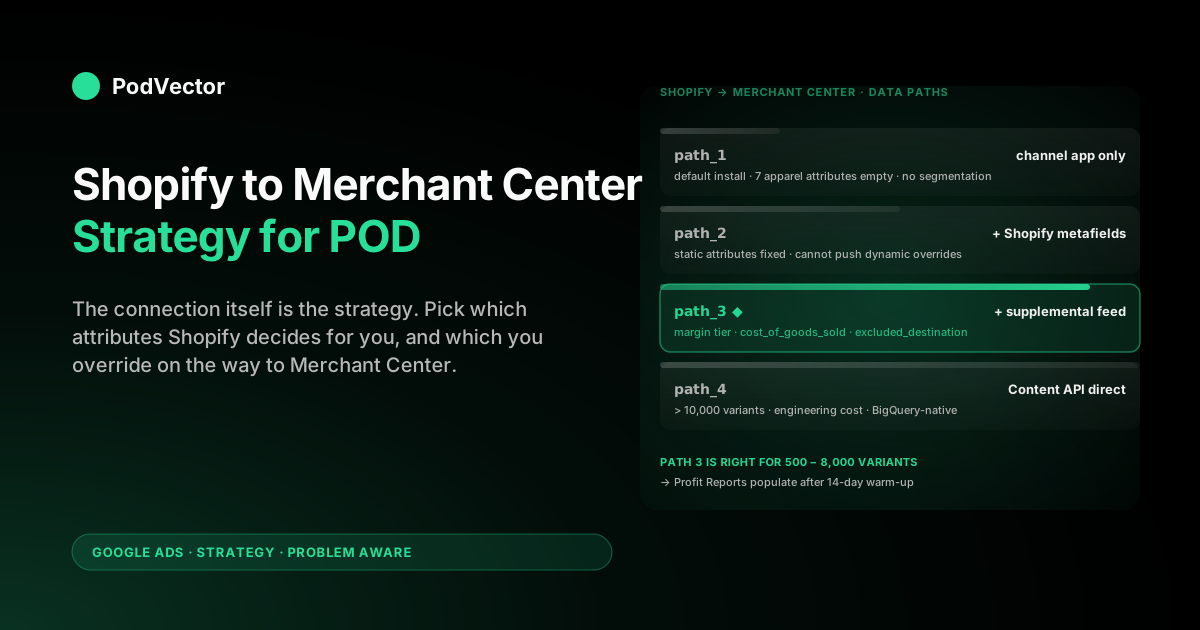
Quick Answer: The Shopify-to-Merchant-Center connection is a one-afternoon job; the Shopify-to-Merchant-Center strategy is choosing which of four data paths to run, and what to push down each. Path one (channel app only) covers product fundamentals but leaves seven apparel attributes empty and gives Performance Max nothing to segment by.
Path two (channel app + Shopify metafields) closes the attribute gap but caps out at static, per-product values. Path three (channel app + Google Sheet supplemental feed) adds the dynamic layer Shopify alone cannot produce — margin tier, supplier label, cost-of-goods-sold, identifier_exists override, excluded_destination on tier-4 variants.
Path four (custom feed via Content API) replaces the channel app entirely for catalogs >10,000 SKUs where Shopify's nightly sync window doesn't fit. For most Shopify POD stores, path three is correct and the channel app's default install (path one) is what's silently leaving money on the table. The strategic decision isn't "should I connect Shopify to Merchant Center" — it's "which attributes do I let Shopify decide for me, and which do I override."
Why the connection itself is the strategy
Most Shopify POD sellers treat the Shopify-to-Merchant-Center connection as a switch. Install the Google & YouTube channel app, click through the OAuth handshake, accept the defaults, watch the products sync.
The popular setup walkthroughs match that framing — DataFeedWatch's 3,500-word guide covers four upload methods and 17 sub-sections of mechanics; StoreGrowers' shorter walkthrough stops at "is it worth it" without ever asking which fields to override; FirstPier's "5 easy steps" reaches as far as the bulk editor and the shopping experience scorecard. None of them treat the connection itself as a strategic decision. For an owned-inventory Shopify store with 200 stable SKUs, that's correct — the channel app's defaults work fine.
POD inverts the math, again. The connection from Shopify to Merchant Center is the single chokepoint where every downstream decision — how Performance Max bids, which products are eligible for free listings, whether the supplemental feed can override a missing GTIN, whether the contribution-margin reports inside Merchant Center can compute at all — gets either set up correctly or silently broken.
The connection isn't plumbing; it's the configuration surface where Shopify's product data meets Google's apparel ranking, and Shopify's product data is wrong by default for half the attributes Merchant Center cares about. Choosing what to override at the connection layer is what determines whether the next 12 months of Shopping spend land on profitable variants or on $1.80-margin black mugs.
The connection has four practical architectures. Each one trades operational simplicity for control over the feed Merchant Center sees.
The right architecture depends on catalog size, supplier mix, and how aggressively the seller intends to segment. For most Shopify POD stores between 500 and 8,000 variants, the right answer is the channel app plus a Google Sheet supplemental feed — and that's the architecture 90% of POD stores currently aren't running.
The four Shopify-to-Merchant-Center data paths
The four paths sit on a complexity gradient. Each one builds on the previous one rather than replacing it; the channel app is part of paths 1, 2, and 3, and only fully replaced in path 4.
| Path | Architecture | Right when | POD failure mode |
|---|---|---|---|
| 1. Channel app only | Google & YouTube channel app pushes Shopify products into a single primary feed; no overrides, no supplemental layer | Catalog under 200 owned-inventory SKUs with native GTINs and stable margins | 7+ apparel attributes empty; identifier_exists missing; Performance Max bids identically across the entire catalog regardless of margin |
| 2. Channel app + Shopify metafields | Same as path 1, plus Shopify metafields populated for color, size, age_group, gender, material — the channel app maps these into the primary feed | Catalog under 1,000 SKUs where attribute values are static and rarely change | Metafields cap out at static per-product values; cannot push margin tier or supplier label without nightly metafield rewrites; cost-of-goods-sold field does not exist as a Shopify metafield Google maps |
| 3. Channel app + Google Sheet supplemental feed | Path 2 plus a daily-fetched supplemental feed that joins on id and overrides identifier_exists, custom labels, cost_of_goods_sold, excluded_destination | Catalog 500–8,000 variants — most Shopify POD stores | Requires building the Sheet refresh job (10-line Python script or scheduled Apps Script); two refresh failures in a week can spook the team into reverting |
| 4. Custom feed via Content API | Channel app uninstalled; primary feed pushed directly via Google's Content API from a server-side job that reads Shopify, joins supplier cost, and writes the merged feed | Catalogs above 10,000 variants where Shopify's sync timing or rate limits don't fit, or businesses already running warehouse-backed product systems | Engineering cost to build and maintain; no fallback if the API job breaks; overkill for catalogs that path 3 handles cleanly |
The interesting line is between path 2 and path 3. Path 2 is what most POD-aware setup guides describe — populate the metafields, let the channel app do the rest.
Path 3 is what actually works at POD scale, because at 2,000 variants the segmentation that drives profit (margin tier, supplier label, performance tier, fulfillment region) cannot be maintained as static metafields. They have to recompute weekly or monthly from sales data, and that recompute happens in a sheet or a warehouse, not in Shopify's metafield UI. The supplemental feed is the channel that lets that recomputed data reach Merchant Center without dragging it through Shopify first.
Path 4 is rare and correct for a specific scale. If the Shopify storefront crosses 10,000 variants, or the seller is already operating supplier costs and design metadata in a warehouse, replacing the channel app with a Content API job removes a layer of Shopify-side latency and gives full control over when and how the feed updates.
The cost is engineering time and a permanent dependency on the API job's uptime. Below 10,000 variants, path 3's tradeoffs are better — the channel app handles the boring 80% (price, image, inventory, variant fan-out) and the supplemental feed adds the strategic 20%.
What flows automatically, and what Shopify gets wrong
The Google & YouTube channel app is competent at the Shopify-native fields and silent on the rest. Knowing which is which is the prerequisite for deciding what to override.
Flows correctly from Shopify automatically: product title, description, price, sale price, currency, primary image, additional images (up to 10), variant fan-out (color × size produces one Merchant Center entry per variant with shared item_group_id), inventory status, link, mobile_link, condition (defaulted to "new"), availability.
Flows incompletely or incorrectly from Shopify:
gtin— empty for most POD products. Shopify only populates if the seller manually enters a GTIN per variant, which POD sellers don't have because POD products aren't registered.mpn— empty unless the Printify or Printful product ID is manually pasted into Shopify's barcode field.identifier_exists— Shopify never sends this. Without an override, Merchant Center disapproves products for missing GTIN.brand— populated from Shopify's Vendor field, which most POD sellers leave as the supplier name (Printify, Printful, Gelato) instead of the storefront brand.color,size,material,pattern,age_group,gender— populated only if Shopify metafields exist and the channel app's mapping is configured. Default install: empty.cost_of_goods_sold— Shopify has a cost-per-item field, but the channel app does not push it to Merchant Center. The field has to come via supplemental feed or Content API.shipping— pulled from Shopify's shipping zones, which reflect the storefront's configured zones, not Printify partner geography. Often wrong for POD, especially when one Shopify zone is served by multiple Printify partners with different fulfillment times.custom_label_0throughcustom_label_4— Shopify cannot populate these natively. Either set as metafields (path 2) or pushed via supplemental feed (path 3).
The pattern is that Shopify is correct on commercial fundamentals (price, title, image, variant relationships) and silent or wrong on apparel-specific attributes and segmentation labels. Every override the seller adds at the connection layer either fixes a Shopify silence or replaces a Shopify default that doesn't fit POD.
The seven-to-ten attributes above are where the strategy lives. Everything else is plumbing the channel app handles correctly enough.
Variant structure and item_group_id: the POD mapping problem
Shopify's variant model and Merchant Center's variant model agree on the surface and disagree on the details. A Shopify product with three colors and four sizes produces twelve variants, each with its own SKU.
The channel app pushes those twelve variants as twelve separate Merchant Center entries with a shared item_group_id equal to the Shopify product ID. Merchant Center then groups them in Shopping ads as a single product with twelve color/size options. That's correct.
The disagreement starts when the same design is sold across multiple Shopify products — typically because the seller offers the design on two different shirt bases (e.g., a Bella+Canvas 3001 and a Gildan 64000), and Shopify treats those as two separate products with separate IDs. The channel app sends them as two separate item_group_id values, which means Merchant Center treats them as unrelated products.
Shoppers searching for the design see two ads competing against each other in the auction; the seller pays twice for the same impression. For POD stores that intentionally offer designs across multiple base products, this is a recurring leak.
Three approaches to fix it, in order of operational simplicity:
- Single Shopify product per design, multi-base via variant axis — restructure Shopify so each design is one product with a "base" variant axis (Bella+Canvas / Gildan) added alongside color and size. Shopify's variant cap is 100 per product, so a 3-base × 5-color × 4-size design (60 variants) fits. Cleanest from Merchant Center's perspective; requires up-front Shopify migration.
- Override
item_group_idvia supplemental feed — keep separate Shopify products per base, but push a supplemental-feed override that gives all variants of the same design the sameitem_group_idvalue (typically the design SKU prefix). Merchant Center then groups them as one product. Operationally cheap; requires that the supplemental feed knows the design-to-product mapping. - Accept the duplication and use exclusion logic — keep the duplicate item_group_ids and use
excluded_destinationto suppress one of the two from paid Shopping. Loses some inventory exposure but stops the auction-against-self leak. Right for sellers who don't want to migrate Shopify and don't want to maintain a supplemental-feed mapping.
The single-product-per-design approach is what we recommend for new Shopify POD stores. The override-via-supplemental-feed approach is the right fix for existing stores with hundreds of multi-base products already structured the wrong way. Either path produces a Merchant Center catalog that looks like the seller's actual product line — one entry per design — instead of a duplicated mess that competes with itself.
Metafields vs supplemental feed: where to put each override
Path 3 — channel app + Shopify metafields + Google Sheet supplemental feed — is the architecture most Shopify POD stores should run. The question becomes: which overrides go in Shopify metafields, and which go in the supplemental feed? The split matters because metafields and supplemental feeds have different operational characteristics.
Metafields are static, per-product, and editable from the Shopify admin. They flow through the channel app on every sync. They're the right place for attributes that don't change once set.
Supplemental feeds are dynamic, refreshed daily from a Google Sheet, and editable from a single spreadsheet that can be regenerated programmatically. They're the right place for attributes that recompute from sales data or supplier state.
| Override | Where it goes | Why |
|---|---|---|
color, size, material, pattern | Shopify metafields | Static per-variant; rarely change after setup; channel app maps natively |
age_group, gender | Shopify metafields with global default | Mostly static (set once per product, occasionally overridden); set defaults globally via supplemental feed if metafield discipline is poor |
brand | Shopify Vendor field, corrected to storefront brand | Set once per Shopify store; doesn't need supplemental feed |
identifier_exists: false | Supplemental feed, applied globally | Cannot be set as a Shopify metafield the channel app reads; must come via supplemental feed |
cost_of_goods_sold | Supplemental feed | Recomputes when Printify or Printful updates pricing; sourced from supplier API or cost spreadsheet, not from Shopify admin |
custom_label_0 (margin tier) | Supplemental feed | Recomputes monthly from selling-price-minus-supplier-cost; cannot be statically maintained |
custom_label_1 (supplier) | Shopify metafield or supplemental feed | Static if products don't move between suppliers; supplemental feed if they do |
custom_label_2 (fulfillment region) | Supplemental feed | Depends on which supplier currently fulfills, which can shift weekly under Printify Express |
custom_label_3 (design category) | Shopify metafield | Static; rarely re-categorize a design |
custom_label_4 (performance tier) | Supplemental feed | Recomputes monthly from 90-day Shopping performance |
excluded_destination | Supplemental feed | Driven by margin tier and supplier outages; needs to push within hours when a supplier goes down |
The rule that emerges: anything static and per-product belongs in a Shopify metafield. Anything dynamic, computed, or driven by external data (supplier cost, sales performance, supplier availability) belongs in the supplemental feed.
The boundary line is whether the value can be set once and forgotten. POD-specific values that depend on supplier mix, sales performance, or margin recompute almost always cross that line.
Pushing cost-of-goods-sold from Printify and Printful
The single highest-leverage attribute Shopify cannot natively push is cost_of_goods_sold. Merchant Center accepts it as a per-product field; when present, it powers the Profit Reports view inside Merchant Center that shows gross profit per Shopping campaign instead of just revenue. Without it, Merchant Center reports revenue and Google Ads reports revenue ROAS, and neither one tells the seller whether a Shopping campaign actually made money after Printify or Printful took their cut.
The data path for cost-of-goods-sold on a Shopify POD store:
- Printify cost per variant from the Printify API (
products.listendpoint,variants.costfield) — pulled nightly into a sheet. - Printful cost per variant from the Printful API (
store/productsendpoint,retail_priceminusprofitper variant) — pulled nightly into the same sheet. - Shopify SKU-to-supplier mapping from a maintained crosswalk (the Shopify variant SKU corresponds to which Printify or Printful product ID).
- Joined into the supplemental feed alongside
idand the other overrides; pushed to Merchant Center on the daily fetch.
The 80% case is a 30-line Python script or a Google Apps Script that runs the three pulls, joins them, and writes the supplemental-feed sheet. The script lives in a tiny GitHub repo or a Google Apps Script project; the cost to set up is one afternoon.
Once it's running, every Shopping report inside Merchant Center starts showing profit numbers instead of revenue numbers, which changes what the seller can decide. Specifically, it lets the seller answer "did Performance Max actually make money on this campaign last week" without exporting Shopify orders, joining Printify invoices, and rebuilding the math in a spreadsheet. The math is precomputed and pushed to Merchant Center where it belongs.
For sellers who don't want to maintain the script, the same data can flow into a warehouse view that Merchant Center reads via the Reporting API. That's path 4 territory and overkill for most stores. The script-and-sheet version handles the same data with a fraction of the engineering cost and works for catalogs up to about 8,000 variants before the Sheet refresh starts hitting timing limits.
Connection pitfalls that suspend POD accounts
Most Merchant Center suspensions on POD accounts trace to three pitfalls at the connection layer. All three are avoidable with correct configuration; all three are common because the channel app's defaults don't catch them.
1. Shipping cost mismatches. Merchant Center compares the shipping cost the seller declares (from Shopify's shipping zones) to the shipping cost a test buyer actually sees on the Shopify checkout.
If the two diverge by more than a few percent, Merchant Center flags the entire account for "inaccurate shipping" and suspends paid Shopping until the seller proves the rates align. POD is structurally vulnerable to this because Shopify's shipping zones reflect the storefront's configured rates, but Printify and Printful charge per-product shipping that varies by which partner fulfills.
A black mug fulfilled out of Printify's Latvia partner ships differently than the same mug fulfilled out of the Texas partner under Printify Express. The fix is either (a) charge a flat shipping rate that comfortably covers the worst-case supplier, eating margin on best-case orders, or (b) push shipping overrides per supplier region via supplemental feed so Merchant Center sees the same per-supplier shipping the customer sees. Option (b) is more work but eats no margin.
2. Misrepresentation via design content. Merchant Center's policy engine reviews product images and titles for trademark, copyright, and counterfeit risk.
POD designs that reference pop culture, sports teams, song lyrics, or celebrity likenesses can trigger account-wide suspension regardless of how the seller intends them. The connection-layer fix is two-fold: (a) maintain a flagged-design list inside Shopify (a metafield or tag) and use the supplemental feed's excluded_destination to keep flagged designs off Shopping, and (b) split the catalog across MCA sub-accounts (covered in the companion Merchant Center strategy article) so a suspension on one sub-account doesn't take down the whole storefront. The Shopify-side discipline is what keeps the flagged-design list current.
3. Empty or default brand attribute. Shopify's Vendor field defaults to whatever was set when the product was created, and many POD sellers leave it as "Printify" or "Printful" because that's what the supplier sync apps populate.
Merchant Center reads the Vendor field as brand, and a Shopping ad that says "Brand: Printify" instead of the storefront brand both confuses customers and trips Merchant Center's authenticity heuristics. The fix is a one-time sweep through Shopify products to set Vendor to the storefront brand, or a global brand override via supplemental feed if the seller doesn't want to touch the underlying products. Either path solves the problem; doing nothing leaves Merchant Center reporting the wrong brand on every Shopping impression.
The pattern across all three: the channel app's defaults reflect Shopify's data as-is, and Shopify's data as-is is wrong on details that matter to Merchant Center's review process. The connection-layer overrides exist to fix exactly these mismatches before they become suspensions.
A 30-60-90 day Shopify-to-MC connection plan
The four-path architecture and the override list are abstract until they hit a calendar. A practical sequence:
| Days | Action | Outcome |
|---|---|---|
| 1–7 | Install Google & YouTube channel app. Sweep Shopify Vendor field to storefront brand. Populate color, size, material metafields on every product. Verify domain. | Path 1 → Path 2. Initial review clears at 70%+ approval rate. |
| 8–21 | Stand up the supplemental feed: create the Google Sheet, configure Merchant Center fetch schedule (daily). Push global defaults — identifier_exists: false, age_group: adult, gender: unisex, brand: [storefront]. | Path 2 → Path 3. Apparel disapprovals drop to under 5%. |
| 22–45 | Build the cost-of-goods-sold pull from Printify and Printful APIs into the supplemental feed. Verify the Profit Reports view in Merchant Center starts populating. | Merchant Center reports gross profit per campaign, not just revenue. |
| 46–60 | Compute per-product margin tier from selling-price-minus-supplier-cost. Push margin tier into custom_label_0 via supplemental feed. Suppress tier-4 from paid Shopping via excluded_destination. | Performance Max stops bidding on loss-making variants. |
| 61–75 | Add supplier label to custom_label_1. Add per-supplier shipping overrides via supplemental feed to fix the shipping-mismatch suspension risk. | Catalog can be paused per-supplier in 30 seconds; shipping accuracy review passes cleanly. |
| 76–90 | Restructure or remap multi-base designs so each design has one item_group_id. Add design category to custom_label_3 for seasonal ramping. | Auction-against-self leak closed; seasonal design rotation runs without manual SKU lists. |
By day 90, the connection has evolved from "channel app defaults" to a four-attribute static layer (metafields) plus a six-attribute dynamic layer (supplemental feed) plus the cost-of-goods-sold push that powers Profit Reports. The Shopify storefront looks identical to a customer.
The Merchant Center feed looks completely different to Google's algorithm. That delta is what turns Shopping spend from a margin-burning experiment into a profitable channel.
The half this article doesn't cover is what happens to the campaign-side strategy after the feed is structurally correct — how to split campaigns by margin tier, how to set per-tier ROAS targets, how to allocate free vs paid eligibility. That's the segmentation layer, handled in the Google Merchant Center Shopify strategy article and the broader complete Google Ads playbook for POD sellers.
The companion Shopify Google Merchant Center strategy article handles the inverse-keyword Shopify-side framing; the ecommerce Google Ads strategy article sits next to it on the bidding-and-budget side. The Google Ads strategy hub indexes everything in this cluster, and the Google Ads topic page indexes the broader Google Ads work.
Measuring whether the new connection is moving profit requires looking at gross-profit-per-Shopping-spend dollar — not Shopify ROAS, not Google Ads ROAS, but actual contribution margin after Printify and Printful cost. Merchant Center's Profit Reports view gets close once cost_of_goods_sold is populated. Victor closes the loop by pulling live Shopify orders, supplier costs, and Google Ads spend into a warehouse-backed view and answering questions like "which margin tier earned more after Printify cost last week" in plain English. The Shopify-to-MC connection puts the data in place; Victor reads it and tells the seller what to do with it.
FAQs
Should I uninstall the Google & YouTube channel app to use a custom feed?
Only at scale. Below 10,000 variants, the channel app is doing more for you than it costs you — it handles price, image, variant fan-out, and inventory sync correctly without engineering work.
Path 3 (channel app + supplemental feed) layers the strategic overrides on top without uninstalling the channel app. Uninstall and switch to Content API only when catalog size or sync timing forces it.
How often does the Shopify-to-Merchant-Center sync actually run?
The channel app does a full sync nightly and pushes incremental updates within minutes of a Shopify product edit (price change, inventory adjustment, variant addition). The supplemental feed runs on a separate daily fetch schedule from Google's side, set in Merchant Center under the feed's settings.
The two schedules are independent, which means a metafield change in Shopify can reach Merchant Center within minutes while a custom-label recompute in the supplemental feed reaches it on the next daily fetch. Plan around both timings.
Does the channel app push Shopify customer reviews to Merchant Center?
No. Shopify customer reviews live in Shopify's review apps (Judge.me, Loox, Shopify Product Reviews) and need a separate Merchant Center connection — typically via a third-party reviews aggregator like Trustpilot or via Google's own Customer Reviews program. The channel app only handles product data, not review data. Worth setting up the review connection separately once Shopping is profitable; reviews lift CTR materially in apparel categories.
Can I use the supplemental feed to fix prices or override Shopify's price?
Yes, but don't. Merchant Center requires that the price shown on the Shopping ad matches the price the customer pays at Shopify checkout — the Microdata Comparison check enforces this.
Overriding price in the supplemental feed without changing it in Shopify will trigger a price-mismatch suspension within days. Use the supplemental feed for attributes that aren't price-related; manage prices in Shopify directly.
What's the right Shopify-side data path if I'm running Printify Express?
Path 3 with extra attention to the supplier label and shipping overrides. Printify Express moves products between fulfillment partners based on order destination, which means a single Shopify variant can ship from Texas, Latvia, or Australia depending on the order.
The custom_label_2 fulfillment region needs to be set based on the most-likely partner for the storefront's primary geography (typically US-east or US-west for US-based stores), and the shipping overrides need to cover the worst-case partner. Don't try to encode the dynamic Express routing in the supplemental feed — Merchant Center's daily refresh can't keep up with order-by-order routing decisions.
How long until the Profit Reports inside Merchant Center start showing useful data?
About 14 days after cost_of_goods_sold starts populating in the supplemental feed. The 14 days is Merchant Center's internal aggregation window — it needs enough sales-with-cost-data to compute meaningful per-campaign profit.
After that, the Profit Reports view shows gross profit per Shopping campaign and the seller can finally answer "did this campaign make money" without a separate spreadsheet. Worth standing the cost push up early in the connection plan because the 14-day clock doesn't start until the data starts flowing.
Want the connection layer to actually report profit, not just revenue?
The Shopify-to-Merchant-Center supplemental feed gets you Profit Reports inside Merchant Center after a 14-day warm-up. Victor closes the loop with a live warehouse-backed view of Shopify orders, Printify and Printful supplier cost, and Google Ads spend — answering "which margin tier earned more after supplier cost last week" or "did the new supplemental-feed structure move gross profit per Shopping dollar" in plain English. The Merchant Center connection puts the data in place; Victor reads it and tells you what's working.
Try Victor free