
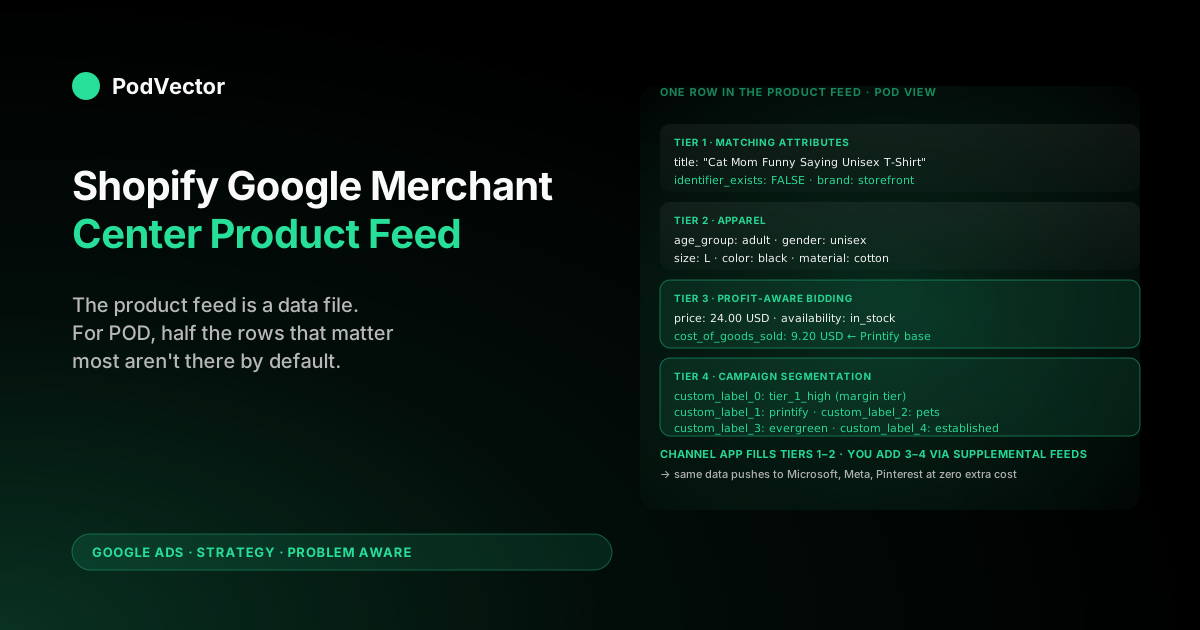
Quick Answer: A Shopify Google Merchant Center product feed strategy for print-on-demand isn't about installing the Google & YouTube channel app — that part takes 20 minutes. It's about deciding what data the feed actually carries once it's there.
The product feed is a structured data file (XML or delimited rows) of one entry per variant, with 30+ attributes per entry, that Google reads to decide which queries match which products and how much to bid. POD catalogs break the channel app's defaults in three places: GTINs don't exist (need identifier_exists: false), supplier costs vary per SKU (need cost_of_goods_sold per variant), and the channel app silently mismaps brand and apparel attributes. Get those three right, layer custom labels for margin tiers, and the same feed pushes cleanly to Microsoft Bing, Meta, and Pinterest from one source of truth.
What the product feed actually is
The Merchant Center product feed is a data file with one row per saleable item, where each row carries the attributes Google needs to (a) decide which user queries the item is eligible for, (b) display the item correctly in Shopping listings, and (c) bid the item appropriately under Smart Bidding. The format is one of three things: an XML file conforming to Google's product RSS schema, a tab-separated or comma-separated text file with a header row matching Google's attribute names, or rows pushed via the Content API for Shopping (the API surface that the Google & YouTube channel app uses under the hood). All three formats carry the same attribute set; the differences are in delivery, refresh cadence, and how transformations get applied.
For a Shopify POD store, the feed exists in three places simultaneously. The canonical product data lives in Shopify (product and variant rows in the platform's database).
A continuously synced copy lives in Merchant Center (pushed from Shopify by the channel app via the Content API every time a product is created, updated, or deleted). And — for POD operators who care about feed quality — one or two supplemental feeds live as Google Sheets that Merchant Center pulls from on a schedule, layering POD-specific overrides on top of the channel-app-pushed primary feed. Shopify's product data feed guide walks through the channel-app installation; this article focuses on what goes in the feed once the plumbing exists, not the plumbing itself.
The reason the file structure matters: Google Shopping has no keyword targeting. Every match between a search query and one of your products is decided by Google's matching algorithm reading the feed.
A feed with vague titles, missing apparel attributes, or empty identifier_exists values quietly surfaces the catalog for the wrong queries — or for no queries at all — and the campaigns running on top of it look like they're underperforming when in fact the feed is upstream-broken. The companion Merchant Center feed strategy for POD covers the broader feed-type architecture; this piece zooms in on the product feed as a data artifact.
Four ways a Shopify POD store can source a product feed
The feed has to come from somewhere. POD stores have four practical options, each with different tradeoffs in fidelity, transformation power, and maintenance cost.
| Source | Fidelity | Transformations | Cost | POD fit |
|---|---|---|---|---|
| Google & YouTube channel app (Shopify) | High; real-time | None — pushes Shopify fields as-is | Free | Required as the primary feed source |
| Manual Google Sheet | Stale; depends on operator updating it | Full — any column logic the sheet supports | Free | Best as a supplemental feed for POD-specific overrides |
| Third-party feed app (Simprosys, Nabu, DataFeedWatch) | High; real-time with re-sync | Full — rule-based attribute rewriting, dynamic titles, computed custom labels | $5–$60/month | Useful past 5,000 SKUs or when feed rules need to be operator-friendly |
| Custom-built feed pipeline (a warehouse + Apps Script or API push) | High; controlled cadence | Unlimited — joins to Printify/Printful supplier costs, custom margin logic | Engineering time | Required when COGS-aware feeds and per-SKU margin labels are non-negotiable |
The pattern that works for POD operators between 500 and 5,000 SKUs is hybrid: channel app pushes the primary feed, one or two manual Google Sheets layer supplemental overrides (POD attributes the channel app misses, plus COGS and custom labels). Past 5,000 SKUs, manual sheet maintenance breaks down and either a paid app or a custom pipeline takes over the supplemental layer. The channel app itself stays as the primary feed source regardless of catalog size — its real-time push from Shopify is the lowest-friction way to keep stock and price aligned.
Required and recommended fields, ranked by impact
Google's documented attribute set runs to 60+ fields. POD stores need a working subset of about 25, and the impact ranking is uneven — getting the title right matters more than getting energy_efficiency_class right (which doesn't even apply to POD). The hierarchy that matches how Google's matching algorithm actually weighs feed quality:
- Tier 1: matching attributes (titles and identifiers).
title,description,brand,identifier_exists,gtin/mpn. The title carries roughly 60% of the signal Google uses to match queries to your product. The description is parsed but lower-weighted. The identifier triplet (brand + identifier_exists or brand + gtin/mpn) determines whether the SKU is eligible for competitive auctions vs suppressed. - Tier 2: apparel attributes.
age_group,gender,size,color,material,pattern. For apparel-heavy POD catalogs (which is most of them), these are functionally required — Google suppresses apparel listings without them. The channel app fills some by default and silently fails to fill others. - Tier 3: bidding-input attributes.
price,sale_price,cost_of_goods_sold,shipping,availability. Smart Bidding reads these to estimate margin and project conversion value. Missingcost_of_goods_soldmeans Smart Bidding can only optimize on revenue, not profit — a major issue for POD where margins vary 4× across SKUs. - Tier 4: campaign segmentation.
custom_label_0throughcustom_label_4,product_type,google_product_category. These don't affect matching directly but enable the campaign-level segmentation (margin tier, supplier, niche, season) that turns a flat catalog into a structured one Smart Bidding can carve up. - Tier 5: presentation polish.
additional_image_link,highlights,product_detail,shipping_weight. Marginal CTR lift; worth populating but not the leverage point.
For an operator deciding where to spend the first 10 hours of feed work, the ranking is unambiguous: fix Tier 1 and Tier 2 first (which together unlock 80–90% of impression eligibility), then Tier 3 (which unlocks profit-based bidding), then Tier 4 (which makes campaigns segmentable), then Tier 5. Most POD stores ship Tier 5 polish before Tier 1–3 are fully clean — and waste the polish time because Tier 1 and 2 issues are still suppressing the SKUs the polish was meant to enhance.
The five fields the channel app gets wrong for POD
The Google & YouTube channel app has reasonable defaults for owned-inventory ecommerce. POD breaks five of those defaults, and the failures are silent — the channel app reports a successful sync, the Merchant Center dashboard shows products as "active," and only the Diagnostics → Item issues view (which most operators don't open) reveals the suppressed SKUs.
brandmapping. The channel app pullsbrandfrom Shopify's product type field by default, not the vendor field. POD stores typically use product type as a category ("T-Shirts," "Hoodies") and vendor as the storefront name. Result: the feed pushes "T-Shirts" as the brand, which Merchant Center treats as invalid. Fix: in the channel app's attribute mapping screen (Settings → Product feed → Configure attributes), change thebrandsource toproduct.vendor. Then verify the vendor field is populated on every Shopify product (use the Shopify product CSV export to spot-check).identifier_existshandling. POD products have no GTIN, no MPN as a standardized identifier, and the brand is the storefront name (not a global brand registered with Google). The correct attribute combination isidentifier_exists: falsewith brand populated. The channel app doesn't exposeidentifier_existsand leaves it empty, which Merchant Center interprets as "you should have a GTIN you forgot to provide" — and silently caps the SKU's auction eligibility. Fix: add a supplemental feed (Google Sheet) with two columns —idandidentifier_exists— and populate every row withidentifier_exists: FALSE. Upload as a supplemental feed in Merchant Center.age_groupandgenderdefaults. Required for apparel; not in Shopify's native field set; the channel app leaves them empty. Most POD apparel isadult+unisex, but Google won't infer this. Fix: in the same supplemental feed, addage_groupandgendercolumns. Populateadultandunisexas defaults, then override per-SKU where the design is gendered (e.g., "Women's V-Neck — [Design Name]" getsgender: female).sizeandcolorfrom variant options. The channel app maps these from Shopify variant option names — but only if the option is literally named "Size" or "Color." POD stores often use "T-Shirt Size," "Variant," or "Style" as option names; those silently fail to map. Fix: standardize variant option names across the catalog. In Shopify admin → Products → bulk edit, rename variant options to exactly "Size" and "Color." This is a one-time data hygiene task that pays dividends across every Shopping campaign that reads from the feed.cost_of_goods_sold. The channel app doesn't push this attribute at all. Without it, Smart Bidding can only see revenue per conversion — not profit. For POD, where a Bella+Canvas tee at $24 retail with $9.20 supplier cost has 60% gross margin while an all-over-print hoodie at $54 retail with $34.80 supplier cost has 35% gross margin, this is the single largest gap between revenue-optimized and profit-optimized Shopping. Fix: source supplier costs from Printify or Printful (their bulk export tools list per-SKU cost), join to Shopify variant IDs, and push as a supplemental feed column. Refresh weekly when supplier prices shift.
The fixes above don't require leaving the free channel app — they layer on top of it via supplemental feeds. The combined feed (primary from channel app + supplemental Google Sheets) is what Merchant Center reads when matching queries and bidding, and the supplemental rows override the primary rows for any attributes they specify.
Schema decisions that compound: titles, custom labels, COGS
Three feed-schema decisions have outsized leverage for POD: how the title is structured, what the five custom labels represent, and how COGS flows in. None of these are documented as "POD best practices" by Google because Google's documentation is supplier-and-vertical-agnostic; they emerge from how POD economics differ from other verticals.
Title structure for POD
The title is a 150-character field that gets ~60% of the matching signal. POD titles need to carry, in order: niche keyword (the design's audience or theme), product type ("T-Shirt," "Hoodie," "Mug"), design name or descriptor, and any sub-attributes ("Unisex," "Vintage Style," "Soft Cotton"). Brand and supplier do not belong in the title — they waste characters that should fund matching against niche keywords. A working title template:
[Niche keyword] [Design descriptor] [Product type] - [Sub-attributes]
Example: "Cat Mom Funny Saying Unisex T-Shirt - Soft Cotton Vintage Print"
What that template wastes characters on is irrelevant ("Soft Cotton Vintage Print" adds CTR-relevant detail without taking matching weight from the niche keyword). What it doesn't waste characters on is the storefront brand name (which goes in brand) or the supplier ("Printify Bella+Canvas" — which goes in custom_label_1, invisible to matching but available for segmentation).
Custom labels: what each one represents
Merchant Center provides five custom labels (custom_label_0–custom_label_4). They don't affect matching; they're invisible to buyers. Their job is to give campaigns ways to slice the catalog without restructuring the product data. The schema that's worked across POD operators we've seen do this cleanly:
custom_label_0= margin tier. Values:tier_1_high(40%+ margin),tier_2_mid(25–40%),tier_3_low(10–25%),tier_4_loss(under 10% or negative). Refreshed weekly from actual order data.custom_label_1= supplier. Values:printify,printful,gelato, etc. Useful when one supplier's quality issues spike disapprovals.custom_label_2= niche. Values:pets,occupations,hobbies, etc. — the audience cluster the design serves.custom_label_3= seasonality. Values:evergreen,q4,summer,holiday. Lets seasonal campaigns scale up exactly the right slice.custom_label_4= launch age. Values:new_under_30d,30_to_90d,established. New designs get different bidding behavior than proven ones; this label exposes the difference.
The five-label schema becomes the spine for campaign structure. Performance Max asset groups segment by margin tier and seasonality.
Standard Shopping campaigns scale up tier_1 niches. Negative campaigns suppress tier_4_loss entirely. Without the labels, the same campaigns have to operate on the entire catalog as a single pool — which means Smart Bidding's optimization fights against the per-SKU margin variance instead of working with it.
COGS as a feed input, not a Smart Bidding afterthought
The cost_of_goods_sold attribute is what unlocks Performance Max's Profit Optimization mode and what feeds Smart Bidding's "maximize conversion value" target with a profit-aware value (when paired with a profit-based conversion value at the campaign level). For POD, the COGS column has to be per-variant, not per-product, because the same design at three sizes has three different supplier costs. The supplemental feed source is a Google Sheet (or warehouse export) joining Shopify variant IDs to Printify/Printful supplier costs, refreshed weekly when supplier prices shift.
The feed-side work and the conversion-value-side work are paired. Putting COGS in the feed without sending profit as the conversion value back to Google Ads doesn't unlock profit bidding.
Sending profit as the conversion value without COGS in the feed limits Performance Max's optimization (which uses feed COGS to project margin per impression, not just per conversion). The complete Google Ads + Shopify integration guide for POD covers the conversion API setup that closes the loop.
Validating the feed: a 30-minute audit
The Merchant Center dashboard surfaces the obvious problems (outright disapprovals, missing required attributes), but the high-leverage feed issues are quieter — silently suppressed SKUs, low-quality titles, missing custom labels — and don't show up unless you go looking. A 30-minute audit that's worked across POD operators inheriting an existing setup:
- Minutes 0–5: Diagnostics → Item issues. Filter by "limited" and "suppressed" status (not just "disapproved"). These are SKUs Google is showing less often than they could; the suppression usually traces to
identifier_exists, missingbrand, or apparel-attribute gaps. Count the affected SKUs as a percentage of catalog. Anything above 10% is a feed-fix priority. - Minutes 5–15: title quality on top 50 SKUs. Pull the trailing-90-day Shopping report sorted by impressions. Open the top 50 SKUs and compare each title against the niche-keyword-first template. Count how many waste leading characters on brand/supplier names or generic descriptors ("Bestselling Premium T-Shirt"). Anything above 30% is a title-rewrite priority.
- Minutes 15–25: custom-label coverage. Export the feed (Merchant Center → Products → All products → download). Count how many rows have populated
custom_label_0(margin tier). For most POD stores running stock channel-app feeds, the answer is zero. The fix is the supplemental feed described in the previous section, but the audit confirms the gap. - Minutes 25–30: COGS coverage. Same export. Count populated
cost_of_goods_soldvalues. Below 80% coverage means Performance Max Profit Optimization can't activate; below 50% means Smart Bidding is making profit decisions on a tiny slice of catalog.
The audit isn't a one-time exercise — supplier prices shift, new SKUs arrive without supplemental rows attached, variant option naming drifts as new staff add products. Run it monthly, and the audit takes 10 minutes after the first pass because most of the catalog stays clean once the supplemental feeds are in place.
Reusing the feed for Microsoft, Meta, and Pinterest
The product feed isn't just a Google asset. Microsoft Advertising, Meta (Shops + Advantage+ Catalog Ads), Pinterest Shopping, and TikTok Shop all read product feeds with substantially overlapping schemas. A clean Merchant Center feed becomes the primary source of truth and the per-channel feeds become trimmed-down or transformed views of the same data.
| Channel | Feed format | Schema overlap with Google | POD-specific notes |
|---|---|---|---|
| Microsoft Advertising | XML/TSV (Microsoft Merchant Center) | ~90% identical to Google | Import from Google Merchant Center directly; no re-mapping needed for POD |
| Meta (Facebook/Instagram Shops, Advantage+) | CSV/XML (Catalog Manager) or Shopify channel app | ~70% identical; Meta has its own availability values | Use Shopify's Facebook & Instagram channel as source; same product data |
| Pinterest Shopping | CSV/XML or Shopify channel app | ~70% identical; Pinterest weights image quality higher | Square 1:1 images preferred; matters for POD mockups |
| TikTok Shop | CSV via TikTok Shop app | ~50% — different category taxonomy | Less direct reuse; treat as a separate feed source |
The implication for POD operators: every hour spent improving the Merchant Center feed (fixing titles, adding custom labels, populating COGS) compounds across four-plus paid channels at no additional cost, because most of those channels read schema-equivalent feeds. Stores treating each channel's feed as a separate maintenance burden end up with three or four mediocre feeds instead of one good one. The cleaner pattern is one canonical feed (Shopify product data + supplemental sheets) and per-channel transformations layered on top via the channel apps or Catalog Manager imports.
Common feed failures and the fix layer
Feed issues fall into four buckets, each with a fix that lives at a specific layer. Knowing which layer to fix at saves hours of unproductive Shopify-product editing for issues that actually need supplemental-feed or Merchant Center-policy fixes.
- Required-attribute disapprovals ("missing
age_group," "missingbrand"): fix in the supplemental POD-overrides feed. Cheaper than going back into every Shopify product. - Image quality disapprovals ("image too small," "promotional overlay," "watermark"): fix at the Shopify product level by replacing the featured image with a clean, ≥800×800 mockup. The channel app re-syncs within 30 minutes.
- Shipping/policy disapprovals ("shipping rate not declared," "free returns not honored"): fix in Merchant Center directly under Account → Business information → Shipping & returns. The Shopify Google Merchant Center strategy piece covers the rate configuration that POD stores need to set up once.
- Silent suppression (no disapproval, but Diagnostics → Item issues shows "limited"): fix in supplemental feed. Usually traces to
identifier_existsor missingbrand. The Digital Darts feed guide documents the identifier rules in detail.
The taxonomy matters because the wrong layer is expensive. Editing 200 Shopify products to add age_group via metafield takes hours; adding two columns to a supplemental Google Sheet takes minutes.
The first instinct of operators new to Merchant Center is to fix everything at the Shopify product level — and that instinct is wrong about half the time. The broader Google Ads strategy hub for POD indexes the campaign-side companion pieces; the Google Ads topic hub covers ad types, integrations, and conversion measurement across the rest of the funnel.
FAQs
Do I need a paid feed app to run a POD product feed in Merchant Center?
For most POD stores under 5,000 SKUs, no. The free Google & YouTube channel app handles the primary feed, and supplemental feeds via Google Sheets handle the POD-specific overrides (identifier_exists, age_group/gender defaults, COGS, custom labels). Past 5,000 SKUs, paid apps like Simprosys or DataFeedWatch start to earn their cost — they automate transformations that get expensive to maintain in a sheet at scale.
Can I run Performance Max without cost_of_goods_sold in the feed?
Yes, but you lose Profit Optimization mode. Performance Max will still run and Smart Bidding will still optimize for "maximize conversion value" — it just optimizes against revenue value (or whatever you're sending as the conversion value), not margin. For POD where margins vary 4× across SKUs, that gap is significant: Performance Max will scale low-margin tier-3 SKUs the same way it scales high-margin tier-1 SKUs, because revenue per conversion looks similar even though profit per conversion doesn't.
How often does Merchant Center re-pull a supplemental Google Sheet feed?
Configurable per supplemental feed — you set the schedule in Merchant Center → Products → Feeds → [your supplemental feed] → Schedule. Most POD stores set daily for the POD-overrides feed (which rarely changes) and weekly for the COGS/custom labels feed (which updates when supplier prices shift or margin tiers recalculate). Manual one-off uploads are also supported when an out-of-cycle change is needed.
What's the right title length for a POD product feed?
Aim for 90–130 characters. Google allows up to 150, but the matching algorithm weights the first 70 characters heavily, and titles past 130 risk truncation in the Shopping carousel display.
Front-load the niche keyword and product type, leave the descriptors and sub-attributes for the back half. Titles under 60 characters tend to under-match; titles past 140 tend to over-stuff and look like keyword spam.
Should I include the variant in the title for POD apparel?
Generally no — the variant attributes (size, color) are already structured fields in the feed, and Google treats them as filterable attributes in Shopping listings. Stuffing "Black, Size L" into the title wastes title characters that should fund matching against niche keywords. The exception: if the design itself is color-locked (e.g., "Pink Ribbon Awareness Tee" is meaningful only in pink), the color belongs in the title because it's part of the design's meaning, not just a variant choice.
Why does Merchant Center show "approved" but the SKU gets zero impressions?
Most common cause: the SKU is approved but silently suppressed because identifier_exists is empty and brand doesn't match a known global brand. Check Diagnostics → Item issues, filter to "limited" status.
Second most common: title is generic enough that it doesn't match any high-volume queries. Third: target ROAS in the campaign is set higher than what the feed's data can support — Smart Bidding finds zero queries that meet the threshold and serves nothing.
Can the same supplemental feed serve multiple campaigns?
Yes — supplemental feeds attach to the Merchant Center account, not to specific campaigns. Every campaign that reads from the primary feed automatically inherits the supplemental overlays. A single supplemental Google Sheet covering POD overrides + COGS + custom labels feeds Performance Max, Standard Shopping, Free Listings, and any non-Shopping channels (YouTube Shopping, Discover ads) that read from the same product data.
Does the feed need refreshing when I add a new product to Shopify?
The primary feed updates automatically — the channel app pushes new products to Merchant Center within 30 minutes of creation in Shopify. The supplemental feeds don't auto-sync; new SKUs ship with the channel-app defaults until the supplemental rows are added manually (or via Apps Script triggered on Shopify product creation webhooks).
The gap is usually 1–7 days for stores adding products in batches and updating sheets weekly. To close the gap entirely, automate the supplemental-feed append step or accept that new products underperform until the sheet catches up.
Stop maintaining a feed by hand
The supplemental Google Sheet that carries COGS, margin tier custom labels, and per-variant supplier costs is the largest weekly maintenance burden in this whole strategy. Pulling Printify and Printful supplier costs, joining to Shopify variants, recalculating margin tiers from rolling 30-day order data, then writing it all back to the sheet — that's 2–4 hours every week, and it gets skipped first when something else is on fire. Victor is the AI employee that runs that calculation continuously: live data joins of Shopify, Printify, Printful, and Google Ads data, with margin tier labels and per-variant COGS available on demand. Victor answers "what's the COGS column look like for the supplemental feed this week?" from real profit data and pushes the labels and COGS values directly to Merchant Center — with your approval. And skip the weekly sheet maintenance entirely.
Try Victor free