
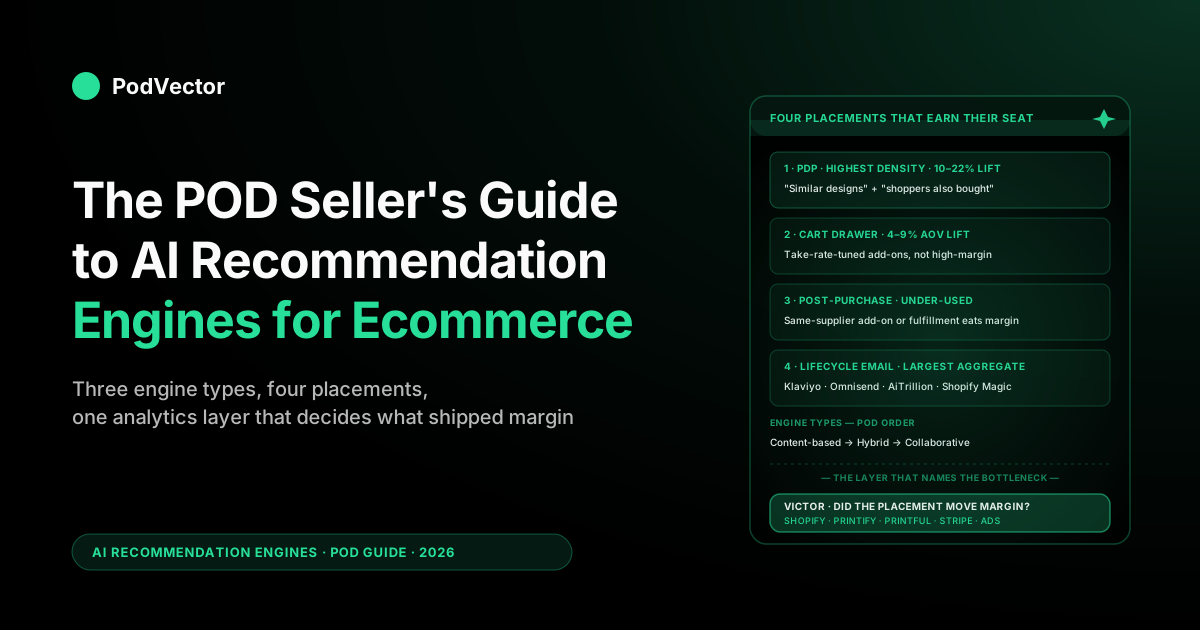
Quick Answer: An AI recommendation engine for ecommerce is the layer that decides which products to surface to which shopper at which moment — homepage, PDP, cart, post-purchase, lifecycle email. It reads behavioral signals, runs them through a content-based, collaborative, or hybrid model, and returns a ranked list of SKUs to render. For POD sellers, the priority question is not which engine to buy first — it is which SKUs to optimize first: start with your highest-revenue, highest-traffic designs (your Pareto products), clean their feed metadata, and let the engine run on that slice before touching the long tail.
Print-on-demand operates on thin net margins per order with item-level cost varying by supplier and base, ships a fast-rotating catalog where collaborative filtering never accumulates enough per-SKU history, and inherits product data from Printify or Printful sync rather than writing it. This guide covers the engine types in POD context, a SKU prioritization framework for optimizing which products to tackle first, the four storefront placements that earn their seat, the five POD-specific failure modes, and the analytics layer that tells you whether the recommendation lift translated into net margin or just into refund-prone orders.
What an AI recommendation engine does — and what POD makes it do differently
An AI recommendation engine is the software layer that decides which products to put in front of which shopper at which moment. It reads behavioral signals (browse path, dwell time, cart history, purchase history, segment membership), runs them through a model (collaborative filtering, content similarity, or — increasingly — a vector-embedding hybrid), and returns a ranked list of SKUs to render — on the homepage, the product page, the cart drawer, the checkout upsell, the post-purchase thank-you, and the lifecycle email queue.
According to Feedonomics's 2026 review of AI product ranking, AI-powered recommendation systems prioritize listings based on performance signals like engagement, conversion rates, and completeness of product data — which means the engine is only as good as the structured data you feed it. The category itself is scaling fast: Intelligence Node notes that ChatGPT alone now receives over 84 million shopping-related questions each week in the U.S., signaling how quickly consumers are turning to AI for product discovery. That is why nearly every Shopify app you evaluate this year ships an AI recommendation feature.
Where the generic ecommerce guides fall over for print-on-demand operators is the underlying economics. Stocked DTC brands run at high gross margins, deep per-SKU history (a single best-seller can sell for two or three years), and a single-supplier feed they wrote themselves.
POD operations look almost nothing like that. Item-level cost varies by base, by size, by region, by supplier. The catalog adds new designs weekly and retires slow movers within a season. The product feed is shared — Printify or Printful sync the schema, and the recommendation engine inherits whatever they pushed.
The implication for the recommendation layer is concrete: a model that's optimizing for a generic "click-through" or "add-to-cart" lift, without seeing item-level cost or supplier sync state, can recommend a sequence of products that lifts the gross-revenue line and drops the net-margin line in the same quarter. The generic guides don't catch this because their reference customer is a stocked retailer where item-level margin is uniform enough to ignore. For POD it isn't, and that single mismatch is why many operators who turn on a recommendation engine see a "revenue up, margin flat" pattern in the first quarterly review.
This guide walks the engine types in POD context, a SKU prioritization framework, the placements that pay back, the data problem underneath every recommendation decision, the tools, the pitfalls, and the measurement framework that tells you whether the lift was real. The broader cluster context lives at the AI overview cluster hub and the topic-level read at the AI analytics topic hub.
Which SKUs to optimize first: the POD prioritization framework
The most common mistake POD operators make when deploying a recommendation engine is treating every SKU in the catalog equally — enabling the engine across the full catalog on day one and waiting for lift to appear. It doesn't work that way. Yotpo's 2026 AEO guide puts it plainly: trying to optimize a large, complex catalog all at once spreads resources thin and slows early wins. The same principle applies directly to POD recommendation optimization.
The framework that earns payback fastest for POD operators is a three-tier prioritization:
Tier 1 — Pareto products (start here)
According to eFulfillment Service's 2026 product data guide, the right starting point is the roughly 20% of SKUs that drive 80% of revenue. For a POD store that means your evergreen niche winners — the Father's Day classics, the perennial best-sellers in your core niche, the holiday SKUs that run year after year. These are the designs with enough purchase history to support collaborative filtering, enough revenue weight that a lift on them moves the store-level number, and enough search queries behind them that clean structured data pays back in AI discovery too.
The feed-cleaning effort for Tier 1 is also the most leverage-per-hour work in the catalog. Clean the title, add a "theme," "audience," and "occasion" metafield, confirm the supplier identifier is structured so the engine can read it, and verify schema markup is complete. eFulfillment Service reports that stores achieving near-complete attribute coverage see significantly higher visibility in AI recommendations compared to stores with sparse data — and that gap compounds as AI shopping volume grows.
Tier 2 — High-traffic, low-conversion SKUs
The second tier is designs that are drawing traffic (sessions, PDP views) but converting below their category average. These are the SKUs where a recommendation engine has the most slack to work with: the shopper arrived, showed intent, and left without buying — often because the recommendation layer either sent them off-site or surfaced irrelevant cross-sells. Nudge's catalog optimization guide recommends prioritizing high-revenue and high-traffic SKUs first, with the audit surfacing which ones have zero AI citation share — giving the work a direct revenue lens rather than a gut-feel ordering.
For these SKUs, the recommendation engine fix is usually two things: cleaning the content-similarity metadata so the "similar designs" row surfaces actually relevant alternatives, and confirming the supplier-aware constraint so the cart-drawer recommendation stays within the same fulfillment flow.
Tier 3 — New designs (cold-start management)
New designs ship weekly on most POD stores. The engine can't optimize what it hasn't seen purchase data for, but it can surface new SKUs through content-based recommendations from the moment they're published — IF the feed metadata is clean enough to compute a similarity score. Shopthru's 2026 SKU-level analysis makes the mechanics clear: if a SKU is missing a required attribute, the AI engine excludes it entirely — there is no "page two." For POD new designs, the implication is that launching a design without complete metafields means the recommendation engine treats it as invisible until the tags are fixed.
The practical workflow: when a new design ships, run a five-field check (theme, audience, occasion, supplier, blank type) before publishing. The content-based recommendation graph picks it up immediately once those fields are present. Collaborative filtering will catch up on its own as the SKU accumulates history — the operator's job is only to ensure the cold-start content layer has signal to work with on day one.
This SKU prioritization lens connects directly to contribution margin tracking: the Tier 1 and Tier 2 designs you're optimizing first should also be the ones where you have reliable per-order margin data, so the recommendation lift can be validated against net contribution rather than gross revenue.
The three engine types and which one fits a POD catalog
Recommendation engines come in three families. The generic guides cover them in academic order; the operator's order — fastest payback for POD first — is the inverse.
1. Content-based filtering — the POD default
Content-based filtering recommends products that share features with the products a shopper has interacted with. The shopper looked at a Father's Day fishing-themed t-shirt; the engine surfaces other Father's Day designs, other fishing-themed designs, other t-shirts on the same blank. The model lives off the product feed (titles, tags, collections, variants, images) and doesn't need cross-shopper data to work.
This is the right default for POD specifically because of the catalog cadence. New designs ship weekly, often without enough purchase history to support a collaborative-filtering signal for months. Content similarity is computable from the moment a SKU is published — the engine reads the title, tag, collection, and design metadata and slots the new product into the recommendation graph immediately. The cold-start problem that burns collaborative filtering doesn't apply.
The 2026 evolution worth knowing: the better content-based engines no longer match on literal tag overlap. They embed each product — title, description, and increasingly the design image itself — into a vector and recommend by nearest-neighbor distance in that space. Nudge's catalog optimization guide describes this as multimodal ingestion — combining text and image sources to capture attributes that exist in one format but not another. For POD specifically this matters more than for stocked retail, because the catalog is image-first: visual-similarity embeddings can link two designs that share a color palette, illustration style, or motif but zero text tags, which is exactly the linkage keyword tags drop. If you're evaluating engines this year, ask whether the content side runs on vector embeddings (Recombee, Vertex AI, Coveo, Klevu) or on legacy tag-matching — the embedding-based ones recover a meaningful slice of the cross-design pattern that pure tag-matching misses.
2. Collaborative filtering — earns its seat past a threshold
Collaborative filtering recommends products based on cross-shopper patterns: shoppers who bought X also bought Y. The model lives off purchase and browse logs and improves with volume. It's the engine type that powers most of the celebrated case studies (Amazon, Netflix), and on a stocked DTC catalog it routinely produces significant AOV lift.
For POD the threshold is real. Collaborative filtering needs a meaningful volume of purchases per SKU to produce stable recommendations, and most POD designs never accumulate that volume before they're rotated out. The exception is the perennial sellers — the Father's Day classics, the holiday inventory, the niche-segment evergreens — where collaborative filtering does start to outperform content similarity once the per-SKU history crosses the threshold. This is precisely why Tier 1 Pareto products should be optimized first: they are the only SKUs in most POD catalogs with enough cross-shopper history for collaborative filtering to produce reliable signal.
The decision rule for POD operators: collaborative filtering earns its seat on SKUs that have accumulated enough purchase history to produce stable cross-shopper patterns — which on most POD stores means the established evergreen designs, not the seasonal or new additions. Below that history threshold, the cross-shopper signal is too thin to outperform content-based filtering, and the operator is buying a tier-2 tool to optimize a slice of traffic that doesn't have enough volume to learn from.
3. Hybrid filtering — the production default for mature POD stores
Hybrid filtering combines content and collaborative signals — content similarity carries the cold-start period, collaborative kicks in once the per-SKU data accumulates, and the engine blends both into a unified score. Most production-grade engines (Recombee, Coveo, Klaviyo's personalization layer, Google's Vertex AI Search, Amazon Personalize) ship a hybrid model by default, with the blend tunable.
For POD, hybrid is the right call for stores whose Tier 1 Pareto SKUs have accumulated enough per-SKU history to support a collaborative signal. The blend usually weights toward content similarity on new SKUs and shifts toward collaborative on established SKUs as their history accumulates. Most engines handle the weighting automatically; the operator's job is to make sure the supplier-feed metadata is clean enough that the content side of the hybrid has signal to work with.
The pattern in practice: a smaller POD store with a thin catalog runs content-based filtering through Shopify's built-in recommendations or a low-cost third-party app. A mid-size store with established evergreen SKUs runs hybrid through Klaviyo's personalization layer or a Shopify-native recommendation app like Glood or LimeSpot. A high-volume store runs hybrid through Recombee, Coveo, or a Google/Amazon-cloud-hosted engine wired into the data warehouse. The crossover is set by data volume, not by operator preference.
Four storefront placements that earn their seat for POD
The recommendation engine is upstream of the placements; the placements are where the lift actually shows up in the metrics. Four placements consistently earn their seat for POD, ranked by ROI density.
1. Product page recommendations — highest density per impression
"You might also like" on the PDP, ranked by the recommendation engine, is the placement with the highest revenue density per impression for POD specifically. The shopper has already shown intent (they're on a product page), the engine has the most context (the current SKU is a strong content-similarity anchor), and the fold real estate is closer to the purchase decision than any homepage placement.
Two PDP placements typically work in tandem: a "similar designs" row driven by content similarity (same theme, same blank, same audience) and a "shoppers also bought" row driven by collaborative filtering (cross-purchase pattern). The first row is where content-based shines on POD; the second is where collaborative earns its seat once volume permits. This is also the placement most directly connected to checkout conversion rate optimization — a well-tuned PDP recommendation row reduces the bounce-to-exit path by giving the shopper a next-best alternative rather than a dead end.
2. Cart drawer recommendations — small bet, fast payback
The cart drawer recommendation slot ("complete the look" / "frequently bought together") is the second-highest-density placement. The shopper is closer to checkout than anywhere else on the site, so the lift conversion-per-impression is high; the constraint is that the cart drawer is small real estate and only one or two recommendations fit.
For POD the right fill is usually a low-friction add-on: a coffee mug to pair with a t-shirt, a sticker to pair with the mug, a different size of the same design. The recommendation engine should be tuned to surface items at price points that don't trigger second-thoughts on the existing cart commitment. The mistake we see is operators stuffing the cart drawer with the highest-margin upsell rather than the highest-take-rate add-on; the take-rate-tuned approach wins on net contribution every time. See also how contribution margin per order provides the right lens for evaluating cart-drawer lift rather than relying on AOV alone.
3. Post-purchase recommendations — the under-used placement
The thank-you page and the order confirmation email both support recommendation slots, and both are under-used by POD operators. The shopper has converted, the friction is at its lowest, and the engine has full context on what they just bought. Adding a single "complete your collection" recommendation on the thank-you page, with a one-click-add flow, typically produces incremental add-on revenue that stocked-retail operators have captured for years but POD operators have been slower to adopt.
The constraint: the post-purchase add-on works best when the recommended item ships with the original order on the same supplier, which means the engine needs to know which designs and which products are routed through the same Printify or Printful flow. Recommending a Gelato-fulfilled mug as a post-purchase add-on to a Printify-fulfilled t-shirt creates a second shipment, a second tracking number, and a fulfillment-coordination cost that often eats the add-on margin. The recommendation engine has to be supplier-aware for this placement to clear margin.
4. Lifecycle email recommendations — the largest aggregate surface
Klaviyo, Omnisend, AiTrillion, and the Shopify Email stack all support recommendation slots inside lifecycle email — welcome series, abandoned cart, browse abandonment, post-purchase, win-back. The per-email lift is smaller than the on-site placements, but the aggregate surface across a year of campaigns is large.
The recommendation engine for the email channel is often a different engine than the on-site one — Klaviyo runs its own personalization layer that consumes Shopify data, while the on-site recommendations might run through Shopify's built-in slots or a specialized app. For most POD operators that's fine, but the measurement reality is that two engines optimizing two surfaces can recommend conflicting things to the same shopper, so the analytics layer has to dedupe across the two for the attribution to read clean. We covered the lifecycle-email mechanics in the POD seller's guide to AI marketing for ecommerce.
The POD data problem underneath every recommendation
Every recommendation engine's quality is bounded by the quality of the data feeding it. For POD specifically, three data realities decide whether the recommendation layer earns its keep.
The product feed is shared, not authored. Printify and Printful sync product titles, descriptions, tags, and variants on a schedule, and the schema they push doesn't always read cleanly to the recommendation engine. A title field that reads "Personalized Custom Father's Day Gift Funny Fishing Dad T-Shirt for Men 2026 Best Catch Dad Hooked on Daddy" optimizes for keyword search but degrades content-similarity scores because the engine can't extract a clean "fishing" or "Father's Day" feature. The recommendation engine inherits the supplier sync's choices.
As Shopthru's SKU-level analysis explains, AI recommendation algorithms filter on structured attributes at the SKU or variant level — if your SKU fails one required filter due to a missing or garbled attribute, it is excluded from recommendations entirely. Operators who clean the feed at the metafield layer (a "theme" metafield for the engine to read, separate from the title field for SEO) close that gap. The Shopify Admin API is the practical surface for scripting those metafield writes in bulk rather than editing each product by hand.
Item-level margin is the missing dimension. Most recommendation engines optimize for click-through, add-to-cart, or revenue. None of them, by default, optimize for net margin per order. For POD that's the difference between a recommendation layer that lifts revenue and a recommendation layer that lifts margin. The fix is working out the real margin for each product — supplier cost, Shopify revenue, fees, and refunds — and feeding that number back into the recommendation engine as a re-ranking signal. Most native ecommerce engines don't expose that surface; the ones that do (Recombee, Vertex AI, Klaviyo with custom segments) need a system underneath that can reliably tell them the true margin on each product. The mechanics of that calculation are covered in depth in the guide to getting contribution margin for ecommerce.
The cold-start problem is structural, not transient. A stocked DTC store hits cold start once when it launches. A POD store hits cold start every time new designs ship. The recommendation engine has to be tuned for a permanent cold-start regime — content-based filtering carrying new SKUs from day one, collaborative kicking in only on the perennial designs that accumulate enough history. Engines configured for stocked-retail cold-start patterns (assume the catalog is stable, expect cold-start to be a one-time event) underperform on POD on the new-SKU slice of the catalog, which is exactly the slice an operator most wants to push.
The thread connecting all three: the recommendation engine can only work as well as the data behind it. On POD, that means the supplier feed has to be cleaned up, the item-level margin has to be known, and the permanent cold-start problem has to be solved before the engine can earn its seat. We covered the data architecture in the complete guide to AI analytics for print-on-demand.
Tools that ship with Shopify versus specialized engines
The recommendation tooling for POD on Shopify breaks into three tiers. The right choice scales with catalog and revenue, not with operator ambition.
| Tier | Engine | POD fit | Monthly cost |
|---|---|---|---|
| Built-in | Shopify's native product recommendations API + Shopify Magic | Small catalogs, thin revenue — content-based, no per-shopper personalization | Free |
| Shopify-native apps | Glood AI, LimeSpot, Wiser, Rebuy | Growing catalogs, mid-revenue — content + simple collaborative, drag-and-drop placements | $29–199 |
| Marketing-stack engines | Klaviyo personalization, Octane AI, Nosto | Larger catalogs, higher revenue — hybrid filtering across email + on-site, multi-channel attribution | $99–499 |
| Cloud-hosted engines | Recombee, Coveo, Vertex AI Search, Amazon Personalize | Deep catalogs, high revenue — full hybrid, real-time, requires data engineering | $299–2,000+ |
| Search + recommendations | Klevu, Searchanise, Boost AI Search | Search-led traffic — semantic search drives recommendation context | $29–299 |
The single most expensive mistake we see at every tier: buying a higher-tier engine when the catalog isn't deep enough to feed it. A premium Klaviyo personalization seat on a thin-SKU store optimizes a recommendation surface that doesn't have enough cross-shopper signal to outperform Shopify's free built-in recommendations. The decision rule scales with the data volume, not with the operator's ambition for the brand.
The second most expensive mistake: running the recommendation engine without an analytics layer underneath that can read item-level margin. Every engine in the table above will report its own lift in its own dashboard, and every dashboard will overstate its contribution because in-tool attribution counts assisted conversions broadly. The analytics layer is what tells you whether the recommendation lift translated into net margin or whether it was washed out by the other surfaces. We covered the broader AI tooling decision-tree for POD in the POD seller's guide to AI for ecommerce and the Shopify-specific lens in the POD seller's guide to AI for Shopify.
Five POD-specific recommendation pitfalls
Five mistakes we see repeatedly in POD recommendation deployments. Avoiding them is worth more than picking the "best" engine in the table above.
1. Recommending high-margin items over high-take-rate items
The instinct is to point the recommendation engine at the highest-margin SKUs in the catalog. The math doesn't work. A high-margin item with a low take rate produces less net contribution per impression than a moderate-margin item with a strong take rate. The recommendation engine should be tuned to optimize net contribution per impression, not margin per order. See the contribution margin guide for how to compute the per-SKU number that feeds that optimization.
2. Letting collaborative filtering run before the catalog supports it
Apps that ship with collaborative filtering on by default will produce recommendations the moment the engine is installed, regardless of whether there's enough cross-shopper data to support them. On a thin-catalog POD store with sparse per-SKU history, the recommendations are noise — the engine is matching shoppers based on coincidence, not pattern. The fix is to configure the engine to fall back to content-based filtering until the per-SKU history threshold is hit, which most engines support but few default to. This is exactly why the SKU prioritization framework above matters: start the engine on your Tier 1 Pareto SKUs, where the history exists, and expand coverage as history accumulates on the rest of the catalog.
3. Recommending across suppliers without coordinating fulfillment
The recommendation engine doesn't know which supplier a SKU is fulfilled by unless the metadata is structured to expose it. A cross-supplier post-purchase recommendation creates a second shipment, doubles the fulfillment coordination, and often eats the add-on margin. The fix is exposing the supplier identifier as a metafield the recommendation engine can read, then constraining post-purchase and cart-drawer recommendations to the same supplier as the cart's anchor item. PDP and homepage recommendations can stay supplier-agnostic; the placement-by-placement constraint is what protects margin. The Printify cost and profit breakdown is a useful reference for understanding where supplier-specific margins diverge enough to make cross-supplier recommendations materially risky.
4. Trusting the in-engine dashboard for attribution
Every recommendation engine's dashboard claims credit for every conversion that touched it. Sum the dashboards across Klaviyo, Glood, the Shopify built-in, and a homepage personalization seat, and the attribution will add up to multiples of actual revenue. The fix is server-side, time-decay attribution living downstream of the engines — not a sum of in-engine dashboards. The reading we usually give operators: discount each engine's claimed lift as a starting heuristic and validate against the analytics layer's net read.
5. Not cleaning the supplier feed before turning on the engine
This is the silent killer. The recommendation engine reads whatever the Printify or Printful sync wrote, and a feed loaded with keyword-stuffed titles and inconsistent tagging produces content-similarity scores that recommend roughly random items. As Feedonomics notes, if your product feed has incomplete attributes or vague information, the AI will skip you and recommend a competitor with better data. Operators who clean the feed at the metafield layer — a curated "theme," "audience," and "occasion" metafield separate from the noisy title field — close that gap. Skipping this step is the most common reason a recommendation engine "doesn't work" on a POD store; the engine is fine, the feed isn't.
How to measure whether recommendations moved margin
Recommendation engine measurement, like AI marketing measurement broadly, is a four-signal stack. The signals in priority order:
- Item-level net margin pre/post engine launch. Pull Printify or Printful cost feed plus Shopify revenue plus Stripe fees plus refund accrual, compute net per order, compare a 30-day pre vs. 30-day post window for the placements the engine is running on. CVR lift means nothing if the recommended items push net per order down. The contribution margin guide covers how to structure that calculation reliably.
- Recommendation-attributed take rate, not impression count. The right metric is the percentage of impressions that converted to add-to-cart, not the raw impression volume. An engine that fires on many sessions but converts at a low rate is underperforming an engine that fires on a smaller share of sessions and converts at a strong rate, even though the raw "recommendation revenue" line may favor the first.
- Cross-engine dedupe. If two engines (on-site recommendation app + Klaviyo personalization in email) are both attributing the same conversion, the analytics layer has to dedupe — usually with last-meaningful-touch or a time-decay model — before the per-engine ROI read is honest.
- Refund and chargeback rate as a canary. A revenue lift paired with a rising refund rate usually means the engine is pushing the wrong size, the wrong fit, or the wrong audience match. POD-specific failure modes (sizing chart mismatch, supplier mockup color drift, ship window over-promise) often surface as refund spikes rather than as recommendation-quality complaints. Monitoring checkout conversion rate alongside refund rate gives the cleanest read on whether recommendation lift is durable.
This is where Victor pays back. Before the recommendation engine goes live, Victor looks at your orders, products, and ad spend together — pulled straight from Shopify, Printify, Printful, and your ad platforms — and tells you which step is holding back the next sale: product page to cart, cart to checkout, after purchase, or your email flows. That way the engine gets pointed at the spot that actually needs help, not the spot a vendor's marketing page assumes you have. After the engine is live, Victor can show you whether the lift you saw actually turned into more profit per order, or whether refunds, rising supplier costs, or overlapping ad credit ate it up. This is the same approval-first pattern we covered in the complete guide to AI analytics for print-on-demand.
The employee roadmap — recommendation to coordination
Today's recommendation engines are recommendation AI in the strict sense — they recommend a product, and the storefront renders the recommendation. The next wave is agentic: AI that doesn't just recommend a product but coordinates the surrounding execution. The pattern worth naming because it shapes which engines to buy now:
- Today: Victor (and the analytics-layer category broadly) answers the recommendation-strategy questions an employee would otherwise put to an analyst — which placement is leaking margin, which supplier-feed cleaning project would unlock the most content-similarity score lift, which cross-engine attribution overlap is misreading the lift, which SKUs' collaborative filtering is mature enough to start outperforming content-based. Victor reads live data across Shopify, Meta Ads, Google Ads, Printify, and Printful, proposes a typed action with rationale, and the merchant approves or rejects before anything executes. On the Shopify side, Victor can already execute approved actions like repricing products to a target margin, bulk repricing across the store, creating discount codes, organizing products into collections, and reverting price changes.
- On the roadmap: Victor coordinates with the recommendation stack to inform the changes — identifying which metafield corrections in Shopify would clean up the supplier feed, flagging which SKUs in a collection need re-organizing so the recommendation graph has cleaner structure, all gated behind operator approval, all measured against item-level margin. For ad-platform moves Victor reads and proposes; the merchant executes on the ad platform directly.
The implication for engine selection: every recommendation tool you adopt this year should expose a clean API and a webhook surface, because the next layer of value will sit in the orchestration across engines, not in any single engine's UI. Engines that lock the operator into a proprietary dashboard are buying short-term lift at the cost of medium-term flexibility. We covered the agentic architecture in agentic AI for ecommerce: what it looks like for POD sellers and the operator-loop pattern in the complete guide to AI agents for ecommerce analytics.
For the broader Shopify-side roadmap and the recommendation engine's place inside the wider AI marketing stack, see the POD seller's guide to Shopify AI and the POD seller's guide to AI marketing for Shopify. The cluster's other angles live at the AI overview cluster hub; the wider topic at the AI analytics topic hub.
FAQs
What is an AI recommendation engine in ecommerce?
An AI recommendation engine is the software layer that decides which products to show which shopper at which moment — homepage, product page, cart, post-purchase, and lifecycle email. It reads behavioral signals (browse history, cart, past purchases, segment), runs them through a model (content-based, collaborative, or hybrid), and returns a ranked list of SKUs to render. According to Feedonomics, these systems prioritize listings based on performance signals like engagement, conversion rates, and completeness of product data — which means the quality of your structured feed directly gates the quality of the recommendations. For print-on-demand the margin floor is tighter than stocked retail, so the engine has to be tuned for net contribution rather than gross revenue.
Which SKUs should I optimize first for an AI recommendation engine?
Start with your Pareto products: as eFulfillment Service's 2026 guide frames it, the roughly 20% of SKUs that drive 80% of revenue. For POD that means evergreen niche winners with enough purchase history to support collaborative filtering and enough search volume to benefit from clean structured data. After Tier 1, prioritize high-traffic, low-conversion SKUs where the recommendation layer has slack to recover revenue. New designs are Tier 3 — ensure their five core metafields (theme, audience, occasion, supplier, blank type) are clean at launch so the content-based layer can surface them from day one.
Which recommendation engine type is best for a POD Shopify store?
Content-based filtering for stores with thin catalogs or fast-rotating designs — the cold-start tolerance and the weekly design cadence make it the default. Hybrid filtering once the store's Pareto SKUs have accumulated enough cross-shopper history to support a collaborative signal. Pure collaborative filtering rarely earns its seat across a full POD catalog because most designs rotate before the per-SKU history threshold is met.
How much does an AI recommendation engine cost for a Shopify POD store?
Four rough tiers: free for Shopify's built-in product recommendations API plus Magic; approximately $29–199/month for Shopify-native apps (Glood AI, LimeSpot, Wiser, Rebuy); approximately $99–499/month for marketing-stack engines (Klaviyo personalization, Octane AI, Nosto); approximately $299–2,000+/month for cloud-hosted engines (Recombee, Coveo, Vertex AI Search, Amazon Personalize). The right tier scales with data volume, not with operator ambition; over-spending on a higher-tier engine for a thin-SKU store wastes seat fees on a recommendation surface that doesn't have enough data to feed it.
How long before a recommendation engine starts producing reliable lift?
Content-based recommendations work from day one because the model lives off the product feed rather than purchase history — provided the feed metadata is clean. Collaborative filtering needs enough per-SKU purchases to produce stable cross-shopper patterns, which on a POD catalog typically means the established Tier 1 designs and never for the seasonal one-offs. Hybrid engines bridge the gap by leaning on content similarity during the cold-start period and shifting toward collaborative as the per-SKU history accumulates.
Will an AI recommendation engine cause refunds or chargebacks for POD stores?
Only if the engine recommends across designs whose sizing, fit, fabric, or shipping windows don't match what the shopper saw on the anchor product. The fix is supplier-aware metadata — if the engine knows which Printify or Printful supplier each SKU runs through, it can constrain cross-product recommendations to consistent fit and ship windows. Operators who maintain that discipline don't see refund spikes from recommendation engines; operators whose engines recommend across mismatched supplier flows often see refund rates climb within a quarter, which can erase the recommendation lift entirely.
Can Shopify's built-in recommendations replace a paid engine for a POD store?
For stores with small catalogs and thin revenue, yes — the built-in product recommendations API plus Shopify Magic handles the content-similarity work competently and costs nothing. Above that threshold, the lift from a specialized engine (better collaborative filtering, multi-placement coordination, lifecycle email recommendations, semantic search integration) typically pays back the seat fee within the first quarter. The crossover depends on traffic volume and segmentation complexity.
Do I need to clean the Printify or Printful feed before turning on a recommendation engine?
Yes, and most operators skip this step and then conclude the engine "doesn't work." As Shopthru's analysis makes clear, if a SKU is missing a required structured attribute, AI engines exclude it entirely — there is no "page two." The fix is exposing curated metafields ("theme," "audience," "occasion," "supplier") that the engine reads instead of the keyword-stuffed title field. The Shopify Admin API automation guide covers how to script those metafield writes in bulk. Operators who skip feed cleaning often abandon the engine after a quarter, blaming the tool for what's actually a data-quality problem.
How does a recommendation engine fit into the broader AI stack for POD?
The recommendation engine sits next to lifecycle email AI, ad creative AI, on-site personalization, semantic search, and AI SEO — the five surfaces of the AI marketing stack we covered in the POD seller's guide to AI marketing for ecommerce. Underneath sits the analytics layer that decides which surface gets the next dollar of investment. The recommendation engine is one of the highest-density surfaces because it touches multiple placements (PDP, cart, post-purchase, email) with the same model, but it's not the right place to start if the bottleneck is upstream — for instance, if the lifecycle email open rate is low, the recommendation engine inside the email is fixing the wrong thing. Understanding ad fatigue and ad frequency in your paid channels helps clarify whether the bottleneck is on-site (where recommendation engines help) or upstream in acquisition.
What's the difference between a recommendation engine and on-site personalization?
A recommendation engine produces a ranked list of products. On-site personalization is a broader category that includes recommendations plus popups, content swaps, navigation reordering, banner targeting, and quiz routing. Recommendation engines are a subset of personalization, focused on the product-suggestion task specifically. Most operators conflate the two, which causes the budget question to get answered wrong — buying a personalization quiz when the actual bottleneck is PDP recommendations is a common pattern. The decision rule: identify the placement that's bottlenecking the next dollar, then pick the tool that addresses that placement specifically.
What's coming next in AI recommendation engines for ecommerce?
The 2026 trajectory is agentic — engines that don't just rank products but coordinate the surrounding execution. Yotpo's AEO guide describes active, agent-led execution as "the real difference-maker for brands winning the share-of-voice race." Today's tools recommend; the next layer coordinates metafield corrections, collection organization, and re-ranking constraints — all gated behind operator approval and measured against item-level margin. The other live trend is real-time context — engines that read the current session's behavior live (where in the funnel, what's in the cart, what got dwell time) rather than relying on stored profile data. Prefer engines with clean APIs, real-time inference, and webhook surfaces over ones that lock you into a batch-update proprietary UI.
Pick the recommendation surface the engine should fix first
Every recommendation engine in this guide earns its seat only when the placement it touches is the one your POD store is currently bottlenecking on — and only when the SKUs you feed it have clean enough metadata for the engine to produce real signal rather than noise. PodVector AI's Victor is the AI employee that reads your live Shopify, Printify, Printful, and ad-platform data, proposes which placement is leaking margin and which feed-cleaning project would unlock the next jump in content-similarity quality, and executes approved Shopify-side changes — so the next dollar of recommendation spend goes to the work that moves the next dollar of POD margin.
Try Victor free