
Quick Answer: "AI for Shopify website" in 2026 is every AI tool that touches your storefront — from building it to running it. That's the AI store builder spinning up a full storefront from a one-line brief, Shopify Magic generating themes and copy, Sidekick answering merchant questions, and Search & Discovery resolving natural-language search, plus third-party chat, personalization, and AI image apps. Shopify's Spring 2026 Edition pushed this further with first-party Agentic Storefronts and Campaign Autopilot. Behind all of it sits the analytics layer that reads what shoppers actually do once they land.
Generic guides bundle these together and rank them by feature count. POD sellers can't — per-order supplier costs, design-as-SKU catalogs, and Printify/Printful routing turn the same feature list into a very different ROI map.
This guide walks through which Shopify website AI features actually move POD numbers, where the agentic shift is rewriting how shoppers reach your store, and the install order that keeps page speed alive while the storefront gets smarter.
What "AI for Shopify website" means in 2026
"AI for Shopify website" is the slice of Shopify's AI ecosystem that touches the customer-facing site itself — distinct from the back-office tooling that runs behind it. It covers four things at once: the AI that builds the storefront (themes, sections, layouts, copy), the AI that lives on the page once the site is up (search, recommendations, chat, popups, personalization), the AI that produces the content the storefront publishes (product descriptions, SEO meta, blog posts, image assets), and the AI that reads how shoppers behave on the site so the rest of the stack can react. Every major Shopify-adjacent AI tool fits one of those four buckets, and the ROI math is different for each one.
The category exploded between 2023 and 2026. Shopify shipped first-party AI directly into the platform — the AI store builder that generates a full storefront from a short description, Magic for content and theme generation, Sidekick for the conversational admin assistant, Shopify Inbox for messaging, Search & Discovery for AI on-site search. The Spring 2026 Edition added Agentic Storefronts (storefronts built to be shopped by AI agents), Campaign Autopilot, and an AI Toolkit for developers, moving Shopify itself into the agentic-commerce layer rather than leaving it to third-party apps.
The Shopify App Store added hundreds of AI-labeled apps spanning chat, personalization, popups, search, reviews, and storefront analytics. Third-party estimates put the share of mid-to-high-revenue Shopify stores running at least one AI app north of 70% in 2026. The question stopped being "should I use AI on my Shopify website" and became "which AI on my Shopify website is worth the page-speed cost and the subscription line." For broader category framing, the AI Overview cluster covers the full picture, and the AI Analytics topic hub walks through the data layer behind all of it.
What changed between Shopify 2022 and Shopify 2026
Four shifts reshaped what "AI for a Shopify website" actually means in practice:
- Native AI raised the floor. Shopify Magic and Sidekick are free across plans and cover the basics — theme generation, product copy, chat responses, FAQ drafting, image edits. A storefront in 2026 starts with non-trivial AI even before any apps are installed. A walkthrough of Shopify Magic's website-relevant features covers what's actually shipping.
- Personalization moved to one-to-one. Storefront personalization used to mean different banners for repeat visitors. In 2026 it means session-level recommendations, dynamic merchandising, AI-resolved natural-language search, and on-page content that re-orders itself based on signals from the current session.
- Generative-engine optimization (GEO) became real traffic. A growing share of product discovery happens inside ChatGPT, AI search assistants, and Google's AI Overviews instead of through traditional blue-link search. Shopify storefront content has to be readable by both shoppers and AI engines, and the ones that aren't lose discovery share month over month.
- The page-speed bill came due. Every AI app on the storefront is paid for in milliseconds. Shopify storefronts that stack three personalization apps, two chat widgets, and a popup engine end up with mobile load times that crater conversion in ways the AI features can't recover.
Why POD Shopify storefronts evaluate website AI differently
Most "AI for Shopify website" articles are written with DTC wholesale brands in mind — companies that buy inventory, hold it, and ship from a warehouse. POD inverts almost every assumption baked into that playbook.
Apply a generic Shopify-website-AI feature list to a print-on-demand store and you'll either over-invest in features that don't move your numbers or skip the one change that would have. Five things make the math different.
Conversion rate isn't the biggest lever
For a wholesale brand with stable inventory and predictable margins, lifting on-site conversion 10% drops straight to the bottom line. For a POD store, conversion is bounded by traffic quality and creative fit more than by recommendation logic or chat tone.
Storefront AI can move conversion a few percent. Killing a money-losing design or routing fulfillment to the cheaper supplier can move profit by an order of magnitude. Website-layer AI is real, but on POD it's rarely the headline lever.
Your COGS is computed per order, not per SKU
A wholesale storefront sets a unit cost when the buyer orders inventory. A POD storefront doesn't know what an order cost until the supplier invoice prints, and the number varies by product, print method, garment color, shipping destination, and which supplier fulfilled it.
That single difference breaks every Shopify analytics or "AI insights" tool that assumes COGS is a number you type into a settings field. AI tools that read itemized Printify or Printful API costs give you a real margin number; everything else gives you a guess. The complete guide to AI analytics for print-on-demand walks through how that data layer has to be built.
Design is the SKU, and there are thousands
A wholesale brand has dozens of SKUs. A working Shopify POD store carries hundreds or thousands of designs across product types and color options.
Shopify's native reports and most third-party AI dashboards reason at the store or product level, not the design level. "Which design ate ad spend without returning orders" is a question Shopify Analytics literally cannot answer without an external layer that handles design-level granularity. Storefront-AI features that don't reason at that depth are wallpaper for POD.
Two suppliers, different pricing, different strengths
Most working POD stores run both Printify and Printful, or at least consider the tradeoff. Printful tends to win on quality and customer experience.
Printify tends to win on cost and catalog breadth. Routing products between them by geography, product type, or margin target is a legitimate optimization lever — and a generic Shopify AI app doesn't know either supplier exists.
POD-native tools read both. Background context: the complete Printful review covers the supplier-side comparison.
The page-speed budget is tighter
POD storefronts win or lose on impulse traffic from paid social. Mobile load time is the variable that decides whether the ad-clicker becomes a buyer or a bounce. Every AI app you stack onto the page costs milliseconds.
On a wholesale storefront with category-traffic and brand-direct visitors, the speed cost is partially absorbed; on a POD store buying $0.50 clicks from Meta, every dropped half-second cuts directly into ROAS. Website-AI choices on Shopify have to be made with that constraint in mind.
Three layers of AI on a Shopify website
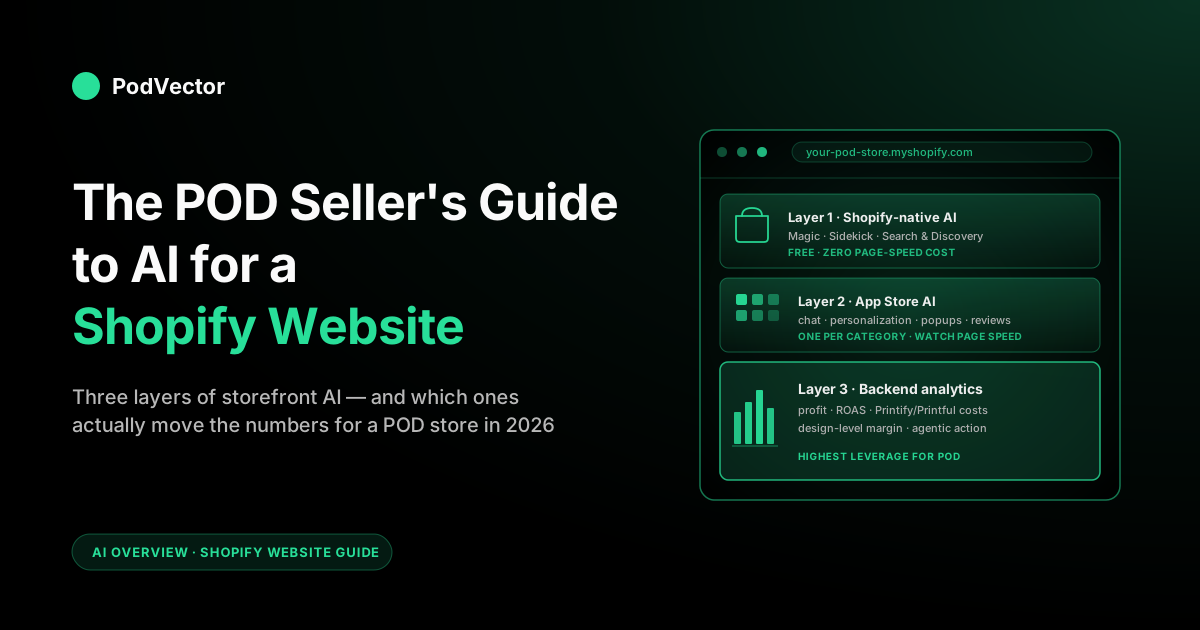
Every AI feature attached to a Shopify storefront fits into one of three layers. The distinction matters because each layer has a different ROI curve, a different page-speed cost, and a different ceiling on what it can do for a POD store.
Layer 1: Shopify-native AI
This is the AI Shopify ships natively, available on every plan. It includes Shopify Magic (theme generation, product description writing, blog drafting, email copy, image edits, FAQ generation), Sidekick (the conversational admin assistant), Shopify Inbox (AI-suggested responses for chat), and Shopify Search & Discovery (semantic on-site search). For most POD sellers, layer 1 covers the storefront basics with zero added page-speed cost — Sidekick and Magic run in the admin, not on the customer-facing site, and Search & Discovery is part of the platform. A breakdown of what Sidekick handles for POD merchants covers the admin-side surface; the storefront-side native AI is mostly Search & Discovery and the content tools.
Layer 2: Shopify App Store AI
This is the third-party app ecosystem — chat agents (Tidio, Gorgias, Zoko, Maisie), personalization (Rebuy, LimeSpot, Nosto), popup and conversion-path tools (OptiMonk, Justuno, Privy with AI), AI search alternatives (Searchspring, Algolia AI), AI review tools (Loox AI, Junip), and dozens of others. The category is crowded and the floor of quality is lower than Shopify-native. Most POD storefronts need exactly one app per category — chat, personalization, popups — and stacking redundant apps is the most expensive mistake on this layer because each one taxes page speed regardless of feature lift.
Layer 3: Backend AI that informs the storefront
This is the AI that doesn't live on the page but reads what the page does. Profit and design-level analytics, ROAS reconciliation across ad platforms, anomaly detection on conversion drops, supplier-route analysis, content GEO monitoring.
The lever here is decisions, not features — what to test on the storefront, which design pages to scale, which apps to remove, where margin is leaking. For POD, layer 3 is where the highest-leverage AI lives because it's the only layer that handles per-order variable costs and design-level profitability natively. Generic Shopify-website-AI guides skip this layer; it's the one that pays back fastest. The complete guide to AI agents for ecommerce analytics covers the employee capability.
For a Shopify-website-AI stack to actually work on a POD store, all three layers have to be present and balanced. Most stacks over-invest in layer 2 (more apps), under-invest in layer 1 (don't fully use Magic, Sidekick, or Search & Discovery), and skip layer 3 entirely. The fix is a flatter, deliberate distribution.
10 Shopify website AI features that earn their keep on POD
Narrowing the landscape: these are the ten AI capabilities on a Shopify website that routinely return their cost on a working POD store in 2026. Everything else on the App Store is either nice-to-have or not yet mature enough to justify the page-speed and subscription cost for most sellers.
1. The AI store builder and Shopify Magic for theme and section scaffolding
Shopify's AI store builder and Magic generate a credible storefront — sections, copy, hero images, product page templates — from a one-line description of the business. For a POD seller spinning up a new niche store, this collapses days of layout work into an afternoon, and standalone builders (Storebuild.ai, Atlas, PagePilot, GemPages) cover the same job when you're launching many niche stores fast.
Don't expect the output to be the final design; expect a strong week-one starting point that beats the blank canvas and lets you ship ad creative against a real store sooner. The cost is zero, the ceiling is launch speed, not ongoing margin. More on what Shopify Magic does well and where it stops.
2. Shopify Search & Discovery (semantic search)
The native Shopify search has gotten significantly smarter — it now resolves queries like "warm pullover for hiking under $50" by reasoning over your catalog, not by matching keywords. For POD stores with hundreds of designs across collections, this is real conversion lift.
Shoppers stop bouncing when the search bar fails them. Install the platform-native version first; only consider a third-party search app (Searchspring, Algolia AI) if you're at scale and the platform-native is leaving meaningful money on the table.
3. AI product description generation at catalog scale
A 500-design POD catalog is impossible to write by hand and embarrassing if you ship placeholder copy. Shopify Magic, Jasper, Copy.ai, and a wave of POD-specific tools generate product descriptions that ingest the design, the product type, and brand voice, then output SEO-tuned copy in batches.
The lift is in organic traffic and PDP conversion together — long-tail design pages that would otherwise have nothing under the title now have ranking-grade content. Use AI for the first pass and a human (or a tightly-prompted second-pass model) for editorial.
4. AI chat that handles tracking, sizing, and returns
The default workload on a Shopify chat agent for a POD store is shipping status, size questions, and return policy. AI agents resolve these at high rates because the questions are bounded and the data is structured.
The math is straightforward: every ticket the bot resolves is a ticket you didn't pay a human to answer; every answer delivered in seconds is a session that didn't bounce. Shopify Inbox covers entry-level volume; Tidio, Gorgias, or Zoko cover scale. A walkthrough of what an AI chatbot looks like on a Shopify POD store covers the install and tuning.
5. Session-level personalization on collection and product pages
Modern personalization apps (Rebuy, LimeSpot, Nosto) observe what the session is doing — first-time visitor versus returner, paid-social click versus organic, cart-abandonment risk — and adjust merchandising. For POD, where catalog depth is high and intent varies wildly across traffic sources, session-level personalization moves the AOV and conversion needle more than for narrow brands. Pick one app, configure it carefully, don't stack two.
6. AI image generation for lifestyle imagery and ad creative
Mockup generators (Placeit, Printify's mockup generator), lifestyle photo generators (Photoroom, Flair, Adobe Firefly), and ad-creative tools collapse the cost of visual content. For POD storefronts, this stacks naturally — you're already running design generators, and adding AI lifestyle imagery means every product page can carry a credible photo without a photoshoot. Watch quality at full size; thumbnail-grade is solved, PDP-grade is uneven across niches in 2026 but improving fast.
7. AI-driven popups and exit intent (with restraint)
OptiMonk, Justuno, and platform-native popup engines now use AI to time offers and pick the right discount tier per session. The lift is real but bounded. Worth installing one tool; not worth obsessing over. The mistake is treating popup AI as a substitute for a creative-quality problem on the underlying ad — popups don't fix bad traffic.
8. Generative engine optimization (GEO) for storefront content
A growing share of product discovery happens inside ChatGPT, other AI search assistants, and AI Overviews. Optimizing your Shopify storefront content (collection pages, blog posts, FAQs, product copy, structured data) so AI engines cite your store is now a real channel.
For POD sellers in long-tail niches, GEO frequently outperforms traditional SEO because the niches are exactly where AI engines are most useful and where blue-link competition is fiercest. Most "Shopify AI" guides ignore this; it's the cheapest traffic acquisition lever available in 2026 if your storefront content is already good.
9. AI review summarization and selection
Tools like Loox AI and Junip's AI features now summarize review themes, surface the most useful reviews per product, and stitch UGC into PDPs automatically. For POD, where review volume per design is usually low, selection and summarization matter more than collection volume — the lift is in showing the right two reviews, not the most reviews. Lightweight install, modest but consistent return.
10. AI analytics agents that watch your numbers
This is the layer-3 feature most generic guides skip — and on a POD store it's the highest-leverage AI on the entire stack. An AI analytics agent reads your Shopify orders, Printify or Printful supplier costs, and Meta or Google ad spend, then answers questions like "what was the real margin on Design X in April after fulfillment, ads, and Shopify fees" in real time.
It also watches the metrics for problems and tells you about them before you'd notice on your own. A comparison of AI tools for ecommerce data analysis covers the category. Victor is PodVector AI's take: an AI employee built specifically for POD sellers. He reads your Shopify, Printify, Printful, Meta, and Google Ads data all the time, so he always has the full picture. Victor answers margin and attribution questions, flags problems before they cost you money, and can act on Meta budgets, Printify and Printful orders, and ad creative — always with your approval first.
AI shopping agents and what they do to your Shopify storefront
The piece of "AI for Shopify website" that's still being underestimated in most playbooks is the shopper side of the agentic shift. ChatGPT's shopping agent, the commerce features in other AI assistants, Amazon's Rufus, and Google's AI Mode are increasingly researching, comparing, and even completing checkouts on a shopper's behalf.
Adobe Analytics tracked traffic from AI sources to U.S. retail sites growing roughly seven-fold during the 2025 holiday season. By 2026 that traffic is no longer a curiosity — it's a measurable acquisition channel with its own conversion math.
For a Shopify storefront, the agentic shift creates two specific requirements. First, the storefront has to be readable by shopper agents.
That means clean structured data (JSON-LD product schema, organization markup, FAQ schema), consistent product metadata across collections, machine-friendly content that answers shopper questions in plain language, and a checkout that an agent can complete without human-only friction. Stores that don't ship structured data don't surface in agent-driven discovery. Second, the storefront has to be optimized for traffic that arrives with high intent and no patience — agent-routed shoppers tend to land on a single page with a specific question and bounce hard if the answer isn't on it.
Shopify itself moved to meet this shift in its Spring 2026 Edition with Agentic Storefronts — first-party storefront infrastructure designed to be read and transacted by shopper agents, alongside Campaign Autopilot on the marketing side. For most POD sellers, the practical takeaway is that the structured-data and machine-readability work below is increasingly handled by the platform and a good theme rather than by a paid app.
For POD specifically, the agentic shift is mostly an upside. Long-tail design niches are exactly where AI agents are most useful (matching abstract shopper intent to specific designs), and POD storefronts that ship clean schema and good product copy frequently see disproportionate gains in agent-routed traffic.
The merchant side of the same shift is covered in agentic AI for ecommerce — what it looks like for POD sellers. For the broader competitive landscape on Shopify, the POD seller's guide to AI for Shopify covers ecosystem-wide tooling beyond just the storefront slice.
A realistic AI website stack for a POD store on Shopify
Most Shopify-AI articles end with a long vendor list. Here's a more useful framing — what an actual working POD storefront stack looks like in 2026, by layer.
Layer 1 — Shopify-native (always on)
Shopify Magic for theme/section/copy generation in the admin. Sidekick for admin-side merchant questions and bounded actions on the store.
Shopify Search & Discovery for AI on-site search. Shopify Inbox for entry-level chat.
Shopify's native product description and blog tools for content generation. None of these add page-speed weight; they're the floor every Shopify POD store should be running before installing a single app.
Layer 2 — App Store (one per category)
One chat tool — Shopify Inbox if your volume is small, Tidio or Gorgias as you scale, Gorgias or Kustomer at high volume. One personalization tool — Rebuy or LimeSpot, picked once and not stacked.
One popup tool — OptiMonk or Privy with AI features turned on. One review tool with AI — Loox or Junip.
One AI search alternative only if Shopify Search & Discovery is leaving money on the table at scale. Each app on the page costs page speed; pick deliberately.
Layer 3 — Backend analytics (the highest leverage)
A POD-focused profit tool that reads your Shopify, Printify, Printful, Meta, and Google Ads data — Triple Whale, Polar Analytics, or PodVector AI's Victor — gives you the profit math nobody else can produce.
Generic dashboards (GA4, Shopify Analytics) are necessary but not sufficient; they don't reconcile per-order supplier costs against ad spend at design granularity. Layer 3 has zero impact on page speed (it's a backend connection) and the highest impact on the decisions that determine which storefront experiments are worth running.
For a side-by-side of what each category's vendor options look like, Best AI for ecommerce, compared walks through the major tools. The broader ecommerce-website framing is in the POD seller's guide to AI for ecommerce websites, and the AI website builder comparison is in Best AI website builder for ecommerce, compared.
How to install Shopify website AI without breaking conversion
The biggest mistake POD sellers make installing Shopify website AI isn't picking the wrong tool — it's installing too many tools at once and dragging mobile load time into the basement. Conversion on a Shopify POD store is heavily sensitive to page speed; a one-second delay in mobile load time costs measurable revenue, and AI features that run on the page (chat widgets, personalization scripts, popup engines, review widgets) all add weight. Some of that weight is worth it; some isn't.
A pragmatic install order:
- Turn on every layer-1 native AI feature first. Shopify Magic, Sidekick, Search & Discovery, Inbox. Free, zero shopper-facing weight, covers the basics. If you don't have these configured, no third-party app will compensate.
- Connect the backend analytics layer next. Layer 3 doesn't sit on the storefront — it's a backend connection — so it has zero impact on shopper experience and high impact on the decisions you can make. This is the AI that pays for itself fastest on a POD store, and it gives you the measurement you need to evaluate whether each subsequent layer-2 install is actually working.
- Add one chat tool. Pick one based on volume and don't stack. Tune it on top FAQs, sizing, and tracking before turning on AI-generated freeform replies.
- Add one personalization tool, only if your traffic justifies it. Below a few thousand monthly sessions, the lift won't measure cleanly above noise. Don't pay for personalization on a store that hasn't found product-market fit yet.
- Add content tools as a workflow, not as on-page widgets. Product description generators, blog tools, and image generators run in your admin or workflow — not on the page. Use them aggressively; they don't cost shopper experience.
- Watch Lighthouse every time you install something. Measure on mobile, on a real cellular connection if possible. If a new app drops your score by more than a few points, the conversion cost is probably bigger than the feature's lift. Remove it and try the next one.
- Audit the stack quarterly. Apps that earned their keep at $50k/month may not at $200k/month, and vice versa. The right stack for your storefront in Q1 isn't necessarily right by Q3.
Mistakes POD sellers make with Shopify website AI
The pattern of mistakes is consistent enough across stores to itemize.
Treating layer 2 as the main lever
Generic Shopify-AI advice obsesses over App Store apps because that's what the App Store sells. POD sellers should split attention more evenly: layer 1 (free, native) before any apps; layer 3 (backend analytics) before any layer-2 over-investment. Spending three months tuning chat-widget conversational flows while design-level margin reporting is broken is, in dollar terms, an own goal.
Stacking redundant apps in the same category
Two AI search apps. Two personalization tools. Two chat agents. Two popup engines. Each new app adds load time and overlap, and the second app in any category usually adds less feature lift than the page-speed cost it imposes. Pick one, tune it, move on.
Trusting AI-generated copy without editing
AI product descriptions and SEO copy are great as a 70% draft. As 100% output, they read flat, miss brand voice, and drift toward the same generic tone every other AI-using Shopify store ships.
The win is using AI to scale your editorial layer, not replace it. POD descriptions need to reference design intent, not just product specs — that requires editorial judgment AI can support but not own.
Buying analytics that don't reconcile supplier costs
The most common mistake on the layer-3 side is buying a dashboard tool that reads Shopify and your ad accounts but not your Printify or Printful supplier costs. The output looks reasonable; it's also wrong, because POD margins are too thin for unitless ROAS to mean anything. Verify the tool reads your supplier APIs (not a manual COGS upload) before signing up.
Ignoring structured data for AI agents
Shopify storefronts that don't ship clean JSON-LD product schema, organization markup, and FAQ schema lose discovery share to agent-routed traffic. The fix is a one-time structured-data audit and a theme that emits schema correctly per page type — not an ongoing app subscription. Most stores discover the gap only after a competitor starts showing up in ChatGPT-driven shopping queries instead of them.
Ignoring page speed
Every AI app on the page is paid for in milliseconds. POD storefronts that run three personalization apps, two chat widgets, a popup engine, and a recommendation block end up with a six-second mobile load time and conversion that craters silently while the stack looks impressive on paper.
Measure before and after every install. The stack should subtract apps as often as it adds them.
FAQs
What's the difference between "AI for Shopify" and "AI for Shopify website"?
"AI for Shopify" is the broader category — every AI feature in the Shopify ecosystem, including back-office admin tools, ad-platform integrations, supplier connectors, and operations tooling. "AI for Shopify website" is the subset attached to the storefront itself: builders, on-site features, content engines, and the analytics that read storefront behavior. For POD sellers, the website slice is real but not the biggest lever; the back-office analytics layer usually moves more dollars per month.
Do I need a separate AI website builder, or is Shopify Magic enough?
For most POD sellers staying inside Shopify, Magic plus a good theme is enough. Standalone AI website builders matter when you're spinning up many niche stores fast or working outside the Shopify ecosystem. Inside Shopify, the platform-native AI is already strong enough that paying for a separate builder is rarely worth it after launch week. A side-by-side of AI website builders covers the comparison.
How much should AI tools on my Shopify website cost in 2026?
Realistic monthly budget for a working Shopify POD store: $0 for native AI (included), $30–$100 for chat, $20–$80 for personalization, $20–$60 for review tools, $20–$60 for popup tools, and $50–$300 for the layer-3 analytics layer (the most variable line item). A reasonable mid-stage POD storefront runs $150–$400/month total in AI subscriptions and recovers it through margin protection and content throughput rather than pure conversion lift.
Will AI shopping agents (ChatGPT, AI assistants) replace my Shopify website?
Not soon, but they will route a growing share of discovery and comparison through agent-driven sessions. The practical implication for Shopify storefronts is to make your site readable by shopper agents — clean schema, consistent metadata, machine-friendly content — so your products surface in agent-driven discovery. Treat agents as a new traffic source, not a replacement.
Does AI on my Shopify website hurt page speed?
Yes — every script you add to the page costs milliseconds. Platform-native AI (Magic, Sidekick) runs in the admin and has zero shopper-facing weight.
Third-party AI apps on the storefront — chat widgets, personalization, popups, review widgets — all add load. Measure mobile Lighthouse before and after every install; if you lose more speed than the feature's lift gains, remove the app. Page speed is the underrated tax on Shopify website AI.
Can AI write all my Shopify product descriptions?
It can write a 70% draft for hundreds of products in an afternoon. It can't write final, brand-voiced, SEO-tuned copy on its own.
The right workflow is AI for the first pass and a human (or a tightly-prompted second-pass model) for editing. For POD specifically, descriptions need to reference design intent, not just product specs — that requires editorial judgment AI supports but doesn't own.
What's the highest-ROI AI feature for a POD Shopify website?
The backend analytics layer (layer 3), not anything on the storefront itself. AI that reads Shopify orders, Printify or Printful supplier costs, and ad spend, then tells you which designs and campaigns are actually profitable, recovers margin that no on-site feature can match. Storefront AI is useful; analytics AI is foundational. The complete guide to AI analytics for POD walks through what that layer looks like.
Is AI for Shopify websites worth it for a small POD store under $5K/month?
Selectively. Shopify-native AI (Magic, Sidekick, Search & Discovery, Inbox) is essentially free and worth turning on from day one.
Paid layer-2 apps usually aren't worth it under a few thousand monthly sessions — the lift won't measure cleanly. The layer-3 analytics layer is worth it from the first dollar, because the questions it answers (which designs are profitable, where margin is leaking) matter just as much at small scale, and the cost of a wrong call is bigger when the buffer is thinner.
How does AI for Shopify website compare to building a Shopify store with AI from scratch?
Building a store with AI is a launch-week activity — Shopify Magic, AI theme generators, AI image tools collapse the time from domain registration to first ad click. Adding AI to an existing Shopify store is an ongoing operational layer — chat, search, personalization, content, analytics. The two questions are different, and the second one is where most POD sellers live for the bulk of a store's life. Shopify's overview of AI website builders covers the launch-time side; this guide covers the operational side.
See your Shopify store's real margin, by design and campaign
Most "AI for Shopify website" tools live on the storefront. Victor lives on the data behind it. He reads your Shopify, Printify, Printful, Meta, and Google Ads accounts all the time, so he can answer the profit questions a generic dashboard can't. He's built specifically for POD sellers, with real supplier costs, design-level reporting, and broader employee skills.
Try Victor free