
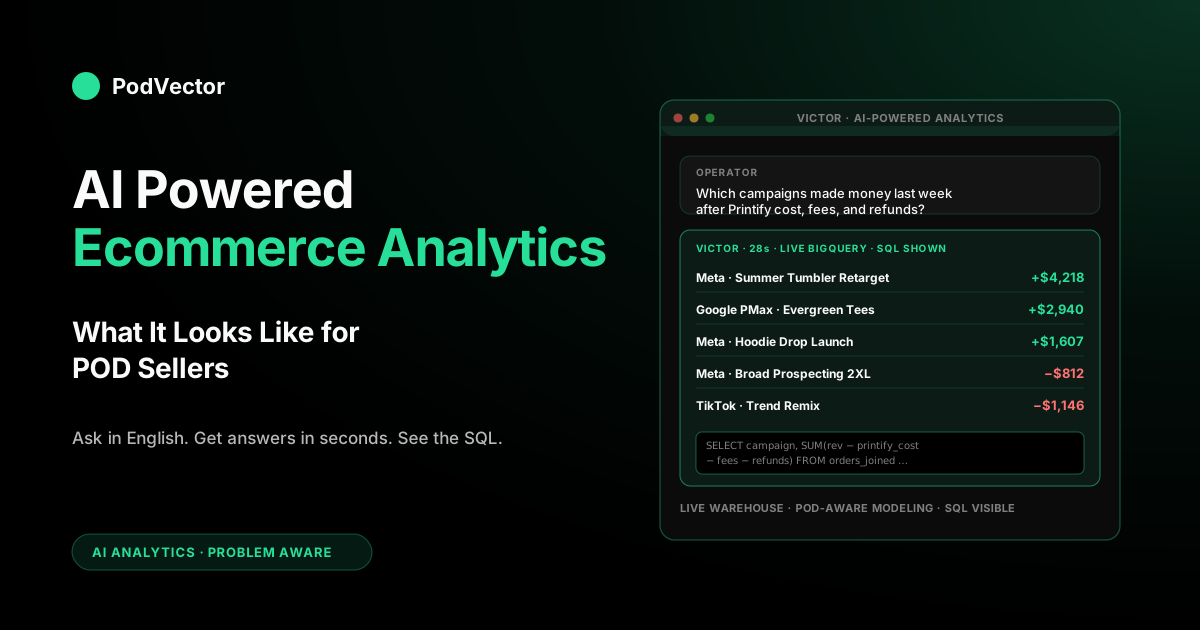
Quick Answer: "AI powered ecommerce analytics" usually means one of three things — a dashboard with a search box that understands plain English, a report that flags unusual numbers for you, or an AI employee who answers your questions using your real store data. Only the third one actually changes how your store runs day to day, because the first two still need you (or someone on your team) to figure out what the numbers mean.
For a POD seller, AI-powered analytics is useful when it does three things at once: looks at fresh data (not numbers from last night), knows your exact Printify or Printful cost down to each product variant, and answers questions like "which campaigns made money last week after refunds and fees" in under a minute — no tech person needed. Most of the "AI-powered" ecommerce analytics tools on the market today fail the first two tests, which is why the dashboards look sharp in the demo and give numbers that drift from reality within a month of going live.
What "AI powered ecommerce analytics" actually means (and what it doesn't)
The phrase "AI powered ecommerce analytics" has been stretched far enough that every vendor in the analytics category now uses it. It appears on Triple Whale, Polar Analytics, LayerFive, GA4, Shopify's own Analytics page, and about four hundred smaller tools.
Used that broadly, it conveys approximately nothing. The useful version of the term describes one of three distinct product shapes, and they are not interchangeable.
The first shape is a BI dashboard with a natural-language query box on top. You type "show me revenue by channel last week" and the tool generates a chart.
Tableau's Pulse, Looker's AI assistant, Power BI's Copilot, and most Shopify-native BI tools fall here. They are still dashboard products.
The AI is a front-end convenience that produces a chart faster than you could build it by clicking. An analyst still has to interpret the chart, and the tool does not tell you what's actionable. A newer wrinkle on this shape is AI data storytelling — generative summaries that narrate the chart in plain English ("revenue was up 12% week-over-week, driven by the tumbler category") and assemble executive briefings. It reads well and saves the writeup, but for a POD operator it's still describing a number that was computed by a generic model, so a confident-sounding narrative built on a blended-cost margin is a wrong answer with better prose.
The second shape is a reporting platform with ML-driven anomaly detection and forecasting bolted on. Triple Whale's Moby, Polar Analytics, CorralData, Glew, Daasity, and most of the "AI-powered" DTC analytics category live here.
The platform pulls from Shopify, Meta, Google, Klaviyo, and sometimes Printify; it applies statistical models to flag when something is drifting (your CAC is up, your refund rate is spiking); and it surfaces the flags on a dashboard. The AI is doing the work of a junior analyst who scans dashboards looking for anomalies.
This is genuinely useful — but it's still reactive. You get the flag after the damage happened.
The third shape is an agent that queries your warehouse on demand from a natural-language question and returns a grounded answer with the work shown. Victor is this shape.
Shopify's Sidekick and Graas's hoppr are limited versions of this shape — Sidekick scoped to Shopify's own catalog, hoppr scoped to marketplace and ad data. The agent doesn't build a dashboard you have to interpret; it answers the question. "Which campaigns made money last week after Printify cost, refunds, and transaction fees" returns a ranked list with dollar amounts, not a chart of spend. This is the shape that actually changes operator behavior, because the time between having a question and having an answer collapses from "schedule a meeting with the data person" to "thirty seconds."
There's a fourth set of products sold under the same phrase that isn't really store analytics at all — it's competitive and digital-shelf intelligence. DataWeave (which ranks prominently for this search) and parts of Graas's agent suite live here: AI-powered price benchmarking against competitors, share-of-search and share-of-media tracking, assortment gap detection, and content scoring across marketplaces. It's genuinely useful for brands fighting on price across Amazon and big-box retailers, but it answers a different question than "did my store make money this week." For a POD seller whose differentiation is design rather than price-matching a commodity SKU, this category is largely orthogonal — it tells you where you sit on a competitor's shelf, not what your true margin was after Printify cost and refunds.
Vendors blur these shapes on purpose, because the market is willing to pay premium prices for the third shape but not the first. When evaluating an "AI powered ecommerce analytics" tool, the first question to answer is which shape you're looking at — and for POD, the answer almost always needs to be the third, because POD economics are unusual enough that dashboards, anomaly detection, and competitive benchmarking aren't enough.
Why generic AI-powered ecommerce analytics gives POD sellers wrong answers
The central problem is that every analytics tool assumes your cost of goods sold is a stable, knowable number you can upload as a CSV. That assumption is close enough to true for a stocked-inventory DTC brand buying wholesale at a fixed unit cost. For print-on-demand, it's wrong in ways that cascade through every margin number the AI layer produces.
A Printify product cost depends on the specific print provider selected for that order, the garment SKU (Gildan 5000 is cheaper than Bella+Canvas 3001), the color (white costs less to print than dark heather), the size (2XL is a dollar or two more than M), the number of print areas used on that variant, and Printify's current supplier pricing, which moves. A T-shirt variant that ran a 45% margin in January can be running 31% in April because Printify's supplier raised the blank cost by $1.80 and the CSV you uploaded six months ago still says the old cost. The AI layer sitting on top of that data queries what it was told — and confidently reports a margin that's six to fifteen percentage points off reality.
Then refunds add a second layer of distortion. Generic ecommerce analytics tools model refunds as a blended percentage applied to revenue.
For POD, the refund timing changes the P&L math: an order cancelled before Printify started fulfillment costs you the Shopify transaction fee only; the same order cancelled after fulfillment is a full loss of the blank, the print, and the shipping. Treating those two events as the same "refund" hides which campaigns are driving expensive-refund traffic vs cheap-refund traffic. The AI answers "our refund rate is 8%" when the cost-weighted refund impact on two similar campaigns is wildly different.
The third distortion is attribution. POD stores run heavy on Meta and TikTok and email; Shopify's native attribution is first-touch or last-click depending on a dropdown setting, and every analytics tool makes a slightly different default choice.
An AI agent asked "which campaigns made money" returns different rankings depending on which attribution model is sitting underneath the query. Generic tools rarely expose this — you get a confident number that's a function of a default assumption you never signed off on.
That attribution problem got harder in 2026, not easier. Browser privacy changes, ad-platform walled gardens, and GA4's modeling defaults mean a growing share of POD orders arrive with no clean click path attached, so the analytics layer is increasingly guessing which channel earned the sale. Vendors paper over the gap with server-side conversion APIs (Meta's CAPI and the Signals Gateway, Google's enhanced conversions), first-party pixels, and identity resolution — which recover some of the signal — but every recovered match is still an estimate. An AI agent that reports campaign profitability without telling you how much of the attributed revenue is modeled vs. directly observed is hiding the single biggest source of error in a POD store's margin math today. The operator question that cuts through it isn't "which campaign made money," it's "which campaign made money, and how confident are you in the attribution."
The cumulative effect: an AI-powered ecommerce analytics tool that isn't POD-aware will give you answers that sound precise, look professional on a dashboard, and are wrong at the scale that matters. You'll decide to scale a campaign that's actually unprofitable, or kill one that's actually your best performer, because the margin math it's running is generic. For the deeper version of this argument with worked examples, see the complete guide to AI analytics for print-on-demand.
The four things "AI powered" has to actually mean to be useful
Strip away the marketing language and there are four things an AI-powered ecommerce analytics tool has to do to be genuinely useful for a POD operator. Tools that skip any of these four are still useful — as dashboards, as reporting layers, as faster ways to get a chart — but they're not doing the work the phrase "AI powered" implies.
1. Query live data, not a nightly batch
Most of the "AI" in AI-powered analytics is applied to a snapshot of your data that was synced overnight. You ask a question at 11 AM and get an answer based on yesterday's state.
For a POD operator who launched a Meta campaign at 9 AM and wants to know at 11 AM whether it's pacing profitably, that's useless. Live means the orders table reflects orders placed in the last few minutes; the Printify fulfillment cost table reflects fulfillments confirmed in the last few minutes; and the ad spend table is at most an hour behind Meta's own reporting.
Getting instant updates from Shopify, Printify, and Meta the moment something happens is what makes this possible. Waiting for a once-a-day update is the defining feature of old-school analytics and the defining failure of the "AI powered" version of it.
2. Ground answers in POD-aware modeling
The AI layer is only as accurate as the data model under it. POD-aware modeling means the tool knows that supplier cost is per-variant, itemized, and changes; that refund timing affects the P&L; that attribution is a choice, not a default; and that shipping cost differs on every order.
The behind-the-scenes work that turns messy raw numbers into clean, correct ones is where the real accuracy lives. If the tool uses generic, one-size-fits-all math for your numbers, the AI is just dressing up a wrong number.
3. Answer questions in English, not generate charts
A dashboard that requires a human to interpret it is a slower version of a report. The "AI powered" promise is collapsing the loop: the operator asks "which campaigns made money last week after costs" and gets a ranked list with dollar amounts in seconds.
The tool should also show the work it ran so the operator can trust the answer. Chart generation is a lower bar; answer generation is the one that changes behavior.
4. Show its work so you can trust the number
AI models can get things wrong. They can make up an answer, mix together numbers that don't belong together, or apply the wrong filter.
The fix is not to hide how the AI got its answer, but to show it to you. A useful AI-powered ecommerce analytics tool shows you what it checked, what it assumed about your data, which ad-credit window it used, and the date range it looked at.
When the operator spots a wrong assumption, they can correct it and re-run. Tools that give you a number without the underlying query force you to either trust them or ignore them, and over time most operators ignore them. For a deeper look at what "grounded" means in practice, the complete guide to AI agents for ecommerce analytics walks through the architecture.
The everyday questions a POD operator should be able to ask
A useful way to evaluate an AI-powered ecommerce analytics tool is to write down the questions you actually ask in a week and see how many the tool can answer in under a minute. For a POD operator, the list usually looks like this:
- "Which of my Meta campaigns made money last week after Printify cost, transaction fees, and refunds?" This is the acceptance test for the category. If the answer is a ranked list with a dollar amount per campaign in under thirty seconds, the tool works. If it requires a CSV export, a spreadsheet, or "ask the data team," the tool is a dashboard.
- "What's my blended margin this month, and how is that different from last month?" Should return two numbers and a variance, with the option to drill into what drove the change (a product launch, a supplier price increase, a refund cluster).
- "Which product variants dropped below 25% margin this month?" This surfaces the variant-level drift that generic tools hide behind a blended number.
- "Which campaigns have the highest cost-weighted refund impact?" Not which campaigns have the highest refund rate — which ones are costing you the most money in refunds after supplier cost is eaten.
- "What's my repeat-purchase rate by channel, and which channel has the best LTV after sixty days?" Cohort-level analysis that requires joining orders to customers to channels.
- "What did Klaviyo contribute this week vs last week, and which flows are driving it?" Separating owned from paid at the flow level.
- "At what ROAS does this campaign break even, given the variant mix it's selling?" Dynamic break-even, because blended break-even is a lie for any store with variable margin.
- "Compared to the same week last year, how's our traffic-to-order conversion rate?" Year-over-year at a grain most tools can't handle without a custom report.
If the tool you're evaluating can answer seven of those eight in under a minute each, you have an AI-powered ecommerce analytics tool. If it can answer three, you have a dashboard with a chat interface. The gap between seven and three is mostly a function of whether the underlying modeling layer knows about POD economics, and whether the agent can run real queries against live data rather than fetching from a cached summary.
The stack behind the agent: what lives under the hood
The visible part of AI-powered ecommerce analytics is the chat box. The invisible part is the five layers of data infrastructure that determine whether the answers are right. Glossing over these layers is how vendors sell pretty front-ends that don't work in production.
Data capture. Connectors to Shopify (orders, line items, refunds, transactions), Printify or Printful (itemized fulfillment cost per order), Meta and Google (campaign-level spend with UTM tagging), Klaviyo (flow-attributed revenue), and the payment processor (transaction fees). Missing any of these is a blind spot the AI will paper over with a wrong number.
Warehouse. Snowflake, or Redshift — commodity at the volumes POD stores run. The choice that matters isn't the product, it's the refresh cadence. Streaming inserts mean orders hit the warehouse within a minute; nightly batch means you're asking questions about yesterday.
Modeling. The transformation layer that turns raw tables into order-level net margin, campaign-level attributed revenue, variant-level margin history, cohort revenue, and break-even ROAS. This is where POD-specific work lives. A generic ecommerce modeling layer will blend supplier cost, blend attribution, and miss refund-timing asymmetry — and the AI on top will inherit every one of those errors.
Agent. This is the part that understands your plain-English questions and turns them into real answers from your store's data. It's a smart AI that knows your store's numbers inside and out. For this to work, it needs to see your actual, up-to-the-minute orders, costs, and ad spend — not a summary, not an old PDF report, but the real, current numbers.
Action. The employee roadmap — where the AI doesn't just answer but also executes. Auto-pause a losing campaign when margin drops below a threshold, flag margin drift on a variant when supplier cost changes, push a repricing change to Shopify.
Most vendors describe this and few deliver it today; it's the frontier of the category. For the fuller five-layer walkthrough, see the AI data solution for ecommerce guide.
A useful mental check when evaluating a vendor: ask them which of the five layers their product owns, and which they assume the customer has built. Vendors who own Layers 4 and 5 only (the agent and action, nothing below) are selling you a chat interface that's hoping your data team has built the modeling layer — which for most POD sellers, they haven't.
How AI-powered analytics changes the POD weekly operating cadence
The cultural change of AI-powered ecommerce analytics is bigger than any single feature. Before, the POD operator runs ads Monday through Friday, compiles numbers in a spreadsheet over the weekend, and has a margin readout by Monday evening of the following week.
Decisions get made on data that's a week stale. After, the same operator asks the agent at 11 AM on Tuesday "how's last week's Meta campaign pacing after costs" and gets an answer in thirty seconds.
The decision gets made on Tuesday, not Monday of the next week. Over a quarter, that's thirteen decision cycles vs three.
The compounding effect is where the value lives. A POD store running twenty concurrent campaigns at various stages of profitability loses money to lag — the half-week between "campaign starts losing money" and "operator notices and pauses it." Cutting the lag from a week to a day doesn't just save the pause cost; it surfaces patterns faster. The operator notices that the 22oz tumbler category has slipped below break-even three weeks in a row and digs into why, instead of noticing it six weeks in.
The second cultural change is the question pattern. Before the AI layer, operators ask the questions they know how to answer — the ones where the dashboard is already built.
The questions that aren't already on the dashboard don't get asked, because getting an answer (bugging the data person, writing code, waiting around) is too much hassle. With AI that actually works, store owners ask more unusual questions: "what's my margin on orders that had a discount applied vs orders that didn't" or "which ad creative is getting stale across my Meta account right now." Those questions turn up insights that weren't visible before, not because the data wasn't there, but because asking used to be too much work.
The third change is who can ask. In an old-school setup, the person who runs your ads doesn't know how to write code and never touches the raw data.
In an AI-powered setup, the person running your ads asks the AI directly. The data person spends less time pulling one-off reports and more time making sure the numbers are set up right — still important, just different work.
For a solo POD operator, the change is even more dramatic: the tool collapses the need for a data person at all, up to a certain scale. The complete guide to AI tools for POD sellers walks through where the scale thresholds land.
Buying criteria: what to test before signing an annual contract
Most POD sellers end up buying the wrong AI-powered ecommerce analytics tool the first time around, because the demo optimizes for what looks good in a 30-minute call and not what holds up in production. The buying criteria that actually matter are unglamorous and rarely get asked in the sales call.
- Does the tool pull in your exact Printify or Printful cost for each product variant? Ask for a live demo where the vendor connects to your own Printify account and shows the cost breakdown per order. If they can only accept a CSV file, they don't have a real Printify connection — they have a cost guess.
- How fast does a new order show up in the data you can ask about? Under an hour is the bar to clear. A once-a-day update is a dealbreaker.
- Does the tool show you what it did? If the answer is "no, that's hidden" or "you can't see how it got the answer," the tool is asking for trust you can't check. Move on.
- Can the attribution model be swapped without a support ticket? A tool that locks you into one attribution model is hiding a decision. Good tools let you swap between 7-day click, 1-day view, data-driven, and custom windows.
- How does the tool handle refunds? Ask how a refund on a three-week-old order is netted — against the original order date (correct) or against today's revenue (wrong). Wrong-date refund handling distorts every weekly margin number.
- What's the migration path if we outgrow the tool? If your data lives only inside the vendor's platform, you'll be re-building from scratch when you switch. Tools that give you your own data and let you look at it directly are more defensible.
- Pricing model — is it per-order, per-seat, or flat? Per-order pricing at POD volumes gets expensive fast. Per-seat is fairer if the team is small. Flat is best if you can negotiate it.
A useful procedural trick: before the vendor call, write down five questions from the everyday questions list above using your own data. Ask the vendor to answer them live in the demo. Vendors who refuse or redirect ("we can set that up as a custom report post-onboarding") are telling you something important.
For side-by-side comparisons of the tools that survive these tests, the best AI tools for ecommerce data analysis comparison goes head-to-head on the category.
Common failure modes in POD stores
After seeing a number of POD stores set up AI-powered ecommerce analytics and run into problems, the same handful of failure modes keep recurring. Each one is avoidable if you know it exists.
Failure mode 1: Stale Printify cost CSV. The store uploads a cost CSV on day one, the tool starts computing margin from it, and nobody updates it. Six weeks later supplier costs have moved and the margin numbers are wrong. Fix: demand a live Printify API connector, not a CSV upload.
Failure mode 2: Blended break-even ROAS. The tool computes a single break-even ROAS across the whole store and applies it to every campaign. But a campaign selling mostly 2XL hoodies has a different break-even than one selling M T-shirts.
The store scales a campaign that looks profitable at the blended number but is losing money at the variant-weighted number. Fix: use a tool that computes variant-weighted break-even per campaign.
Failure mode 3: Attribution drift. The vendor's default attribution model changes silently in a product update, and the margin numbers shift by five or ten percentage points without anyone noticing. The store makes a wrong call about which channel to double down on. Fix: ask the vendor how they notify on attribution model changes, and lock the model in your contract if possible.
Failure mode 4: Late-cancelled orders not reconciled. An order cancels after Printify has printed it. Revenue reverses on Shopify, but supplier cost doesn't reverse (you still owe Printify for the print).
The tool treats this as a standard refund and restores full margin. Actual loss is invisible. Fix: use a tool that joins Printify's fulfillment status timeline to Shopify's refund timeline and computes the real loss per event.
Failure mode 5: The agent gets the question wrong. The natural-language layer is a probabilistic model, and occasionally it quietly answers a different question than the one you asked — wrong date range, wrong grouping, wrong filter. You get a confident number that's actually about something else. Fix: ask the tool to show its work on every answer, and double check on complex questions.
Failure mode 6: Model quota limits. Many AI-powered analytics tools cap the number of agent queries per month, or the context window, or the complexity of questions. Operators hit the ceiling at the worst time (end of quarter, when they need to ask more questions). Fix: understand the quota structure before signing, and negotiate overage pricing.
Failure mode 7: Inventory forecasting applied to POD. Generic ecommerce analytics tools ship with an inventory forecasting feature built for stocked inventory. In POD, there's no inventory to forecast — fulfillment is on-demand.
The feature is either meaningless or actively misleading. For POD-aware forecasting of a different kind (demand forecasting to inform ad budget allocation), see AI inventory forecasting for Shopify.
The employee roadmap: from answering to acting
The current state of AI-powered ecommerce analytics is that the best tools answer questions accurately. The next state — which several vendors including Victor are actively building — is the action layer.
The agent doesn't just tell you which campaign is losing money; it asks whether you want it paused, and pauses it. It doesn't just surface that a variant's margin has drifted below threshold; it flags the product and suggests a price update on Shopify. It doesn't just report a customer segment's LTV; it drafts the Klaviyo flow to win them back.
The sequence in which vendors are shipping these features matters. The safer first steps are advisory actions — the agent suggests, the operator approves, the agent executes.
Auto-pausing an ad campaign below a margin threshold, alerting on margin drift, drafting an email copy that the operator reviews. More ambitious steps are direct actions — the agent has standing authority to take certain classes of decisions without human approval. Reordering low-stock variants in stocked-inventory brands is the canonical example; in POD, the analog is adjusting ad spend allocation across a set of campaigns within a budget cap.
The implication for a POD operator evaluating AI-powered ecommerce analytics today is that the tool you pick should have a credible roadmap toward the action layer, not just a demo of it. Ask the vendor which actions they ship today, which they're planning to ship in the next six months, and what the governance model is (who approves, what audit trail, what rollback).
Vendors who describe action features but don't have a clear shipping cadence are selling a promise. Vendors who have even one small action feature live today are further along than they look.
For the broader view on where this is heading, a useful reference is Triple Whale's survey of AI in ecommerce, which covers the action layer from the point of view of the agencies and brands already deploying it. The POD-specific version of that roadmap is narrower (fewer but more meaningful actions, tied tightly to Printify/Printful economics), and that's the part a POD seller should be asking their vendor about specifically.
FAQs
Is AI-powered ecommerce analytics just a rebrand of BI?
Partly. Business intelligence dashboards with a chat interface bolted on top are genuinely a subset of what the term covers.
But the category now also includes agents that query live warehouses directly, and that's a different product shape — the user doesn't interpret a chart, they get an answer. BI is reactive (you look for patterns in dashboards); the employee capability is on-demand (you ask, it answers). Most of the real value sits in the employee capability, but the BI-with-chat version is what most vendors ship, because it's easier to build.
Can I just use ChatGPT with my data exported to CSV?
You can, and for one-off questions it works. The limits show up fast: ChatGPT doesn't stay connected to your store data, can't refresh from live numbers, and doesn't know how your store is set up without you re-explaining it every session.
For a POD seller, the time cost of exporting, uploading, and re-explaining your store setup every session outweighs the time saved on the question. The "AI powered ecommerce analytics" category exists because the integration is the hard part — and ChatGPT-with-CSV is the manual version of that integration.
How much data do I need before AI-powered analytics is worth it?
Rule of thumb: once you have 500+ orders a month across 50+ SKUs and three or more concurrent paid channels, the margin-visibility gap generic tools leave behind starts costing you real money. Below that, a spreadsheet close every Sunday and Shopify's native reporting will handle it. Above, the compounding effect of faster decisions and better margin accuracy pays for the tool quickly.
Does this work if I sell on Etsy or Amazon and not Shopify?
Partially. Etsy's closed data model means attribution across channels is limited — you can pipe Etsy order data into a warehouse but you can't match a Meta ad to an Etsy order because Etsy doesn't expose the attribution chain.
For Amazon Handmade or Merch by Amazon, the constraint is similar. Most POD sellers running AI-powered analytics end up running Shopify as the primary channel where the deep analysis happens, and using Etsy's or Amazon's native analytics for the other slices.
Will this replace my agency or freelance analyst?
Complements more than replaces. A good analyst adds judgment — which question to ask, how to interpret a weird result, when to push back on the AI's answer.
An AI-powered analytics tool collapses the time between having a question and having an answer, which means the analyst spends more time on the interpretive work and less on pulling numbers. Agencies and freelancers who've adapted to the AI tools are faster and more effective than before; ones who haven't are quietly being priced out.
What's the simplest acceptance test to know if a tool is actually working?
Ask it: "Which of my ad campaigns made money last week after Printify costs, transaction fees, and refunds?" If you get a ranked list with dollar amounts in under thirty seconds, the tool works. If the response is a chart, a request to build a custom report, or a generic answer that doesn't mention your actual campaign names, the tool is a dashboard wearing AI clothing. This single question separates the category into "useful" and "decorative" faster than any feature comparison.
Is there a difference between "AI powered ecommerce analytics" and "AI agents for ecommerce"?
The overlap is heavy but the center of gravity is different. AI-powered analytics is the data-and-reporting slice — answering questions, surfacing patterns, running the margin math.
AI agents for ecommerce is the broader category that includes analytics but also customer support, merchandising, inventory, creative, and pricing automation. Every AI agent that touches analytics is doing AI-powered analytics; not every AI-powered analytics tool is a general-purpose agent. For the broader view, see the AI agents for ecommerce guide.
How does this compare to Shopify's own analytics features?
Shopify's native analytics improved significantly in 2025 with Sidekick and the Data Lake, but both are scoped to Shopify's own data. They don't know your Printify cost, your Meta ad spend, your Klaviyo revenue, or your true blended margin.
For single-channel Shopify-only stores with no paid acquisition, Shopify's native analytics might be enough. For any POD store running ads, a cross-channel AI-powered analytics tool is necessary because the questions that matter (what's my post-cost ROAS by campaign) can't be answered inside Shopify alone.
How does signal loss and first-party data affect AI-powered analytics for POD?
Heavily, and it's the part most demos skip. Cookie deprecation, browser privacy changes, and ad-platform walled gardens mean a large and growing share of orders reach your store with no observable click path, so attribution is increasingly modeled rather than measured. The 2026-grade tools respond with server-side conversion APIs (Meta CAPI and the Signals Gateway, Google enhanced conversions), first-party pixels, and identity resolution that recover some of the lost matches — useful, but still estimates. For a POD operator, the practical takeaway is to treat any campaign-level profit number as carrying an attribution confidence band, and to favor a tool that tells you how much of the attributed revenue was directly observed vs. inferred rather than one that hides the distinction behind a clean dashboard.
What's the realistic timeline to get AI-powered ecommerce analytics operational?
For a POD store with Shopify + Printify + Meta + Google + Klaviyo, a properly-scoped implementation takes two to four weeks. Week one is connecting data sources and confirming the warehouse is getting clean rows.
Week two is validating the modeling layer against a known-good spreadsheet close — you should reconcile to within a dollar on a recent week's margin before trusting the AI layer. Weeks three and four are training the team on what to ask and how to interpret what the agent shows. Vendors who promise "operational in 48 hours" are either automating only the easy parts or skipping the modeling validation, and either way the numbers will be wrong downstream.
Victor is AI-powered ecommerce analytics built for POD sellers
Everything in this article is what Victor was built to do. Victor pulls in your Printify and Printful costs and lines them up with your Shopify orders and ad spend, so you always know your true numbers. He answers your questions in plain English and shows his work. And he's an AI employee who takes action for you, one approved step at a time. Ask Victor "which of my campaigns made money last week after costs" and get a ranked answer with dollar amounts in under thirty seconds. — no CSV uploads, no daily batch, no dashboards to interpret.
Try Victor free