
Quick Answer: "AI data solution for ecommerce" is a catch-all term for five distinct stack layers — data capture, warehouse, modeling, AI/agent layer, and action layer. Vendors market themselves as "AI data solutions" while owning only one or two of those layers. For a print-on-demand seller, the layer that matters most is the modeling-plus-agent combo grounded in itemized Printify or Printful costs — because generic ecommerce data platforms compute gross margin with a blended COGS assumption that simply does not hold for POD, where base cost varies by provider, product, color, size, and print area.
A good AI tool for POD stores needs to know the exact cost of each product, match it to your Shopify orders and ad spend, and let you ask a question like "which products made money last week" in plain English — then give you a real answer, with the numbers to back it up. If your current tools can't answer that in under thirty seconds, you don't have an AI data solution. You have a dashboard.
What "AI data solution for ecommerce" actually means — five layers, not one product
The phrase "AI data solution for ecommerce" hides five different products inside one keyword, and vendors make this confusion worse on purpose. Triple Whale's intelligence platform is marketed as an "AI data solution." So is Polar Analytics. So is CommerceIQ. So is DataWeave. So are Salesforce Data Cloud, Segment, and a long tail of analytics SaaS. They are not the same product. They sit at different layers of the stack, each solves a different problem, and a POD operator who buys the wrong one wastes a subscription.
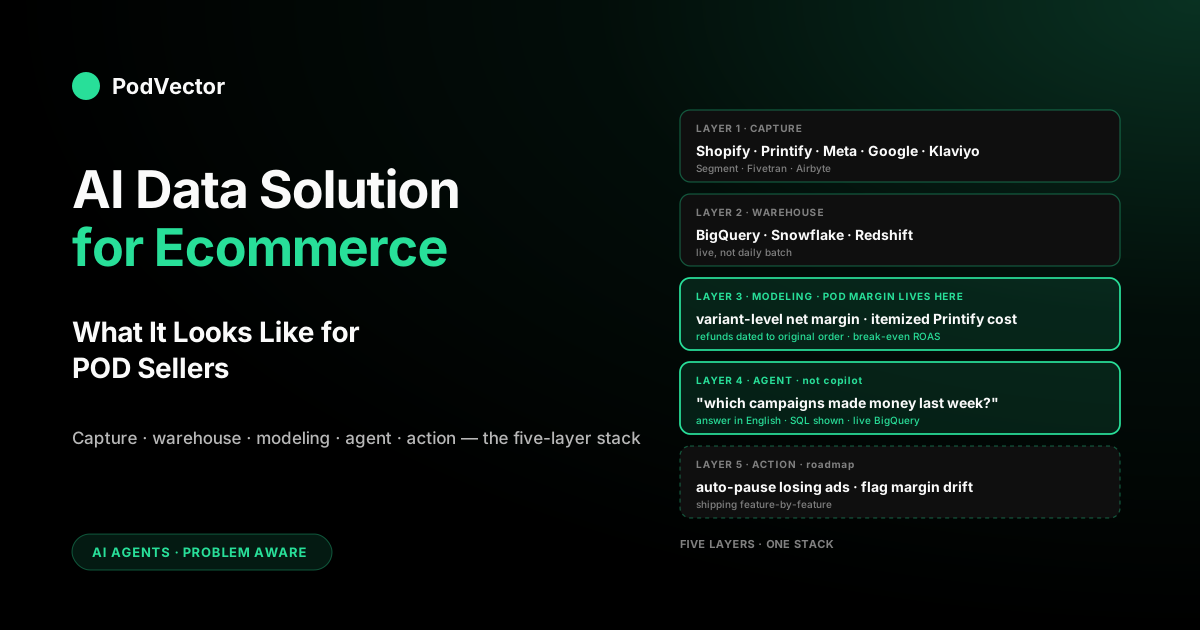
The clean way to cut this category is by what the platform owns end-to-end. There are five layers in any real ecommerce data solution:
- Layer 1 — Data capture. Pulling raw data out of source systems: Shopify orders, Printify or Printful fulfillments, Meta and Google ad spend, Klaviyo email, GA4, Shopify Payments, returns. Segment, Fivetran, Stitch, Airbyte, Rivery, and Shopify's own Data Lake live here.
- Layer 2 — Storage. This is where all your pulled-in data is kept and combined. Snowflake, Redshift, BigQuery, Databricks. Some platforms build this storage right into their system — Triple Whale's Data Platform does this, as does Fabric and Snowflake itself.
- Layer 3 — Modeling. This step turns messy raw numbers into clean, trustworthy numbers: a profit model that matches orders to supplier costs and ad spend, then subtracts refunds and fees. This is where the real POD-specific work happens, and store owners usually never see it.
- Layer 4 — AI layer. The part that lets a non-technical operator ask questions in plain English and get answers. AI employees like Victor and Triple Whale's Moby, BI copilots like Looker's Gemini integration, and product-specific chatbots like Shopify's Sidekick all live here. Triple Whale formally launched Moby as an agentic system in mid-2025, positioning it as an "agentic system turning insights into income."
- Layer 5 — Action. Where the AI doesn't just answer but also executes within guardrails — adjusting a pricing rule, updating a discount, scheduling a Klaviyo flow — after the operator approves the proposed move. Most vendors describe this layer; fewer deliver it today.
A true AI data solution covers Layers 3, 4, and eventually 5 in a way that's grounded — meaning the AI answers from live, correctly-modeled data, not from a vector-embedded PDF of last quarter's report. Layers 1 and 2 are plumbing; they matter, but they're increasingly commodity. Layer 3 (modeling) is the part most vendors quietly skip, and it's the reason the "AI" layer on top of their stack gives wrong answers when you ask POD-specific questions.
Worth noting: Triple Whale now describes itself as serving more than 60,000 ecommerce brands and has expanded into agentic capabilities with Moby Agents that automate complex analyses. It also acquired Anteater in January 2026 to expand its AI-powered commerce intelligence. That's a meaningful evolution from a dashboard tool — but it's still built around the DTC inventory model, not the POD cost model. That gap is exactly what this article covers.
The POD-specific gap generic ecommerce data solutions leave behind
Every general-purpose ecommerce data solution makes the same assumption about cost of goods sold: you know what each product cost you, that number is stable, and you can upload it as a CSV. That assumption is close to true for a stocked-inventory DTC brand buying inventory in bulk at a fixed wholesale price.
It's false for print-on-demand. A Printify product has a base cost that depends on the print provider, the specific product (Gildan 5000 vs Bella+Canvas 3001, SKU by SKU), the color, the size (2XL costs more than M), the print area (front, back, sleeve), and current supplier pricing — which moves. A bestseller that ran a strong margin in January can be running a materially lower one in April if Printify's supplier raised the blank price and nobody updated the CSV.
The result: the margin numbers shown by generic ecommerce data solutions drift off reality for POD sellers almost immediately after setup. A store owner looks at a dashboard showing a healthy blended margin and runs ads confidently, when the real number is lower because high-cost variants are dragging the mean down and the CSV hasn't been refreshed in months. The AI agent sitting on top of that stale data will confidently report a strong ROAS on a campaign that is actually running below break-even after real supplier costs are applied.
This isn't a bug in the vendor's AI. It's a modeling problem — the AI simply doesn't know what the actual Printify cost was on the day the order was placed. Generic ecommerce tools assume someone else will handle that modeling. For a POD seller, there is no someone else; if the modeling isn't built for POD from the start, the AI is just for show.
The adjacent problem is that POD orders have asymmetric return and cancellation patterns. A stocked-inventory brand absorbs a return into sellable inventory. A POD order that cancels between Shopify capture and Printify fulfillment is a reversed order with a Shopify transaction fee eaten but no supplier cost; a POD order that cancels after fulfillment is a full loss. Generic data solutions model returns as a uniform rate applied to revenue. For POD, the return event timing changes the P&L math in ways that matter at the campaign level. For the deeper version of this argument, see The POD Seller's Guide to AI for Ecommerce Brands.
Layer 1 — Data capture: what a POD stack has to collect
A POD AI data solution has to pull data from at least seven sources to work out your true margin. Miss even one, and you get a blind spot — the AI will cover it up with a wrong number.
- Shopify orders and line items. The order header (total, discounts, taxes, currency) plus the line items (variant ID, quantity, price, applied discount). Shopify's REST and GraphQL APIs cover this. Shopify's native Data Lake makes this cheaper at scale.
- Printify or Printful order cost. This is the one most stacks miss. The Printify API exposes an order-by-order itemized cost (base + print + shipping) that has to be joined back to the Shopify order. Printful exposes similar data via its Orders endpoint. This is the ground truth for supplier cost — not a CSV, not a blended estimate.
- Meta ad spend with campaign-level tagging. Daily spend by campaign, with UTM parameters that can be joined to Shopify sessions. Meta's Marketing API is the canonical source; the Ads Insights endpoint is where the rows live. See Shopify Meta Ads Integration Setup Guide for POD Sellers for the full connection walkthrough.
- Google ad spend. Same structure, different API (Google Ads API). If you run Performance Max or Shopping campaigns, the asset-level attribution matters. Note: ValueTrack tokens must be properly configured or Google-channel attribution will be silent and incomplete on the warehouse side.
- Klaviyo email and flow revenue. Flow-attributed revenue to separate owned channel from paid channel. Klaviyo's Metrics API exposes this per flow and campaign — Victor reads Klaviyo and can propose scheduling or delaying a flow, but Klaviyo is a read surface for the warehouse, not a write target for autonomous actions.
- Shopify Payments / transaction fees. Transaction fees vary by card type, country, and plan tier. For a POD store processing international orders, this is a real percentage-point hit on margin that most dashboards ignore.
- Refunds and chargebacks. Shopify's refund records plus any chargeback data from your payment processor. Has to be dated correctly so that a refund on yesterday's order is netted against yesterday's revenue, not today's.
Segment, Fivetran, and Airbyte all have prebuilt connectors for most of these. The Printify and Printful connectors are often thinner — you'll either write a custom job or use a vendor that's built a POD-specific connector. The capture layer, once running, is boring and reliable; it's Layer 3 (modeling) where the real work happens.
The single most-cited reason ecommerce AI projects fail is data quality — fragmented, inconsistent, siloed source data that the AI then confidently reasons over and gets wrong. The fix is always the same: unify sources into one trusted record before any AI touches them. For a POD seller, that unification problem is sharper than for a stocked-inventory brand, because the source that actually grounds margin (Printify or Printful itemized cost) lives in a separate system from the one that owns revenue (Shopify) and the ones that own spend (Meta, Google). If those three never get joined at the order level, every downstream number is an estimate wearing a dashboard.
Layer 2 — Warehouse: why the substrate has to be live
Where your data is stored barely matters for a POD store at typical volumes — BigQuery, Snowflake and Redshift are all fine choices. What matters is how often that data gets updated from your stores, suppliers and ad accounts.
A lot of "AI data solutions" ship with a daily batch refresh: sources pull overnight, the warehouse updates at 3 AM, the AI agent queries yesterday's data. For a POD operator who launched a Meta campaign at 9 AM and wants to know at 11 AM whether it's pacing profitably, daily batch is useless. The operator waits 18 hours to get a margin readout, by which point the campaign has either spent past break-even or been killed preemptively without cause.
A live (or near-live) system means your data updates the moment something happens, or at least every hour, and the AI always looks at the latest numbers. Shopify can push a new order into the system within a minute of checkout. Printify sends fulfillment updates within minutes of a job moving. Meta and Google ad spend update on their own schedule — Meta's numbers settle in one to three hours, Google's closer to real time. For a POD AI tool to actually help you, the time between something happening and the AI seeing it should be under an hour for the things that matter most: orders, supplier cost, and ad spend.
At typical POD store volumes — under 10,000 orders a month — the cost of storing your data is modest. BigQuery and Snowflake cost about the same at that size. Storage isn't where your money goes; the modeling work on top of it is.
Layer 3 — Modeling: where POD margin math lives or dies
The modeling layer is the unsexy middle of the stack where most of the work happens and all of the accuracy comes from. It's also the layer that vendors marketing "AI data solutions" either skip or sell as a separate consulting engagement. For POD, skipping it is a wrong-answer machine.
A correct POD modeling layer has at minimum these transformed tables:
- Order-level net margin. For each Shopify order: revenue (net of discounts) minus Printify/Printful fulfillment cost minus shipping cost minus transaction fees minus attributed ad spend (via UTM), with refunds netted to the original order date. This is the atom of POD margin math. Every question the AI answers eventually walks back to a sum or group of this table.
- Campaign-level attributed revenue. Orders joined to the Meta or Google campaign that drove them, using a chosen attribution window (7-day click, 1-day view, or data-driven). The attribution model is a choice — and the AI employee should let you swap it, because the right attribution model on Meta vs Google is not the same. See Best Practices for Meta Ads: Higher ROAS Compared for the Meta-specific attribution tradeoffs.
- Variant-level margin history. For each product variant, net margin by week, capturing the drift when Printify raises supplier prices or when a new design's print complexity changes the production cost.
- Cohort revenue. New vs returning customer revenue split, by channel and product. POD stores with high first-time-buyer rates live and die on CAC; the cohort split makes that visible.
- Break-even ROAS lookup. Given the variant margin table, the ROAS threshold at which each campaign-product pairing breaks even after all costs. Most generic platforms ship with a blended break-even that's off for any store with variable margin. For the full math, see Best Practices for Meta Ads: Higher ROAS.
If your AI data solution has all five pieces of modeling in place and keeps them updated live, the AI on top will give you reliable answers. If it only has three of the five, the AI will be right sometimes and wrong other times — and you won't know which is which. If it has none, because the vendor treats modeling as "the customer's job," you're buying a dashboard, not an AI data solution.
One important note on cost data: PodVector AI pulls your Printify, Printful and Gelato product costs directly from those suppliers — before you even sell anything. That means Victor can tell you the margin on a brand-new product with zero orders, not just ones you've already sold.
Layer 4 — The AI layer: agent, not dashboard
The AI layer has been rebranded repeatedly — chatbot, copilot, agent. The rebrand matters less than the architecture underneath. There are two shapes of AI layer in ecommerce data solutions today, and they behave very differently.
Shape one: natural-language-to-chart. You ask a question in plain English; the AI turns it into a database search and shows you a chart or table. Looker's Gemini integration, Mode's AI, ThoughtSpot — all work this way. They're good for exploring data and quick dashboards, but weak at giving you real answers. If you ask "which campaigns made money last week and why," you'll get a table, not an answer.
Shape two: AI employee. The AI breaks your question into smaller pieces, looks up each one, thinks through the results, and gives you a real answer — a clear sentence plus the numbers behind it, with its reasoning shown. Triple Whale's Moby now works this way; Victor works this way too, built specifically for POD stores; Shopify's Sidekick works this way at the catalog level. This is the shape that actually saves you time, because you get an answer, not a spreadsheet to dig through yourself.
Triple Whale describes Moby Agents as tools that "automate complex analyses and detect potential issues" — that's a shape-two capability. The distinction from Victor is what's underneath: Triple Whale's modeling layer is built for stocked-inventory DTC brands; Victor's is built for POD, with itemized Printify and Printful costs at the order level. Both are agents; only one knows your actual POD cost structure.
For POD specifically, shape two is the only one worth paying for. The reason: POD questions are compound. "Which campaigns made money last week" is actually three sub-questions — which campaigns ran, what revenue did each drive, and what was the fully-loaded cost of each campaign's attributed orders including Printify costs and transaction fees. Shape one gives you three tables and asks you to do the math. Shape two does the math and writes the sentence.
A good agentic AI layer also has to show the work. Black-box agents that return answers without exposing their query will hallucinate or misuse a column eventually, and the operator won't catch it until a monthly close is wrong. Transparency is not a luxury feature — it's the trust layer that makes the rest of the stack usable. For the broader treatment of this category, see Best AI Chatbots for Shopify 2026 Compared.
Layer 5 — Action: the employee roadmap
Layer 5 is where most vendors describe capabilities in roadmap decks and fewer deliver today. It's the agent-that-acts capability — and it's the layer where the approval-gate model matters most. For ecommerce, the canonical examples are adjusting a product's price when margin erodes from a supplier price change, creating or updating a discount (including buy-one-get-one and free-shipping thresholds), managing collections, or scheduling a Klaviyo email flow when a cohort crosses a threshold.
Two things have to be true before Layer 5 is safe. First, the agent has to reliably answer questions from Layer 4 with the right data — if the answer is wrong, acting on it is worse than not acting at all. Second, the operator has to trust the agent's scope boundaries. The vendors who rush Layer 5 without hardening Layers 3 and 4 are the ones who will produce the first viral horror stories in this category.
For a POD seller in 2026, the real wins are narrow and useful. Victor can reprice products one at a time or in bulk to hit a target margin, create or update discounts (buy-one-get-one, free shipping, customer-specific), manage collections, raise your free-shipping threshold, and schedule or delay a Klaviyo email flow or campaign. He can also look at your Meta Ads campaigns and pause a losing one himself, once you approve the change — he isn't limited to Shopify.
What Victor still can't do: process or approve refunds, or generate new designs, images, or mockups. He can act on your Google Ads campaigns and on your Printify or Printful orders and products too, always with your approval first. The goal is simple: you approve, Victor executes. See Best AI Chatbots for Shopify 2026 Compared for how Victor compares to other Shopify-native tools.
The operator leading the pack today runs Layer 4 with discipline and lets Layer 5 come online feature by feature as approval gates earn trust. Each move Victor proposes arrives as an approval card — rationale shown, expected effect stated — and executes only when the seller approves.
Buying criteria that actually matter for POD
Vendor feature matrices all converge on the same checklist — integrations, dashboards, AI, export. None of it separates platforms that work for POD from ones that don't. Use these criteria instead:
- Itemized Printify/Printful cost integration. Not a CSV upload. Live API join from completed orders. If the vendor demo can't show you a Shopify order with its actual Printify cost line-item next to it, the margin math is decorative.
- Variant-level margin, not just blended. Ask the vendor to show net margin for three specific variants side by side. If the platform can only show product-level or store-level margin, you'll be blind to the variant dragging your mean down.
- Fast updates, not once-a-day. Ask how long it takes for a new Shopify order to show up in your reports. If it takes more than an hour, that's a problem for ad decisions.
- Agentic AI, not copilot. Ask the demo to answer "which campaigns had positive net ROAS last week after Printify costs and fees." A copilot returns a chart. An agent returns the sentence. You want the sentence.
- Show its work. Ask if the AI tool explains how it got its answer. If it just gives you a number with no explanation, mistakes can slip through and you won't know.
- Refund timing correctness. Ask how refunds are attributed — to the refund date or the original order date. Original-order-date is correct for operational P&L.
- Honest scope limits. Ask what the agent cannot do yet. A vendor who lists no limits is either not honest or hasn't shipped Layer 5 yet and won't admit it.
- Cost that fits your store size. A platform built for big brands may charge well over $1,000 a month before you even connect your stores. For a smaller POD store, look for a starter plan that covers everything — connecting your data, storing it, and the AI that answers your questions — for a price that makes sense.
The vendor that scores well on all of these is worth a serious trial. Fewer than five, and you're buying a dashboard with an AI button. For a comparison of how ad tool integrations affect your data foundation, see Facebook Ads Tools That Integrate with Shopify: Strategy for POD.
Build vs buy — why most POD sellers shouldn't build this
Every POD operator with a data-inclined founding team eventually asks: should I just build this myself? A warehouse is cheap; dbt is free; Claude or GPT can write the agent layer. Why pay a vendor?
The honest answer: if you already have a data engineer on staff, building your own is doable for a store under seven figures. The pieces you need are easy to find. A free-tier storage tool can hold your data. Fivetran or the open-source tool Airbyte can pull in data from most of your stores; you may need to build a simple Printify connector yourself if one doesn't exist. dbt can organize the data. An AI model that can take actions can serve as your assistant, with some engineering work.
What most POD sellers who go down this path underestimate is the maintenance cost. Shopify changes their API. Printify changes their order format. Meta deprecates an attribution window. Your dbt model needs a new column because you added a new SKU dimension. The build phase is a weekend; the run-rate is a quarter-time engineer forever. If you don't have that engineer, the math on a built stack is worse than on a bought one, because the vendor absorbs the maintenance cost across its customer base.
The exception: if you have deep data engineering expertise and your differentiation depends on a custom model — unusual COGS structure, unusual fulfillment partner network, novel attribution logic — building gives you flexibility a vendor won't. For the 95% of POD sellers who don't, buying the AI data solution is the operationally correct choice.
A realistic 90-day implementation sequence
If you're adopting an AI data solution for your POD store, the sequence that pays back on a 90-day horizon is not "turn everything on at once." It's staged, because each layer has to work before the next one provides value.
Days 1–14: Get your data connected. Get Shopify orders, Printify or Printful order costs, and Meta and Google ad spend flowing in reliably. Don't organize it yet. Just check that a day's worth of orders shows up correctly, with the right supplier cost attached. This step is where you'll find odd issues — like Printify test orders mixing in with real ones, or Meta campaign IDs not matching up cleanly with Shopify.
Days 15–30: Core modeling. Build the order-level net margin table. Validate it against a month you already closed manually — the new model should reconcile closely with your closed P&L. If it's off by more than a few percent, dig in; the discrepancy is telling you which source is wrong or which join is broken. Don't move on until this table reconciles.
Days 31–60: AI layer. Turn on the agent, point it at the modeled tables, and ask it ten questions you already know the answer to. If the agent returns answers that match, expand the question set. If it returns answers that don't, the model layer needs more work — fix the model, not the agent. This is the phase where trust gets built or broken.
Days 61–90: Operational integration. Move the daily standup or weekly review off spreadsheets and onto the agent. Set up alerts for campaigns dropping below break-even ROAS, variants with sudden margin compression, or refund rate spikes. Ask the agent in the morning; let it answer in real time. At the end of 90 days, the stack is load-bearing — you should be making decisions from it, not from exported CSVs.
FAQs
What's the difference between an AI data solution and a dashboard like Triple Whale or Northbeam?
A dashboard displays pre-configured views of data the vendor thinks you care about. An AI data solution lets you ask arbitrary questions in plain English and get answers from the underlying data. Triple Whale is now both — it ships dashboards and has Moby, which is its agent layer, including Moby Agents that automate complex analyses. Northbeam is primarily dashboards with a narrower AI layer.
This matters because dashboards answer the questions you already know to ask. AI tools answer the ones you didn't think to ask. For POD sellers, being able to ask things like "why did my margin drop on Tuesday?" is where the real value is. There's another difference too: both Triple Whale and Northbeam are built for brands that hold their own inventory. Neither one pulls in your exact Printify cost per order automatically — so their margin numbers for POD sellers are guesses, not the real numbers.
Do I need my own data system to use an AI data solution for my POD store?
Functionally yes, but the warehouse doesn't have to be something you manage. Most modern AI data solutions either bundle their own warehouse or provision one during onboarding. You don't need to hire a data engineer to run it. What matters is that the warehouse exists under the AI agent, because the agent's answers only go as deep as the data it can query. A platform with no warehouse — one that queries Shopify and Meta APIs directly on every question — will be slow and miss joins across sources.
How much should an AI data solution for a POD store cost in 2026?
Starter plans for stores your size should be affordable, especially if you're under seven figures in revenue. Look for a plan that covers connecting your data, storing it, and the AI itself, at a price that fits your revenue. Plans for bigger stores doing more volume cost more. Anything priced for large enterprise brands isn't meant for you. This works because POD stores don't generate huge amounts of data — a store doing a few thousand orders a month fits easily into a free storage tier — so it's cheap for the vendor to serve you. If a company is charging enterprise prices, you're paying for features you don't need.
Will ChatGPT or Claude replace AI data solutions for ecommerce?
Not directly, and here's why. General AI chatbots are great at reasoning over data you paste in, but they don't have ongoing access to your store's data, they don't know how your data is organized, and they can't pull fresh numbers on their own. An AI data solution's real value is that it's connected — it checks your live numbers and gives you answers based on real, current data. You can use a general AI chatbot to double-check an answer an AI data solution gave you, and that's a fine way to work, but the two do different jobs. Over the next two to three years, expect AI data tools to run on powerful general AI models behind the scenes, built to understand your specific numbers.
Can one AI data solution cover both my Shopify store and my Etsy store?
With important limits. Etsy keeps its data closed off. You can pull in your Etsy order data and Etsy Ads data, but you can't match a Meta ad to an Etsy order because Etsy controls that connection. Victor reads Shopify, Meta Ads, Google Ads, Printify, Printful, and Klaviyo — Etsy isn't one of his data sources. For a POD seller selling on both Shopify and Etsy, the AI data solution gives you accurate margin numbers on the Shopify side; the Etsy side still needs Etsy's own analytics. Most serious POD sellers run Shopify as their main channel and handle Etsy separately.
What's the simplest test to know if my current AI data solution is actually working?
Ask it this question: "Which of my ad campaigns made money last week after Printify costs, transaction fees, and refunds?" If the answer comes back in under thirty seconds as a ranked list with the dollar amount for each, your stack works. If it takes several minutes, requires a CSV export, hands you three tables instead of an answer, or tells you costs aren't in the system — your stack isn't an AI data solution; it's a collection of dashboards. This question is the single best acceptance test for the category.
How does an AI data solution integrate with the agentic tools I already use (Shopify Sidekick, Klaviyo AI)?
Carefully, and usually through the warehouse as the common substrate. Shopify Sidekick answers catalog and merchandising questions scoped to Shopify's own data; Klaviyo AI acts on email audiences within Klaviyo; an AI data solution joins across both plus paid channels and fulfillment. They don't overlap cleanly. The practical pattern: use Sidekick for order status questions, use Klaviyo AI for flow A/B testing decisions, use the AI data solution for fully-loaded margin by channel. Each answers a different question; asking the wrong agent the wrong question produces wrong-sounding answers. For more on how these tools intersect, see Best AI Chatbots for Shopify 2026 Compared.
How long until an AI data solution pays for itself for a POD store?
For POD specifically, this happens fast: Victor can start showing you your real order-by-order margins within the first month. The first real payback usually lands the week Victor catches a campcampaign that looks profitable on paper but is actually losing money once you count all the real costs. That single corrected decision often covers significant subscription cost. The slower-building payback — automatic guardrails and smarter decisions about customer value and ad spend — builds up over the back half of the first year. If you haven't seen a single decision change in the first 60 days, something is off, not the timeline.
Does this apply if I'm pre-revenue or under $10k/month?
At under $10k/month, the benefit of using Victor is modest, because you can still manage the margin math in a spreadsheet. Setting Victor up pays off once you're running more than two or three ad campaigns at once and have more than fifty products. Below that scale, Shopify's own reports plus a weekly spreadsheet check are enough. Above it, Victor's speed advantage adds up fast. Also note: Victor can tell you the margin on a product even before it has a single sale, because he pulls your supplier costs from Printify, Printful and Gelato ahead of time — so he's useful from day one, not just once you have order history.
Is this the same category as "AI for ecommerce" more broadly?
Overlapping but not identical. "AI for ecommerce" is the umbrella — search, merchandising, chat, support, personalization, fraud, data. "AI data solution for ecommerce" is specifically the data-and-analytics slice of that umbrella. If a vendor pitches themselves as "AI for ecommerce" but the demo is a product search engine or a customer support bot, they're in a different category. For the broader view, see The POD Seller's Guide to AI for Ecommerce Photos and The POD Seller's Guide to AI for Ecommerce Brands for where data intersects with the other AI slices relevant to POD.
How does Google Ads fit into a POD data solution?
Victor reads your Google Ads account live — spend, campaigns and performance — and looks at it together with your Shopify and Meta data so you can see the whole picture in one place. One thing to watch: if your Shopify store is missing Google Ads tracking tags on your landing pages, Victor won't be able to match Google Ads spend to your actual sales correctly, so your Google profit numbers could be off. With your approval, Victor can also make changes in Google Ads — like pausing a campaign, adjusting a budget or rewriting an ad — based on what he finds. For a comparison of Google vs Meta for POD advertising, see Google Adwords vs Facebook Ads: Which Is Best for POD Sellers?
Victor runs your POD business with a clear view of your real margins
This article's framework is exactly how Victor works for you: he sees your orders, your ad spend and your real Printify and Printful costs together, all the time. He's an AI employee who proposes every move to you, and nothing happens until you approve it.
He doesn't just tell you which campaigns actually made money last week after costs — he flags the product whose margin is shrinking, suggests a price change or a discount update, and shows you why, plus what effect it should have, on a card you can approve or reject. You always see exactly what he's about to do before it happens.
— and stop trusting margin numbers computed from a CSV you uploaded months ago.
Try Victor free