
Quick Answer: An AI chatbot solution for ecommerce is the full stack of model, data layer, integrations, orchestration, and analytics that turns shopper questions into resolved tickets and recovered carts — not just a chat widget. For print-on-demand sellers, the data layer is where most off-the-shelf solutions break: a generic chatbot can't quote a real production time for a specific Printify variant or recognize a misprint claim. The right POD chatbot solution has a Shopify-native data layer, a real Printify or Printful integration, and an orchestration layer that knows your per-SKU margin before it offers a discount.
What "AI chatbot solution" actually means
The phrase gets used loosely. Vendors slap "solution" onto a chat widget that pipes questions to a foundation model and call it done.
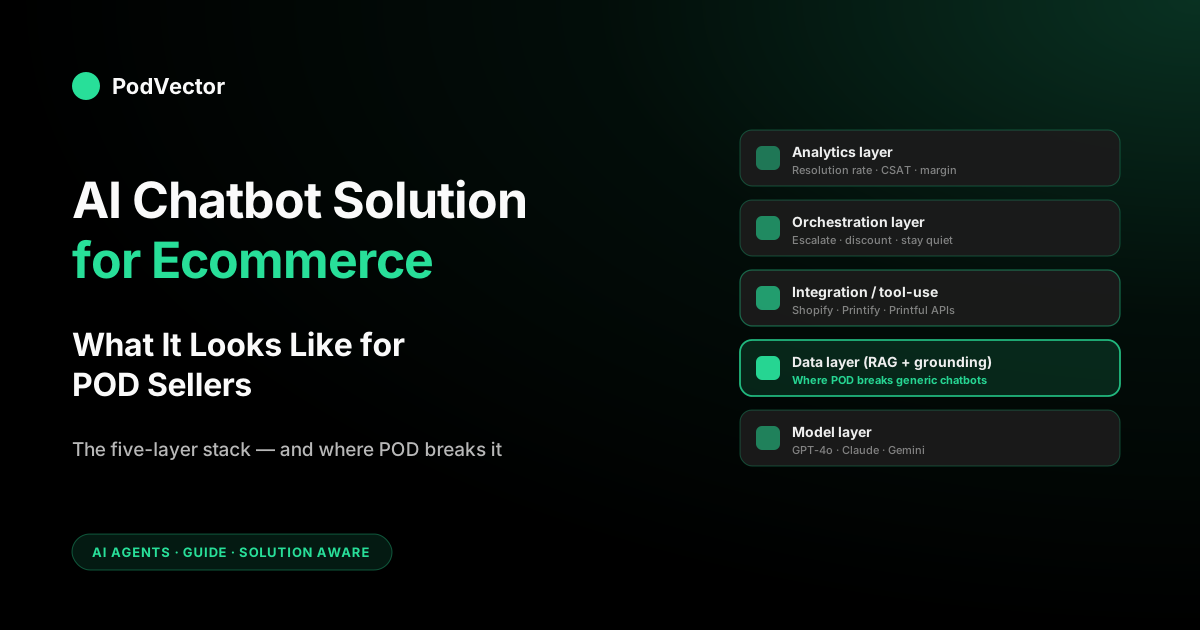
That's a chat widget. A real AI chatbot solution for ecommerce is the full assembly: the language model, the data layer that grounds its answers in your store's reality, the integrations that let it act inside your stack, the orchestration logic that decides when to escalate, and the analytics layer that tells you whether any of it is working.
Get any one of those wrong and the rest doesn't matter. A great model with a stale data layer hallucinates shipping dates. A great data layer with weak orchestration burns out your support team because every ticket still escalates.
A complete solution is the layered thing — and for POD it's even more layered, because you have a fulfillment supplier sitting between you and the customer that the chatbot also needs to reason about.
If you want the broader explainer on chat-as-feature versus chat-as-system, our piece on what an AI chatbot for ecommerce actually looks like for POD covers the conversational side. This guide is the buyer's view: how to evaluate the whole solution, not just the widget.
The architecture of a real chatbot solution
Every credible AI chatbot solution for ecommerce in 2026 has the same five components, regardless of vendor. The differentiation is in how each layer is implemented and how cleanly they connect.
1. The model layer
The language model doing the reasoning. Most production chatbots use a frontier model for response generation and sometimes a smaller model for routing.
For ecommerce specifically, model choice matters less than people think. The differences in raw capability wash out once the data layer is feeding it good context. Where model choice does matter is latency (sub-second is the bar) and cost-per-conversation at scale.
2. The data layer (RAG and grounding)
This is what separates a useful chatbot from a confident liar. The data layer is your product catalog, order history, customer profile, shipping rules, return policy, knowledge base, and — for POD — your fulfillment supplier's production and shipping data. Most production solutions use retrieval-augmented generation (RAG) with a vector index over the static content, plus live API calls for dynamic data like order status and inventory.
For POD, the data layer is the make-or-break. A chatbot that can read Shopify orders but can't read Printify production estimates is going to invent shipping windows. A chatbot that can read both but not your Meta Ads spend can't make margin-aware discount decisions. Building this layer is most of the project.
3. The integration / tool-use layer
What lets the chatbot do things, not just say things. Anthropic's Model Context Protocol (MCP) and OpenAI's function calling are the two dominant standards in 2026.
Production chatbots use them to read inventory, create draft orders, issue refunds, file replacement claims with suppliers, trigger flows in third-party email tools, and update CRM records. The tools the chatbot can call define the actions it can take.
For a POD-specific solution, the must-have tools are: Shopify Admin API (orders, products, customers), Printify or Printful API (production estimates, claim filing, tracking), an email/SMS escalation tool (your helpdesk), and ideally a margin lookup so the bot knows what it can give away in a discount.
4. The orchestration layer
The decision logic. When does the chatbot try to resolve, when does it escalate, when does it offer a discount, when does it stay quiet?
Some solutions hard-code this in YAML; the better ones let you express it in plain language ("if the customer is upset and the order is over a certain threshold, escalate immediately"). The 2026 standard is confidence-threshold routing: the bot auto-resolves only when its confidence clears a bar you set, and hands the rest to a human with full context rather than guessing. The orchestration layer is also where you set guardrails — never promise a delivery date you can't honor, never offer a discount that crosses the margin floor.
5. The analytics layer
Without measurement you can't tell if the solution is working, and "the bot answered 1,000 questions this week" isn't an answer — it could mean 1,000 frustrated customers got worse service. The analytics layer should track resolution rate (percent of conversations that ended without human escalation), conversion lift (revenue from sessions that engaged the bot vs sessions that didn't), CSAT, deflection rate, and — uniquely valuable — the failure modes that tell you what to fix next.
The architecture-first frame matches how serious operators think about this. GroupBWT's deep dive on chatbot architecture and ROI walks through the build side from a custom-development angle.
Why POD breaks generic chatbot solutions
Most ecommerce chatbot solutions are built for stores that hold inventory, ship from one warehouse, and have a returns policy that maps to "send it back, get money back." Print-on-demand violates all three assumptions, and the violations show up in chatbot quality:
- No inventory, but production time isn't free. A POD chatbot has to explain "always available, but takes 2–4 days to make." Generic chatbots either say "in stock" (wrong, because the customer expects it shipped today) or "lead time" (vague enough to lose the sale).
- Variable shipping by SKU and supplier. The same store might fulfill some orders from Printful's California facility and others from Printify's UK partner. A chatbot quoting one shipping window will be wrong for half the catalog. The data layer needs to know which supplier handles which SKU and resolve to the right ETA.
- Print quality questions are common. "Will it look like the mockup" is a top-three pre-purchase question for POD apparel. A generic chatbot trained on FAQ docs has a generic answer. A POD-aware solution can explain DTG vs DTF vs sublimation for the specific product the customer is viewing, and link to real customer photos when they exist.
- Sizing depends on the base, not the brand. Bella+Canvas, Gildan, AS Colour, Stanley/Stella all run differently. The chatbot needs to pull the right size chart per SKU — not "the size chart" — or it converts at the rate of having no chatbot at all.
- Returns are usually replacements, not refunds. Misprints, sizing exchanges, and quality issues all flow into the supplier's claims process, not your inventory. A chatbot solution that doesn't understand this will offer refunds the merchant can't recover or refuse claims that should be honored.
- Margins are thin and per-SKU. Offering a discount is fine on a high-margin product and painful on a low-margin one. The orchestration layer needs to be margin-aware — which means the data layer has to surface the cost-per-SKU. Most generic solutions don't. See our Printify t-shirt cost and profit breakdown for how much this varies by product.
Skip any of those and the chatbot will look impressive in a demo and disappoint in production. The cost data point is especially overlooked — itemized Printify and Printful costs change with promotions, plan tier, and supplier. Understanding your true contribution margin is what makes discount guardrails meaningful.
SaaS, custom build, or hybrid: which fits POD
Three paths to an AI chatbot solution. Each one has a clear right answer for a specific revenue band.
SaaS (Tidio, Gorgias AI, Intercom Fin, Bloomreach Clarity)
Install in a day, pay a monthly subscription, get a working chatbot grounded in your Shopify catalog and help center. Best for smaller POD stores without engineering resources.
The downside: no native Printify or Printful integration, so the data layer is incomplete out of the box. You'll either accept the gap (reasonable at small scale) or wire in a partner app to bridge the missing data. According to Neuwark's 2026 ecommerce chatbot guide, most competitive AI chatbots for small to mid-size stores cost between $29 and $199 per month.
- Time to launch: 1–7 days
- Sweet spot: POD stores without an engineering team, earlier in their growth curve
Hybrid (SaaS + custom data layer)
Start with a SaaS chatbot platform and pay a developer or agency to wire in the missing pieces — the Printify or Printful integration, the cost-per-SKU lookup, the supplier-aware shipping ETA. The platform handles the model, orchestration, and analytics; you bring the POD-specific data layer. This is where most mid-scale POD stores end up.
- Time to launch: 4–10 weeks
- Sweet spot: POD stores with meaningful ticket volume and a budget for integration work
Custom build (full stack on your own infrastructure)
Use the foundation models directly, build the data layer, write the orchestration in your own code, deploy on your own infrastructure. Maximum control, maximum cost, maximum risk if you don't have a real engineering team. For POD, custom is rarely the right call unless you're a very large operator with a unique workflow that the SaaS layer can't model.
- Time to launch: 3–9 months
- Sweet spot: Large POD operators with unique workflows and an in-house engineering team
The mistake most POD merchants make is over-buying — going hybrid when SaaS would carry them through their next year of growth, or going custom when hybrid would do the same job for a fraction of the cost. The right path scales with your revenue band, not with your ambition. Our guide to Shopify Admin API store modifications and automation shows exactly what the integration layer looks like when you wire it yourself.
Use cases that actually move POD revenue
The use cases on every vendor's slide deck (cart recovery, sizing, FAQs) all apply to POD too. The ones that move the needle disproportionately for print-on-demand specifically:
- Variant-aware product recommendations. "Show me the same design on a hoodie" — the bot crosses your catalog by artwork, not just by category, because POD stores often sell the same design across many bases. Engaged sessions with this capability tend to convert meaningfully better than sessions with no bot at all.
- Live production-time quoting. "If I order today, when will it arrive?" answered with a real number from Printify or Printful's production queue plus the customer's shipping zone. Closes hesitating buyers far better than a static "5–10 business days" answer.
- Misprint and replacement workflow. Customer uploads a photo, bot recognizes the quality issue, files the claim with the supplier, sends a confirmation. Cuts unhappy-customer-to-resolution time from days to minutes and recovers retention.
- Proactive intent detection. The newest solutions don't wait to be asked — they watch behavioral signals (hesitation on a product page, repeated comparisons, exit intent) and open the conversation at the moment a shopper is about to bounce. For POD, this pairs naturally with variant-aware help: catch the hesitation, answer the sizing-or-print question, save the session.
- Margin-aware cart recovery. Bot offers a discount only within the per-SKU margin you've pre-authorized. Recovers carts without quietly killing your unit economics. See our guide on ecommerce checkout conversion rate optimization for how chatbot recovery fits the broader conversion stack.
- Personalization intake for made-to-order POD. Custom name, custom date, custom message — handled in chat instead of forcing the customer to a separate form. Drop-off on personalized SKUs falls sharply.
- Operator-side analytics queries. "Which campaigns lost money last week after Printify cost and Meta ad spend?" This is a different chatbot — operator-facing, not shopper-facing — and it's the gap most POD merchants don't realize they have until they spend a Saturday pulling the answer manually.
That last one is its own buying category. We cover it in our pillar guide on AI agents for ecommerce analytics — Victor sits in this slot for POD.
What an AI chatbot solution really costs for POD
The vendor decks quote the platform fee. The honest cost is more layered. Here's what year-one typically looks like across the three paths for a POD store at varying scales.
| Cost line item | SaaS | Hybrid | Custom |
|---|---|---|---|
| Platform / model fees | $400–$3,600/yr | $3,000–$12,000/yr | $5,000–$40,000/yr (token usage) |
| Per-conversation or per-resolution charges | $0–$1,200/yr | $0–$5,000/yr | Direct API cost, ~$0.005–$0.05/convo |
| Integration / data layer build | Included | $10,000–$40,000 one-time | $60,000–$200,000 one-time |
| Maintenance / ops | Negligible | $2,000–$8,000/yr | $30,000–$120,000/yr (eng time) |
| Hidden: bad answers refunded | Variable | Lower | Lowest |
| Year-one total (typical) | $400–$5,000 | $15,000–$60,000 | $80,000–$400,000+ |
Two cost lines vendors don't volunteer. First, the cost of the chatbot being wrong — refunded orders, lost CSAT, churned customers — is real and goes down as you invest more in the data layer.
Second, the engineering time to keep integrations from drifting (Printify changes an API contract, Shopify deprecates an endpoint) is non-zero even for SaaS solutions. Budget a small percentage of the platform fee per year for upkeep.
For more on the operator-side cost math — what your data layer actually contains and what it costs to keep current — see our pillar on AI analytics for print-on-demand.
A 30-day implementation plan for POD stores
The teams that ship fast follow a tight sequence. The teams that get stuck try to do all five layers in parallel and end up with none working.
Week 1 — pick the platform and audit your data
Decide on SaaS, hybrid, or custom based on your revenue band (table above). Audit what your data layer already contains and where the gaps are.
The audit usually surfaces three things: your size charts are out of date, your knowledge base hasn't been updated recently, and you don't have per-SKU cost data anywhere centralized. Fix those before you turn the bot on, not after. Our breakdown of Printify t-shirt cost and profit is a good starting point for understanding what cost data you need to centralize.
Week 2 — wire integrations and ground the model
Connect Shopify (orders, products, customers), Printify or Printful (production estimates and claim filing), your help center (knowledge base), and your email/escalation tool. For SaaS, this is mostly clicking through OAuth flows. For hybrid or custom, this is the heaviest engineering week of the project. The Shopify Admin API automation guide is useful reference for the Shopify side of this wiring.
Week 3 — orchestration, guardrails, and dry-run testing
Set the rules: when does the bot escalate, when does it offer a discount, when does it stay quiet. Define guardrails — never promise an undeliverable delivery date, never discount past the margin floor, always escalate high-value orders to a human.
Run the chatbot against historical tickets to see how it would have handled them. Track failure modes specifically; the failures are what tell you where to invest next.
Week 4 — soft launch and analytics setup
Roll the bot to 10–20% of traffic. Watch the analytics dashboard daily.
Look at four numbers: resolution rate, conversion lift on engaged sessions, CSAT, and your top three failure modes. Iterate the data layer or orchestration where you see breakage. Once you've held resolution rate above 60% and CSAT above 4.0 for a week, ramp to 100%.
How to measure ROI honestly
Vendor case studies always show dramatic conversion lift and deflection numbers. The ones that matter, from the operator side:
- Conversion lift on engaged sessions. Compare conversion rate of sessions that talked to the bot vs sessions that didn't. Below a meaningful threshold usually means the bot is talking to people who would have bought anyway.
- Resolution rate. Percent of conversations that ended without human escalation. Aim for 60–80% within 90 days. Below 50% usually means the data layer is incomplete.
- Cost per resolved ticket. Total chatbot spend / autonomously resolved tickets. Compare against your fully-loaded support cost per ticket. Most POD stores see chatbot cost-per-resolution well below the human cost once they're past initial setup.
- CSAT on bot-handled conversations. Aim for 4.0+. Below 3.5 means customers are escaping the bot frustrated and you're losing trust.
- Margin on bot-recovered carts. POD-specific. Track the realized margin on carts the bot saved with a discount. If the discount eroded margin to break-even, the bot saved revenue but not profit. Adjust the discount ceiling accordingly. Our guide on how to get contribution margin shows exactly what number to use as your floor.
The honest test: would you pay for the chatbot solution out of pocket if it weren't a tax-deductible business expense? If yes, it's working. If you're not sure, the data layer is probably incomplete and the resolution rate is low.
From chatbot solution to agentic POD operator
Last year's chatbots talked; 2026's chatbots act. Agentic AI represents the cutting edge in 2026. Gorgias's AI Agent issues refunds. Intercom Fin creates draft orders. Shopify Sidekick drafts campaigns inside the admin. The line between "chatbot solution" and "AI agent" is dissolving — and the buying decision today should account for which roadmap your vendor is on.
The reason it matters: the bulk of POD support is order-status ("where is my shipment"), returns, and product questions — the exact tickets an agentic bot can close end to end instead of just describing.
For POD specifically, the agentic shift means a chatbot that doesn't just describe your replacement policy but actually files the supplier claim. A bot that doesn't just suggest a discount but applies it within the margin floor. Understanding your ad fatigue signals and ad frequency becomes more actionable when the operator-side agent can read your live data and surface those patterns for you.
Victor — PodVector AI's AI employee — answers your questions and proposes actions on your behalf, with your explicit approval before anything executes. He reads your live data across Shopify, Meta Ads, Google Ads, Printify, and Printful, then proposes Shopify-side moves: repricing, discounts, collections, and more. He doesn't act without you. The vendors building toward that approval-gated agentic model are the ones worth a multi-year commitment. Our piece on AI agents for ecommerce walks through this shift from the operator's seat.
FAQs
What's the difference between an AI chatbot and an AI chatbot solution?
A chatbot is the widget that talks to the customer. A solution is the full stack — model, data layer, integrations, orchestration, analytics — that makes the widget useful. You can buy a low-cost chatbot in an hour. A real solution takes weeks of data-layer work no matter which vendor you pick.
How long does it take to deploy an AI chatbot solution for a POD store?
SaaS: 1–7 days. Hybrid: 4–10 weeks. Custom: 3–9 months. The variability is mostly in the data layer — getting Shopify, Printify or Printful, your help center, and your cost data wired in cleanly. The model and the chat UI are the easy parts.
Do I need a custom-built chatbot for my POD store?
Almost certainly not. SaaS or hybrid covers the use case for the vast majority of POD stores. Custom only makes sense when you have a unique workflow the SaaS layer can't model and an engineering team to own the build long-term.
How much does an AI chatbot solution cost for a POD store?
Year-one budget by path: SaaS $400–$5,000, hybrid $15,000–$60,000, custom $80,000–$400,000+. The variance inside each band is mostly driven by traffic volume (per-conversation or per-resolution charges) and how much data-layer integration work you take on.
Can the chatbot handle Printify and Printful orders directly?
Only if you wire it in. Out of the box, none of the major SaaS chatbot platforms have a native Printify or Printful integration. You'll either accept the gap (the bot won't quote real production times or file claims), wire it in via a partner app, or build the integration yourself.
What's the ROI of an AI chatbot solution for a POD store?
Payback timeline depends heavily on ticket volume, whether the data layer is complete, and how well the orchestration is tuned. The biggest contributors to ROI are conversion lift on engaged sessions and ticket deflection — not the cost saving of replacing support headcount, which is usually overstated.
Will an AI chatbot solution replace my support team?
It will replace the routine portion of tickets — order status, sizing, shipping, simple replacements — and let your team focus on the cases that need human judgment. POD stores that try to fully automate usually see CSAT drop and end up rehiring. Augmentation works; full replacement doesn't.
What's the operator-side equivalent of a chatbot solution?
An operator-facing AI agent — the bot you ask "which SKUs lost money last week" and get an answer from your live data, not a dashboard you have to read. Victor is the POD-native version of that, wired to Shopify, Printify, Printful, Meta Ads, and Google Ads with reconciled per-SKU economics. If you're thinking about funding growth from revenue, our guides on how to get Shopify Capital and whether Shopify Capital checks credit are useful context for what your P&L needs to look like.
Pick a chatbot solution for your shoppers. Pick Victor for your operations.
Your customers need a chatbot — sized to your revenue band, wired to your POD supplier. You also need an AI employee for the questions only you ask: "which SKUs lost money this week?" Victor is that AI employee, built for print-on-demand sellers. He sees your orders, supplier costs and ad spend together, so he can show you real profit the moment you ask.
Try Victor free