
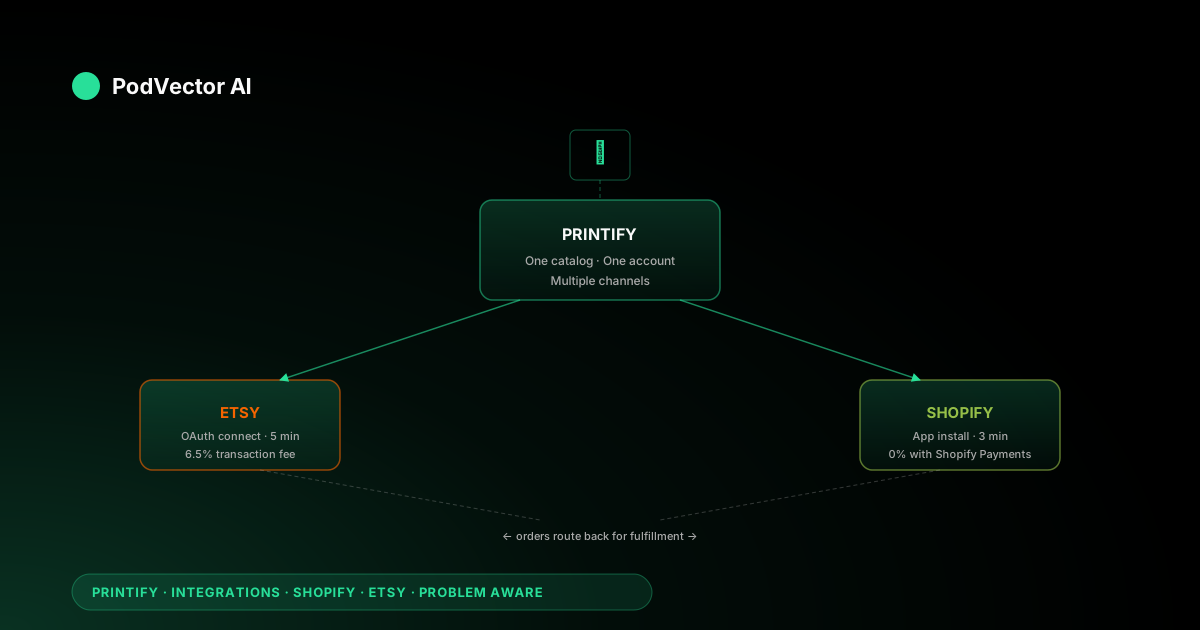
Quick Answer: Printify integrates with both Shopify and Etsy for free. Etsy connects via OAuth in about 5 minutes; Shopify connects through the Shopify App Store in about 3 minutes. Both integrations push products from Printify into your storefront and route orders back to Printify for fulfillment automatically.
Running both channels from one Printify account is where the real leverage is — same designs, same providers, two income streams. But it's also where most sellers get stuck: Etsy fees work differently from Shopify fees, shipping profiles don't sync between the two, and your actual profit per order becomes invisible without a unified view.
This guide covers setup for both platforms, the differences that matter, and what to track once you're live on both.
Why connect Printify to both Shopify and Etsy
Each platform reaches a different buyer at a different stage. Etsy brings organic search traffic from buyers who are already looking for custom or niche products. Shopify gives you a standalone brand storefront you control completely — pricing, layout, checkout, retargeting.
When you connect Printify to both, you maintain one product catalog inside Printify and push it to two storefronts. Design once, sell on two channels. Connecting Printify to Etsy alone takes minutes, and adding Shopify on top costs nothing extra.
The financial upside is straightforward. Etsy charges listing fees and a 6.5% transaction fee. Shopify charges a monthly subscription but lower transaction fees (0% on its own payment gateway). The same $22 t-shirt might net you $7.40 profit on Etsy and $9.10 profit on Shopify — same production cost, different fee structures. Running both lets you see which channel earns more for each design.
Prerequisites before you start
Get these set up before you begin the connection flow. Stalling mid-setup because an account isn't ready is the most common source of connection failures.
- A Printify account. Free plan supports up to 5 stores. No card required to sign up — you'll add payment info when your first order ships.
- An active Etsy shop. Must be fully open — currency, payment method, billing, and About section all completed. Draft shops can't accept OAuth connections. New Etsy sellers get 40 free listings.
- A Shopify store. Any plan works, including the $1/month trial. The store must be live (not password-protected) for orders to flow.
- Payment method on both platforms. Etsy Payments with a bank account on file. Shopify Payments or a third-party gateway activated.
- Print-ready design files. 300 DPI minimum, PNG with transparent background. Printify recommends 4500 × 5100 px for standard full-front apparel prints.
One Etsy shop can only connect to one Printify account at a time. If you tested with a personal Printify account and now want to use a business one, disconnect the first before connecting the second.
Connect Printify to Etsy — step by step
The Etsy connection uses OAuth — Printify redirects you to Etsy, you authorize, and Etsy grants Printify permission to manage listings and read orders on your shop.
- Log in to Printify. From the top-left store switcher, click Manage my stores.
- Click Add a new store. Select Etsy from the channel list.
- Authorize on Etsy. Printify redirects to Etsy's consent screen. Sign in if prompted. Click Allow access to grant Printify permission to create listings and receive orders.
- Confirm the connection. You're redirected back to Printify. Your Etsy shop name now appears in the store switcher.
- Add Printify as a Production Partner. In Etsy, go to Shop Manager → Settings → Production Partners. Click Add a new production partner and enter "Printify" with its address. This is an Etsy policy requirement — skipping it can get listings removed.
The whole flow takes about 5 minutes. Once connected, anything you publish in Printify with the Etsy store selected will appear as a new listing in your Etsy shop within a few seconds.
Connect Printify to Shopify — step by step
You can start from either Printify's dashboard or the Shopify App Store. Both paths end in the same place — the Printify app installed on your Shopify store.
Option A — Start from Printify
- Log in to Printify. Click Manage my stores → Add a new store → Shopify.
- Enter your Shopify store URL. Use the
yourstore.myshopify.comformat. - Install the app. Shopify opens and shows the app install prompt. Click Install app.
- Done. Printify confirms the connection. Your Shopify store appears in the store switcher.
Option B — Start from Shopify App Store
- Go to the Shopify App Store. Search for "Printify."
- Click Add app → Install. Shopify installs the Printify app and connects it to your store automatically.
- Log in to Printify. The app links your Shopify store to your Printify account. If you don't have a Printify account yet, you'll create one in this step.
Either path takes about 3 minutes. LitCommerce's in-depth Shopify connection guide covers edge cases like connecting multiple Shopify stores to one Printify account.
Key differences between the two integrations
Both integrations push products to a storefront and route orders back to Printify. But the fee structures, listing mechanics, and shipping configurations are different in ways that affect your margins.
| Feature | Etsy | Shopify |
|---|---|---|
| Connection method | OAuth (redirect to Etsy) | App install (Shopify App Store) |
| Listing fee | $0.20 per listing (renews every 4 months) | None |
| Transaction fee | 6.5% of sale price + shipping | 0% with Shopify Payments, 0.5–2% with third-party gateways |
| Payment processing | 3% + $0.25 (Etsy Payments) | 2.4–2.9% + $0.30 (Shopify Payments) |
| Shipping setup | Printify publishes flat rates to Etsy; you can override per listing | Printify shipping calculator, manual rates, or carrier-calculated |
| Product sync | One-way push; edits in Printify overwrite Etsy listing | Two-way for inventory; one-way push for new products |
| Order routing | Automatic — Etsy order triggers Printify production | Automatic — Shopify order triggers Printify production |
The net effect: Etsy takes a bigger cut per sale but sends you organic buyers with zero ad spend. Shopify keeps more of your revenue but you have to drive your own traffic. Understanding this trade-off is critical when you're deciding which fees actually eat into your Printify margins.
Managing both channels from one Printify account
Printify's store switcher lets you toggle between connected stores. You design a product once and choose which store(s) to publish it to. Same mockup, same print provider, same base cost — just a different destination.
Here's what to know about running both simultaneously:
Pricing can differ per channel
You set retail prices at publish time, per store. A mug that sells for $18.99 on Etsy can sell for $21.99 on Shopify if your brand positioning supports it. Etsy buyers expect marketplace pricing; Shopify buyers expect branded pricing. Adjust accordingly.
Shipping profiles don't sync
Etsy uses Printify's flat-rate shipping table (published automatically). Shopify gives you three options: Printify's built-in shipping calculator, manual rates you set in Shopify, or carrier-calculated rates. These are configured independently. A change to your Shopify shipping rates has no effect on Etsy.
Inventory is unlimited by default
Print-on-demand products have no stock limit — Printify produces on order. Both integrations reflect this by showing "in stock" perpetually. If you use a specific print provider that has capacity limits, you'd need to manage that manually.
Order fulfillment is per-channel
An Etsy order routes to Printify separately from a Shopify order. They go to the same print provider (if you've selected the same one), but tracking numbers flow back to the respective platform. Your customer on Etsy never sees anything about your Shopify store and vice versa.
If you're also considering adding eBay as a third Printify channel, the same one-catalog-many-channels logic applies. The eBay setup process follows a similar OAuth pattern to Etsy.
What to track once both integrations are live
The connections themselves are the easy part. The hard part — and what none of the top guides cover — is understanding your actual profit per order across two platforms with different fee structures.
Profit per order, per platform
Your Etsy revenue includes transaction fees, listing fees, payment processing, and Etsy Ads costs (if running). Your Shopify revenue includes payment processing and app subscription costs. Printify production + shipping is the same on both. Without combining all three data sources, you can't know which platform actually earns more per order.
Best-selling designs by channel
A design that sells 10 units/month on Etsy might sell 2 on Shopify — or vice versa. The audience intent differs. Track which designs perform on which channel to guide where you invest ad spend and new design effort.
Fulfillment speed by provider
Both integrations use the same Printify production network, but delivery times affect reviews differently. Etsy buyers leave star ratings that affect your shop's search ranking. Shopify buyers affect your brand reputation. Track average fulfillment days and dispute rates per provider.
Return on ad spend per channel
If you're running Etsy Ads and Google/Meta ads pointing to Shopify, you need to compare ROAS (return on ad spend) per channel. Etsy Ads reporting lives inside Etsy's dashboard. Google and Meta reporting live in their respective ad platforms. Combining them manually is tedious but necessary to know where your next dollar should go.
The Printify Premium subscription ($29/month) gives you up to 20% off production costs — which improves margins on both channels equally. Whether it's worth it depends on your combined monthly volume across Shopify and Etsy.
Common issues and fixes
Etsy says "connection failed" during OAuth
Usually means your Etsy shop isn't fully set up. Go to Shop Manager and confirm payment method, billing address, and About section are all complete. Draft shops can't accept API connections.
Shopify app won't install
Check that you're signed into the correct Shopify store. If you have multiple stores, Shopify may default to a different one. Also confirm you're on a paid plan — some features require an active subscription (the $1 trial counts).
Products published but showing wrong price
Printify sets the retail price at publish time. If you edit the price in Printify after publishing, you need to re-sync to push the update. On Etsy, re-syncing overwrites the listing. On Shopify, price updates sync automatically for most plan levels.
Orders not flowing back to Printify
On Etsy: confirm the product was published from Printify (not manually created in Etsy). Only Printify-published listings auto-route orders. On Shopify: confirm the Printify app has "order access" permission in your Shopify admin under Apps → Printify → App permissions.
Shipping rates seem too high on Etsy
Printify publishes its flat-rate table to Etsy by default. These are calculated based on the print provider's location and standard shipping. You can override rates per listing in Etsy, but keep in mind: undercharging means you absorb the difference. Check your provider's actual shipping cost in Printify before adjusting.
FAQs
Can I use the same Printify account for both Shopify and Etsy?
Yes. Printify's free plan supports up to 5 stores across any combination of platforms. You switch between them using the store dropdown in Printify's dashboard.
Do I need Printify Premium for both stores?
No. Printify Premium ($29/month) applies to your account, not per store. The 20% production discount covers orders from all connected stores.
Will the same product look identical on both platforms?
The product itself (design, provider, variants) will be the same. But titles, descriptions, tags, and pricing are set per publish. Most sellers optimize Etsy listings for Etsy search (tags are critical) and Shopify listings for brand consistency (longer descriptions, SEO-focused titles).
What happens if I disconnect one platform?
Existing listings stay on the platform but become "unlinked." No new orders will route to Printify. Products remain in Printify and can be re-published if you reconnect. Pending orders already in production continue as normal.
Can I sell different products on each platform?
Yes. You choose which store to publish each product to. You can publish a mug only to Etsy and a hoodie only to Shopify — or publish both to both. The catalog is flexible.
How do I know which platform is more profitable?
You need to combine revenue data from each platform with Printify's production costs and each platform's fees. Etsy's 6.5% transaction fee + listing fees vs. Shopify's monthly subscription + lower processing — the break-even depends on your volume and average order value. A broader look at Printify operations helps put the math in context.
Let Victor run your Shopify and Etsy ops on autopilot
Victor is an AI employee that manages your Printify, Shopify, and Etsy operations — updating listings, reallocating ad spend, and flagging margin issues across both platforms. He asks before acting on anything material.
Try Victor free