
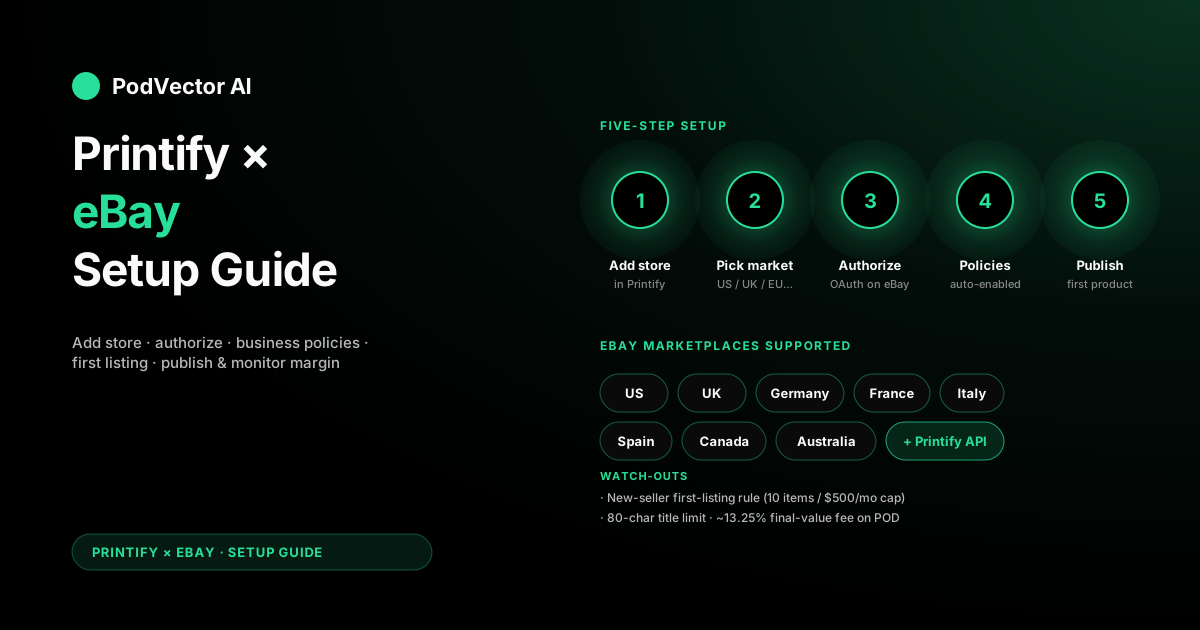
Quick Answer: Connect Printify to eBay in three moves: add a new store inside Printify, authorize the app on eBay, and let Printify auto-enable the required business policies.
If you're a brand-new eBay seller, you need one manual listing on eBay before Printify can publish products — eBay's anti-fraud rule, not Printify's.
Plan on 20-30 minutes for the connect itself. The first 30 days after launch matter more than the setup: variant limits, fee math, and tracking are where most POD sellers leak margin.
What you need before you start
The connect itself is short. The prep is where new sellers stall.
You need an active eBay account — Personal or Business is fine. eBay requires a verified payment method on file for selling fees before any listing can go live. Add that under My eBay → Account → Payments if you haven't already.
You also need a Printify account with at least one product designed and saved. Connecting an empty Printify store works, but you'll only get to test the integration once you have something to publish.
If you've never sold on eBay before, expect a soft launch. eBay throttles new sellers — usually 10 items or $500 in total listings per month — until you build a feedback history. That cap lifts after your first few successful sales.
Step-by-step: connect Printify to eBay
The whole flow takes 5-10 minutes if your eBay account is already set up.
1. Open the store menu in Printify. In the upper-left corner of your Printify dashboard, click the store dropdown and choose Manage my stores. If this is your first store, you'll see a Connect button. If you already have a Printify store connected (Shopify, Etsy, etc.), choose Add a new store instead.
2. Pick the eBay tile. Printify supports several eBay marketplaces — eBay US, UK, Germany, France, Italy, Spain, Canada, and Australia. Pick the marketplace you'll sell on. You can connect more than one later, but each is a separate store inside Printify.
3. Authorize Printify on eBay. You'll be redirected to eBay's login page. Sign in with your eBay credentials, then click Agree on the permissions screen. This grants Printify scoped access to publish listings, sync inventory, and create orders on your behalf — nothing else.
4. Let Printify configure business policies. When you land back on Printify, the onboarding wizard auto-enables eBay's business policies (payment, shipping, returns) and writes Printify-friendly defaults into each one. This is mandatory — without business policies enabled on your eBay account, Printify can't publish.
5. Confirm the store is live. The store dropdown should now show your eBay marketplace as connected. The wizard saves each completed step automatically, so if you get pulled away mid-flow, you can pick up where you left off. One catch: you can't edit a completed step. If you mistype your store name or pick the wrong marketplace, you'll have to disconnect and start over.
The new-seller first-listing trap
This is the step that catches most first-time POD sellers, and it's not Printify's fault.
eBay requires every new seller to publish at least one listing manually — directly on eBay.com — before any third-party app (Printify included) can push listings on your behalf. It's an anti-fraud check. No way around it.
The fix is fast. Create any cheap, simple listing on eBay directly — a used book, a household item, anything you actually own. List it for 24 hours, then end the listing or let it sell. Once eBay sees you have selling history, the Printify publish flow unblocks.
After your manual listing settles, you can delete it. Don't list a Printify mockup as your manual first item — eBay's bot has flagged accounts for listing unfulfillable POD products before the Printify integration was authorized to fulfill them.
Business policies Printify enables (and why)
eBay business policies are reusable templates for payment, shipping, and returns. Most casual eBay sellers never touch them. POD sellers must.
When you connect Printify, the integration writes three default policies into your eBay account:
- Payment policy: immediate payment required. POD orders can't be queued — Printify needs to charge your card and start production the moment a buyer pays.
- Shipping policy: handling time set to match Printify's average production time for your primary product (typically 3-5 business days), with shipping cost calculated from Printify's per-product shipping table.
- Returns policy: 30-day returns, buyer pays return shipping. POD products are custom-made, so blanket "free returns" will eat your margin on every return.
You can edit these policies inside your eBay account at any time, but be careful: changing the handling time below Printify's actual production window will cause "ship-late" defects, which hurt your eBay seller rating. The Printify defaults are conservative for a reason.
Publishing your first POD product
Once the store is connected and the new-seller listing trap is cleared, publishing is one click.
Open any product in your Printify catalog, click Publish, and choose your eBay store as the destination. Printify pushes the title, description, mockup images, variants, and price as a new eBay listing in the appropriate category.
Two things to check before you hit publish:
Title length. eBay caps titles at 80 characters. Printify product titles run long by default, especially with brand or color modifiers in front. The publish dialog will truncate silently — review the eBay preview before confirming.
Variant count. eBay allows up to 250 variants per listing, but listings with more than ~50 variants get suppressed in search. If your product has every size × every color, split it into two listings (one per color family) instead of one giant listing.
Categories are auto-detected from the product type. If Printify picks the wrong category — a "performance tee" landing under "vintage clothing," for instance — you can override it on the eBay side after publish.
What happens when an order comes in
The fulfillment loop is fully automatic once the integration is live.
A buyer pays on eBay. eBay sends the order to Printify within seconds. Printify charges your billing card for the base cost + shipping, sends the order to the assigned print provider, and updates the eBay listing with a tracking number when the package ships. The buyer sees only the eBay tracking — Printify's role stays invisible.
You don't touch anything. The exception is when Printify flags an order — wrong address, out-of-stock variant, or a payment method failure. Those show up in your Printify dashboard as Action Required, and they will sit there until you resolve them. Set up email alerts under Settings → Notifications so you don't miss them.
eBay's variant and listing limits for POD
eBay's defaults aren't built for POD catalogs, and the constraints catch sellers by surprise.
New sellers start with a 10-item / $500/month listing cap. That cap rises after your first 5-10 sales, then again after 90 days of clean selling history. You won't hit any meaningful POD scale until the cap is fully lifted.
Insertion fees: eBay gives you 250 free listings per month on most plans. Above that, you pay $0.35 per listing. POD sellers who publish hundreds of variants of the same design get charged for each one — split your catalog into multi-variant listings instead of single-variant listings to stay under the threshold.
Final value fees: eBay takes ~13.25% of the sold price (including shipping) on most categories. That's higher than Etsy's 6.5% and Shopify's 0%, and you need to bake it into your retail price before publishing.
True cost: eBay fees + Printify base + shipping
POD margin on eBay is tighter than it looks on the Printify product card.
Take a $24.99 T-shirt as the worked example. Printify's base cost (depending on garment and print provider) runs $9-12. Shipping inside the US is ~$4.99 for the first item. That's roughly $14-17 in production cost before you've paid eBay anything.
eBay then takes 13.25% of the total sale (item + shipping). If the buyer paid $24.99 + $4.99 shipping, that's $29.98 × 13.25% = ~$3.97 in eBay fees. Plus a fixed $0.40 per-order transaction fee.
Net margin on a $24.99 tee: $24.99 - $14 (Printify) - $3.97 (eBay) - $0.40 (transaction) = $6.62, or roughly 26%. That assumes no ad spend, no returns, and a buyer paying full price (eBay ranks listings partially by sale-price competitiveness, so most POD listings end up discounted).
If you're choosing between marketplaces, the fee math matters. See our breakdown of Printify vs. Gelato for POD sellers and Printify vs. Redbubble for how the base-cost side compares across providers.
The first 30 days: what to track
The setup gets you live. The first 30 days decide whether eBay becomes a real channel or stays an experiment.
Five numbers to watch every week:
- Listing impressions per product. eBay's algorithm needs ~14 days to score new listings. If a product is under 50 impressions after two weeks, the title or category is wrong.
- Click-through rate (CTR). Industry baseline is ~1-2%. Below that, the first mockup image isn't earning the click.
- Sell-through rate. Sales ÷ active listings. POD baseline is 1-3%. Below 1% and you're publishing in low-demand categories.
- Defect rate. Late shipments, cancellations, "item not as described" claims. eBay throttles sellers above 2% defect rate — POD sellers spike on this when Printify's handling-time defaults aren't honored.
- True per-order margin. Sale price minus Printify base, minus eBay fees, minus the per-order fixed fee, minus refund cost. The Printify dashboard shows revenue. Your actual margin lives in a spreadsheet you build, or in a connected analytics layer.
POD sellers running on three or more channels (eBay + Etsy + Shopify, say) usually have all five numbers in three different dashboards, and reconciliation breaks down fast. The path forward is consolidating those streams into one warehouse and letting an AI employee run the optimizations on your approval — instead of you opening four tabs every morning.
For the connection mechanics themselves, Printify's official eBay integration page is the canonical reference and is kept current with marketplace changes.
FAQs
Does Printify support all eBay marketplaces?
Printify supports eBay US, UK, Germany, France, Italy, Spain, Canada, and Australia. Each is a separate store inside Printify — connect them independently if you want to sell across regions.
Can I connect Printify to eBay and Etsy at the same time?
Yes. Printify lets you publish the same product to multiple sales channels. For setup mechanics on the Etsy side, see our Printify-to-Etsy setup guide and the multi-channel Etsy + Shopify guide.
Why does Printify need to authorize on eBay?
Printify uses eBay's official API. Authorization is scoped — Printify can publish listings, sync inventory, and create orders, but it can't access your eBay password, your buyer messages, or any financial data outside its own orders.
What's the difference between connecting Printify to eBay and connecting it to other channels?
The mechanics are similar across Printify's integrations (see our general Printify integration setup guide for the shared flow), but eBay is unique in requiring business policies, the new-seller first-listing rule, and the 80-character title cap. Etsy and Shopify don't have those.
Can I publish bulk products through the Printify-eBay integration?
Yes, but eBay's monthly insertion-fee cap (250 free listings on most plans) applies. Bulk-publishing a 500-product catalog in one go will trigger insertion fees on items 251+. Stagger across months or consolidate variants into multi-variant listings.
What if my Printify eBay store gets disconnected?
Most often, the OAuth token has expired or you changed your eBay password. Go to Manage my stores → Reconnect in Printify and re-authorize. In-flight orders aren't affected — only new orders pause until reconnect.
Do I need an eBay Store subscription to use Printify?
No. A free eBay account works. An eBay Store subscription ($7.95+/mo) gets you more free listings per month and slightly lower final-value fees, which becomes worth it once you're publishing more than ~100 products.
For the broader Printify ecosystem and other integration options, browse the Printify integrations hub or the full Printify topic library.
Let Victor run your eBay + Printify ops with your approval
Once eBay is live alongside Etsy or Shopify, the margin math fragments across dashboards. Victor consolidates eBay, Etsy, Shopify, Printify, and your ad accounts into one warehouse, then runs the optimizations — repricing slow listings, pausing under-performing ads, reordering variants when stockouts hit — on your approval. You stay in control. He does the operating.
Try Victor free