
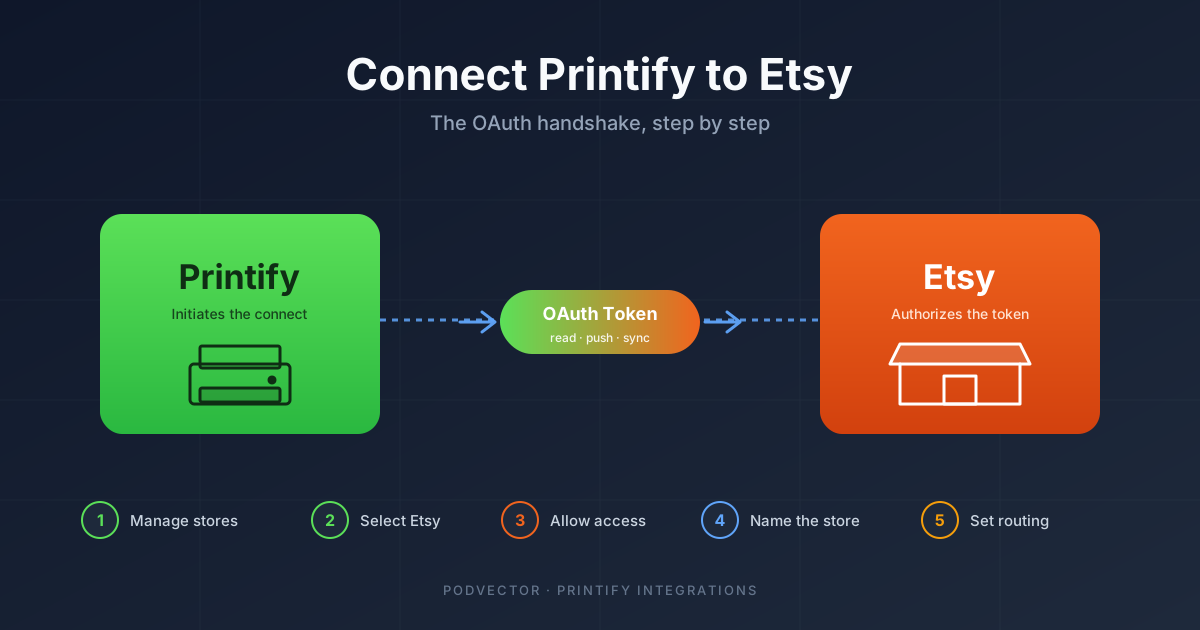
Quick Answer: Connecting Printify to Etsy is the OAuth handshake between two accounts you already own — not the full Etsy shop setup. The actual click path takes about 60 seconds.
The work around it takes longer. You need a verified Etsy shop on the Etsy side and a Printify account with billing on the Printify side before the connect button does anything useful. After the handshake, you still have order-routing settings, store naming, and the production-partner step to get right.
This guide covers every click of the connection itself, the settings most sellers miss, and the cross-platform metrics worth watching once orders start flowing.
What "connect" actually does
"Connecting Printify to Etsy" is an OAuth handshake. Etsy issues Printify an access token tied to your shop, and Printify uses that token to read orders, push product listings, and update tracking on your behalf.
The connection is one-way in terms of who initiates it: you start the flow in Printify, not Etsy. Etsy's role is to authorize Printify when you arrive at their OAuth screen. You won't find a "connect Printify" button anywhere in your Etsy dashboard — the only way in is through Printify's store menu.
Once connected, three things start happening automatically. Printify products you publish push to Etsy as draft listings. Etsy orders on those listings flow into Printify for production. Tracking numbers from your print provider sync back to Etsy so the buyer sees normal shipping notifications.
What the connection does not do: it doesn't create your Etsy shop, it doesn't verify you with Etsy Payments, and it doesn't satisfy Etsy's production-partner disclosure requirement. Those are separate steps that have to be done before or after the connection itself.
Prerequisites: both accounts have to be ready
The connect button silently fails or partially completes when either side isn't fully set up. Check this list before you click anything.
On the Etsy side:
- An active Etsy seller account. Not a buyer account. If you've only ever bought on Etsy, you need to upgrade at etsy.com/sell first.
- Etsy Payments connected. Your bank account verified via Plaid or micro-deposits. The connect step won't fail without this, but order payouts will.
- The $15 Etsy setup fee paid. Until that clears, your shop won't be searchable, even if technically "open."
- At least the shop name and basic profile filled in. A completely empty shop sometimes throws errors during the Printify OAuth handshake.
On the Printify side:
- A Printify account. Free to create at printify.com with email or Google.
- A payment method on file. Credit card or PayPal. Printify charges this per order for production — separate from how Etsy pays you out.
- Email verified. Click the verification link Printify sends at signup. Unverified accounts can browse the catalog but can't connect stores.
If you don't have an Etsy shop yet, work through the full Printify + Etsy setup walkthrough first, then come back here for the connection step. If you already have both accounts, keep reading.
Step 1: Open the connection from the Printify side
Log into Printify at printify.com with the account you want to connect.
In the top navigation, click the store dropdown (it shows the name of your current store, or "My new store" if you've never connected one). From the dropdown, click Manage my stores.
You'll land on a page listing every store currently connected to this Printify account. If this is your first store, the list will be empty and you'll see an Add new store button front and center. If you already have other stores connected, the button sits in the top right.
Click Add new store. A modal opens showing every platform Printify supports — Etsy, Shopify, WooCommerce, eBay, Wix, Squarespace, Amazon, BigCommerce, PrestaShop, TikTok Shop, and the API option.
Step 2: Select Etsy and start the OAuth flow
Click the Etsy tile.
Printify shows a confirmation screen with what permissions it's about to request from Etsy: read your shop info, manage listings, read transactions, and update shipping. Read these — they're the same scopes any Etsy integration needs, and Etsy will display them again on their side.
Click Connect. Printify redirects you to etsy.com in the same tab. If you're already logged into Etsy in another tab, you'll skip the login step. If not, Etsy prompts you to sign in.
Use the email and password (or Google / Facebook / Apple sign-in) tied to the Etsy seller account you want to link. Not a different one. Etsy will happily authorize whichever account you log in with, and untangling a misconnection later is a support-ticket headache.
Step 3: Authorize Printify on Etsy
After login, Etsy shows the authorization screen. The headline reads "Allow Printify to access your Etsy account?" with a list of permissions underneath: view your shop information, view and manage your listings, view your transactions, and update your shipping carrier and tracking information.
These are the standard scopes for any POD platform integration. If a scope here looks unfamiliar (something asking for billing access, payment method updates, or buyer messaging) close the tab and start over — that's a sign you ended up on a phishing imitation of Etsy's OAuth screen.
Click Allow access. Etsy generates the access token and redirects you back to Printify. The redirect can take 3–10 seconds; don't refresh the page during the wait. A premature refresh sometimes voids the token and forces you to restart.
Step 4: Confirm the connection and name the store
Back in Printify, you'll see a "Store connected" success screen. Your Etsy shop name appears at the top, along with a field to name this connection inside Printify.
The "store name in Printify" is internal — Etsy never sees it. It's how Printify labels this connection in your dashboard so you can tell stores apart if you connect more than one later. Use the same name as your Etsy shop or something close to it. Names like "Store 1" or "test" age badly once you have three stores running.
Click Continue. You're now on the store's settings page in Printify, with order-routing, shipping, and notification options waiting to be configured.
The connection itself is done. The next two steps are the ones most sellers skip and then regret.
Step 5: Configure order-routing settings
The order-routing settings control how fast Printify sends new Etsy orders to your print provider after they're paid. The default is "Auto-send to production after 24 hours," and that's usually wrong for first-time sellers.
The options Printify exposes:
- Manual approval. Every Etsy order sits in your Printify dashboard until you click Send to production. Good for the first 10–20 orders while you're still catching pricing or design errors.
- After 1 hour. Orders auto-route after a 60-minute window during which you can cancel. Good middle ground once your products are stable.
- After 24 hours. Default. The 24-hour window catches buyer cancellation requests but adds a day to fulfillment.
- Send to production immediately. Order goes straight to print the moment Etsy marks it paid. Use this only when your products are dialed in and you trust the print provider on quality and timing.
- Send at a set time each day. Useful if you're batching for cost or operational reasons. Most POD sellers don't need this.
The right choice depends on volume and design stability. Start with manual approval for your first batch of orders, switch to "after 1 hour" once you've shipped 20+ orders without issue, and only graduate to immediate when you're sure your pricing and design files are locked.
You can change this setting any time from My Stores → [your store] → Settings → Order routing. The change applies to future orders, not ones already in the queue.
Step 6: Register Printify as a production partner
This is the step that lives entirely on Etsy and that the Printify connect flow does not handle for you. Etsy requires you to disclose any production partner — anyone who helps you make, design, or ship your items — in your shop's listings.
Without this disclosure, Etsy can suspend your shop the first time a buyer reports a quality issue or a competitor reports you. Suspension reviews take 7–30 days, during which your shop is invisible and existing orders may be frozen.
The registration takes about 5 minutes:
- Log into Etsy and go to Shop Manager → Settings → Production partners.
- Click Add a new production partner.
- Fill in: partner name (Printify), location (United States, Latvia, China, Australia — pick whichever matches the print provider you'll use most), what they help with (printing and shipping), and how you work together (I send Printify the designs and they print and ship the finished items).
- Confirm that the partner agrees with Etsy's policies. Printify does — they publish their compliance statement publicly.
- Save.
Once saved, edit your existing Etsy listings (or set this as your default for new listings) to reference the production partner. New Printify-pushed drafts will pick up the partner automatically if you set it as default.
Multiple stores and connection limits
Printify's free plan supports up to 5 connected stores per account. Printify Premium ($24.99/mo) extends this to 10. Each connected store gets its own order routing settings, product catalog, and print providers — they don't share inventory or pricing.
You can connect multiple Etsy shops to a single Printify account. Useful if you run a main brand and a secondary niche shop and want consolidated billing and reporting in Printify.
You cannot connect a single Etsy shop to multiple Printify accounts. Etsy enforces this at the OAuth level — when a new Printify account requests authorization for an Etsy shop already connected elsewhere, the older connection is revoked. Useful to know if you're handing off a shop to a contractor or business partner.
Disconnection is mutual: revoking access from inside Etsy (Account → Apps and integrations → Printify → Remove) or from inside Printify (Manage my stores → [store] → Disconnect) does the same thing. Both sides lose access immediately.
Troubleshooting common connection failures
Most connection failures fall into one of five buckets. Walk through these before opening a Printify support ticket.
"Etsy authentication failed" right after clicking Allow access. Usually a session/cookie issue. Log out of Etsy completely, clear cookies for etsy.com, and restart the connect flow from Printify. Disable browser extensions (ad blockers and privacy extensions) for the duration of the connect step.
The Etsy OAuth screen loops back to login forever. Your Etsy account has two-factor authentication failing silently. Go to etsy.com/your/account/security, confirm 2FA is set up correctly, complete a fresh login, then retry the Printify connect from a clean tab.
"Your Etsy account isn't a seller account." Printify can only connect to seller accounts. Go to etsy.com/sell and complete the seller upgrade — name your shop, set currency, add the payment method. Once your shop status reads "Open," retry the connect.
Connection appears successful but no products push. Check the order-routing settings (Step 5 above) — by default, Printify connects in a "draft sync paused" state for the first 24 hours so you can review the integration. Push a test product manually from inside a Printify product's listing details to confirm the pipe is open.
Shop suspended right after connecting. Almost always the production-partner disclosure (Step 6) was skipped, and Etsy's automated review flagged the suspicious volume of new POD-style listings. The fix is the same as the prevention: add the production partner, reply to Etsy's suspension email with the partner info, and wait out the review.
What to track once the connection is live
The connection working is the start of the operations problem, not the end. Once orders begin flowing, the metrics that matter live across three platforms that don't talk to each other directly.
Etsy tracks revenue, fees, and refund rate inside its Stats dashboard. Printify tracks per-order production cost, print provider, and shipping cost inside its Orders view. Your ads platform — Etsy Ads, Meta, or Google — tracks acquisition cost separately. Your bank tracks the actual cash position after all of those settle on different schedules.
The numbers worth watching every week:
- True margin per order. Etsy revenue minus Etsy fees (transaction fee, processing fee, listing renewal, regulatory fees) minus Printify production cost minus shipping minus ad-attributed cost. The Etsy dashboard shows you the first half. Printify shows you the second. Nothing shows you the combined number without manual stitching.
- Cost per acquisition by product. Some products have $4 margins and pull $1 ad costs; others have $12 margins but cost $9 to acquire. The "best seller" in unit terms is often the worst in margin terms once ads are factored in.
- Refund rate by print provider. Printify lets you switch providers per product. A 6% refund rate on Monster Digital vs. 2% on SwiftPOD on the same garment is a margin-killer hidden inside the Printify Orders page.
- Repeat-buyer rate per design. Some Etsy designs are gift-driven and never repeat. Others build cult followings. The ones with repeat buyers deserve more ad spend; the gift-driven ones need product-line expansion to capture the second purchase.
The data lives across Etsy, Printify, your ads accounts, and your bank. Pulling it together every week is the boring half of running a POD business and the half that determines whether you're actually profitable.
Hand the cross-platform tracking to Victor
Once Printify is connected to Etsy, you have orders flowing — and four dashboards to stitch together every week.
Victor is the AI employee for POD sellers. He pulls Etsy revenue and fees, Printify production cost, ad spend across Meta and Google, and your payouts into one live data warehouse. Ask him a question in plain English — "what's my true margin on the unicorn mug this month?" — and he answers from the combined data.
When the numbers say something needs to change, Victor proposes the move (pause this campaign, raise this price, switch this provider) and waits for your approval before acting.
Try Victor freeFAQs
How long does the Printify-to-Etsy connection actually take?
The OAuth handshake itself is about 60 seconds of clicking. Counting the prerequisite steps — a verified Etsy shop, a Printify account with billing, and the production-partner registration — budget 90 minutes from "I have nothing set up" to "first product is live on Etsy."
Do I need to pay for Printify before I can connect?
No. Printify's free plan can connect to Etsy and push unlimited products. You only pay Printify when an order goes to production, and Printify charges the card on file at that point. Printify Premium ($24.99/mo) gives a 20% product discount but is rarely worth it under 30 orders/month.
Will Printify push my existing Etsy listings into Printify?
No. The sync is one-way: Printify products push to Etsy, not the other way around. Existing Etsy listings stay where they are. If you want to migrate a hand-made listing to a POD listing, you have to recreate it inside Printify.
Can I connect Printify to Etsy and Shopify at the same time?
Yes. A single Printify account supports up to 5 connected stores on the free plan, and they can be a mix of any supported platforms. Many POD sellers run Etsy (for organic discovery) and Shopify (for paid traffic and brand control) side by side. The Shopify connection walkthrough covers the OAuth flow for that side.
What happens if I disconnect Printify from Etsy?
Existing Printify-pushed listings stay on Etsy as normal listings — they don't get deleted. New orders on those listings will no longer route to Printify, and you'll need to fulfill them manually or reconnect. Tracking sync also stops, so you'd need to update tracking by hand for any in-flight orders.
Does Etsy charge a fee for using Printify?
Etsy doesn't charge a separate "Printify fee." You pay Etsy's normal fees on every Printify-fulfilled sale: $0.20 listing fee per listing renewal (every 4 months or after each sale), 6.5% transaction fee on the item + shipping, plus payment processing of about 3% + $0.25 depending on country. The Printify Etsy calculator breaks down how those stack against Printify's production cost per item.
Why does my Printify product show as a draft on Etsy?
That's the default behavior, not a bug. Printify pushes new products as Etsy drafts so you can review SEO tags, pricing, and category before they go live. Click Publish on the draft inside your Etsy listing editor when you're ready. You can change this default to "publish directly" inside Printify's product publish settings, but most sellers benefit from one human review before each listing goes live.
Is the Printify Etsy integration free?
Yes. There is no platform fee, monthly subscription, or transaction fee specific to the integration itself. You pay Etsy's normal listing and transaction fees, Printify's per-order production cost, and any optional Printify Premium subscription. Anything else marketed as a "Printify Etsy integration fee" is a third-party tool, not Printify itself.
What about the Printify subscription — do I need it for Etsy?
No. The free Printify tier connects to Etsy and supports unlimited listings. Premium becomes worth it once you're past about 30 orders/month, where the 20% product discount exceeds the $24.99 monthly fee. The full subscription breakdown covers when Premium actually pays for itself, and the coupon code guide shows where the legitimate discounts come from.
Where can I read Printify's official connection docs?
Printify maintains a help-center article on this at help.printify.com. It covers the same OAuth flow with screenshots, though it skips the production-partner step and the order-routing defaults, which are the two settings that cause the most post-launch headaches.
For more guides on the Printify integrations cluster, or the full Printify topic hub, see the linked resources. Both pages list every related setup walkthrough as it ships.