
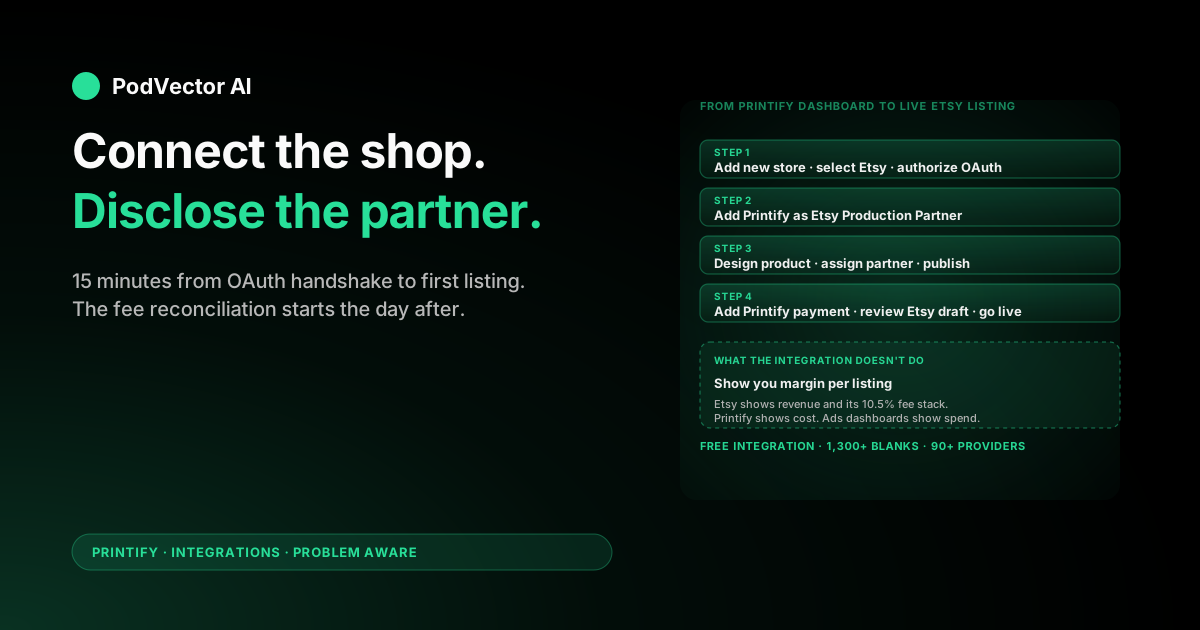
Quick Answer: The Printify Etsy integration is free, takes about 15 minutes end-to-end, and connects your Etsy shop to Printify's print-on-demand fulfillment network. Once connected, products you design in Printify publish straight into your Etsy listings, and Etsy orders flow back to Printify for production.
One step almost every guide skips: Etsy requires you to add Printify as a Production Partner on your shop before listings are policy-compliant. Miss it and your listings can be removed.
The connection is the easy part. The harder problem starts the day after: your fee data sits in Etsy, your cost data sits in Printify, and your ad data sits in Etsy Ads, Meta, and Google. This guide covers both halves.
What the Printify Etsy integration actually does
The integration is the official link between your Etsy shop and Printify's print-on-demand network. After you connect, Printify becomes the back-end fulfillment system for any product you publish from its catalog into Etsy.
Functionally it does three things. It pushes products you build in Printify into your Etsy shop as listings. It listens for Etsy orders on those listings and queues them for production. And it pushes tracking back to Etsy so the buyer sees a normal Etsy order status.
Everything customer-facing stays with Etsy. Etsy owns the storefront, search, payments, messages, reviews, and refund flow. Printify never touches the buyer side. A full walkthrough of selling on Etsy with Printify is here.
Before you connect — prerequisites
You need two accounts open in separate tabs before you start. Setting them up mid-connection is the most common source of stalled flows.
- An active Etsy shop. Not a draft — Etsy requires you to complete shop setup (currency, payment, billing, About section, first listing or "Open your shop" click) before its API will accept a Printify connection. New shops get 40 free listings.
- A Printify account. Free to create, no card required at signup. You'll add a card later for production charges. The free plan supports up to 5 connected stores.
- A payment method on Etsy. Etsy Payments must be active, with a valid bank account on file, or Etsy won't process orders the integration sends through.
- A payment method ready for Printify. Credit or debit card. Printify charges per order for production + shipping, separate from what your buyer pays on Etsy.
- Design files at print-ready resolution. 300 DPI minimum, PNG with transparent background for most blanks. Printify's recommended size is 4500 × 5100 pixels for full-front shirt prints.
One Etsy shop can only be connected to one Printify account at a time. If you try to connect a second Printify account to the same Etsy shop, Etsy rejects the OAuth handshake. That trips up sellers who tested with a personal Printify account and want to switch to a business one — disconnect the first before connecting the second.
Step-by-step: connect Printify to Etsy
The connect flow itself takes about 5 minutes once both accounts are live.
- Sign in to Printify. From the top-left store switcher, click Manage my stores.
- Click Add a new store. Select Etsy from the sales channel list.
- Printify redirects you to Etsy's authorization page. Sign in to Etsy if you aren't already (email + password, or Google / Facebook / Apple).
- Etsy shows the permissions screen with the scopes Printify is requesting (read shop, read/write listings, read transactions, read/write shop sections). Click Allow access.
- Etsy redirects back to Printify. You'll see a confirmation screen with your Etsy shop name and a green Connected badge.
- Give the new store a name inside Printify (e.g.,
MyEtsyShop). This is the internal label Printify uses to differentiate stores — buyers never see it. - Add a saved payment method in Printify under My profile → Payments. Production won't start without one.
If Etsy shows a different page at the authorization step — usually "Open your shop" or a setup wizard — your Etsy shop isn't fully set up yet. Finish Etsy's onboarding (publish at least one placeholder listing if needed), then restart the connect flow.
Add Printify as a Production Partner on Etsy
This is the step most setup guides bury or skip entirely, and it's the one that gets shops suspended.
Etsy's policy requires sellers to disclose any third party that physically makes their products. Printify fulfills your orders, so Etsy considers it a production partner. Every Printify-fulfilled listing must reference a Production Partner entry on your shop.
To add one:
- In Etsy, go to Shop Manager → Settings → Production partners.
- Click Add a new production partner.
- Production partner name:
Printify - Where is the production partner located? Pick the country of the print provider you'll use most often. If you'll use providers in multiple countries, add a separate partner entry per country.
- About your production partner: Etsy wants a short description of what they do. A safe template: "Printify is a print-on-demand network that produces and ships my custom-designed products to my customers. I create the designs and approve each product; Printify handles production and fulfillment."
- How is the partner involved? Select "They produce the items I sell" and "They ship the items I sell."
- Save.
Then, when you publish a Printify product to Etsy, the integration will prompt you to assign the matching production partner. Pick the right country's entry. New listings without a production partner assigned are technically out of policy — Etsy doesn't always enforce immediately, but they do enforce eventually.
Publish your first product from Printify to Etsy
Connection alone doesn't move any listings. You design each product in Printify and click publish.
1. Pick a blank and a print provider
Open the Printify catalog. Pick a blank (t-shirt, mug, poster, tote, sweatshirt — the catalog has 1,300+ options) and a print provider. Provider choice matters more than blank choice: the same t-shirt can cost $3 more or ship 5 days slower depending on which provider you pick. Sort by cost and production time for your main buyer region.
2. Upload your design
Use Printify's design tool to upload artwork. It auto-generates mockups for every variant. PNG with transparent background, 300 DPI minimum. Sub-300 DPI uploads warn you but still publish — they just print blurry.
3. Set retail price
Printify shows production cost per variant in real time. You enter the retail price; Printify calculates margin live. Default markup of 40–60% is common, but Etsy fees take a bigger chunk than Shopify, so price accordingly (see the pricing section below).
4. Fill in Etsy-specific listing fields
Printify's publish screen asks for an Etsy-specific listing title, description, tags (up to 13), materials, and which Etsy section to put the listing in. Etsy SEO lives mostly in title + tags + first 160 characters of the description — spend time here, not in the Printify default copy.
5. Assign the production partner
Pick the Etsy production partner entry whose country matches the print provider's country. If you missed creating the partner entry, go back and add it now — the publish will fail without one assigned.
6. Click "Publish to store"
By default the listing lands in Etsy as a draft. That's the right default. Toggle Hide in store off only after you've reviewed the listing in Etsy and confirmed mockups, price, and tags look right. Once you click Publish in Etsy itself, Etsy charges $0.20 per listing — there's no take-back.
Check the listing in Etsy under Shop Manager → Listings → Draft. You should see the new product with all variants, mockups, and the production partner assigned. A deeper walkthrough of the Printify-to-Etsy publish flow is here.
Pricing, currency, and Etsy fees
Pricing on Etsy is where Printify integrations quietly lose money. Three things to know.
Etsy fees stack to ~10.5% before you ever pay Printify
Per sale, Etsy takes: 6.5% transaction fee on item + shipping + gift wrap, 3% + $0.25 payment processing (US), $0.20 listing fee (every 4 months per listing), and offsite ad fees of 12–15% on any sale Etsy attributes to its paid ads. On a $25 shirt with $5 shipping, you're paying Etsy roughly $3.30 before Printify ever charges you for the blank.
Currency mismatches don't break — but they don't auto-convert either
Printify lists production costs in USD. Etsy lists buyer-facing prices in your shop's listing currency. The number you type in Printify's retail price field transfers literally — type 25 in Printify and Etsy lists it as 25 in whatever currency your shop is set to, not converted. UK shops get £25 listings, EU shops get €25, AU shops get A$25. Set your Printify retail prices in the same currency as your Etsy shop, or you'll under-price internationally by ~25% without noticing.
VAT and sales tax are excluded from the published price
The price that transfers from Printify to Etsy is tax-exclusive. Etsy adds VAT or sales tax on top at checkout based on buyer location and your tax settings. Buyers in tax jurisdictions see a higher final price than your listed price — that's normal Etsy behavior, not a Printify bug.
Practical rule of thumb: to clear ~$8 net per t-shirt sale on Etsy after blank cost, shipping, and Etsy fees, list at $24.99 or higher. POD margins on Etsy are thinner than on Shopify because of the fee stack. Printify Premium's 20% production discount changes the math at higher volumes.
Running the business after the integration is live
The top guides stop at "your products are live, congrats." That's the easy half.
The hard half is that the integration leaves you with three or four systems and no shared view of profit. Etsy shows revenue and its own fees. Printify shows production and shipping cost. Etsy Ads (and Meta and Google, if you run external ads) show spend. None of them join.
Five things to track from week one:
1. True margin per order
Etsy's "net" payout is gross of Printify production cost and outside-ad spend. A $24.99 shirt that nets $18.50 after Etsy's cut might actually clear $4 once Printify charges you $9 for the blank and shipping, and you spent $5 acquiring the order. Export Printify orders as CSV from My Orders and join to Etsy's Orders & Shipping CSV on order ID.
2. Listing-level conversion vs. listing fees
Etsy charges $0.20 per listing every 4 months whether the listing sells or not. A catalog of 200 listings costs $40 every cycle. Pull a quarterly view of revenue per listing — anything that hasn't sold in 8 months is paying Etsy to sit there. Either refresh the design, rework SEO, or deactivate.
3. Etsy Ads spend recovered per SKU
Etsy's Ads dashboard shows ROAS at the campaign level, not at the SKU level. Some listings convert at 4× spend; some never recover their click cost. Pull the Etsy Ads stats CSV monthly, join to your Printify cost per SKU, and rank by margin-after-ads. Kill the bottom decile.
4. Print provider performance on your SKUs
Printify reports average production time per provider. The number that actually moves your Etsy star rating is your production-to-shipped time on your orders. A provider that's 2 days slower than the average will quietly tank your "shipped on time" rate, which Etsy uses for placement.
5. Refund and case rate by provider
Print quality complaints, missing items, and wrong-variant orders pull your Etsy review average down faster than slow shipping does. Track refunds grouped by print provider, not just by SKU. A single bad provider can poison a top listing's reviews in a month.
All five live across Etsy, Printify, Etsy Ads, and often a separate ads tool. None surface natively in either dashboard. You either build a weekly CSV reconciliation in Sheets, or you hand the join off to a tool that reads every source into one live data warehouse. The same reconciliation problem applies the moment you add Shopify alongside Etsy.
Disconnecting and reconnecting
To disconnect: in Printify, go to Manage my stores, find your Etsy store in the list, click the three-dot menu, select Disconnect. Confirm. The integration revokes its Etsy OAuth token and stops sending new orders.
Important: disconnecting does not remove already-published listings from your Etsy shop. Those stay as Etsy listings forever — you have to delete them in Etsy if you want them gone. Disconnecting also doesn't cancel in-flight Printify orders. Those continue to production on the cards you have on file.
To reconnect, follow the connect flow above. Reconnecting refreshes the OAuth token, which expires every 90 days for Etsy and is the most common cause of "orders suddenly stopped syncing" on long-running shops.
Troubleshooting
Etsy authorization redirects to "Open your shop" instead of permissions
Your Etsy shop isn't fully published. Finish the Etsy onboarding wizard, publish at least one placeholder listing, then restart the Printify connect flow.
"This Etsy shop is already connected to another Printify account"
One Etsy shop can only link to one Printify account. Log into the other Printify account, disconnect the Etsy shop from there, then retry the connect flow on the account you want.
Products won't publish from Printify to Etsy
Three common causes. First, you haven't assigned a Production Partner — Printify's publish screen requires it. Second, your Etsy shop currency and Printify retail-price currency don't match. Third, the OAuth token has expired (every 90 days). Disconnect and reconnect to refresh.
Orders not flowing from Etsy to Printify
Check My Orders → Action required in Printify first. The two usual culprits: your Printify payment method failed, or the buyer ordered a variant Printify has since retired. The order sits in the queue waiting for you to fix the card or pick a replacement variant.
Listing rejected by Etsy after publish
Usually a missing production partner or a trademark issue in the design. Etsy's bot scans uploaded artwork for known trademarks (sports teams, Disney, major brands) and removes listings within hours. Republish without the protected element. If the listing was rejected for the partner, add the partner entry and republish.
Shipping cost shown in Etsy doesn't match what Printify charges
You're using Etsy's calculated shipping based on your own profile, not Printify's. Either set Printify's recommended shipping profiles on each listing during publish, or align your Etsy shipping profile to Printify's actual rates by region. The mismatch is the single biggest source of low-margin orders on Etsy.
FAQs
Is the Printify Etsy integration free?
Yes. The integration itself costs nothing. You pay Etsy's standard listing fees ($0.20 per listing every 4 months), Etsy's transaction and payment fees per sale, and Printify's per-order production and shipping cost. Printify Premium ($14.99/month) is optional and gives you a 20% discount on production cost.
How long does the connection take?
About 15 minutes if both accounts are already set up. Add 30+ minutes if you're creating Etsy from scratch and waiting for shop setup to finish. First product publish takes another 15–20 minutes. A full small catalog launch is half a day.
Do I have to add Printify as a Production Partner on Etsy?
Yes, if you want to follow Etsy's policy. Etsy requires disclosure of any third party that physically makes your products. Listings without a production partner can be removed, and repeat offenders risk shop suspension. The integration prompts for it on publish — don't skip the prompt.
Can I connect more than one Etsy shop to one Printify account?
Yes. The free Printify plan supports 5 connected stores; Premium supports 10. Each Etsy shop gets its own entry in Manage my stores with separate product lists and order feeds. Useful for multi-brand sellers running niche shops.
Does Printify handle Etsy taxes?
No. Etsy collects and remits sales tax and VAT based on buyer location and your shop's tax settings. Printify only charges you for production and shipping. Configure Etsy's tax settings before launch; Printify is invisible to that side of the flow.
What happens if my Printify payment method fails?
Orders pause in Printify's "Action required" queue and don't go to production until you fix the card. The Etsy order stays in "in progress" status. Add a backup payment method in Printify to avoid silent outages — this is the most common cause of slipped ship dates on stores past their first 100 orders.
Can I edit a Printify-published listing directly in Etsy?
Yes, but with caveats. Edits to title, description, tags, and photos in Etsy won't be overwritten by Printify on future publishes. Price and variants stay editable from either side. Most sellers manage Etsy SEO copy from Etsy directly once a listing is live, and keep Printify for design + cost changes.
Does the integration work with Etsy Pattern (Etsy's standalone storefronts)?
Pattern was retired by Etsy in 2024. The integration only works with main Etsy shops, which is now the only Etsy option anyway. If you see Pattern referenced in older guides, ignore it.
Can I use Printify with Etsy if I'm not in the US?
Yes. Etsy is available to sellers in 80+ countries, and Printify supports international fulfillment with print providers in the US, UK, EU, Canada, Australia, and Asia. Pick a provider in or near your main buyer region to keep shipping times competitive on Etsy's "shipped in X days" filter.
Related reading
For the broader Printify ecosystem, see our Printify integrations hub and the Printify topic page. Printify's official Etsy integration page is also worth bookmarking for current pricing, feature changes, and the connect button.
Hand off the operations to Victor
You connected the integration. You added the production partner. You published your first listings. Now you have revenue data in Etsy, cost data in Printify, ad data in Etsy Ads (and probably Meta and Google), and no shared view of which listings actually make money.
Victor is an AI employee built for POD sellers. He reads every source into one live data warehouse, answers questions in plain English ("which Etsy listings lost money to ads last week?"), and — with your approval — reallocates ad spend, pauses unprofitable campaigns, and updates Printify and Etsy listings. You stay in control; Victor does the busywork.
Stop reconciling CSVs every Sunday.
Try Victor free