
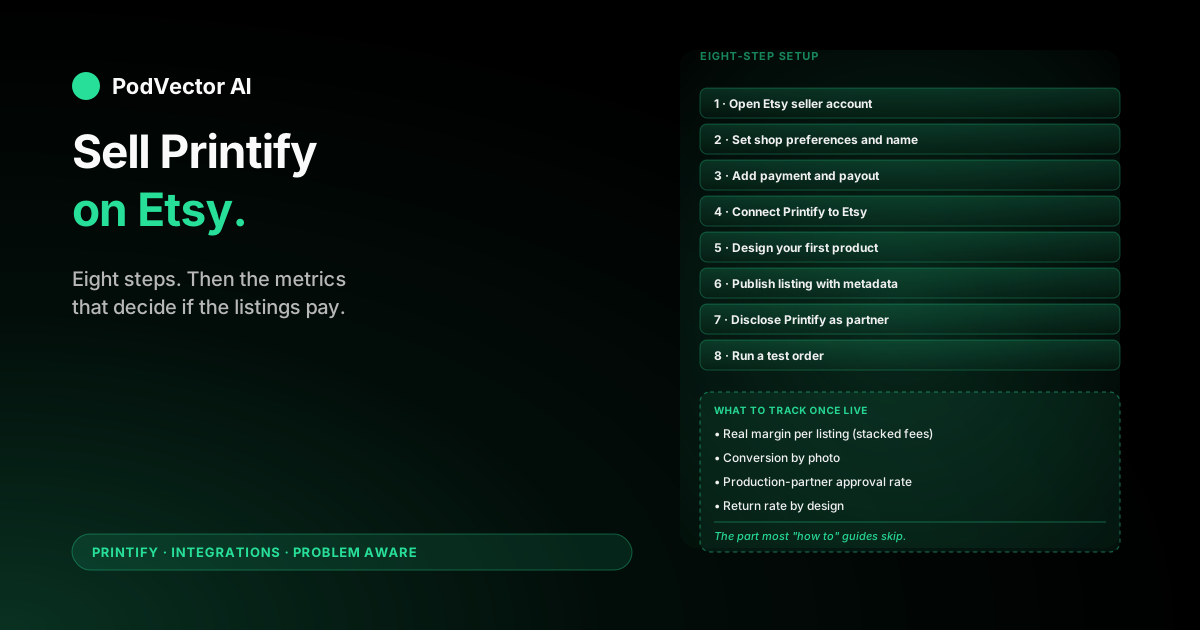
Quick Answer: Open an Etsy seller account, connect it to a free Printify account under Manage my stores → Add new store → Etsy, then publish Printify designs as Etsy listings with Printify disclosed as your production partner.
The clicks take roughly thirty minutes. The Etsy listing fees and Printify per-order costs are what determine whether the channel makes money once orders start.
This guide walks the exact setup in order, then covers the part the SERP skips — what to track once the listings are live.
What you need before you start
The actual integration is short. The slow parts are the things Etsy needs from you that don't depend on Printify at all.
Have these ready before you open Etsy:
- A government ID and a bank account in your name. Etsy verifies both before they pay you out.
- A credit or debit card on file. Etsy charges listing and transaction fees off this, separate from your payout.
- A shop name idea — Etsy locks the name once you commit, and changing it later is friction-heavy.
- A free Printify account with a payment method saved. Printify bills your card per order for production and shipping, separate from what Etsy collects from the buyer.
- At least one finished design ready to upload. Don't try to design in the middle of setup.
If you're brand new to selling online, give yourself an afternoon. The clicks themselves are fast, but Etsy will pause you at identity verification and bank linking, and Printify wants you to design at least one product before connecting.
For a deeper look at how Etsy and Printify share costs once the channel is running, the Printify-Etsy calculator step-by-step walks the per-listing math.
Step 1: Open your Etsy seller account
Etsy bundles seller and buyer accounts together. If you already buy on Etsy, you can sell from the same account — you don't need a second one.
- Go to etsy.com/sell and click Get started.
- Sign in with your existing Etsy account, or create a new one with email.
- Answer the onboarding questions about your goals. Etsy uses these to personalize the dashboard — none of your answers lock you into anything.
If Etsy asks you to verify your identity at this step, do it now. Skipping it just pushes the same blocker to Step 3.
Step 2: Set shop preferences and pick a shop name
Etsy will walk you through three quick choices: language, country, and currency. Pick the country you'll get paid out in, not the country you'd like to sell into. The currency follows the country.
- Set Shop language to the language your listings will be in.
- Set Shop country to where your bank account is.
- Set Shop currency — it will default to your country's currency. If you change it, Etsy converts at checkout and charges a 2.5% currency-conversion fee on top of regular fees.
- Enter your shop name. Four to twenty characters, letters and numbers only.
The shop name is the one part of this step that's worth pausing on. It shows up in your URL, on every listing, and on every receipt. Pick something brandable, not the keyword you're chasing.
Etsy will tell you immediately if the name is taken. If it is, you can add a digit or a short word — though "shop123" looks like a stub. Try one or two real alternatives before settling.
Step 3: Add payment and payout details
This is the step new sellers stall on. Etsy needs to verify who you are before they'll let you accept money.
- In your seller dashboard, open Finances → Payment settings.
- Add a bank account in your legal name. The name on the account must match the name Etsy has on file exactly — middle initials count.
- Add a credit or debit card. This is what Etsy bills for listing and transaction fees, separate from your payout.
- Upload a government ID if Etsy prompts for one. Most US sellers will skip this; sellers in some other countries get asked upfront.
Etsy holds your first few payouts longer than usual — they call it a reserve, and it can be up to 75% of incoming funds for the first 90 days. That's normal for new sellers. Plan your Printify cash flow around it.
Step 4: Connect Printify to Etsy
With the Etsy shop set up, the actual Printify connection is fast.
- Log in to your Printify account.
- Click your account icon in the top-right and choose Manage my stores.
- Click Add new store.
- Find Etsy in the integrations list and click Connect.
- Printify redirects you to Etsy. If you're not signed in to the right Etsy account in the same browser, sign in now.
- On Etsy's permissions screen, click Allow access. Printify needs read/write on listings, orders, and shipping data to function.
Etsy redirects you back to Printify. Your store now shows up under Manage my stores with status "Connected."
If the redirect fails or you end up in a login loop, you're almost certainly signed in to two different Etsy accounts in the same browser. Sign out of all Etsy properties, close the tab, and start Step 4 again in a private window.
Step 5: Design your first product
Printify won't push anything to Etsy until you have at least one product designed in Printify itself. Pick one to start — don't try to launch a 30-listing catalog on day one.
- In Printify, open Catalog and pick a product. Bella + Canvas 3001 unisex tees and Gildan 18000 sweatshirts are the safest starting points for Etsy traffic.
- Click Start designing.
- Upload your artwork. Printify wants a transparent PNG at 300 DPI for best print quality. The print-area template they show you is the safe zone — anything that crosses the dashed line risks getting trimmed.
- Pick the colors and sizes you want to offer. Each variant is its own Printify SKU.
- Click Save product.
For the first listing, keep the variant count low. Two or three colors and a standard S–2XL size range is plenty. You can expand once you know which variants Etsy buyers actually click.
Step 6: Publish the listing with the right metadata
This is where you push the product from Printify into Etsy as a real listing. Printify pre-fills some fields, but the Etsy-specific ones — title, tags, attributes — you write.
- In Printify, open My Products and find the product you just saved.
- Click Publish.
- Choose your Etsy store from the destination dropdown.
- Write the listing title. Etsy gives you 140 characters. Front-load the most-searched keyword, then add long-tail variants.
- Add up to 13 tags. Each tag can be up to 20 characters, multiple words count as one tag. Use all 13 — Etsy's search engine reads them.
- Fill in attributes (color, holiday, occasion, recipient). Etsy uses these for filter search, which a lot of buyers actually use.
- Pick the right category. Etsy's category tree is messy, but the closer you match what buyers browse, the more impressions you get.
- Set the price. Bake the Etsy fees plus Printify production cost plus your margin into one number.
- Click Publish to Etsy.
Printify pushes the listing to Etsy as a draft. Open Etsy in another tab to finish the parts Printify can't fill in — the Who Made It / What Is It / When Was It Made trio, plus shipping. (Step 7 covers the production partner disclosure.)
If you're new to Etsy SEO, the listing photo carries more weight than people expect. Printify's auto-generated mockups work for a first listing, but lifestyle photos win the click. Plan to replace mockups with real product shots as soon as your first orders ship.
Step 7: Disclose Printify as a production partner
This is the step that catches POD sellers off guard. Etsy requires every listing made by a third party to disclose that partner. Printify counts.
It's not optional and it's not buried — Etsy can suspend listings (or shops) that don't disclose. The disclosure itself takes about 60 seconds per listing once you set up the partner record.
- In Etsy, open Shop Manager → Settings → Production partners.
- Click Add a new production partner.
- Partner name: Printify.
- Location: pick the country Printify is fulfilling from. For US sellers using US Printify providers, that's the United States.
- Description: short, factual. "Printify is a print-on-demand service that produces and ships my designs on apparel and accessories" is enough.
- Save.
- Now open the listing you just published. In the About this listing section, under Who Made It, choose Another company or person. Pick Printify from the partner dropdown.
- Save the listing.
You only set up the partner record once. Every new listing after that just needs the dropdown selected.
Step 8: Run a test order
Before you tell anyone about your shop, place an order yourself. This catches integration breaks while only your eyes are watching.
- Open Etsy in a private window or a different browser.
- Search your listing by title and add it to cart.
- Check out with your personal payment method to your home address. Yes, you pay the Etsy fees and Printify cost — call it the cheapest insurance available.
- Watch the order flow:
- Etsy confirms the sale in Shop Manager.
- Printify imports the order within a few minutes. By default it waits an hour before sending to production so you can cancel typos — that hold is configurable under Settings → Order approval.
- Printify charges your card for production and shipping.
- Printify produces, ships, and syncs tracking back to Etsy.
- When the package lands, check the print, the garment, and the packaging. Etsy buyers expect a finished product — generic poly mailers from Printify's standard fulfillment are fine, but anything torn or off-color is a problem.
If any link in that chain breaks — order doesn't import, tracking doesn't sync, package arrives crooked or in the wrong color — fix it before scaling. The fix is cheap when one order is broken and expensive when twenty are.
What to track once you're live
Every guide on this topic stops at "now market it." That's where the actual work starts.
The metrics that decide whether a Printify-Etsy listing makes money are different from any other channel. Etsy's fees stack in a way that hides true margin until you reconcile manually.
Real margin per listing. Sale price minus Etsy listing fee, transaction fee, processing fee, ad fee (if Offsite Ads triggered), then minus Printify production and shipping cost. Two listings at the same retail price can have wildly different real margins once Printify's size-based pricing kicks in.
Conversion by photo. Etsy ranks listings on conversion. If your first mockup isn't converting, swap it before throwing more impressions at it. Track click-through-rate from search separately from listing-page conversion — they're different problems.
Production-partner approval rate. Printify holds orders for an hour by default so you can cancel obvious problems. If you're approving 100% of orders without looking, that hour is wasted overhead. If you're catching 5%+ as problems, your design files or listing copy need work upstream.
Return rate by design. Etsy treats returns rougher than Amazon does — most POD sellers run a no-returns policy on apparel because sizing complaints are unavoidable. Track which designs trigger return requests anyway. They're telling you something about the design or the sizing chart.
Reconciling all of that manually means stitching Etsy's CSV exports, Printify's invoices, and your bank statements every week. Most POD sellers either skip it or do it badly, and the listings that should have been retired stay live for months.
Let Victor run your Printify-Shopify ops
Victor is an AI employee built for POD sellers. If your POD business runs on Shopify, Victor joins your Shopify orders, itemized Printify costs, and Meta/Google ad spend into one live view — then runs the day-to-day work: pausing listings that lose money, flagging ad spend that isn't paying back, proposing repricing on slow movers. He works on your Shopify orders, not your Etsy shop, and every material action stops for your approval before anything changes.
You ship designs. Victor runs the business.
Try Victor freeEtsy + Printify fees, end to end
This is the part that catches new POD sellers in the first month. Etsy's fees are small individually, but they stack.
Etsy listing fee. $0.20 per listing, paid when you publish and every four months if the listing renews. Variants on a single listing share one fee — multi-variant listings are cheaper per SKU than separate listings.
Etsy transaction fee. 6.5% of the sale price including shipping. This is the big one.
Payment processing fee. Varies by country. US sellers pay 3% + $0.25 per order.
Offsite Ads fee. If Etsy ran ads on your listing and the click converted, 12–15% of the sale (12% if you do $10K+/year in sales, 15% otherwise). You can opt out unless you're at $10K+/year, in which case it's mandatory.
Printify production cost. Set per product in Printify's catalog. The same Bella 3001 tee can cost differently depending on which print provider Printify routes to.
Printify shipping cost. Charged per order. Most US sellers see $4-$6 for a single tee.
If your retail price doesn't cover all six lines plus a margin, the listing loses money. The is Printify free rundown and the how to cancel Printify subscription step-by-step guide cover the Printify side in detail.
FAQs
Do I need a business license to sell Printify on Etsy?
Usually no, but it depends where you live. Most US hobby sellers below $400/year in net profit don't need a license, but anything over that triggers self-employment tax. Once you cross into "real income," check your state and local rules — a few cities (notably some in California and New York) require a business registration before you sell anything.
How much does it cost to start?
Etsy charges nothing to open a shop. The first costs you'll see are $0.20 per listing you publish, plus whatever you spend on the test order (typically $15-$30 including Printify production and shipping). Printify itself is free to use without an upgrade.
How long does setup take end to end?
About thirty to ninety minutes for the clicks. Identity verification can pause you for 24-48 hours if Etsy decides to ask for a document — that's the variable part.
Can I use Printify on an existing Etsy shop?
Yes. Connecting Printify doesn't replace anything already in your shop. You can run Printify listings alongside listings you fulfill yourself. Just remember the production partner disclosure on every Printify listing — Etsy treats fulfillment type per-listing, not per-shop.
Why is the Etsy production partner disclosure required?
Etsy is a marketplace originally built for handmade and vintage goods. The disclosure is how they signal to buyers that a third party (Printify) helped make the item, while still allowing the designer to own the design. Skipping it is a policy violation, not a technicality — Etsy actively enforces it.
Will Etsy ban POD shops?
Not for being POD. They ban for not disclosing production partners, for stolen artwork, for misrepresented handmade claims, and for shipping times that don't match the listing. POD shops that follow the rules run fine on Etsy long-term.
Do I need a separate Printify subscription to sell on Etsy?
No. Free Printify accounts can connect to Etsy and publish unlimited products. The paid tiers (Printify Premium, Printify Enterprise) add discounts and features but aren't required to start.
What products sell best on Etsy through Printify?
Apparel (T-shirts, hoodies, sweatshirts), mugs, posters, and tote bags all do well. Niche designs on basic products usually outsell generic designs on premium products — Etsy buyers come for personality, not for the blank substrate.
How do I track profit across Etsy and Printify together?
Manually, you'd export both monthly and reconcile in a spreadsheet — Etsy's fee statement on one side, Printify's order invoices on the other, with your bank statement to confirm payouts. Most sellers skip this or do it badly. The Printify-Etsy calculator guide walks the per-listing math; if your POD business also runs on Shopify, Victor automates that loop for the Shopify side — the Etsy line stays a manual reconcile.
For other ways into the Printify integrations cluster:
- How to connect Shopify to Printify (step-by-step)
- How to set up Printify with Etsy (step-by-step)
- Printify-Etsy calculator (step-by-step)
For the broader Printify topic and the integrations hub, see the Printify topic hub and the integrations cluster.
External reference: Printify's own Etsy integration overview covers the current feature set and country support.