
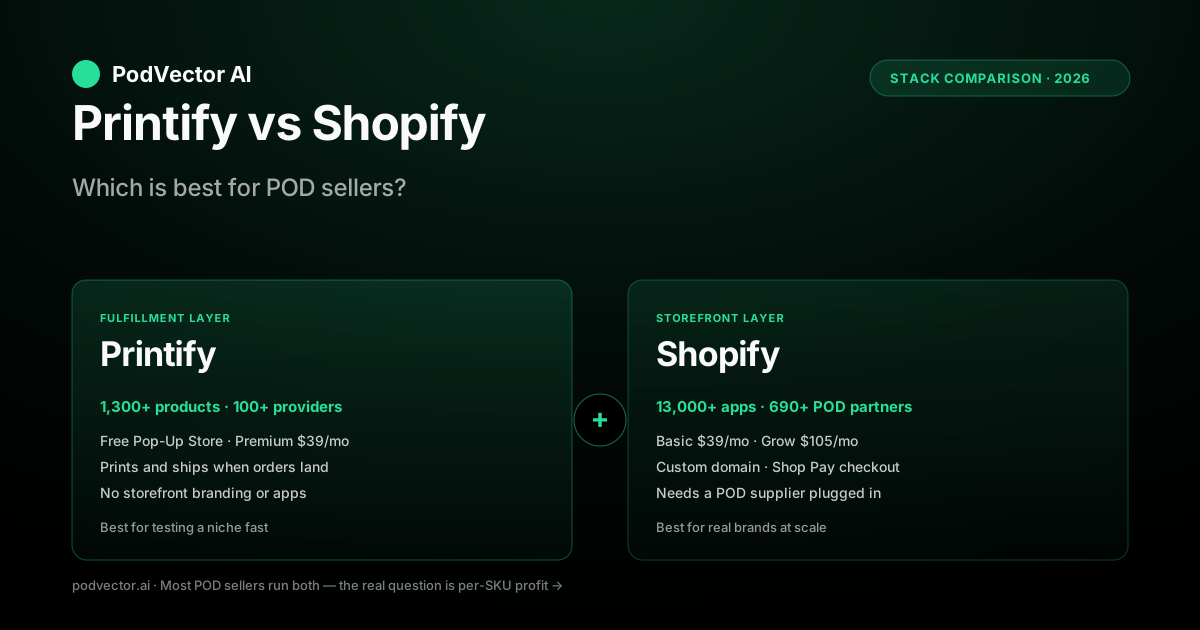
Quick Answer: Printify and Shopify are not competitors — they operate at different layers of your business. Printify is a print-on-demand fulfillment network: it makes and ships products when an order lands. Shopify is an ecommerce platform: it runs the storefront, checkout, and payments your buyers see.
If you only pick one, Printify's free Pop-Up Store gets you selling with zero monthly cost. Shopify alone doesn't print anything — you'd still need a POD supplier behind it.
For almost every POD seller past hobby stage, the right answer is both: a Shopify storefront with Printify handling fulfillment. The real question isn't "which platform" — it's how much margin each SKU nets after the combined stack of fees, base costs, and shipping.
The quick verdict
Most "Printify vs Shopify" articles bury the answer. Here it is up front: you don't pick one. The honest comparison is between three options.
Option A — Printify alone (Pop-Up Store): Free storefront hosted by Printify, limited design and branding, fastest path to first sale. Best for testing a niche or a single product before committing. According to ecommerce-platforms.com, the Pop-Up Store gives you full access to Printify's fulfillment catalog at zero monthly cost.
Option B — Shopify alone: Pro storefront with full branding, themes, apps, and marketing tools. But Shopify doesn't print anything — you still need a POD supplier (Printify, Printful, Gelato, or another) plugged in. So "Shopify alone" rarely exists in practice.
Option C — Shopify + Printify together: Shopify runs the buyer-facing store, Printify handles fulfillment. This is what almost every POD operator past hobby stage runs. The Printify app for Shopify auto-syncs products, mockups, and orders — and once correctly linked, orders flow from Shopify to Printify automatically.
If you're already past the "is POD a real thing" stage, you're picking between Option A and Option C. Option B isn't really an option — it's half a stack.
The fundamental difference
The cleanest way to think about it: Printify and Shopify operate at different layers of your business.
Printify is the fulfillment layer
Printify is a print-on-demand network. You upload designs, pick products from its catalog, and Printify routes each order to a print provider who handles printing, packing, and shipping. You don't hold inventory and you don't ship anything yourself. According to podbase.com, Printify's catalog spans over 800 products across more than 100 print providers worldwide as of 2026.
Printify also includes a free Pop-Up Store — a basic hosted storefront so you can sell without setting up your own site. That's the only reason Printify shows up in "vs Shopify" comparisons at all. The Pop-Up Store is a feature, not Printify's core business.
Shopify is the storefront layer
Shopify is a full ecommerce platform. You get a custom-domain store, hundreds of themes, a checkout, payment processing, customer accounts, abandoned cart recovery, email marketing, analytics, and access to a large app ecosystem. None of that is POD-specific — it's the infrastructure any online store needs.
Shopify doesn't print anything. To run POD on Shopify, you install a POD supplier's app — Printify, Printful, Gelato, Gooten, or a category alternative covered in the roundup of Printify alternatives. The supplier handles production; Shopify handles everything the buyer sees.
So why do people compare them?
Because the Printify Pop-Up Store and Shopify both let you sell online. At the surface that looks like overlap. Underneath, the Pop-Up Store is a starter feature Printify offers so you can sell without leaving their ecosystem, and Shopify is the full platform you graduate to when the Pop-Up Store's limits start to bite. As Style Factory puts it, most sellers end up using both because they solve completely different problems.
Side-by-side snapshot
Quick orientation. Each row hides nuance unpacked below.
| Dimension | Printify (Pop-Up Store) | Shopify (+ a POD app) |
|---|---|---|
| What it is | POD service with a free starter storefront | Ecommerce platform; needs a POD supplier plugged in |
| Monthly fee | Free (up to 5 stores); Premium $39/mo billed monthly or $24.99/mo billed annually; Enterprise custom | Basic $39/mo; Grow $105/mo; Advanced $399/mo; Plus $2,300+/mo |
| Custom domain | Not supported on the free Pop-Up Store | Yes on all paid tiers |
| Themes and design control | Single template, limited customization | Hundreds of themes, full CSS/HTML control |
| Checkout | Printify-hosted checkout | Shopify Checkout (one of the highest-converting in ecommerce) |
| Payment processing | Stripe / PayPal | Shopify Payments + 100+ alternative gateways |
| Marketing tools | Minimal | Email, abandoned cart, discounts, Shop Pay, Shop app |
| Apps and integrations | None on the Pop-Up Store | Large app marketplace including hundreds of POD apps |
| Catalog management | Up to a Printify-limited number of products | Unlimited products |
| Production network | 800+ products, 100+ providers — the actual Printify service (podbase.com, 2026) | Whichever POD supplier you install |
| Multi-supplier support | No | Yes — run Printify, Printful, Gelato simultaneously |
| Best for | Testing a niche fast with zero cost | Building a real brand with full operating leverage |
When Printify alone is enough
The Printify Pop-Up Store is the right call in a small set of situations. Be honest about whether you're in one of them.
You're testing a niche with zero budget
The Pop-Up Store costs nothing. You can spin up a store, push a few designs, run a small ad test, and learn whether a niche has demand before paying for a Shopify plan. Treat it as market research with a checkout attached. According to ecommerce-platforms.com, you can test the full Printify + Shopify setup for under $5 using Printify's free plan alongside Shopify's introductory offer — so even the upgrade path is low-risk.
You're selling to one audience through one channel
If your traffic comes entirely from one Instagram account, one TikTok creator, or one Facebook group, you don't need a branded storefront experience. A Pop-Up Store link in bio works. The conversion difference between a Pop-Up Store and a custom Shopify store is smaller when the buyer arrives already primed to purchase.
You're running a giveaway, fundraiser, or one-off campaign
A school spirit shirt drop, a charity fundraiser, a band's tour merch — short-lived stores where the URL is shared once and used for a few weeks. No reason to pay for Shopify on a campaign that closes in 30 days.
What you lose with Pop-Up Store
No custom domain (your URL is a printify.me subdomain). No themes or branded design control. No marketing automation. No abandoned cart recovery. No checkout optimization. No way to plug in third-party apps. No customer account system. According to mockupmaestro.com, the Pop-Up Store limits brand growth specifically because it lacks custom domain support — and serious sellers should connect to an independent Shopify store instead.
If any of those matter to your business — and they will the moment you try to scale past one channel — you've outgrown Pop-Up Store.
When you need Shopify (and a POD supplier)
The moment you want a real brand, a custom domain, or marketing automation, Shopify becomes the right answer. But Shopify alone doesn't sell POD products — you'll plug a supplier in. Here's what each layer gives you.
What Shopify gives you
A custom domain, professional themes, full design control, the Shopify Checkout (consistently one of the highest-converting checkouts in ecommerce), abandoned cart recovery, email marketing, Shop Pay (one-click checkout that lifts conversion meaningfully on mobile), customer accounts, and a deep app ecosystem for everything from reviews to upsells to loyalty programs.
It also gives you operational leverage. You can run multiple POD suppliers in parallel, plug in dropshipping for non-POD products, add accessories from a wholesale supplier, and route orders through whichever fulfillment path makes sense per SKU. The Pop-Up Store can't do any of that. According to ecommerce-platforms.com, Shopify handles payments, marketing, SEO, and multichannel selling across Instagram, TikTok, and Amazon — all from one dashboard.
What you still need from Printify (or another supplier)
Production and shipping. Shopify doesn't print anything. The Printify app for Shopify auto-syncs products from your Printify catalog to your Shopify store, generates mockups, and routes orders from Shopify back to Printify for fulfillment. You manage designs and pricing in Printify; you manage marketing and customer experience in Shopify.
You can use Printful, Gelato, Gooten, or a category alternative instead of Printify — Shopify doesn't care. Each has its own app. The Printify-specific tradeoff vs other suppliers sits in the Gelato vs Printify comparison and the Gooten vs Printify comparison if you're picking between suppliers before committing to one.
Using Printify and Shopify together
The dominant pattern for POD sellers past hobby stage. The stack works like this.
How the integration runs
You design products in Printify, sync them to your Shopify store via the Printify app, and Shopify handles the storefront. When a buyer orders, Shopify processes payment, sends the order to Printify, and Printify routes it to the chosen print provider for production and shipping. You see the order in both dashboards.
Refunds, reprints, and customer support flow through Shopify for the buyer-facing side and Printify for the production side. The buyer never knows Printify exists — your brand, your domain, your customer relationship.
Who manages what
Designs, product variants, base costs, and provider selection live in Printify. Pricing, themes, copy, checkout, marketing, and customer accounts live in Shopify. The Printify app pushes products from Printify to Shopify; you set the retail price in Shopify (or in Printify, your choice).
Most operators set retail price in Printify because Printify shows the margin in the same view as the base cost. Some operators set retail price in Shopify because they're A/B testing prices via Shopify apps. Either works.
Setup time
Roughly 60 minutes end-to-end if you've never done it before. Create a Shopify trial account, install the Printify app, connect, pick a Shopify theme, configure your domain, sync your first products. The Printify-to-Shopify product sync handles mockups and variants automatically.
For a deeper walkthrough of the Shopify side of the setup — including Google Ads and Meta campaign structure — see the Shopify Google Ads strategy guide for POD sellers.
The full cost of the stack
This is where most articles wave hands. Below is the actual all-in cost of running the stack at three common scales.
Printify pricing (the fulfillment side)
- Free: $0/mo. Standard catalog pricing on every product, up to 5 connected stores. No subscription discount. Good for under ~$150/mo of product spend.
- Premium: According to podbase.com, Printify's Premium plan rose to $39/mo billed monthly (or $24.99/mo billed annually) in February 2026 and adds up to 20% off base costs across most products, plus up to 10 connected stores.
- Enterprise: Custom pricing for high-volume stores. Negotiated directly.
Base product costs vary by provider. The full price-by-tier breakdown for Premium specifically sits in the complete guide to Printify Premium.
Shopify pricing (the storefront side)
- Basic: $39/mo. Full custom-domain storefront, themes, checkout, basic reports. The default starting tier for serious POD sellers.
- Grow: $105/mo. Lower payment processing fees, professional reports, more staff accounts.
- Advanced: $399/mo. Lowest processing fees, advanced reports, custom checkout.
- Plus: $2,300+/mo. Enterprise SLAs, B2B features, multi-store, custom checkout extensibility.
Shopify routinely runs new-store promos — ecommerce-platforms.com notes you can test the full Shopify setup for under $5 in the first months — so the real early-stage cost of testing a storefront is minimal.
Shopify also takes a payment processing fee when using Shopify Payments; third-party gateways add an extra fee on top of their own charges. Themes (free or a one-time cost) and apps layer on top of the monthly subscription.
Real-world all-in cost at three scales
Hobby — 10 sales/mo: Pop-Up Store ($0) or Shopify Basic ($39) + Printify free. Total: $0–$39/mo plus product cost per order. Pop-Up Store wins unless you already have a brand identity worth a custom domain.
Side-hustle — 100 sales/mo: Shopify Basic ($39) + Printify Premium ($39/mo, or $24.99/mo annually per podbase.com) + 1–2 apps + theme amortized = roughly $100–$125/mo overhead, plus product and shipping cost per order. The Premium subscription pays for itself at this volume on most catalogs.
Real business — 1,000 sales/mo: Shopify Grow ($105) + Printify Premium + 3–5 apps + theme amortized = meaningful monthly overhead, but lower Shopify payment processing fees at this revenue level justify the upgrade from Basic.
Integrations and store setup
The Printify-Shopify integration is the most mature POD integration on Shopify, alongside Printful's. It handles the core flow well and the edge cases reasonably.
What syncs automatically
Products (with variants — size, color, style), mockup images, base costs, inventory status (in stock / out of stock per provider). Order placement from Shopify to Printify is automatic the moment the order is paid.
What you manage manually
Retail pricing (you set this — Printify suggests based on margin target). Product descriptions on Shopify (you can sync from Printify but most operators rewrite for SEO). Mockup selection (you pick which Printify-generated mockups appear on the Shopify product page).
What sometimes breaks
Inventory sync lag — if a Printify provider goes out of stock on a SKU, the Shopify product page can still show "in stock" for up to 30 minutes. For high-velocity sellers this matters; the workaround is checking inventory status before running paid traffic to a SKU. Variant naming sync — occasional mismatches when a provider updates a colorway. Mockup regeneration — bulk mockup refreshes from Printify don't always cleanly replace Shopify product images; the Printify app's "force sync" handles this most of the time.
Paid ads and attribution on the combined stack
Running Meta or Google campaigns against a Shopify + Printify store introduces attribution complexity — Printify has no ad data and Shopify's native attribution is last-click only. For Google Ads specifically, see the Google Ads data-driven attribution overview for POD sellers and the Google Ads vs Facebook Ads cost comparison for 2026 before committing budget to either channel. For Facebook video creative on Shopify POD stores, the Facebook video ads for ecommerce strategy guide covers what works at the product level.
Alternatives if you don't want Printify on Shopify
Printful, Gelato, Gooten, CustomCat, SPOD, and Teelaunch all have Shopify apps. The category-by-category Printify alternative comparison lives in the roundup of Printify alternatives. For the full Printify product picture before deciding, the Printify complete guide covers what Printify does and where it fits.
Ease of use, support, and mobile
Beyond pricing and features, the day-to-day experience of running each side differs — and they matter once you're operating, not just shopping.
Ease of use
Printify is the gentler on-ramp: upload a design, drop it on a product, push it live on the Pop-Up Store in minutes. Shopify carries a steeper learning curve because it does more — themes, navigation, checkout settings, apps, domains. According to litextension.com, Shopify's wide range of features means it has a slightly steeper learning curve, especially for beginners building their first online store. Neither is hard, but expect a weekend of setup on Shopify versus an afternoon on Printify.
Support
Printify support runs through email and chat and is primarily English-language. Shopify offers 24/7 support across multiple languages plus an extensive help center, and higher tiers add priority routing. For an operator running both, most fulfillment questions go to Printify and most storefront/billing questions go to Shopify — knowing which dashboard owns a problem saves the most time.
Mobile apps
Both ship mobile apps. According to litextension.com, the Printify mobile app lets you view all your orders in one place, update order details before submission, track production and fulfillment progress, and receive real-time updates. Shopify's app covers the full storefront — orders, inventory, customers, analytics, and push notifications for new sales. The Shopify mobile ecosystem is the more complete of the two.
When you outgrow the Pop-Up Store
Most operators graduate from Pop-Up Store to Shopify at one of four trigger points.
Trigger 1: You want a custom domain
Pop-Up Store URLs are printify.me subdomains. The moment you want yourbrand.com, you need a real storefront. Shopify is the most common destination, but WooCommerce, Wix, and BigCommerce also work.
Trigger 2: You're running paid ads
Pop-Up Store doesn't give you the pixel coverage, conversion tracking, or checkout customization paid ads need to scale efficiently. Once you're spending meaningfully on ads, the conversion lift from Shopify's checkout alone typically covers the monthly fee. See the Shopify + GA4 + Meta Ads integration setup guide for the tracking stack POD sellers use once they graduate to Shopify.
Trigger 3: You're building a brand
Themes, branded mockups, custom packaging slips, email flows in your brand voice — none of that works on Pop-Up Store. If you care about being recognizable across channels, you've outgrown the starter storefront.
Trigger 4: You're at ~50+ orders/month
Past this volume, the time you spend working around Pop-Up Store's limits (no apps, no automation, manual flows) costs more than the Shopify subscription. The migration is straightforward — your Printify catalog stays where it is, you just point it at a new storefront.
Running multiple POD suppliers on Shopify
One of the most underrated advantages of Shopify over the Pop-Up Store is the ability to run multiple POD suppliers simultaneously. According to podifai.com, many successful POD stores use one platform for their core products (best quality or margins), a second platform for products the first doesn't offer, and a backup for redundancy during peak seasons — and Shopify handles multiple POD integrations without issue.
The main complexity is order routing: when a buyer purchases a product fulfilled by Printify and one fulfilled by Printful in the same cart, you need to make sure each order goes to the right supplier. This usually means setting up routing rules in each supplier's app or using a POD aggregator. According to podifai.com, this "usually means setting up routing rules or using a POD aggregator."
For sellers running at real scale on Shopify with multiple suppliers, knowing which SKUs net the most margin after fees, refunds, and ad spend — per supplier, per geography — is the analytical layer that separates profitable stores from busy ones. The PodVector strategy guide covers how intermediate-to-advanced POD sellers on Shopify approach that problem.
Alternatives to either side of the stack
You don't have to run Printify on the fulfillment side or Shopify on the storefront side. Both have credible alternatives.
Alternatives to Printify (fulfillment)
- Printful: Owned facilities, higher base cost, more consistent quality, mature branding suite. According to podifai.com, Printful operates fulfillment centers in the US, Europe, and Mexico with most products shipping within two days. According to podbase.com, Printful's Growth plan at $24.99/mo unlocks up to 33% product discounts.
- Gelato: Distributed network across 32+ countries, best for international sellers who want local production close to the buyer (podbase.com, 2026).
- Gooten: Smaller catalog, competitive on specific product lines, popular for wholesale-style POD and higher-volume stores.
- CustomCat, SPOD, Teelaunch: Niche suppliers with specific category or speed advantages.
None of these are categorically better than Printify. Each wins in a specific geography or product category. The full landscape comparison sits in the Printify alternatives roundup.
Alternatives to Shopify (storefront)
- WooCommerce: Free WordPress plugin, more customization, more operational overhead. Strong if you already run WordPress.
- Etsy: Marketplace, not a storefront. Built-in audience but you don't own the customer or the relationship.
- Wix and Squarespace: Easier than Shopify for design-first sellers, fewer commerce features at scale.
- BigCommerce: Strong for larger catalogs, less mainstream for POD specifically.
- TikTok Shop: Native storefront on TikTok for creator-led brands.
For most POD sellers, the Shopify ecosystem is the path of least resistance. The exception is if you already have a WordPress site, in which case WooCommerce + Printify is a credible alternative.
The comparison that actually decides profit
The "Printify vs Shopify" framing assumes the question is which platform to pick. Once you've made that call — and the answer is almost always Shopify + Printify together — a different question takes over.
The question that actually decides profit: which products in your catalog, sold to which buyer geographies, through which Printify provider, net the most margin after Shopify fees, payment processing, ad spend, refunds, and reships?
That answer is per-SKU. A unisex tee selling to US buyers nets different margin from a hoodie selling to EU buyers, even on the same Printify provider. A canvas print with a meaningful refund rate behaves differently from a mug with a low refund rate. The supplier and platform comparisons get you most of the way there; the rest is in your own data.
According to podifai.com, "the platform matters less than consistent execution" — the POD stores that succeed upload new products consistently while keeping a close eye on their per-product numbers. For a structured approach to reading those numbers across Shopify, Printify, and your ad channels, see the PodVector POD strategy overview.
If ad spend is a meaningful part of your cost stack, ad fatigue on Meta can quietly erode ROAS on your best-performing POD products — the Meta ad fatigue diagnosis guide explains how to spot and fix it before it drains margin.
FAQs
Is Printify cheaper than Shopify?
They're not really comparable. Printify Pop-Up Store is free; Shopify starts at $39/mo for a real storefront. But Printify is fulfillment and Shopify is storefront — comparing the monthly fees is apples to oranges. According to podbase.com, Printify's Premium plan is now $39/mo billed monthly or $24.99/mo billed annually (updated February 2026).
Can I use Printify without Shopify?
Yes. Printify's free Pop-Up Store sells your designs without any other tool. Limits: no custom domain, single template, no marketing tools, no apps. Good for testing or short-lived campaigns; outgrown by most operators within a few months of serious selling.
Can I use Shopify without Printify?
Only if you plug in a different POD supplier (Printful, Gelato, Gooten, or other) or hold inventory yourself. Shopify is a storefront — it doesn't print or ship POD products on its own.
Which has better checkout conversion?
Shopify, by a meaningful margin. Shopify Checkout and Shop Pay consistently outperform generic hosted checkouts on mobile and desktop. The conversion lift is one of the biggest reasons sellers graduate from Pop-Up Store to Shopify once they're running paid traffic.
What does the Printify app for Shopify do?
Syncs products, variants, mockups, and base costs from Printify to Shopify. Routes paid orders from Shopify back to Printify for fulfillment. Handles mockup generation and inventory status sync. The integration is mature and used by a large number of sellers on the Shopify platform.
How much does Shopify + Printify cost together?
At side-hustle scale (~100 orders/mo): roughly $100–$125/mo all-in — Shopify Basic ($39), Printify Premium ($39/mo billed monthly or $24.99/mo annually per podbase.com), 1–2 apps, and amortized theme cost. Plus product and shipping cost per order. At hobby scale you can run both for free or close to it — and Shopify's introductory offer makes the first months cheaper still.
Is the Printify Pop-Up Store good enough to skip Shopify?
Only if you're testing, running a one-off campaign, or selling through a single channel where the storefront experience doesn't matter. According to nextsky.co, the Pop-Up Store is suitable for quick testing but not recommended for a long-term business. For brand-building, paid ads, or anything past 50 orders/mo, Shopify usually pays for itself in conversion lift and operating leverage.
Which Shopify plan should a Printify seller start on?
Basic ($39/mo) for almost everyone. Starter ($5/mo) is too limited — no real custom storefront. Grow ($105/mo) makes sense once you're at higher monthly revenue and the lower processing fees pay back the upgrade. Advanced and Plus are for established brands at scale.
Can I switch from Pop-Up Store to Shopify later?
Yes, easily. Your Printify catalog stays where it is. You install the Printify app on a new Shopify store, sync your products across, point your domain at Shopify, and turn off the Pop-Up Store. The migration takes a couple of hours; designs and product setup carry across automatically.
Is Printify on Shopify better than Printful on Shopify?
Different tradeoffs. Printify is typically cheaper on base cost and has a wider catalog; Printful has more consistent quality from owned facilities and a more mature branding suite. According to podbase.com, Printful's Growth plan unlocks up to 33% product discounts at $24.99/mo. The supplier-level comparison is the deciding factor, not the integration quality — both apps are solid. The fuller picture sits in the Gelato vs Printify comparison for the international angle.
Can I run Printify and Printful at the same time on Shopify?
Yes. Shopify supports multiple POD supplier apps simultaneously. According to podifai.com, experienced POD sellers often use one platform for core products, a second for products the first doesn't offer, and a backup for redundancy during peak seasons. Order routing between suppliers requires some configuration — either per-product routing rules or a POD aggregator.
Does Printify charge any fee through Shopify on top of the product cost?
No additional Printify fee beyond the product base cost and shipping. Shopify charges its own monthly subscription and payment processing fees. The Printify app for Shopify is free to install.
Where can I read more about the storefront-vs-fulfillment split?
For a broader walkthrough of the stack split, ecommerce-platforms.com runs a detailed Shopify vs Printify comparison with category winners. For the deeper Printify comparison landscape, see the Printify comparison cluster and the full Printify topic hub for pricing, alternatives, and integration guides.
Once Shopify + Printify is running, the next question is per-SKU profit
Shopify gives you the storefront. Printify gives you the fulfillment. Neither tells you which products, sold to which buyer geographies, through which provider, actually net the most margin after fees, refunds, and ad spend. Victor — PodVector's AI employee — connects to your Shopify, Printify, Meta Ads, and Google Ads data in a single live warehouse and proposes specific actions (price changes, bulk repricing to a target margin, discount creation, collection updates) that you approve or reject in one click. He reads; you decide; Shopify executes.
Try Victor free