
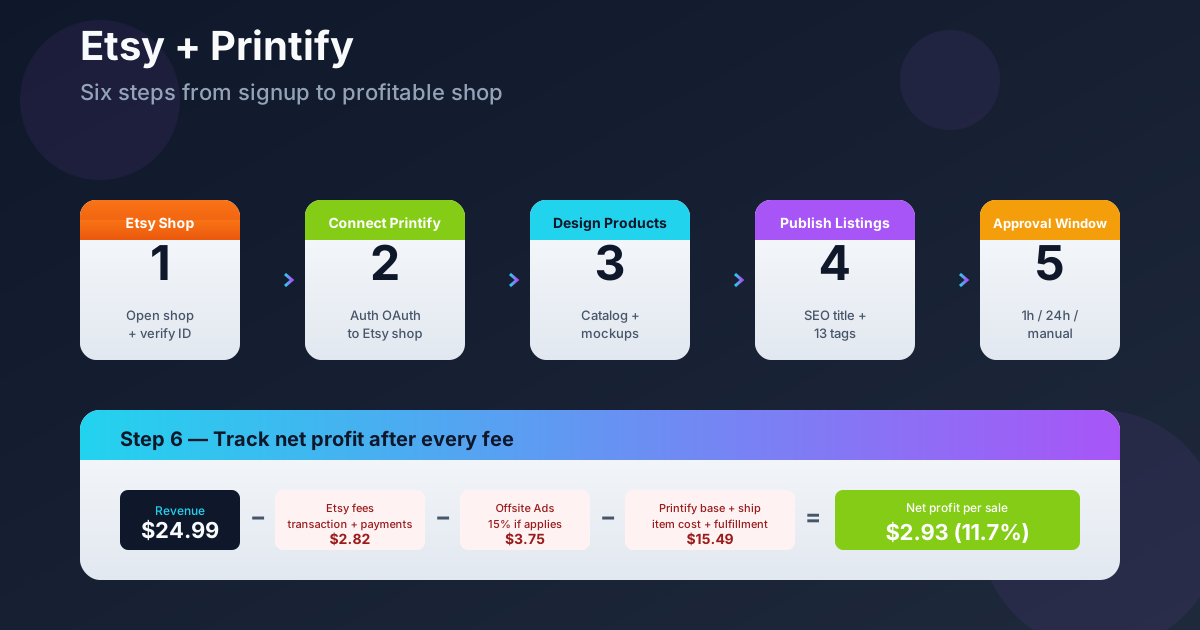
Quick Answer: Selling on Etsy with Printify takes six steps: open an Etsy shop, connect Printify as a production partner, build products in Printify's creator, publish listings to Etsy, set an order-approval window, then monitor per-listing margin after fees.
The setup itself is fast — under an hour for most sellers. The part nobody warns you about is what happens after launch: Etsy fees, ad fees, and Printify's per-item cost can eat 40-60% of revenue if you don't track them per listing from day one.
This guide walks the setup and the post-launch tracking that keeps your shop profitable.
What you need before you start
Before you touch either platform, line up four things. Skipping any of them costs you time later.
1. A bank account and government-issued ID. Etsy needs both during onboarding. US sellers also need a Social Security Number or EIN for tax reporting.
2. A shop name. Etsy requires 4-20 characters, letters and numbers only. Pick something niche-relevant but not boxed in — "MugShopCo" limits you to mugs forever.
3. Two or three product designs ready to upload. You can design inside Printify, but having artwork ready makes the first hour move faster. PNG files at 300 DPI, transparent background.
4. Around $15 for setup fees. Etsy charges a one-time $15 setup fee in most regions, plus $0.20 per listing. Printify is free — you only pay when an order ships.
If you're still deciding whether Printify is the right POD partner for an Etsy shop, our Printify alternatives comparison covers Printful, Gelato, and other options against the same fee structure.
Step 1: Open your Etsy shop
Go to etsy.com/sell and click Get Started. Sign up with email (or Google/Apple). Etsy will walk you through five onboarding screens.
Shop preferences: Pick your language, country, and currency. The currency you choose here is what buyers see — Etsy will convert at posting time for international viewers, but your reporting stays in this currency.
Shop name: Etsy checks availability live. If your first pick is taken, it suggests variations. Add a hyphen or a niche word rather than adding random numbers — random numbers read as spam.
How you'll get paid: Etsy Payments deposits into your bank account on a rolling schedule (weekly or monthly, your choice). You'll need to verify your identity by uploading an ID photo and a selfie. This step blocks some sellers for 24-48 hours — start it before your launch deadline.
Billing: A card on file pays Etsy fees: $0.20 per listing, 6.5% transaction fee, and payment processing (3% + $0.25 in the US). Save this number — you'll need it for Step 6.
Two-factor authentication: Etsy enables this by default in 2026. Use an authenticator app, not SMS, since a compromised Etsy shop can take weeks to recover.
Skip the "Open your shop" final button for now. You can come back to it after Printify is connected, which means your first listings are real products instead of placeholders.
Step 2: Connect Printify to Etsy
Sign up at printify.com with the same email you used for Etsy. It keeps invoices and order receipts in one inbox.
From the Printify dashboard, click My Stores in the left sidebar, then Add new store. Pick Etsy from the integration list.
Printify redirects you to Etsy's authorization screen. Allow the requested permissions — Printify needs them to publish listings, read orders, and update tracking numbers on your behalf. The permissions look broad but they're the minimum Etsy requires for production-partner integrations.
When you land back in Printify, you should see your Etsy shop name in My Stores with a green "Connected" badge. If you don't, log out of both platforms, clear cookies, and reconnect — this fixes 90% of first-time auth issues.
For a deeper walkthrough of the connection flow including troubleshooting common errors, see our Printify-to-Etsy connection guide.
Step 3: Design products in Printify
Click Catalog in the Printify dashboard. You'll see 1,300+ product types — t-shirts, mugs, posters, hoodies, totes, and more — each with multiple suppliers behind it.
Pick the product type first, then the supplier. Suppliers vary on print quality, base cost, and ship-from location. For US-targeted shops, filter to US-based providers like Monster Digital, SwiftPOD, or DJ. Faster shipping means fewer angry buyer messages.
Click Start designing. Printify's product creator opens with the blank product on a mockup. Drag your PNG onto the print area or use the AI generator if you don't have artwork yet.
Design tips that matter for Etsy specifically:
- Add at least 3 mockup angles. Etsy's algorithm favors listings with 5+ photos. Use Printify's auto-generated mockups for free, then add 1-2 lifestyle mockups via Placeit or Photoshop.
- Save designs as templates. Once you nail one product, save the template. Applying the same design to 5 product types (tee, hoodie, mug, tote, sticker) takes minutes instead of hours.
- Check the print area boundaries. What looks fine in the preview can crop badly on the actual garment. Order a sample of your first design before you build out the line.
Set the retail price inside Printify before publishing. The platform shows you the base cost and your profit margin live as you adjust. Aim for at least 40% gross margin before Etsy fees — see Step 6 for why that number matters.
Step 4: Publish listings to Etsy
With your product designed and priced, click Publish. Printify pushes the listing to Etsy as a draft (or live, your choice).
Most of the listing data carries over, but several fields need your attention on the Etsy side:
Title: Printify gives you a generic title like "Unisex Cotton T-Shirt." Replace it with a keyword-rich title — "Funny Cat Lover T-Shirt | Unisex Cotton Tee | Gift for Cat Mom" beats the generic version in search every time. Aim for 120-140 characters.
Tags: Use all 13 tags Etsy allows. Mix exact-match keywords ("cat mom shirt") with long-tail variations ("crazy cat lady gift"). Tools like eRank or Marmalead help if you're stuck.
Who made it: Etsy requires you to disclose Printify as a production partner. In the listing editor, under "About this listing," select "Another company or person" as the maker. Printify is now listed as a production partner — link it in your shop settings under Production Partners.
Processing time: Set 1-3 business days. Printify's actual production averages 2-5 days, but Etsy buyers see "ships in X days" not "produces in X days." Add a safety buffer.
Shipping profile: Printify creates a default profile, but verify it matches your real shipping. Free shipping over $35 wins Etsy's search boost — factor that into your retail price.
Publish the first listing. Etsy charges $0.20. If everything looks right, the listing goes live within minutes.
Many sellers also wonder whether they should be on Shopify instead of (or alongside) Etsy. The trade-offs are different enough that we covered them separately in Shopify vs Printify for POD and how Printify works with Shopify.
Step 5: Set your order-approval window
This is the most-skipped setting that costs sellers money.
In Printify, go to My Account → Settings → Production. You'll see Order Approval with three options:
- Manual approval — you approve every order before it goes to production.
- Auto-approve after 1 hour — Printify holds for an hour, then sends to production unless you cancel.
- Auto-approve after 24 hours — same idea, longer window.
The 24-hour window is the right default for most shops. It gives you time to catch fraud, wrong-size orders, or buyers who message you to fix a typo on a personalized item. Once production starts, cancellation requires you to eat the cost.
If you're running personalized listings (engraved jewelry, custom names, photo prints), use manual approval. The 30 seconds per order to verify text is cheaper than the refund-and-reprint cycle from a wrong order.
If you're running stock designs with no personalization, 1 hour is fine — but only if you actually check your email daily. Auto-approval after 1 hour with a seller who checks email weekly equals shipping wrong sizes you can't cancel.
Step 6: Track what actually matters after launch
Setup is the easy part. The shops that fail aren't the ones with bad designs — they're the ones who don't know which listings make money.
Here's the per-order fee stack on a $24.99 t-shirt sale:
- Etsy listing fee: $0.20 (paid every 4 months on renewal)
- Etsy transaction fee (6.5%): $1.62
- Etsy payment processing (3% + $0.25 US): $1.00
- Etsy Offsite Ads fee (15% if applicable): up to $3.75
- Printify base cost (typical tee): $10.50
- Printify shipping (US): $4.99 — often passed to buyer, but factored in
On the $24.99 sale with Offsite Ads applied: $24.99 - $0.20 - $1.62 - $1.00 - $3.75 - $10.50 = $7.92 gross profit. That's 31.7% margin, not the 40%+ you saw in Printify's calculator.
If the customer paid for shipping separately at $4.99, you net closer to $7.92 still — Printify charges you the shipping cost out of that line. If you offered free shipping and absorbed the $4.99, you're down to $2.93 net profit per shirt. That's 11.7% margin.
What to track per listing, weekly:
- Net profit per sale — revenue minus all fees, not gross margin from Printify's calculator
- Refund rate — anything above 5% means a quality or sizing issue worth investigating
- Offsite Ads attribution — Etsy bills you 15% on ad-sourced sales whether you opted in voluntarily or hit the $10K/year threshold
- Cost-per-acquisition if you run external ads — Meta or TikTok ads to drive traffic to Etsy listings, divided by orders attributed
Etsy's analytics show revenue and visits but not net profit. You'll need to export order data and join it with Printify's billing data manually — or use an operator tool that pulls both into one view automatically.
For a full breakdown of when Printify Premium pays for itself (it's not always), see our Printify Premium cost analysis.
Common mistakes that kill margins
Not opting out of Offsite Ads early. Etsy opts you in automatically once your shop crosses $10K/year. The 15% fee can wipe out margin on cheap items. If you sell stickers at $4.99, Offsite Ads can take more than your profit. Check Settings → Marketing in the first week.
Pricing in Printify, not in Etsy. Printify's calculator doesn't know about Etsy fees. A 40% margin in Printify becomes 15-20% net once Etsy takes its cut. Always price backwards from net profit.
Forgetting that Etsy listings expire. Etsy renews each listing every 4 months automatically — and charges $0.20 each time. A dormant 200-listing shop costs $40 every 4 months whether anything sells or not. Archive dead listings.
Not setting up shipping profiles correctly. If Printify charges you $4.99 to ship but you offered free shipping on a $14.99 mug, you're at break-even before fees. Build shipping cost into the retail price for low-ticket items.
Skipping samples. Order your own product before listing it. Mockups lie. Print quality varies between Printify suppliers — a tee from one provider can look amazing while the same design from a different provider looks washed out.
For broader Printify integration patterns (Shopify, Amazon, TikTok), browse the full integrations cluster or the Printify topic hub.
FAQs
Is it worth selling on Etsy with Printify in 2026?
Yes, if you treat it as a real business with cost tracking from day one. The sellers who fail aren't beaten by competition — they're beaten by ignoring fees until profit looks suspiciously thin. A 30%+ net margin per listing is achievable; a 50%+ gross margin in Printify's calculator usually isn't, once Etsy is added.
How many listings should I start with?
10-20 listings before launch. Etsy's algorithm needs data to figure out what your shop is about. Twenty listings across 2-3 product types in one niche outperforms 5 listings spread across 5 niches.
Do I need a business license to sell on Etsy?
In most US states, no — Etsy treats casual sellers as sole proprietors until you cross income thresholds for self-employment tax. Check your state's rules. Once revenue passes $1,000-5,000 (state-dependent), most sellers register an LLC or DBA.
Can Etsy ban me for using Printify?
No. Printify is an authorized Etsy production partner. You must disclose Printify as a production partner under "Who made it" — failing to disclose is what gets shops suspended, not using Printify itself.
How long does Printify take to ship?
Production averages 2-5 business days. Shipping adds 3-7 days domestically, 7-30 days internationally. Set your processing time on Etsy to 3-5 days and ship from a US provider if your buyers are mostly in the US. Slow shipping is the most common reason for negative reviews.
What's the cheapest way to start a Printify Etsy shop?
Free Printify account plus around $15 in Etsy setup fees gets you live. No monthly fees on either platform's free tier. Printify Premium ($24.99/month) starts paying for itself only after 30-50 sales/month — worth doing the math first.
Should I use Printify or another POD service?
Depends on your product mix. Printify has the largest catalog and strongest Etsy integration, but Printful has tighter quality control and Gelato has faster international shipping. See our full comparison.
Let Victor run the Shopify + Printify stack with your approval
Setting up Etsy and Printify is the easy part. Tracking which listings make real money — after Etsy fees, Offsite Ads, and Printify costs — is the hard part most sellers never do.
Victor is an AI employee built for Shopify-based POD stores. If your POD business runs on Shopify, he joins your Shopify orders, itemized Printify costs, and Meta/Google ad spend into a single live view. He calculates net profit per product, flags margin leaks, and proposes price changes for your approval before pushing them to your Shopify store.
He handles the operator work so you stay focused on designs and growth.
Try Victor free