
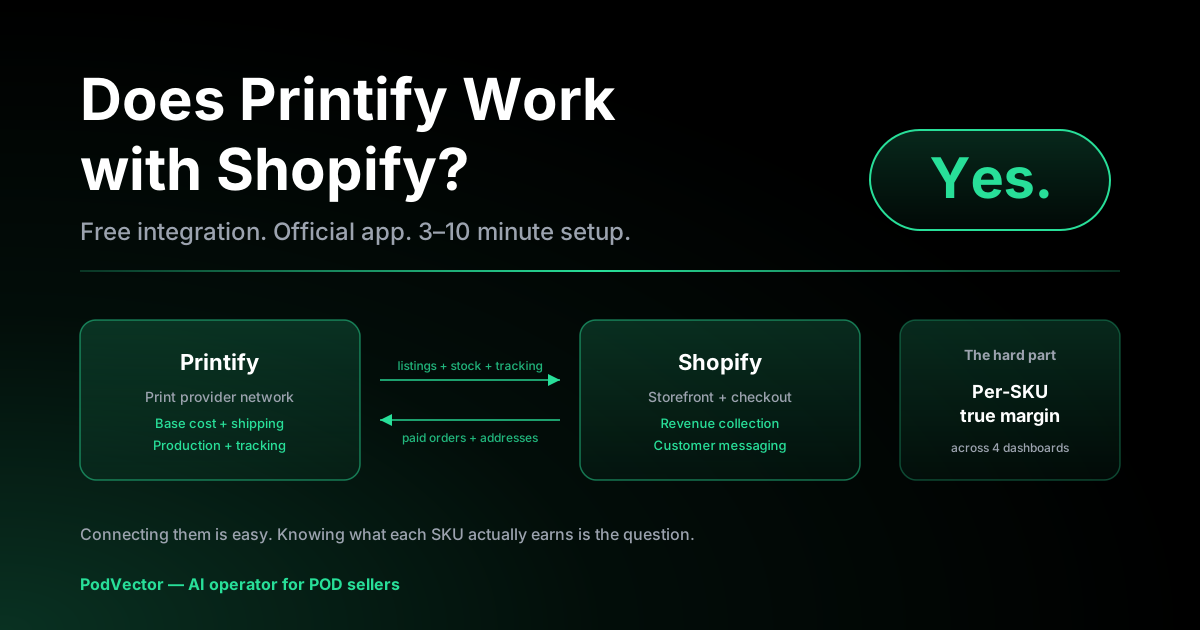
Quick Answer: Yes. Printify works with Shopify out of the box. The official Printify app sits in the Shopify App Store, and the connect flow takes about 3–10 minutes from either side (Printify dashboard or Shopify App Store).
Once it's live, paid Shopify orders push to Printify automatically. Printify charges you base cost + shipping, prints and ships the product, and pushes the tracking number back to Shopify.
The integration itself is free. Real costs come from your Shopify plan (Basic is $39/month at current US pricing), Shopify payment processing, and Printify's per-order base + shipping.
Yes — But Here's What "Works" Actually Means
The short answer is yes. Printify is one of the most-installed print-on-demand apps in the Shopify App Store, and the integration is officially supported by both companies.
The longer answer matters because "works with" gets used loosely in POD blog posts. Here's the precise version.
What works automatically: Printify pushes product listings into Shopify, Shopify pushes paid orders back to Printify for fulfillment, and Printify pushes tracking numbers forward to Shopify (which then emails the customer).
What is one-time setup: The OAuth connection between the two accounts, shipping profile mapping, your Printify billing method, and any custom product templates.
What still needs manual work: Pricing decisions, design uploads, ad spend, customer service, and refund handling on disputed orders. Printify does not run your store — it fulfills it.
If you're coming from Etsy or eBay where the marketplace handles traffic, Shopify is a different deal. You own the storefront, but you also own the demand-generation problem.
What Syncs Automatically (and What Doesn't)
This is the part most beginner POD guides skip, and it's the part that costs you orders when you miss it. Here's the actual sync map.
From Printify → Shopify (push)
- Product listings. When you click Publish on a Printify product, the listing (title, description, images, variants) is created in Shopify.
- Inventory status. If a base product or variant goes out of stock at the Printify print provider, Printify marks it unavailable in Shopify.
- Tracking numbers. Once an order ships, Printify pushes the carrier and tracking number to the Shopify order, which triggers Shopify's standard shipping-confirmation email.
From Shopify → Printify (pull)
- Paid orders. Shopify orders with paid status push to Printify within seconds. Unpaid/pending orders do not.
- Customer shipping address. Used by Printify to route the order to the closest print provider and calculate shipping.
- Variant SKU mapping. Printify uses the SKU you set during product creation to match Shopify orders back to its production queue.
What does NOT sync
- Pricing. If you change a product's retail price in Shopify, that price stays in Shopify only. Printify still charges you the base cost — your margin is just whatever's left.
- Product description edits made in Shopify. If you edit the description in the Shopify admin, that edit is local. The next Printify Publish can overwrite it.
- Refunds. Refunding the customer in Shopify does not refund you from Printify. If you've already approved production, you eat the base cost.
- Customer messages. Customer emails go to your Shopify-configured inbox. Printify never sees them.
The pricing one bites the most people. Edit prices in Shopify if you want, but treat Printify as the source of truth for base cost — your margin math has to start from there.
How to Connect Printify to Shopify
You can start from either side. Both routes converge on the same OAuth handshake.
Route A: Start from Printify
Log in to printify.com, click your profile icon, choose My Account, then My Stores in the sidebar. Click Add new store, pick Shopify from the channel list, and enter your your-store.myshopify.com URL.
Shopify opens its OAuth approval screen. Approve the permissions, and you're back in Printify with the store connected.
Route B: Start from the Shopify App Store
Go to the Shopify App Store and search for Printify. Click Add app, sign in to (or create) your Printify account, and approve the permissions on Shopify's side.
Both routes take 3–10 minutes if you already have accounts on both platforms. For a deeper step-by-step with screenshots, see our Printify–Shopify integration setup guide or the link Printify to Shopify step-by-step.
For the broader integration picture across all sales channels, our Printify integrations hub is the starting point.
Post-connect setup checklist
- Set up shipping in Shopify. Printify ships from the print provider's location; you need to either add Printify's shipping rates to your Shopify shipping profile or set up flat-rate shipping that absorbs the cost.
- Add a billing method in Printify. Without this, orders stall in "payment required" status. Printify never auto-pulls from Shopify Payments — it has its own billing relationship with you.
- Publish your first product. Pick a base product, upload your design, set variants and pricing, and click Publish. The product appears in Shopify within 1–2 minutes.
- Place a test order. Buy one of your own products using a real card, then refund or cancel it before production starts. This validates the full Shopify → Printify → tracking-back loop.
What It Actually Costs to Run
The Printify–Shopify integration is free. Both apps have free tiers. The real cost is the stack underneath.
Shopify side (fixed monthly):
- Basic plan: $39/month (or $29/month billed annually)
- Shopify plan: $105/month
- Advanced: $399/month
Shopify side (per transaction):
- Shopify Payments: 2.9% + $0.30 per transaction on Basic (lower on higher tiers)
- Third-party processors: above + 2% transaction fee on Basic (drops to 0.5% on Advanced)
Printify side:
- Free plan: $0/month, full base + shipping cost per order
- Printify Premium: $29.99/month, ~20% off base costs on most products
- Per-order: base product cost + shipping, charged when the order goes to production
Take a $25 unisex tee as a worked example. Base cost might be $9, Printify shipping is $4.49, so your fulfillment cost is $13.49. Shopify Payments takes $0.30 + 2.9% of $25 = $1.03. Net margin: $25 − $13.49 − $1.03 = $10.48 per unit before Shopify subscription, ads, and design time.
That $10.48 is your real unit economics. Knowing it cold is the difference between a profitable POD shop and one that subsidizes its own marketing.
Limits, Restrictions, and Gotchas
"Yes it works" is true. "It always works perfectly" is not. Here's what to know before you scale past your first 50 orders.
Product cap. Free Printify accounts are limited to 5 stores. Each store can list as many products as you want, but only 10 designs at a time on the free plan in some markets. Printify Premium lifts limits.
Order volume during sales spikes. Printify uses a network of print providers, each with their own capacity. Sales spikes during Q4 or a viral TikTok can push production times from 2–7 days to 7–14 days. Plan accordingly.
Variant publishing failures. If a Shopify product hits the 100-variant cap (a real limit on Shopify), Printify silently skips the excess variants when publishing. You won't see an error — the variants just won't be available for sale.
Address validation. Printify rejects orders with invalid or PO Box addresses for certain print providers. The order will sit in Shopify as "in production" until you fix it manually.
Customer messaging. Shopify sends shipping notifications using Shopify's templates. The "from" address is your Shopify-configured sender, not Printify. Customers replying to complaints email you, not Printify.
What to Track After You Go Live
The integration is the easy part. Knowing whether the store is making money is the hard part — and it's where most POD sellers get stuck.
You need four data sources reconciled: Shopify revenue, Shopify payment processing fees, Printify base + shipping costs, and ad spend (Meta, Google, TikTok). None of those four sit in the same dashboard by default.
Per-SKU true margin. What's the net profit on each product variant after Printify base cost, Printify shipping, Shopify processing fees, and a fair allocation of ad spend? Most sellers know revenue. Very few know this number.
Ad ROAS by SKU. Meta and Google report ROAS using Shopify revenue. They don't subtract Printify's $13.49 fulfillment cost. A "3x ROAS" Meta campaign can be selling at a loss if base cost + shipping eats more than two-thirds of revenue.
Restock and reprice triggers. Which SKUs are profitable enough to push more ad spend at? Which are losing money and should be paused? The decision needs daily attention but you don't want to spend 90 minutes a day in spreadsheets to make it.
This is the operator problem that PodVector's AI agent, Victor, was built for. Victor connects to Shopify, Printify, and your ad accounts, builds your per-SKU true margin in a live data warehouse, and proposes specific actions — pause this campaign, reallocate spend to this SKU, raise this price by $2 — with approval gates so you stay in control of every change.
You don't have to use Victor to do this. You can build it in spreadsheets if you have the time. But knowing what to track is non-negotiable once you're past your first 50 orders.
Does It Work Better Than Printify + Etsy or Wix?
"Works" is a different question for each channel. Here's the honest comparison.
Shopify: You own the storefront, the customer relationship, and the demand-generation problem. The technical integration with Printify is the smoothest of any channel — the OAuth and order push work cleanly, and Shopify's app store gives you 10,000+ other tools to layer on. The cost is the $39+/month Shopify subscription and you have to drive your own traffic.
Etsy: Etsy brings the demand. Sync between Etsy and Printify is also automated, but the marketplace takes a cut (6.5% transaction + 3-4% payment processing + $0.20 listing fee). Margins are tighter but customer acquisition cost is near zero. See our Printify–Etsy integration guide and Printify–Etsy: how it works for the full setup.
Wix: Same model as Shopify — you own the store. Fewer apps, lower monthly cost ($27/month and up for Business plans that support POD).
The right answer is usually multiple channels. List the same product on Shopify (own the customer), Etsy (cheap acquisition), and TikTok Shop (impulse buys). Printify handles the fulfillment for all three from one product catalog.
For pricing context across Printify's plans, our Printify free plan breakdown and Printify free plan pricing breakdown walk through which plan to pick at which volume.
If you want the canonical step-by-step from the source, LitCommerce's in-depth Printify-to-Shopify connect guide is the most thorough external walkthrough we've seen.
FAQs
Is Printify free to use with Shopify?
Yes. The Printify app on the Shopify App Store is free to install, and Printify's free plan is enough to run a Shopify storefront. You only pay Printify per order (base product cost + shipping) when an order is placed.
Does Shopify automatically send orders to Printify?
Yes, once the integration is connected. Paid Shopify orders push to Printify within seconds. Printify charges your billing method, prints the order, ships it, and sends the tracking number back to Shopify, which emails the customer.
Do I need Printify Premium to use Shopify?
No. Printify's free plan works fine with Shopify. Printify Premium ($29.99/month) shaves ~20% off base product costs and tends to pay for itself once you're consistently doing 30–40+ orders per month.
Can I edit a product's price in Shopify without breaking Printify?
Yes. Pricing is one of the few things that does not sync — Shopify is the source of truth for retail price, Printify is the source of truth for base cost. Just remember the difference is your margin, minus Shopify payment processing.
What happens if Printify is out of stock on a product I've already sold?
Printify marks the variant unavailable in Shopify (so new orders can't be placed) and flags existing in-flight orders for you to switch to an alternate print provider or refund. You'll see this in your Printify dashboard's Orders view.
Can I use Printify with multiple Shopify stores?
Yes. Each Printify store profile maps to one Shopify store, and you can have up to 5 stores on the free plan (more on Premium). This is how multi-brand POD operators run separate storefronts from one Printify account.
How long do Printify orders take to fulfill on Shopify?
Production averages 2–7 business days. Shipping is on top of that, usually 3–10 business days within the US. Print providers in Europe and Australia ship locally if you have buyers there. Spikes during Q4 can extend production to 7–14 days.
Does the integration sync customer email or phone?
Printify only receives the shipping address it needs to route the order. Customer email and phone stay in Shopify — Printify doesn't email your customers directly.
Let Victor run your Shopify + Printify business
Connecting Printify to Shopify is 10 minutes. Knowing what each SKU actually earns after base cost, shipping, processing fees, and ad spend is the part that eats your week.
Victor is an AI employee for POD sellers. He connects to Shopify, Printify, and your ad accounts, builds your per-SKU true margin in a live data warehouse, and proposes specific actions — pause this campaign, raise this price, reallocate spend to that SKU — with approval gates so you stay in control of every change.
Stop reconciling four dashboards in a spreadsheet.
Try Victor free