
Quick Answer: The Canva + Printify + Etsy stack is the fastest path to a print-on-demand shop with zero upfront inventory. You design in Canva, push the artwork into Printify's mockup generator, and Printify auto-syncs the products to your Etsy listings.
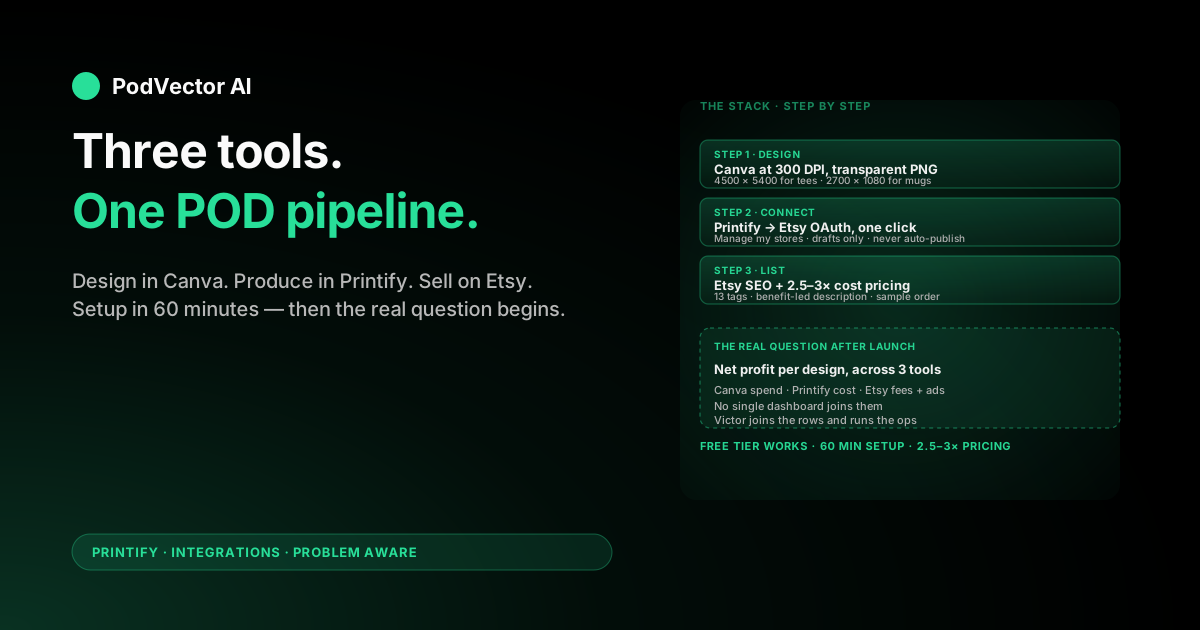
Setup takes about 60 minutes if you already have an Etsy account: connect Printify to Etsy from your Printify dashboard, then design your first artwork in Canva at the exact pixel dimensions Printify requires for each product. Export as a transparent PNG at 300 DPI and upload.
Once the pipeline is live, the harder problem is reading across three platforms (Canva spend, Printify costs, Etsy fees and revenue) to know which designs actually make money. That's where most sellers stall.
Why Canva + Printify + Etsy works for POD
Three tools, three jobs, almost no overlap.
Canva is your design app. Printify is your factory and fulfillment network. Etsy is your storefront and traffic source. Each one is the cheapest serious option in its category, and they hand off cleanly to each other.
For a new seller, this stack means you can start a real shop for under $20 (your one-time Etsy listing fees plus a Canva Pro month, if you upgrade). No inventory. No warehouse. No design school degree.
The trade-off: you have to learn how the three tools talk to each other. That's what this guide walks through.
If you're still weighing platforms, the Printify side of the stack also pairs with Shopify — see our breakdowns on whether Printify or Shopify is better and how they compare for new sellers. For more on the wider Printify ecosystem, and especially other Printify integrations beyond Etsy, see those hubs. For this guide we'll stay on Etsy, since Etsy traffic is the closest thing to a free customer pipeline for first-time POD sellers.
What you need before you start
You'll want all of these ready before you start clicking:
- An Etsy account set up as a seller (Etsy.com → "Sell on Etsy" → Get Started). New shops typically pay $0.20 per listing.
- A Printify account — free. Sign up here.
- A Canva account — free is enough for most starter designs. Pro ($15/month) unlocks the Background Remover and the Magic Resize tool, both of which are time-savers once you're scaling.
- A bank account or PayPal connected to Etsy for payouts, and a payment method on Printify for production costs.
- 5–10 design ideas tied to a niche. Generic "funny mug" designs won't differentiate. Pick a niche (nurses, dog moms, pickleball players, software engineers) and design for that specific buyer.
One quick clarification on ownership before we go further: Printify and Etsy are separate companies, and Printify isn't owned by Shopify either — we dig into the corporate structure in this breakdown if you're curious.
Step 1: Set up Canva for POD work
Sign up at canva.com. The free tier covers about 80% of POD design work.
Inside Canva, do two things before you design anything:
- Create a folder called "POD Designs" from your dashboard. This is where you'll save every design so you can find them again when you scale.
- Decide on Free vs. Pro. The Pro upgrade is worth it the moment you need to remove a background from a hand-drawn or photographed element. If all your designs are vector-style text on a flat color, Free is fine.
Don't worry about brand kits or templates yet. The first job is to ship a few designs and see what sells. Branding gets formalized in month two, not week one.
Step 2: Connect Printify to Etsy
This is the one-time pipe that lets Printify push products into your Etsy shop. Here's the exact path:
- Log into your Printify dashboard.
- Click your store name in the top-left sidebar.
- Choose Manage my stores → Add new store.
- Select Etsy from the platform list.
- Sign into your Etsy account when prompted and grant Printify the requested permissions (manage listings, sync orders).
- Confirm. Printify will pull in your shop details and the connection is live.
From this point forward, every product you publish from Printify lands in your Etsy shop as a draft listing. You then review the title, tags, and pricing before going live — Printify never publishes to Etsy without your approval.
If the OAuth handshake fails, the usual cause is a browser-extension conflict. Open the connection flow in a fresh incognito window with no extensions and try again.
Step 3: Design in Canva at the right size
This is where most beginners lose hours. Printify expects your artwork at very specific pixel dimensions per product, and an upload that's too small will print blurry.
The rule: design at 300 DPI at the print area's full size. Here are the canvases to set up in Canva for the most popular POD products:
| Product | Canva canvas size (pixels) | Notes |
|---|---|---|
| T-shirt / hoodie front | 4500 × 5400 | Standard 15" × 18" print area at 300 DPI |
| Mug (11oz) | 2700 × 1080 | Wraparound; bleed on both sides |
| Tote bag | 4500 × 4500 | Centered square design |
| Sticker (3" round) | 900 × 900 | Add 1/8" bleed if cut-to-shape |
| Poster (18" × 24") | 5400 × 7200 | Portrait orientation |
In Canva, click Create a design → Custom size and enter the pixels. Set units to "px" in the dropdown.
Design rules to keep your file print-ready:
- Background: for apparel and stickers, the background must be transparent. Don't put your design on a white square — the white will print over the shirt color. Set the Canva background to transparent before exporting.
- Fonts: stick to Canva's built-in fonts. If you upload a custom font from a third-party site, double-check the commercial-use license — Etsy's IP enforcement is fast and unforgiving.
- Colors: Canva exports in RGB; Printify converts to CMYK on its end. Avoid neon or fluorescent colors — they shift the most in conversion.
- Edge margins: keep critical design elements at least 100 pixels from the canvas edge so they don't get cropped in production.
When you're done, click Share → Download → choose PNG → check Transparent background (Pro feature) → set size multiplier to 1×. Save to your "POD Designs" folder.
If you're on Canva Free and can't tick "Transparent background," use the free remove.bg tool to strip the white before uploading to Printify.
Step 4: Upload your Canva design to Printify
In Printify:
- Click Catalog and pick the product you designed for (must match the canvas size you used in Canva).
- Choose your print provider. Printify lists several per product — the one ranked highest by Printify usually has the best balance of price and quality, but read the recent reviews. Production location matters for shipping speed to your target market.
- Click Start designing.
- Drag your PNG into the design canvas, or upload it from your computer. Printify will fit it to the print area.
- Drag the corners to align with the print area. Use the alignment guides — getting this centered now saves you a returns headache later.
- Click Preview to see Printify's auto-generated mockups. If the design looks pixelated in preview, your file is too small — re-export from Canva at 2× or 3× size.
- Click Save product.
Printify will now generate 4–6 mockup images automatically. These are what Etsy buyers see in your listing, so they matter as much as the underlying design.
Step 5: Publish to Etsy
From the saved Printify product, click Publish.
Printify pushes it to Etsy as a draft listing. Open your Etsy Shop Manager → Listings → Drafts and finish the listing there:
- Title: include your top three keywords in the first 60 characters (Etsy truncates after that on mobile search results).
- Tags: all 13 tag slots. Mix broad terms ("dog mom t-shirt") with niche long-tails ("golden retriever mom shirt funny").
- Categories and attributes: fill every relevant attribute. Each one is a free filter you appear under.
- Price: Printify shows your production cost. Etsy charges 6.5% transaction fee + payment processing. Most POD sellers price at 2.5–3× their Printify cost to net ~25% margin after Etsy fees and Etsy Ads.
- Description: first three lines matter most — that's what shows above the fold. Lead with the benefit, then specs.
Hit Publish on Etsy. Your listing is live. Etsy will charge $0.20 for the listing, and you'll pay that again every four months if it doesn't sell, or after each sale.
Speaking of fees: Printify's Premium membership ($24.99/month) lowers per-product production cost by up to 20%, which can be worth it once you're at a few sales per week. We unpacked the math in our breakdowns of the Printify Premium price and breakdown and the Premium benefits in detail.
Step 6: Track what matters after launch
Here's where the Canva + Printify + Etsy setup stops being a setup problem and becomes a business problem.
You now have data in three places:
- Canva — design files, but no sales context.
- Printify — production cost, fulfillment status, shipping cost per order.
- Etsy — gross revenue, transaction fee, payment processing fee, Etsy Ads spend, and tax collected.
The question that matters — which design actually made me the most profit last month, after all fees? — lives in none of those three dashboards alone. You have to join them.
Most sellers do this by exporting CSVs every Sunday and pivoting them in Google Sheets. It works at five listings. It collapses at fifty.
This is where Victor, PodVector's AI employee, takes over the chore. If your POD business runs on Shopify, Victor pulls live data from Printify, Shopify, and your Meta and Google ad accounts into one source of truth, then answers questions in plain English: "Which three listings have the lowest margin after ad spend?" or "What's my net profit per design this month, sorted by best?"
Beyond reporting, Victor can also act with your approval — flagging money-losing ad campaigns, suggesting price changes on underpriced listings, and adjusting your Shopify side when you say go. You stay in the loop on every material change.
For the setup-and-design phase, you don't need any of this. Get your first five listings live first. But when you start hitting the wall of "which design is actually working" — that's the signal to wire up real cross-platform tracking.
Common mistakes to avoid
Designing in Canva at screen size, not print size. A 1080 × 1080 Instagram square will print blurry on a t-shirt. Always start with the right pixel dimensions per product.
Exporting with a white background. Your "white" square will print over a black shirt as a literal white box. Always transparent PNG for apparel.
Skipping the Etsy listing draft review. Printify's auto-generated title and tags are generic. Spending 10 minutes hand-writing Etsy SEO per listing is the single biggest free lever you have.
Pricing at 2× cost. After Etsy's transaction fee, payment processing, listing fee, and any Etsy Ads spend, 2× usually means 5–10% margin. 2.5–3× is the working range.
Not buying a sample. Print providers vary. Order one of your own products before you list it. Spend $15 once to avoid a one-star review for "color looked nothing like the photo."
Treating Etsy Ads as set-and-forget. Etsy Ads compounds losses fast on POD products because margins are thin. Check the spend-vs-revenue weekly, minimum.
FAQs
Do I need Canva Pro to use Canva with Printify?
No. Canva Free is enough for most starter designs. You'll want Pro once you need the transparent-PNG export ($15/month) or the Background Remover for photographed elements. Until then, remove.bg works for free.
Can I use Canva's stock images on Etsy products?
Some of Canva's stock content is licensed for commercial use, but the rules are tighter than they look. The safest path: design with your own typography and shapes, or use Canva elements explicitly labeled "Free" with commercial-use rights. Read Canva's content license terms before shipping.
How long does the Printify-to-Etsy connection take?
The OAuth connection itself takes about two minutes. Setup, from "no account" to "first product live on Etsy," typically takes 60–90 minutes for a beginner — most of which is design time in Canva.
Can I have multiple Etsy shops on one Printify account?
Yes. Printify lets you connect multiple stores (Etsy, Shopify, eBay, others) under one account. This is useful if you're testing niches in separate shops or running brand and personal accounts in parallel.
What if my design looks pixelated in Printify's preview?
It means your Canva file was exported below 300 DPI for the product's print area. Re-open the design in Canva, check the canvas dimensions match the table above, and re-export. Printify won't let you publish a low-resolution file to Etsy.
Does Printify charge me upfront for products?
No. You only pay Printify when an order comes through — that production cost is deducted automatically when the customer pays you via Etsy. Your only upfront costs are Etsy's $0.20 listing fee per product and any optional Canva Pro subscription.
How do I track which Canva designs sell best on Etsy?
Etsy's stats dashboard shows views, favorites, and orders per listing. Match that back to the Canva design file in your folder. For a small shop, a manual spreadsheet works. Once you're past a few dozen listings — and if you also sell through Shopify — an AI employee like Victor can join your Shopify orders with itemized Printify costs and ad spend to give you real net-profit-per-design.
Once the pipeline is live, let Victor run the numbers
Canva, Printify, and Etsy each give you a slice of the picture. If your POD business runs on Shopify, Victor joins your Shopify orders, itemized Printify costs, and Meta/Google ad spend into one live view and answers profit questions in plain English. He'll also flag losing ad campaigns and underpriced listings, then propose the fix — all with your approval before he acts.
Try Victor free