
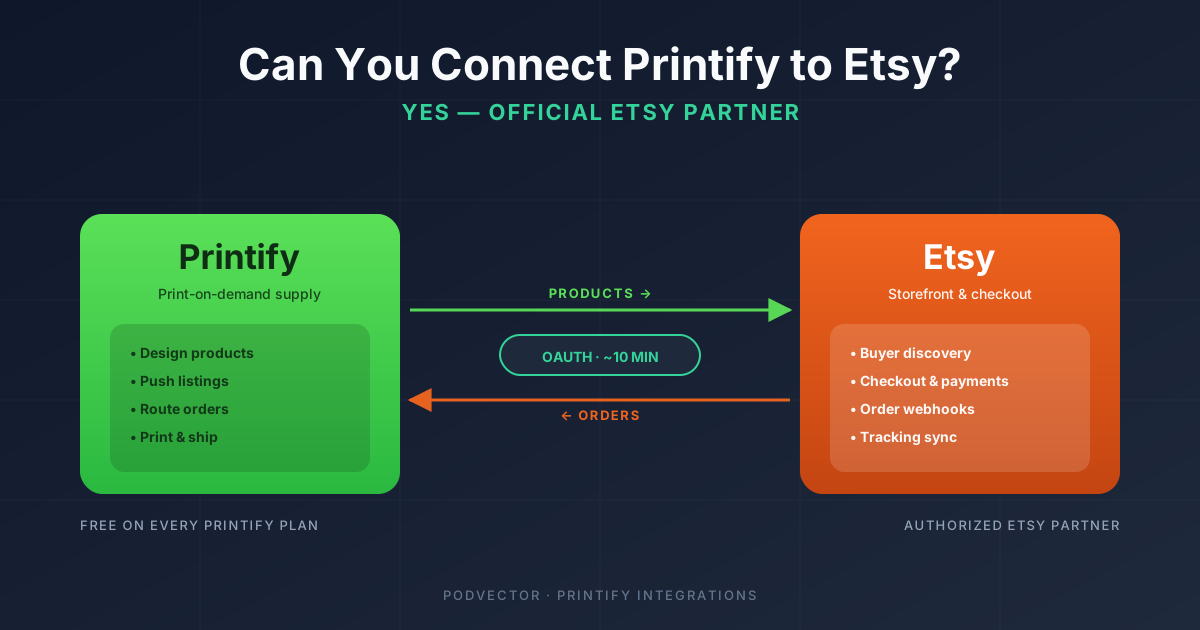
Quick Answer: Yes. Printify is an authorized Etsy Partner, and the official integration lets you design products in Printify, publish them as Etsy listings, and have Etsy orders flow back to Printify for automatic fulfillment.
The connection takes about ten minutes. You need an active Etsy shop (open, with billing set up) and a free Printify account. From the Printify dashboard, you go to Manage my stores → Connect → Etsy, sign into Etsy, and click Grant access.
What most "yes you can" articles skip is the part after you connect. The integration handles the plumbing; the operational decisions — pricing, ad spend, listing health, refund reconciliation across two dashboards — are still on you.
The short answer
Yes, you can connect Printify to Etsy, and you should. Printify is one of a small number of print-on-demand platforms that Etsy has authorized as an official integration partner.
That status matters. Etsy's API access is gated — third-party apps need approval to publish listings and read orders on a seller's behalf. Printify has had that approval for years, which is why the connection flow takes a few clicks instead of a developer week.
Once connected, every product you create in Printify can be pushed to your Etsy shop as a fully-priced listing with images, variants, and shipping profiles already mapped. Every Etsy order that contains one of those products lands in Printify and routes to the appropriate print provider — no copy-paste, no manual order entry.
If you want the exhaustive step-by-step with screenshots, the Printify-to-Etsy setup guide in this cluster goes deeper. This page is the direct answer plus the parts other articles leave out.
What "connecting" actually does
Worth being concrete, because the word "connect" hides a lot of mechanics.
When you authorize Printify on Etsy, you're granting an OAuth permission. Printify gets a token that lets it call Etsy's API on your behalf with a defined set of scopes — read your shop info, write new listings, read incoming orders, and update shipping/tracking.
From that point on, the two platforms exchange data continuously. Listings you publish from Printify show up in your Etsy shop as native Etsy listings. Orders placed on those listings get pushed from Etsy into Printify, where they enter the production queue based on your approval settings. Tracking numbers generated when the order ships get written back into the Etsy order record, which triggers Etsy's standard shipping notification to the buyer.
The buyer never sees Printify. They see your Etsy shop, your branding, your product photos, and Etsy's checkout. Printify is the back-of-house production layer that the buyer experience is built on top of.
This is the same architecture the integration uses on every channel Printify supports — Shopify, eBay, WooCommerce, TikTok Shop, Wix, Squarespace, and a handful of others. The flow is identical; only the OAuth handshake and the listing field mapping change per platform.
Before you connect: prerequisites
Four things need to be true before the connection will work cleanly.
1. Your Etsy shop has to be open. Not "registered as a seller" — actually open. That means you've completed Etsy's onboarding (shop name, language, currency, country), accepted the seller policies, and added at least one listing or saved a draft listing. Etsy treats not-yet-opened shops as incomplete and the API connection will silently fail.
2. Your Etsy shop needs billing on file. Etsy charges a one-time setup fee (US$15 in most regions) plus a US$0.20 listing fee for every product you publish. If you don't have a payment method attached, the listings will fail to publish even though the Printify side will look like it worked.
3. You need a Printify account. Free is fine — you don't need Printify Premium to connect to Etsy. Premium is purely a discount on Printify's wholesale prices; the integration itself is free on every tier.
4. The Etsy account you're connecting must be the shop owner. If you're a team member or assistant, the OAuth handshake will succeed but you won't have permission to publish listings. Either connect from the owner's account or have the owner grant you shop admin access first.
Skip step 1 or 2 and the connection itself completes — you'll see "Etsy connected" in Printify — but every subsequent publish attempt fails. That's the single most common cause of "I followed the instructions and nothing works" support tickets.
The five-step connection
From a fresh Printify login, the click path is:
Step 1 — Open the store manager. In Printify's top navigation, click Manage my stores. If this is your first store, you'll land directly on the channel picker. If you already have a store connected, click Connect in the top-right.
Step 2 — Pick Etsy. The channel grid shows every supported sales channel. Click the Etsy tile. Printify will explain what permissions it's about to request and what they're used for.
Step 3 — Authenticate with Etsy. A new tab opens on Etsy's domain. Sign in with the email and password of the Etsy account that owns the shop you want to connect. If you have two-factor authentication enabled on Etsy (you should), you'll be prompted for your code.
Step 4 — Grant access. Etsy displays the scopes Printify is requesting — read shop info, create and update listings, read transactions, manage shipping. Click Allow Access. You'll be redirected back to Printify.
Step 5 — Confirm the store appears. Back in Printify's Manage my stores view, your Etsy shop now appears in the list with its real shop name pulled from Etsy. Click into it once to verify the connection status reads "Connected" and not "Error" or "Pending."
That's the whole flow. If everything is configured correctly on the Etsy side, total time is six to ten minutes including the Etsy sign-in.
What happens the moment you connect
Nothing visible to the buyer. The integration doesn't publish products automatically and it doesn't change anything about your existing Etsy listings.
What changes is what's available to you. From the Printify product catalog, you can now click Publish on any product you've designed and pick "Etsy" as the destination. Printify pushes the mockups, the variants, the pricing, and a default shipping profile.
On the order side, the integration starts polling immediately. Any new order on a Printify-published listing flows into Printify within a few minutes. By default, orders enter a 24-hour approval window — you can review and adjust before they go to production. You can switch this to auto-approve if you want hands-off fulfillment.
If you already have listings in your Etsy shop that you created manually before connecting, they remain unaffected. Printify doesn't claim or modify them. You can import them into Printify after the fact and re-link the fulfillment, or leave them as Etsy-managed and self-fulfilled. Most sellers leave existing listings alone and add new Printify-managed listings alongside them.
The combined fee stack you just inherited
This is the part nobody walks you through, and it's where margins quietly disappear.
Connecting Printify to Etsy means a single sale now passes through two fee structures stacked on top of each other.
On the Etsy side, every sale costs you:
- Listing fee: US$0.20 per listing, renewed every four months or when an item sells
- Transaction fee: 6.5% of the total (product price + shipping)
- Payment processing fee: roughly 3% + US$0.25 in the US (varies by country)
- Offsite Ads fee: 12–15% if Etsy attributes the sale to one of their paid ads, applied on top of everything else
- Regulatory operating fee: 0.25–1.1% in some jurisdictions (EU, UK, India), applied to product + shipping
On the Printify side, every sale costs you:
- Base product cost: the wholesale price Printify charges you for the blank plus printing
- Shipping cost: Printify's shipping rate from the chosen print provider to the buyer's address
- Optional subscription: Printify Premium (US$29/month) gives you up to 20% off wholesale prices, which pays for itself somewhere around US$200/month in Printify cost-of-goods
Stack those together on a US$25 T-shirt and the merchant margin can swing from "comfortable" to "underwater" depending on a few variables you don't think about until your first month of sales settles. The Printify T-shirt price full breakdown walks through the actual math for the most common SKU, and the Printify T-shirt production cost breakdown covers the production-side variables.
Worth being honest about: the connection itself is free, but the operational cost of running both platforms together is meaningful. Plan your retail prices with all of the above in mind, not just the wholesale-plus-markup math.
What to track once it's live
This is the part most "how to connect" articles end without writing. The integration goes live and you're left with two dashboards that each show you half the picture.
The numbers that actually matter live across both systems and have to be reconciled by you.
True margin per SKU. Etsy shows you gross revenue minus Etsy fees. Printify shows you cost of goods. Neither shows you the combined number — and neither knows about your ad spend. A SKU that looks profitable in Etsy can be losing money once Printify's shipping cost and your Meta ad spend are layered in.
Refund and chargeback reconciliation. When an Etsy buyer requests a refund, Etsy refunds the buyer but Printify still charges you for the production cost (because the order was already printed and shipped). That asymmetry is invisible in Etsy's dashboard. You only see it when you compare Etsy's revenue export against Printify's invoice line by line.
Listing health. Etsy quietly down-ranks listings with stale tags, missing variations, or lower conversion than category peers. Printify-published listings inherit Printify's defaults, which are competent but generic. Listings that don't get manually optimized after publishing tend to flatline on traffic after the first 90 days.
Offsite Ads attribution. Etsy can retroactively reclassify a sale as Offsite-Ads-driven up to 30 days after the sale, which means the fee you owe Etsy can change after the fact. If you're not pulling Etsy's transaction-level export monthly, you'll see "unexplained" margin drift in your bookkeeping.
Cross-source operating decisions. "Which Printify product should I push more ad spend toward?" requires joining Etsy revenue, Printify costs, Meta and Google ad spend, and Etsy's Offsite Ads fees into one view. None of the platforms involved will hand you that view. You either build it yourself in a spreadsheet, hire someone to maintain it, or — if your POD business runs on Shopify — hand the data layer to an AI employee like Victor that joins your Shopify orders, itemized Printify costs, and Meta/Google ad spend into one live view, then proposes the reallocation for your approval.
The integration solves the data-entry problem. The operational problem — what to do with the unified data — is the one that decides whether your POD business grows or stays small.
When the connection fails or breaks
A short list of the failure modes worth knowing in advance so you don't waste an afternoon on them.
"Etsy connected" but listings fail to publish. Almost always one of: Etsy shop isn't fully open, billing isn't on file, or the connected Etsy account doesn't have shop-owner permissions. Re-check each in the Etsy admin before retrying.
Orders aren't flowing into Printify. Check that the listing was published via Printify (not created manually in Etsy). Only Printify-published listings get their orders routed back. Manually-created Etsy listings stay self-managed even after the connection is live.
Connection randomly disconnects. Etsy occasionally invalidates OAuth tokens — usually after a password change, a security event, or an Etsy-side policy update. The fix is to re-run the connection flow; your existing products and orders are preserved.
Shipping profiles don't match. Printify creates a default shipping profile when you publish, which sometimes conflicts with shop-wide profiles you already have configured. If buyers see weird shipping prices, go to Etsy's shipping settings and either align the profiles or let Printify own shipping for those listings.
Listings get suspended. Etsy's policy enforcement applies to Printify-published listings the same as any other. Trademark issues, restricted material claims (the word "vintage" on something less than 20 years old), or category violations can trigger a takedown. Etsy notifies you in the Etsy admin, not in Printify.
When connecting might not be the right move
Three scenarios where the answer to "should I connect Printify to Etsy" is actually no, or not yet.
You're still validating a product concept. If you're testing whether a niche has demand, you don't need Etsy's listing fees and shop fees on top of your testing budget. Run a few test listings through Printify's storefront, or use a free trial on a Shopify alternative, before committing to Etsy fees.
Your designs aren't trademark-cleared. Etsy is more aggressive than most marketplaces about taking down listings on trademark complaints — and a single takedown on a high-traffic listing can lose you the listing's full sales history. Validate your design IP before connecting, not after.
You already have a Shopify store doing volume. Etsy is a discovery channel with low intent buyers and tight margins. Shopify is a destination channel with higher intent and better margins. If your Shopify store is working, adding Etsy is operational complexity (two dashboards, two fee stacks, two compliance regimes) for incremental volume. The Printify-to-Shopify setup guide walks through the alternative path, and the Printify-to-Squarespace setup guide covers the lighter-weight option if you want a destination site without Shopify's monthly fee.
For a wider view of how Printify slots into different sales channels, the Printify integrations cluster covers every supported channel side by side, and the Printify topic hub is the index for everything Printify-related on this site.
Worth checking the source documentation too: Printify's official Etsy integration page has the canonical connection flow and current feature list straight from Printify.
FAQs
Is connecting Printify to Etsy free?
The connection itself is free on every Printify tier, including the free plan. You'll still pay Etsy's standard listing fee (US$0.20), transaction fee (6.5%), and payment processing fee on every sale. Printify Premium (US$29/month) is optional and only affects your wholesale costs, not the integration.
How long does the connection take?
Six to ten minutes for the OAuth flow if your Etsy shop is already open and billing is configured. Longer if you also need to set up Etsy from scratch — budget an hour for the full first-time onboarding (shop opening, billing, policies, first draft listing).
Do I need Printify Premium to connect to Etsy?
No. The integration is on every plan, including free. Premium is purely a wholesale discount — it pays for itself somewhere around US$200/month in Printify product spend, so most sellers don't add it until they're past that volume.
Can I connect more than one Etsy shop to Printify?
Yes. Printify supports multiple stores per account. Re-run the connection flow for each Etsy shop you want to manage. They appear as separate stores in Printify's Manage my stores view.
What happens to existing Etsy listings when I connect?
Nothing. Existing manually-created Etsy listings are not modified, claimed, or moved into Printify. They remain self-managed. Only new listings you explicitly publish through Printify after connecting will be linked.
Does Printify automatically fulfill Etsy orders?
By default, orders enter a 24-hour approval window in Printify before going to production. You can switch this to auto-approval in Printify's order settings for hands-off fulfillment. Most sellers start with manual approval and switch to auto once they trust the catalog.
Can I disconnect Printify from Etsy later?
Yes. From Manage my stores in Printify, you can disconnect any store, which revokes the OAuth token. You can also disconnect from Etsy's side via Etsy → Settings → Apps, which has the same effect. Existing Printify-published listings stay on Etsy but will no longer route orders back to Printify.
Will Etsy buyers know I'm using Printify?
No. The buyer sees your Etsy shop, your branding, your product photos, and Etsy's checkout. Printify is invisible to them. The shipping label uses your shop's return address, not Printify's.
Does the connection break if I change my Etsy password?
Sometimes. Etsy may invalidate the OAuth token after a password change. If your orders stop flowing after a password reset, re-run the connection flow in Printify and re-grant access. Your products and order history are preserved.
Can I use Printify and another POD provider on the same Etsy shop?
Yes. Printify only controls the listings you explicitly publish through it. You can run Printful, Gelato, or any other POD provider in parallel on the same Etsy shop. Each provider only sees and fulfills its own listings' orders.
Let Victor run the part Etsy and Printify can't see
Connecting Printify to Etsy gives you two dashboards. Running a profitable POD business on top of them requires a third view — the one that joins Etsy revenue, Printify costs, Meta and Google ad spend, refunds, and Offsite Ads fees into one number per SKU.
Victor is an AI employee built for that — for POD stores that run on Shopify. He sits on top of your Shopify, Printify, Meta, and Google accounts; reconciles the full margin per listing; flags losing creative and where ad budget should move; and updates your Shopify listings. Every material action waits for your approval before it ships.
Try Victor free