
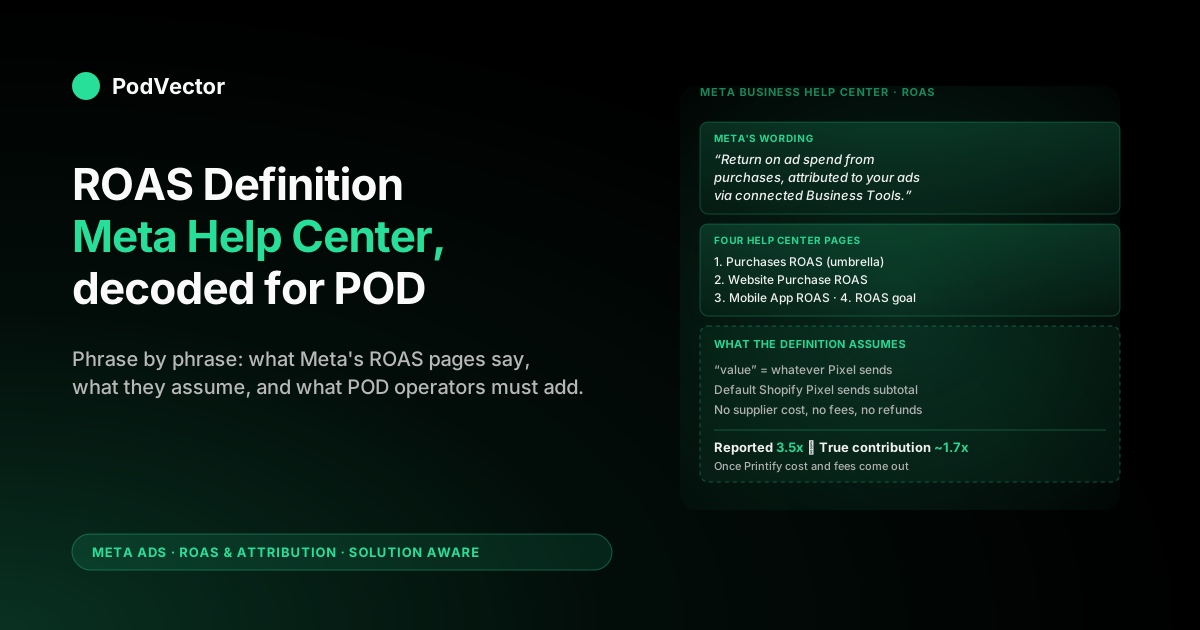
Quick Answer: The Meta Business Help Center defines ROAS as "the total return on ad spend (ROAS) from purchases," calculated as attributed purchase conversion value divided by the amount spent. The same definition repeats — with small wording shifts — across the Purchases ROAS, Website Purchase ROAS, Mobile App Purchase ROAS, and ROAS goal pages.
For print-on-demand sellers, the Help Center wording is precise about the math and silent about what gets fed into it. Meta counts whatever number your pixel sends as "value." The default Shopify integration sends the order subtotal, which means Meta's reported ROAS is a top-line revenue ratio — not a profit metric. A 3.5x reading often translates to roughly 1.7x once Printify or Printful supplier cost, payment fees, and refunds are subtracted.
This guide walks each phrase of Meta's official ROAS definition, calls out where the documentation assumes a generic ecommerce advertiser, and shows POD operators what to mentally append to every Help Center page.
The Help Center pages that define ROAS
Meta does not have a single canonical ROAS page. Search the Business Help Center for "ROAS" and you get four primary results, each defining a slightly different slice of the same calculation.
The primary page is Purchases ROAS. It carries the umbrella definition — the one most quotes and most third-party guides reproduce. The companion pages cover narrower scopes.
Website Purchase ROAS covers purchases tracked on a website through Pixel or CAPI events. Mobile App Purchase ROAS covers purchases inside a mobile app via the Facebook SDK. About ROAS goal describes a bid strategy, not a metric.
For POD operators, the page that matches your data the closest is Website Purchase ROAS — your sales come from a Shopify storefront, with the purchase event firing through the Pixel and (ideally) mirrored through CAPI. The umbrella Purchases ROAS rolls in any offline upload events you might have, which most POD accounts don't use.
Knowing which page applies matters because the Ads Manager column picker shows all four side-by-side. Pick the wrong one and you're either over-counting (if you accidentally include offline test events) or under-counting (if you isolate website-only when revenue arrives by other channels).
"Total return on ad spend from purchases" — decoded
Meta's canonical phrasing is short. Word-for-word from the Purchases ROAS Help Center page: "The total return on ad spend (ROAS) from purchases. This is based on information received from one or more of your connected Meta Business Tools and attributed to your ads."
That sentence does three things at once. It declares the metric is a ratio (return per spend). It restricts the numerator to "purchases" specifically. And it qualifies the data source ("connected Meta Business Tools") and the attribution boundary ("attributed to your ads").
The arithmetic underneath is unambiguous. ROAS equals attributed purchase conversion value divided by ad spend, displayed as a multiplier. Spend $150, drive $525 in attributed purchase value, and the column shows 3.5 — meaning $3.50 of attributed purchase revenue per $1 of ad spend.
What the definition does not say is anything about cost of goods, returns, fees, or profit. Meta's ROAS is a top-line revenue metric by design. The Help Center is honest about this — it never claims to measure profit — but the language is so close to a profitability metric that it gets read as one by default.
For a deeper companion that walks the four-variant taxonomy and the ROAS-goal mechanics, see our parallel breakdown of the Meta Ads ROAS definition Help Center explained for POD sellers.
"Purchase conversion value" — what Meta means and what you send
The Help Center uses the phrase "purchase conversion value" in every ROAS definition. It does not define what that value should be. The omission is deliberate — Meta accepts whatever your pixel, CAPI integration, or offline upload sends in the event's value parameter.
For Shopify stores using Meta's default Pixel integration, the value sent is the order subtotal — line-item revenue before shipping and tax, but also before any cost. That's what shows up in Meta's "purchase conversion value" column, and that's what divides into ad spend to produce ROAS.
For a POD store, the order subtotal is the worst possible proxy for profit. A $24.99 t-shirt order sends $24.99 to Meta as value. The supplier cost on that shirt — Printify or Printful's invoice line — might be $11.50. Shopify's payment fee runs around 2.9% + $0.30, roughly $1.05 on this order. Real contribution before ad spend: about $12.44.
Meta's ROAS column treats the full $24.99 as if it were available to spend on the next ad. The arithmetic is internally consistent but it inflates the perceived efficiency of every campaign.
POD operators who want the Help Center column to mean something closer to profit have two options. Override the Pixel's value field to send contribution margin instead of subtotal — risky, because it breaks compatibility with other tools reading the same event. Or accept that Meta-reported ROAS is GMV-ROAS and reconcile it against true contribution offline. The second is what most operators end up doing.
"Attributed to your ads" — the attribution-window assumption
The Help Center qualifier "attributed to your ads" hides the entire attribution-window question. Meta only counts a purchase's value toward ROAS if the buyer's last qualifying touchpoint with your ads falls inside the attribution window the campaign is configured for.
The 2026 Meta default is 7-day click plus 1-day engaged-view plus 1-day view. A buyer who clicked an ad on day 1 and bought on day 6 counts. A buyer who clicked on day 1 and bought on day 9 does not. A buyer who saw the ad without clicking and bought 2 days later counts only if the engaged-view criteria are met (typically a 3-second video view or an interaction).
The Help Center page on Purchases ROAS does not list the attribution window inline. It assumes you know which window applies to the column you're looking at. If you've changed the account default — many POD operators move to 1-day click for cleaner signal — your ROAS column reflects that narrower window without flagging the change.
Two campaigns with identical underlying performance can show wildly different ROAS numbers because they're being compared across different attribution windows. The numerator shrinks or grows depending on how generous the window is.
For POD specifically, the relevant pattern is that apparel buying tends to involve longer consideration times than impulse goods — design discovery, niche-fit research, and frequent comparison shopping. A 1-day click window will under-count POD revenue significantly versus a 7-day click. The Meta-reported ROAS shifts accordingly. For a closer look at how attribution choices flow into the calculation itself, see how to calculate ROAS in Meta Ads (step-by-step).
"Connected Meta Business Tools" — Pixel, CAPI, SDK, offline
The Help Center's phrase "connected Meta Business Tools" covers four data sources that can feed a purchase event into the Meta system. Each source produces a value Meta then includes in the ROAS calculation.
Meta Pixel. JavaScript snippet on the Shopify storefront. Fires the Purchase event on the order confirmation page with the value parameter set to the order subtotal by default. The most common source for POD accounts.
Conversions API (CAPI). Server-to-server event delivery that mirrors the Pixel events from your Shopify backend. Less affected by ad blockers and iOS tracking restrictions than the Pixel alone. Shopify's official Meta integration sends both Pixel and CAPI events for redundancy and deduplication.
Facebook SDK. Mobile app integration. Almost no POD seller uses this unless they've built a branded shopping app — uncommon below seven-figure annual revenue.
Offline conversions. CSV uploads or API submissions of purchases that happened outside the website (in-store, phone orders, etc.). POD has no real use case here unless you're running pop-up events.
The Help Center says ROAS is "based on information received from one or more" of these. The "one or more" matters — if Pixel and CAPI both fire for the same purchase, Meta deduplicates them via the event ID. If deduplication fails (mismatched event IDs are common after a Shopify theme update), the same sale gets counted twice and the ROAS column inflates accordingly.
For a POD store, the practical setup is Pixel + CAPI through Shopify's official Meta channel, with deduplication confirmed by checking Events Manager once a quarter. Offline and SDK can be ignored.
"ROAS goal" — the bid strategy hidden in the same definition
The fourth Help Center page Meta lists under "ROAS" describes ROAS goal — a bid strategy, not a reporting column. The wording is: "Set a goal for the average ROAS you'd like to achieve and Meta will dynamically bid to maximise results around that goal."
That single sentence collapses an entire optimisation behaviour. ROAS goal accepts values between 0.001 and 1,000.00. The auction algorithm bids to deliver an average ROAS hovering around the target across the campaign's lifetime — pulling spend back when the running average drops below goal, pushing harder when it sits above.
The Help Center includes one important caveat: "If your ROAS goal value is set too high for Facebook to meet, delivery may sometimes stop." Setting a 7.0x goal in a market that delivers 3.5x results in starved campaigns rather than improved performance.
For ROAS goal to function, the same machinery needs to be in place: Pixel or SDK firing purchase events with values, plus enough volume for Meta to learn (typically 50+ purchase conversions per ad set per week to qualify for value optimisation). Most POD stores under $30K monthly revenue sit below that threshold and either can't enable ROAS goal or run it with insufficient signal.
The honest read: ROAS goal is downstream of the value parameter problem. If your Pixel sends order subtotal, the algorithm optimises toward subtotal — not profit. Even a perfectly hit goal can lose money on every order if the underlying value signal is misaligned with contribution margin.
A POD seller's Help Center reading guide
Reading Meta's ROAS pages with POD economics in mind requires translating the language at four points. None of these translations live in the docs themselves.
Where Meta says "purchase conversion value," read "whatever the Pixel sent — usually order subtotal, not profit." The page assumes a generic ecommerce advertiser whose subtotal roughly tracks profitable revenue. POD's 50–70% supplier cost makes that assumption wrong by default.
Where Meta says "attributed to your ads," read "filtered through whatever attribution window your account is currently set to." The window can shift the same campaign's ROAS by 20–40% in either direction without any underlying performance change. Lock the window before benchmarking anything.
Where Meta says "connected Meta Business Tools," read "Pixel + CAPI for Shopify, deduplicated by event ID." Confirm dedup periodically through Events Manager. A broken dedup quietly inflates ROAS for as long as the duplicate events keep firing.
Where Meta says "return on ad spend," read "return on ad spend, before supplier cost, fees, refunds, and shipping pass-through." The column never represents profit. It represents top-line revenue per ad dollar, which is a useful relative signal between campaigns but a misleading absolute measure of business health.
For the contribution-margin floor that determines whether a Meta-reported ROAS is actually profitable for a POD store, see break-even ROAS in POD: how to calculate it and why it matters.
When the Help Center number matches your bank statement
The Meta-reported ROAS aligns reasonably well with bank-deposited contribution in three specific scenarios. Outside those, the gap is structural.
Scenario 1: high-margin SKUs with overridden value parameter. If you sell limited-run designs at $39+ price points with a contribution margin of 50%+, and you've configured the Pixel to send a profit-approximated value rather than subtotal, the gap closes substantially. Few POD operators do this.
Scenario 2: low-volume periods with no refunds. Inside any given week with zero returns, the Help Center ROAS reflects revenue that actually deposited (minus the supplier and fee layer Meta still doesn't see). The math holds for the week. The reconciliation breaks when refunds for past orders settle in the current period.
Scenario 3: pure traffic-only campaigns where the value is engagement, not revenue. If you're running awareness campaigns measured against a custom event with a manually set value that approximates the action's real worth, the ROAS can match its definition. This is rare for POD where every campaign eventually rolls up to revenue.
For most POD operators in 2026, the Help Center ROAS is best treated as a relative metric — useful for ranking campaigns against each other within the same account, period, and attribution window — not as an absolute profitability indicator. The bank statement and the Shopify financial reports tell that story.
Fixing the value parameter so the Help Center math works
If you want the Help Center's ROAS definition to actually approximate profit for your POD store, there are three layers to address. Each closes a portion of the gap.
Layer 1: send a profit-aware value through CAPI. Shopify's default Meta integration sends order subtotal. A custom CAPI implementation can send a value field that subtracts known supplier cost per SKU before transmission. This requires either a custom-built bridge or a third-party tool that joins Printify or Printful supplier data to the order before forwarding to Meta.
Layer 2: send refund events through CAPI. Meta supports a refund event that reduces a previously reported purchase's value. The default Shopify-Meta integration does not send these. A custom integration can, which keeps the ROAS column closer to deposited revenue over a 30-day window.
Layer 3: reconcile reported vs true contribution monthly. Even with layers 1 and 2 in place, edge cases (chargebacks, partial refunds, dispute resolutions, shipping adjustments) keep the columns slightly out of sync. A monthly reconciliation against actual deposits — the kind your accountant does anyway — closes the residual gap.
For POD operators not ready to build custom CAPI infrastructure, an alternative is to use a live data warehouse that joins Meta spend, Shopify revenue, and Printify or Printful supplier cost into a single table — and to query that table for true contribution ROAS rather than relying on Meta's column at all. The Meta column stays useful for in-platform optimisation; the warehouse stays definitive for business decisions. Snowflake, Databricks, BigQuery, or any equivalent data layer works.
This is the architecture Victor sits on. POD sellers ask Victor questions like "which Meta campaigns are unprofitable after Printify cost?" and the answer comes from the warehouse, not from the Meta-reported ROAS column. The Help Center definition stays exactly as Meta wrote it — Victor just routes around its blind spots.
FAQs
What does the Meta Help Center define ROAS as?
Meta's Business Help Center defines ROAS as "the total return on ad spend (ROAS) from purchases. This is based on information received from one or more of your connected Meta Business Tools and attributed to your ads." Mathematically, it's attributed purchase conversion value divided by amount spent.
Where in the Help Center is the official ROAS definition?
The umbrella definition lives on the Purchases ROAS page. Three companion pages cover narrower scopes: Website Purchase ROAS (web events only), Mobile App Purchase ROAS (SDK events only), and About ROAS goal (a bid strategy, not a reporting metric).
Why does Meta's ROAS overstate POD profitability?
The Help Center definition counts whatever value the Pixel sends, and Shopify's default Pixel integration sends the order subtotal — gross merchandise value before any cost. POD economics include 50–70% supplier cost (Printify or Printful), 2–4% payment fees, and 8–14% return rates that don't flow back into Meta. A reported 3.5x ROAS often reflects roughly 1.7x true contribution.
What is "purchase conversion value" in Meta's ROAS definition?
It's whatever number your Pixel, Conversions API, Facebook SDK, or offline upload sent in the purchase event's value field. Meta does not define what that value should be — it accepts whatever the integration sends. For most Shopify stores, that's the order subtotal.
Does Meta's ROAS account for refunds?
Only if your CAPI integration sends refund events to Meta. The default Shopify-to-Meta channel does not send refund events. Without them, a 30-day return window of revenue stays counted in ROAS even after the customer has been refunded.
What's the difference between Purchases ROAS and Website Purchase ROAS in the Help Center?
Purchases ROAS is the umbrella metric — it rolls in revenue from all sources Meta receives (web, app, offline). Website Purchase ROAS is narrower, counting only purchases tracked through the Pixel or CAPI on a website. For most POD stores selling exclusively via Shopify, the two columns are functionally identical because there are no app or offline events.
Is "ROAS goal" a metric or a bid strategy?
A bid strategy. The Help Center page describes ROAS goal as a target you set so Meta's auction algorithm bids to deliver a specified average ROAS. It accepts values between 0.001 and 1,000.00. It is not reported in the standard ROAS columns — those still report achieved ROAS regardless of bid strategy.
How can I make Meta's reported ROAS reflect actual POD profit?
Override the Pixel value to send contribution margin instead of subtotal (requires a custom CAPI implementation), send refund events through CAPI to reverse refunded revenue, and reconcile against actual bank deposits monthly. Most POD operators take the simpler route — use Meta's ROAS as a relative campaign-ranking signal and calculate true contribution offline against a unified data warehouse.
Read Meta's docs without losing money in the gaps.
Meta's Help Center defines ROAS as value divided by spend. Both inputs hide what POD economics actually depend on — supplier cost on every order, refunds that arrive 30 days later, fees that drift with channel mix.
Victor connects Meta spend, Shopify revenue, Printify and Printful supplier cost, and payment fees in one live data layer. You ask "which Meta campaigns are unprofitable after Printify cost?" in plain English. Victor returns the answer from your real data — not from the column Meta's docs describe.
and see your true contribution ROAS alongside the one Meta reports.
Try Victor free