
Quick Answer: Meta Ads ROAS is the dollars of attributed conversion value Meta credits back for every dollar you spent on a campaign. The headline formula is conversion value ÷ ad spend, pulled directly from your pixel and Conversions API.
For most print-on-demand stores, the column to watch is Website Purchase ROAS — but the number in Ads Manager isn't your real return. It's revenue, not contribution margin.
After Printify or Printful supplier costs, shipping, processor fees, and ad-platform tax, the ROAS that actually pays your bills is usually 30%–45% lower than what Meta shows. This guide walks through how to read the column, what's behind the math, and how to set a target that reflects your store's real break-even.
What Meta Ads ROAS actually is
ROAS stands for Return on Ad Spend. Inside Meta Ads, it's the headline efficiency metric that appears in every campaign, ad set, and ad row of Ads Manager.
The number answers one question: for every dollar you put through this campaign, how many dollars of conversion value did Meta's pixel match back to it?
A 3.0x ROAS means Meta credited $3.00 of revenue to every $1.00 of spend. A 1.0x means you broke even on revenue alone — long before product, shipping, or fees come out.
That last sentence is the entire reason POD operators get burned by ROAS reporting. Meta tracks revenue, not profit. The platform has no idea what your shirt costs to print.
The formula, with a worked POD example
The math is one line:
ROAS = total conversion value ÷ total amount spent
Both numbers come from the campaign you're looking at. Conversion value is the sum of purchase amounts your pixel and Conversions API reported during the chosen attribution window. Spend is what Meta charged your ad account in the same period.
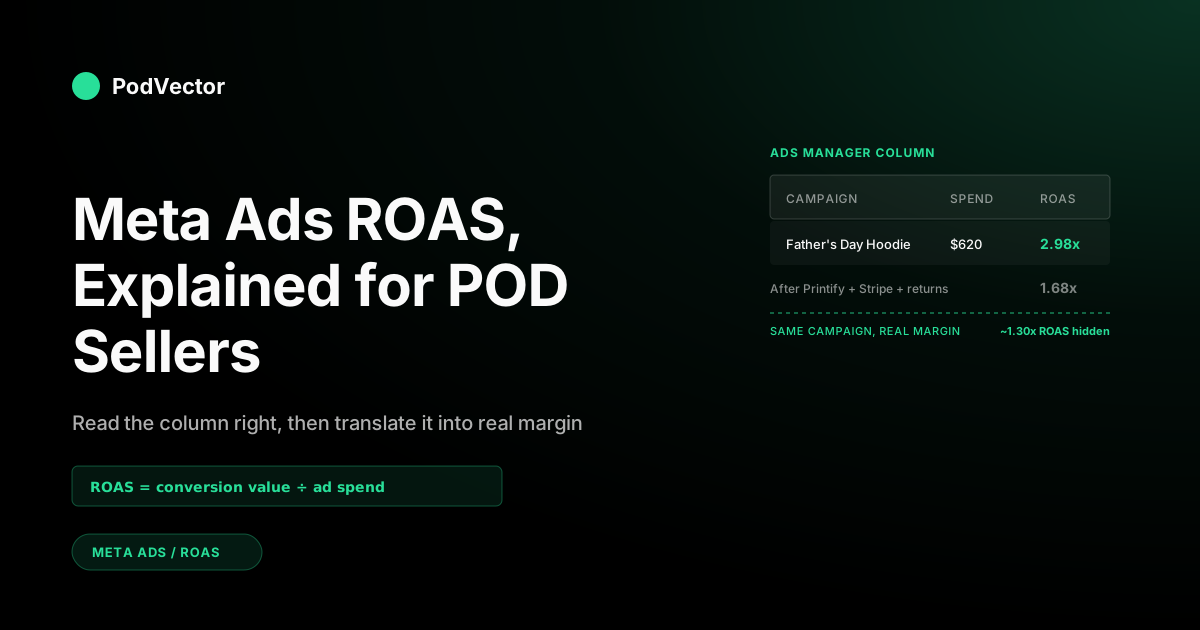
Worked example. You ran a Father's Day campaign for $620 last week pushing one premium hoodie SKU. The pixel fired 23 purchases totaling $1,847 in revenue. Your campaign-level reported ROAS is $1,847 ÷ $620 = 2.98x.
That's the number Meta shows. Whether the campaign was actually profitable depends on what's hidden behind the $1,847 — supplier cost, shipping, payment processing, returns, and your time. We'll work through that math in the after-COGS section.
Where to find ROAS in Ads Manager
Most operators stare at the default Performance view and never realize Meta hides the most useful ROAS columns by default. The fix takes two minutes.
Step 1 — open Columns: Customize Columns
From any campaign or ad set view in Ads Manager, click the Columns dropdown above the table and choose Customize Columns. A panel opens with hundreds of available metrics grouped by category.
This is the only place you can permanently add the ROAS variants you actually need. The default presets ship with Purchase ROAS but skip the more honest Website Purchase ROAS for POD stores running Shopify or WooCommerce.
Step 2 — pick the right ROAS columns
Search "ROAS" in the panel. The columns that matter for a POD store:
- Website Purchase ROAS — your storefront-only return. The number to lead with.
- Purchase ROAS — blended across all surfaces. Useful as a sanity check.
- Cost per Purchase — pair with ROAS to see the absolute spend efficiency, not just the ratio.
Skip Mobile App Purchase ROAS unless you actually have an installed app, which most POD operators don't.
Step 3 — save the preset
Tick "Save as preset" before applying, name it something obvious like POD ROAS, and Ads Manager will keep it across sessions. From here on, every campaign view starts with the right column set.
The ROAS columns Meta shows you
Meta doesn't report a single ROAS number. It reports several, and they measure different things. Reading the wrong one is the most common reporting error in POD ad accounts.
Here's the short version. For the full teardown, see our companion guide on the four ROAS variants in Ads Manager.
Purchase ROAS (blended)
Sums every Purchase event Meta attributed — website, in-app, Shop, Marketplace — and divides by spend. Convenient single number, but it averages high-trust pixel events with lower-quality cross-platform conversions.
Website Purchase ROAS
Conversion value from your pixel and Conversions API on your storefront only. For Shopify, WooCommerce, or any custom POD store, this is the row that matches your actual sales data.
Mobile App Purchase ROAS
In-app purchase value from an SDK-instrumented app. Almost always zero for a POD store. If it isn't, check whether Meta is misclassifying your events.
Direct Purchase ROAS
Checkouts that complete on Meta's surfaces — Shops, Marketplace, Messenger. Most POD operators run Printify or Printful syncing to Shopify, not Meta-native checkout, so this row is informational at best.
Practical rule for POD: build your dashboards on Website Purchase ROAS. It's narrower, more honest, and the column your storefront analytics can independently verify.
What changes the number you see
The formula is fixed. The inputs aren't. Three knobs determine which version of "your ROAS" Meta surfaces.
Attribution window
Meta credits a conversion to an ad if the user clicked or viewed inside a defined window before purchasing. As of January 2026, the available options are:
- 1-day click — strictest. Conversions within 24 hours of a click count.
- 7-day click — current default for Advantage+ Shopping and most manual campaigns.
- 1-day view — paired add-on. Counts users who saw but didn't click, then purchased within 24 hours.
The longer 7-day-view and 28-day-view windows older blog posts reference were retired by Meta in early 2026. Switching from 7-day click to 1-day click typically shaves 15%–25% off reported ROAS — same business, different default.
Conversion event optimization
ROAS is reported against Purchase events, but the algorithm bids for whatever optimization event you set. Optimize for "Add to Cart" and the Purchase column will look erratic — spend is buying carts, not checkouts.
For POD revenue accountability, optimize for Purchase. Upper-funnel optimization sounds clever but rarely produces a cleaner ROAS read.
Pixel and CAPI hygiene
Meta builds ROAS from events your pixel and Conversions API (CAPI) report. CAPI is Meta's server-side companion to the browser pixel — defined inline because it matters: it sends purchase events directly from your storefront's server, recovering signal that browser blockers and iOS privacy features strip out.
If your pixel or CAPI is misfiring, half the conversions never reach Meta. Reported ROAS reads low. The opposite — double-counted events from a duplicated pixel — inflates ROAS until you reconcile against your store backend. A clean CAPI setup typically recovers 20%–40% of the purchase signal browser blockers and iOS privacy features would otherwise strip out, so the difference between "CAPI on" and "pixel only" can move your reported ROAS by a third on its own.
Using Meta's ROAS goal bid strategy
ROAS shows up in Ads Manager two ways: as the reported metric covered above, and as a bid strategy you can steer the auction with. The second one is the ROAS goal control, and it's the feature Meta's own help docs now lead with.
With a ROAS goal set, you tell Meta the average return you want — say 2.5x — and its value-optimization bidding tries to buy conversions that hit that goal instead of just maximizing volume. To turn it on you need a working pixel or Conversions API sending purchase value (not just the Purchase event), plus enough conversion history to clear Meta's value-optimization eligibility bar.
Two things POD operators get wrong with it:
- Setting the goal from Meta's reported ROAS, not your break-even. If you tell Meta to hit 2.5x but your after-COGS break-even is 3.2x, you're instructing the algorithm to optimize toward a loss. Set the goal above your true break-even (covered below), not at a benchmark you read online.
- Setting it too high and starving delivery. If the goal is unrealistic for your creative and audience, Meta throttles spend to protect the target and your budget goes unspent. Start near your recent actual ROAS and tighten gradually.
The bid strategy doesn't change the math — it optimizes toward the revenue number, which still ignores what Printify charges you for the blank. A ROAS goal built on Meta's revenue view can look like it's hitting target while the contribution margin underneath it is flat.
Why reported ROAS lies for POD stores
Most ROAS guides treat the Ads Manager number as ground truth. For a print-on-demand store, that's the wrong frame. Two structural issues turn the column into a vanity metric.
It measures revenue, not contribution margin
Meta sees the order total. It doesn't see what you paid Printify for the blank, the markup the supplier built into shipping, the Stripe fee, or the ad-platform tax now layered on top of your spend.
Your reported 3.0x ROAS could be a 1.4x after-everything return. Same campaign, very different decision.
It assumes a stable margin per order
Public ROAS benchmarks assume one cost line and a single product type. POD inventory mixes hoodies, tees, mugs, and posters with margins from 12% to 60%. A campaign averaging 3x ROAS that sells the high-margin SKUs is healthy. The same 3x selling mostly low-margin SKUs is bleeding cash.
Meta's column can't tell you which one you're running. Your warehouse can.
Calculating your real after-COGS ROAS
The fix is mechanical. Take the reported ROAS, strip out everything Meta doesn't see, and end with the number that actually reflects what landed in your bank account.
The full POD cost stack
For a typical Printify or Printful order on Shopify, the lines are:
- Supplier blank cost — what Printify or Printful charges for the unprinted product.
- Print fulfillment fee — bundled into the supplier total but listed separately on the invoice.
- Supplier shipping — the supplier's quoted ship cost, often higher than what you charge the customer.
- Customer-charged shipping (revenue offset) — what the buyer paid you for shipping.
- Payment processing — Shopify Payments or Stripe at ~2.9% + $0.30 per order.
- Ad-platform tax — sales tax on Meta spend in jurisdictions that apply it (CA, IL, etc.).
- Returns and refunds — POD return rate runs 3%–8% depending on category.
The contribution margin per order is order revenue minus all of those minus ad spend allocated to that order.
Worked example
Same Father's Day campaign as earlier. $620 spent, $1,847 reported revenue, 23 purchases, 2.98x reported ROAS.
Now break the $1,847 down:
- Average order value: $80.30
- Supplier blank + print: $24.50 per order × 23 = $563.50
- Supplier shipping (after customer offset): $4.00 per order × 23 = $92.00
- Stripe fees: 2.9% × $1,847 + $0.30 × 23 = $60.46
- Estimated returns (5%): $1,847 × 0.05 = $92.35
- Total cost of goods + fees: $808.31
Net revenue after COGS and fees: $1,847 − $808.31 = $1,038.69.
True ROAS: $1,038.69 ÷ $620 = 1.68x.
That's the number that pays the bills. Reported was 2.98x; the campaign earned closer to 1.68x once Printify and Stripe took their cut. Subtract any creative or analyst time and the contribution margin is even thinner.
Building it once, reusing it forever
Doing this math by hand for every campaign isn't sustainable. The durable fix is to land Printify or Printful order data, Stripe fee data, and Meta spend data into a single warehouse and join them on order ID. After that, true ROAS becomes a column, not a project.
For a deeper walkthrough of the unit-economics math, see the profitability and margin analysis hub.
Setting a ROAS target from your break-even
The most common targeting mistake is borrowing a benchmark from a different business model. A 4x target is conservative for a 65%-margin SaaS subscription and aggressive for a 22%-margin POD t-shirt.
Set the target from your own contribution margin instead.
The break-even ROAS formula
Break-even ROAS = 1 ÷ contribution margin %
If your contribution margin per order (revenue minus product, shipping, fees, returns) is 28%, your break-even ROAS is 1 ÷ 0.28 = 3.57x. Anything above that earns money. Anything below it loses money on incremental spend.
Most POD stores running standard supplier pricing land between 22%–35% contribution margin, which puts break-even ROAS between 2.86x and 4.55x. Healthy targets sit 30%–50% above break-even to absorb returns and seasonality.
Cohort-level vs campaign-level targets
Don't expect every campaign to hit the same number. Prospecting campaigns will run lower ROAS than retargeting; new product launches will run lower than perennial bestsellers. The target that matters is the blended account-level ROAS rolled up across the whole portfolio.
For more on what "good" looks like by funnel stage, see what is a good ROAS on Meta Ads and the POD-specific average ROAS breakdown.
2026 benchmarks (and why most don't apply)
Industry-aggregated 2026 benchmarks put median Meta Ads ROAS at 2.79x for general e-commerce, with top performers clearing 4x–6x. Fashion and apparel — the closest public category to most POD catalogs — sits at 2.65x median. Beauty and personal care runs lower at 1.57x; electronics around 2.95x; baby products the highest at 4.39x. On the same 2026 data, Advantage+ Shopping campaigns average 4.52x against 3.70x for manual setups.
None of those are POD-specific. Even the fashion bucket folds inventory-stocking apparel brands (50%–60% margin) into the same average as POD operators (22%–35% margin) — so a 2.65x "fashion" benchmark quietly assumes a margin most print-on-demand stores don't have.
For POD, our internal data and operator interviews show the realistic working range is:
- 1.8x–2.5x — break-even territory for most catalogs. Spend is buying volume, not profit.
- 2.6x–3.5x — healthy. Most established POD stores live here once creative and audiences mature.
- 3.6x+ — elite. Usually means strong organic flywheel, repeat-buyer base, or above-average margin from premium SKUs.
Treat these as orientation, not law. Your break-even math beats any external benchmark.
Common reasons your number is off
Before you tear down a campaign for "low ROAS," rule out the boring causes that distort the number itself.
Pixel firing on the wrong page
Purchase events should fire only on the order-confirmation page. If the snippet leaked into product pages or thank-you templates from a duplicate Shopify theme, Meta sees inflated conversion volume and ROAS reads abnormally high.
Check with Meta Pixel Helper. One Purchase fire per real order, no extras.
Conversions API duplicates
Running both pixel and CAPI without proper event deduplication double-counts purchases. Each event needs a matching event_id across both layers so Meta can collapse the duplicates.
Attribution window mismatch
If you compare Ads Manager's 7-day-click ROAS to your Shopify last-click attribution, the numbers will never match. Pick one window for reporting and stick with it.
Currency and timezone drift
Meta reports in your ad account currency at the timezone you set. If your store runs in PST and your ad account is set to UTC, end-of-day ROAS rows split orders across two days. Force them to align.
Excluded events
If you flagged certain Purchase events as "test" or excluded them via the Events Manager, they vanish from ROAS while still hitting your storefront. The column under-reports until you re-include.
Letting an AI employee close the gap
The structural problem behind everything in this article: Meta's column reports revenue, your accountant tracks margin, and joining the two by hand is a weekly tax on your operating attention.
Victor — the AI employee PodVector AI built for POD operators — solves the join. It connects to your Meta Ads, Shopify, and Printify or Printful accounts, lands the data into a unified data store, and answers questions like:
- "Which Meta campaigns are unprofitable after Printify cost and Shopify fees this month?"
- "What's my true after-COGS ROAS by SKU for Father's Day?"
- "Where did the 7-day-click vs 1-day-click attribution split move the needle on reported ROAS?"
Victor answers in plain language with numbers backed by your live data — and acts on those answers with your approval. The employee roadmap takes that further: Victor moves from answering to acting — reallocating budget, pausing unprofitable ad sets, and surfacing creative variants that hit your real margin target.
For the complete cluster overview, start at the Meta Ads ROAS & attribution hub or the Meta Ads topic hub.
FAQs
What is a good ROAS on Meta Ads for a POD store?
Healthy is 2.6x–3.5x reported, which corresponds to roughly 1.6x–2.2x after Printify or Printful cost, shipping, and payment-processing fees. The exact target depends on your contribution margin — divide 1 by your margin percent to get your break-even.
Is Meta Ads ROAS the same as ROI?
No. ROAS is revenue divided by ad spend. ROI is profit divided by total investment, including all costs. ROAS will always be higher than ROI for the same campaign because it ignores cost of goods.
Why does my Meta Ads ROAS not match my Shopify revenue?
Three usual causes: attribution window differences, pixel/CAPI deduplication issues, or timezone drift between the ad account and the store. Reconcile by exporting both reports to the same window and comparing order IDs.
Should POD sellers use Purchase ROAS or Website Purchase ROAS?
Website Purchase ROAS. It only counts pixel/CAPI events from your storefront, which matches what Shopify or WooCommerce shows. Purchase ROAS blends in Shop, Marketplace, and Messenger — surfaces most POD operators don't actually sell on.
How often should I recalculate my break-even ROAS?
Quarterly at minimum. Anytime Printify or Printful change supplier pricing, anytime your shipping mix shifts, or anytime you launch a SKU with materially different margin, your break-even moves and your target should move with it.
What is Meta's ROAS goal and should POD sellers use it?
ROAS goal is a bid strategy where you set a target return and Meta's value optimization bids to hit it, rather than just maximizing volume. It's worth using once you have steady purchase-value data flowing through your pixel or Conversions API — but set the goal above your after-COGS break-even, not at a public benchmark. Aiming at Meta's revenue ROAS can optimize you straight into a margin loss.
Does Meta's Advantage+ Shopping change how ROAS is calculated?
The formula is identical. What changes is the optimization layer — Advantage+ uses broader audiences and creative permutations, which usually lifts blended ROAS but reduces your control over what's working. The reported number means the same thing.
Stop guessing what your real ROAS is.
Meta shows you revenue. Printify charges you for the blank. Shopify takes the fee. The number that matters lives at the intersection — and Victor reads it from your live data, not your spreadsheet.
Ask Victor "what's my after-COGS ROAS by Meta campaign this month?" and get the honest answer in seconds.
Try Victor free