
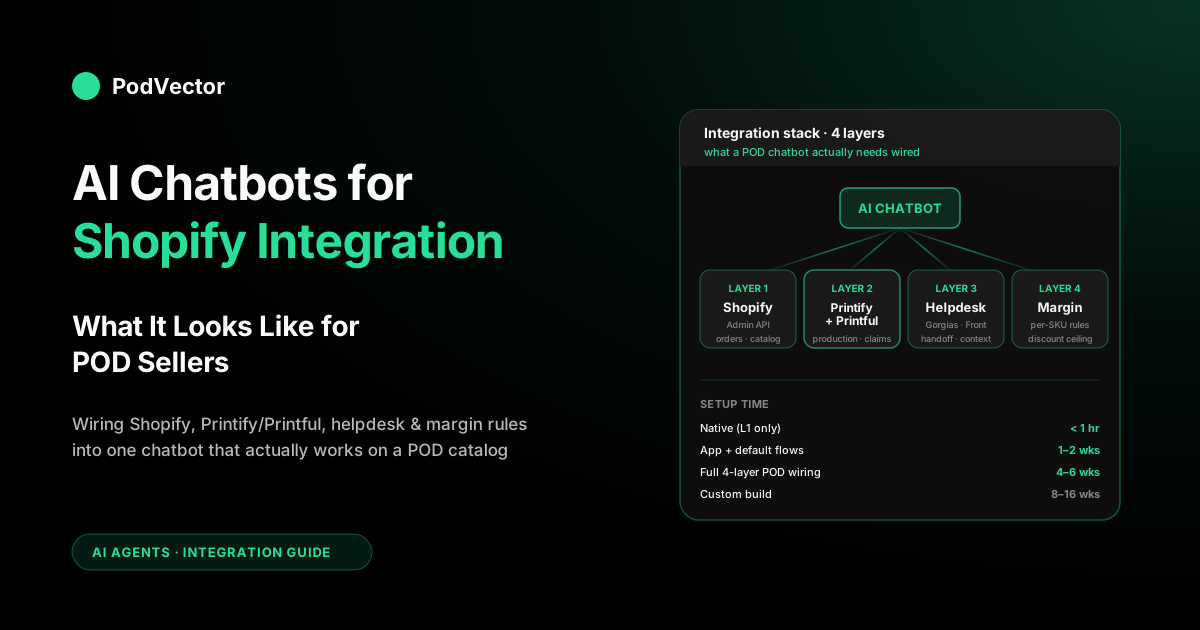
Quick Answer: Integrating an AI chatbot with Shopify is a half-hour job if you only want FAQ coverage and a multi-week job if you want it to actually work on a print-on-demand catalog. The difference is four wiring layers: Shopify Admin API (products, orders, inventory, discounts), your fulfillment supplier (Printify or Printful, for live production time and misprint claims), your helpdesk (Gorgias, Front, Zendesk — for the handoff), and your margin data (so the bot doesn't offer discounts that break your floor). Plug in just the first layer and you have a demo. Plug in all four and you have something that pays for itself.
What Shopify AI chatbot integration actually means
"Install the app and paste a snippet" is what the App Store listings show. That's a connection, not an integration. A real Shopify AI chatbot integration for a print-on-demand store means every conversational answer is grounded in data the bot pulled live from at least four systems: Shopify itself, your fulfillment supplier, your helpdesk, and your margin rules.
When all four wires are live, the bot can answer "will this arrive by Friday?" with the actual production lead time on that specific Printify base, not a generic shipping policy. It can offer a discount code on cart abandonment without breaking your margin floor on that SKU. It can file a misprint replacement without paging a human. And when it can't — and there will be times it can't — it hands the shopper to a real person with the full conversation attached.
Most generic Shopify chatbot integration guides stop at wire one. For a store running Shopify + Printify or Printful + paid traffic, that's a missing 60% of the ROI. Our AI chatbot for Shopify write-up ranks the apps themselves; this guide walks through what it takes to make the integration actually work on a POD catalog.
The four integration layers for a POD store
Think of Shopify chatbot integration as a stack, not a plug. Each layer unlocks specific conversation types and specific ROI. Skipping a layer is fine as long as you accept what you're giving up.
Layer 1 — Shopify Admin API
This is the table stakes. Products, variants, orders, customers, inventory, discounts. Every serious Shopify chatbot app handles this through an OAuth flow and a scope list. Layer 1 alone gets you order status lookups, product recommendations from catalog content, FAQ answers grounded in policy pages, and the suggested-reply UI for your human agents.
What it doesn't get you: anything POD-specific. Shopify doesn't natively know your Printify base, your Printful production time, or the claim-submission endpoint for a misprint. If your integration stops at Layer 1, your bot will confidently quote the wrong shipping window every time.
Layer 2 — Fulfillment supplier (Printify or Printful)
The POD-specific wire. Printify and Printful both publish REST APIs that cover product-variant metadata (which base is this, what's the production lead time, what are the size options), order status (where is this in production), and a claims endpoint for misprints. Almost no chatbot app reads this natively. You'll either need an app that publishes direct integrations with your supplier, or you'll wire it through Zapier, a custom middleware, or metafields you maintain on your Shopify catalog.
Layer 2 is what lets the bot answer "when will my hoodie ship?" with the actual answer. Without it, you're reading Shopify storefront shipping settings, which for a POD store are a generic fallback — useful for zero-data cases and wrong for every real order.
Layer 3 — Helpdesk and routing
The bot will fail. The 10–20% of conversations it hands off are the ones that matter most — high-value customers, complicated edge cases, angry shoppers. The integration between the chatbot and the helpdesk (Gorgias, Front, Zendesk, Re:amaze, or a shared inbox) decides whether the human picks up with context or with nothing.
At minimum, the helpdesk integration should pass the full conversation transcript, the order context the bot already looked up, and any attempts the bot made to resolve (tags like "tried_tracking_lookup", "offered_replacement_flow"). A clean handoff is worth more than deflection rate — it's the difference between a 4.6 CSAT and a 3.8.
Layer 4 — Margin and business logic
The POD-specific ceiling. Your fulfillment cost on a Printify SKU is usually 40–70% of your retail price. If your chatbot can offer discount codes — which most cart-recovery flows do — it needs a per-SKU or per-collection ceiling it will never breach. Without Layer 4, you will discover a chatbot offering 20% off on a product with a 25% margin, and you'll discover it by looking at your P&L a month later.
Layer 4 is almost always custom. The chatbot apps that support it call it "discount rules" or "deal guardrails"; the ones that don't support it leave the discount floor at whatever you type into the admin, which is dangerous if your catalog has mixed bases. A weekly reconciliation of bot-offered discounts against your live cost data is the minimum hygiene.
Native widget vs App Store app vs custom integration
Three deployment shapes, three trade-offs. Pick based on stage and appetite for engineering cost.
Shopify Inbox + Shopify Magic (native)
The free, zero-code path. Shopify Magic reads your store content — products, policies, FAQ pages — and grounds answers there. It's Layer 1 only, by design. No Printify, no Printful, no margin rules, no helpdesk handoff beyond Shopify's own agent UI. For a POD store under $10k/month with a narrow catalog, native is not a compromise — it's the right call. You'll feel the ceiling when shoppers start asking POD-specific questions and the bot deflects to a human because it can't ground an answer.
App Store app (paid, medium effort)
Where most POD stores land. Apps like Tidio, Gorgias, SmartBot, Chatty, and Re:amaze publish Shopify integrations with various degrees of Layer 2 and Layer 3 support. Layer 4 is usually the manual part — you configure discount ceilings per-collection in the admin and hope your operators keep them current.
Setup time: one to two weeks for default flows, four to six weeks to fully tune for a POD catalog with Printify or Printful wiring and margin-aware cart recovery. Monthly cost ranges from $30 at entry tiers to $1,500+ at enterprise. The ROI math generally pencils out once your ticket volume clears 200/month or your storefront engagement volume clears 5,000 sessions/month.
Custom integration (engineering project)
Direct API integration with OpenAI, Anthropic, or Google's model APIs, plus a RAG layer on your product catalog, plus custom tool-use handlers for Shopify and Printify/Printful calls, plus a handoff handler. Eight to sixteen weeks minimum for a capable engineering team, and most POD operators shouldn't take this path — the App Store apps have converged on the functionality and the maintenance burden of a custom stack is real.
When custom makes sense: multi-store POD brands with unusual integration needs (custom PIM, ERP, multi-currency margin rules), or brands deep enough into AI strategy that the chatbot needs to share a model and memory with other AI surfaces in the business. For most POD stores, buy don't build.
The integration checklist, step by step
The order matters. Most integration failures come from skipping one of the first three steps, not from a bug in step seven.
- Clean the catalog. Every chatbot integration reads your product titles, descriptions, variant names, metafields, and policy pages. Inconsistent variant names become inconsistent bot answers. Spend a day on the catalog hygiene before you install anything. Fix broken descriptions, normalize size names (don't let "Small", "S", and "small" coexist), align variant option labels across bases.
- Install the app and connect Shopify. Standard OAuth flow. Accept the scopes the app requests — more on scopes below. This gives you Layer 1. At this point the bot can answer FAQ-style questions and order-status lookups.
- Wire Printify or Printful. If the app has a native supplier integration, use it. If not, you have two choices: use Zapier or a direct Printify/Printful API middleware, or maintain the critical supplier data as Shopify metafields synced from your OMS. Either path, you're writing production-time metadata per variant onto the Shopify product record so the bot can read it.
- Connect the helpdesk. Gorgias and Tidio publish native connectors. Zendesk and Front take an intermediate step through a helpdesk connector or middleware. Configure the routing rules: what triggers a handoff (escalation tags, high-value customer tags, detected frustration), where the conversation goes, what context it carries.
- Load policies as source documents. Returns, exchanges, misprint handling, shipping windows, sizing charts per base, discount rules. The bot's grounding depends on these being current. Version them. If your return policy changes, the bot needs to know within a day, not a month.
- Configure margin-aware discount ceilings. Layer 4. Walk through your collection structure and set a maximum discount the bot can offer per collection. If your catalog has bases with materially different margins, break collections down further. Never leave this at the default.
- Configure the misprint workflow. For apps that support it, this is a conditional flow: the shopper reports a defect → the bot asks for a photo → the bot either files the Printify/Printful claim via API or tags the conversation for a human to file. If your app doesn't support this, the Layer 3 handoff should route misprint tickets to a specific queue.
- Dry-run in staging. Shopify's development-store feature clones production for testing. Run twenty realistic conversations: pre-purchase ("what size should I order?"), sizing ("does this run small?"), order status ("where is my hoodie?"), misprint ("the print is off-center"), refund request, custom order, and at least one frustrated-shopper escalation. Review every response. Tune policies and metafields until you're satisfied.
- Launch with a kill switch. Most apps let you scope which pages the widget appears on and which customer segments see it. Start with 10% of traffic or a single collection. Watch the first 200 conversations by hand. Expand only after deflection rate hits 50%+ and CSAT stays above 4.2.
Budget two weeks from kickoff to live for a store under $10k/month, four to six weeks for a mid-market POD catalog with Printify/Printful wiring and margin-aware flows. Most of that time is data hygiene and staging tests, not vendor setup.
Wiring Printify or Printful into the bot
This is where 80% of POD chatbot integrations either work or don't. Generic Shopify AI chatbot integration guides skip this entirely, which is why their deflection-rate promises fall apart on a POD catalog.
What Printify and Printful expose
Both publish REST APIs. Printify's covers products (including base-provider metadata, print-on-demand-specific variant details, production lead times per variant), orders (status including in-production, fulfilled, shipped), and a claims/issues endpoint for misprint or quality reports. Printful's API covers roughly the same territory — product catalog, order lifecycle, reshipment requests — with slightly different naming. Both have rate limits measured in requests per minute; at normal chat volumes this is rarely the bottleneck.
Four ways to wire the supplier data
- Native app integration. A handful of chatbot apps publish direct Printify or Printful connectors. This is always the cleanest path when it's available. Ask the vendor during the demo; many say "yes we integrate" and mean "we can connect via Zapier".
- Zapier or Make middleware. Works for simple flows (order-status lookups, claim submissions). Doesn't scale well for per-message real-time enrichment — Zapier latencies of 1–5 seconds feel like forever in a chat window.
- Custom middleware. A small Node or Python service that sits between the chatbot's webhook and the Printify/Printful API. Most flexibility, highest engineering cost. Worth it for brands doing more than $500k/year where the bot is on the critical path.
- Shopify metafields. Sync the critical supplier data onto your Shopify product/variant records as metafields — production time, base provider name, SKU-level cost, size chart reference. The bot reads them alongside the Shopify product record. This is the workhorse approach because most chatbot apps already read metafields as context by default.
The metafield schema that works
Whatever wire you use, these are the fields that make the biggest difference in bot-answer quality, in rough priority order: production lead time in days (variant-level), base provider name (variant-level), size chart identifier (variant-level), supplier SKU (variant-level), product cost in USD (variant-level, for Layer 4), reshipment/misprint policy tag (product-level), shipping window in business days (variant-level). Most POD stores already maintain half of these in their OMS; the integration work is just making them visible to Shopify and to the bot.
For the underlying economics of why variant-level cost data matters in a POD store, our profit analysis playbook for Shopify POD stores walks through the full cost stack. For the Shopify-native sibling view, see Shopify AI Chatbot: What It Looks Like for POD Sellers.
Shopify Admin API scopes the bot actually needs
Ask every vendor for the scope list. Scopes the bot legitimately needs, in a POD context:
- read_products — catalog, variants, metafields. Non-negotiable.
- read_orders — order status, tracking, fulfillment state.
- read_customers — VIP tagging, past-purchase context.
- read_inventory — low-stock responses, sizing availability.
- read_discounts — existing codes the bot can reference.
- write_draft_orders — only if you want the bot to complete carts with custom bundles or one-off discounts. Some stores skip this.
- read_fulfillments — tracking-number lookups when you use Shopify Fulfillment.
Scopes to refuse: write_products, write_customers (except narrowly for tagging), write_orders. A chatbot should not be able to edit your catalog, modify your customer records, or mutate orders directly. Apps that request these are over-privileged and a data-governance risk — a compromised chatbot vendor becomes a compromised storefront.
If an app asks for a scope you don't understand, read Shopify's Admin API access scopes documentation and decide whether it maps to a feature you actually want. Unexplained scope requests are the clearest signal of a sloppy vendor.
POD-specific integration edge cases
Seven edge cases that generic integration guides miss and POD operators hit in the first month of running an AI chatbot:
- Mixed-base size charts. A Bella+Canvas Unisex Tee fits one way; a Gildan 18500 hoodie fits another. Your size chart data needs to be variant-level, not product-level. A chatbot that answers "what size" from a product-level size chart will be wrong half the time on a store with mixed bases.
- Production time vs shipping time. Shopify's shipping settings give you shipping time once an order is handed to the carrier. That's half the answer. The other half is production time — three to seven days for most Printify bases. If your bot quotes shipping settings only, you'll systematically promise faster than reality.
- Misprint vs buyer's remorse. These are different workflows with different costs. A misprint gets a free replacement via Printify/Printful; buyer's remorse is store credit or denial per your policy. The bot needs to distinguish them — usually by asking for a photo — before it promises anything.
- Multi-supplier stores. If you run both Printify and Printful (common for geographic fulfillment), the bot needs to know which supplier fulfilled a given order. Your order metafield or tag strategy has to surface this; otherwise the bot defaults to the wrong claim endpoint.
- Custom order flows. POD stores that offer bulk orders, custom art uploads, or personalized text on products need a conversational flow that captures the custom data and routes it to a human for quote. Generic chatbot flows don't handle this out of the box.
- Out-of-stock bases. Printify and Printful periodically drop bases or discontinue sizes. The bot needs a live inventory read against the supplier, not just Shopify's inventory. Otherwise it'll cheerfully recommend a product you can't fulfill.
- Ad-traffic shoppers. A shopper from a Meta ad has context (which product, which offer, which audience) that a shopper from organic search doesn't. If your integration surfaces UTM parameters to the bot, you can personalize the greeting and the offer. Most operators skip this; it's worth doing.
How to test the integration before it goes live
Staging tests are the difference between a chatbot that launches clean and a chatbot that launches into a week of firefighting. The conversation scenarios to run, in order of priority:
- Order status lookup, all states. Place at least one test order that reaches each state: pending, in production, shipped, delivered. Ask the bot about each. Confirm the response matches reality.
- Sizing questions across multiple bases. Ask about sizing on a Bella+Canvas shirt, a Gildan hoodie, and a Comfort Colors tee on your staging store. Confirm the bot returns the correct size chart for each.
- Shipping ETA from ad traffic. Simulate a shopper coming in from an ad UTM, asking "will this arrive by Friday?" on a product with a 5-day production + 3-day shipping profile. Confirm the bot factors both.
- Misprint claim flow. Submit a fake misprint complaint with a test photo. Confirm the bot asks for the right information and (depending on setup) either files the claim via API or routes to the human misprint queue.
- Cart abandonment with discount offer. Simulate an abandoned cart on a low-margin product. Confirm the bot respects your Layer 4 discount ceiling and doesn't offer a code that breaks your floor.
- High-value customer escalation. Tag a test customer as VIP and simulate a frustrated message. Confirm the bot escalates to a human with full context.
- Hallucination check. Ask the bot something outside its grounding — a policy that doesn't exist, a product you don't sell. Confirm it refuses to invent an answer.
Document each test's expected and actual response in a shared doc. Disagreements between the two are tuning work. Repeat after every major change to policies or metafields.
Storefront integration vs back-office agent integration
Everything in this guide is about the storefront chatbot — the widget that talks to shoppers. That's one category of AI integration with your Shopify store, and for most POD operators, it's the visible one. There's a second category that's separate and complementary: the back-office analyst agent that talks to you, the merchant.
The storefront chatbot is integrated to convert browsers and resolve shopper tickets. It's measured on conversion lift, deflection rate, and CSAT. Every app covered above — Tidio, Gorgias, SmartBot, Shopify Inbox — belongs here.
The back-office analyst agent is integrated against your warehouse data: Shopify orders, Printify and Printful itemized costs, Meta and Google Ads spend, Klaviyo flows. It answers questions like "which Printify SKUs lost money last week after ads and fulfillment?" in plain English. Shopify's Sidekick is the native entry; PodVector's Victor is the POD-native implementation, reading itemized Printify and Printful costs, reconciling them against Shopify orders and paid traffic in live BigQuery.
Most serious POD operators end up integrating both. A storefront chatbot for the shopper side; an analyst agent for the back office. The two share no code and no budget line, and neither replaces the other. For a full view of the analyst category, the complete guide to AI agents for ecommerce analytics walks through the architecture and the buying logic, and the AI agents for ecommerce piece covers the landscape end to end.
FAQs
How long does AI chatbot integration on Shopify actually take?
Shopify Inbox + Magic: under an hour, and it's Layer 1 only. A mid-tier App Store integration with default flows: one to two weeks. Full integration for a POD catalog — Printify or Printful wiring, margin-aware discount ceilings, misprint automation, and helpdesk handoff — four to six weeks. Custom engineering from scratch: eight to sixteen weeks minimum. Most of that time is data hygiene and staging tests, not vendor setup.
Does the integration require coding?
For 90% of POD stores, no. Most App Store apps install via OAuth and expose all configuration through a dashboard. You'll write no code if you pick an app with native Printify or Printful integration. You'll write small amounts of glue code (or pay a developer for a day or two) if your supplier integration has to go through Zapier or Make. Full custom integrations are a real engineering project.
What Shopify Admin API scopes does an AI chatbot need?
Read scopes on products, orders, customers, inventory, discounts, and fulfillments cover most apps. Write on draft orders if you want the bot to complete carts with custom bundles. Avoid apps that request write access to products, customers, or orders — a chatbot has no business editing your catalog, and vendors asking for those scopes are over-privileged.
Can the chatbot read my Printify or Printful data directly?
Rarely natively, usually through a middleware. A small number of Shopify chatbot apps publish direct Printify or Printful connectors; check during the demo. The more common path is Zapier, a custom middleware service, or (workhorse option) syncing supplier metadata onto Shopify metafields that the chatbot reads alongside the Shopify product record.
Will the chatbot integration break my theme or slow down my store?
Most modern chatbot apps load as a script that lazy-loads after the page is interactive, so Core Web Vitals impact is small (typically 10–40 ms on LCP, low-double-digit KB on initial payload). Theme impact is usually zero unless you customize the widget with inline code. Audit the script loading behavior before launch — some older apps still load synchronously and will hurt your Lighthouse score.
How do I test the integration safely before production?
Shopify's development-store feature lets you clone production for testing. Create a dev store, install the chatbot app in it, connect to a sandbox Printify or Printful account (both suppliers support dev environments), and run twenty realistic conversations across the full scenario set — pre-purchase, sizing, order status, misprint, escalation. Fix every surprise before flipping the widget on production.
Can the chatbot integrate with my existing Gorgias or Zendesk setup?
Yes, and you should insist on it. Gorgias and Tidio publish native connectors to most ticket systems; Zendesk and Front take a connector step. The integration needs to pass the full conversation transcript, any order context the bot looked up, and resolution attempts the bot made. A handoff without context is worse than no bot at all.
What breaks first when the integration is wrong?
Order-status answers. The bot quotes shipping windows from Shopify's storefront settings instead of the real Printify/Printful production lead time, and shoppers get mad when their package arrives six days later than promised. Fix this by wiring Layer 2 (supplier API or metafield sync) before you open the bot to production traffic.
Integrated the storefront bot. Now integrate the back office.
Your shoppers need an AI chatbot that knows your Printify base, your production time, and your margin floor. Your business needs an AI agent that knows the same things — and can answer "which SKUs lost money last week after ads and fulfillment?" from live BigQuery. Victor is the back-office half of the stack, purpose-built for POD sellers running Shopify + Printify or Printful + Meta/Google Ads. Try Victor free.