
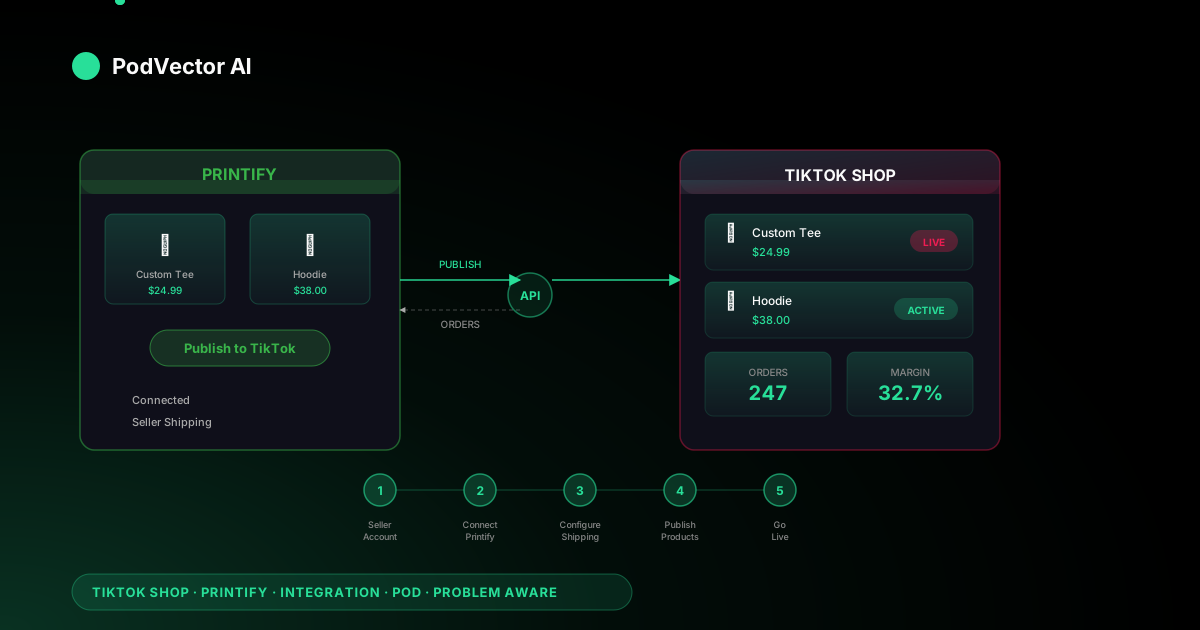
Quick Answer: To connect Printify to TikTok Shop, open your Printify dashboard, go to Manage My Stores → Add New Store, and select TikTok Shop. Authorize the connection with your TikTok seller account and configure shipping to use Seller Shipping.
The integration is currently US-only. You need a verified TikTok Shop seller account with tax information submitted before Printify can connect. Once linked, products you publish from Printify appear as listings in your TikTok Shop.
Why POD sellers should care about TikTok Shop
TikTok Shop hit $15.8 billion in US sales in 2025. The platform has over 1.9 billion monthly active users, and its built-in shopping features turn short-form video views into direct purchases without leaving the app.
For print-on-demand sellers, that's a different kind of channel than Etsy or Shopify. Buyers discover your products through content — a trending video, a live stream, a creator's product showcase — not through search queries. That means your design's visual appeal matters more than your SEO.
Printify's native integration with TikTok Shop handles the fulfillment side: you design in Printify, publish to TikTok Shop, and Printify prints and ships when orders come in. No inventory, no upfront cost.
Requirements before you start
The Printify–TikTok Shop integration has a few hard requirements. Missing any one of them will block the connection.
Geographic restriction
You must be a US-based seller with a valid US address and tax ID. The integration only supports US-based print providers and shipping within the United States. International sellers can't use the direct Printify–TikTok Shop connection yet — see the FAQ section for workarounds.
TikTok Shop seller account
You need an approved TikTok Shop seller account, not just a regular TikTok account. Individual sellers submit a US passport or driver's license plus a taxpayer ID. Business sellers submit a company registration document alongside personal ID.
Tax information
TikTok requires completed tax information in the Seller Center before you can publish products. If you skip this step, Printify will connect successfully but product publishing will fail silently.
Printify account
Any Printify plan works — Free, Premium, or Enterprise. The TikTok Shop integration doesn't require a paid tier.
Step 1: Create your TikTok Shop seller account
If you already have an approved TikTok Shop seller account, skip to Step 2.
Register as a seller
- Go to TikTok Seller Center and click Sign Up.
- Use your existing TikTok account or register with a phone number and email.
- Select your business type: Individual or Corporation/Business.
Submit verification documents
TikTok verifies every seller before granting shop access. The documents differ by business type:
- Individual seller: US passport or driver's license + US taxpayer ID (SSN or ITIN).
- Business seller: Company registration document + personal ID of the authorized representative + EIN.
Verification typically takes 1–3 business days. TikTok may request additional documents if anything is unclear.
Complete your tax setup
Inside TikTok Seller Center, navigate to Account Settings → Tax Information and submit your W-9 (for US sellers). This is the step most new sellers skip — and it's the step that blocks product publishing later.
Step 2: Connect Printify to TikTok Shop
With your TikTok Shop seller account approved and tax info submitted, the Printify connection takes about two minutes.
- Log into your Printify dashboard.
- Click Manage My Stores in the sidebar.
- Click Add New Store.
- Select TikTok Shop from the list of available integrations.
- You'll be redirected to TikTok — log in as a US merchant and authorize Printify.
- Once authorized, you'll land back in Printify with your TikTok Shop listed under My Stores.
If the authorization screen doesn't appear, check that you're logged into TikTok as a seller (not just a viewer). A regular TikTok account without seller access won't complete the OAuth flow.
For a side-by-side comparison of how this flow works across other channels, see our Printify integrations guide for Shopify and Etsy.
Step 3: Configure shipping settings
This is where most setup guides gloss over the step that causes the most failed orders. TikTok Shop offers two shipping models, and picking the wrong one breaks Printify fulfillment.
Set shipping to Seller Shipping
In TikTok Seller Center, go to Logistics → Shipping Settings. Set your shipping method to Seller Shipping — not "TikTok Shipping." Printify ships from its own print provider warehouses, so TikTok's managed logistics don't apply.
If you leave it on TikTok Shipping, your products may publish but orders will fail at fulfillment because TikTok expects to handle the shipping that Printify is actually handling.
Shipping templates
Create a shipping template that reflects realistic delivery times. Printify's US-based print providers typically ship within 2–5 business days for production, plus 3–8 days for transit. Set your estimated delivery window to 5–12 business days to avoid late-delivery penalties.
TikTok enforces a 48-hour fulfillment window for order confirmation — meaning Printify needs to accept and begin processing the order within 48 hours. This happens automatically through the integration, but if Printify's systems are delayed, TikTok may flag the order.
Warehouse address
You'll need to enter a warehouse address in TikTok Seller Center. Use your business address. Printify handles actual fulfillment from its provider locations, but TikTok requires a warehouse on file for seller verification.
Step 4: Publish your first product
With the connection live and shipping configured, you can push products from Printify to TikTok Shop.
- In Printify, go to My Products and select a product (or create a new one).
- Under the product's Sales Channel section, select your TikTok Shop store.
- Click Publish.
Printify sends the product listing — title, description, images, variants, and pricing — to your TikTok Shop. The transfer usually takes under a minute.
Title and description formatting
TikTok Shop has stricter listing requirements than some channels. Titles must use Latin characters only — no emojis, special symbols, or non-English characters in the title field. Descriptions should be clear and descriptive; TikTok's algorithm uses them for product discoverability.
If you're managing products across multiple channels, the multi-channel Printify integration guide covers how to tailor listings per platform.
Pricing considerations
Set your retail price in Printify before publishing. The price you set is what TikTok Shop displays to buyers. Remember to account for TikTok's referral fee (currently around 6% per sale) on top of Printify's base cost and shipping when calculating your margin.
For a detailed breakdown of which Printify products carry the best margins, see our product profitability guide.
Step 5: Activate products and go live
Publishing from Printify doesn't automatically make your product visible to shoppers. There's one more step inside TikTok.
- Open TikTok Seller Center.
- Go to Products → Manage Products.
- Find your newly published product — it will be in Draft status.
- Change the status to Active.
Once active, the product appears in your TikTok Shop tab, can be tagged in videos, and is eligible for TikTok's product discovery feeds.
Place a test order first
Before promoting your products, order one yourself. Check that the print quality matches your design, the shipping time falls within your listed window, and the packaging looks professional. A $15 test order costs less than a 1-star review.
TikTok Shop fees and true cost tracking
TikTok Shop's fee structure eats into margins if you don't price correctly. Here's what you're actually paying per order:
Fee breakdown
- Referral fee: ~6% of the sale price. This is TikTok's commission on every transaction.
- Transaction fee: A small per-transaction processing fee on top of the referral fee.
- Withdrawal fee: $0.05 per withdrawal from your TikTok Shop balance.
- Refund administration fee: Up to 20% of the original referral fee if a customer returns an item.
The real margin math
Suppose you sell a Gildan 18000 sweatshirt. Printify's base cost is around $18, shipping adds $5, and you price it at $38 on TikTok Shop. Here's where the money actually goes:
- Printify base cost: $18.00
- Printify shipping: $5.00
- TikTok referral fee (6%): $2.28
- TikTok transaction fee: ~$0.30
- Your margin: $12.42 (32.7% of the sale price)
That margin looks fine on one channel. The problem is tracking it across all your channels. A sweatshirt sold on TikTok Shop carries different fees than the same sweatshirt on Etsy (6.5% + listing fees) or Shopify (payment processing only). If you're selling the same designs across three or four platforms, you need per-channel, per-SKU cost tracking — not a single blended number.
Most POD sellers track this in spreadsheets until the volume makes manual updates unsustainable. That's the point where a unified data layer across all your sales channels and Printify becomes a time-saver rather than a nice-to-have.
Optimizing your TikTok Shop listings
Publishing a product is the floor. Making it sell requires optimization specific to how TikTok surfaces products.
Product images
TikTok Shop listings support multiple images. Use lifestyle mockups over flat product photos — a sweatshirt on a model in a realistic setting outperforms a floating mockup on a white background. Printify's mockup generator gives you both; use the lifestyle option.
Titles that match search behavior
TikTok Shop has its own search engine. Buyers search for "custom sweatshirt," "funny cat shirt," or "personalized gift" — not brand names. Front-load your title with the most common search term for your product type.
Product descriptions
Keep descriptions scannable. Lead with what the product is and who it's for. Include fabric details, sizing notes, and care instructions. TikTok's algorithm indexes description text for product recommendations, so relevant keywords here improve discoverability beyond search.
Pricing strategy
TikTok shoppers skew younger and more price-sensitive than Etsy or Shopify buyers. Many successful TikTok Shop sellers use a free-shipping-included pricing model: add shipping cost to the product price and offer "free shipping." The perceived value increase typically outweighs the higher sticker price.
Four ways to sell on TikTok Shop
TikTok Shop isn't just a storefront. It offers four distinct selling channels, each with different conversion dynamics.
Shoppable videos
Tag your products directly in TikTok videos. Viewers see a product link at the bottom of the video and can buy without leaving the app. This is the highest-volume channel for most POD sellers — a single viral video can drive hundreds of orders overnight.
LIVE shopping
Go live on TikTok and showcase your products in real time. Pin products during the stream and viewers can purchase while watching. Live shopping creates urgency and impulse purchases that static listings can't match.
Shop tab
Your TikTok Shop tab is a browsable storefront on your profile. It's the slowest channel for organic discovery but gives returning customers a familiar catalog experience.
Product showcase
A curated grid of your top products pinned to your TikTok profile. Think of it as a mini-storefront that visitors see before scrolling through your content. Good for showcasing bestsellers or seasonal collections.
Common issues and troubleshooting
Products won't publish from Printify
The most common cause is incomplete tax information in TikTok Seller Center. Printify sends the listing, TikTok rejects it silently, and the product stays in limbo. Go to TikTok Seller Center → Account Settings → Tax Information and verify everything is submitted.
Orders fail at fulfillment
Check your shipping settings. If TikTok Shipping is enabled instead of Seller Shipping, the order routing breaks. Switch to Seller Shipping in Logistics → Shipping Settings.
Products stuck in Draft after publishing
This is by design. TikTok requires you to manually activate products in Seller Center → Products → Manage Products. Change the status from Draft to Active.
Account verification rejected
TikTok's verification is strict. Ensure your uploaded documents are clear, unobstructed photos (not screenshots), and that the name on your ID matches the name on your seller account exactly.
New seller product limits
TikTok places new sellers in a Probation Program that limits you to 100 products initially. Once you demonstrate consistent sales and policy compliance, the limit increases. Don't try to publish your entire Printify catalog on day one.
For troubleshooting issues that span multiple integrations — like when the same product behaves differently on TikTok Shop versus other Printify-connected channels — check our Printify resource hub.
FAQs
Can I sell on TikTok Shop with Printify if I'm outside the US?
Not directly. The Printify–TikTok Shop integration requires a US-based seller account and US print providers. Some non-US sellers use a Shopify bridge — connecting Printify to Shopify, then Shopify to TikTok Shop — but this adds complexity and an extra platform's fees.
How much does it cost to start selling on TikTok Shop with Printify?
Zero upfront. Both Printify's free plan and TikTok Shop seller accounts are free. You only pay when an order comes in: Printify's base cost + shipping + TikTok's referral fee (~6%). Your first real cost is the test order you should place before going live.
Can I use the same Printify products on TikTok Shop and other channels?
Yes. Printify lets you publish the same product to multiple sales channels — TikTok Shop, Shopify, Etsy, eBay, and more. Each channel gets its own listing that you can customize independently. The product and design stay in Printify; you just choose which channels to publish to.
How long does shipping take for TikTok Shop orders via Printify?
Production typically takes 2–5 business days. Shipping within the US adds 3–8 business days. Total delivery: 5–12 business days. Set your shipping template in TikTok Seller Center to match these estimates — underselling delivery time triggers late-delivery penalties.
What products sell best on TikTok Shop?
Apparel dominates — custom t-shirts, hoodies, and sweatshirts are the top categories. Trend-driven designs perform especially well because TikTok's audience discovers products through content. Seasonal and meme-based designs have shorter lifespans but higher velocity during their peak.
Does Printify handle returns for TikTok Shop orders?
Printify's return policy applies: they cover reprints and refunds for print defects and shipping damage. For buyer's-remorse returns (wrong size, changed their mind), you handle the return through TikTok's Seller Center. TikTok requires sellers to offer a return window, and you'll pay a refund administration fee of up to 20% of the original referral fee.
Let Victor manage your TikTok Shop and every other channel
Tracking margins across TikTok Shop, Etsy, Shopify, and your print provider gets messy fast. Victor connects to all of them, monitors your per-SKU costs across every channel, and reallocates ad spend to where your margins are actually highest — then asks for your approval before changing anything.
Try Victor free