
Quick Answer: Running Printify on Etsy means listing Printify's print-on-demand products inside an Etsy shop and letting the two platforms hand orders back and forth automatically. Etsy hosts the storefront, traffic, and checkout. Printify produces and ships every order without inventory.
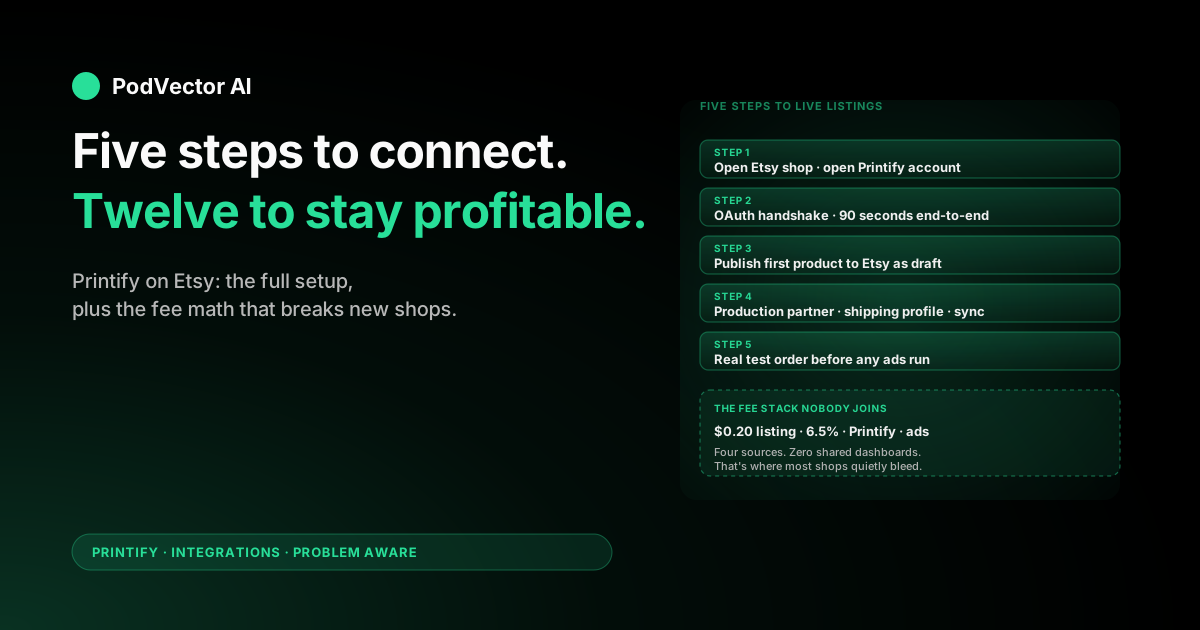
Setup is free, takes about 20 minutes, and clears in five stages: open both accounts, connect them via OAuth, publish a first product as a draft, configure your Etsy production partner and shipping profiles, then run a real test order before any ads.
This guide walks the full setup, then covers the part most guides skip — the operational reality once Etsy's $0.20 listing fees, 6.5% transaction cut, and Printify production cost start fighting your margin every single order.
What "Printify on Etsy" actually means
Etsy is the storefront. It owns your traffic, your buyer reviews, and your checkout. Printify is the production network sitting behind it. It owns the product catalog, the print providers, and the shipping.
The integration is an OAuth-authorized API connection between the two. Printify pushes product listings into your Etsy shop. Etsy webhooks new orders back to Printify. Printify charges your card on file, prints the item, ships it, and pushes the tracking number back to Etsy so the buyer gets a shipping email.
The buyer never sees Printify. They check out on Etsy, get an Etsy confirmation, and receive a package with no Printify branding. From their side, it looks identical to a maker shop with in-house fulfillment.
What it doesn't do: marketing, customer support, refund handling, or margin reporting. Those stay yours. The integration moves products, orders, and tracking — nothing else.
What to decide before you connect
Most guides walk the click sequence and stop. The clicks are the easy part. Three calls shape your unit economics for the next twelve months — settle them now.
1. Shipping: flat rate or calculator?
Etsy lets you set shipping per listing or via a profile that covers a whole catalog. Printify exposes its real shipping cost per item and destination. If your Etsy rate is lower than Printify's real cost, you eat the gap every order.
Most new sellers default to "free shipping" because Etsy's algorithm prefers it. That's fine if you've baked the cost into the product price. It's a slow bleed if you haven't.
2. Production approval window
Printify lets you set how long after an Etsy order it pauses before sending to production: one hour, twenty-four hours, or a set time each day. Twenty-four hours is the safe default for new shops — it gives you a window to catch a misprint, a wrong variant, or a buyer mistake before the print provider commits the order.
3. How you'll see margin across sources
Etsy shows revenue, listing fees, and transaction fees. Printify shows production cost and shipping. Your ad spend lives in Etsy Ads, Pinterest, Meta, or TikTok. None of those numbers share a dashboard.
You'll need a plan. A Sunday-night spreadsheet works until your monthly orders cross about 100. Past that, you need a single source of truth — a unified data warehouse — or every margin question takes hours to answer.
Step 1: Open both accounts
You need active accounts on both platforms before the integration can complete. Open them in this order.
Open your Etsy shop
Go to Etsy's seller signup, pick a shop name, set your shop currency and country, and complete the onboarding checklist. You'll add one placeholder listing to satisfy Etsy's "publish to open" requirement — you can delete it after the Printify connection succeeds.
Etsy charges $0.20 per listing whether the listing sells or not. New shops sometimes get 40 free listings via a referral link before billing starts. The shop fee is paid through whatever billing method Etsy verifies during signup.
Open your Printify account
Sign up at printify.com. It's free. Printify's free plan supports five connected stores and unlimited product designs. The paid Premium plan ($14.99/month) gives a 20% production discount and bumps the store limit to ten.
Add a payment method to Printify under Payment settings. Every Etsy order moves to "Awaiting payment" if your Printify card declines, freezing the queue until you fix it. Adding a backup card here is one of the cheapest insurance policies in your operation.
Step 2: Connect Printify to Etsy
The handshake itself takes about ninety seconds. From the Printify dashboard:
- Open Manage my stores and click Connect.
- Pick Etsy from the channel list.
- You'll be redirected to Etsy's OAuth approval screen. Sign into your Etsy account if you aren't already.
- Etsy lists every permission Printify needs — read/write listings, manage orders, post tracking. Click Allow access.
- You're redirected back to Printify. Your Etsy shop now appears under Manage my stores.
If the connection fails, the issue is almost always one of three things: your Etsy shop isn't fully published yet (Etsy needs at least one live listing), you're logged into the wrong Etsy account in the browser, or your Printify account already has an Etsy shop attached and you need to disconnect the old one first.
Step 3: Publish your first product
The connection is live but Etsy still has zero Printify products. Push one through to verify the data path before you spend on ads.
- Pick a starter product. A unisex T-shirt or a ceramic mug is fastest. Shipping rates are predictable and design constraints are minimal. Sort the catalog by print provider location closest to your target buyers — US buyers want a US provider, EU buyers want an EU provider.
- Upload your design. Use a high-resolution PNG with a transparent background. 300 DPI minimum. Printify shows a mockup preview as you upload.
- Pick variants. Start with two or three colors and three or four sizes for the first listing. You can expand later. Every variant Printify pushes to Etsy counts as a separate listing fee — wide catalogs balloon listing costs fast.
- Set Etsy-specific fields. Title, description, tags (Etsy allows thirteen — use all of them), category, and "Who made it / What is it / When was it made." Etsy's search ranking weighs tags and category heavily.
- Price for the full cost stack. Don't price on production cost alone. Add Etsy's $0.20 listing fee, the 6.5% transaction fee, any ad spend per acquisition, and your target margin. The fee section below has a worked example.
- Publish to Etsy as Draft. Don't go straight to Active. Open the draft in Etsy admin, review the listing as a buyer would, and fix anything that looks wrong before activating.
Step 4: Configure the Etsy side
Etsy needs three settings configured correctly before the integration runs cleanly. Most sellers skip these on day one and lose money on the first wave of orders.
Add Printify as a production partner
Etsy policy requires you to disclose that a third party prints and ships your items. Go to Shop Manager → Settings → Production partners, click Add a new production partner, and enter Printify's name and location. Check the boxes confirming you designed the item and that the partner produces it.
Skipping this is a policy violation. Etsy occasionally suspends shops for it during compliance sweeps. The fix takes ninety seconds — do it before your first listing goes live.
Set shipping profiles
Etsy uses shipping profiles per listing. Create one profile for each shipping model you'll run — domestic flat, international flat, free shipping baked into price, or Printify's calculated rates. Apply the right profile to each Printify listing during the publish step.
The wrong shipping profile is the number-one cause of negative-margin orders for new shops. A $24 mug with $4 buyer-paid shipping and $7 Printify shipping costs you $3 the moment it ships.
Turn on Etsy's order auto-sync settings
In Printify, under Manage my stores → Etsy → Settings, set the order approval window (one hour, twenty-four hours, or scheduled). Enable auto-sync tracking so Printify pushes carrier scans back to Etsy. Without it, buyers email you asking where their order is on day three.
Step 5: Place a real test order
Activate one listing. Use your own card and address. Place a real order through your live Etsy shop. Don't skip this.
The test order verifies five things at once: Etsy captured payment, Printify received the order, Printify charged your card, the print provider produced the item, and the tracking number flowed back to Etsy. Every one of those steps can fail silently. The cheapest place to find a bug is in your own dry run; the most expensive place is a refund request from a real buyer.
Wait for the test order to ship and arrive. Inspect the print quality, packaging, and any branding. Once it's in your hands and matches what you expected, you're cleared to push more listings and start ads.
The full Etsy + Printify fee stack
Most first-time sellers price against Printify's production cost and discover Etsy's cut on their first $1K month. Run this math on every listing before you publish.
| Fee | Who charges it | Typical rate (2026) |
|---|---|---|
| Etsy listing fee | Etsy | $0.20 per listing, every 4 months or per sale |
| Etsy transaction fee | Etsy | 6.5% of item + shipping + gift wrap |
| Etsy Payments processing | Etsy | 3% + $0.25 (US); varies by country |
| Etsy regulatory operating fee | Etsy | 0.25–1.1%, region-dependent |
| Etsy Ads (optional) | Etsy | Whatever daily budget you set |
| Printify production cost | Printify | Per blank, varies (e.g., $9.30 Bella+Canvas tee) |
| Printify shipping | Printify | $4–8 US, $10–20+ international |
| Printify Premium (optional) | Printify | $14.99/month for a 20% production discount |
A worked example. You sell a $24.99 T-shirt with $4.99 buyer-paid shipping = $29.98 gross. Etsy takes $0.20 listing + 6.5% × $29.98 = $1.95 + 3% × $29.98 + $0.25 = $1.15. That's $3.30 in Etsy fees. Printify charges $9.30 production + $4.99 shipping = $14.29. Pre-ad margin: $29.98 − $3.30 − $14.29 = $12.39.
If Etsy Ads cost you $5 per sale on average, you net $7.39. If they cost $10, you net $2.39. If they cost $14, you're losing money on every order. Spending more in that state doesn't grow the shop — it accelerates the bleed.
None of these numbers live in one place. Etsy shows revenue and Etsy fees. Printify shows production cost. Etsy Ads lives in Etsy. External ads live in Meta, Pinterest, or TikTok. Reconciling them by hand is the work most operators do every Sunday for the rest of their POD career.
Five mistakes that quietly kill margin
1. Publishing with Printify's default title
Printify auto-fills listings with generic titles like "Custom T-Shirt." Etsy's search algorithm reads the title heavily. A generic title is a guarantee that the listing never appears in search. Rewrite every title before activating.
2. Skipping tags
Etsy gives you thirteen tags per listing. Each unused tag is a free keyword opportunity left on the table. Tag every listing with the full thirteen — long-tail buyer queries, occasions, recipient types, design styles, and material descriptors.
3. Using one mockup image
Etsy's listing page shows up to ten images. Single-image listings convert worse than multi-image ones at every price point. Use Printify's lifestyle mockups, flat lays, and color variants — at minimum four images per listing.
4. Not adding Printify as a production partner
Etsy policy requires the disclosure. Listings without it can be hidden in compliance sweeps without warning. Adding the partner once covers every listing in the shop — it's a one-time setup that protects every dollar of future revenue.
5. Disconnecting and reconnecting
Every disconnect/reconnect cycle risks orphaning live listings or duplicating product entries. If something breaks, troubleshoot in place rather than disconnecting. The integration is more fragile than the dashboard suggests.
What running Printify on Etsy really looks like
Setup ends at the test order. The real work starts there. Three jobs define the day-to-day once orders are flowing.
Sync monitoring
Etsy-to-Printify order sync fails occasionally. A variant mapping breaks. A payment method declines and the order freezes in "Awaiting payment." A buyer changes their address after checkout and the change doesn't propagate. Each failure is recoverable if you catch it fast and silent if you don't.
Build a daily habit of opening Printify's My orders view, filtering to anything not "Shipped," and chasing the holdouts. Most issues are five-minute fixes; ignored, they become refund requests on day four.
Listing operations
Top sellers need more variants and more ad spend. Slow movers need to be paused, repriced, or rewritten. Etsy's search ranking rewards fresh listings, so dead inventory drags the whole shop's visibility down. Every week needs an hour of catalog hygiene.
Margin tracking across sources
The question you'll ask every Monday is "which listings lost money last week after Etsy fees and Printify shipping?" The answer isn't in Etsy. It isn't in Printify. It's spread across both plus your ad platforms.
At low volume you reconcile by hand. Around 100 orders a month, the spreadsheet takes longer than running the shop. The scaling answer is a unified live data warehouse — Snowflake, Redshift, Databricks, or equivalent — that ingests Etsy, Printify, and your ad platforms into one SQL surface. The pattern is standard in B2B SaaS; it's just rare in POD because nobody's packaged it for the category yet.
Troubleshooting common issues
OAuth fails when connecting
Your Etsy shop probably isn't fully open. Etsy requires at least one live listing before the API will grant access. Publish a placeholder listing, retry the connection, then delete the placeholder.
Printify products don't appear in Etsy after publishing
Two checks. First, the product is in Etsy as a draft — open Shop Manager → Listings → Drafts and activate it. Second, a required Etsy field (category, "who made it," shipping profile) is missing. Printify shows a warning during publish; the warning is easy to miss.
Orders stall in "Awaiting payment"
Your Printify card declined. Open Payment settings, update the method, and approve the stuck orders manually. A single decline pauses the entire queue, not just one order.
Tracking numbers don't reach Etsy
Verify the order moved to "Shipped" in Printify — Printify only pushes tracking after the carrier's first scan, which can lag twelve to twenty-four hours after "Production complete." If Printify shows "Shipped" but Etsy doesn't, disconnect and reconnect the tracking sync setting under Manage my stores.
Etsy fees on the order are higher than expected
Etsy charges the 6.5% transaction fee on item price plus shipping plus gift wrap. New sellers calculate against item price only and discover the gap on their first payout. Re-run the math including shipping; reprice if it broke the model.
Duplicate listings appear after a reconnect
Printify can re-push every product in its catalog on reconnect. Delete duplicates in Etsy admin (the new ones are at the top of the drafts list). Avoid disconnect/reconnect unless absolutely necessary.
FAQs
Is the Printify–Etsy integration free?
Yes. The integration costs nothing. You pay Etsy's $0.20 listing fee and 6.5% transaction fee per sale, plus Printify's per-order production and shipping. Printify Premium ($14.99/month) is optional.
How long does setup take?
About twenty minutes to connect, publish a first product, and configure the Etsy side. Add five to ten business days for a physical sample to arrive before you flip listings live.
Do I need an existing Etsy shop?
Yes. Etsy requires the shop to be open and have at least one published listing before the API grants Printify access. The placeholder listing can be deleted right after.
Can I connect multiple Etsy shops to one Printify account?
Printify's free plan supports five connected stores; Premium supports ten. Each Etsy shop needs its own OAuth connection — there's no shared catalog across shops.
What happens to my existing Etsy listings when I add Printify?
Nothing. The integration only manages products Printify publishes. Existing Etsy listings stay as they are. You can run Printify alongside hand-made products or another POD provider in the same shop.
How are refunds handled?
You refund the buyer through Etsy. Whether Printify refunds you, reships, or charges you depends on the reason — production defects and shipping damage are usually Printify's cost; buyer's-remorse returns are usually yours. Document with photos before opening a Printify ticket.
Does Etsy hide that I'm using Printify from buyers?
Buyers don't see Printify's name on the order or package. But Etsy policy requires you to disclose Printify as a production partner inside your shop settings. Skipping the disclosure is a policy violation, not a way to hide the relationship.
Can I sell Printify products on Etsy outside the US?
Yes. The integration works in every country Etsy supports. Your print provider options vary by buyer region — orders ship from the closest provider regardless of where you are.
Will switching to a different POD provider break my Etsy shop?
The Printify-published listings stop fulfilling. Etsy listings stay live until you delete them. Disconnect Printify, install the new provider's Etsy integration, republish through them, and delete the old Printify-managed listings. Plan for a few hours of catalog cleanup.
Do I need to know how to code?
No. The integration is install-and-go. For advanced workflows — custom order routing, automated repricing — see Printify's developer surface: the Printify API integration setup guide, the Printify API setup guide, and the broader Printify integrations hub.
If you're weighing other front-ends alongside Etsy, see the Printify Big Cartel integration guide or compare alternatives in the broader Printify topic page. The companies like Printify and companies similar to Printify comparisons help if you're still picking the production layer. PaloTagz's connect Printify to Etsy walkthrough is a useful screenshot-heavy reference if you prefer that format.
Connect the platforms. Hand the operations to Victor.
You opened the accounts. You ran the OAuth. You published the listing and waited for the sample. Now you have revenue in Etsy, production cost in Printify, ad spend in Etsy Ads and Meta, and no shared view of which listings actually make money.
Victor is an AI employee built for POD sellers. He reads Etsy, Printify, and your ad platforms into one live data warehouse, answers cross-source questions in plain English ("which listings lost money after Etsy fees and Printify shipping last week?"), and — with your approval — pauses unprofitable variants, reallocates ad spend, reprices listings when your cost stack shifts, and rewrites titles and tags for slow-moving SKUs.
You stay in control. Victor does the reconciliation, the Monday math, and the listing operations that take your Sundays.
Try Victor free