
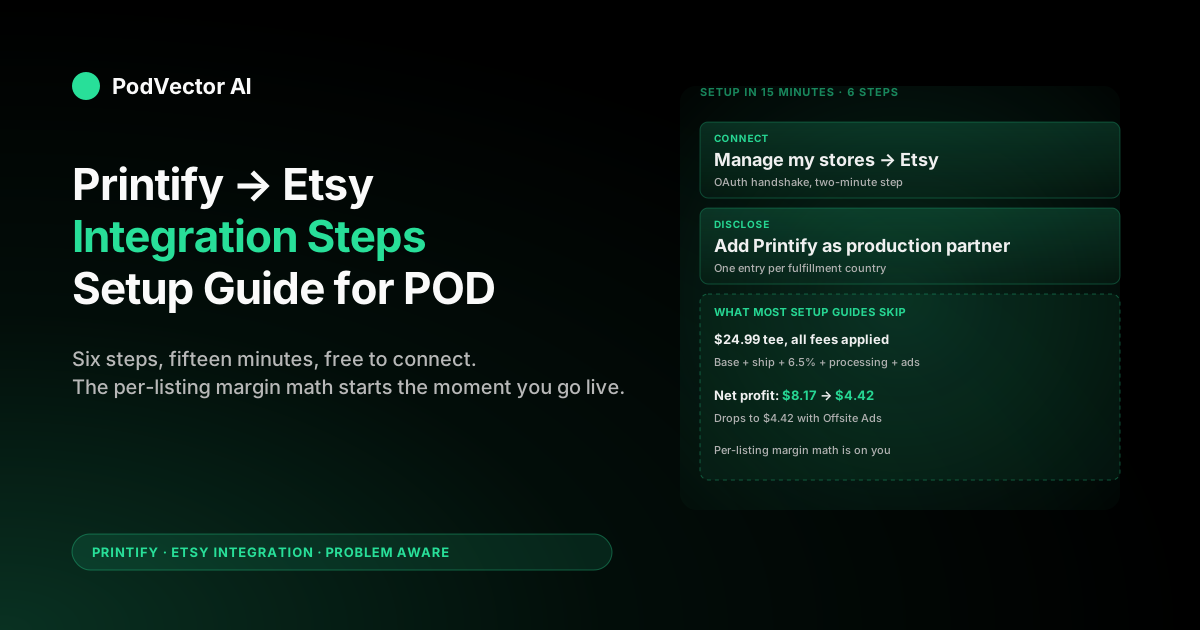
Quick Answer: Connecting Printify to Etsy takes about 15 minutes. Open an Etsy shop, sign into Printify, click Manage my stores → Connect → Etsy, grant permissions, then add Printify as an Etsy production partner.
The setup is free. The work that decides whether your shop is actually profitable starts the moment the connection goes live: Etsy fees, Printify base costs, shipping, ad spend, and refunds all hit different systems, and the listing-level math is on you.
Before you start: prerequisites checklist
Skipping prerequisites is the most common reason this setup stalls halfway through. Sort these first.
- An open, public Etsy shop. A shop in draft or under review will not connect. Etsy's system needs at least one listing live, and your shop has to be fully open with billing on file.
- An Etsy account in good standing. Suspended or under-review accounts cannot grant Printify the API permissions it needs.
- A payment method for Etsy fees. Etsy bills you monthly for listing fees, transaction fees, processing fees, and ad fees. No payment method, no API access.
- A Printify account. Free plan is fine to start. Premium ($29/month) only pays back once you cross roughly $300/month in Printify base costs.
- Designs ready to upload. PNG or JPG at 300 DPI is the safe bet for most apparel and accessories.
If any of these are missing, fix them before you touch Printify — the connection step assumes all five.
Step 1: Open and verify your Etsy shop
If you already have an active Etsy shop with at least one listing, skip to Step 2.
If you don't:
- Go to etsy.com/sell and click Get started.
- Set your shop preferences: language, country, currency, and shop name. The shop name is hard to change later, so pick something brandable.
- Add at least one placeholder listing. You can delete it after Printify publishes the real one. Etsy needs an active listing to mark the shop as "open."
- Set your billing method and verify the email Etsy sends.
Etsy's new-shop fee structure: $0.20 per listing for four months, 6.5% transaction fee, plus payment processing (around 3% + $0.25 in the US). Hold those numbers — you'll need them in Step 6.
Step 2: Create a Printify account
Head to printify.com and sign up with email, Google, or Facebook.
During onboarding Printify asks how you plan to sell. Pick Etsy. This pre-loads recommended product templates and shipping defaults that match Etsy's listing rules.
Stay on the free plan for now. Free includes unlimited product designs, 5 stores per account, and standard Printify pricing. Premium ($29/month) gives roughly 20% off catalog base prices but only makes sense once your monthly Printify spend is high enough that the discount beats the subscription fee — see our breakdown in does Printify cost anything on the free plan.
Step 3: Connect Printify to Etsy
This is the actual integration step. It takes about two minutes.
- In Printify, click your profile in the top right, then Manage my stores.
- Click Connect in the top-right corner.
- Select Etsy from the platform list.
- Click Connect again. Printify redirects you to Etsy's authorization page.
- Sign into Etsy if prompted, then click Allow access. This grants Printify the API scopes it needs to read your shop, create listings, and receive order webhooks.
- Etsy redirects you back to Printify. The store now appears in your Manage my stores list.
If you see an error like "Etsy shop not found," your Etsy shop isn't fully open yet. Go back and confirm at least one listing is live and your billing method is verified.
The other direction — connecting from Etsy out to Printify — is also documented in our how to connect Etsy to Printify step-by-step walkthrough, which is useful if you're starting from the Etsy side.
Step 4: Add Printify as an Etsy production partner
Etsy requires sellers to disclose anyone who helps make their products. Skipping this gets listings hidden during Etsy's quality reviews.
- In Etsy's Shop Manager, click Settings → Production partners.
- Click Add a new production partner.
- Partner name: Printify.
- Location: pick the country your Printify provider ships from. For US-based providers like Monster Digital or SwiftPOD, use the United States.
- About the partner: a short, honest sentence works. Example: "Printify connects me to print providers who manufacture and ship my designs on demand."
- Save.
Add a separate production partner entry for each country you fulfill from. If you use both a US and a UK Printify provider, that's two entries.
Step 5: Create and publish your first product
From the Printify dashboard:
- Click Catalog and pick a product. Bella+Canvas 3001 t-shirts, AOP hoodies, and 11oz mugs are the three highest-volume Etsy sellers across Printify's catalog.
- Pick a print provider. Sort by production time and shipping cost — Etsy buyers expect fast shipping, so a provider with 2-3 business day production and ground shipping inside your customers' region matters more than saving $0.50 on base cost.
- Upload your design. 300 DPI PNG with transparent background is the safe default.
- Position the design on the mockup. Use Printify's auto-generated mockups — they match Etsy's image specs.
- Fill in title, description, and tags. Etsy gives you 13 tags. Use all 13, and lean keyword-research-driven rather than cute.
- Set your retail price. Printify shows you the base cost — your markup goes on top. See Step 6 for the actual math.
- Click Publish. The listing pushes to Etsy as a draft by default. Toggle "Publish as draft" off if you want it to go live immediately.
The first product takes 30 minutes. By the time you've done five, it's a 5-minute job.
Step 6: Set pricing, shipping, and tax
This is where most new Etsy + Printify sellers leak margin. Run the math once and you can re-use the template across every listing.
For a single Bella+Canvas 3001 t-shirt sold at $24.99:
- Printify base cost: ~$9.50 (varies by provider)
- Printify shipping to customer: ~$4.50
- Etsy listing fee: $0.20
- Etsy transaction fee (6.5%): $1.62
- Etsy payment processing (~3% + $0.25 in US): $1.00
- Etsy Offsite Ads fee (if applicable, 12-15% of sale): up to $3.75
Total cost: ~$16.82 without Offsite Ads, ~$20.57 with. That leaves $8.17 or $4.42 in gross profit per sale before refunds, returns, and your own marketing spend.
The fix is pricing for profit, not for popularity. A $29.99 list price changes those margins by roughly $4.69 — often the difference between a viable listing and one that loses money on every refund. For a full cost walk-through across the platform, see does Printify cost money.
Shipping profiles
Printify auto-creates shipping profiles in Etsy that match each provider's rates. Don't override these unless you know exactly what you're doing — manually setting flat-rate shipping below the provider's cost is the single fastest way to turn a profitable listing into a loss leader.
Tax
Etsy collects sales tax in most US states automatically. For VAT/GST outside the US, set the rates in Etsy's tax settings. Printify doesn't handle tax collection — it just sends you a base cost invoice.
What to track once the integration is live
Setup is the easy part. The next 90 days are where most Etsy + Printify shops either find their winners or quietly stop. Track these five numbers per listing, weekly:
- Net profit per sale — retail price minus Printify base + shipping + all Etsy fees + ad spend allocated to that listing.
- Refund rate — Printify won't refund you for buyer-error returns, so a high refund rate eats your margin directly.
- Etsy ad ROAS — Etsy's on-platform ads have a different return profile than off-platform paid social. Track them separately.
- Conversion rate by listing — Etsy gives you this in Stats. Listings under ~1% conversion need new photos or a new title before they're worth pushing.
- Printify fulfillment time per provider — Etsy reviews mention "slow shipping" more than any other complaint. If a provider drifts past their stated production window, switch.
Etsy's Stats tab covers the on-platform side. Printify's order export covers the cost side. The painful part is joining them: you need to know that listing #4291 — the one Etsy says converted at 2.3% — also has a $3.20 net margin once you back out Printify base cost, shipping, transaction fees, and the offsite ad fee.
That cross-source join is where an AI employee earns its keep. Victor — PodVector's AI employee — is built for Shopify-based POD stores: if your POD business runs on Shopify, he joins your Shopify orders, itemized Printify costs, and Meta/Google ad spend into one live view, then runs the listing-level profit math automatically. When a winner emerges, Victor proposes the profit move for you to approve. When a product's margin slips below threshold, he flags it before the refund queue catches up.
Common setup issues and fixes
"Etsy shop not found" during connect
Your shop isn't fully open. Go to Etsy Shop Manager and confirm: at least one active listing, billing method on file, no pending review flags.
Listings publish as drafts only
Default behavior. In Printify's publish settings, uncheck "Publish as draft" to push directly live.
Production partner missing from listings
You added Printify as a partner but forgot to attach it to the listing template. In Etsy Shop Manager, edit the listing → Production Partners section → check the Printify box. Set it as the default for new listings to skip this every time.
Connection drops after a few weeks
Etsy's OAuth tokens expire. Reconnect from Printify's Manage my stores page. If it drops more than once a quarter, file a Printify support ticket — it usually means a permission scope changed.
Orders not syncing to Printify
Check that the listing was created in Printify and published to Etsy from there. Orders on listings created directly in Etsy (not through Printify) won't sync to Printify — those need to be re-created in Printify first.
For Amazon-side integration alongside Etsy, our how to connect Printify to Amazon step-by-step guide covers the same ground for the Amazon Custom flow. And for sellers automating notifications and inventory across both, the Zapier Printify integration setup guide covers the most common cross-platform automations.
FAQs
Is the Printify-Etsy integration free?
Yes. Printify charges nothing to connect or to publish products. You pay base cost + shipping per order Printify fulfills. Etsy charges its own fees (listing, transaction, processing, optional ads). Printify Premium ($29/month) is optional and only worth it once your Printify base costs cross roughly $300/month.
How many Etsy shops can I connect to one Printify account?
Up to 5 stores per Printify account on the free plan, 10 on Premium. You can connect multiple Etsy shops, but each Etsy shop can only be connected to one Printify account at a time.
Can I connect an existing Etsy listing to a Printify product?
No. Printify can only sync orders from listings it created itself. Existing Etsy listings need to be re-created from Printify's catalog and re-published. Old listings can stay live, but Printify won't fulfill them.
How long does setup take end-to-end?
About 15 minutes for the integration itself if your Etsy shop is already open. Add 30-60 minutes for your first product. After that, new products are 5-10 minutes each.
What if my Etsy shop gets suspended after connecting?
The Printify connection stays in place but Printify can't push new listings or receive orders. Resolve the suspension with Etsy directly. Once your shop is back in good standing, the integration resumes automatically.
Does Printify handle returns and refunds for Etsy orders?
Printify will reprint or refund for production defects and lost shipments. They will not refund buyer-remorse returns. Etsy holds you responsible for the customer relationship — Printify is your supplier, not your customer service team.
Can I use both Printify and another fulfillment source for the same Etsy shop?
Yes. List each fulfillment partner separately under Etsy's Production Partners section. Listings created in Printify fulfill through Printify; listings you fulfill manually stay manual. Just be clear in the listing description so buyers know.
Let Victor run the Shopify + Printify math for you
Setup is one afternoon. The ongoing work — joining Etsy orders to Printify costs, watching margin per listing, catching when a winner needs more ad spend — is every week, forever.
Victor is an AI employee built for Shopify-based POD stores: he joins your Shopify orders, itemized Printify costs, and Meta/Google ad spend into one live view, runs the per-product profit math automatically, and asks for approval before any change touches your Shopify store. He doesn't just show you the numbers — he proposes the next action.
Try Victor freeMore Printify integration setup guides: all Printify integration guides · all Printify articles. External reference: Printify's official Etsy integration page.