
Quick Answer: Printify's Profit Calculator is a built-in tool inside every Printify product page that estimates your Etsy profit by combining the product's production cost with Etsy's listing fee, transaction fee, payment processing fee, and an optional shipping input. It lives under the Pricing section of each product, not in the main navigation.
Setup takes about two minutes. Open a product, scroll to Pricing, click Profit Calculator, enter your target retail price (or your target profit), and the tool back-solves the math per variant.
This guide walks the full flow with screenshots in mind, then covers what most calculator tutorials skip — the fees Printify's tool does not automatically include, how to model Offsite Ads and regulatory fees, and how to keep the per-SKU math honest once you have a few hundred orders behind you.
What the Printify Etsy calculator actually is
There are two things people mean when they say "Printify Etsy calculator." Both exist, and they do different jobs.
The first is Printify's public Etsy calculator, a landing-page tool that anyone can use without a Printify account. You type in a sale price, product cost, and shipping cost, and it returns Etsy's fees plus your profit. It's useful for back-of-envelope checks before you commit to a product.
The second — and the one this guide focuses on — is the Profit Calculator built into every Printify product page. This one is wired to your actual production cost, your actual variants, and your actual Etsy shop. It's the calculator you'll touch a hundred times once you're running a real catalog.
The mechanics are similar. The accuracy is not. The product-page calculator pulls your real Printify cost (which changes by variant, color, and print provider), so the profit number reflects the SKU you'd actually ship.
The Etsy fees the calculator handles for you
Printify's calculator builds Etsy's standard fee stack into every estimate. You don't have to remember the percentages.
The fees automatically included are:
- Listing fee: $0.20 per listing, charged when you list and every four months on renewal.
- Transaction fee: 6.5% of the item price plus shipping (and gift wrap, if used).
- Payment processing fee: varies by country. US sellers pay 3% + $0.25 per order. UK, Canada, and EU rates differ; Etsy publishes the full table.
For most US-based Printify sellers, those three fees cover the bulk of what Etsy takes per order. The calculator subtracts them from your sale price, subtracts Printify's production cost, and shows you what's left.
The Etsy fees the calculator misses
This is the part most tutorials gloss over. The Profit Calculator is a guide, not a complete P&L. A few real costs sit outside it.
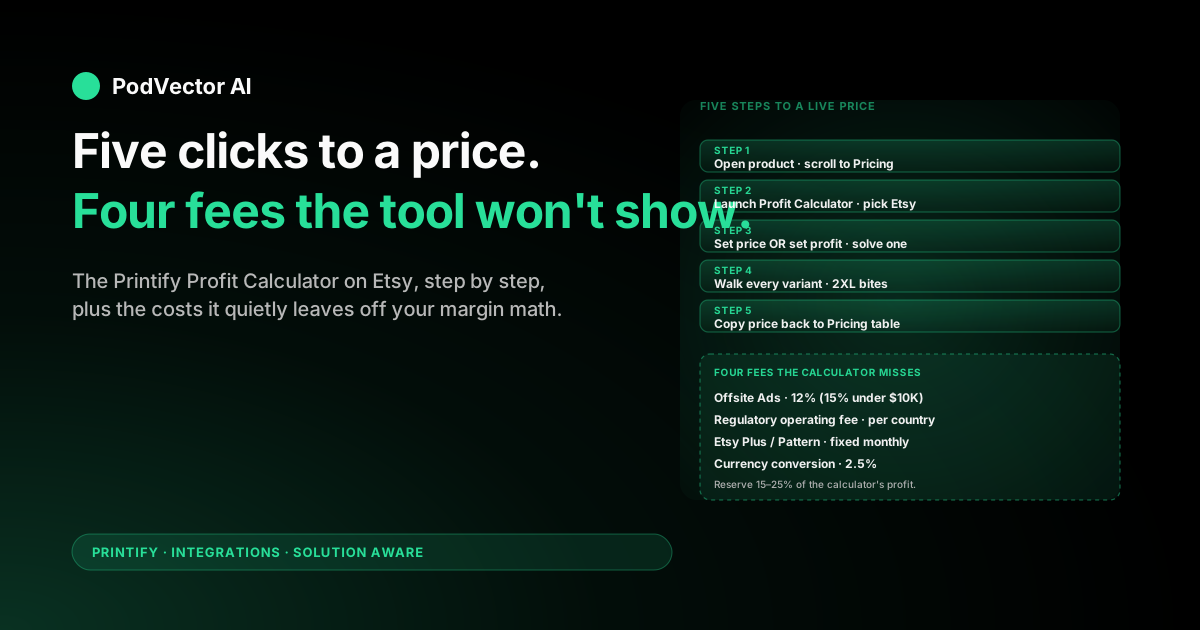
Offsite Ads fee. If Etsy attributes an order to its Offsite Ads program, Etsy takes another 12% (or 15% if your shop made under $10,000 in the last 365 days). That fee only fires on Offsite-attributed orders, so it's irregular — but on the ones it hits, it can eat the entire margin the calculator just promised you.
Regulatory operating fee. Etsy charges a small per-country regulatory fee in select markets (Turkey, UK, France, India, and others), ranging from roughly 0.25% to over 2%. The Profit Calculator doesn't ask where your buyers live, so this one always lives in your blind spot.
Etsy Plus or Pattern subscription. If you pay for Etsy Plus ($10/month) or Pattern ($15/month), those are fixed monthly costs that need to be amortized across orders. The calculator doesn't know they exist.
Returns and chargebacks. A small percentage of orders come back. Printify won't reimburse production cost on most returns, so a buyer-paid return on a custom mug is a 100% loss. Build this into your target margin before you trust the calculator's number.
Currency conversion. If your shop sells in USD but you're paid in another currency, Etsy's conversion adds a 2.5% fee. Not in the calculator.
Step 1: Open a product and find the Pricing section
Log in to Printify. Open the storefront connected to your Etsy shop (or create a new product if you don't have one yet). Click the product you want to price.
Scroll past the design preview, variants, and shipping toggles. The Pricing section sits below all of those — it's the table listing every variant's cost, your retail price, and your profit per variant.
If you're brand new to Printify and haven't published the product yet, the calculator still works. You don't need a live listing to model your margins.
Step 2: Launch the Profit Calculator
In the Pricing section, look for the Profit Calculator button. On most product types it sits to the right of the variant pricing table, near the "Set price" and "Set profit" controls.
Click it. A side panel opens with three inputs at the top:
- Sale channel — pick Etsy. The calculator changes the fee stack based on which storefront you select.
- Set price or Set profit — toggle between solving for retail price (you know your margin target) or solving for profit (you know what you want to charge).
- Variant selector — pick the size/color combo you're modeling.
If the Etsy option doesn't show up, your Printify shop isn't connected to Etsy yet. The calculator pulls fee logic per channel, so it needs to know which marketplace's math to run.
Step 3: Set price or set profit — pick one
This is the most common point of confusion, and it's worth ten seconds.
Set price means: "I'm going to charge $X. Tell me what my profit will be after all fees and production cost." Use this when you've decided on a price (because competitors are at that price, or because you're matching a round-number anchor like $24.99) and you want to see what falls out the bottom.
Set profit means: "I want to make $Y per order. Tell me what to charge." Use this when you're working backward from a margin target — say, $8 profit per t-shirt — and you want the calculator to back-solve the retail price.
Most sellers default to Set price. It matches how shoppers think (they see a price, not a margin). But for a brand-new product line where you're not anchored to a competitor, Set profit is the faster way to a sane price floor.
Step 4: Walk every variant, not just the cheapest
This is where the calculator either pays for itself or becomes worthless.
Printify's production cost is not flat. A 2XL t-shirt costs more than a Small. A black hoodie costs different from a heather grey. Certain print providers carry different price ladders for the same blueprint.
If you set one retail price across all variants and use the calculator only on the cheapest size, the larger variants will quietly run at break-even or a loss. The fix: open the variant selector, click through Small → Medium → Large → XL → 2XL → 3XL, and watch the profit number move. Pick a retail price where even your largest variant clears your margin floor.
Some sellers solve this with variant-specific pricing on Etsy (charging more for 2XL+). Others pick a single price that works for the worst case and accept thinner margins on smaller sizes. Either way, the calculator only helps if you actually walk every SKU you'll list.
Step 5: Copy the retail price back into the Pricing table
One more gotcha: the Profit Calculator does not automatically update your published prices. It's a modelling tool, not a price setter.
Once you've landed on a number you like, close the calculator and type the retail price into the variant's row in the Pricing table itself. If you used Set profit and Printify suggested, say, $27.50, you type 27.50 into the variant's price field. Save. Push to Etsy.
This trips up beginners constantly — they spend twenty minutes in the calculator, close it, and wonder why their Etsy listing still shows the default price. Always check the Pricing table one more time before publishing.
Worked example: $24.99 t-shirt on Etsy
Concrete numbers help. Here's how the math plays out for a typical Printify-on-Etsy t-shirt at $24.99 retail with free shipping baked in.
- Sale price: $24.99
- Printify production + shipping cost: $11.85 (typical Bella+Canvas 3001, US print provider, first-class shipping)
- Etsy listing fee: $0.20
- Etsy transaction fee (6.5%): $1.62
- Etsy payment processing (3% + $0.25): $1.00
- Subtotal of Etsy fees: $2.82
- Profit before Offsite Ads and regulatory fees: $24.99 − $11.85 − $2.82 = $10.32
That's the number the Profit Calculator will show you. Now layer the items the calculator misses:
- If Etsy attributes the order to Offsite Ads (12% under-$10K shops: 15%): subtract another $3.00 → profit drops to ~$7.32.
- If the buyer is in the UK or another regulated market: add ~0.25–2% regulatory fee → another $0.06 to $0.50 off.
- If you pay Etsy Plus and amortize across 30 orders/month: add $0.33 per order in fixed cost → profit drops further.
- If 3% of orders get refunded with no Printify reimbursement: reserve about $0.36 per order for return loss.
Best case (no Offsite Ads, US buyer, no subscriptions): $10.32. Realistic blended case: closer to $8 once you average across the long tail. That difference compounds across a thousand orders.
When the built-in tool stops being enough
The Profit Calculator is excellent for setting a launch price on one SKU. It is not built for running an ongoing POD business across dozens or hundreds of products.
You outgrow it when any of these get painful:
- Catalog-wide margin drift. A print provider raises 2XL pricing by $0.50. You have 80 listings using that blueprint. Re-walking every Profit Calculator manually is a half-day of work.
- Offsite Ads blended cost. You want to know your true per-order profit averaged across Offsite and non-Offsite orders, not just the best case.
- Cross-channel reconciliation. You sell the same designs on Etsy, Shopify, and TikTok Shop. The Profit Calculator only models one channel at a time, and it doesn't know what your ad spend is doing on top of that.
- Per-SKU return rate. Some designs come back more than others. You want your margin number to reflect that, not assume a flat 3% across the catalog.
At that point the calculator stops being a daily tool and becomes a sanity check for new product launches. The real margin work moves into a spreadsheet, a BI tool, or a live data layer that joins Printify cost data with Etsy fee data, ad spend, and returns.
If you're at that stage and still computing per-order profit by hand, that's exactly the problem an AI employee like Victor exists to solve — he keeps a unified data warehouse of Printify production cost, Etsy fees (Offsite Ads included), ad spend, and returns across every channel you sell on, and answers "what's my true margin on SKU X this month?" in plain English. More on that in the Printify integrations hub.
Common mistakes POD sellers make
Setting one retail price using only the Small variant's math. Already covered. Always walk every variant. The 2XL is the one that gets you.
Forgetting Offsite Ads on launch math. The calculator doesn't show it. New shops under $10K in trailing revenue are charged 15% on Offsite-attributed orders. That can flip a "healthy" margin negative on a heavy-discount launch.
Treating the Profit Calculator number as net. It's gross of Offsite Ads, regulatory fees, subscriptions, returns, and currency conversion. Reserve at least 15–25% of the calculator's profit number for the long-tail items it doesn't track.
Not re-running the calculator after a Printify cost change. Printify adjusts production costs periodically (especially seasonal items and new print providers). A retail price that cleared $9 margin last quarter may clear $6 this quarter without you noticing — until you reconcile the books and find your annual profit shrank.
Mixing up the public calculator and the product-page calculator. The public landing-page calculator uses whatever cost you type in, including potentially-wrong cost estimates from memory. The product-page Profit Calculator uses the live Printify cost for that exact variant. Use the live one for real decisions.
FAQs
Does Printify's calculator include Etsy Offsite Ads fees?
No. The calculator covers listing, transaction, and payment processing fees, plus your production cost. Offsite Ads (12% or 15% depending on shop revenue) only fires on Offsite-attributed orders, so it isn't a per-listing fee the calculator can predict. Model it separately as a blended percentage based on what portion of your orders historically come from Offsite.
Why does my Etsy profit look different from what the calculator showed?
Three common reasons. First, the order may have been attributed to Offsite Ads. Second, the buyer may have been in a country with a regulatory operating fee that the calculator doesn't ask about. Third, Etsy's currency conversion (if you sell in USD but the buyer paid in a different currency) adds 2.5%. Reconcile against your Etsy CSV export to find the gap.
Can I use the calculator before connecting my Etsy shop to Printify?
Yes — the in-product Profit Calculator lets you pick "Etsy" as the channel even if your shop isn't yet connected. Useful for modelling whether Etsy is the right channel for a given product before going through the storefront connection flow.
How does the calculator handle free shipping vs paid shipping?
Most experienced Etsy sellers bake shipping into the item price (free shipping above $35 helps with Etsy's search ranking). The calculator handles either model — you can set shipping to $0 and price the item to absorb it, or set shipping as a separate line item. Just be consistent with how the actual Etsy listing is configured, or your profit number will drift.
What's the calculator's default profit margin?
40%. That's Etsy's recommended floor for healthy POD margins, and it's what Printify pre-sets when you connect a new Etsy shop. You can change the default in your shop settings, and you can override it per-product in the calculator. Below 30% margin on Etsy, Offsite Ads alone can flip you negative.
Does the calculator work on the Printify mobile app?
Partially. You can view variant pricing on mobile, but the full Profit Calculator UI is desktop-optimized. For serious pricing work, use the web app on a laptop or tablet — the variant-walk step (Step 4) is faster with a real keyboard.
Why is my profit calculator showing different numbers than Printful's calculator for the same retail price?
Because the production cost is different. Printful and Printify use different blueprints, different print providers, and different shipping rates. For an apples-to-apples comparison, you'd need to model the same retail price against each provider's true cost — see our full Printify pricing breakdown and Printify pricing model deep-dive.
Can I export the calculator's output to a spreadsheet?
Not directly. Printify doesn't offer a CSV export from the Profit Calculator itself. You can export your full product catalog from the Pricing section (CSV) and rebuild the math externally — useful once you have more than a couple dozen products and want to model price changes in bulk.
How often should I re-run the calculator on existing products?
At minimum: once a quarter, and whenever Printify announces a cost adjustment or a new print provider for one of your blueprints. Catalog-wide, do a full walk before peak season (Q4) so Black Friday and holiday discounts aren't sneaking you into negative margin.
Does the Profit Calculator account for TikTok Shop or other channels?
It does, but the fee structure differs per channel. The calculator changes its math when you switch the sale channel selector. For TikTok specifically, see our TikTok Shop integration guide and TikTok Shop setup walkthrough for the channel-specific fee gotchas.
For broader context on how the calculator fits inside the full Printify-Etsy workflow, browse the Printify integrations hub or the Printify topic hub.
Let Victor close the gap between the calculator and your real margin
The Profit Calculator gives you a starting price. The hard part comes later — keeping that margin honest across Offsite Ads, returns, ad spend, and currency conversion the calculator doesn't see.
Victor is an AI employee for POD sellers. He connects to your Printify, Etsy, Shopify, Meta, and Google accounts, joins production cost with channel fees and ad spend in a unified data warehouse, and answers "what's my true profit on SKU X this month?" in plain English. He'll also flag margin drift, propose price changes, and reallocate ad spend across channels — asking for your approval before any change goes live.
Try Victor free