
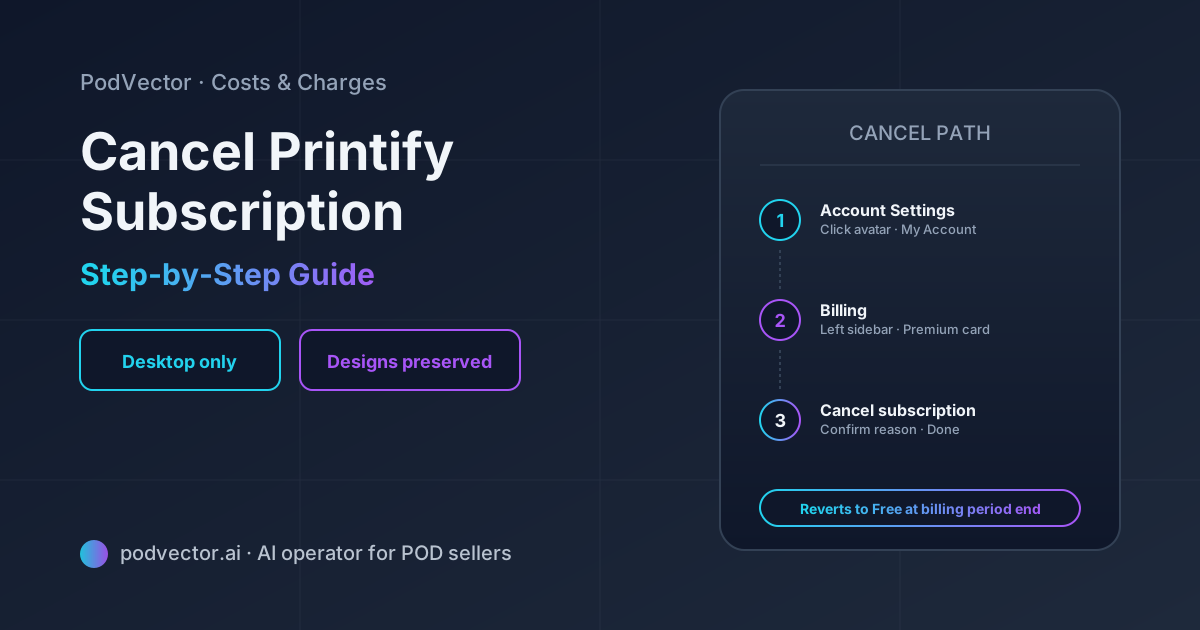
Quick Answer: Cancel Printify Premium from a desktop browser at Account Settings → Billing → Cancel (or Wallet → Payments → Cancel subscription). The mobile app doesn't allow cancellation.
You keep Premium benefits until your current billing period ends. Printify Premium is non-refundable, so cancel before your next renewal date to avoid the upcoming charge.
Cancelling Premium is not the same as deleting your Printify account. Your stores, designs, and order history stay intact — you just revert to the Free plan and lose the catalog discount.
Cancel vs. delete: which one you actually want
Two different actions are often conflated. Cancelling stops your Premium subscription. Deleting removes your entire Printify account.
Cancel Printify Premium — you keep your account, your stores, your designs, and your order history. You revert to the Free plan at the end of the current billing period. No catalog discount, but everything else still works.
Delete your Printify account — your stores disconnect, your designs are removed, and your account becomes inaccessible. This is a one-way action; reactivating means starting from scratch.
Almost everyone searching for "cancel Printify" wants the first one. They want to stop paying $29/month for Premium because order volume dropped, ad spend got reallocated, or the catalog discount stopped paying for itself. They don't want to lose six months of design work and store integrations.
The rest of this guide focuses on cancelling Premium. If you actually want to delete your account, that's a separate flow in Account Settings → Account → Delete account.
The pre-cancellation checklist
POD sellers tend to cancel Premium and then realize three days later that something broke. Run through this list first.
1. Check in-flight orders. Premium and Free both fulfill orders the same way — your existing orders don't change. But if you've placed bulk sample orders in the last 48 hours at Premium pricing, confirm they've already been processed (not still pending), so you don't get charged retroactively at Free-plan prices. In practice this is rare, but worth a quick check in your order dashboard.
2. Count your connected stores. Premium allows 10 stores; Free allows 5. If you currently have 6+ connected stores, you'll need to disconnect the extras manually after cancellation, or Printify will pause fulfillment on the over-cap stores. Disconnect the lowest-revenue stores first.
3. Export any reports you need. Premium doesn't give you exclusive reporting features, but if you use Printify Connect's order management or any Sellers Club Pro materials, save what matters before the access window closes.
4. Note your next billing date. Cancellation stops the next renewal but doesn't refund the current period. Knowing your renewal date tells you exactly when Free-plan pricing kicks in.
5. Decide whether you'll need Premium back. If your slow month is seasonal (post-holiday Q1, for example), cancelling and re-subscribing in March costs you two months of subscription fees ($58). Downgrading by absorbing two slow months at Premium pricing might be cheaper than churn-and-resubscribe.
Step-by-step: cancel Printify Premium on desktop
There are two paths to the same cancellation screen. Either works.
Path 1: via Account Settings
- Log into printify.com on a desktop browser
- Click your profile avatar in the top-right corner
- Select My Account from the dropdown
- In the left sidebar, click Billing (or Subscription, depending on UI version)
- Find your current Premium plan card
- Click Cancel subscription (a smaller link below the main plan info)
- Printify will show a confirmation modal — choose your reason, click Confirm cancellation
- You'll see a confirmation screen with the date access ends
Path 2: via Wallet → Payments
- From the main dashboard, click Wallet in the top navigation
- Select Payments
- Scroll to the Premium subscription section
- Click Cancel subscription
- Follow the confirmation prompts
Both paths trigger the same backend action. Use whichever you find first.
The cancellation typically takes effect immediately — meaning no further charges will be made — but the Premium benefits (catalog discount, store cap, Printify Connect) remain active until the end of the current billing period. Most cancellations process within minutes, though Printify notes some may take up to 24 hours to update across the dashboard.
Cancelling Sellers Club Pro (the membership tier)
Sellers Club Pro is a separate Premium-tier add-on for 1:1 mentorship and community access. Cancelling Premium also cancels your Sellers Club Pro access, but you can cancel Sellers Club Pro independently while keeping Premium.
To cancel Sellers Club Pro only:
- Go to Account Settings → Billing
- Look for the Sellers Club Pro line item (separate from Premium)
- Click Cancel on the Sellers Club Pro entry specifically
If you don't see a separate Sellers Club Pro line, you may not be subscribed to it — Sellers Club Pro is an opt-in additional plan, not part of base Premium.
According to Printify's own documentation, after cancelling Sellers Club Pro "you'll retain access until the date that would have been your next payment." Same logic as Premium itself.
Why you can't cancel from the mobile app
Printify's mobile app doesn't expose the cancellation flow. The Billing section in the app shows your current plan but doesn't include a Cancel button.
This is partly an Apple/Google compliance thing — in-app subscription cancellations are handled by the platform's own subscription manager when the original subscription was purchased through the App Store or Play Store. But for Printify Premium specifically, subscriptions are billed directly by Printify (not through Apple/Google), so the cancel flow lives on the web.
The fix: open printify.com in a mobile browser (not the app), log in, and follow the desktop steps. The web UI is responsive — the same Account Settings → Billing → Cancel path works on a phone.
What happens after you cancel
Here's what changes and what stays the same.
| What | Status after cancellation |
|---|---|
| Your Printify account | Stays active on the Free plan |
| Connected stores | Stay connected (up to 5; over-cap stores get fulfillment paused) |
| Existing designs | All preserved |
| Published products | Stay published in your stores; reprice if needed |
| In-flight orders | Fulfill normally at Premium pricing if already placed |
| New orders after Premium ends | Charged at full catalog price (no 20% discount) |
| Sellers Club Pro | Loses access at end of current billing period |
| Printify Connect | Loses access at end of current billing period |
| Order history | Fully preserved |
| Mockups and uploaded images | Preserved |
The biggest operational impact is your unit margin. Every order placed after the Premium benefits end costs you the full catalog price — typically 15–20% more per item than you were paying. Reprice your products or accept the margin hit.
For the broader cost picture, see our Printify discount code breakdown and our guide to all available Printify discount codes — some pricing relief is available outside Premium.
Refunds, prorations, and the "cancel anytime" fine print
Printify Premium is sold as non-refundable. The "cancel anytime" language on the pricing page means you can stop future renewals — not that you can get a refund for the current period.
Three specific cases worth knowing:
Monthly billing. Cancel any day of the month and you keep Premium until the next monthly renewal date. No partial refund, no proration.
Annual billing. If you paid $299 for a year and cancel after month 3, you keep Premium for the remaining 9 months. No partial refund of the remaining months. The annual discount assumes you'll use the full year.
Accidental renewal. If Premium auto-renewed and you cancel within a few days, Printify's support team has been known to issue case-by-case refunds, but this is at their discretion — not a published policy. Contact support immediately if this happens; the longer you wait, the less likely they'll process it.
The non-refundable terms are why the pre-cancellation checklist matters. Cancel before your renewal date, not after.
When to downgrade to Free instead of cancelling outright
Cancelling Premium and reverting to Free is a downgrade — not a deletion. But sometimes the right move is keeping Premium and adjusting how you use it.
Cancel Premium if:
- Your monthly order volume is below 12 (you're paying more for Premium than you save in catalog discount)
- You're pausing the business entirely for a season
- You've consolidated to 2–3 stores and don't need the 10-store cap
- Sellers Club Pro and Printify Connect aren't part of your workflow
Keep Premium if:
- Your slow month is temporary (post-holiday Q1, summer dip) and volume will return
- You're between 12–20 monthly orders — Premium pays for itself at this volume
- You use Printify Connect for customer order tracking
- You have higher-base-cost items (AOP hoodies, canvas wraps) where 20% off compounds quickly
The math on Premium versus Free is purely volume-driven. At a $12 average base cost, Premium pays for itself at 12 monthly orders on monthly billing or 10 monthly orders on annual billing. Above that volume, cancelling Premium costs you margin. Below it, cancelling is the right call.
If you're hovering near break-even, also consider whether seasonal lift is coming. Cancelling in February and re-subscribing in November means paying for 1 month of churn-and-resubscribe overhead plus losing the annual billing discount.
For the in-depth break-even analysis, see our Printify deals breakdown and our broader cost analysis.
If you change your mind: how to restore
If you cancel and then reconsider during the same billing period, you can restore Premium without losing any access continuity.
Steps to restore:
- Log into printify.com on desktop
- Go to Account Settings → Billing
- Find the Premium plan card showing the "cancelled, ends [date]" status
- Click Restore subscription
- Confirm — billing resumes from your original renewal date with no gap
Restoration only works while you still have access — meaning before the end of your paid billing period. Once Premium has fully lapsed, restoring means subscribing fresh (and you typically lose any new-subscriber promo eligibility, including the FP30 free-trial code).
If you waited until after the period ended, see our Printify deals page for whether any current promos can reduce the resubscription cost.
Connecting Printify to Shopify after cancellation
If you're cancelling Premium because you're consolidating to a smaller setup, double-check that your Shopify integration still works on the Free plan. It does — both Premium and Free allow Shopify integration — but the integration steps and product re-syncing rules differ from a fresh setup.
For full integration walkthroughs, see our Printify-Shopify integration setup guide and the step-by-step Shopify connection walkthrough.
For the full Costs & Charges cluster, see our index. The Printify topic hub covers everything else. Printify's own help center includes the official cancellation article at help.printify.com — useful as the canonical source, though it doesn't address downgrade-vs-cancel decision logic.
FAQs
Will I lose my designs if I cancel Printify Premium?
No. Your designs, mockups, and product images stay in your Printify account when you cancel Premium. The cancellation only stops the subscription — it doesn't touch your library. You can continue listing and selling those designs on the Free plan; you'll just pay full catalog price on the next order instead of the Premium-discounted price.
Can I get a refund on Printify Premium?
Printify Premium is officially non-refundable. The "cancel anytime" terms mean you can stop future renewals, not get money back for the current period. In edge cases — like an accidental annual renewal — Printify's support team has issued case-by-case refunds, but this isn't a published policy. Contact support quickly if this applies to you.
How long does cancellation take to process?
Most cancellations process within minutes; some take up to 24 hours to fully update across your dashboard. The billing change (no future renewal) is recorded immediately, but the visual confirmation in Billing settings sometimes lags. If you see Premium still listed as "active" 24 hours after cancellation, contact Printify support to verify.
Can I cancel Printify Premium from the mobile app?
No. The Printify mobile app doesn't expose the cancellation flow — only the desktop or mobile web version of printify.com does. Open the site in a phone browser (not the app), log in, and navigate to Account Settings → Billing → Cancel.
What happens to my stores when I cancel Premium?
All connected stores stay connected. If you have more than 5 stores (Premium allows 10, Free allows 5), fulfillment pauses on the over-cap stores until you either disconnect some or resubscribe to Premium. Disconnect the lowest-revenue stores first to keep your highest-margin channels active.
If I cancel Premium and resubscribe later, do I lose my catalog discount history?
Yes — there's no concept of carry-forward discount. When you resubscribe, the 20% catalog discount applies to new orders going forward. Past orders billed at full catalog price during your Free period stay at that price. New-subscriber promo codes (like the FP30 30-day free trial) typically don't apply to accounts that previously held Premium.
Is there a way to pause Premium instead of cancelling?
Printify doesn't offer a formal pause feature. The two options are cancel (stops future renewals, you revert to Free) or stay subscribed. If you're worried about losing a low promotional price, note that annual billing locks you into the $24.99/month effective rate for the full year — pausing wouldn't be cheaper than cancelling and resubscribing later at whatever the current rate is.
What's the difference between cancelling Premium and deleting my Printify account?
Cancelling Premium reverts your account to the Free plan. Everything stays — stores, designs, order history, mockups. Deleting your account removes everything permanently. Deletion is the right call only if you're exiting POD entirely; cancellation is the right call if you're scaling down or pausing.
Let Victor decide when to cancel — and when to come back
Most sellers cancel Premium during a slow month, then keep paying full catalog price for six months after volume recovers because nobody's tracking the break-even line. The dashboard doesn't surface it.
Victor is an AI employee that runs your POD business across Meta, Google, Shopify, and Printify/Printful. He reads your live order data, calculates real per-order margin including base-cost differences across plan tiers, and proposes the next action — downgrade, resubscribe, switch channels — with the math attached. You approve, he executes.
Get a single operator across ads, store, and fulfillment instead of stitching spreadsheets together.
Try Victor free