
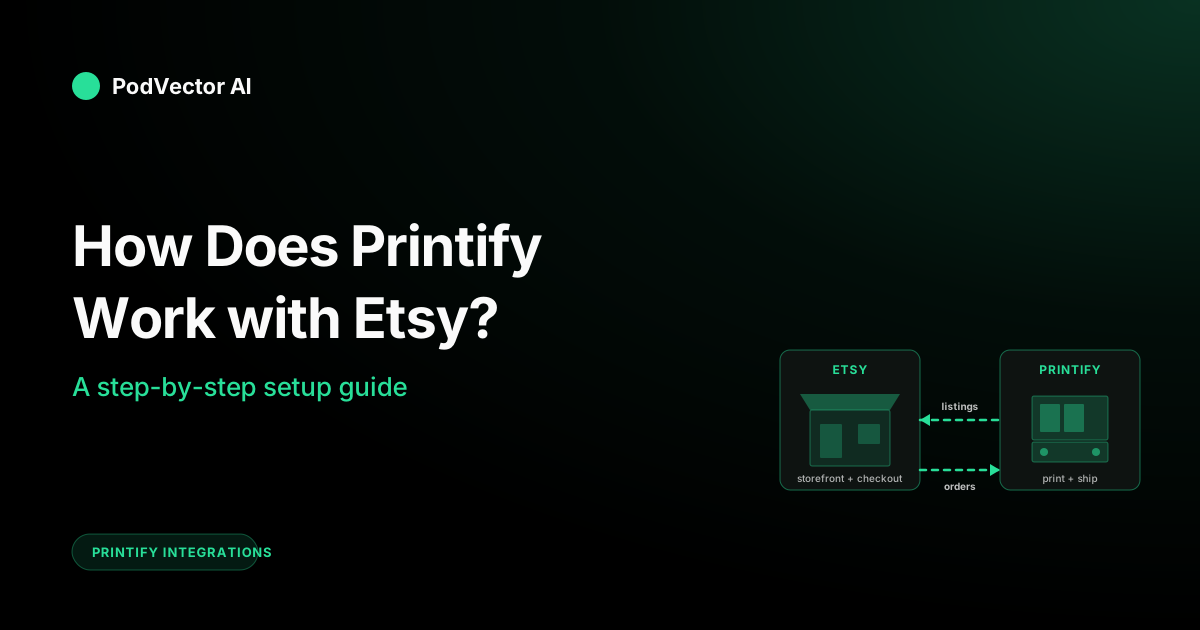
Quick Answer: Etsy is your storefront and payment processor. Printify is your factory and shipping desk. You design the product, Printify hosts the production cost, and the integration syncs new orders one direction and product listings the other.
The connection itself is two clicks: Printify → Manage my stores → Add new store → Etsy → Grant access. That's the handshake. Total time under a minute if both accounts already exist.
The harder question — and the one this guide actually answers — is what happens to each order, who gets paid first, and which dashboards lie to you about margin once the integration is live.
Who Does What: Etsy vs. Printify vs. You
Every Printify-on-Etsy guide jumps to the connect button. That skips the part most new sellers actually want to know: when a customer hits "Buy," what happens behind the scenes and who is responsible for what.
The split is simple once you see it:
- Etsy hosts the listing, runs checkout, processes the customer's payment, and handles buyer-facing support and reviews.
- Printify receives the order data, prints the product through one of its partner providers, packs it, and ships it directly to the buyer.
- You own the catalog. You pick the products, upload the designs, set the retail price, write the listing copy, and approve (or auto-approve) each order that flows through.
Nobody holds inventory. Each order is printed only after it's placed. That's why this model is called print-on-demand — there's no warehouse, no minimum order quantity, and no risk of dead stock.
The trade-off: production cost per unit is much higher than bulk printing. The whole game is making sure your Etsy retail price covers the Printify production cost, Etsy's fees, your shipping cost, and any ad spend — with margin left over. We get into that math in The Money Flow below.
The Data Flow, From Click to Ship
The integration is doing two jobs in opposite directions:
Direction 1: Products go out (Printify → Etsy). When you click Publish to Store in Printify, the listing — title, description, images, variants, price — gets pushed into your Etsy shop as a new product. Etsy treats it like any other listing.
Direction 2: Orders come in (Etsy → Printify). When a customer buys, Etsy sends the order data to Printify within seconds. Printify queues the order for production. After your approval window passes (default 24 hours), the order goes to the print provider, gets made, gets shipped, and the tracking number flows back to Etsy automatically.
The two sides never touch your inventory or warehouse — there is none. The "inventory" is the design file you uploaded; production happens once per order.
One nuance most guides miss: the order flows through Printify, but the customer relationship stays with Etsy. Refund requests, review responses, and shipping complaints all come to you through Etsy's messaging system. Printify never talks to your customer directly. That means support time is your job even though fulfillment isn't.
Before You Connect
You need three things in place before the link will hold:
- An active Etsy shop with at least one published listing and a valid payment method on file. Etsy's API won't grant integration access to a shop in vacation mode or a brand-new shop that hasn't completed the listing-fee charge.
- A Printify account (free is fine — no Premium required for the integration).
- Owner-level access on both. Manager or staff roles on Etsy get bounced halfway through the OAuth handshake.
If you haven't published anything to Etsy yet — even a draft listing — pause and do that first. The integration handshake checks for at least one listing as a heuristic that the shop is real. We've seen new accounts fail the connect step purely because the shop was empty.
Open both tabs side by side. Printify in one, Etsy in the other. The OAuth redirect bounces between them, and a misclick on the wrong tab dumps you back at step one.
The 5-Step Setup
Step 1: Open Manage My Stores in Printify
Sign in to Printify. In the top-left corner, click the dropdown next to your account name. Pick Manage my stores.
This screen lists every storefront already linked to your account. If Etsy is already there from a stale install or a previous trial, disconnect it first — adding a second connection to the same Etsy shop fails silently and creates a debugging headache later.
Step 2: Click Add New Store, Then Etsy
The button is in the top-right of the store list. Printify shows a grid of supported sales channels — Etsy, Shopify, WooCommerce, eBay, TikTok Shop, BigCommerce, Wix, Squarespace, and a few more. Click Etsy.
A modal opens with a Connect button. Click it. You'll be redirected to Etsy's authorization screen.
Step 3: Sign in to Etsy and Grant Access
Etsy asks you to log in (if you aren't already), then shows the permissions Printify is requesting: read shop info, manage listings, read order details, update transactions, and a few related scopes. Every permission listed is required for the integration to function — there's nothing optional to opt out of.
Click Allow Access. Etsy processes the grant, then redirects you back to Printify with a green confirmation banner.
That's the handshake done. Your Etsy shop now shows up in Manage my stores with a green status dot.
Step 4: Set Your Default Approval Window
Before you publish anything, set the order-approval setting on the Etsy store inside Printify. Go to Manage my stores → Etsy → Settings. The default approval window is 24 hours, which means every order sits for a day before going to production unless you manually approve it sooner.
For most beginners, leave it at 24 hours. That gives you a safety window to catch a customer message about a typo or wrong size. Once you're running at scale, drop it to 0 (instant approval) so production starts immediately and you ship faster.
Step 5: Publish Your First Product to Etsy
In Printify, pick a blueprint (a basic mug or unisex tee is cheapest for testing), pick a print provider, upload your design, and click Save product. On the publish screen, write the Etsy-facing title (keyword-rich, under 140 characters), tags, description, and set the retail price.
Click Publish. Printify pushes the listing into Etsy as a draft (default) or live listing depending on the store-level setting. For your first ten products, leave it on Publish as draft — every push lands in Etsy as a draft you can review before going live.
For the deeper publish-step mechanics — Print Provider selection, profit math, design-to-mockup tips — the Printify API create-order endpoint guide walks through what the integration is doing under the hood when you click Publish.
Verify the Connection Actually Works
A green status dot in Printify doesn't guarantee orders will flow. Two quick checks confirm it:
Check 1: Push a test product. Publish that test product from step 5 above. Within thirty seconds, the listing should appear in Etsy under Shop Manager → Listings → Draft (or live if you changed the default). If it does, the outbound sync is working.
Check 2: Place a test order. Move the test listing to live. Place an order on it using your own Etsy account or a friend's. Within a minute, the order should appear in Printify under Orders → Awaiting fulfillment (or On hold if you set a 24-hour approval window). If it does, the inbound sync is working too.
If either check fails, jump to the errors section below. Don't bulk-publish your full catalog until both checks pass — pushing 50 listings into a half-broken connection is the fastest way to create cleanup work for yourself.
The Money Flow: Who Charges Whom
This is the part Printify's own marketing page glosses over. Three parties touch the money, in this order:
- Customer pays Etsy at checkout — full retail price plus whatever shipping you set on the listing.
- Etsy holds the funds, deducts its own fees (listing fee, transaction fee, payment processing fee, and the Offsite Ads fee if the click came from a paid Etsy referral), then deposits the rest into your Etsy Payments account on Etsy's payout schedule.
- Printify charges your saved card or wallet for the production cost + shipping the moment the order is approved for production. Not when the customer pays — when production starts.
The gap between step 2 and step 3 is where most new sellers get burned. Etsy's payout is on a weekly or bi-weekly schedule. Printify's charge is real-time. So you'll see Printify debits hit your card several days before the matching Etsy deposit lands.
If your retail price math is wrong — production cost + Etsy fees + shipping > revenue — you'll be funding the loss out of pocket every cycle until you fix the price. Doing that math by hand for every SKU is brutal. The Printify fees full breakdown covers the production-side numbers; pair it with Etsy's published fee schedule to model net margin per listing before you publish.
One concrete example: a $24 unisex tee with a $12 production cost looks like a 50% margin on paper. After Etsy's 6.5% transaction fee ($1.56), 3% + $0.25 payment processing (~$1.00), $0.20 listing fee, and a $3 shipping subsidy that you absorbed to win the buy-box, your real margin is closer to $6 — a 25% net. Half what the spreadsheet said.
Common Errors and Fixes
"This shop is not eligible" during the Etsy authorization
Your Etsy shop is either in vacation mode, suspended, or hasn't published a listing yet. Open Etsy → Shop Manager and check status. If you're in vacation mode, switch it off. If you haven't published, draft and publish any listing (even a placeholder) and retry the connect.
"Grant Access" button does nothing or loops back to login
You're logged in to multiple Etsy accounts in the same browser. Etsy's OAuth flow gets confused about which account to authorize. Open an incognito window, log in only to the Etsy account you want connected, and redo the connect from Printify.
Connection succeeds but products don't appear in Etsy
The publish queue can stall if Etsy rate-limited the Printify app during a bulk push. Open the product in Printify, click the three-dot menu, and pick Re-publish. If it repeats across multiple products, disconnect and reconnect the store from Manage my stores — the OAuth token refresh usually clears it.
Test order appears in Etsy but not Printify
Two possibilities. First, the order is sitting in Printify's hold window (default 24 hours) — check Orders → On hold, not just Awaiting fulfillment. Second, the saved card on Printify is invalid, so the production charge failed and the order is parked. Open Payments in Printify settings and confirm the card is active.
Etsy listings show different shipping prices than Printify expected
Etsy uses its own shipping profile, not Printify's calculated rates by default. You either need to set up an Etsy shipping profile that mirrors Printify's per-blueprint shipping cost, or configure each listing to use a flat shipping rate you've already baked into the retail price. The mismatch is the single most common reason new sellers lose money on every order.
"Duplicate listing" warning when re-publishing
Printify keeps an internal record of every product it has pushed to Etsy. If you delete the listing on Etsy's side without unlinking it on Printify's side, the next publish attempt sees a duplicate. Open the Printify product, click the three-dot menu, and pick Unpublish first — that clears the link. Then re-publish.
What to Track Once Orders Are Live
Most setup guides end at "the connection works." That's where the real work starts. Once orders flow, you need answers to questions that neither Etsy alone nor Printify alone can give you — only the two together can:
- True per-unit net margin. Etsy shows revenue. Printify shows production cost. Net margin = revenue minus Printify cost minus Etsy fees minus your shipping subsidy minus ad spend. None of the dashboards calculates this for you.
- Which listings are profitable vs. burning cash. A top-seller in Etsy's stats can be a margin loser once Printify's production cost and Etsy's variable fees eat the difference. The reverse happens too — slow movers with high margins often deserve more attention, not less.
- Provider performance per blueprint. Printify lets multiple print providers fulfill the same product type. They have different unit costs, ship times, and reject rates. Tracking which provider made each order — and how that order performed in customer reviews — tells you which providers to consolidate on.
- Order-to-ship latency. Etsy timestamps the order. Printify timestamps the production handoff and the shipped event. The gap between order and ship is what Etsy's review system implicitly judges your shop on. If it's drifting past 5–7 days, you're losing repeat business.
You can answer all of this with spreadsheets and weekly CSV exports. Most operators do. It works for the first few months and collapses around the point where you have more than 20 active listings and three providers.
The cleaner approach is to pipe both feeds into a unified data warehouse — your own (Snowflake, BigQuery, Redshift) or via a tool that maintains one for you. Once the data is in one place, the cross-source questions ("which provider has the best net margin on long-sleeve tees this quarter?") become a single query instead of a multi-hour reconciliation.
The full Printify integrations hub covers the connector mechanics for every channel. The Printify topic page indexes everything else — costs, providers, integrations, and the operator workflows that run on top of them. For the canonical Etsy-side reference, Printify's own Etsy integration page is the source of truth for supported features and the latest API changes.
Where to Go Next
For the API-level view of what the integration is doing under the hood when an order flows from Etsy into Printify, the Printify API docs setup guide and the more detailed Printify API documentation setup guide cover the request/response shape and the webhook events Printify emits during the order lifecycle.
On the cost side, the Printify features and pricing breakdown covers what the free vs. Premium tiers actually change for an Etsy seller's unit economics.
FAQs
How long does it take to set up Printify with Etsy?
Under two minutes if both accounts already exist and you have owner access on both. The handshake is one click on each side; the only manual step is approving the permission grant on Etsy. Test-product verification adds another minute or two on top.
Is there a fee to connect Printify to Etsy?
No fee for the integration itself. Printify charges you only when an order is produced — production cost + shipping at that moment. Etsy charges its own fees (listing, transaction, payment processing) on the sale side. The connection is free; the per-order economics are where the costs sit.
Can I sell on Etsy with Printify if I'm outside the US?
Yes. Etsy operates in most countries and Printify ships globally. Both sides require you to set up your local payment method and tax info correctly during account creation. The integration itself doesn't care about geography.
Do I need to handle the printing or shipping myself?
No. That's the entire value of the Printify-Etsy model. You design and list; Printify's partner providers print and ship directly to the buyer with your shop name on the packing slip. You never touch the physical product.
What happens if a customer wants a refund on a Printify-fulfilled Etsy order?
The customer messages you through Etsy. You decide whether to refund. If the issue is a Printify production defect (wrong design, misprint, damage in transit), Printify will reprint or refund you on the production cost — you submit a quality claim through their support. If the customer just changed their mind, the refund comes out of your pocket because production already happened.
Can one Printify account connect to multiple Etsy shops?
Yes. Printify's free plan supports up to ten linked stores per account, across any combination of channels. Repeat the 5-step setup for each Etsy shop. Each connection runs independently with separate publish queues and order feeds.
Does Printify automatically update my Etsy listings if I change the design later?
It depends on what you change. Edits to title, description, tags, or price in Printify can be pushed to Etsy by re-publishing the product. Design edits (uploading a new image) require unpublishing and republishing — Etsy treats it as a new listing because the mockup images change. Plan design revisions accordingly to avoid losing the listing's accumulated reviews and search rank.
Will Printify charge me before the customer pays?
Printify charges when the order is approved for production, not when the customer pays. With Etsy's payout schedule (weekly or bi-weekly) and Printify's real-time production charge, you'll see Printify debits hit your card several days before the matching Etsy deposit lands. Keep enough float in your account to cover that lag.
Let Victor run your Etsy + Printify ops
Wiring Etsy to Printify is the setup. Knowing what to act on once orders flow — which listings are losing money after fees, which provider to swap, where to shift ad spend — is the actual job. Victor is an AI employee built for POD sellers. He runs your Meta and Google ads, updates your Etsy and Shopify catalogs, and reallocates spend with your approval, on top of a live data warehouse that already speaks Etsy, Printify, and every ad platform you use. He does the work. You approve the moves.
Try Victor free