
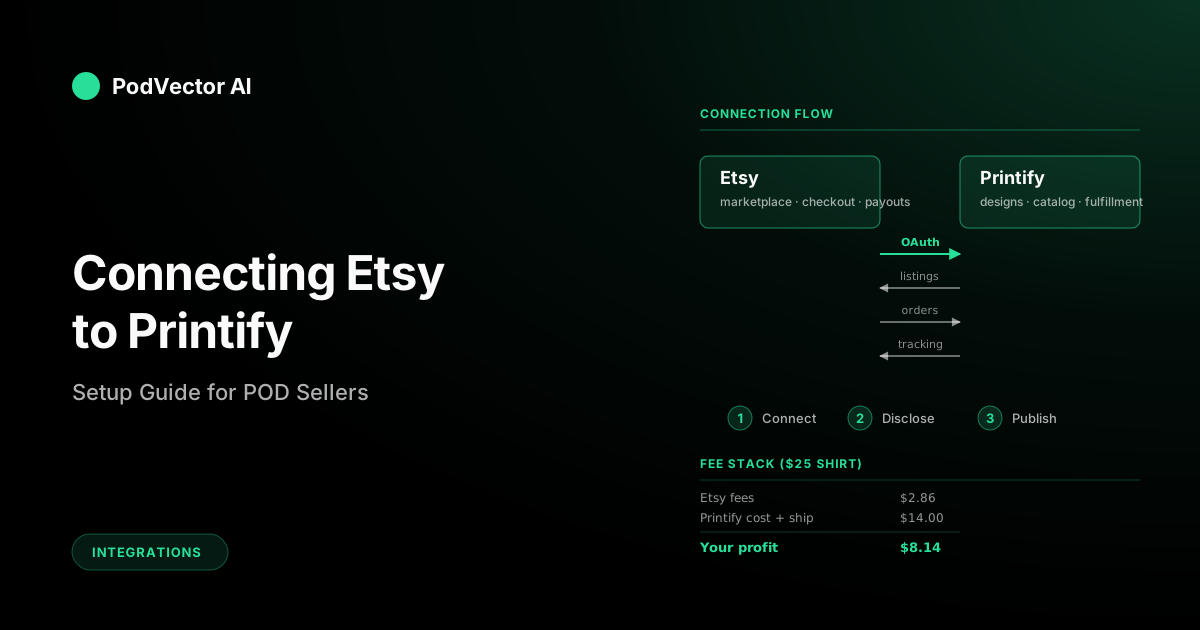
Quick Answer: Connecting Etsy to Printify takes about five minutes. You open Manage my stores in Printify, pick Etsy, sign in, and grant access. Orders then flow from Etsy to Printify automatically, and tracking numbers push back when the item ships.
The connection itself is the easy part. The steps most guides skip — adding Printify as a production partner inside Etsy, understanding the real fee stack, and knowing what numbers to watch after launch — are what determine whether the store actually makes money.
This guide covers the full process: prerequisites, the connect flow, the production partner disclosure, your real per-sale margin, and the post-launch metrics that separate stores that grow from stores that stall.
Before You Start: What You Need
The connect flow is fast, but it assumes a few things are already set up. Missing any one of these causes the integration to either fail silently or behave in ways that look like bugs.
Here's what needs to be in place before you click Connect:
- A Printify account. The free tier works. Sign up at printify.com — you don't need Printify Premium until you're running real volume and want the 20% product discount.
- A live Etsy shop. Not just an Etsy account — a published shop. Etsy's onboarding must be complete with at least one listing active. Printify cannot connect to a shop that hasn't been opened yet.
- Etsy Payments enabled. Without this, customers can't check out, and the order-sync side of the integration never fires. Verify your bank account and identity during Etsy's onboarding.
- A billing method on Printify. Printify charges your card per order when a sale comes in. Etsy collects payment from the customer separately — the two are independent transactions.
- At least one design file. A PNG with a transparent background at 4500×5400 pixels (300 DPI) is the safe spec. No design yet? Printify's built-in Product Creator can generate basics.
If your Etsy shop isn't open yet, handle that first. Shop setup is a 20–30 minute process on Etsy's side and has nothing to do with Printify. Pick a shop name you can live with — Etsy makes it difficult to change later.
Connect Etsy to Printify (Step by Step)
With both accounts ready, the actual connection takes about three minutes. Log into both Printify and Etsy in the same browser before starting — it makes the OAuth redirect smoother.
Step 1: Open Manage My Stores
From the Printify dashboard, click the store dropdown in the top-left corner. On a new account, it reads My new store. Select Manage my stores from the dropdown.
You'll see a list of every storefront connected to your Printify account. For a new account, this list is empty.
Step 2: Choose Etsy
Click the green Add new store button. A modal shows logos for every supported platform — Etsy, Shopify, eBay, Amazon, TikTok Shop, Walmart, Wix, and others.
Click the Etsy tile. A new tab opens and redirects to Etsy's authorization screen.
Step 3: Grant Access on Etsy
If you're already signed into Etsy, you'll land directly on the permissions screen. If not, sign in first.
The permissions screen lists what Printify is requesting: access to read shop data, create and edit listings, read and update orders, and post shipping information. All of these are required — there's no option for a partial connection.
Click Allow access. Etsy redirects you back to Printify with the authorization token attached.
Step 4: Confirm the Connection
Back in Printify, the Manage my stores page now shows your Etsy shop with a green Connected badge. The shop name from Etsy appears underneath.
That's the connection done. But there's a manual step most guides skip entirely — and skipping it can get your listings flagged.
Add Printify as a Production Partner on Etsy
Etsy requires sellers who use third-party fulfillment to disclose their production partners. This isn't optional. Listings without this disclosure can be flagged, delisted, or — in repeat cases — result in a shop suspension.
Here's how to add it:
- In Etsy, go to Shop Manager → Settings → Production partners.
- Click Add a new production partner.
- Enter the partner name: Printify.
- For location, enter the country of the print provider you plan to use most (e.g., United States, United Kingdom, or China — depending on your primary provider in Printify).
- Write a short description: something like "Printify handles printing and fulfillment of my custom-designed products."
- Click Save.
Once saved, Etsy adds a disclosure note to your listings automatically. Buyers see it; the algorithm expects it. This step takes two minutes and prevents a category of problems that's painful to debug after the fact.
Create and Publish Your First Product
With the connection live and the production partner added, you're ready to push your first product from Printify to Etsy.
Pick a Product in Printify
From the Printify dashboard, click My products → Add a new product. Browse the catalog by category (apparel, accessories, home & living) or search for a specific item like "unisex t-shirt" or "mug."
Each product listing shows the print providers available for that item, with base costs, production times, and shipping rates. Compare providers before committing — the base cost difference between providers on the same product can be $2–4, which matters at POD margins.
Design and Configure
Upload your design file. The Product Creator shows a live preview on the product mockup. Adjust placement, size, and print area.
Set your retail price for each variant (sizes, colors). A good starting formula: base cost + shipping to your primary market + 40–60% markup. You'll refine this once real data comes in, but undercutting yourself on launch is hard to walk back.
Publish to Etsy
Click Publish. Printify pushes the listing to your connected Etsy shop — title, description, photos, all variants, and pricing. The listing appears in Etsy within a few seconds.
Check the listing in your Etsy shop to verify everything looks right. Printify's auto-generated descriptions are functional but generic. Edit the title and description in Etsy's listing editor to include the keywords your buyers actually search for — our full Printify-Etsy integration guide covers listing optimization in more detail.
How Orders Flow Between Etsy and Printify
Once a customer buys your product on Etsy, the integration handles everything between checkout and delivery. Here's the sequence:
- Customer places an order on Etsy. Etsy collects payment and deducts its fees.
- Order arrives in Printify. Within seconds, the order appears in your Printify dashboard with the customer's shipping address and product details.
- Printify charges your card. The base cost plus shipping is billed to the payment method on your Printify account. This is separate from the Etsy transaction.
- Print provider produces the item. The provider assigned to that product prints, packages, and ships. Production typically takes 2–5 business days.
- Tracking pushes back to Etsy. Once shipped, Printify sends the tracking number to Etsy. The order status updates to Shipped automatically — you don't touch it.
The whole point of this flow is that you never manually mark an order as shipped, copy a tracking number, or log into Printify to trigger fulfillment. It's end-to-end once the integration is live.
The Real Fee Stack: What You Actually Keep
This is where most guides go light. The connection is free, but every sale passes through multiple fee layers. Understanding the stack before you set prices is the difference between a profitable store and one that bleeds $1–2 per order without realizing it.
Here's the full breakdown on a $25.00 t-shirt sale:
| Fee | Amount | Who Charges It |
|---|---|---|
| Etsy transaction fee | $1.63 (6.5%) | Etsy |
| Etsy listing fee | $0.20 | Etsy |
| Etsy payment processing | $1.03 (3% + $0.25) | Etsy Payments |
| Printify base cost | $9.50 (typical for Gildan 64000) | Printify / provider |
| Printify shipping | $4.50 (US domestic) | Printify / provider |
| Total costs | $16.86 | |
| Your profit | $8.14 |
That's a 32.6% margin on a $25 shirt. If you priced it at $20, you'd keep $3.14 — and one return wipes out three sales of profit. Price deliberately.
Three variables move the needle on your margin the most:
- Base cost by provider. Different Printify providers charge different base costs for the same product. The gap can be $2–4 on a single item. Check your provider options in the Printify catalog before publishing.
- Shipping destination. International shipping from a US provider can be $8–12. If you sell globally, consider providers located closer to your customers.
- Retail price. The ceiling is set by what competitors charge for similar items on Etsy. Search your category, check the first two pages of results, and price within that range.
What Syncs (and What Doesn't)
The Printify-Etsy integration syncs some things automatically and leaves others to you. Knowing which is which prevents surprises.
Automatically synced
- New listings. Publish in Printify → appears on Etsy within seconds.
- Orders. Etsy checkout → Printify order queue, automatically.
- Tracking numbers. Printify ships → Etsy order marked shipped.
- Price updates. Change the price in Printify → Etsy listing price updates.
Not synced (you manage manually)
- Listing titles and descriptions. Edits made directly in Etsy are not overwritten by Printify, but edits in Printify do push to Etsy. Best practice: edit in Printify first, then polish in Etsy.
- Etsy tags and SEO fields. Printify doesn't touch these. Add your 13 tags and fill the SEO fields in Etsy's listing editor yourself.
- Inventory quantity. There's no stock count in print on demand. Etsy listings default to 999 quantity (essentially unlimited).
- Reviews and customer messages. These live entirely on Etsy. Printify never sees or responds to them.
The practical takeaway: design and price in Printify, optimize listings for search in Etsy. For a deeper look at how the Printify-Etsy integration works under the hood, see the linked guide.
What to Track After You're Live
Most setup guides end at "you're connected." That's roughly equivalent to opening a store and walking away. The connection is infrastructure — what you do with it decides whether the store grows or stalls.
Here are the numbers that matter in the first 30 days:
Conversion rate
Etsy shows this in Shop Manager → Stats. A healthy Etsy POD store converts at 1–3%. Below 1%, your listings need better photos, titles, or pricing — the traffic is there but isn't buying.
Per-order profit
Track the actual dollar amount you keep after every fee layer. Don't estimate from your retail price; calculate from the deposited amount. If your average per-order profit is under $5, you're one refund away from a loss on each order cycle.
Production and shipping time
Check your Printify order history for actual production-to-delivery time. Etsy's algorithm factors shipping speed into search rankings. If your provider is consistently taking 7+ business days to ship, consider switching to a faster one — even if the base cost is slightly higher.
Return and refund rate
POD returns are tricky because you can't resell returned custom items. If your return rate exceeds 5%, the problem is usually sizing (add a size chart), print quality (switch providers), or misleading product photos.
If tracking all of this across Etsy's dashboard, Printify's order panel, and a spreadsheet sounds like a lot — it is. This is exactly the kind of cross-platform ops work that an AI employee like Victor handles: pulling numbers from every connected platform into one view and flagging when something needs your attention.
Common Connection Errors and Fixes
Most connection issues fall into a few predictable categories. Here's what to check first:
"Shop not found" or connection fails immediately
Your Etsy shop isn't fully published. Go back to Etsy, complete the shop setup wizard, and make sure at least one listing is active. Printify can't connect to a draft shop.
Connected but listings won't publish
Check whether Etsy Payments is enabled. Without it, the listing sync appears to work but the listings are invisible to buyers. Also check for Etsy's listing limits — new shops have a 10,000 active listing cap, but some accounts start with lower limits during their first 90 days.
Orders aren't appearing in Printify
Verify that your billing method on Printify is valid and not expired. Printify pauses order processing when it can't charge your card. Also check whether the order is marked as a "pre-order" in Etsy — those don't push to Printify until the payment clears.
Duplicate listings after reconnecting
If you disconnect and reconnect the integration, Printify may create new listings instead of linking to existing ones. Delete the duplicates in Etsy and republish from Printify. To avoid this, don't disconnect unless the support team advises it.
For print on demand-specific integration troubleshooting, see the linked guide.
FAQs
Is it free to connect Printify to Etsy?
Yes. The connection itself is free. You pay Printify's base cost plus shipping per order, and Etsy charges its own fees (6.5% transaction fee, $0.20 listing fee, payment processing). There's no monthly charge for the integration.
Can I connect multiple Etsy shops to one Printify account?
Yes. Printify supports connecting multiple storefronts — including multiple Etsy shops — to a single account. Each shop appears separately in your Manage my stores list. You cannot connect two separate Printify accounts to the same Etsy shop.
What happens if I disconnect and reconnect?
Existing listings on Etsy stay live, but the link between them and Printify breaks. When you reconnect, Printify treats them as unlinked. Republishing from Printify may create duplicate listings. Only disconnect if you have a specific reason to.
Do I need Printify Premium to connect to Etsy?
No. The free Printify plan includes all integrations, including Etsy. Premium ($29.99/month) gives you up to 20% off product base costs, which matters once you're doing volume. For more on this, see our guide on Printify Premium.
How long does it take for orders to appear in Printify after a sale?
Usually seconds. In rare cases, it can take up to 30 minutes during high-traffic periods on Etsy (like holiday sales). If an order hasn't appeared after an hour, check your Printify billing method and connection status.
Can I edit listings in Etsy after publishing from Printify?
Yes. Edits made in Etsy (tags, descriptions, photos) stay in Etsy — Printify doesn't overwrite them. But if you edit in Printify and republish, those changes push to Etsy and may overwrite your Etsy-side edits. Best practice: finalize in Printify first, then polish in Etsy.
For a broader overview of everything Printify offers and how it works, start with the linked guide. And for more on Printify's integration options across all platforms, visit the Printify topic hub.
Let Victor Run Your Etsy + Printify Ops
Connecting Etsy to Printify is step one. After that comes tracking margins, monitoring production times, catching orders that stall, and knowing which products actually make money across platforms.
Victor is an AI employee that manages your Etsy, Printify, and Shopify ops — pulling data from every connected platform, flagging issues before they cost you, and taking action with your approval.
Try Victor free