
Quick Answer: The Printify–Etsy integration takes about 10 minutes: create a Printify account, click My new store → Etsy, grant access on Etsy, and you're connected. From there, design products in Printify and publish them straight to your Etsy listings.
The connection itself is the easy part. The harder job starts the day after — knowing which SKUs actually make money once you factor in Etsy fees, Printify production costs, ad spend, and personalization time.
Before you connect: 4 prerequisites
You can technically connect the two platforms on a fresh account. You'll just hit walls 24 hours later if any of these aren't sorted first.
1. An open Etsy shop. Not a draft — a live shop with at least the listing setup wizard completed, billing on file, and shop preferences saved. Printify's authorization step fails silently if your shop is still in onboarding limbo.
2. Etsy seller verification done. US sellers need a payout bank linked and a tax ID (SSN or EIN). EU/UK sellers need IBAN plus VAT details. If Etsy hasn't finished verifying you, Printify will connect, but your first order will stall in "payment pending."
3. A Printify account. Free is fine to start. The Premium plan ($29/month, 20% off catalog) only pays back once you're doing roughly $145+/month in production volume — wait until you have sales data before upgrading.
4. Designs ready, or a plan to make them. Printify's design tool, AI image generator, and Shutterstock library all work. But the integration won't help you if you're still hunting for a niche when you click "Connect."
The 5-step Printify–Etsy connection
Once the prerequisites are done, the connection itself is quick.
Step 1: Open Printify and start a new store. Log in at printify.com, go to My stores in the top navigation, and click Add new store.
Step 2: Pick Etsy from the platform list. Printify supports about a dozen sales channels. Select Etsy and click Connect.
Step 3: Authorize on Etsy. You'll be redirected to Etsy's grant-access screen. Read the permission scope — Printify needs read/write on listings, orders, and inventory. Click Allow access.
Step 4: Confirm the redirect. Etsy bounces you back to Printify with a success banner. If you see "Connection failed," it's almost always because the Etsy shop wasn't fully verified (see prerequisite #2).
Step 5: Set your shop preferences. Pick your default Printify print provider, shipping origin, and currency. These propagate to every new listing — change them later in Account settings → Stores if your strategy shifts.
That's it for the technical side. For a more granular walkthrough including screenshots of each click, see our step-by-step guide to linking Etsy to Printify.
Publishing your first product
The integration's job is to push product data — title, description, mockups, variants, price — from Printify into an Etsy listing. Here's how that flow actually goes.
Design in Printify first. Pick a blank product (a Bella+Canvas 3001 tee is the safe default for a first test), upload artwork, position it on the mockup, and save.
Set Etsy-specific fields. Title (140-char limit), description, tags (13 allowed), category, and shipping profile. Printify pulls Etsy's category tree live, so you can map "Unisex T-Shirts > Crew Neck" without guessing.
Set retail price. Printify shows your base production cost, suggests a retail price at roughly 2.3x markup, and lets you override. We'll cover what that markup actually leaves you in the next section.
Publish — but hide first. Click Publish to Etsy. The listing appears in your Etsy shop, but mark it as hidden in store initially. This avoids Etsy's $0.20 listing fee firing on a product you haven't QA'd yet.
QA the live listing on Etsy. Check that mockups uploaded correctly, variants line up, and shipping calculates. Once it looks right, flip the visibility to active and the $0.20 fee posts.
If you're brand new to selling on Etsy with Printify, our how-to-sell-on-Etsy-using-Printify guide covers the end-to-end flow from niche pick to first sale.
Etsy + Printify fees you'll actually pay
This is where most beginner guides hand-wave. Here's the itemized breakdown on a $25 t-shirt sale fulfilled by Printify's standard US provider.
Etsy side:
- Listing fee: $0.20 (charged when you list, renews every 4 months or per sale)
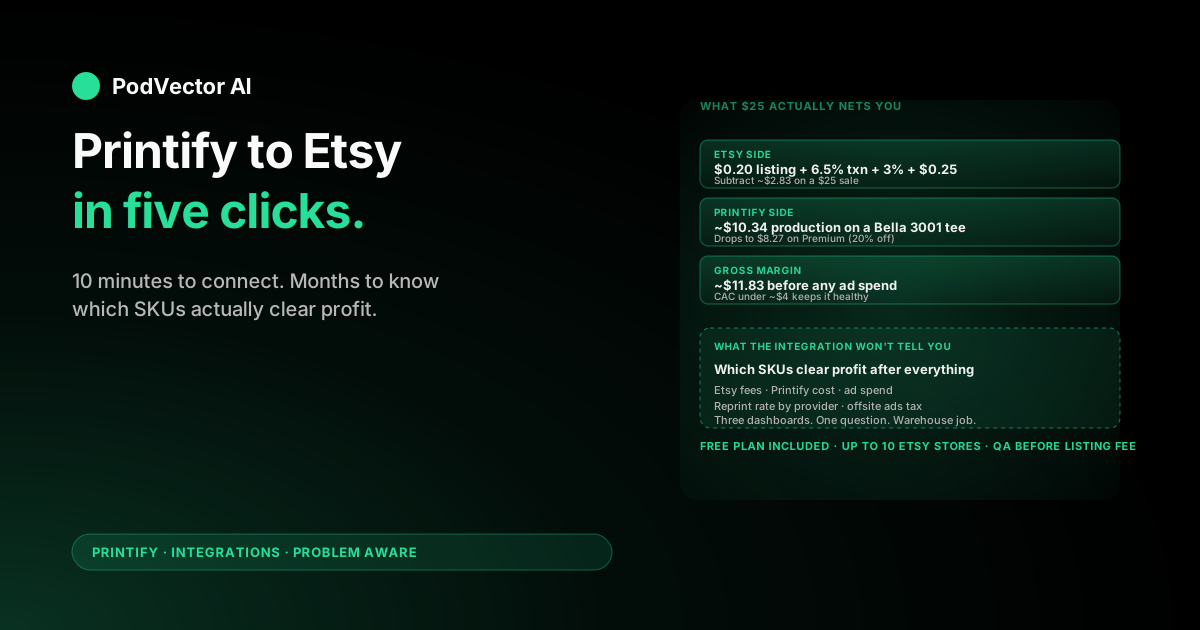
- Transaction fee: 6.5% of sale + shipping = $1.63
- Payment processing: 3% + $0.25 = $1.00
- Offsite Ads fee (if applicable): 12–15% of order — opt out if you can while you're under $10K annual
Printify side (Bella+Canvas 3001 tee, US standard provider):
- Production cost: ~$10.34
- Shipping (charged to customer separately, varies by zone): ~$4.59
Your take-home on a $25 retail tee: $25 − $0.20 − $1.63 − $1.00 − $10.34 ≈ $11.83 gross margin, before any ad spend. That's roughly 47% — solid by POD standards but only if your customer acquisition cost stays under ~$4.
The Premium plan changes this math meaningfully. A 20% production discount on that same tee drops Printify cost from $10.34 to $8.27, lifting gross margin to ~$13.90. For a deeper look at when Premium pays back, see our Printify Premium discount breakdown and the percentage breakdown by product category.
What to track once it's live
The integration handles fulfillment. It does not tell you which products are actually working.
Inside 30 days of first sale, you'll need answers to questions like:
- Which SKUs are profitable after Etsy fees, Printify cost, and the ad spend that drove them?
- Which Printify provider has the lowest reprint/refund rate on a given product?
- What's your real cost per order — Etsy's reported "$25 sale" minus everything Etsy and Printify quietly subtract?
- Which keyword on which listing is actually driving organic Etsy traffic, vs. just sitting there?
Etsy's stats page shows traffic. Printify's dashboard shows production cost. Your bank account shows the net. Tying those three together — plus any Meta or Pinterest ad spend — is its own project.
This is exactly the gap PodVector's AI employee, Victor, fills. Once your Etsy and Printify accounts are connected to Victor, he pulls every order, fee, and production cost into a single warehouse and answers questions like "which of my mug designs cleared $5 profit per unit last week after offsite ads?" in plain English. He also runs the next action — pausing an unprofitable Etsy promoted listing, swapping a Printify provider on a SKU with reprint issues — and asks for your approval before each change.
That's a Stage 4-onward concern. For the connection itself, you're done as soon as the first test order ships.
Troubleshooting common errors
"Connection failed" on the Etsy authorization step. Almost always an unverified Etsy shop. Finish Etsy's seller verification (bank, tax ID) and retry.
"Listing not published" after clicking Publish. Check that all required Etsy fields are filled — category, shipping profile, and at least one tag are non-optional. Printify's editor will let you save with missing fields but Etsy's API rejects the publish call.
Mockups uploaded but look pixelated on Etsy. Printify renders at 2000x2000, Etsy displays at 1588x1588 in the gallery. Your source art should be at least 4000px on the longest side, 300 DPI, PNG with transparent background.
Order placed on Etsy but not pulled into Printify. Sync delay is normally under 5 minutes. If it's been more than 30, disconnect and reconnect the store from Account settings → Stores — re-authorization usually clears stuck order queues.
Shipping cost wrong on Etsy listing. Etsy uses your Etsy shipping profile, not Printify's calculated shipping. Either build an Etsy profile that matches Printify's shipping rates by zone, or enable Printify's "Sync shipping" toggle so the integration overrides your Etsy profile per listing.
If you're also planning to add Shopify alongside Etsy, our Printify–Shopify linking guide walks through running both stores from one Printify account.
FAQs
Does Printify's Etsy integration cost extra?
No. The integration is included on Printify's free plan. You only pay Etsy's standard fees and Printify's per-order production cost.
How many Etsy stores can I connect to one Printify account?
Up to 10 Etsy stores per Printify account on the free plan. Each is managed as a separate store inside Printify's My stores view.
Can I personalize products on Etsy via Printify?
Yes. Printify's personalization feature lets you expose name/text fields on Etsy listings, then prints the customer's input on each order. Enable it per-product in the Printify editor before publishing.
Who handles shipping — Etsy, Printify, or me?
Printify handles production and shipping directly. The customer buys on Etsy; Printify receives the order automatically, prints, and ships under your shop's name with optional branded packing slip.
What happens if a customer wants a refund?
Etsy handles the customer-facing refund. You're separately responsible for any Printify reprint or refund — Printify only refunds production cost if the issue is a manufacturing defect with photo evidence submitted within 30 days.
Is the Printify–Etsy integration two-way?
Mostly. Printify pushes product, pricing, and stock updates to Etsy, and pulls orders from Etsy. Etsy listing edits made directly in Etsy do not sync back to Printify — always edit in Printify and republish.
Why is my first listing not appearing on Etsy?
Check the publish status in Printify — listings default to "draft" or "hidden in store" on first publish so you can QA before paying the $0.20 listing fee. Flip visibility to active in Etsy when ready.
Where can I find Printify's official integration docs?
Printify's official Etsy integration page has the marketing overview plus links to current setup videos.
For a broader view of the Printify integration ecosystem, our Printify integrations hub rounds up every channel Printify connects to. The Printify topic page covers everything else from product picks to scaling tactics.
Hand off the post-connection ops to an AI employee
Connecting Printify and Etsy is one click. Knowing which SKUs to scale, which providers to swap, and which Etsy promoted listings to kill — that's a daily fight across three dashboards.
Victor connects to both, pulls orders and costs into one warehouse, and runs the next action with your approval. Pauses unprofitable promoted listings. Swaps Printify providers when reprint rates spike. Tells you in plain English which mug design cleared profit this week.
Try Victor free